15 Best Mechanical Keyboards Under $150, Compared
As an Amazon Associate we earn from qualifying purchases. Links on this page are affiliate links.
Finding the right mechanical keyboard under 150 depends on your desk space, switch preferences, and daily typing habits. The GravaStar Mercury 75% Wireless Keyboard leads the list because of its aluminum structure, soft gasket mounting, and versatile tri-mode wireless connectivity.
To help you find the best match, we compared 15 products strictly using the specifications published on their listings. This guide helps you decide which form factor, switch type, and connection method fit your desk setup.
Quick picks
The best fit for you
- You want a compact aluminum wireless gaming keyboard. GravaStar Mercury 75% Wireless Keyboard Its 75% form factor includes tri-mode wireless connectivity and an aluminum structure.
- You need full number pad utility for your desk. ASUS ROG Strix Scope II 96 Wireless The 96% condensed footprint provides a numpad alongside hot-swappable switches and tri-mode wireless.
- You travel frequently and want a slim, lightweight keyboard. NuPhy Air60 V2 Low Profile Keyboard At 0.79 inches thin and 1.02 pounds, it offers a compact 60% Bluetooth layout.
- You want adjustable analog actuation for competitive gaming. Razer Huntsman V3 Pro Mini 60% Analog Keyboard This mini 60% footprint features fine-grained switch actuation and rapid resets.
Our 15 picks

GravaStar Mercury 75% Wireless Keyboard
Best for: compact gaming setups needing flexible wireless connectivity
- Switch Type
- GravaStar x Kailh linear
- Form Factor
- 75%
- Connectivity
- Wired USB-C, Bluetooth 5.0, 2.4GHz
- Backlighting
- RGB
- Case Material
- Aluminum alloy
- Use
- Gaming
View on Amazon: GravaStar Mercury 75% Wireless Keyboard (paid link)
The GravaStar Mercury 75% Wireless Keyboard is a compact gaming board built around an aluminum alloy exoskeleton and a gasket-mounted design. It features Kailh linear switches with 40gf actuation, tri-mode wireless connectivity, and five layers of sound-dampening foam with a polycarbonate plate. You get support for Windows and Mac, along with dual-zone RGB backlighting. This setup suits you if you want a sturdy 75% layout with smooth keystrokes for daily typing and gaming.
Pros
- Tri-mode connectivity supporting 2.4GHz, Bluetooth 5.0, and USB-C
- Gasket mount with flexible polycarbonate plate and five foam dampening layers
- Kailh linear switches with 40gf actuation force and 1.5mm pre-travel
- Aluminum alloy exoskeleton frame
Cons
- Lacks a dedicated number pad
- Weighs 2.34 pounds, limiting mobile use
Good fit if
- You want a 75% compact layout with an aluminum frame.
- You need tri-mode connectivity to switch between Bluetooth, 2.4GHz, and USB-C.
- You prefer light linear switches with low actuation force.
Skip if
- You need a full-size layout with a numeric keypad.
- You require tactile or clicky switches instead of linear switches.
Verdict: GravaStar Mercury 75% Wireless Keyboard delivers a durable aluminum structure, versatile tri-mode connectivity, and soft gasket mounting. It gives you balanced gaming and typing performance in a space-saving 75% form factor.

Razer BlackWidow V4 X Mechanical Keyboard
Best for: gamers wanting dedicated macros and linear switches
- Switch Type
- Yellow mechanical linear
- Backlighting
- Chroma RGB per-key
- Keycap Material
- Doubleshot ABS
- Use
- Gaming
- Dimensions
- 20.5 × 7.75 × 2.15 inches
- Weight
- 3.4 pounds
View on Amazon: Razer BlackWidow V4 X Mechanical Keyboard (paid link)
The Razer BlackWidow V4 X Mechanical Keyboard is a gaming keyboard built with Razer Yellow linear switches. These switches feature a 1.2 mm actuation point, 45 g actuation force, and integrated sound dampeners. You get six dedicated macro keys, doubleshot ABS keycaps, per-key RGB lighting, and a multi-function roller for media control. It suits you if you need fast key inputs alongside dedicated hardware macros.
Pros
- Razer Yellow linear switches with 1.2 mm actuation and 45 g actuation force
- Six dedicated programmable macro keys
- Multi-function roller and secondary media keys
- Doubleshot ABS keycaps with extra-thick walls
Cons
- Wide desk footprint measuring 20.5 inches long
- Heavy build weighing roughly 3.4 pounds
- No wireless connectivity listed in specifications
Good fit if
- You want linear switches with a short 1.2 mm actuation distance.
- You need dedicated macro keys for fast command inputs.
- You prefer an integrated roller for adjusting volume and brightness.
Skip if
- You have limited desk space for a 20.5-inch long board.
- You require a wireless connection for your setup.
- You need a lightweight keyboard that weighs under 3.4 pounds.
Verdict: Razer BlackWidow V4 X Mechanical Keyboard provides rapid 1.2 mm linear actuation and six dedicated macro keys in a full-sized design. It delivers reliable hardware controls and sound dampening for gamers who prefer dedicated macro options over compact form factors.

Logitech G PRO X TKL Wireless Keyboard
Best for: wireless gamers wanting tactile switches and media controls
- Switch Type
- GX Brown tactile
- Form Factor
- TKL
- Connectivity
- LIGHTSPEED, Bluetooth, USB
- Backlighting
- LIGHTSYNC RGB
- Keycap Material
- Dual-shot PBT
- Use
- Gaming
View on Amazon: Logitech G PRO X TKL Wireless Keyboard (paid link)
The Logitech G PRO X TKL Wireless Keyboard is a tenkeyless mechanical board equipped with GX Brown tactile switches and dual-shot PBT keycaps. You connect via LIGHTSPEED wireless, Bluetooth, or wired USB. Dedicated media controls and an integrated volume roller sit alongside LIGHTSYNC RGB lighting. This layout suits you if you need tactile feedback, durable keycaps, and flexible wireless pairing across your devices.
Pros
- LIGHTSPEED wireless, Bluetooth, and USB connectivity
- Durable dual-shot PBT keycaps
- Dedicated media buttons and integrated volume roller
- Standard layout compatible with third-party keycaps
Cons
- Tenkeyless form factor excludes a numeric keypad
- Switches are not listed as hot-swappable
Good fit if
- You want dedicated media controls and a physical volume roller.
- You need both LIGHTSPEED wireless and Bluetooth connectivity options.
- You prefer tactile GX Brown switches with dual-shot PBT keycaps.
Skip if
- You need an integrated numpad for number entry.
- You prefer linear or clicky switches instead of tactile feedback.
Verdict: Logitech G PRO X TKL Wireless Keyboard pairs tactile GX Brown switches with durable PBT keycaps and three connection modes. It delivers reliable wireless connectivity and dedicated media controls in a compact tenkeyless form factor.

Razer Huntsman V3 Pro Mini 60% Analog Keyboard
Best for: competitive FPS players wanting adjustable actuation
- Switch Type
- Analog Optical Gen-2
- Form Factor
- 60%
- Keycap Material
- Doubleshot PBT
- Use
- Gaming
- Color
- Black
- Dimensions
- 13.8 × 6.18 × 1.81 inches
View on Amazon: Razer Huntsman V3 Pro Mini 60% Analog Keyboard (paid link)
The Razer Huntsman V3 Pro Mini 60% Analog Keyboard is a compact gaming board built with Gen-2 analog optical switches. You get an adjustable actuation range from 0.1 to 4.0 mm, Rapid Trigger sensitivity, and Snap Tap input prioritization. Onboard LED indicators let you adjust key settings without software. This keyboard suits you if you play fast-paced competitive games and want maximum desk space alongside granular switch response.
Pros
- Gen-2 analog optical switches rated for 100 million keystrokes
- Adjustable actuation range from 0.1 mm to 4.0 mm with Rapid Trigger
- Dual-purpose bottom-right modifier keys double as arrow keys when tapped
- Textured doubleshot PBT keycaps with side-printed secondary functions
- Onboard LED array allows actuation adjustments without software
Cons
- Compact 60% layout lacks dedicated arrow, function, and numpad keys
- Razer Snap Tap requires a firmware update to function
Good fit if
- You want a compact 60% footprint that maximizes desk space for mouse movement.
- You require custom actuation points between 0.1 mm and 4.0 mm.
- You prefer adjusting switch settings directly on the hardware via onboard LEDs.
Skip if
- You need dedicated arrow keys, a function row, or a number pad.
- You prefer full-size or tenkeyless layouts that avoid layered key bindings.
Verdict: Razer Huntsman V3 Pro Mini 60% Analog Keyboard delivers fine-grained switch actuation and rapid resets in a space-saving tournament footprint. It gives competitive players deep control over key response directly from the hardware.

ASUS ROG Strix Scope II 96 Wireless
Best for: compact numpad setups requiring PBT keycaps
- Switch Type
- ROG NX Snow linear
- Form Factor
- 96%
- Connectivity
- Bluetooth, 2.4GHz wireless, USB wired
- Backlighting
- RGB
- Keycap Material
- PBT
- Hot-Swap Support
- Hot-Swappable
View on Amazon: ASUS ROG Strix Scope II 96 Wireless (paid link)
The ASUS ROG Strix Scope II 96% Wireless Keyboard provides a condensed 96-percent layout that retains the numeric keypad while measuring 14.84 inches long. It features tri-mode connectivity via low-latency 2.4 GHz, Bluetooth, or wired USB, along with hot-swappable switches and durable PBT keycaps. Integrated dampening foam absorbs internal typing noise. This design suits you if you need full numpad functionality in a desk-saving form factor.
Pros
- Tri-mode connectivity supporting Bluetooth, 2.4 GHz, and USB wired
- Up to 1,500 hours of battery life in 2.4 GHz wireless mode
- Hot-swappable switch sockets with pre-lubricated switches
- PBT keycaps paired with sound-dampening foam and switch pads
Cons
- Weighs 2.78 pounds, making it heavier to carry
- Condensed 96% spacing packs arrow and navigation keys tightly against the numpad
Good fit if
- You want a dedicated number pad without taking up full-size desk space.
- You need tri-mode wireless connectivity across multiple devices.
- You prefer hot-swappable linear switches with factory lubrication.
Skip if
- You require standard spacing between the navigation keys and number pad.
- You prefer an ultralight keyboard designed specifically for portable travel.
Verdict: ASUS ROG Strix Scope II 96% Wireless Keyboard delivers full number pad utility in a condensed footprint with hot-swappable switches and durable PBT keycaps. Its versatile tri-mode wireless and sound-dampening layers make it a well-equipped tool for gaming and productivity.

Logitech G515 Lightspeed TKL Tactile Keyboard
Best for: low-profile wireless tactile typing
- Switch Type
- Low-profile GL Brown Tactile
- Form Factor
- TKL
- Connectivity
- LIGHTSPEED wireless, Bluetooth, wired
- Backlighting
- LIGHTSYNC RGB
- Keycap Material
- Double-shot PBT
- Use
- Gaming
View on Amazon: Logitech G515 Lightspeed TKL Tactile Keyboard (paid link)
The Logitech G515 Lightspeed TKL is a low-profile wireless gaming keyboard built with factory-lubed GL Brown tactile switches. You get tri-mode connectivity via 2.4 GHz Lightspeed, Bluetooth, or USB cable, alongside double-shot PBT keycaps and a slim 0.87-inch profile. KEYCONTROL allows up to 15 assignments per key. This compact board fits you if you want tactile feedback in a low-profile tenkeyless layout.
Pros
- Low-profile GL Brown tactile switches are factory-lubed
- Tri-mode connectivity with 1 ms Lightspeed wireless, Bluetooth, and wired USB
- Double-shot PBT keycaps resist oil and wear
- KEYCONTROL enables mapping up to 15 functions per key
- Slim 0.87-inch profile in a compact tenkeyless footprint
Cons
- Battery life is limited to 36 continuous hours
- Tenkeyless layout omits a dedicated numeric keypad
Good fit if
- You prefer low-profile mechanical switches with tactile feedback.
- You switch between Lightspeed wireless, Bluetooth, and wired connections.
- You want deep key customization with up to 15 functions per key.
Skip if
- You need a dedicated number pad for data entry.
- You require weeks of continuous battery life between charges.
Verdict: Logitech G515 Lightspeed TKL Tactile Keyboard delivers responsive low-profile typing with versatile tri-mode wireless connectivity. Its compact footprint and 15-function per-key programmability make it a capable gaming setup option.

KEEBMONKEY Rainy 75 CNC Aluminum Keyboard
Best for: sturdy CNC aluminum wireless typing setups
- Switch Type
- Violet Switch
- Form Factor
- 75%
- Connectivity
- Triple-Mode
- Backlighting
- No RGB
- Case Material
- CNC Aluminum
- Color
- Black
View on Amazon: KEEBMONKEY Rainy 75 CNC Aluminum Keyboard (paid link)
The KEEBMONKEY Rainy 75 is a compact mechanical keyboard built with a solid CNC aluminum chassis. It features triple-mode connectivity, RGB backlighting, and factory-lubricated switches. At over 4.4 pounds, its dense metal housing keeps the board completely stationary on your desk during long sessions. It suits you if you want a heavy, full-metal typing setup with flexible wireless and wired connection choices.
Pros
- CNC aluminum case construction
- Triple-mode connectivity support
- Integrated RGB backlighting
- Substantial 4.41-pound weight prevents desk slippage
Cons
- Heavy 4.41-pound weight limits travel portability
- Compact 12.6-inch length lacks a dedicated number pad
Good fit if
- You want a heavy CNC aluminum chassis that remains anchored to your desk.
- You need triple-mode connectivity for flexible wired and wireless use.
- You prefer factory-lubricated mechanical switches and RGB lighting.
Skip if
- You need a lightweight keyboard designed for easy mobile travel.
- You require a full-size layout with a numeric keypad for data entry.
Verdict: KEEBMONKEY Rainy 75 CNC Aluminum Keyboard delivers a sturdy metal chassis, triple-mode connectivity, and integrated RGB lighting in a compact form factor. It provides a dense, stable foundation for anyone who values a heavy, stationary desk setup.

Razer Huntsman V3 TKL Magnetic Keyboard
Best for: competitive players wanting adjustable magnetic switches
- Switch Type
- Hall Effect magnetic
- Form Factor
- TKL
- Connectivity
- Wired (USB-C)
- Backlighting
- RGB
- Keycap Material
- Doubleshot PBT
- Case Material
- 5052 aluminum alloy top case
View on Amazon: Razer Huntsman V3 TKL Magnetic Keyboard (paid link)
The Razer Huntsman V3 TKL Magnetic Keyboard is a wired tenkeyless gaming keyboard engineered for rapid input. It pairs Hall Effect magnetic switches with an 8000Hz polling rate, letting you adjust switch actuation between 0.1 mm and 4.0 mm while enabling Rapid Trigger. Built with a 5052 aluminum top case and doubleshot PBT keycaps, it suits you if you need fine movement control, low input latency, and dedicated arrow keys.
Pros
- Hall Effect magnetic switches with 0.1–4.0 mm adjustable actuation
- 8000Hz HyperPolling rate for low input latency
- Rapid Trigger and Snap Tap movement priority features
- 5052 aluminum alloy top plate with textured doubleshot PBT keycaps
- Hybrid onboard storage holding up to 6 profiles
Cons
- Wired-only USB-C operation with no wireless or Bluetooth connectivity
- Tenkeyless layout omits a dedicated numeric keypad
Good fit if
- You want adjustable switch actuation points between 0.1 mm and 4.0 mm.
- You need an 8000Hz polling rate and Rapid Trigger for competitive play.
- You prefer a tenkeyless layout to leave extra desk room for mouse movement.
Skip if
- You require wireless connectivity or multi-device Bluetooth pairing.
- You need a dedicated number pad for data entry.
Verdict: Razer Huntsman V3 TKL Magnetic Keyboard delivers fast 8000Hz polling and customizable Hall Effect actuation inside a sturdy aluminum tenkeyless frame. It provides exact input tuning for players who do not need wireless capability or a numpad.

GravaStar Mercury V60 Magnetic Keyboard
Best for: rapid-trigger gaming and fine actuation tuning
- Switch Type
- GravaStar UFO magnetic
- Connectivity
- Wired
- Backlighting
- RGB
- Use
- Gaming
- Dimensions
- 1.63 × 7.39 × 2.27 inches
View on Amazon: GravaStar Mercury V60 Magnetic Keyboard (paid link)
The GravaStar Mercury V60 Magnetic Keyboard features hot-swappable UFO Hall Effect magnetic switches with adjustable actuation depths ranging from 0.005mm to 3.5mm. It includes Rapid Trigger and Snap Tap dynamic key resets alongside an 8000Hz polling rate for low input latency. Wired connectivity supports Windows and Mac. This compact board suits you if you want ultra-fine switch travel customization, rapid key responses, and an acoustic foam structure inside a transparent crystal chassis.
Pros
- GravaStar UFO magnetic switches with 0.005mm to 3.5mm adjustable actuation
- 8000Hz polling rate minimizes input latency
- Rapid Trigger and Snap Tap dynamic key reset features
- Hot-swappable Hall Effect switches and multi-layer acoustic foam
Cons
- Wired-only connection without wireless options
- Available only in the transparent Onyx Crystal aesthetic
Good fit if
- You need rapid actuation adjustments down to 0.005mm for gaming.
- You prioritize an 8000Hz polling rate for fast input registration.
- You want hot-swappable Hall Effect switches with Rapid Trigger functionality.
Skip if
- You need a wireless connection with Bluetooth or 2.4GHz support.
- You prefer an opaque or traditional keyboard enclosure over transparent crystal.
Verdict: GravaStar Mercury V60 Magnetic Keyboard delivers extreme input responsiveness through its 8000Hz polling rate, Rapid Trigger tech, and finely tunable Hall Effect switches. It remains a focused wired choice tailored for competitive gaming setups.
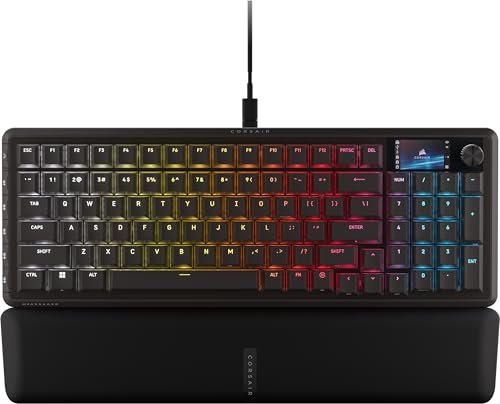
Corsair Vanguard 96 RGB Tactile Keyboard
Best for: streamers and gamers wanting high-polling numpad utility
- Form Factor
- 96%
- Connectivity
- Wired
- Backlighting
- RGB
- Switch Type
- Tactile Switch
- Use
- Gaming
- Color
- Black
View on Amazon: Corsair Vanguard 96 RGB Tactile Keyboard (paid link)
The Corsair Vanguard 96 Wired Mechanical Keyboard delivers a 96% form factor in a compact 15.3-inch frame. You get a tenkey number pad, dedicated arrow keys, and an integrated 1.9-inch color LCD screen. It supports 8,000Hz wired hyper-polling for minimal input latency, plus six dedicated programmable G-keys configured for Elgato Virtual Stream Deck macros. This setup suits gamers and streamers who need dedicated keys and fast response times without desk clutter.
Pros
- 8,000Hz wired hyper-polling rate
- Built-in 1.9-inch full-color LCD screen and rotary dial
- Compact 96% layout preserves arrow keys and number pad
- Six programmable G-keys with Elgato Virtual Stream Deck support
Cons
- Wired-only connection with no wireless option
- Weighs 2.19 pounds, limiting portability
Good fit if
- You want an 8,000Hz polling rate and dedicated macro keys.
- You need a number pad in a compact desk footprint.
- You use Elgato Virtual Stream Deck controls while gaming.
Skip if
- You require a wireless connection for your setup.
- You prefer a minimalist layout without macro keys or an LCD display.
Verdict: Corsair Vanguard 96 Wired Mechanical Keyboard packs a 96% layout, an onboard LCD screen, and 8,000Hz hyper-polling into a space-saving wired design. It gives you full numpad utility and streaming macro controls without the width of a standard full-size keyboard.

ASUS ROG Falchion Ace HFX 65% TKL
Best for: esports players wanting adjustable magnetic switches
- Switch Type
- ROG HFX magnetic
- Form Factor
- 65% TKL
- Connectivity
- Dual USB-C wired
- Keycap Material
- PBT
- Use
- Gaming
- Color
- Black
View on Amazon: ASUS ROG Falchion Ace HFX 65% TKL (paid link)
The ASUS ROG Falchion Ace HFX is a compact 65% wired gaming keyboard built with Hall Effect magnetic switches. You get an adjustable actuation range from 0.1 to 4.0 mm, an 8000 Hz polling rate, and Rapid Trigger support for precise key stops. Dual rear USB-C ports let you connect two computers simultaneously. It suits competitive players who want customizable switch travel and high input speeds in a space-saving desk footprint.
Pros
- Adjustable 0.1 to 4.0 mm magnetic switch actuation
- 8000 Hz polling rate with 0.125 ms response delay
- Dual USB-C ports for switching between two PCs
- Integrated five-layer sound dampening and silicone gasket mount
- Durable PBT keycaps and bundled protective travel cover
Cons
- Wired connection only with no wireless modes
- Compact 65% layout lacks a dedicated number pad and function row
Good fit if
- You want Hall Effect switches with Rapid Trigger and customizable travel.
- You need to toggle one wired keyboard between two computers via dual USB-C ports.
- You prioritize high reporting speeds up to an 8000 Hz polling rate.
Skip if
- You need wireless connectivity via Bluetooth or 2.4 GHz RF.
- You rely on a full-size number pad or dedicated function keys.
Verdict: ASUS ROG Falchion Ace HFX 65% Magnetic Keyboard delivers rapid 8000 Hz reporting and deep actuation customization in a compact wired layout. It is a solid match if you need high-speed Hall Effect switches and dual-PC connectivity.

NuPhy Air60 V2 Low Profile Keyboard
Best for: multi-device portable wireless setups
- Connectivity
- Bluetooth
- Form Factor
- 60%
- Color
- White
- Operating System
- Mac, Windows
- Dimensions
- 11.7 × 4.21 × 0.79 inches
- Weight
- 1.02 pounds
View on Amazon: NuPhy Air60 V2 Low Profile Keyboard (paid link)
The NuPhy Air60 V2 is a compact 60-percent low-profile mechanical keyboard designed for travel and multi-device setups. You get Bluetooth 5.1, 2.4GHz wireless, and USB-C connectivity, allowing you to pair up to four devices across Windows, macOS, and Linux. It weighs 1.02 pounds and packs a 2500mAh battery offering up to 150 hours of use with backlighting off. It suits you if you need a slim, portable board with open firmware customization.
Pros
- Supports Bluetooth 5.1, 2.4GHz wireless, and wired USB-C connections
- Pairs with up to 4 devices simultaneously
- Supports QMK/VIA for system-level key remapping
- Slim 0.79-inch profile and light 1.02-pound weight
Cons
- Lacks a dedicated function row and number pad
- Battery runtime drops to 30 to 90 hours with backlighting enabled
Good fit if
- You need to toggle between up to four devices across multiple operating systems.
- You want a slim, lightweight 60-percent keyboard that supports QMK/VIA firmware.
Skip if
- You require dedicated function keys or a physical numeric keypad.
- You prefer standard full-height mechanical switches over low-profile hardware.
Verdict: NuPhy Air60 V2 Low Profile Keyboard delivers flexible multi-device wireless pairing in a lightweight, travel-ready format. Its low-profile 64-key layout and QMK/VIA support make it a practical tool for compact mobile productivity.

Keychron K8 HE TKL Magnetic Keyboard
Best for: multi-device desks wanting adjustable Hall Effect switches
- Switch Type
- Hall Effect Magnetic
- Form Factor
- 80% TKL
- Connectivity
- 2.4 GHz, Bluetooth 5.2, USB-C wired
- Keycap Material
- Double-shot PBT
- Case Material
- Wood and aluminum frame
- Dimensions
- 15.7 × 7.87 × 2.68 inches
View on Amazon: Keychron K8 HE TKL Magnetic Keyboard (paid link)
The Keychron Magnetic Wireless TKL Keyboard is an 80% tenkeyless board with adjustable Hall Effect switches. You can adjust actuation depths from 0.2 mm to 3.8 mm and use Rapid Trigger for fast resets. It supports 2.4 GHz, Bluetooth 5.2, and wired USB-C connections. Double-shot PBT keycaps and an aluminum and wood frame complete the design. It suits you if you need magnetic switch customization across multiple devices.
Pros
- Adjustable magnetic actuation from 0.2 mm to 3.8 mm with Rapid Trigger
- Tri-mode connectivity supporting 2.4 GHz, Bluetooth 5.2, and USB-C
- Solid aluminum and wood frame construction
- Web-based configuration via Keychron Launcher app and QMK
- Hot-swappable magnetic switch design requires no soldering
Cons
- Keycaps do not feature shine-through lettering
- Lacks a dedicated numeric keypad
- 1000 Hz polling rate is restricted to 2.4 GHz and wired modes
Good fit if
- You want magnetic switches with adjustable actuation and Rapid Trigger.
- You switch among Mac, Windows, and Linux devices using wireless profiles.
- You prefer an 80% TKL footprint that keeps dedicated arrow and function keys.
Skip if
- You need a standard numeric keypad for data entry.
- You require shine-through keycaps for reading legends in dim lighting.
Verdict: Keychron Magnetic Wireless TKL Keyboard combines Hall Effect adjustability with versatile tri-mode wireless connectivity in a rigid aluminum and wood body. It provides precise input tuning for gaming and work without requiring desktop software downloads.

Womier 75% Aluminum Magnetic Keyboard
Best for: rapid-trigger gaming on a wireless aluminum keyboard
- Switch Type
- Magnetic
- Form Factor
- 75%
- Connectivity
- 2.4 GHz, Bluetooth, Type-C
- Backlighting
- RGB
- Keycap Material
- Double-shot PBT
- Case Material
- CNC aluminum
View on Amazon: Womier 75% Aluminum Magnetic Keyboard (paid link)
The Womier 75% Wireless Magnetic Keyboard pairs an aluminum CNC case with adjustable Hall Effect switches. You get tri-mode connectivity across 2.4 GHz wireless, Bluetooth, and USB-C, backed by an 8000mAh battery. The switches support rapid trigger with actuation depths from 0.1mm to 3.5mm and an 8000Hz polling rate. Configure profiles through a web driver without downloading software. It suits you if you want customizable magnetic switches in a metal 75% layout.
Pros
- CNC aluminum body with double-shot PBT keycaps
- Tri-mode connectivity via 2.4 GHz, Bluetooth, and Type-C
- Hot-swappable magnetic switches with 0.1mm to 3.5mm actuation
- 8000Hz polling rate with rapid trigger support
- Large 8000mAh rechargeable battery
Cons
- 75% layout omits a dedicated number pad
- High 2.76-inch case height without an included wrist rest
Good fit if
- You want adjustable magnetic switch actuation between 0.1mm and 3.5mm.
- You need multi-device wireless pairing alongside 2.4 GHz and USB-C.
- You prefer a heavy CNC aluminum body over plastic alternatives.
Skip if
- You require a full-size layout with a dedicated number pad for data entry.
- You prefer standard mechanical switches without magnetic sensor configuration.
Verdict: Womier 75% Wireless Magnetic Keyboard delivers precise rapid-trigger magnetic switches, 8000Hz polling, and solid CNC aluminum build quality in a compact footprint. Its large 8000mAh battery and versatile tri-mode connectivity make it a capable desk centerpiece for fast-paced gaming.

Corsair K65 Plus Wireless 75% Mechanical Keyboard
Best for: compact setups needing multi-device wireless connectivity
- Switch Type
- CORSAIR MLX Red linear
- Form Factor
- 75%
- Connectivity
- 2.4GHz wireless, Bluetooth, USB wired
- Backlighting
- RGB
- Keycap Material
- PBT dye-sublimated
- Use
- Gaming
View on Amazon: Corsair K65 Plus Wireless 75% Mechanical Keyboard (paid link)
The Corsair K65 Plus Wireless is a compact 75% mechanical keyboard designed for gaming and typing. It features pre-lubricated Corsair MLX Red linear switches, dye-sublimated PBT keycaps, and a dedicated multi-function rotary dial. You get three connection options: 2.4GHz wireless with AES encryption, Bluetooth, and wired USB. Its battery lasts up to 266 hours with the RGB backlighting off, making it practical if you want a clutter-free desk setup.
Pros
- Tri-mode connectivity via 2.4GHz wireless, Bluetooth, or USB wired
- Up to 266 hours of battery life with RGB lighting off
- Pre-lubricated Corsair MLX Red linear mechanical switches
- Durable dye-sublimated PBT keycaps
- Multi-function rotary dial for media and shortcut adjustments
Cons
- Compact 75% layout lacks a dedicated numeric keypad
- 266-hour maximum battery runtime requires disabling backlighting
- Available only with linear switches
Good fit if
- You want a 75% layout with a rotary dial and PBT keycaps.
- You need flexible connectivity across 2.4GHz wireless, Bluetooth, and wired modes.
- You prefer smooth, pre-lubricated linear switches for typing and gaming.
Skip if
- You require a full-size layout with a numeric keypad.
- You prefer tactile or clicky switches instead of linear switches.
Verdict: Corsair K65 Plus Wireless 75% Mechanical Keyboard pairs flexible tri-mode wireless connectivity with durable PBT keycaps and a space-saving 75% layout. It is a solid, spec-driven option if you want smooth linear switches and onboard dial control.
Specifications side by side
| Spec | GravaStar Mercury 75% Wireless Keyboard | Razer BlackWidow V4 X Mechanical Keyboard | Logitech G PRO X TKL Wireless Keyboard | Razer Huntsman V3 Pro Mini 60% Analog Keyboard | ASUS ROG Strix Scope II 96 Wireless | Logitech G515 Lightspeed TKL Tactile Keyboard | KEEBMONKEY Rainy 75 CNC Aluminum Keyboard | Razer Huntsman V3 TKL Magnetic Keyboard | GravaStar Mercury V60 Magnetic Keyboard | Corsair Vanguard 96 RGB Tactile Keyboard | ASUS ROG Falchion Ace HFX 65% TKL | NuPhy Air60 V2 Low Profile Keyboard | Keychron K8 HE TKL Magnetic Keyboard | Womier 75% Aluminum Magnetic Keyboard | Corsair K65 Plus Wireless 75% Mechanical Keyboard |
|---|---|---|---|---|---|---|---|---|---|---|---|---|---|---|---|
| Switch Type | GravaStar x Kailh linear | Yellow mechanical linear | GX Brown tactile | Analog Optical Gen-2 | ROG NX Snow linear | Low-profile GL Brown Tactile | Violet Switch | Hall Effect magnetic | GravaStar UFO magnetic | not specified | ROG HFX magnetic | not specified | Hall Effect Magnetic | Magnetic | CORSAIR MLX Red linear |
| Form Factor | 75% | not specified | TKL | 60% | 96% | TKL | 75% | TKL | not specified | 96% | 65% TKL | not specified | 80% TKL | 75% | 75% |
| Connectivity | Wired USB-C, Bluetooth 5.0, 2.4GHz | not specified | LIGHTSPEED, Bluetooth, USB | not specified | Bluetooth, 2.4GHz wireless, USB wired | LIGHTSPEED wireless, Bluetooth, wired | Triple-Mode | Wired (USB-C) | Wired | Wired | Dual USB-C wired | not specified | 2.4 GHz, Bluetooth 5.2, USB-C wired | 2.4 GHz, Bluetooth, Type-C | 2.4GHz wireless, Bluetooth, USB wired |
| Backlighting | RGB | Chroma RGB per-key | LIGHTSYNC RGB | not specified | RGB | LIGHTSYNC RGB | No RGB | RGB | RGB | RGB | not specified | not specified | not specified | RGB | RGB |
| Keycap Material | not specified | Doubleshot ABS | Dual-shot PBT | Doubleshot PBT | PBT | Double-shot PBT | not specified | Doubleshot PBT | not specified | not specified | PBT | not specified | Double-shot PBT | Double-shot PBT | PBT dye-sublimated |
| Case Material | Aluminum alloy | not specified | not specified | not specified | not specified | not specified | CNC Aluminum | 5052 aluminum alloy top case | not specified | not specified | not specified | not specified | Wood and aluminum frame | CNC aluminum | not specified |
| Hot-Swap Support | not specified | not specified | not specified | not specified | Hot-Swappable | not specified | not specified | not specified | not specified | not specified | not specified | not specified | not specified | not specified | not specified |
| Use | Gaming | Gaming | Gaming | Gaming | Gaming | Gaming | not specified | Gaming | Gaming | Gaming | Gaming | not specified | not specified | Gaming | Gaming |
| Color | Gradient Black | Fortnite Edition | Black | Black | Black | White | Black | not specified | Onyx Crystal | Black | Black | White | Aluminum+Wood Frame-Black | SK75 TMR-Black | Black/Gray |
| Operating System | not specified | not specified | not specified | not specified | Mac | not specified | not specified | not specified | not specified | not specified | not specified | Mac, Windows | not specified | not specified | not specified |
| Dimensions | 13.5 × 6.14 × 1.81 inches | 20.5 × 7.75 × 2.15 inches | 5.91 × 13.9 × 1.34 inches | 13.8 × 6.18 × 1.81 inches | 14.8 × 5.16 × 1.57 inches | 14.5 × 5.91 × 0.87 inches | 12.6 × 5.12 × 1.57 inches | 14.2 × 5.5 × 1.6 inches | 1.63 × 7.39 × 2.27 inches | 15.3 × 5.55 × 1.69 inches | 4.5 × 1.4 × 12.4 inches | 11.7 × 4.21 × 0.79 inches | 15.7 × 7.87 × 2.68 inches | 14.6 × 7.87 × 2.76 inches | 12.6 × 5.35 × 1.37 inches |
| Weight | 2.34 pounds | 3.4 pounds | 5.29 ounces | 1.7 pounds | 2.78 pounds | 5.29 ounces | 4.41 pounds | 1.9 pounds | not specified | 2.19 pounds | 1.42 pounds | 1.02 pounds | 1.54 pounds | not specified | 2.02 pounds |
| Model | Mercury K1 | RZ03-04703600-R3M1 | 920-012127 | RZ03-04990200-R3U1 | X901 STRIX SCOPE II 96 WL/NXSW/CA/PBT | 920-012535 | Lite - Black | RZ03-05920200-R3U1 | GS V60 | CH-91E901F-NA | M605 ROG FALCHION ACE HFX/HFX/CA/PBT | Air60 V2 | K8 HE | SK75 TMR | RGP0156 |
| Size | not specified | not specified | TKL - Wireless | Mini 60% | Snow Linear | 1 Count (Pack of 1) | not specified | TKL | not specified | 8 khz | HFX V1 (Hall Effect) | Gateron Moss Switch | 359.2 x 129.2 mm | not specified | Compact |
Hardware Trade-offs Under $150
Under $150, keyboards balance specialized features against specific hardware omissions. Most options provide compact 75% or tenkeyless form factors, but choosing smaller footprints means you lose dedicated number pads and macro keys. While tri-mode wireless connectivity is common, high-polling competitive models remain wired-only. Backlighting varies across the selection; some models lack RGB lighting entirely or do not offer shine-through legends. Additionally, advanced features like Hall Effect magnetic switches or gasket mounting styles require selecting specific models, as hot-swappable switch sockets and durable PBT keycaps are not universal standards across every build.
- Connectivity: High-polling competitive models rely strictly on wired connections instead of tri-mode wireless.
- Backlighting: Some designs omit RGB illumination entirely or do not include shine-through legends.
- Hot-Swap Support: Sockets for swapping switches are absent on fixed mechanical and select magnetic options.
- Form Factor: Compact footprints save desk space but drop dedicated number pads and hardware macro keys.
If you need audio gear for your desk, specifications for headphones under 150 outline driver sizes, frequency response, and connection options.
How We Picked These Keyboards
We select mechanical keyboards from Amazon listings that meet our Under $150 target. All technical details come directly from published manufacturer specifications and feature sheets, as we do not physically handle the keyboards. To keep the comparison straightforward, you will only see one size or variant from each product family.
We order products in stock first, then by Amazon sales rank (better-selling products first). Availability and prices refresh at least daily, so models move on or off the list as figures change. This regular monitoring helps you compare active choices currently available Under $150.
How to Choose the Best Mechanical Keyboard
-
Match Switches to Noise Tolerance
Select your mechanical switch type based on sound preference and keystroke response. Linear switches travel smoothly from top to bottom without an interruption, which suits rapid inputs. Tactile switches give you a physical bump at the actuation point to confirm keypresses quietly. Clicky switches add a sharp audible snap alongside that tactile bump. If you work in shared rooms, choose linear or tactile options to avoid noise complaints. For dedicated solo gaming where sharp acoustic feedback helps your rhythm, pick a clicky model like the Logitech G PRO Clicky TKL Keyboard.
-
Consider Low Profile for Ergonomics
Check the physical height and keycap profile before you buy. Standard mechanical keyboards measure between 1.5 and 2 inches tall, which often requires a wrist rest to maintain a neutral hand position during long typing sessions. Low-profile keyboards reduce total height significantly by using shorter switch stems and slim keycaps. If you dislike steep typing angles or want to travel with your board without packing an extra wrist support, choose a slim option. The Logitech G515 Lightspeed TKL Tactile Keyboard measures under 0.9 inches tall, providing flatter desktop ergonomics.
-
Balance Polling Speed Against Cables
Decide whether your daily routine favors wireless flexibility or tournament-grade input speed. Wireless keyboards connect via Bluetooth and 2.4GHz USB receivers, which keeps your desk tidy and allows easy switching between computers. However, battery management is an ongoing task. If you prioritize competitive latency, choose a dedicated wired connection with an elevated polling rate. Standard keyboards poll inputs at 1000Hz, while specialized wired models like the GravaStar Mercury V60 Magnetic Keyboard operate at 8000Hz. This higher polling frequency reduces input delay during fast-paced competitive play.
-
Verify Keycap Plastic Composition
Look closely at the keycap material listed on the spec sheet. Standard keycaps wear down over time, developing a slick, shiny texture from finger friction and skin oils. Polybutylene terephthalate, or PBT, is a denser thermoplastic that resists surface shine, holds textured finishes longer, and prevents legend fading through heavy use. If you type for hours each day or sweat during intense gameplay, prioritizing PBT plastic ensures long-term texture consistency. The ASUS ROG Strix Scope II 96 Wireless includes durable PBT keycaps directly from the factory.
-
Check Chassis Weight and Stability
Examine the total weight and case composition of the keyboard. Plastic frames are light and portable, but they can shift around on your desk during aggressive typing or gaming sessions. CNC-machined aluminum cases add considerable mass, anchoring the keyboard securely to your desk pad. This extra heft reduces case ping and hollow vibration, creating a more solid typing feel. If you keep your keyboard permanently on one desk, prioritize metal construction. The KEEBMONKEY Rainy 75 CNC Aluminum Keyboard weighs over four pounds, providing exceptional desktop stability.
-
Evaluate Dedicated Hardware Controls
Determine whether your workflow benefits from dedicated hardware shortcuts or a clean, minimal layout. Compact keyboards require multi-key combinations to execute secondary functions like volume adjustment or media playback. Full-size boards frequently integrate standalone volume rollers and dedicated macro buttons along the perimeter. If you frequently record custom automation sequences for productivity or complex gaming rotations, verify that the board includes physical macro keys. The Razer BlackWidow V4 X Mechanical Keyboard offers six dedicated macro keys along its left edge for immediate single-press execution without software layering.
Frequently asked questions
What does an 8000Hz polling rate do on a mechanical keyboard?
An 8000Hz polling rate transmits keypress signals to your computer eight times faster than a standard 1000Hz keyboard. This reduces input latency from 1 millisecond down to 0.125 milliseconds. High-polling wired models like the Razer Huntsman V3 TKL, Corsair Vanguard 96, and GravaStar Mercury V60 use this reporting frequency to deliver immediate keystroke registration during fast-paced competitive gaming.
How do low-profile mechanical keyboards differ from standard keyboards?
Low-profile mechanical keyboards feature shorter switch housings and slimmer keycaps to reduce overall typing height and wrist strain. Standard keyboards often reach over 1.5 inches tall, whereas low-profile boards sit flatter on your desk. For example, the NuPhy Air60 V2 measures 0.79 inches in height and the Logitech G515 Lightspeed measures 0.87 inches, allowing you to type without an elevated wrist rest.
Can you use a mechanical keyboard with both Mac and Windows?
Yes, many mechanical keyboards feature dual operating system compatibility to work seamlessly across Mac and Windows. Models such as the NuPhy Air60 V2 support both Mac and Windows operating systems alongside open-source QMK/VIA remapping. The ASUS ROG Strix Scope II 96 Wireless also lists Mac OS compatibility, letting you access specific platform modifier keys and commands without manual setup issues.
What is the advantage of PBT keycaps over ABS keycaps?
PBT keycaps provide higher durability, rigid construction, and superior resistance to surface wear compared to standard ABS plastic keycaps. The dense material keeps a textured matte finish that resists finger oils and prevents keys from developing an uneven, shiny surface over extended daily use. Keyboards such as the Logitech G PRO X TKL, Corsair K65 Plus Wireless, and ASUS ROG Falchion Ace HFX include PBT keycaps directly.
What is the difference between a 75% layout and a tenkeyless layout?
A 75% layout clusters navigation keys and arrow keys directly against the alphanumeric block, while a tenkeyless layout maintains traditional spacing between sections. Both form factors omit the numeric keypad to save desk space. A tenkeyless board like the Logitech G PRO X TKL uses standard spacing, whereas a 75% model like the GravaStar Mercury K1 eliminates gaps to provide a more compact desk footprint.
How does dual-PC connectivity work on a gaming keyboard?
Dual-PC connectivity allows you to connect one keyboard to two separate computers at the same time and switch active input between them instantly. This feature eliminates the need for external switch boxes or unplugging cables when managing separate work and gaming setups. The ASUS ROG Falchion Ace HFX includes dual-PC support, letting you control two independent computers from a single compact wired keyboard.
What does hot-swappable mean on a mechanical keyboard?
Hot-swappable means you can remove and replace mechanical switches from the circuit board without using a soldering iron. Keyboards with hot-swap sockets let you pull out individual switches to replace worn components or alter keystroke feel between switch styles. On this list, the ASUS ROG Strix Scope II 96 Wireless supports hot-swapping, giving you the freedom to change switches without replacing the entire keyboard.