Best Mechanical Keyboards with Blue Switch in 2026: 15 Picks Ranked by Specs
As an Amazon Associate we earn from qualifying purchases. Links on this page are affiliate links.
Finding the right mechanical keyboard with blue switch comes down to key layout, chassis dimensions, and hardware features. The Redragon Full-Size Blue Switch Keyboard takes the top spot because it combines hot-swappable switch sockets, dedicated macro controls, and full RGB backlighting in a standard 104-key frame.
We compared 15 models strictly by the specifications published on their listings for 2026. This guide helps you choose the ideal switch mount, physical form factor, and connectivity options for your typing needs.
Quick picks
The best fit for you
- You want a full-size layout with hot-swappable switches Redragon Full-Size Blue Switch Keyboard It combines a standard 104-key layout with hot-swappable switch sockets and dedicated macro controls.
- You need wireless Bluetooth connectivity on a compact desk DIERYA Compact 60% Blue Switch Keyboard It provides Bluetooth wireless connectivity in a compact 60% form factor measuring 11.5 inches long.
- You want retro typewriter styling with dedicated hardware controls AULA Typewriter Mechanical Keyboard with Blue Switches It pairs typewriter styling with a dedicated hardware control knob and an aluminum top plate.
- You need a dedicated one-handed keypad for gaming Redragon One-Handed Mechanical Gaming Keypad This wired gaming keypad offers a 42-key layout with hot-swap sockets and customizable macro profiles.
Our 15 picks

Redragon Full-Size Blue Switch Keyboard
Best for: gamers wanting dedicated macros and hot-swap switches
- Switch Type
- Blue Switch
- Connectivity
- Wired
- Backlighting
- RGB
- Keycap Material
- Double-shot
- Use
- Gaming
- Dimensions
- 0.98 × 5.91 × 15.7 inches
View on Amazon: Redragon Full-Size Blue Switch Keyboard (paid link)
This full-size wired board gives you clicky tactile Blue switches paired with hot-swappable sockets so you can change switches without soldering. You get 104-key anti-ghosting, five dedicated macro keys, onboard media buttons, and double-shot keycaps rated for 50 million presses. It suits you if you want a complete desktop layout with tactile feedback, dedicated hardware controls, and the freedom to swap out switches later.
Pros
- Hot-swappable switch sockets require no soldering
- Five dedicated hardware macro keys and media controls
- Full 104-key anti-ghosting input registration
- Double-shot keycaps rated for 50 million keystrokes
Cons
- Wired connection only
- Heavy 2.65-pound full-size desktop footprint
Good fit if
- You want clicky Blue switches with the option to hot-swap them later.
- You need dedicated macro keys and media controls on your keyboard.
- You prefer a full 104-key layout with full anti-ghosting.
Skip if
- You need a wireless keyboard for cable-free setups.
- You have limited desk space and prefer a compact 60% layout.
Verdict: Redragon Full-Size RGB Blue Switch Keyboard combines tactile clicky feedback with hot-swappable switch sockets and dedicated macro controls in a standard 104-key layout.

AULA Typewriter Mechanical Keyboard with Blue Switches
Best for: retro typewriter styling with dedicated media controls
- Switch Type
- Blue Switch
- Form Factor
- 104 Keys
- Connectivity
- USB wired
- Case Material
- Aluminum alloy
- Use
- Gaming
- Design
- Typewriter
View on Amazon: AULA Typewriter Mechanical Keyboard with Blue Switches (paid link)
The AULA Full-Size Typewriter Mechanical Keyboard combines clicky blue mechanical switches with vintage round keycaps across a full 104-key layout. It features an aluminum alloy top plate, a dual-function control knob for audio and backlight adjustments, and a detachable magnetic wrist rest. You get full anti-ghosting for rapid typing and gaming. This setup suits you if you want retro aesthetics without giving up dedicated numpad keys or physical media controls.
Pros
- Dedicated dual-mode control knob for audio volume and 19 lighting effects
- Full 104-key layout with complete anti-ghosting support
- Aluminum alloy top plate with an included magnetic wrist rest
- Double-shot injection molded round typewriter keycaps
Cons
- Wired USB connection only with no wireless options
- Large 17.1-inch width requires substantial desk space
Good fit if
- You want clicky tactile blue switches paired with retro round keycaps.
- You prefer a full numpad and a dedicated dial for volume and lighting adjustments.
- You need an included magnetic wrist rest for wrist support.
Skip if
- You require wireless connectivity via Bluetooth or 2.4 GHz.
- You need a compact tenkeyless or 60% layout to save desk space.
Verdict: AULA Full-Size Typewriter Mechanical Keyboard pairs retro typewriter styling with clicky blue switches and a dedicated hardware control knob. It delivers a full 104-key layout, an aluminum top plate, and an included wrist rest over a standard wired USB connection.

MageGee MK-Box 68-Key Blue Switch Keyboard
Best for: compact desks needing dedicated arrow keys
- Switch Type
- Blue Switch
- Form Factor
- 60%
- Connectivity
- Wired
- Backlighting
- Blue LED
- Keycap Material
- Double-color injection
- Use
- Gaming
View on Amazon: MageGee MK-Box 68-Key Blue Switch Keyboard (paid link)
The MageGee 68-Key Compact Blue Switch Keyboard gives you a space-saving 12.1-inch footprint while keeping dedicated arrow keys. It features tactile blue switches with audible click feedback, full 68-key anti-ghosting, and a detachable USB 2.0 cable. Blue LED backlighting includes 15 illumination modes with adjustable brightness. You will find it suits compact desks and gaming setups where you need mechanical key response without losing essential directional navigation.
Pros
- Full 68-key anti-ghosting prevents input conflicts
- Dedicated arrow keys retained in a compact 12.1-inch footprint
- Detachable USB 2.0 cable enables easy pack-up and cable replacement
- Double kickstand feet provide two adjustable typing angles
Cons
- Lacks a numeric keypad and dedicated top function row
- Single-color blue backlighting offers no RGB options
- Wired connection only with no wireless modes
Good fit if
- You want a compact 68-key layout that preserves dedicated arrow keys.
- You need tactile, audible blue mechanical switches for gaming or typing.
- You prefer a wired setup with a detachable USB cable.
Skip if
- You require a dedicated numeric keypad for data entry.
- You want wireless connectivity or multi-device Bluetooth switching.
- You prefer full RGB backlighting customization over single-color blue LEDs.
Verdict: MageGee 68-Key Compact Blue Switch Keyboard delivers tactile mechanical typing in an ultra-narrow 12.1-inch frame with dedicated arrows and detachable wiring. It suits compact setups if you do not require a number pad or RGB effects.

RK Royal Kludge Retro Typewriter Mechanical Keyboard
Best for: retro aesthetics with full-size productivity features
- Switch Type
- Blue Switch
- Form Factor
- Full size (108 keys)
- Connectivity
- Wired
- Backlighting
- RGB
- Case Material
- Aluminium alloy
- Use
- Gaming
View on Amazon: RK Royal Kludge Retro Typewriter Mechanical Keyboard (paid link)
This full-size wired mechanical keyboard features 108 keys with clicky blue switches and retro round typewriter keycaps. It includes an aluminum alloy top panel, dynamic RGB per-key illumination, transparent sidelights, and a detachable ABS wrist rest. You get full anti-ghosting across all keys and plug-and-play operation. It suits you if you want tactile feedback, dedicated number pad utility, and vintage styling on your desk.
Pros
- Full 108-key layout with dedicated number pad and complete anti-ghosting
- Aluminum alloy top plate with detachable ABS wrist rest
- Per-key RGB illumination with customizable transparent sidelights
- Universal keycap compatibility for swapping round caps with standard profiles
Cons
- Wired-only connection without wireless or Bluetooth options
- Large desktop footprint measuring 17.4 inches by 7.2 inches
Good fit if
- You need a full 108-key layout with a dedicated number pad
- You prefer clicky blue switches paired with an included wrist rest
- You want an aluminum frame with per-key RGB and side lighting
Skip if
- You need a wireless keyboard for cable-free setups
- You have limited desk space for a 17.4-inch wide board
Verdict: RK Royal Kludge Retro Typewriter Mechanical Keyboard delivers full-size utility and tactile blue switches inside a sturdy aluminum chassis. The included wrist rest and extensive RGB lighting make it a well-equipped desk centerpiece.

RisoPhy Full-Size Wired Blue Switch Keyboard
Best for: full-size typing with tactile clicky feedback
- Switch Type
- Blue Switch
- Form Factor
- Full-size
- Connectivity
- USB Wired
- Backlighting
- Rainbow LED
- Keycap Material
- Double injection ABS
- Use
- Gaming
View on Amazon: RisoPhy Full-Size Wired Blue Switch Keyboard (paid link)
The RisoPhy Full-Size Wired Blue Switch Keyboard provides a standard 104-key layout with tactile, clicky blue switches rated for 50 million keystrokes. It measures 16.9 by 4.72 inches with a 0.98-inch profile, featuring full anti-ghosting, 12 multimedia shortcuts, and nine backlighting modes across five brightness levels. You get spill-resistant hydrophobic drainage holes and foldable kickstands, making it a reliable pick if you want full numeric keys and audible typing feedback.
Pros
- Full 104-key layout with dedicated number pad and 100% anti-ghosting
- Clicky blue switches rated for up to 50 million keystrokes
- Four hydrophobic drainage holes for liquid spill protection
- Nine lighting modes with five speed and brightness levels
Cons
- Wired USB connection only with no wireless modes
- Larger 16.9-inch footprint occupies more desk space than compact layouts
Good fit if
- You need a dedicated numeric keypad for data entry or productivity.
- You prefer loud, tactile blue switches with deep key travel.
- You want spill drainage protection on your desktop.
Skip if
- You require wireless connectivity like Bluetooth or 2.4GHz.
- You prefer quiet switches for shared office environments.
Verdict: RisoPhy Full-Size Wired Blue Switch Keyboard offers a complete 104-key setup with clicky mechanical switches and built-in spill drainage. It delivers essential full-size functionality and tactile feedback for everyday typing and gaming.

Redragon One-Handed Mechanical Gaming Keypad
Best for: dedicated one-handed gaming with hot-swappable switches
- Switch Type
- Blue Switch
- Form Factor
- 42-Key
- Connectivity
- Wired
- Backlighting
- RGB
- Use
- Gaming
- Dimensions
- 11 × 2 × 9 inches
View on Amazon: Redragon One-Handed Mechanical Gaming Keypad (paid link)
The Redragon One-Handed Mechanical Gaming Keypad provides a tactical 42-key layout equipped with blue switches. You get hot-swappable sockets compatible with 3-pin and 5-pin switches, seven onboard macro keys supporting up to 28 combos across four profiles, and a USB pass-through port. It suits you if you want a dedicated, wired gaming controller that frees desk space while keeping critical inputs and RGB lighting directly under your left hand.
Pros
- Hot-swappable sockets support 3-pin and 5-pin switches without soldering
- Seven onboard macro keys store up to 28 commands across four profiles
- Built-in USB pass-through port for connecting peripherals
- Detachable magnetic wrist rest included
Cons
- Restricted 42-key layout cannot replace a standard keyboard for typing
- Wired-only connection with no wireless options
Good fit if
- You need extra desk clearance for wide mouse movements during games.
- You want dedicated macro keys and switch hot-swapping on an off-hand device.
- You prefer using a magnetic wrist rest that can be removed.
Skip if
- You need a standard layout for general typing or office tasks.
- You want wireless connectivity via Bluetooth or 2.4 GHz.
Verdict: Redragon One-Handed Mechanical Gaming Keypad delivers specialized gaming input with its 42-key layout, hot-swap sockets, and customizable macro profiles. It serves as a focused secondary controller rather than a complete keyboard for general computing.

Redragon TKL Hot-Swap Blue Switch Keyboard
Best for: ergonomic tenkeyless setups requiring clicky switches
- Switch Type
- Blue Switch
- Form Factor
- TKL (87-key)
- Connectivity
- Wired
- Hot-Swap Support
- Yes (3-pin)
- Backlighting
- RGB
- Keycap Material
- Double-shot PBT
View on Amazon: Redragon TKL Hot-Swap Blue Switch Keyboard (paid link)
This compact 87-key tenkeyless keyboard features clicky blue switches and an ergonomic design for gaming and typing. It gives you a space-saving footprint without losing navigation keys. Key hardware specifications include hot-swappable 3-pin switch sockets, a rigid metal frame, double-shot PBT keycaps, and customizable 18-mode RGB backlighting. It suits you if you want tactile feedback and durable materials while saving desk space for your mouse.
Pros
- Hot-swappable sockets compatible with 3-pin switches
- Metal frame with spill-resistant construction
- Double-shot PBT keycaps and full N-key rollover
- 18 RGB backlighting modes with onboard shortcut controls
Cons
- Hot-swap functionality supports 3-pin switches only
- Limited operating system support on Mac OS
- Lacks a dedicated numeric keypad
Good fit if
- You want clicky blue switches in a space-saving 87-key footprint.
- You prefer the durability of a metal frame and PBT keycaps.
- You want hot-swappable sockets for 3-pin mechanical switches.
Skip if
- You need a dedicated number pad for numerical data entry.
- You use Mac OS and require full shortcut and function compatibility.
- You plan to install 5-pin mechanical switches.
Verdict: Redragon TKL Hot-Swap Blue Switch Keyboard combines an ergonomic tenkeyless build with a metal frame and modular 3-pin sockets. It is a dependable choice for tactile, audible typing on Windows systems.

DIERYA Compact 60% Blue Switch Keyboard
Best for: multi-device wireless typing on a compact desk
- Switch Type
- Blue Switch
- Form Factor
- 60%
- Connectivity
- Bluetooth 5.0, 2.4G, wired USB
- Backlighting
- RGB
- Use
- Gaming
- Color
- Black
View on Amazon: DIERYA Compact 60% Blue Switch Keyboard (paid link)
The DIERYA 60% Wireless Mechanical Keyboard gives you a compact 63-key layout featuring tactile Blue switches with 50g actuation and audible 65dB feedback. It features tri-mode connectivity via Bluetooth 5.0, 2.4GHz wireless, and USB wired options, backed by a 3000mAh internal battery. This setup suits you if you need a portable, clutter-free typing tool with dedicated directional arrows that easily switches between multiple wireless devices.
Pros
- Tri-mode connectivity via Bluetooth 5.0, 2.4G wireless, and wired USB
- 3000mAh battery provides up to 90 hours of run time without backlighting
- Compact 63-key layout retains dedicated directional arrow keys
- 18 RGB backlight modes with 16.8 million customizable colors
Cons
- Battery run time drops to roughly 8 hours at maximum RGB brightness
- 600,000 keystroke rating is lower than standard mechanical switches
- Lacks a dedicated number pad and function row
Good fit if
- You want to pair and switch between computers, tablets, or phones over Bluetooth.
- You need a space-saving 60% design that still retains dedicated arrow keys.
- You prefer clicky 50g switches with distinct 65dB acoustic feedback.
Skip if
- You rely on a full numeric keypad or dedicated F-keys for daily work.
- You need all-day battery life while running RGB lighting at maximum intensity.
Verdict: DIERYA 60% Wireless Mechanical Keyboard delivers flexible tri-mode wireless connectivity and clicky Blue switch typing in a compact, desk-friendly footprint. It is a solid pick if you need multi-device Bluetooth support alongside dedicated arrow keys.

YSCP 104-Key Retro Typewriter Keyboard
Best for: vintage typewriter aesthetics with clicky switches
- Switch Type
- Blue Switch
- Form Factor
- 104 Keys
- Connectivity
- Wired USB
- Backlighting
- Rainbow / RGB
- Keycap Material
- Dual-color injection-molded
- Use
- Gaming
View on Amazon: YSCP 104-Key Retro Typewriter Keyboard (paid link)
The YSCP 104-Key Retro Typewriter Keyboard gives you a full-size layout paired with clicky blue switches and vintage round keycaps. It features wired USB connectivity, RGB backlighting with adjustable sidelights, and 26-key anti-ghosting. Measuring 13.78 inches long and weighing 1.1 pounds, it provides tactile feedback with medium resistance. This board suits you if you want retro typewriter styling alongside desktop number-pad keys.
Pros
- Tactile blue switches with audible click feedback
- Retro round dual-color injection-molded keycaps
- RGB backlighting with customizable modes and sidelights
- Full 104-key stepped layout with plug-and-play USB connection
Cons
- Anti-ghosting limited to 26 keys rather than full N-key rollover
- Wired USB connection only with no wireless modes
Good fit if
- You prefer vintage round typewriter keycaps over traditional square profiles.
- You want clicky blue switches paired with dedicated RGB sidelights.
- You need a wired full-size 104-key setup compatible with Windows, Mac, and Linux.
Skip if
- You need wireless connectivity via Bluetooth or 2.4GHz.
- You require full N-key rollover across all 104 keys simultaneously.
Verdict: YSCP 104-Key Retro Typewriter Keyboard delivers tactile blue switch typing with vintage round keycaps and customizable RGB lighting. It is a solid desktop option if you want classic aesthetics without giving up standard 104-key functionality.

DIERYA 68-Key Blue Switch Mini Keyboard
Best for: compact setups requiring tactile typing feedback
- Switch Type
- Blue Switch
- Form Factor
- 60%
- Connectivity
- Bluetooth 5.0, 2.4GHz, USB-C wired
- Backlighting
- Blue LED
- Use
- Gaming
- Operating System
- Windows
View on Amazon: DIERYA 68-Key Blue Switch Mini Keyboard (paid link)
The DIERYA 68-Key Blue Switch Mini Keyboard is an ultra-compact typing tool designed for minimal desk footprints. At 11.41 inches long and 3.89 inches wide, it gives you full anti-ghosting across all 68 keys alongside tactile, clicky mechanical blue switches. It includes blue LED backlighting featuring 19 lighting modes. This layout suits you if you want audible actuation feedback and essential arrow keys without the bulk of a standard desktop keyboard.
Pros
- Compact mini footprint measuring 11.41 by 3.89 inches
- Full anti-ghosting across all 68 keys
- 19 built-in blue LED lighting modes with speed and brightness controls
- Audible click and distinct tactile bump on actuation
Cons
- Single-color blue backlight with no RGB options
- Only partially compatible with Mac OS
- Lacks dedicated function row and numeric keypad
Good fit if
- You need a compact layout to clear desk space.
- You want tactile keypresses with loud acoustic confirmation.
- You type or game primarily on Windows or Linux.
Skip if
- You require full compatibility and keymapping on Mac OS.
- You prefer multi-color RGB lighting effects.
- You rely heavily on a separate number pad.
Verdict: DIERYA 68-Key Blue Switch Mini Keyboard provides reliable anti-ghosting and tactile typing within an ultra-compact footprint. Its 68-key arrangement maximizes desk area while keeping dedicated arrow keys.
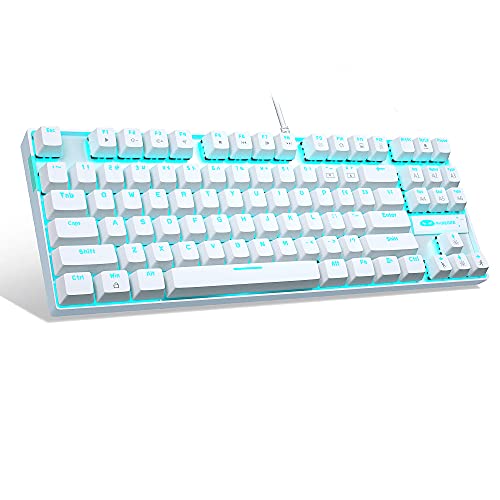
MageGee 87-Key Wired Mechanical Keyboard
Best for: tenkeyless typing with clicky tactile feedback
- Switch Type
- Blue Switch
- Form Factor
- Compact 87-key
- Connectivity
- USB 2.0 wired
- Backlighting
- LED Ice Blue
- Keycap Material
- Double-shot injection
- Case Material
- Metal panel
View on Amazon: MageGee 87-Key Wired Mechanical Keyboard (paid link)
The MageGee 87-Key Blue Switch Mechanical Keyboard gives you a tenkeyless layout with clicky tactile switches. It features full 87-key anti-ghosting, an ice blue LED backlight system with 21 lighting modes, and an integrated metal top plate. You connect via a wired USB 2.0 cable with no software required. This setup suits you if you need dedicated navigation keys and clicky feedback without the footprint of a full-size number pad.
Pros
- Full 87-key anti-ghosting prevents key conflicts during simultaneous presses
- Metal top panel provides structural rigidity and scratch resistance
- Ice blue backlighting includes 21 preset modes with adjustable speed and brightness
- Double-shot injection suspension keycaps resist wear
Cons
- Fixed single-color ice blue backlighting rather than full RGB
- Lacks a dedicated numeric keypad
- Wired USB 2.0 connection only with no wireless options
Good fit if
- You want a compact tenkeyless form factor that preserves dedicated arrow keys
- You prefer tactile, audible click feedback for typing and gaming
- You want hardware-based backlight controls without installing background software
Skip if
- You need a 10-key numeric pad for data entry
- You require multi-color RGB backlighting across your setup
- You want wireless connectivity via Bluetooth or 2.4 GHz
Verdict: MageGee 87-Key Blue Switch Mechanical Keyboard delivers responsive clicky switches and solid metal plate construction in a space-saving tenkeyless layout. It provides reliable full anti-ghosting performance without requiring configuration software.

CACKBIRD 60% Wired Mechanical Keyboard
Best for: compact setups needing tactile clicky switches
- Switch Type
- Blue Switch
- Form Factor
- 60%
- Connectivity
- Wired USB-C
- Backlighting
- Rainbow LED
- Keycap Material
- Double injection ABS
- Use
- Gaming
View on Amazon: CACKBIRD 60% Wired Mechanical Keyboard (paid link)
The CACKBIRD 60% Wired Blue Switch Keyboard gives you an ultra-compact 61-key layout that frees up desktop space for mouse travel. It features clicky blue mechanical switches with tactile resistance, full-key anti-ghosting, and 18 rainbow LED backlight modes. With its detachable Type-C cable and foldable kickstands, this wired model suits you if you want responsive tactile feedback and maximum desk space efficiency without installing drivers.
Pros
- Compact 61-key 60% form factor
- Tactile, clicky blue mechanical switches
- Detachable Type-C cable
- Full-key anti-ghosting with simultaneous keystroke support
Cons
- Fixed rainbow backlighting without full per-key RGB customization
- Wired-only connection with no wireless options
- No dedicated arrow keys or number pad
Good fit if
- You want an ultra-compact 61-key footprint to maximize mouse space.
- You prefer clicky blue mechanical switches with distinct tactile feedback.
- You travel frequently and want a detachable Type-C cable.
Skip if
- You need a wireless keyboard with Bluetooth or 2.4GHz connectivity.
- You require dedicated navigation keys without using a function layer.
- You want full individual per-key RGB color lighting.
Verdict: CACKBIRD 60% Wired Blue Switch Keyboard delivers a compact 61-key footprint with clicky tactile feedback and a detachable cable for space-saving setups.

AJAZZ 75% Hot-Swappable Mechanical Keyboard
Best for: compact TKL typing with dedicated volume control
- Switch Type
- Blue Switch
- Form Factor
- 75%
- Connectivity
- Type-C wired
- Backlighting
- Ice Blue
- Hot-Swap Support
- Hot-Swappable
- Use
- Gaming
View on Amazon: AJAZZ 75% Hot-Swappable Mechanical Keyboard (paid link)
The AJAZZ 75% Hot-Swappable Mechanical Keyboard packs an 82-key layout into a compact desk footprint. It pairs clicky blue switches with a five-layer sound-dampened gasket mount, giving you tactile feedback without hollow case echo. A built-in aluminum knob controls media volume directly, while full hot-swap sockets support both 3-pin and 5-pin switches. This wired board suits you if you want a space-saving design that keeps dedicated arrow keys and quick audio control.
Pros
- Gasket mount structure with 5-layer sound-absorbing foam
- Hot-swap PCB compatible with 3-pin and 5-pin switches
- CNC-machined aluminum volume knob
- Compact 82-key layout preserves arrow keys and shortcuts
Cons
- Wired USB Type-C connection only
- Single-color ice blue backlighting rather than RGB
- No dedicated numeric keypad
Good fit if
- You want an 82-key layout with dedicated volume knob control.
- You plan to swap mechanical switches using 3-pin or 5-pin sockets.
- You prefer a gasket-mounted structure with internal sound-dampening foam.
Skip if
- You need a full numeric keypad for data entry.
- You require multi-color RGB lighting effects.
- You want wireless Bluetooth or 2.4GHz connectivity.
Verdict: AJAZZ 75% Hot-Swappable Mechanical Keyboard delivers a solid gasket-mounted typing platform with tactile blue switches and custom knob controls. It provides a balanced tenkeyless footprint without sacrificing hot-swap versatility or essential keys.
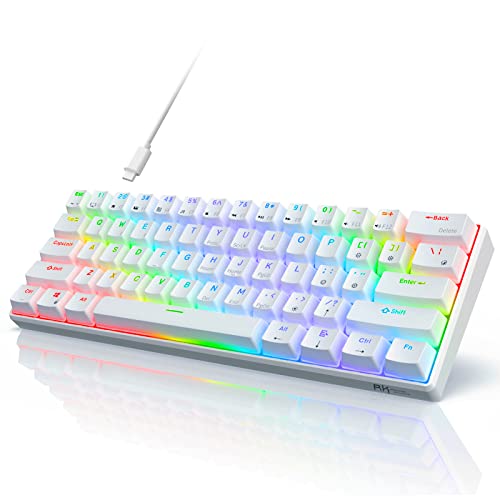
RK Royal Kludge 60% White Mechanical Keyboard
Best for: white desk setups wanting clicky hot-swappable switches
- Switch Type
- Blue Switch
- Form Factor
- 60%
- Connectivity
- USB wired
- Backlighting
- RGB
- Hot-Swap Support
- Hot-Swappable
- Use
- Gaming
View on Amazon: RK Royal Kludge 60% White Mechanical Keyboard (paid link)
This RK Royal Kludge compact 60-percent mechanical keyboard pairs clicky blue switches with a white chassis. It features a 61-key layout measuring 11.4 inches long, freeing up desk space for mouse movement. The board includes hot-swappable switch sockets and 18 RGB backlight modes. It connects via a wired USB connection to Windows, macOS, and Android. It suits you if you want a compact white clicky keyboard for gaming or daily typing.
Pros
- Hot-swappable switch sockets for easy replacement
- Compact 61-key 60% layout saves desk space
- 18 RGB backlight modes and 8 monochrome options
- Compatible with Windows, macOS, and Android
Cons
- No dedicated arrow keys or numeric keypad
- Wired USB connection only with no wireless mode
Good fit if
- You want a white 60% keyboard with hot-swappable clicky switches.
- You need a compact wired board that works across Windows, macOS, and Android.
- You prefer a stair-up keycap design to support natural hand positioning.
Skip if
- You require dedicated arrow keys or a number pad.
- You need wireless connectivity for your desk setup.
Verdict: RK Royal Kludge 60% White Mechanical Keyboard delivers a space-saving 61-key layout with hot-swappable blue switches and customizable RGB lighting. It is a practical wired option for gamers and typists seeking a compact white aesthetic.

Snpurdiri 60% Wired Blue Switch Keyboard
Best for: compact desktop gaming with tactile blue switches
- Switch Type
- Blue Switch
- Form Factor
- 60%
- Connectivity
- Wired (Detachable USB-C)
- Backlighting
- Rainbow LED
- Keycap Material
- Double-color injection
- Use
- Gaming
View on Amazon: Snpurdiri 60% Wired Blue Switch Keyboard (paid link)
The Snpurdiri 60% Wired Blue Switch Keyboard provides a 61-key ultra-compact layout measuring 11.38 inches wide by 3.98 inches long. It features tactile blue switches with audible click feedback, full anti-ghosting across every key, and rainbow LED backlighting. The detachable USB-C cable and dual kickstand feet make it convenient to pack and adjust. It suits you if you need a space-saving wired keyboard with clicky switches for gaming.
Pros
- Full 61-key anti-ghosting prevents key conflicts
- Detachable USB-C wired connection for portability
- Tactile blue switches provide audible click feedback
- Double kickstand feet allow adjustable typing angles
Cons
- Compact 60% layout omits dedicated arrow and numeric keys
- Fixed rainbow LED lighting lacks individual per-key RGB customization
- Wired-only design with no wireless connectivity options
Good fit if
- You want an ultra-compact 60% layout with 61 keys to save desk space.
- You prefer clicky blue mechanical switches with tactile bump feedback.
- You need a detachable USB-C cable for easier transport.
Skip if
- You need a dedicated number pad, navigation cluster, or function row.
- You require wireless connectivity options such as Bluetooth or 2.4GHz.
Verdict: Snpurdiri 60% Wired Blue Switch Keyboard is an ultra-compact 61-key gaming board built with tactile clicky switches, rainbow LED backlighting, and a detachable USB-C cable. It delivers full anti-ghosting performance and adjustable placement angles for setups prioritizing minimal desk footprint.
Specifications side by side
| Spec | Redragon Full-Size Blue Switch Keyboard | AULA Typewriter Mechanical Keyboard with Blue Switches | MageGee MK-Box 68-Key Blue Switch Keyboard | RK Royal Kludge Retro Typewriter Mechanical Keyboard | RisoPhy Full-Size Wired Blue Switch Keyboard | Redragon One-Handed Mechanical Gaming Keypad | Redragon TKL Hot-Swap Blue Switch Keyboard | DIERYA Compact 60% Blue Switch Keyboard | YSCP 104-Key Retro Typewriter Keyboard | DIERYA 68-Key Blue Switch Mini Keyboard | MageGee 87-Key Wired Mechanical Keyboard | CACKBIRD 60% Wired Mechanical Keyboard | AJAZZ 75% Hot-Swappable Mechanical Keyboard | RK Royal Kludge 60% White Mechanical Keyboard | Snpurdiri 60% Wired Blue Switch Keyboard |
|---|---|---|---|---|---|---|---|---|---|---|---|---|---|---|---|
| Switch Type | Blue | Clicky Blue | Mechanical blue switch | Mechanical Blue | Blue | Blue Switch | Clicky Blue | Blue Switch (Tactile & Clicky) | Blue Switch | Clicky Blue Switch | Mechanical Blue | Blue | Linear Red | Clicky Blue Switch | Mechanical Blue (tactile, clicky) |
| Form Factor | not specified | 104 Keys | 60% | Full size (108 keys) | Full-size | 42-Key | TKL (87-key) | 60% | 104 Keys | 60% | Compact 87-key | 60% | 75% | 60% | 60% |
| Connectivity | Wired | USB wired | Wired | Wired | USB Wired | Wired | Wired | Bluetooth 5.0, 2.4G, wired USB | Wired USB | Bluetooth 5.0, 2.4GHz, USB-C wired | USB 2.0 wired | Wired USB-C | Type-C wired | USB wired | Wired (Detachable USB-C) |
| Hot-Swap Support | not specified | not specified | not specified | not specified | not specified | not specified | Yes (3-pin) | not specified | not specified | not specified | not specified | not specified | not specified | not specified | not specified |
| Backlighting | RGB | not specified | Blue LED | RGB | Rainbow LED | RGB | RGB | RGB | Rainbow / RGB | Blue LED | LED Ice Blue | Rainbow LED | Ice Blue | RGB | Rainbow LED |
| Keycap Material | Double-shot | not specified | Double-color injection | not specified | Double injection ABS | not specified | Double-shot PBT | not specified | Dual-color injection-molded | not specified | Double-shot injection | Double injection ABS | not specified | not specified | Double-color injection |
| Case Material | not specified | Aluminum alloy | not specified | Aluminium alloy | not specified | not specified | Metal frame | not specified | not specified | not specified | Metal panel | not specified | not specified | not specified | not specified |
| Use | Gaming | Gaming | Gaming | Gaming | Gaming | Gaming | Gaming | Gaming | Gaming | Gaming | Gaming | Gaming | Gaming | Gaming | Gaming |
| Design | not specified | Typewriter | not specified | Typewriter | not specified | not specified | Ergonomic | not specified | Typewriter | not specified | not specified | not specified | not specified | not specified | not specified |
| Color | Blue Switch | Black | Clicky Blue Switches | Grey/Blue Switch | Black | Black | Black K585 | White RGB | Black | Cool Black | White/Blue Switch | White/Blue Switch | Premium Black | white/blue switches | White | Black Red/Blue Switch |
| Operating System | not specified | not specified | Mac, Windows | not specified | Mac | not specified | not specified | Windows | not specified | Windows | Windows | not specified | not specified | not specified | not specified |
| Ergonomic Features | not specified | not specified | not specified | Wrist Rest | not specified | not specified | not specified | not specified | not specified | not specified | not specified | not specified | not specified | not specified | not specified |
| Dimensions | 0.98 × 5.91 × 15.7 inches | 17.1 × 4.84 × 1.5 inches | 12.1 × 3.9 × 1.5 inches | 17.4 × 7.2 × 1.6 inches | 16.9 × 4.72 × 0.98 inches | 11 × 2 × 9 inches | 13.9 × 4.84 × 1.46 inches | 11.5 × 4.02 × 0.98 inches | 13.8 × 4.96 × 1.38 inches | 11.4 × 3.89 × 1.37 inches | 13.9 × 5.1 × 0.55 inches | 12.2 × 5.43 × 1.57 inches | not specified | 11.4 × 4 × 1.6 inches | 3.98 × 11.4 × 1.5 inches |
| Weight | 2.65 pounds | 2.25 pounds | 1.12 pounds | 2.2 pounds | not specified | 1.3 pounds | 2.2 pounds | 1.41 pounds | 1.1 pounds | not specified | 1.96 pounds | not specified | not specified | 1.23 pounds | not specified |
| Size | K580 Wired | Round Keycaps | not specified | blue switch | Full-size | Blue Switch | Wired RGB | Blue Switch | not specified | Wired | not specified | not specified | AK820 | Hot-Swappable Blue Switch | not specified |
| Model | K580 | F2088 | MKBox | 108 | not specified | K585 WIRED | K552W-RGB | DK63 | HJK917-7 | Dk68 | MK-Star White | not specified | AK820 | RK61 | not specified |
Is a Blue Switch Keyboard Worth It?
Blue switches deliver tactile feedback paired with an audible click on every keypress. The tactile bump provides physical confirmation during typing and gaming sessions. These switches create loud, clicky keystrokes, which give distinct audio cues for registered inputs. Models with hot-swappable sockets also let you remove or swap these 3-pin switches directly on the board. If you share an office or prefer quiet keystrokes, the audible sound of blue switches will be noticeable. Blue switches prioritize distinct physical and audible response over silent key travel.
Worth it if
- You want tactile feedback paired with an audible click on every keystroke.
- You prefer physical confirmation for everyday typing and gaming.
Skip it if
- You need a silent keyboard for shared workspaces or quiet rooms.
- You dislike loud, clicky mechanical switch noise during use.
If you also evaluate kitchen appliances by their hardware specifications, you can compare motor and capacity data for a blue stand mixer.
How We Picked These Keyboards
To help you find the right model for 2026, this guide evaluates 15 mechanical keyboards selected for their clicky blue switches. We identify this feature directly from the manufacturer title or specification list on each product listing. Only models confirming blue switch hardware are included. In addition, only one variant from each product family appears on the page.
We do not physically handle or test these devices. All details come directly from published technical specifications. You will see products in stock first, then by Amazon sales rank (better-selling products first). Live stock status updates automatically at least once daily.
Choosing Your Next Blue Switch Keyboard
-
Check for Hot-Swap Sockets
Hot-swap support allows you to replace switches without soldering. The Redragon TKL Hot-Swap Blue Switch Keyboard features modular 3-pin switch sockets. If you plan to customize your switches later or replace an individual switch, check the product specifications for hot-swappable sockets. Keyboards lacking hot-swap support require desoldering if you ever need to replace a part. If you want a fixed board that stays standard, non-swappable models work fine. Choosing hot-swap hardware gives you extra flexibility for routine maintenance and switch changes.
-
Evaluate Wired Versus Bluetooth Connectivity
Connectivity affects how you route cables and connect to devices. Most models use a direct wired connection for stable signals without battery management. If you need clean cable routing or multi-device pairing, inspect the connection specs. The DIERYA Compact 60% Blue Switch Keyboard features Bluetooth connectivity for wireless setups. Wired options often feature detachable cables that make packing and storage easier. Choose Bluetooth if you switch between multiple machines, or select a standard wired model if you prefer a continuous connection without charging.
-
Look for Dedicated Control Knobs
Media controls let you change volume or lighting without using software shortcuts or secondary function layers. Some keyboards feature dedicated hardware dials built directly into the frame. The AJAZZ 75% Hot-Swappable Mechanical Keyboard provides a custom knob control on its top plate. If you frequently adjust audio levels during work or gaming sessions, a physical knob saves time compared to multi-key shortcuts. Verify whether the board has a hardware dial or relies entirely on standard key combinations for audio and brightness adjustments.
-
Review Included Ergonomic Wrist Rests
Mechanical switches sit higher off the desk surface than standard low-profile keys. This added height can bend your wrists during long typing sessions. Check the ergonomic features in the specification list to see if a wrist rest comes in the box. The RK Royal Kludge Retro Typewriter Mechanical Keyboard includes a dedicated wrist rest that attaches to its aluminum chassis. If a model does not include an ergonomic rest, you must purchase a separate support pad or angle your arms to maintain straight wrist alignment.
-
Confirm Operating System Compatibility
Not every keyboard works identically across desktop platforms. Before purchasing, verify the operating system details listed on the spec sheet. The MageGee MK-Box 68-Key Blue Switch Keyboard specifies compatibility with both Mac and Windows systems out of the box. Other models specify only Windows or only Mac support, which can affect function row keys and shortcut mapping. If you work in an environment with multiple platforms, ensure the keyboard explicitly lists your operating system so all keys send the correct inputs.
-
Consider Retro Typewriter Keycap Shapes
Keycap shapes influence finger contact and physical typing feel. Most keyboards feature standard rectangular keycaps, but retro designs use circular, typewriter-style caps. The YSCP 104-Key Retro Typewriter Keyboard provides vintage round keycaps alongside clicky blue switches. Round keycaps provide larger gaps between individual keys, which alters how your fingers navigate the board compared to traditional contoured keys. If you want a distinctive visual style, look for typewriter design tags, but choose conventional rectangular caps if you prefer traditional keyboard spacing.
Frequently asked questions
Which blue switch keyboards include typewriter style round keycaps?
You can find retro typewriter styling on full-size models like the AULA Typewriter Mechanical Keyboard, RK Royal Kludge Retro Typewriter Mechanical Keyboard, and YSCP 104-Key Retro Typewriter Keyboard. These designs pair round keycaps with standard wired connections and clicky switches. The AULA model adds a hardware control knob, while the RK Royal Kludge model includes an aluminum chassis and an integrated wrist rest.
What is the smallest blue switch keyboard on this list?
The DIERYA 68-Key Blue Switch Mini Keyboard and MageGee MK-Box offer the narrowest footprints among compact options. The DIERYA model measures 11.41 inches long and 3.89 inches wide, while the MageGee MK-Box measures 12.1 inches long. If you want a 61-key layout, options like the RK Royal Kludge 60% White Mechanical Keyboard span 11.4 inches in length to conserve desk area.
Can you use a blue switch mechanical keyboard with Mac computers?
Yes, several blue switch models list explicit compatibility with Mac operating systems. For example, the MageGee MK-Box 68-Key keyboard supports both Mac and Windows platforms over its wired connection. Similarly, the RisoPhy Full-Size Wired Blue Switch Keyboard lists Mac support alongside built-in spill drainage. Other models, such as the DIERYA DK68 and MageGee MK-Star, specify compatibility with Windows operating systems.
Which blue switch models feature hot-swappable switches?
Hot-swappable sockets appear on several selections in this guide. The Redragon Full-Size Blue Switch Keyboard, Redragon One-Handed Mechanical Gaming Keypad, and Redragon TKL Hot-Swap Blue Switch Keyboard support hot-swapping. You can also choose the AJAZZ 75% Hot-Swappable Mechanical Keyboard with its gasket-mounted layout, or the compact RK Royal Kludge 60% White Mechanical Keyboard, which features modular sockets for fast switch replacement.
Are there dedicated one-handed blue switch keypads for gaming?
Yes, the Redragon One-Handed Mechanical Gaming Keypad provides a dedicated 42-key layout specifically tailored for gaming. It incorporates clicky blue switches, hot-swappable sockets, and customizable macro profiles into an 11-inch by 9-inch wired frame. This configuration acts as a specialized controller rather than a complete daily typing unit, leaving extensive room on your desk for mouse movement.
Which mechanical keyboard with blue switches has a volume knob?
Two models include dedicated hardware knob controls for quick audio adjustments. The AULA Typewriter Mechanical Keyboard features a dedicated hardware control knob above its 104-key layout and aluminum top plate. In addition, the AJAZZ 75% Hot-Swappable Mechanical Keyboard provides custom knob controls paired with a compact 75% gasket-mounted tenkeyless design and wired connectivity.
Do blue switch mechanical keyboards support wireless connectivity?
Most keyboards in this category utilize a wired connection to ensure stable input, but wireless options are available. The DIERYA Compact 60% Blue Switch Keyboard features Bluetooth connectivity for multi-device pairing without desk cables. Measuring 11.5 inches long, it gives you portable wireless operation with tactile blue switches, while boards like the CACKBIRD and Snpurdiri rely on detachable wired cables.