15 Best Keychron Wireless Mechanical Keyboards, Compared
As an Amazon Associate we earn from qualifying purchases. Links on this page are affiliate links.
Choosing the right keychron wireless mechanical keyboard comes down to your layout requirements and switch preferences. To help you find the right fit, we compared 15 models based strictly on the specifications published on their listings.
The Keychron K10 HE Full-Size Wireless Keyboard leads the list because it pairs a complete 100% layout with adjustable magnetic actuation and tri-mode wireless connectivity. This comparison helps you decide which layout size, switch style, and physical dimensions best suit your desk setup.
Quick picks
The best fit for you
- You need a full-size layout with magnetic switches Keychron K10 HE Full-Size Wireless Keyboard It provides a 100% full-size layout with adjustable magnetic actuation and tri-mode wireless connectivity.
- You need an ultra-thin lightweight keyboard for travel Keychron K3 75% Wireless Low-Profile Keyboard Its 75% low-profile build measures 0.79 inches thin and weighs 1.10 pounds.
- You need maximum wireless responsiveness with full-size keys Keychron Q6 Full-Size Wireless Keyboard It delivers an 8000 Hz polling rate and tri-mode wireless connections in an all-metal full-size frame.
- You need maximum battery life in a full-size layout Keychron B6 Pro Ultra-Slim Full-Size Keyboard It delivers 1200-hour battery life and tri-mode wireless connectivity in a full-size low-profile format.
Our 15 picks

Keychron K10 HE Full-Size Wireless Keyboard
Best for: full-size typing with adjustable magnetic actuation
- Connectivity
- Wireless (what this guide is about)
- Switch Type
- Hall Effect magnetic switch
- Form Factor
- Full-size
- Keycap Material
- Double-shot PBT
- Color
- Black
- Dimensions
- 15.7 × 7.87 × 2.68 inches
The Keychron K10 HE is a full-size wireless keyboard equipped with Hall Effect magnetic switches. You get tri-mode connectivity covering Bluetooth 5.2, 2.4 GHz wireless, and USB-C wired connections. Its magnetic switches allow you to adjust actuation points between 0.2 mm and 3.8 mm with 0.1 mm sensitivity. This model fits you if you want a complete 100% layout, numeric keypad, and rapid-trigger performance across macOS or Windows setups.
Pros
- Tri-mode connectivity: Bluetooth 5.2, 2.4 GHz wireless, and Type-C wired
- Hall Effect magnetic switches with 0.2 mm to 3.8 mm adjustable actuation
- Rapid trigger and snap action configuration via Keychron Launcher web tool
- Hot-swappable magnetic switch design requires no soldering
- Durable OSA-profile double-shot PBT keycaps and natural wood sidings
Cons
- Full-size 440.2 mm footprint requires significant desk space
- PBT keycaps have non-shine-through legends
Good fit if
- You need a dedicated number pad and a standard 100% form factor.
- You want adjustable switch sensitivity and rapid-trigger capabilities.
- You switch frequently among Bluetooth, 2.4 GHz, and wired connections.
Skip if
- You prefer a compact layout without a numpad to save desk space.
- You require shine-through keycap legends for working in the dark.
Verdict: Keychron K10 HE Full-Size Wireless Keyboard delivers full 100% layout utility combined with fine-tuned magnetic switch actuation. It handles multi-device desktop setups with reliable tri-mode wireless options.

Keychron K2 HE 75% Magnetic Keyboard
Best for: compact setups needing customizable magnetic switches
- Connectivity
- Wireless (what this guide is about)
- Switch Type
- Gateron Double-Rail Magnetic
- Form Factor
- 75%
- Keycap Material
- Double-shot PBT
- Color
- Black
- Dimensions
- 12.5 × 4.99 × 1.6 inches
The Keychron K2 HE is a 75% layout wireless keyboard with Gateron double-rail magnetic switches. You get multi-mode connectivity with 2.4 GHz, Bluetooth 5.2, and USB Type-C, alongside a 1000 Hz polling rate. Its Hall Effect sensors enable Rapid Trigger and adjustable key actuation from 0.2 to 3.8 mm. This fits you if you want a compact desk footprint with precise magnetic switch tuning for typing or gaming.
Pros
- Adjustable key actuation from 0.2 to 3.8 mm with Rapid Trigger
- Tri-mode connectivity via 2.4 GHz, Bluetooth 5.2, and Type-C
- Web-based Launcher configurator for browser-based key remapping
- 1000 Hz polling rate for wireless and wired use
Cons
- Hot-swap socket supports only Gateron double-rail magnetic switches
- Keycap legends lack shine-through illumination
- No dedicated number pad included on 75% layout
Good fit if
- You need custom actuation sensitivity between 0.2 and 3.8 mm.
- You switch between 2.4 GHz, Bluetooth, and wired connections across devices.
- You prefer configuring macros and key maps through a web browser.
Skip if
- You require a full-size layout with a dedicated number pad.
- You plan to swap in standard mechanical 3-pin or 5-pin switches.
- You need shine-through keycap legends for visibility in dark rooms.
Verdict: Keychron K2 HE 75% Magnetic Wireless Keyboard delivers responsive Hall Effect performance and tri-mode connectivity in a compact footprint. It gives you deep actuation customization and Rapid Trigger without local software installations.

Keychron K3 75% Wireless Low-Profile Keyboard
Best for: low-profile multi-device typing on Mac and Windows
- Connectivity
- Wireless (what this guide is about)
- Switch Type
- Keychron Red Switch
- Form Factor
- 75%
- Backlighting
- White
- Case Material
- Aluminum body, plastic bottom frame
- Dimensions
- 11.8 × 4.57 × 0.79 inches
View on Amazon: Keychron K3 75% Wireless Low-Profile Keyboard
The Keychron K3 V2 is a low-profile wireless mechanical keyboard with a compact 75% layout. You get Broadcom Bluetooth 5.1 pairing for up to three devices, an aluminum top frame with a plastic base, and open-source QMK firmware support via the Keychron Launcher web app. At 0.79 inches tall and 1.1 pounds, it suits you if you need a slim, portable typing setup for Mac or Windows.
Pros
- Bluetooth 5.1 connects with up to 3 devices simultaneously
- Compact 0.79-inch low-profile height and 1.1-pound weight
- Open-source QMK firmware customization via Keychron Launcher
- Includes dedicated Mac multimedia keys and extra Windows keycaps
Cons
- Single-color white backlighting instead of RGB
- Plastic bottom frame rather than full aluminum construction
Good fit if
- You want an ultra-slim 75% mechanical board under an inch tall.
- You frequently switch between up to three devices over Bluetooth.
- You need open-source QMK remapping and Mac layout keycaps.
Skip if
- You need a full-size layout with a dedicated number pad.
- You want multi-color RGB lighting rather than monochrome white.
Verdict: Keychron K3 V2 75% Low-Profile Wireless Keyboard provides a compact, lightweight design with QMK programmability and multi-device Bluetooth switching. It delivers essential wireless mechanical functionality in a 0.79-inch slim build.

Keychron Q6 Full-Size Wireless Keyboard
Best for: high-polling wireless full-size desk setups
- Connectivity
- Wireless (what this guide is about)
- Switch Type
- Silk POM Banana Switch
- Form Factor
- Full-size
- Backlighting
- RGB
- Case Material
- Aluminum
The Keychron Q6 Ultra is a full-size wireless mechanical keyboard featuring an all-metal build and tri-mode connectivity. It supports an 8000 Hz polling rate over 2.4 GHz wireless and wired connections, alongside Bluetooth 5.3 pairing for up to three devices. With hot-swappable switch sockets and ZMK web-based configuration via Keychron Launcher, you get extensive customization. It suits you if you need a complete layout with high wireless polling speeds.
Pros
- 8000 Hz polling rate in 2.4 GHz wireless and wired modes
- Tri-mode connectivity with Bluetooth 5.3 pairing for up to three devices
- Hot-swappable sockets compatible with 3-pin and 5-pin MX switches
- Up to 660 hours of battery life with the backlight off
Cons
- Battery life drops to 200 hours with minimal backlighting enabled
- Pre-installed switch choices limited to Banana or Brown options
- Full-size aluminum frame requires dedicated desk space
Good fit if
- You want an 8000 Hz polling rate over a 2.4 GHz wireless connection.
- You need a full-size layout with Bluetooth pairing across multiple devices.
- You plan to swap mechanical switches without soldering.
Skip if
- You prefer a compact layout without a dedicated numeric keypad.
- You want switch options other than Banana or Brown out of the box.
Verdict: Keychron Q6 Ultra Full-Size Wireless Keyboard delivers an 8000 Hz polling rate and versatile tri-mode wireless connections in an all-metal full-size frame. It is an ideal fit if you require maximum responsiveness and custom mechanical switch support across multiple devices.

Keychron V5 Max 96% Wireless Keyboard
Best for: number pad users wanting space-saving wireless setups
- Connectivity
- Wireless (what this guide is about)
- Switch Type
- Gateron Jupiter Red
- Form Factor
- 96%
- Keycap Material
- Double-shot PBT
The Keychron V5 Max gives you a compact 96% layout that keeps the number pad while saving desk space. It connects wirelessly using 2.4 GHz with a 1000 Hz polling rate or Bluetooth 5.1 across up to three devices. Gasket mounting and sound-absorbing foam soften typing, while hot-swappable sockets support standard switches. It suits you if you need number pad utility and QMK remapping.
Pros
- 2.4 GHz wireless with 1000 Hz polling rate plus Bluetooth 5.1
- Hot-swappable sockets for 3-pin and 5-pin MX switches
- Compact 96% layout retains dedicated number pad
- QMK remapping via Keychron Launcher web app
Cons
- Keycaps do not allow backlight shine-through
- QMK key remapping requires a wired cable connection
Good fit if
- You need a number pad in a tighter layout than a standard full-size keyboard.
- You switch between up to three devices over Bluetooth 5.1.
- You want to swap 3-pin or 5-pin switches without soldering.
Skip if
- You require keycaps with shine-through legends for backlit visibility.
- You want to configure QMK macros entirely over a wireless connection.
Verdict: Keychron V5 Max 96% Wireless Mechanical Keyboard delivers dense number pad functionality, 1000 Hz wireless response, and easy switch swapping in a reduced footprint.
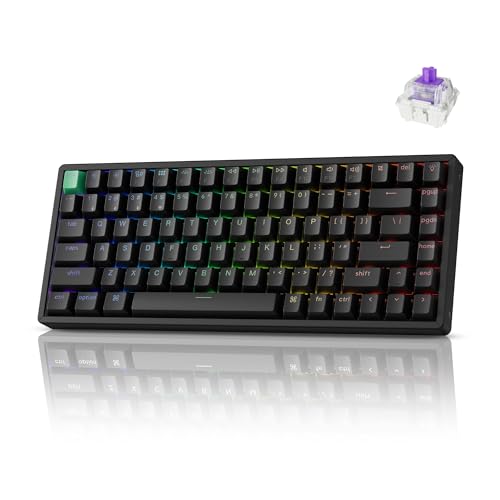
Keychron K2 HE 75% Magnetic Wireless Keyboard
Best for: Gamers wanting compact Hall Effect wireless control
- Connectivity
- Wireless (what this guide is about)
- Switch Type
- Gateron magnetic
- Form Factor
- 75%
- Backlighting
- RGB
- Keycap Material
- Shine-through PBT
- Color
- Black
View on Amazon: Keychron K2 HE 75% Magnetic Wireless Keyboard
The Keychron K2 HE 75% Magnetic Keyboard gives you a compact 75% layout equipped with Hall Effect magnetic switches. You can adjust actuation points between 0.2 mm and 3.8 mm in 0.1 mm steps and map keys via the web-based Launcher tool. With 2.4 GHz wireless, Bluetooth 5.2, and wired USB-C, it suits gamers and typists needing rapid trigger response and multi-device wireless pairing across macOS and Windows systems.
Pros
- Adjustable actuation points from 0.2 mm to 3.8 mm with 0.1 mm precision
- Tri-mode connectivity: 2.4 GHz wireless, Bluetooth 5.2, and Type-C wired
- 1000 Hz polling rate for gaming responsiveness
- Web-based Launcher tool for actuation depth and rapid trigger configuration
- Cherry profile shine-through PBT keycaps with 22+ RGB backlight effects
Cons
- Hot-swap socket accepts only Gateron double-rail magnetic switches
- Compact 75% layout lacks a dedicated numeric keypad
Good fit if
- You need rapid trigger functionality and custom actuation depths for gaming.
- You switch frequently among up to three Bluetooth devices and a 2.4 GHz wireless connection.
- You want a compact 75% form factor that preserves dedicated arrow keys.
Skip if
- You need a full-size layout with a dedicated number pad.
- You plan to swap in standard mechanical 3-pin or 5-pin MX switches.
Verdict: Keychron K2 HE 75% Magnetic Keyboard delivers adjustable Hall Effect switches and flexible tri-mode wireless in a compact desktop footprint. It gives you deep actuation customization and browser-based remapping without requiring background software.

Keychron K8 HE TKL Magnetic Keyboard
Best for: TKL users wanting adjustable magnetic switches
- Connectivity
- Wireless (what this guide is about)
- Switch Type
- Hall Effect Magnetic
- Form Factor
- 80% TKL
- Keycap Material
- Double-shot PBT
- Case Material
- Wood and aluminum frame
- Dimensions
- 15.7 × 7.87 × 2.68 inches
This is an 80% tenkeyless wireless keyboard with Hall Effect magnetic switches. It features adjustable actuation points between 0.2 mm and 3.8 mm, rapid trigger functionality, and tri-mode connectivity across 2.4 GHz, Bluetooth 5.2, and USB-C. The aluminum and wood frame houses hot-swappable sockets and double-shot PBT keycaps. If you need dedicated arrow and navigation clusters without a number pad, this layout balances desk room and input versatility for gaming or typing.
Pros
- Adjustable actuation from 0.2 mm to 3.8 mm with Rapid Trigger
- Tri-mode connection with 1000 Hz polling over 2.4 GHz and USB-C
- Hot-swappable magnetic switch design requires no soldering
- Double-shot OSA PBT keycaps resist surface shine
- In-browser remapping and actuation tuning via Keychron Launcher or QMK
Cons
- Lacks a dedicated numeric keypad
- Non-shine-through keycaps do not illuminate legends
Good fit if
- You want an 80% TKL footprint with dedicated arrow and function rows.
- You need Hall Effect switches with customizable actuation depths.
- You switch between up to three devices across Bluetooth and 2.4 GHz.
Skip if
- You require an integrated numpad for number-heavy workflows.
- You want shine-through legends for backlit key readability.
Verdict: Keychron TKL Hall Effect Wireless Keyboard delivers rapid magnetic switch control and tri-mode wireless flexibility in a space-saving 80% format. It provides precise actuation customization and a rigid wood-and-aluminum frame without occupying full-size desk space.

Keychron Q6 Max Full-Size Wireless Mechanical Keyboard
Best for: Full-size desktop gaming and deep customization
- Connectivity
- Wireless (what this guide is about)
- Switch Type
- Brown Switch
- Form Factor
- 100% full-size
- Case Material
- CNC 6063 aluminum
- Use
- Gaming
- Dimensions
- 17.6 × 5.39 × 1.28 inches
View on Amazon: Keychron Q6 Max Full-Size Wireless Mechanical Keyboard
The Keychron Q6 Max is a full-size wireless mechanical keyboard housed in a CNC-machined 6063 aluminum body. For gaming and input responsiveness, you get a 1000 Hz polling rate over 2.4 GHz wireless or Type-C wired connections, alongside Bluetooth 5.1 for up to three devices. It includes a double-gasket design, sound-absorbing foam, hot-swappable switch sockets for 3-pin and 5-pin MX switches, and full QMK and VIA key remapping.
Pros
- 1000 Hz polling rate on 2.4 GHz wireless and wired Type-C connections
- Full CNC-machined 6063 aluminum chassis with double-gasket structure
- Hot-swappable PCB supporting 3-pin and 5-pin MX mechanical switches
- Full key remapping and macro support through QMK and VIA
Cons
- Large 17.56-inch length requires significant desk space
- Bluetooth 5.1 mode does not support the 1000 Hz polling rate
Good fit if
- You want a full-size mechanical board with a 1000 Hz polling rate over 2.4 GHz wireless.
- You need hot-swappable sockets to change mechanical switches without soldering.
Skip if
- You need a compact layout to free up desk room for mouse travel.
- You prefer a lightweight travel keyboard instead of a solid aluminum build.
Verdict: Keychron Q6 Max Full-Size Wireless Mechanical Keyboard delivers low-latency 1000 Hz performance inside a rigid aluminum body built for heavy desktop use. It balances full-size productivity layout with rapid wireless input for gaming.

Keychron Q6 HE Full-Size Wireless Magnetic Keyboard
Best for: full-size setups needing magnetic switch customization
- Connectivity
- Wireless (what this guide is about)
- Switch Type
- Hall Effect Gateron magnetic
- Form Factor
- 100% Full-Size
- Case Material
- All-aluminum
- Dimensions
- 17.6 × 5.39 × 1.22 inches
View on Amazon: Keychron Q6 HE Full-Size Wireless Magnetic Keyboard
The Keychron Q6 HE is a full-size wireless keyboard featuring Hall Effect magnetic switches and an all-aluminum body. It connects via 2.4 GHz wireless with a 1,000 Hz polling rate, Bluetooth 5.2 across three devices, or wired USB-C. You can adjust switch actuation from 0.2 to 3.8 mm through a web-based configurator. This layout suits you if you need a dedicated number pad alongside rapid trigger inputs and analog controls.
Pros
- Gateron double-rail magnetic switches with rapid trigger functionality
- Adjustable actuation points from 0.2 mm to 3.8 mm with 0.1 mm precision
- Tri-mode connectivity via 2.4 GHz wireless, Bluetooth 5.2, and USB-C
- All-aluminum body with a double-gasket design and acoustic foam
Cons
- Full-size 17.56-inch length requires substantial desk space
- Customization relies on a web-browser configurator rather than offline software
Good fit if
- You want a full-size layout with Hall Effect magnetic switches and rapid trigger.
- You need tri-mode connectivity including low-latency 2.4 GHz and multi-device Bluetooth.
- You want to configure analog inputs and multi-action key bindings.
Skip if
- You have limited desk width to accommodate a 17.56-inch keyboard.
- You prefer a compact layout without a dedicated numeric keypad.
Verdict: Keychron Q6 HE Full-Size Wireless Magnetic Keyboard pairs an all-aluminum chassis with deeply tunable magnetic switches. It provides extensive actuation customization and versatile wireless connections for desktop setups.

Keychron K10 Pro Wireless Full-Size Keyboard
Best for: full-size wireless productivity and switch customization
- Connectivity
- Wireless (what this guide is about)
- Switch Type
- Keychron K Pro Brown (tactile)
- Form Factor
- Full-size
- Backlighting
- White
- Keycap Material
- Double-shot PBT
- Hot-Swap Support
- Hot-Swappable
View on Amazon: Keychron K10 Pro Wireless Full-Size Keyboard
The Keychron K10 Pro Full-Size Wireless Keyboard is a 100% layout board with Bluetooth 5.1 pairing for up to three devices and wired USB Type-C connectivity. It features a 4,000 mAh battery rated for up to 100 hours at low brightness, hot-swappable MX switch sockets, and QMK/VIA key remapping. It suits you if you need a standard full-size layout with a number pad, custom keymaps, and wireless convenience across desktop platforms.
Pros
- Connects up to three devices via Bluetooth 5.1 plus wired USB-C
- Hot-swappable PCB supports 3-pin and 5-pin MX mechanical switches
- 4,000 mAh battery provides up to 100 hours of runtime at lowest brightness
- Full QMK and VIA support for custom keymapping and macros
Cons
- Key remapping through VIA requires a wired connection
- Backlight is restricted to white illumination instead of RGB
Good fit if
- You need a full-size layout with a dedicated number pad
- You want to replace mechanical switches without soldering
- You switch frequently between up to three wireless devices
Skip if
- You require multi-color RGB backlighting
- You want to remap keys directly over a wireless connection
- You have limited desk space for a 17.52-inch board
Verdict: Keychron K10 Pro Full-Size Wireless Keyboard delivers a complete 100% layout with hot-swappable switch sockets and Bluetooth pairing for up to three devices. It is a practical choice if you need full number-pad utility and deep VIA remapping without losing wireless flexibility.
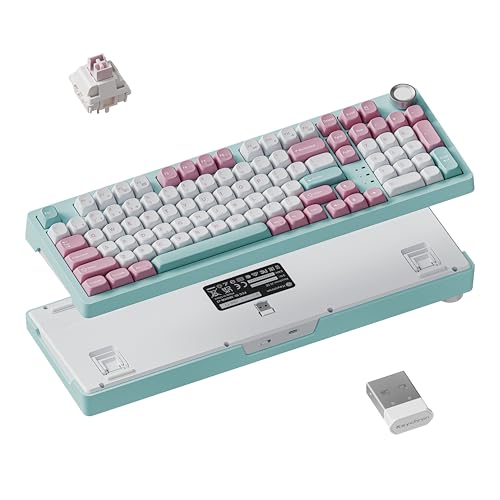
Keychron 96% Wireless Mechanical Keyboard with Knob
Best for: compact numpad setups needing wireless multi-device switching
- Connectivity
- Wireless (what this guide is about)
- Form Factor
- 96%
- Backlighting
- RGB
- Keycap Material
- PBT
- Media Controls
- Volume Knob
View on Amazon: Keychron 96% Wireless Mechanical Keyboard with Knob
The Keychron J3 SE 96% Wireless Mechanical Keyboard provides a compact 96% layout complete with a number pad and dedicated volume knob. It features tri-mode connectivity covering Bluetooth 5.2, 2.4GHz wireless at a 1000Hz polling rate, and wired USB. You get hot-swappable sockets for 3-pin and 5-pin MX switches, QMK firmware support through a web interface, and non-shine-through MDA profile PBT keycaps. This model suits users who need a space-saving numpad layout with deep custom mapping.
Pros
- Tri-mode connectivity with Bluetooth 5.2, 2.4GHz, and USB wired
- Hot-swappable PCB supports 3-pin and 5-pin MX mechanical switches
- Open-source QMK firmware programmable via Keychron Launcher web app
- Built-in volume knob on a space-saving 96% layout
- Durable MDA profile PBT keycaps
Cons
- Non-shine-through keycaps do not illuminate characters in the dark
- Colorway selection is restricted to pink-based options
Good fit if
- You need a dedicated number pad and volume knob in a compact 96% form factor.
- You want to swap 3-pin or 5-pin mechanical switches without soldering.
- You alternate between macOS and Windows operating systems across wireless connections.
Skip if
- You require shine-through keycap legends for low-light visibility.
- You prefer neutral case colors over pink options.
Verdict: Keychron J3 SE 96% Wireless Mechanical Keyboard pairs a space-saving 96% layout and volume knob with versatile tri-mode wireless connectivity. Its hot-swap sockets and QMK programmability provide extensive hardware and software customization.

Keychron K6 Pro Wireless Mechanical Keyboard
Best for: multi-device office typing with RGB lighting
- Connectivity
- Wireless (what this guide is about)
- Switch Type
- Keychron K Pro Red
- Form Factor
- 65%
- Backlighting
- RGB
- Hot-Swap Support
- Hot-Swappable
- Use
- Office
View on Amazon: Keychron K6 Pro Wireless Mechanical Keyboard
The Keychron K6 Pro is a wireless mechanical keyboard featuring RGB backlighting and Bluetooth 5.1 connectivity for up to three devices. You get hot-swappable sockets compatible with 3-pin and 5-pin MX switches, pre-installed Keychron K Pro switches, and sound-dampening foam with a silicone pad. Key remapping requires the wired Launcher web app. It suits you if you need a customizable, multi-device board for Mac or Windows office setups.
Pros
- Bluetooth 5.1 connectivity pairs with up to three devices
- Hot-swappable PCB supports 3-pin and 5-pin MX switches
- Integrated RGB backlighting
- Equipped with sound-absorbing foam and silicone bottom pad
Cons
- Key remapping via Launcher web app requires a wired connection
- Alternative plate materials are sold separately
Good fit if
- You want Bluetooth multitasking across up to three devices.
- You plan to swap between 3-pin or 5-pin MX mechanical switches.
- You need integrated RGB backlighting in an office setup.
Skip if
- You want to configure macros and keymaps over a wireless connection.
- You need alternative plate materials included in the package.
Verdict: Keychron K6 Pro Wireless RGB Mechanical Keyboard provides hot-swappable MX flexibility and multi-device Bluetooth switching with customizable RGB illumination. Configuration requires a wired connection, but settings persist across wireless use.

Keychron V1 Max 75% Wireless Keyboard
Best for: compact productivity setups needing knob control
- Connectivity
- Wireless (what this guide is about)
- Switch Type
- Gateron Jupiter Red
- Form Factor
- 75%
- Backlighting
- South-facing RGB
- Keycap Material
- Double-shot PBT
- Media Controls
- Volume Knob
The Keychron V1 Max gives you a compact 75% layout with a dedicated volume knob and hot-swappable switches. It connects across three modes, including 2.4 GHz wireless with a 1000 Hz polling rate, Bluetooth 5.1 for up to three devices, and wired USB. You get a gasket-mounted design with sound-absorbing foam, double-shot PBT keycaps, and web-based key remapping through Keychron Launcher or QMK. It fits you if you want customizable desktop typing without a number pad.
Pros
- Tri-mode connectivity via 2.4 GHz wireless, Bluetooth 5.1, and wired USB
- 1000 Hz polling rate over 2.4 GHz wireless and wired connections
- Web-based key remapping with Keychron Launcher and open-source QMK support
- Gasket-mounted plate design with sound-absorbing foam and hot-swappable sockets
- Includes physical volume knob and oil-resistant OSA double-shot PBT keycaps
Cons
- Keycap legends do not shine through the RGB backlighting
- 75% compact layout omits a dedicated numeric keypad
Good fit if
- You switch frequently between up to three Bluetooth devices and a 2.4 GHz connection.
- You want physical knob control and hot-swappable switches in a smaller footprint.
- You remap keys or configure macros across macOS, Windows, or Linux using a browser.
Skip if
- You rely on a dedicated number pad for daily data entry.
- You work in the dark and need keycap letters illuminated by backlight passthrough.
Verdict: Keychron V1 Max 75% Wireless Keyboard delivers flexible tri-mode wireless connections, a dedicated knob, and gasket-mount typing in a compact footprint. It gives you deep web-based remapping without taking up full-size desk space.

Keychron Q1 HE 75% Wireless Magnetic Keyboard
Best for: white setups needing adjustable magnetic switches
- Connectivity
- Wireless (what this guide is about)
- Switch Type
- Gateron 2.0 magnetic
- Form Factor
- 75%
- Backlighting
- RGB
- Keycap Material
- Double-shot PBT
- Case Material
- Aluminum
View on Amazon: Keychron Q1 HE 75% Wireless Magnetic Keyboard
The Keychron Q1 HE is a 75% wireless keyboard built with a full aluminum frame and a white finish. It features Gateron double-rail magnetic switches with adjustable actuation points from 0.5 mm to 3.8 mm. You get tri-mode connectivity including 2.4 GHz wireless with a 1000 Hz polling rate and Bluetooth 5.2 for three devices. It suits you if you want customizable magnetic switches in a compact, rigid desk layout.
Pros
- Hall Effect switches allow custom actuation depths between 0.5 mm and 3.8 mm
- 2.4 GHz wireless connection operates at a 1000 Hz polling rate
- Full aluminum chassis with double-gasket mounting
- Bluetooth 5.2 pairs with up to three devices simultaneously
Cons
- Switch compatibility is restricted solely to Gateron double-rail magnetic switches
- Stock OSA-profile PBT keycaps are non-shine-through
- 75% layout lacks a dedicated numeric keypad
Good fit if
- You want a white aluminum keyboard with rapid 1000 Hz 2.4 GHz wireless connectivity.
- You need per-key actuation depth tuning from 0.5 mm to 3.8 mm.
- You switch frequently between up to three Bluetooth devices.
Skip if
- You require a full-size layout with a dedicated number pad.
- You plan to swap in standard mechanical switches.
Verdict: Keychron Q1 HE 75% Wireless Magnetic Keyboard pairs an aluminum build and white finish with precise, adjustable Hall Effect switches. It delivers low-latency 2.4 GHz wireless and Bluetooth flexibility in an 82-key footprint.

Keychron B6 Pro Ultra-Slim Full-Size Keyboard
Best for: extended battery life on full-size multi-OS setups
- Connectivity
- Wireless (what this guide is about)
- Form Factor
- Full-size
View on Amazon: Keychron B6 Pro Ultra-Slim Full-Size Keyboard
The Keychron B6 Pro is a full-size, ultra-slim wireless keyboard built for desk setups requiring dedicated number pads. You get three connection options: 2.4 GHz with a 1000 Hz polling rate, Bluetooth 5.2, and wired mode. Its internal battery runs up to 1200 hours between charges. You can remap every key using the web-based Keychron Launcher or open-source ZMK firmware across macOS, Windows, and Linux operating systems.
Pros
- Up to 1200 hours of continuous battery life
- Tri-mode connectivity: 2.4 GHz, Bluetooth 5.2, and wired
- 1000 Hz polling rate over 2.4 GHz wireless connection
- ZMK firmware and web-based Keychron Launcher key remapping
Cons
- Requires wired cable connection to remap keys in browser tool
- Ultra-slim design lacks hot-swappable mechanical switch specifications
Good fit if
- You need a full-size layout with extended battery runtimes up to 1200 hours.
- You switch between macOS, Windows, and Linux across multiple wireless connections.
Skip if
- You want standard full-height custom mechanical switches.
- You prefer a compact footprint without a dedicated number pad.
Verdict: Keychron B6 Pro Ultra-Slim Full-Size Keyboard delivers extensive 1200-hour battery life and tri-mode wireless flexibility in a low-profile layout. It fits typists wanting deep ZMK customization without managing frequent recharges.
Specifications side by side
| Spec | Keychron K10 HE Full-Size Wireless Keyboard | Keychron K2 HE 75% Magnetic Keyboard | Keychron K3 75% Wireless Low-Profile Keyboard | Keychron Q6 Full-Size Wireless Keyboard | Keychron V5 Max 96% Wireless Keyboard | Keychron K2 HE 75% Magnetic Wireless Keyboard | Keychron K8 HE TKL Magnetic Keyboard | Keychron Q6 Max Full-Size Wireless Mechanical Keyboard | Keychron Q6 HE Full-Size Wireless Magnetic Keyboard | Keychron K10 Pro Wireless Full-Size Keyboard | Keychron 96% Wireless Mechanical Keyboard with Knob | Keychron K6 Pro Wireless Mechanical Keyboard | Keychron V1 Max 75% Wireless Keyboard | Keychron Q1 HE 75% Wireless Magnetic Keyboard | Keychron B6 Pro Ultra-Slim Full-Size Keyboard |
|---|---|---|---|---|---|---|---|---|---|---|---|---|---|---|---|
| Switch Type | Hall Effect magnetic switch | Gateron Double-Rail Magnetic | Keychron Red Switch | Silk POM Banana Switch | Gateron Jupiter Red | Gateron magnetic | Hall Effect Magnetic | Brown Switch | Hall Effect Gateron magnetic | Keychron K Pro Brown (tactile) | not specified | Keychron K Pro Red | Gateron Jupiter Red | Gateron 2.0 magnetic | not specified |
| Form Factor | Full-size | 75% | 75% | Full-size | 96% | 75% | 80% TKL | 100% full-size | 100% Full-Size | Full-size | 96% | 65% | 75% | 75% | Full-size |
| Connectivity | Bluetooth 5.2, 2.4GHz, Type-C wired | Bluetooth 5.2, 2.4 GHz, USB-C | Bluetooth 5.1, Wireless | 2.4 GHz, Bluetooth 5.3, wired | Bluetooth 5.1, 2.4 GHz, wired | 2.4 GHz, Bluetooth 5.2, Type-C | 2.4 GHz, Bluetooth 5.2, USB-C wired | 2.4 GHz, Bluetooth 5.1, Type-C wired | 2.4 GHz, Bluetooth 5.2, Type-C wired | Bluetooth 5.1, wired | Bluetooth 5.2, 2.4GHz, wired | Bluetooth 5.1, wired | 2.4 GHz, Bluetooth 5.1, wired | 2.4 GHz, Bluetooth 5.2, wired | 2.4 GHz, Bluetooth 5.2, wired |
| Backlighting | not specified | not specified | White | RGB | not specified | RGB | not specified | not specified | not specified | White | RGB | RGB | South-facing RGB | RGB | not specified |
| Keycap Material | Double-shot PBT | Double-shot PBT | not specified | not specified | Double-shot PBT | Shine-through PBT | Double-shot PBT | not specified | not specified | Double-shot PBT | PBT | not specified | Double-shot PBT | Double-shot PBT | not specified |
| Case Material | not specified | not specified | Aluminum body, plastic bottom frame | Aluminum | not specified | not specified | Wood and aluminum frame | CNC 6063 aluminum | All-aluminum | not specified | not specified | not specified | not specified | Aluminum | not specified |
| Hot-Swap Support | not specified | not specified | not specified | not specified | not specified | not specified | not specified | not specified | not specified | Hot-Swappable | not specified | Hot-Swappable | not specified | not specified | not specified |
| Media Controls | not specified | not specified | not specified | not specified | not specified | not specified | not specified | not specified | not specified | not specified | Volume Knob | not specified | Volume Knob | not specified | not specified |
| Use | not specified | not specified | not specified | not specified | not specified | not specified | not specified | Gaming | not specified | not specified | not specified | Office | not specified | not specified | not specified |
| Color | Black | Black | Keychron Red Switch | Banana Switch | Gateron Jupiter Red Switch | Black | Aluminum+Wood Frame-Black | Brown Switch | Carbon Black | Hot-swap Keychron K Pro Brown Switch | Pink Blue | Hot-swappable Keychron K Pro Red Switch | Gateron Jupiter Red Switch | White | Blossom Pink |
| Operating System | not specified | not specified | not specified | not specified | not specified | not specified | not specified | not specified | not specified | not specified | not specified | Mac, Windows | not specified | not specified | not specified |
| Dimensions | 15.7 × 7.87 × 2.68 inches | 12.5 × 4.99 × 1.6 inches | 11.8 × 4.57 × 0.79 inches | not specified | not specified | 2.83 × 7.99 × 14.2 inches | 15.7 × 7.87 × 2.68 inches | 17.6 × 5.39 × 1.28 inches | 17.6 × 5.39 × 1.22 inches | 17.5 × 5.43 × 1.59 inches | not specified | 12.3 × 4.09 × 1.57 inches | not specified | 12.9 × 5.71 × 1.41 inches | not specified |
| Weight | 2.2 pounds | 2.13 pounds | 1.1 pounds | not specified | not specified | 2.16 pounds | 1.54 pounds | not specified | not specified | not specified | not specified | not specified | not specified | not specified | not specified |
| Size | 440.2 x 129.2 mm | not specified | 75% | not specified | not specified | not specified | 359.2 x 129.2 mm | 137 X 446mm | not specified | not specified | not specified | not specified | not specified | not specified | not specified |
| Model | KBKCK10HF1 | KBKCK2HF1 | K3A1 | not specified | not specified | not specified | K8 HE | P-Q6M-GM | Q6H-M1 | K10 Pro | not specified | K6P-H1 | V1 Max | not specified | Keychron B6 Pro |
If you want matching cord-free audio for your desk, you can review Bluetooth codecs and battery specs for the best wireless headphones.
How to Choose a Keychron Keyboard
-
Assess Your Desk Footprint
You should check the form factor specifications before buying to match your available desk area. Full-size keyboards offer complete numeric keypads for data entry, while 75% or 80% TKL formats remove the numpad to provide more space for mouse movement. If you need dedicated number keys but want to conserve desk surface, examine 96% layouts. The Keychron V5 Max combines dense number pad functionality with a reduced desktop footprint. Look at the length and width dimensions in the product specifications to confirm the keyboard fits your current workspace layout.
-
Check Keyboard Height Measurements
You should check physical height measurements to ensure comfortable wrist positioning during long typing sessions. Standard mechanical keyboards often exceed 1.2 inches in height and typically require a separate wrist rest to maintain a neutral posture. Low-profile designs sit much flatter on your desk surface, making them easier to transport and type on without extra wrist support. The Keychron K3 features a slim 0.787-inch profile that reduces overall vertical reach. Review the height specification to decide whether you prefer a standard elevated mechanical height or an ultra-slim chassis.
-
Verify Hot-Swappable Switch Sockets
You should verify hot-swappable socket support if you plan to modify or replace switches over time. Hot-swappable boards allow you to pull out individual mechanical switches and press in new ones without using a soldering iron. This feature makes switch maintenance straightforward and lets you change between linear red, clicky blue, or tactile brown switches whenever your needs change. The Keychron K10 Pro includes hot-swappable switch sockets for easy hardware modifications. Check the switch specifications to confirm whether the board supports modular switch swapping or uses permanent, factory-soldered components.
-
Look for Hardware Volume Knobs
You should determine whether you want integrated physical rotary controls for rapid audio adjustments. While almost every wireless keyboard lets you adjust sound via function key shortcuts, a physical volume knob provides immediate tactile control without navigating software layers or taking your eyes off your screen. The Keychron V1 Max includes a dedicated knob on the upper corner of its top plate. If you frequently participate in calls, listen to media, or manage game audio while working, look for dedicated media controls in the keyboard attribute list.
-
Compare Wireless Polling Rates
You should inspect the polling rate specification if you require rapid input registration for competitive gaming. Polling rates indicate how many times per second the keyboard transmits keystroke data to your computer. A standard 1000 Hz polling rate updates once every millisecond, which easily accommodates everyday productivity and standard gameplay. For maximum input precision and lower latency, high-performance models push response rates significantly higher. The Keychron Q6 features an 8000 Hz polling rate for exceptional responsiveness. Review the listed polling frequency to match the keyboard to your specific gaming demands.
-
Review Frame Material and Weight
You should check the chassis materials and total product weight to match your portability preferences. Heavy aluminum frames provide maximum rigidity and prevent shifting on your desk, but they add substantial carrying weight. Lightweight frames constructed with wood, composite materials, or plastic remain easier to slip into a backpack for mobile setups. The Keychron K8 HE incorporates a hybrid wood-and-aluminum frame weighing 1.54 pounds, keeping it stable yet manageable to move. Check the published weight specifications to ensure the keyboard balances stationary desk stability with your travel needs.
Frequently asked questions
Which Keychron wireless keyboard offers the highest polling rate?
The Keychron Q6 Full-Size Wireless Keyboard offers the highest polling rate in this lineup at 8000 Hz. Other high-performance models, including the Keychron Q6 Max and Keychron V5 Max, operate at 1000 Hz. A higher polling rate transmits keypress signals to your computer more frequently, minimizing latency during high-speed typing and competitive gaming.
What is the thinnest and lightest Keychron wireless keyboard available?
The Keychron K3 75% Wireless Low-Profile Keyboard is the slimmest and lightest option listed. Its frame measures 0.79 inches in height and weighs 1.10 pounds. This compact profile makes it significantly easier to pack and carry than standard mechanical keyboards while still maintaining multi-device wireless pairing for Mac and Windows setups.
Which Keychron wireless keyboard provides the longest battery life?
The Keychron B6 Pro Ultra-Slim Full-Size Keyboard delivers the longest operation, rated for up to 1200 hours of battery life. It features tri-mode wireless connectivity and full-size layout utility alongside ZMK customization. This extended capacity lets you work across multiple desktop environments for extended periods without frequently attaching a USB charging cable.
Do any Keychron wireless keyboards come equipped with physical volume knobs?
Yes, select Keychron layouts include dedicated rotary controls for instant audio adjustments. The Keychron V1 Max 75% Wireless Keyboard and the Keychron 96% Wireless Mechanical Keyboard both feature built-in volume knobs. These physical dials let you raise, lower, or mute system audio directly on the keyboard without memorizing extra shortcut combinations.
Which Keychron keyboards support hot-swappable mechanical switches?
Several models feature hot-swappable circuit boards, including the Keychron K10 Pro, Keychron K6 Pro, and Keychron V5 Max. Hot-swap sockets allow you to change switch types without using a soldering iron. This feature makes it straightforward to replace individual damaged switches or customize typing resistance across your layout over time.
What materials are used in Keychron keyboard frames?
Keychron uses aluminum, wood, and composite materials across different keyboard tiers. The Keychron Q6, Q6 Max, and Q1 HE feature all-aluminum frames for heavy desktop stability. In contrast, the Keychron K8 HE incorporates a specialized wood-and-aluminum frame, while low-profile and entry models use lightweight enclosures to remain portable.
Can you remap Keychron wireless keyboards without running background software?
Yes, many Keychron keyboards allow browser-based or onboard configuration without background utilities. The Keychron K2 HE and Keychron V1 Max support web-based adjustments that store settings directly to local keyboard memory. Additionally, models like the Keychron K10 Pro and Keychron K3 support open-source QMK and VIA mapping tools.