Logitech Mechanical Keyboards: 15 Picks Ranked by Specs
As an Amazon Associate we earn from qualifying purchases. Links on this page are affiliate links.
Finding the right logitech mechanical keyboard depends on your specific workspace needs. Logitech offers mini, compact, and full-size layouts, with designs featuring split ergonomic shapes, integrated device cradles, and smart backlighting.
The Logitech Alto Keys Wireless Gasket Keyboard earns the top spot because it combines cushioned gasket-mount typing, hot-swappable switches, and a compact wireless frame with a numpad. We compared 15 models strictly using their published specifications to help you find the right typing hardware for your setup.
Quick picks
Our 15 picks

Logitech Alto Keys Wireless Gasket Keyboard
Best for: compact wireless mechanical typing with a numpad
- Switch Type
- Clicky (Marble Switches)
- Form Factor
- Compact 1800 (98-key)
- Connectivity
- Bluetooth, Logi Bolt USB
- Backlighting
- White
- Mounting Style
- Gasket Mount
- Dimensions
- 15.8 × 5.79 × 1.56 inches
The Logitech Alto Keys gives you a 98-key compact 1800 layout with a built-in number pad. It features hot-swappable Marble switches inside a vibration-dampening gasket mount design. You can connect through Bluetooth Low Energy or the Logi Bolt USB receiver across Windows and macOS setups. With white backlighting, USB-C recharging, and up to 12 months of wireless battery life, this model suits users seeking a cushioned typing feel with full number input.
Pros
- Gasket mount construction designed to absorb typing vibrations
- Hot-swappable Marble mechanical switches
- Dual wireless via Bluetooth Low Energy and Logi Bolt USB receiver
- Up to 12 months of battery life with USB-C recharging
- Compact 98-key layout with dedicated number pad
Cons
- White backlighting only with no RGB color options
- Total weight of 2.43 pounds limits portable lap use
Good fit if
- You want a gasket-mounted mechanical board with hot-swappable switches.
- You need a dedicated number pad inside a reduced desk footprint.
- You switch workflows between Windows and macOS systems.
Skip if
- You require multi-color RGB backlighting effects.
- You prefer a standard 104-key spacing layout.
Verdict: Logitech Alto Keys Gasket Mechanical Keyboard delivers a cushioned typing feel, hot-swappable switches, and dual wireless connectivity in a compact 98-key profile.
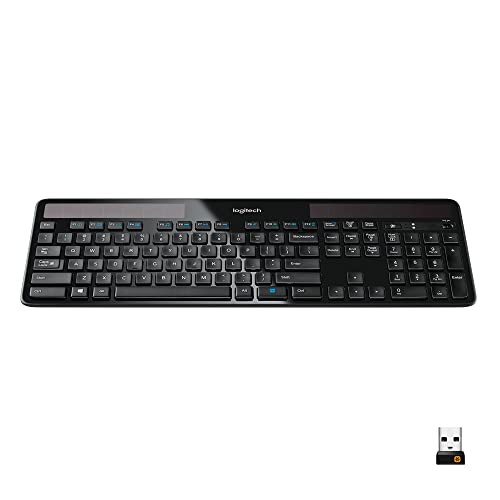
Logitech K750 Wireless Solar Keyboard
Best for: battery-free Windows typing in illuminated workspaces
- Form Factor
- full-size
- Connectivity
- 2.4 GHz wireless, USB Unifying receiver
- Color
- Black
- Operating System
- Windows
- Dimensions
- 7.87 × 1.38 × 19.1 inches
- Weight
- 1.68 pounds
The Logitech K750 Full-Size Solar Keyboard is a low-profile wireless keyboard that charges via ambient light. It eliminates replacement batteries and power cables, holding a charge for at least three months in total darkness. The full-size layout includes concave keycaps and pairs via a 2.4 GHz USB Unifying receiver with a 33-foot range. It fits you if you want a zero-maintenance desk setup dedicated to Windows.
Pros
- Integrated solar panel charges from ambient light sources
- Holds a charge for at least three months in total darkness
- Logitech Unifying receiver pairs up to six compatible devices
- Full-size layout with low-profile concave keycaps
Cons
- No Bluetooth connectivity included in specifications
- Layout and specifications designated specifically for Windows
Good fit if
- You want a keyboard that recharges continuously under ambient indoor light.
- You work on Windows and require a full-size layout with low-profile keys.
- You want to connect multiple compatible Logitech peripherals to one USB receiver.
Skip if
- You need native Bluetooth connectivity without occupying a USB port.
- You use macOS or other non-Windows operating systems.
Verdict: Logitech K750 Full-Size Solar Keyboard provides reliable 2.4 GHz wireless input without battery swaps or charging cables. Its low-profile build and solar design deliver clean, cable-free typing for Windows workstations.

Logitech K270 Full-Size Wireless Keyboard
Best for: everyday full-size Windows typing
- Form Factor
- full-size
- Connectivity
- Wireless, USB receiver
- Color
- Black
- Operating System
- Windows
- Dimensions
- 0.75 × 5.75 × 17.3 inches
- Weight
- 1.1 pounds
The Logitech K270 Full-Size Wireless Keyboard provides a standard layout with a number pad, deep-profile keys, and eight dedicated multimedia hotkeys. It connects through a plug-and-play USB receiver with an operating range of up to 33 feet. A 24-month battery life keeps maintenance minimal, while the spill-proof construction protects against desk accidents. This keyboard fits you if you need a straightforward, durable Windows board for everyday typing without software setup.
Pros
- Up to 24 months of battery life
- Dedicated eight-key multimedia shortcut row
- Spill-proof body with durable key print
- Plug-and-play USB receiver with 33-foot wireless range
Cons
- Supported only on Windows operating systems
- No Bluetooth connectivity listed; requires an open USB port
- No key backlighting listed
Good fit if
- You want a full-size layout with deep-profile keys and a dedicated number pad.
- You use a Windows computer with an available USB port.
- You prefer long battery life with zero software configuration.
Skip if
- You work on macOS or require Bluetooth multi-device pairing.
- You need illuminated keys for typing in dim lighting.
Verdict: Logitech K270 Full-Size Wireless Keyboard delivers dependable wireless Windows typing with long battery life and dedicated media hotkeys. Its spill-proof build and plug-and-play USB receiver offer straightforward utility without extra software.

Logitech K750 Wireless Solar Keyboard
Best for: solar-powered cord-free desktop typing
- Connectivity
- 2.4GHz wireless, USB
- Color
- Black
- Dimensions
- 17 × 17 × 6.25 inches
- Weight
- 2.03 pounds
The Logitech K750 is a full-size wireless keyboard powered by integrated solar panels. It connects through a 2.4GHz wireless USB interface to keep your desk free of cords. Measuring 17 inches across and weighing 2.03 pounds, it features an English (Canada) key layout. This keyboard suits you if you want continuous operation powered by light and prefer a full-width form factor for daily typing.
Pros
- Continuous solar-powered operation
- 2.4GHz wireless connectivity via USB interface
- Full 17-inch width layout
Cons
- English (Canada) layout only
- Mechanical switch design not specified in data
- Heavier build at 2.03 pounds
Good fit if
- You want continuous solar-powered operation without charging cables.
- You prefer a 2.4GHz wireless connection using a USB interface.
- You need a full-width 17-inch desk keyboard.
Skip if
- You require verified mechanical key switches.
- You prefer a compact keyboard under two pounds.
- You need a standard US English layout rather than English (Canada).
Verdict: Logitech K750 Wireless Solar Keyboard delivers cord-free typing powered entirely by ambient light through its integrated solar design. It serves as a low-maintenance wireless option if you do not require verified mechanical switches.

Logitech K750 Solar Wireless Mac Keyboard
Best for: Mac users wanting solar-powered wireless typing
- Connectivity
- 2.4 GHz
- Color
- Grey
- Operating System
- Mac
- Dimensions
- 19.1 × 1.4 × 7.9 inches
- Weight
- 1.68 pounds
The Logitech K750 Solar Wireless Mac Keyboard is a grey wireless board powered by light. It uses built-in solar panels for continuous recharging, eliminating battery swaps. You connect using the 2.4 GHz Logitech Unifying receiver with a range over 33 feet. Built for Mac systems, it features dedicated hotkeys for search and app switching. It suits you if you want a desktop setup without charging cords.
Pros
- Built-in solar panels for light-based recharging
- Logitech Unifying 2.4 GHz wireless with range over 33 feet
- Dedicated Mac hotkeys for search, home, and app switching
- Keys rated for up to 5 million keystrokes
Cons
- Listed only for Mac operating systems
- No Bluetooth connectivity specified
- 5 million keystroke lifespan is lower than standard mechanical switches
Good fit if
- You use a Mac and want dedicated navigation hotkeys
- You want light-based solar recharging to avoid charging cables
- You prefer connecting via a 2.4 GHz Logitech Unifying receiver
Skip if
- You use Windows or non-Mac operating systems
- You require native Bluetooth connectivity
- You need key switches rated beyond 5 million keystrokes
Verdict: Logitech K750 Solar Wireless Mac Keyboard delivers light-powered convenience and dedicated Mac shortcut keys over a 2.4 GHz Unifying connection. It is a practical low-maintenance choice for Mac workstations.

Logitech K750 Wireless Solar Mac Keyboard
Best for: Mac users wanting solar-powered wireless typing
- Connectivity
- Wireless
- Operating System
- Mac
- Dimensions
- 0.33 × 0.33 × 0.33 inches
- Weight
- 2.21 pounds
The Logitech K750 Wireless Solar Mac Keyboard is a slim wireless board designed specifically for macOS. At 0.33 inches thick, it features built-in solar charging panels that run off any light source and stay powered for at least three months in total darkness. You get a dedicated Mac layout, concave key caps, and connectivity via a Logitech Unifying receiver. It suits you if you want a light-powered Mac workspace free of charging cables.
Pros
- Charges via any light source and stays powered for three months in darkness
- Slim 0.33-inch profile
- Mac-specific key layout including a Launchpad hot key
- Includes a compact Logitech Unifying USB receiver
Cons
- Restricted to Mac operating systems
- Relies on a USB receiver with no Bluetooth connectivity listed
- Weighs 2.207 pounds
Good fit if
- You use macOS and want dedicated keys like the Launchpad hot key.
- You prefer continuous ambient light charging over plugging in cables.
- You want an ultra-slim desktop setup measuring 0.33 inches thick.
Skip if
- You use Windows or another non-Mac operating system.
- You require direct Bluetooth pairing without a USB-A dongle.
Verdict: Logitech K750 Wireless Solar Mac Keyboard delivers light-powered wireless operation and a slim 0.33-inch profile tailored for macOS setups. It eliminates battery charging routines using ambient light and connects reliably through a compact Unifying receiver.

Logitech K480 Multi-Device Bluetooth Keyboard
Best for: multi-device typing with phones and tablets
- Form Factor
- Compact
- Connectivity
- Bluetooth
- Color
- Black
- Operating System
- Mac, Windows
- Dimensions
- 12.2 × 1.61 × 7.91 inches
- Weight
- 1.81 pounds
View on Amazon: Logitech K480 Multi-Device Bluetooth Keyboard
The Logitech K480 is a compact Bluetooth keyboard designed to pair with up to three devices at once. You can alternate between paired systems using the physical Easy-Switch dial across Windows, macOS, iPadOS, Chrome OS, and Android. It features a built-in cradle that holds mobile devices up to 0.4 inches thick and 10 inches wide. This setup suits you if you switch frequently between a computer, tablet, and phone at your desk.
Pros
- Pairs with up to 3 Bluetooth devices via a physical selector dial
- Integrated cradle holds tablets and phones up to 10 inches wide
- Up to 24 months of power using 2 included AAA batteries
- Spill-resistant construction
Cons
- Lacks a dedicated number pad
- No USB wireless receiver included
- Total weight is 1.81 pounds
Good fit if
- You switch typing frequently across up to three Bluetooth devices.
- You want a built-in slot to prop up a phone or tablet at your desk.
- You prefer long-life replaceable AAA batteries over recharging cables.
Skip if
- You require a dedicated numeric keypad for data entry.
- You need a lightweight keyboard under one pound for travel.
Verdict: Logitech K480 Multi-Device Bluetooth Keyboard provides straightforward multi-device typing with an integrated device cradle and dial switching. Its compact layout saves desk space while omitting a standard number pad.

Logitech Wireless Solar Full-Size Mac Keyboard
Best for: Mac users wanting light-powered wireless desktop typing
- Form Factor
- Full Size
- Connectivity
- Wireless
- Operating System
- Mac
- Dimensions
- 19.1 × 7.87 × 1.3 inches
- Weight
- 1.6 pounds
View on Amazon: Logitech Wireless Solar Full-Size Mac Keyboard
This full-size wireless keyboard from Logitech runs on integrated solar cells that draw power from any light source, eliminating battery swaps and cables. It features a standard Mac layout, measuring 19.09 inches long, 7.87 inches wide, and 1.3 inches tall, with a total weight of 1.6 pounds. If you use macOS and want a cable-free setup powered by ambient desk lighting, this gray full-size board fits your workspace.
Pros
- Built-in solar cells charge using ambient room or desk light
- Wireless connection eliminates cables and battery changes
- Standard Mac layout matches native macOS keyboard designs
- Full-size footprint with a 1.6-pound weight
Cons
- Designed specifically for Mac without listed Windows support
- Large footprint measuring 19.09 inches long and 7.87 inches wide
Good fit if
- You use a Mac and require a native keyboard layout.
- You want a full-size wireless keyboard that charges under desk light.
- You want to avoid changing disposable batteries.
Skip if
- You need a keyboard configured for Windows operating systems.
- You have limited desk depth or width for a 19.09-inch frame.
Verdict: Logitech Full-Size Solar Wireless Mac Keyboard eliminates battery swaps by using light-powered cells across a full-size layout. It gives macOS users a wide, cable-free typing surface powered by ambient room light.

Logitech K780 Multi-Device Wireless Keyboard
Best for: multi-device desks needing an integrated device cradle
- Form Factor
- Full size
- Connectivity
- USB, Bluetooth
- Color
- White
- Dimensions
- 0.9 × 6.2 × 14.9 inches
- Weight
- 1.92 pounds
View on Amazon: Logitech K780 Multi-Device Wireless Keyboard
The Logitech K780 Multi-Device Wireless Keyboard is a full-size white keyboard featuring an integrated cradle for phones and tablets. It pairs with up to three devices using Bluetooth Smart or a USB receiver, letting you toggle between them with dedicated buttons. At 1.92 pounds, it includes a number pad and quiet keys. This board suits you if you frequently switch between a computer, phone, and tablet at your desk.
Pros
- Pairs with up to three devices via USB receiver or Bluetooth
- Built-in stand holds smartphones and tablets upright
- Full-size layout includes dedicated number pad
- Works across Windows, Mac, Chrome OS, iOS, and Android
Cons
- Weighs 1.92 pounds, making it heavy for frequent travel
- No backlighting listed in specifications
- Integrated device cradle cannot be detached
Good fit if
- You need to type across up to three devices from one station.
- You want an integrated stand to hold your phone or tablet upright.
- You need a white full-size layout that includes a number pad.
Skip if
- You need an ultralight travel keyboard instead of a 1.92-pound base.
- You require backlit keycaps for typing in low-light environments.
Verdict: Logitech K780 Multi-Device Wireless Keyboard provides multi-device wireless switching and an integrated cradle in a full-size white layout. Its 1.92-pound build and fixed stand make it best suited for a permanent multi-screen desk setup.

Logitech Ergo K860 Wireless Split Keyboard
Best for: wrist comfort and ergonomic typing posture
- Switch Type
- Perfect Stroke
- Form Factor
- Full-size split
- Connectivity
- Bluetooth, USB receiver
- Case Material
- Plastic
- Design
- Ergonomic
- Ergonomic Features
- Wrist Rest
The Logitech Ergo K860 is a full-size wireless ergonomic keyboard with a curved, split keyframe and an integrated pillowed wrist rest. It measures 17.95 inches wide, weighs 2.56 pounds, and connects via Bluetooth or the included USB receiver. You get scooped Perfect Stroke keys and adjustable reverse-tilt legs offering 0, -4, and -7 degrees of palm lift. It suits typists prioritizing posture support and quiet operation over traditional mechanical switches.
Pros
- Curved split keyframe with built-in memory foam wrist rest
- Dual connectivity via Bluetooth or USB wireless receiver
- Adjustable reverse tilt legs at 0, -4, and -7 degrees
- Full-size layout with scooped Perfect Stroke quiet keys
Cons
- Large footprint measuring nearly 18 inches wide and 9.17 inches deep
- Features quiet scooped keys instead of mechanical switches
- Attached wrist rest cannot be detached to save space
Good fit if
- You need a split keyframe with reverse tilt options for wrist alignment.
- You want dual wireless connectivity through Bluetooth and a USB receiver.
- You prefer quiet, scooped keys over mechanical switches.
Skip if
- You want true mechanical switches with tactile or clicky feedback.
- You have limited desk space for a keyboard that is 17.95 inches wide.
Verdict: Logitech Ergo K860 Wireless Split Keyboard delivers certified ergonomic positioning with split keys and adjustable tilt angles. It trades traditional mechanical switches for a quiet, wrist-supported typing layout.
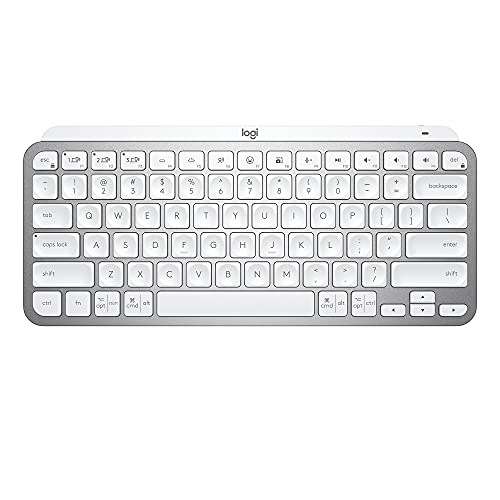
Logitech MX Keys Mini Wireless Keyboard
Best for: compact multi-device workspaces and travel
- Form Factor
- Mini
- Connectivity
- Bluetooth Low Energy
- Backlighting
- Backlit
- Dimensions
- 5.19 × 11.7 × 0.83 inches
- Weight
- 1.5 pounds
The Logitech MX Keys Mini Wireless Keyboard is a compact, 1.5-pound wireless keyboard with a mini form factor measuring 11.65 inches wide and 0.83 inches tall. You get proximity-sensing smart backlighting, Bluetooth Low Energy pairing for up to three devices, and dedicated smart keys for dictation and microphone mute. It suits you if you need a space-saving wireless board that recharges via USB-C and transitions easily across multiple operating systems.
Pros
- Pairs with up to three devices via Bluetooth Low Energy
- Smart illumination backlighting with proximity detection
- Up to five months of battery life with backlighting off
- Compact footprint at 11.65 inches wide and 1.5 pounds
Cons
- Battery life drops to 10 days when using backlighting
- No integrated number pad
Good fit if
- You need to pair and switch between up to three devices
- You want proximity-based backlighting in a compact 11.65-inch frame
- You prefer USB-C recharging rather than replacing disposable batteries
Skip if
- You require a full-size layout with a dedicated number pad
- You want longer than 10 days of runtime without turning backlighting off
Verdict: Logitech MX Keys Mini Wireless Keyboard delivers a compact, multi-device typing setup with smart backlighting and USB-C recharging. It gives you an illuminated layout that fits tight desks without sacrificing essential function keys.

Logitech MX Keys Mini for Mac Wireless Keyboard
Best for: portable multi-device Apple workstation setups
- Form Factor
- Compact
- Connectivity
- Bluetooth Low Energy
- Backlighting
- Backlit
- Operating System
- Mac
- Dimensions
- 5.19 × 7.72 × 0.83 inches
- Weight
- 1.5 pounds
View on Amazon: Logitech MX Keys Mini for Mac Wireless Keyboard
The Logitech MX Keys Mini for Mac is a compact wireless keyboard tailored for Apple hardware running macOS and iPadOS. At 1.5 pounds and under an inch tall, it features Bluetooth Low Energy pairing for multiple devices, smart backlighting, and dedicated keys for dictation and mic muting. It suits you if you need a low-profile, portable Mac setup with up to five months of battery life when illumination is off.
Pros
- Battery lasts up to 5 months without backlighting, or 10 days with illumination on
- Smart illumination senses approaching hands and adjusts to ambient light
- Pairs with and switches between multiple Mac and iPad devices via Bluetooth Low Energy
- Includes dedicated hardware keys for dictation, mic mute, and emojis
Cons
- Compact form factor lacks an integrated numeric keypad
- Layout is designed for macOS and iPadOS rather than Windows
- Backlighting reduces total rechargeable battery run time to 10 days
Good fit if
- You type primarily on Apple hardware including MacBooks, iMacs, or iPads.
- You want a compact, portable wireless board weighing 1.5 pounds.
- You need automated backlighting that reacts to room brightness and hand proximity.
Skip if
- You require a full-size layout with a dedicated number pad.
- You primarily work on a Windows operating system.
Verdict: Logitech MX Keys Mini for Mac Wireless Keyboard delivers an ultra-compact typing layout with dedicated Apple function keys and multi-device Bluetooth switching. It is an efficient choice when desk space is limited and you work across multiple Apple machines.

Logitech MX Mechanical Full Size Clicky Keyboard
Best for: Multi-device typists wanting full-size clicky low-profile keys
- Switch Type
- Clicky low-profile
- Form Factor
- Full size
- Connectivity
- Bluetooth Low Energy, Logi Bolt receiver
- Backlighting
- Backlit
- Dimensions
- 17.8 × 5.9 × 2 inches
- Weight
- 2.49 pounds
View on Amazon: Logitech MX Mechanical Full Size Clicky Keyboard
The Logitech MX Mechanical Full Size Clicky Keyboard is a full-size wireless board built with low-profile clicky mechanical switches. You get automatic proximity backlighting, USB-C recharging, and wireless pairing across three devices via Bluetooth Low Energy or the Logi Bolt receiver. It runs up to 10 months with lights off or 15 days illuminated. This layout suits you if you want a complete number pad, audible typing feedback, and multi-system control.
Pros
- Low-profile clicky mechanical switches with audible feedback
- Smart backlighting senses hand proximity and adjusts to ambient light
- Pairs with up to three devices via Bluetooth Low Energy or Logi Bolt
- Battery runs up to 10 months on a charge with backlighting off
Cons
- Full-size 17.8-inch width requires significant desk area
- Weighs 2.49 pounds, making it heavy for portable travel setups
- Active backlighting reduces total battery run time to 15 days
Good fit if
- You want audible clicky sound paired with a low-profile mechanical key travel.
- You need to jump between up to three computers using Bluetooth or Logi Bolt.
- You prefer a full-size layout with dedicated numpad and smart illumination.
Skip if
- You work in shared environments where loud clicky switches will cause a disturbance.
- You need an ultra-compact or lightweight keyboard to carry in a travel bag.
Verdict: Logitech MX Mechanical Full Size Clicky Keyboard provides tactile and audible low-profile typing alongside robust three-device wireless connectivity. It is a solid full-size desktop pick if you value dedicated function keys and smart backlighting.

Logitech Signature K650 Full-Size Wireless Keyboard
Best for: all-day office typing across multiple operating systems
- Form Factor
- Full Size
- Connectivity
- Bluetooth Low Energy, Logi Bolt
- Case Material
- Post-consumer recycled plastic
- Dimensions
- 18 × 7.62 × 0.96 inches
- Weight
- 1.56 pounds
View on Amazon: Logitech Signature K650 Full-Size Wireless Keyboard
The Logitech Signature K650 is a full-size wireless keyboard featuring deep-cushioned keys and an integrated soft-touch palm rest. You connect via Bluetooth Low Energy or the included Logi Bolt USB receiver across Windows, macOS, Linux, and mobile operating systems. It offers spill resistance and up to 36 months of battery life. This keyboard fits you if you want dedicated shortcut keys, a full numeric pad, and built-in wrist support for daily desktop typing.
Pros
- Dual wireless connectivity via Bluetooth Low Energy or Logi Bolt receiver
- Battery life rated for up to 36 months
- Integrated soft-touch palm rest and spill-resistant surface
- Works across Windows, macOS, Linux, Chrome OS, iPadOS, iOS, and Android
Cons
- Features deep-cushioned keys rather than traditional mechanical switches
- Large 18-inch width requires substantial desk space
Good fit if
- You need an integrated palm rest with a full-size layout and number pad.
- You switch typing tasks across multiple desktop and mobile operating systems.
- You want up to 36 months of battery life without recharging cables.
Skip if
- You prefer dedicated mechanical switches over deep-cushioned keys.
- You need a compact keyboard layout for tight desk setups.
Verdict: Logitech Signature K650 Full-Size Wireless Keyboard delivers broad multi-OS wireless support with an integrated palm rest and dedicated shortcut keys. Its deep-cushioned layout and 36-month battery life suit desktop work environments that do not require mechanical switches.

Logitech K585 Slim Wireless Keyboard
Best for: multi-device typing with an integrated phone cradle
- Connectivity
- Bluetooth, 2.4GHz USB
- Dimensions
- 14.7 × 5.6 × 0.76 inches
- Weight
- 1.24 pounds
The Logitech K585 Slim Wireless Keyboard is a low-profile wireless keyboard measuring 0.76 inches thick and weighing 1.24 pounds. It provides dual connectivity using either Bluetooth or the included 2.4GHz USB receiver with up to 10 meters of range. You get an integrated phone cradle, a dedicated number pad, and 12 customizable FN keys. It suits you if you type across computers, phones, and tablets and prefer quiet, laptop-style keys.
Pros
- Dual connectivity via Bluetooth and included 2.4GHz USB receiver
- Built-in cradle holds phones or tablets securely
- Full layout includes dedicated number pad and 12 FN keys
- Slim 0.76-inch profile with auto-sleep battery management
Cons
- Laptop-style key action rather than mechanical switches
- No integrated backlighting listed in specifications
Good fit if
- You want an integrated cradle to prop up your phone while typing.
- You need to alternate between a computer and a mobile device.
- You prefer quiet, low-profile laptop-style typing.
Skip if
- You want traditional mechanical switches with tactile travel.
- You require illuminated keys for typing in dark environments.
Verdict: Logitech K585 Slim Wireless Keyboard provides a low-profile layout with dual wireless connectivity and an integrated device cradle. It delivers quiet, laptop-style typing and quick switching across multiple operating systems.
Specifications side by side
| Spec | Logitech Alto Keys Wireless Gasket Keyboard | Logitech K750 Wireless Solar Keyboard | Logitech K270 Full-Size Wireless Keyboard | Logitech K750 Wireless Solar Keyboard | Logitech K750 Solar Wireless Mac Keyboard | Logitech K750 Wireless Solar Mac Keyboard | Logitech K480 Multi-Device Bluetooth Keyboard | Logitech Wireless Solar Full-Size Mac Keyboard | Logitech K780 Multi-Device Wireless Keyboard | Logitech Ergo K860 Wireless Split Keyboard | Logitech MX Keys Mini Wireless Keyboard | Logitech MX Keys Mini for Mac Wireless Keyboard | Logitech MX Mechanical Full Size Clicky Keyboard | Logitech Signature K650 Full-Size Wireless Keyboard | Logitech K585 Slim Wireless Keyboard |
|---|---|---|---|---|---|---|---|---|---|---|---|---|---|---|---|
| Switch Type | Clicky (Marble Switches) | not specified | not specified | not specified | not specified | not specified | not specified | not specified | not specified | Perfect Stroke | not specified | not specified | Clicky low-profile | not specified | not specified |
| Form Factor | Compact 1800 (98-key) | full-size | full-size | not specified | not specified | not specified | Compact | Full Size | Full size | Full-size split | Mini | Compact | Full size | Full Size | not specified |
| Connectivity | Bluetooth, Logi Bolt USB | 2.4 GHz wireless, USB Unifying receiver | Wireless, USB receiver | 2.4GHz wireless, USB | 2.4 GHz | Wireless | Bluetooth | Wireless | USB, Bluetooth | Bluetooth, USB receiver | Bluetooth Low Energy | Bluetooth Low Energy | Bluetooth Low Energy, Logi Bolt receiver | Bluetooth Low Energy, Logi Bolt | Bluetooth, 2.4GHz USB |
| Backlighting | White | not specified | not specified | not specified | not specified | not specified | not specified | not specified | not specified | not specified | Backlit | Backlit | Backlit | not specified | not specified |
| Case Material | not specified | not specified | not specified | not specified | not specified | not specified | not specified | not specified | not specified | Plastic | not specified | not specified | not specified | Post-consumer recycled plastic | not specified |
| Mounting Style | Gasket Mount | not specified | not specified | not specified | not specified | not specified | not specified | not specified | not specified | not specified | not specified | not specified | not specified | not specified | not specified |
| Design | not specified | not specified | not specified | not specified | not specified | not specified | not specified | not specified | not specified | Ergonomic | not specified | not specified | not specified | not specified | not specified |
| Color | Lilac | Black | Black | Black | Grey | Silver | Black | gray | White | Graphite | Pale Grey | Pale Grey | Graphite | Off White | Graphite |
| Operating System | not specified | Windows | Windows | not specified | Mac | Mac | Mac, Windows | Mac | not specified | not specified | not specified | Mac | not specified | not specified | not specified |
| Ergonomic Features | not specified | not specified | not specified | not specified | not specified | not specified | not specified | not specified | not specified | Wrist Rest | not specified | not specified | not specified | not specified | not specified |
| Dimensions | 15.8 × 5.79 × 1.56 inches | 7.87 × 1.38 × 19.1 inches | 0.75 × 5.75 × 17.3 inches | 17 × 17 × 6.25 inches | 19.1 × 1.4 × 7.9 inches | 0.33 × 0.33 × 0.33 inches | 12.2 × 1.61 × 7.91 inches | 19.1 × 7.87 × 1.3 inches | 0.9 × 6.2 × 14.9 inches | 9.17 × 18 × 1.89 inches | 5.19 × 11.7 × 0.83 inches | 5.19 × 7.72 × 0.83 inches | 17.8 × 5.9 × 2 inches | 18 × 7.62 × 0.96 inches | 14.7 × 5.6 × 0.76 inches |
| Weight | 2.43 pounds | 1.68 pounds | 1.1 pounds | 2.03 pounds | 1.68 pounds | 2.21 pounds | 1.81 pounds | 1.6 pounds | 1.92 pounds | 2.56 pounds | 1.5 pounds | 1.5 pounds | 2.49 pounds | 1.56 pounds | 1.24 pounds |
| Size | 1.90 | One Size | 1 Pack | not specified | not specified | not specified | not specified | not specified | 1.30 | One Size | Compact | Compact | Full Size | One Size | not specified |
| Model | 920-013577 | 920-002912 | 920-003051 | FBA_920-002912 | 920-003472 | 920-005747 | 920-006342 | 920-003472 | 920-008025 | 920-009166 | 920-010473 | 920-010389 | 920-010549 | 920-010962 | 920-011479 |
The Logitech Lineup at a Glance
The lineup divides primarily by switch mechanics and physical construction. If you prioritize key feel, mechanical models like the Alto Keys Wireless Gasket Keyboard and the MX Mechanical Full Size Clicky Keyboard deliver dedicated switch mechanisms, hot-swappable sockets, or low-profile clicky feedback. These models suit typists who require physical actuation choices and specialized mounting profiles.
Other selections focus on specialized utility and desk ergonomics. Light-powered options like the K750 Wireless Solar Keyboard rely on ambient illumination to eliminate charging cables and battery replacements. For neutral arm positioning, the Ergo K860 Wireless Split Keyboard provides a curved frame with a built-in wrist rest. These alternatives suit shoppers who value physical comfort or zero-cable power over mechanical key switches.
Where the Logitech Range Fits Best
You can choose from compact mini units measuring under 12 inches long up to 19-inch full-size layouts. Form factors vary from flat standard slabs and integrated phone cradles to split ergonomic frames with built-in wrist rests. Illumination options remain focused on smart backlighting on select models, while other units rely entirely on ambient light panels for power.
If you need specific hardware features, note the gaps across this selection. Every keyboard here uses wireless connectivity, meaning you will not find strictly wired setups. The lineup also omits multi-color RGB lighting, built-in trackpads, and traditional tenkeyless layouts.
If you need proper typing clearance, compare your keyboard dimensions alongside height specifications for the best standing desks with keyboard tray.
How to Choose a Logitech Keyboard
-
Check the Mounting Style
Check the mounting style specification if typing comfort and key bounce matter to you. A gasket mount isolates the keyboard plate using flexible cushions. This design absorbs impact force and reduces harsh bottoming out during long typing sessions. Rigid plate designs offer a firmer, direct strike instead. Look for gasket mounting if you prefer a softer, dampened mechanical stroke, as found on the Logitech Alto Keys Wireless Gasket Keyboard. Choose standard rigid mounts if you want an unyielding typing surface.
-
Evaluate the Power Source
Review how each board draws power before deciding. Standard models rely on replaceable batteries or regular cable recharging routines. If you work in well-lit rooms and want zero downtime, check for ambient light power. Light-powered hardware converts office light into continuous operational power, eliminating cable clutter and charging routines entirely. The Logitech K750 Wireless Solar Keyboard uses integrated solar cells to run without battery replacements. Choose light-harvesting models if your desk gets consistent ambient lighting. Select battery boards for dim environments.
-
Match the Operating System
Check the operating system specification to ensure key legends match your hardware. Standard Windows models place Start and Alt keys in familiar positions. Dedicated Mac models provide native Command and Option keys alongside dedicated macOS shortcut controls. Using the wrong layout forces you to memorize mismatched labels or rebind keys manually. If you use macOS exclusively, pick hardware built for that platform, such as the Logitech K750 Solar Wireless Mac Keyboard. Select multi-OS keyboards if you work across mixed desktop setups.
-
Look for Integrated Cradles
Examine whether the keyboard includes physical hardware to support external devices. If you frequently type on phones or tablets alongside your main workstation, an integrated cradle holds mobile screens at an upright angle. This saves desk space and keeps notifications in your direct line of sight. The Logitech K480 Multi-Device Bluetooth Keyboard features a built-in cradle groove designed for mobile devices. Choose a built-in slot if you actively manage mobile screens. Pick a flat keyboard surface if you prefer a clear, unencumbered desk layout.
-
Assess Ergonomic Wrist Support
Consider the wrist support and chassis geometry specifications if you experience wrist fatigue. Standard straight layouts require you to keep your hands flat and bent inward. Ergonomic split designs angle the keys to align with natural arm posture and frequently include an integrated wrist rest to support your palms. The Logitech Ergo K860 Wireless Split Keyboard includes a built-in wrist rest to maintain neutral arm angles. Select ergonomic split builds if you need wrist support, or stick to flat profiles for compact desk efficiency.
-
Verify Spill Resistance Specs
Check durability specifications if you work near drinks or eat at your desk. Accidental liquid spills can permanently ruin internal electrical traces on standard keyboards. Keyboards with explicit spill-proof engineering include drainage pathways and sealed membranes that protect critical internal circuits from incidental liquid contact. The Logitech K270 Full-Size Wireless Keyboard lists a spill-proof build for added durability during everyday workstation use. Choose spill-resistant hardware for high-risk eating or drinking setups, but standard enclosures remain fine for clean, controlled desktop environments.
Frequently asked questions
Which Logitech keyboard models feature mechanical switches?
The Logitech Alto Keys Wireless Gasket Keyboard and the Logitech MX Mechanical Full Size Clicky Keyboard feature mechanical switch designs. The Alto Keys model uses a gasket-mounted assembly with hot-swappable switches in a 98-key layout. In contrast, the MX Mechanical Full Size Clicky Keyboard provides tactile, low-profile mechanical switches across a traditional layout with numeric keys. Both keyboards offer wireless connections for desktop setups.
What is the benefit of a gasket mount keyboard?
A gasket mount keyboard cushions key impacts using flexible internal spacers instead of direct screw mounts. On the Logitech Alto Keys Wireless Gasket Keyboard, this construction provides a softer typing sensation and dampens vibration. You also get hot-swappable switch sockets, which allow switch replacement without soldering. The keyboard weighs 2.43 pounds, providing stable placement on your workspace while typing.
How does a solar-powered wireless keyboard work?
Solar wireless keyboards absorb ambient room light and sunlight using integrated solar panels to power internal cells. Models like the Logitech K750 Wireless Solar Keyboard eliminate battery swaps and external charging cables. You can choose Windows versions or dedicated Mac options, such as model 920-003472. These keyboards communicate over a 2.4 GHz wireless connection, keeping your desk clear of cords.
Which Logitech keyboards include a built-in device cradle?
The Logitech K480, Logitech K780, and Logitech K585 include built-in device cradles to hold phones or tablets upright. The compact K480 uses Bluetooth connectivity with an integrated dial switch. The full-size K780 weighs 1.92 pounds and holds larger screens steadily. The slim K585 measures 0.76 inches tall and supports multi-device wireless pairing, letting you switch between your computer and mobile screens.
Can you use a Logitech wireless keyboard with a Mac?
Yes, several Logitech models offer native Mac support. The list features dedicated macOS models like the Logitech MX Keys Mini for Mac and the K750 Solar Wireless Mac Keyboard. These boards feature Mac-specific command keys and shortcut layouts. In addition, multi-device units such as the Logitech K480 support both Mac and Windows setups through Bluetooth connectivity.
What features support wrist comfort on Logitech office keyboards?
Logitech provides ergonomic features such as split keyframes, cushioned wrist rests, and adjustable tilt legs. The Logitech Ergo K860 Wireless Split Keyboard includes a curved split layout and an integrated wrist rest to promote neutral hand positioning. If you prefer a traditional flat shape, the Logitech Signature K650 Full-Size Wireless Keyboard includes a deep-cushioned palm rest for ongoing wrist support.
What compact Logitech keyboard is best for small desks?
The Logitech MX Keys Mini Wireless Keyboard offers an efficient solution for small spaces. Measuring 11.7 inches wide and 5.19 inches long, it fits tight desks while maintaining smart backlighting and USB-C recharging. If you need mechanical switches in a smaller footprint, the Logitech Alto Keys Wireless Gasket Keyboard uses a 98-key compact profile measuring 15.8 inches long.