7 Best Mechanical Keyboards Under $30, Compared
As an Amazon Associate we earn from qualifying purchases. Links on this page are affiliate links.
A mechanical keyboard under $30 is a real option, but this price comes with choices you need to make. All 7 boards here are wired, and most cut features such as wireless or full RGB to hit the price. Our top pick is the Redragon K671, a hot-swappable board with linear red switches, because you can replace the switches later without soldering. If desk space matters more, the MageGee MK-Box keeps its arrow keys in a 68-key layout. These picks come from published specs and listings, not hands-on testing, and we left out membrane boards sold with a "mechanical feel".
Our top pick: Redragon Hot-Swappable Wired Mechanical Keyboard.
Quick picks
The best fit for you
- You want one board that can change with you Redragon Hot-Swappable Wired Mechanical Keyboard Hot-swappable red switches, and 4 spare switches in the box.
- You have a small desk but still use arrow keys MageGee MK-Box 68-Key Blue Switch Keyboard Its 68-key layout is about 12 inches long and keeps separate arrow keys.
- You enter a lot of numbers RisoPhy Full-Size Wired Blue Switch Keyboard The only full 104-key board here, with a number pad.
- You want volume control without key combinations Newmen 75% Hot-Swappable Mechanical Keyboard A 75% layout with a physical knob and hot-swappable sockets.
- You share a room but like some tactile feedback DIERYA 68-Key Mini Mechanical Keyboard Brown switches give a mild bump without the loud click of blue switches.
- You want the most room for your mouse TMKB 60% Red Switch Mechanical Keyboard A 61-key layout with light 45g linear switches and a detachable USB-C cable.
Our 7 picks

Redragon Hot-Swappable Wired Mechanical Keyboard
Best for: Changing switches later
- Switch Type
- Linear Red
- Connectivity
- Wired
- Backlighting
- LED
- Keycap Material
- Double-shot PBT, double injection ABS
- Hot-Swap Support
- Hot-Swappable
- Use
- Gaming
View on Amazon: Redragon Hot-Swappable Wired Mechanical Keyboard Affiliate link
The Redragon K671 is the most flexible board here. Its red linear switches are hot-swappable, and you get 4 spare switches and two red keycaps in the box. It also supports macros and 12 multimedia shortcuts. The compromise is lighting: you can change effects, but not the color.
Pros
- Hot-swappable red linear switches
- Includes 4 spare switches and 2 keycaps
- Software for macros and key remapping
- Listed 24-month warranty
Cons
- Backlight color cannot be changed
- At 17.1 inches long, it takes more desk space than compact boards
- Listing is inconsistent about PBT versus ABS keycaps
Good fit if
- You may want to try other switches later
- You like quieter linear switches
- You want macros on a budget
Skip if
- You want a compact board
- You want to choose your backlight color
Verdict: The best all-round choice here if you want room to upgrade, provided you have space for its long frame.

MageGee MK-Box 68-Key Blue Switch Keyboard
Best for: Small desks that need arrow keys
- Switch Type
- Mechanical blue switch
- Form Factor
- 60%
- Connectivity
- Wired
- Backlighting
- Blue LED
- Keycap Material
- Double-color injection
- Use
- Gaming
View on Amazon: MageGee MK-Box 68-Key Blue Switch Keyboard Affiliate link
The MageGee MK-Box saves space without giving up arrow keys, using a 68-key layout about 12.1 inches long. Its blue switches are loud and clicky, and its blue backlight offers about 15 modes. The cable is detachable, and no drivers are required.
Pros
- Separate arrow keys in a compact layout
- Detachable USB cable
- Full anti-ghosting across all 68 keys
- Adjustable kickstand feet
Cons
- Blue switches are loud
- Blue backlight only
- No hot-swap support listed
Good fit if
- Your desk is short on space
- You enjoy clicky switches
- You move your keyboard around
Skip if
- You type near other people
- You want RGB lighting
Verdict: A sensible small board if you like clicky keys and work somewhere the noise will not bother anyone.
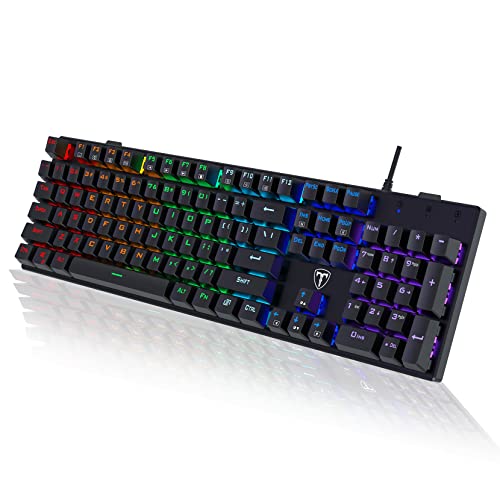
RisoPhy Full-Size Wired Blue Switch Keyboard
Best for: Number entry on a budget
- Switch Type
- Blue
- Form Factor
- Full-size
- Connectivity
- USB Wired
- Backlighting
- Rainbow LED
- Keycap Material
- Double injection ABS
- Use
- Gaming
View on Amazon: RisoPhy Full-Size Wired Blue Switch Keyboard Affiliate link
The RisoPhy is the only full 104-key board in this list, so it keeps the number pad and all navigation keys. It uses clicky blue switches, ABS keycaps and rainbow backlighting with nine modes. Four drainage holes help with small spills, and a keycap puller is included.
Pros
- Full 104-key layout with number pad
- Four drainage holes for spills
- Foldable rear feet
- Keycap puller included
Cons
- Clicky blue switches are loud
- About 16.9 inches long
- No hot-swap support listed
Good fit if
- You enter a lot of numbers
- You want a familiar full layout
- You like clicky switches
Skip if
- You need a quiet keyboard
- You are short on desk space
Verdict: The straightforward choice if you need a number pad and can live with the noise of blue switches.

DIERYA 68-Key Mini Mechanical Keyboard
Best for: Tactile typing in shared spaces
- Switch Type
- Tactile Brown Switch
- Form Factor
- 60%
- Connectivity
- Bluetooth 5.0, 2.4GHz, USB-C wired
- Backlighting
- Blue LED
- Use
- Gaming
- Dimensions
- 11.4 × 3.89 × 1.37 inches
View on Amazon: DIERYA 68-Key Mini Mechanical Keyboard Affiliate link
The DIERYA T68SE puts brown switches in a 68-key layout about 11.4 inches long, the shortest of the boards here with published dimensions. Brown switches offer a mild bump at a moderate noise level. It has 19 blue lighting modes, and Mac support is listed as only partial.
Pros
- Tactile brown switches without a loud click
- Compact 68-key layout
- Full anti-ghosting
- 19 lighting modes
Cons
- Mac support is only partial
- Blue lighting only
- One listing feature conflicts on wireless support
Good fit if
- You use Windows or Linux
- You want tactile feedback at moderate volume
- You have a small desk
Skip if
- You use a Mac every day
- You want wireless for certain
Verdict: A balanced choice for Windows users in shared spaces who want some feedback without the click.

Newmen 75% Hot-Swappable Mechanical Keyboard
Best for: Hands-on volume control
- Switch Type
- Red (linear)
- Form Factor
- 75%
- Connectivity
- Detachable USB-C wired
- Hot-Swap Support
- Yes (3-pin)
- Backlighting
- Rainbow LED
- Keycap Material
- ABS
View on Amazon: Newmen 75% Hot-Swappable Mechanical Keyboard Affiliate link
The Newmen GM326 is the only board here with a volume knob. Its 75% layout pairs that knob with hot-swappable 3-pin sockets, red switches and a detachable USB-C cable. Lighting offers 6 colors and 20 modes, and the listing supports Windows and Mac OS 10.10 or above.
Pros
- Physical volume knob
- Hot-swappable 3-pin sockets
- Detachable USB-C cable
- Two-stage adjustable tilt legs
Cons
- ABS keycaps
- Listing gives no dimensions
- Wired only
Good fit if
- You change volume often
- You want a compact layout with hot-swap sockets
- You use both Windows and Mac
Skip if
- You need a number pad
- You have 5-pin switches you want to fit
Verdict: A feature-rich compact board for anyone who would actually use the knob.

TMKB 60% Red Switch Mechanical Keyboard
Best for: Light linear switches in a small board
- Switch Type
- Linear Red
- Form Factor
- 60%
- Connectivity
- Detachable USB-C
- Backlighting
- LED
- Keycap Material
- Double-shot
- Use
- Gaming
View on Amazon: TMKB 60% Red Switch Mechanical Keyboard Affiliate link
The TMKB T61SE is a 61-key board with red linear switches and a listed 45g actuation force, so it should suit people who prefer a light press. It has double-shot keycaps, 15 lighting modes, a detachable USB-C cable and foldable feet. It lists support for Windows, Linux and macOS.
Pros
- Red switches with 45g actuation
- Double-shot keycaps
- Detachable USB-C cable
- Windows, Linux and macOS support
Cons
- No dedicated arrow keys or number pad
- No hot-swap support listed
- Wired only
Good fit if
- You prefer a light key press
- You want a small board that packs easily
- You switch between operating systems
Skip if
- You rely on arrow keys
- You want to change switches later
Verdict: A simple, portable 60% board for people who value light switches over upgrade options.
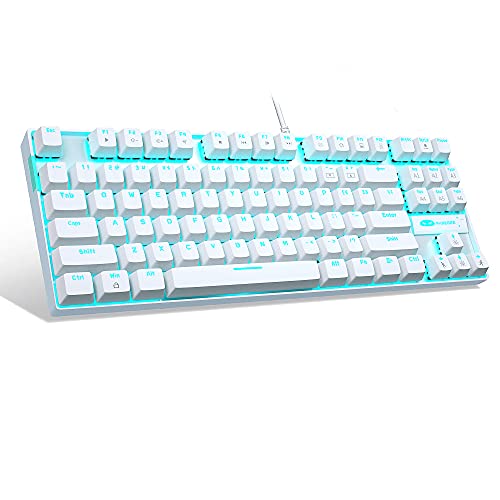
MageGee 87-Key Wired Mechanical Keyboard
Best for: Keeping navigation keys without a number pad
- Switch Type
- Mechanical Blue
- Form Factor
- Compact 87-key
- Connectivity
- USB 2.0 wired
- Backlighting
- LED Ice Blue
- Keycap Material
- Double-shot injection
- Case Material
- Metal panel
View on Amazon: MageGee 87-Key Wired Mechanical Keyboard Affiliate link
The MageGee MK-Star drops the number pad but keeps the navigation keys in an 87-key layout about 13.9 inches long. It pairs clicky blue switches with a metal panel, a splash-proof design and ice blue lighting with 21 modes. It needs no drivers or software.
Pros
- 87-key tenkeyless layout
- Metal top panel
- Full anti-ghosting
- No drivers required
Cons
- Clicky blue switches are loud
- Ice blue lighting only
- Heavier than the compact picks at 1.96 pounds
Good fit if
- You want navigation keys but no number pad
- You like clicky switches
- You prefer plug-and-play setup
Skip if
- You need quiet switches
- You want RGB lighting
Verdict: A sturdy-looking middle size if you want more keys than a compact board and do not mind the click.
Specifications side by side
| Spec | Redragon Hot-Swappable Wired Mechanical Keyboard | MageGee MK-Box 68-Key Blue Switch Keyboard | RisoPhy Full-Size Wired Blue Switch Keyboard | DIERYA 68-Key Mini Mechanical Keyboard | Newmen 75% Hot-Swappable Mechanical Keyboard | TMKB 60% Red Switch Mechanical Keyboard | MageGee 87-Key Wired Mechanical Keyboard |
|---|---|---|---|---|---|---|---|
| Switch Type | Linear Red | Mechanical blue switch | Blue | Tactile Brown Switch | Red (linear) | Linear Red | Mechanical Blue |
| Form Factor | not stated | 60% | Full-size | 60% | 75% | 60% | Compact 87-key |
| Connectivity | Wired | Wired | USB Wired | Bluetooth 5.0, 2.4GHz, USB-C wired | Detachable USB-C wired | Detachable USB-C | USB 2.0 wired |
| Hot-Swap Support | not stated | not stated | not stated | not stated | Yes (3-pin) | not stated | not stated |
| Backlighting | LED | Blue LED | Rainbow LED | Blue LED | Rainbow LED | LED | LED Ice Blue |
| Keycap Material | Double-shot PBT, double injection ABS | Double-color injection | Double injection ABS | not stated | ABS | Double-shot | Double-shot injection |
| Case Material | not stated | not stated | not stated | not stated | not stated | not stated | Metal panel |
| Media Controls | not stated | not stated | not stated | not stated | Volume Knob | not stated | not stated |
| Use | Gaming | Gaming | Gaming | Gaming | Gaming | Gaming | Gaming |
| Color | Black | Grey/Blue Switch | Black | White/Brown Switch | Black | White | White/Blue Switch |
| Operating System | Mac | Mac, Windows | Mac | not stated | not stated | not stated | Windows |
| Dimensions | 17.1 × 4.88 × 1.42 inches | 12.1 × 3.9 × 1.5 inches | 16.9 × 4.72 × 0.98 inches | 11.4 × 3.89 × 1.37 inches | not stated | not stated | 13.9 × 5.1 × 0.55 inches |
| Weight | not stated | 1.12 pounds | not stated | not stated | not stated | not stated | 1.96 pounds |
| Size | Wired | not stated | Full-size | Wired | not stated | Red Linear Switch | not stated |
| Model | K671 | MKBox | not stated | T68SE | GM326 | T61SE | MK-Star White |
What you give up at this price
These boards cover the basics, and the savings show up in a few predictable places. Decide which of these you can live with before comparing models.
- Wireless: all 7 picks here are wired.
- Hot-swap: only two boards let you change switches without soldering.
- Lighting: the two MageGee boards and the DIERYA have blue backlighting only, and the Redragon K671's color cannot be changed.
- Keycaps: expect ABS or unspecified plastic on most boards, which the listings do not rate for wear.
If you want to match your desk peripherals, you can review driver specs and connectivity for headphones under 30.
How we chose these keyboards
We looked at keyboard listings priced under $30 and show one version from each product family. Every detail comes from published specs and feature lists. We do not handle or test these products. We removed anything that is not a complete mechanical keyboard, including membrane boards, keycap sets and one-handed keypads.
The list puts in-stock products first, then orders them by Amazon sales rank, so its order reflects popularity and not a performance test. Prices and availability change often, so check the current price before you buy.
How to choose a keyboard under $30
-
Measure your desk first
Size is the easiest thing to get right. The DIERYA T68SE is about 11.4 inches long and the MageGee MK-Box about 12.1 inches, while the full-size RisoPhy runs about 16.9 inches. A shorter board leaves more room for your mouse, but a 60% layout such as the TMKB T61SE gives up the dedicated arrow keys and number pad.
-
Choose a switch for your room
Blue switches click loudly on every press, which can be satisfying alone and annoying on a call. Red switches are smoother and quieter, and the TMKB lists a light 45g actuation force. Brown switches offer a mild bump at a moderate noise level, making them a reasonable middle ground.
-
Check your operating system
Most of these boards work on both Windows and Mac, but support varies. The DIERYA T68SE lists Mac support as only partial, so choose another board if you use a Mac every day. Shortcut layouts can also differ between systems, even on boards that list both.
-
Decide whether a detachable cable matters
A detachable cable makes a keyboard easier to pack and lets you replace a damaged cable. The MageGee MK-Box, Newmen GM326 and TMKB T61SE all list one, and the last two use USB-C.
-
Read conflicting listings closely
Budget listings are not always consistent. The Redragon K671's title mentions PBT keycaps while its features describe ABS, and one DIERYA T68SE feature mentions wireless although the rest of the listing says wired. If one of those details decides your purchase, confirm it with the seller first.
Frequently asked questions
Can you get a real mechanical keyboard for under $30?
Yes. All 7 boards on this page list mechanical switches. Watch for listings that say "mechanical feeling" or "membrane", because those are not mechanical keyboards even when the name suggests it.
Which keyboards under $30 are hot-swappable?
The Redragon K671 and Newmen GM326. The GM326 lists 3-pin switch support, so check your switch type before buying replacements.
Which budget mechanical keyboard is the quietest?
Choose a board with red switches, such as the Redragon K671, Newmen GM326 or TMKB T61SE. They are linear and lack the click of blue switches, though any mechanical board can still be noticeable in a quiet room.
Are any of these keyboards wireless?
No. All 7 picks are wired. Several wireless keyboards appear at this price, but the ones we reviewed were membrane boards or listed only a "mechanical feeling", so we left them out.
Which keyboard is best for a small desk?
The DIERYA T68SE and MageGee MK-Box are 68-key boards, and the MageGee listing confirms separate arrow keys. The TMKB T61SE has 61 keys and leaves more room, but you lose the dedicated arrow keys.
Do these mechanical keyboards work with a Mac?
Most list Mac compatibility, including the Redragon K671, MageGee MK-Box, Newmen GM326 and TMKB T61SE. The DIERYA T68SE lists Mac support as only partial, so it is the one to avoid if you mainly use a Mac.