Best Mechanical Keyboards with Brown Switch in 2026: 15 Picks Ranked by Specs
As an Amazon Associate we earn from qualifying purchases. Links on this page are affiliate links.
Finding the right mechanical keyboard with brown switch gives you balanced tactile feedback for both typing and gaming without unnecessary noise. We compared 15 models based strictly on the specifications published on their official listings.
The Redragon Full-Size Hot-Swap Keyboard takes the top spot because it combines hot-swappable brown switch sockets with dedicated macro controls and a reliable wired connection. This guide helps you decide on the ideal form factor, connection type, and switch hardware for your desktop setup.
Quick picks
The best fit for you
- You want full-size keys with dedicated macro hardware Redragon Full-Size Hot-Swap Keyboard It provides a full-size layout with dedicated macro controls, RGB backlighting, and hot-swappable brown switches.
- You want a compact desk footprint with audio controls RK Royal Kludge 75% Hot-Swap Mechanical Keyboard This 75% wired keyboard features a built-in volume knob and hot-swappable brown switch sockets.
- You want an ultra-slim wireless keyboard for travel Keychron K3 75% Low-Profile Wireless Keyboard The 75% layout has a low-profile 0.87-inch height and wireless Bluetooth connectivity.
- You need a number pad in a space-saving footprint Keychron V5 Max 96% Wireless Keyboard Its 96% form factor integrates a number pad and wireless connectivity without full-size chassis bulk.
Our 15 picks
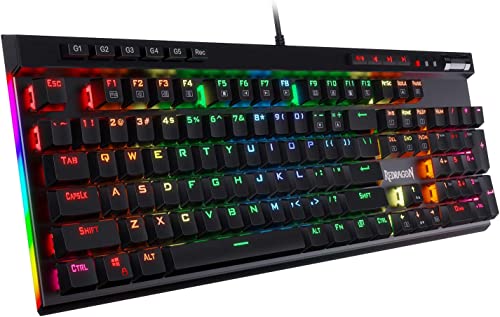
Redragon Full-Size Hot-Swap Keyboard
Best for: tactile gaming with dedicated macro controls
- Switch Type
- Brown Switch
- Connectivity
- Wired
- Backlighting
- RGB
- Keycap Material
- Double-shot
- Use
- Gaming
- Dimensions
- 15.4 × 1.57 × 7.48 inches
The Redragon Full-Size Hot-Swap Keyboard provides tactile brown switches across a 104-key layout with full anti-ghosting. You get hot-swappable switch sockets, five dedicated on-the-fly macro keys, and dedicated media controls with a media wheel. The wired design uses double-shot keycaps rated for 50 million keystrokes alongside RGB backlighting. It suits you if you want customizable tactile typing and direct hardware controls for gaming without mandatory configuration software.
Pros
- Hot-swappable switch sockets allow replacement without soldering
- Five dedicated macro keys support on-the-fly recording without software
- 104-key matrix features complete anti-ghosting
- Double-shot keycaps and switches rated for 50 million keystrokes
Cons
- Wired connectivity only with no wireless support
- Large footprint measuring 15.35 inches long and weighing 2.62 pounds
Good fit if
- You want dedicated hardware macro keys and dedicated media controls
- You prefer tactile brown switches with the option to swap switches later
- You need a full 104-key layout with complete anti-ghosting
Skip if
- You need wireless connectivity via Bluetooth or 2.4 GHz
- You want a compact keyboard that takes up less desk space
Verdict: Redragon Full-Size Hot-Swap Keyboard delivers versatile brown switches, hot-swap flexibility, and dedicated macro hardware in a dependable wired package. It provides complete input reliability and long-term durability for tactile gaming setups.

MageGee 68-Key Compact Brown Switch Keyboard
Best for: compact desks needing dedicated arrow keys
- Switch Type
- Brown Switch
- Form Factor
- 60%
- Connectivity
- Wired (USB 2.0)
- Backlighting
- Blue LED
- Keycap Material
- Double-color injection
- Use
- Gaming
View on Amazon: MageGee 68-Key Compact Brown Switch Keyboard
The MageGee 68-Key Compact Brown Switch Keyboard gives you a space-saving 60% layout with dedicated arrow keys and mechanical brown switches. It features a detachable wired USB 2.0 cable, blue LED backlighting with 16 modes, and full anti-ghosting across all 68 keys. If you want a straightforward wired typing setup with tactile switches, adjustable kickstand feet, and broad operating system support across Windows, Mac, and Linux, this compact keyboard fits your desk.
Pros
- Compact 68-key layout retains dedicated arrow keys
- Mechanical brown switches balance acoustic feedback and triggering resistance
- Detachable USB cable with full 68-key anti-ghosting
- Blue LED backlighting includes 16 lighting modes
Cons
- Wired-only connection without wireless or Bluetooth options
- Blue LED backlighting lacks full RGB color options
Good fit if
- You need a compact 68-key keyboard that keeps physical arrow keys.
- You prefer a wired USB setup with a detachable cable.
- You want quiet mechanical brown switches for work or gaming.
Skip if
- You require multi-color RGB backlighting instead of static blue LEDs.
- You need wireless connectivity for cable-free desk setups.
Verdict: MageGee 68-Key Compact Brown Switch Keyboard delivers essential mechanical typing in a space-saving 68-key footprint with quiet brown switches. It is a practical wired option for desks that need physical arrow keys without excess bulk.

RK Royal Kludge 75% Hot-Swap Mechanical Keyboard
Best for: compact desks needing dedicated volume control
- Switch Type
- Brown Switch
- Form Factor
- 75%
- Connectivity
- Detachable USB-C wired
- Hot-Swap Support
- Yes (3-pin or 5-pin)
- Backlighting
- RGB
- Media Controls
- Volume Knob
View on Amazon: RK Royal Kludge 75% Hot-Swap Mechanical Keyboard
The RK Royal Kludge 75% Hot-Swap Mechanical Keyboard combines a compact 75 percent layout with a dedicated CNC aluminum volume knob. It comes with tactile Brown switches seated in a hot-swappable PCB that accepts both 3-pin and 5-pin switches. Inside, a gasket mount structure pairs with triple-layer sound damping foam and pre-lubed stabilizers. This wired board suits you if you want quick audio control and compact desk dimensions without losing function keys.
Pros
- Dedicated CNC aluminum volume knob
- Hot-swappable PCB supports 3-pin and 5-pin switches
- Gasket mount with poron, IXPE, and sponge damping foams
- South-facing RGB backlighting with detachable USB-C cable
Cons
- Wired connectivity only without wireless options
- Lacks a dedicated number pad
Good fit if
- You want dedicated hardware volume control in a compact 75% footprint.
- You plan to swap between 3-pin and 5-pin switches without soldering.
- You prefer a wired setup with multi-layer acoustic dampening.
Skip if
- You need a wireless keyboard for cable-free desk setups.
- You require a full-size layout with a 10-key numeric pad.
Verdict: RK Royal Kludge 75% Hot-Swap Mechanical Keyboard delivers tactile typing and dedicated CNC aluminum audio control within a space-saving gasket-mounted design. It gives you broad 3-pin and 5-pin switch flexibility if you do not mind staying tethered via USB-C.

Redragon Full-Size Aluminum Keyboard with Brown Switches
Best for: full-size durability and switch customization
- Switch Type
- Brown Switch
- Form Factor
- 104-key
- Connectivity
- Wired
- Backlighting
- RGB
- Case Material
- Brushed aluminum
- Use
- Gaming
View on Amazon: Redragon Full-Size Aluminum Keyboard with Brown Switches
This full-size wired board combines tactile brown switches with a brushed aluminum frame. You get 104 anti-ghosting keys, hot-swappable sockets fitting 3-pin or 5-pin switches, and 20 RGB lighting modes. Companion software enables custom keybindings and macros on Windows and Mac systems. It suits you if you want a sturdy, metal-top typing setup with standard numeric keys, customizable switch options, and fixed USB connectivity for daily gaming or work.
Pros
- Brushed aluminum frame construction
- Hot-swappable sockets supporting 3-pin and 5-pin switches
- Full 104-key anti-ghosting layout
- 20 preset RGB lighting modes with companion software support
Cons
- Wired-only connection with no wireless options
- Substantial desk footprint weighing 2.2 pounds
Good fit if
- You need a full 104-key layout with tactile brown switches.
- You want an aluminum chassis with hot-swappable switch sockets.
- You prefer a plug-and-play wired connection for Windows or Mac.
Skip if
- You require wireless connectivity such as Bluetooth or 2.4 GHz.
- You want a compact tenkeyless or 60% form factor.
Verdict: Redragon Full-Size Aluminum Mechanical Keyboard delivers a rigid metal build, modular switch sockets, and full-key anti-ghosting over a standard wired connection.

RK Royal Kludge Full-Size Typewriter Keyboard
Best for: typewriter aesthetics with tactile brown switches
- Switch Type
- Brown Switch
- Form Factor
- Full-size
- Connectivity
- Wired
- Backlighting
- RGB
- Case Material
- Aluminium alloy panel
- Use
- Gaming
View on Amazon: RK Royal Kludge Full-Size Typewriter Keyboard
This full-size wired keyboard features mechanical brown switches paired with vintage steampunk round keycaps. It delivers tactile feedback with medium resistance across all 108 non-conflict keys. The build includes an aluminum alloy top plate, a detachable wrist rest, per-key RGB backlighting, and online QMK/VIA programmability. If you want classic typewriter aesthetics combined with standard brown switch tactility and full anti-ghosting for typing or desktop tasks, this board fits your workspace.
Pros
- Tactile brown switches with 108-key anti-ghosting
- QMK/VIA online driver support without local software installation
- Detachable ABS wrist rest and aluminum alloy top panel
- Per-key RGB illumination with customizable transparent sidelights
Cons
- Switches are soldered and not hot-swappable
- Wired-only connectivity with no wireless options
Good fit if
- You want round typewriter keycaps on a full 108-key layout.
- You need web-based QMK/VIA remapping without installing local software.
- You prefer an included detachable wrist rest paired with a metal top plate.
Skip if
- You want hot-swappable switch sockets for future hardware changes.
- You need wireless connectivity via Bluetooth or 2.4 GHz.
Verdict: RK Royal Kludge Full-Size Typewriter Keyboard combines vintage round keycaps with programmable brown switches and full-size utility. Its wired build and fixed switch design prioritize vintage desktop styling over modular hardware changes.

Keychron V6 Max Full-Size Wireless Keyboard
Best for: customizable full-size wireless typing setups
- Switch Type
- Brown Switch
- Form Factor
- Full-size 100% (108 Keys)
- Connectivity
- 2.4 GHz, Bluetooth 5.1, wired
- Hot-Swap Support
- Yes (3-pin and 5-pin MX)
- Backlighting
- South-facing RGB
- Keycap Material
- Double-shot PBT
This full-size 108-key mechanical keyboard features pre-lubed Gateron Jupiter Brown tactile switches, a gasket mount design, and triple-mode connectivity via 2.4 GHz wireless, Bluetooth 5.1, or USB cable. You can remap keys through the Keychron Launcher web app and hot-swap 3-pin or 5-pin switches without soldering. It suits you if you need a complete number pad, multi-device wireless pairing, and customizable hardware.
Pros
- Triple-mode connectivity via 2.4 GHz wireless, Bluetooth 5.1, and wired USB
- Hot-swappable sockets support 3-pin and 5-pin MX mechanical switches
- Rapid 1000 Hz polling rate on 2.4 GHz wireless and wired connections
- Double-shot PBT keycaps and PCB-mounted screw-in stabilizers
Cons
- Keycaps do not allow RGB backlighting to shine through legends
- Large 17.63-inch footprint requires substantial desk space
Good fit if
- You want wireless connectivity across up to three Bluetooth devices plus 2.4 GHz
- You need a full-size 108-key layout with a dedicated numeric keypad
- You plan to customize key layouts or macros using QMK firmware or web software
Skip if
- You want shine-through keycap legends for low-light typing
- You have limited desk width and prefer a compact tenkeyless or 60% layout
Verdict: Keychron Full-Size Wireless Mechanical Keyboard delivers versatile triple-mode connectivity, tactile switches, and complete key remapping in a full 108-key form factor. It provides durable PBT keycaps and hot-swappable hardware for multi-device setups.

Keychron K3 75% Low-Profile Wireless Keyboard
Best for: low-profile multi-device Mac and Windows typing
- Switch Type
- Brown Switch
- Form Factor
- 75%
- Connectivity
- Bluetooth 5.1, Wireless
- Backlighting
- White
- Case Material
- Aluminum body, plastic bottom frame
- Dimensions
- 12.1 × 4.57 × 0.87 inches
View on Amazon: Keychron K3 75% Low-Profile Wireless Keyboard
The Keychron K3 75% Low-Profile Wireless Keyboard pairs tactile Brown switches with an ultra-slim 0.87-inch profile. You get a compact 75% layout, Bluetooth 5.1 pairing across three devices, and open-source QMK firmware customization via a web interface. Its lightweight 1.1-pound aluminum and plastic build fits tight desks. This setup suits you if you want tactile feedback in an easily portable, low-height format for Mac or Windows multitasking.
Pros
- Low-profile 0.87-inch height and 1.1-pound weight
- Bluetooth 5.1 connectivity for up to three devices
- Open-source QMK firmware support for macros and remapping
- Mac layout with extra Windows keycaps included
Cons
- White backlighting only with no RGB listed
- Plastic bottom frame rather than full aluminum construction
- No 2.4 GHz wireless connection option
Good fit if
- You want a low-profile typing angle with tactile Brown switches.
- You need to toggle between up to three Bluetooth devices across Mac and Windows.
- You want open-source QMK remapping in a compact 75% footprint.
Skip if
- You prefer standard full-height switches and keycaps.
- You require full RGB backlighting rather than white lighting.
- You need a dedicated 2.4 GHz wireless USB dongle.
Verdict: Keychron K3 75% Low-Profile Wireless Keyboard delivers tactile typing in an ultra-slim 0.87-inch build with versatile multi-device Bluetooth. It provides QMK open-source programmability and multi-platform keycaps in a lightweight 75% layout.

DIERYA 68-Key Mini Mechanical Keyboard
Best for: compact desk setups needing tactile switches
- Switch Type
- Brown Switch
- Form Factor
- 60%
- Connectivity
- Bluetooth 5.0, 2.4GHz, USB-C wired
- Backlighting
- Blue LED
- Use
- Gaming
- Operating System
- Windows
The DIERYA Mini 68-Key Mechanical Keyboard gives you a compact 68-key mini layout paired with tactile brown switches. Its small 11.41-inch footprint frees up desk space while keeping dedicated arrow keys. You get wired USB connectivity, full anti-ghosting across all keys, and 19 single-color blue LED backlight modes. This keyboard suits you if you need a space-saving typing setup for Windows or Linux without loud clicking.
Pros
- Compact 68-key mini layout measuring 11.41 inches long
- Tactile brown switches with moderate sound and gentle feedback
- Full anti-ghosting across all 68 conflict-free keys
- Blue LED backlighting with 19 static and dynamic lighting modes
Cons
- Backlighting is limited to blue LEDs rather than full RGB
- Only partial compatibility with macOS
Good fit if
- You want a compact 68-key mini footprint with tactile brown switches.
- You need full anti-ghosting across every key for gaming and typing.
- You work on Windows or Linux and prefer a wired connection.
Skip if
- You need multi-color RGB lighting instead of single-color blue LEDs.
- You require full feature compatibility with macOS.
- You need a dedicated number pad or a full-size layout.
Verdict: DIERYA Mini 68-Key Mechanical Keyboard delivers tactile brown switch operation in an ultra-compact footprint. It offers a straightforward wired mini option for Windows and Linux users who do not need full RGB backlighting.

Keychron C2 Full-Size Mechanical Keyboard
Best for: full-size desktop typing across Mac and Windows
- Switch Type
- Brown Switch
- Form Factor
- Full size
- Connectivity
- USB Type-C wired
- Dimensions
- 17.1 × 5.1 × 1.5 inches
- Weight
- 3.31 pounds
The Keychron C2 is a full-size wired mechanical keyboard with tactile Keychron Brown switches and a 104-key layout. You get a dedicated number pad, two-level adjustable feet at six and nine degrees, and a braided USB Type-C cable. Because it lacks backlighting, it suits you if you prioritize straightforward Mac and Windows desktop productivity with tactile feedback over night-time illumination or wireless connectivity.
Pros
- Full-size 104-key layout with dedicated number pad
- Keychron Brown tactile switches rated for 50 million keystrokes
- Two-level adjustable feet offering 6-degree and 9-degree tilt
- Includes dedicated Mac and Windows keycaps
Cons
- Lacks key backlighting
- Wired-only USB Type-C connection with no wireless support
Good fit if
- You need a 104-key layout with a dedicated number pad for data entry.
- You want tactile brown switches for Mac or Windows office tasks.
- You prefer a wired USB Type-C setup without battery management.
Skip if
- You work in low-light environments and need illuminated keycaps.
- You require wireless connectivity for cable-free desk setups.
Verdict: Keychron C2 Full-Size Wired Keyboard delivers reliable full-size typing with tactile brown switches and direct OS support for Mac and Windows. It provides a practical desktop solution if you do not require backlighting or wireless connectivity.

Keychron Q6 Ultra Wireless Full-Size Keyboard
Best for: full-size desktop setups needing high polling rates
- Switch Type
- Brown Switch
- Form Factor
- Full-size
- Connectivity
- 2.4 GHz, Bluetooth 5.3, wired
- Backlighting
- RGB
- Case Material
- Aluminum
View on Amazon: Keychron Q6 Ultra Wireless Full-Size Keyboard
The Keychron Q6 Ultra is a full-size wireless mechanical keyboard built with an aluminum frame and tactile Brown switches. You get tri-mode connectivity via Bluetooth 5.3, wired mode, and 2.4 GHz wireless with an 8000Hz polling rate. ZMK firmware and Keychron Launcher allow you to remap keys and macros. It suits typists and gamers wanting a complete layout with high-speed wireless tracking.
Pros
- 8000Hz polling rate in wired and 2.4 GHz wireless modes
- Tri-mode connectivity with Bluetooth 5.3 pairing across 3 devices
- Hot-swappable sockets compatible with 3-pin and 5-pin MX switches
- Up to 660-hour battery life with backlight off
- Full key and macro customization via ZMK and Keychron Launcher
Cons
- Large 137 x 446mm footprint occupies significant desk space
- Battery life drops to 200 hours when operating backlight at 8000Hz
Good fit if
- You need an 8000Hz polling rate over 2.4 GHz wireless or wired connections.
- You want a full-size aluminum keyboard with hot-swappable switch sockets.
- You multitask across up to three Bluetooth devices alongside a 2.4 GHz connection.
Skip if
- You want a compact or tenkeyless layout that preserves desk space.
- You prefer a lightweight plastic build for easy portability.
Verdict: Keychron Q6 Ultra Wireless Full-Size Keyboard pairs an all-metal full-size frame with an 8000Hz polling rate and versatile tri-mode connectivity. It delivers full programmability and hot-swappable switches for demanding desktop setups.

Keychron K10 Full-Size Mechanical Keyboard
Best for: full-size wireless typing with white backlighting
- Switch Type
- Brown Switch
- Form Factor
- Full-size
- Connectivity
- Bluetooth 5.1, USB Type-C wired
- Backlighting
- White LED
- Use
- Gaming
- Operating System
- Mac, Windows
The Keychron K10 is a full-size 104-key wireless mechanical keyboard equipped with Keychron Apex Brown switches and white backlighting. You get dual connectivity through Bluetooth 5.1 across three devices or a wired USB Type-C connection. Its 4000 mAh battery provides up to 240 hours of use with the backlight turned off. This setup suits you if you need a standard number pad for productivity alongside tactile typing.
Pros
- 4000 mAh battery lasts up to 240 hours with backlight off
- Connects to up to 3 devices via Bluetooth 5.1 or wired USB Type-C
- Full-size 104-key layout with dedicated Mac and Windows keys
- Two-level adjustable feet offering 6-degree and 9-degree angles
Cons
- White LED backlighting without RGB color options
- Num Lock function works only on Windows
- Lacks a 2.4 GHz wireless connection mode
Good fit if
- You want a full-size layout with a number pad and white backlighting.
- You switch typing tasks between up to three Bluetooth devices and a wired setup.
- You need dedicated keys and extra keycaps for Mac and Windows systems.
Skip if
- You prefer multi-color RGB backlighting instead of static white illumination.
- You require a 2.4 GHz wireless USB dongle connection.
- You use macOS and rely on standard Num Lock functionality.
Verdict: Keychron K10 Full-Size Wireless Mechanical Keyboard delivers dependable Bluetooth multitasking, large battery capacity, and clean white backlighting in a standard 104-key format. It provides solid tactile productivity across both Mac and Windows systems.

RK Royal Kludge RK61 60% Hot-Swap Keyboard
Best for: compact desk setups needing QMK customization
- Switch Type
- Brown Switch
- Form Factor
- 60%
- Connectivity
- USB wired
- Backlighting
- RGB
- Hot-Swap Support
- Hot-Swappable
- Use
- Gaming
The RK Royal Kludge RK61 60% Hot-Swap Keyboard gives you a 61-key ultra-compact footprint designed to maximize desk space. It features tactile brown switches with hot-swappable sockets, allowing switch replacement without soldering. You get full RGB backlighting and QMK/VIA software support for custom keymapping. Its wired USB connection supports Windows, MacOS, and Android, making it a practical option if you want a minimal setup focused on gaming or fast typing.
Pros
- Hot-swappable brown switch sockets
- QMK/VIA programmability for custom layouts
- Compact 61-key layout saves desk space
- RGB backlighting with 18 dynamic modes
Cons
- Lacks dedicated arrow keys and number pad
- Wired-only USB connection with no wireless support
Good fit if
- You need an ultra-compact 60% layout to free up mouse space.
- You want QMK/VIA programmability to remap keys and functions.
- You prefer hot-swappable tactile brown switches in a wired build.
Skip if
- You need dedicated arrow keys or a physical numeric keypad.
- You want wireless Bluetooth or 2.4 GHz connectivity.
Verdict: RK Royal Kludge RK61 60% Hot-Swap Keyboard delivers a space-saving 61-key footprint paired with hot-swappable brown switches and QMK/VIA customization. It is a solid wired choice for setups prioritizing desktop room over dedicated navigation keys.

Snpurdiri 60% Wired Mechanical Keyboard
Best for: minimalist desk setups needing tactile switches
- Switch Type
- Brown Switch
- Form Factor
- 60%
- Connectivity
- USB-C wired
- Backlighting
- Ice Blue LED
- Use
- Gaming
- Dimensions
- 11.4 × 3.98 × 1.5 inches
The Snpurdiri 60% Wired Mechanical Keyboard provides an ultra-compact 61-key layout measuring 11.38 by 3.98 inches. It features tactile brown switches for quiet tactile feedback and full-key conflict-free input. A detachable USB-C cable makes it easy to pack, while two tilt feet adjust typing angles. With single-color ice blue backlighting and plug-and-play Windows support, this keyboard suits you if you want a minimal wired typing setup without extra software.
Pros
- Compact 60% layout with 61 conflict-free keys
- Tactile brown switches suited for quiet typing
- Detachable USB-C cable for portability
- Two adjustable feet stands for typing ergonomics
Cons
- Single-color ice blue backlighting without RGB options
- Lacks dedicated arrow keys and a number pad
- No wireless connectivity options supported
Good fit if
- You want a compact 61-key footprint with a detachable USB-C cable.
- You prefer tactile brown switches with full anti-ghosting performance.
- You need a simple plug-and-play keyboard that requires no software.
Skip if
- You need dedicated arrow keys, navigation clusters, or a numpad.
- You require wireless connectivity over Bluetooth or 2.4 GHz.
- You prefer customizable RGB backlighting across multiple colors.
Verdict: Snpurdiri 60% Wired Mechanical Keyboard delivers a space-saving 61-key layout with tactile brown switches and a detachable USB-C connection. It works well if you want a driver-free, compact typing platform with fixed ice blue backlighting.

Keychron V5 Max 96% Wireless Keyboard
Best for: compact desk setups needing a number pad
- Switch Type
- Brown Switch
- Form Factor
- 96%
- Connectivity
- 2.4 GHz, Bluetooth 5.1, wired
- Keycap Material
- Double-shot PBT
The Keychron V5 Max is a 96% compact wireless mechanical keyboard equipped with Gateron Jupiter Brown tactile switches and a number pad. You get triple connectivity across 2.4 GHz, Bluetooth 5.1, and wired USB, paired with a 1000 Hz polling rate for responsive typing. It features a gasket design with sound-absorbing foam, hot-swappable sockets, and full QMK web-app remapping. It suits you if you need number pad utility in a smaller footprint.
Pros
- Tri-mode connectivity: 2.4 GHz, Bluetooth 5.1, and wired
- Hot-swappable sockets compatible with 3-pin and 5-pin MX switches
- 1000 Hz polling rate on 2.4 GHz and wired connections
- Full key remapping via the QMK Keychron Launcher web app
Cons
- Keycaps lack shine-through legends
- QMK configuration requires a wired cable connection
Good fit if
- You need a dedicated number pad within a compact 96% layout.
- You switch frequently between macOS, Windows, or Linux systems.
- You want hot-swappable switch sockets without soldering.
Skip if
- You require keycaps with shine-through legends for typing in the dark.
- You prefer an ultra-compact board without a number pad.
Verdict: Keychron V5 Max 96% Wireless Keyboard delivers flexible wireless connectivity, gasket-mounted sound dampening, and full switch customization in a space-saving layout. It is a capable Brown switch option if you require a number pad without full-size bulk.

Cherry MX 3.0S Wired Aluminum Keyboard
Best for: Durable wired tactile gaming setups
- Switch Type
- Brown Switch
- Connectivity
- Wired (USB-A to micro-USB)
- Backlighting
- RGB
- Case Material
- Extruded aluminum
- Use
- Gaming
The Cherry MX 3.0S is a wired gaming keyboard built around an extruded aluminum housing. You get authentic Cherry MX Brown mechanical switches offering tactile, non-clicky feedback with a lifespan exceeding 100 million actuations. For input reliability, it includes full N-key rollover and anti-ghosting alongside customizable RGB backlighting. This board suits you if you want durable hardware and high switch longevity in a dedicated wired configuration.
Pros
- Cherry MX Brown switches rated for over 100 million actuations
- Screwless extruded aluminum housing
- Full N-key rollover with anti-ghosting
- RGB backlighting with over 16 million colors
Cons
- Uses micro-USB rather than a modern USB-C connection
- Wired-only configuration without Bluetooth or 2.4 GHz wireless
Good fit if
- You want authentic Cherry MX Brown switches rated for high actuation life.
- You prefer a sturdy extruded aluminum frame.
- You need full N-key rollover and Windows key lock for gaming.
Skip if
- You need wireless connectivity for cable-free desk setups.
- You prefer keyboards utilizing native USB-C ports.
Verdict: Cherry MX 3.0S Wired Aluminum Keyboard provides authentic tactile switches and an aluminum build for wired gaming setups. It delivers dependable hardware specifications without wireless extras.
Specifications side by side
| Spec | Redragon Full-Size Hot-Swap Keyboard | MageGee 68-Key Compact Brown Switch Keyboard | RK Royal Kludge 75% Hot-Swap Mechanical Keyboard | Redragon Full-Size Aluminum Keyboard with Brown Switches | RK Royal Kludge Full-Size Typewriter Keyboard | Keychron V6 Max Full-Size Wireless Keyboard | Keychron K3 75% Low-Profile Wireless Keyboard | DIERYA 68-Key Mini Mechanical Keyboard | Keychron C2 Full-Size Mechanical Keyboard | Keychron Q6 Ultra Wireless Full-Size Keyboard | Keychron K10 Full-Size Mechanical Keyboard | RK Royal Kludge RK61 60% Hot-Swap Keyboard | Snpurdiri 60% Wired Mechanical Keyboard | Keychron V5 Max 96% Wireless Keyboard | Cherry MX 3.0S Wired Aluminum Keyboard |
|---|---|---|---|---|---|---|---|---|---|---|---|---|---|---|---|
| Switch Type | Brown Switch | Brown switch | Tactile Brown | Brown | Mechanical brown (tactile) | Tactile Brown (Gateron Jupiter) | Keychron Brown Switch | Tactile Brown Switch | Tactile Keychron Brown | Silk POM Brown Switch | Keychron Apex Brown Switch | Tactile Brown Switch | Mechanical Brown | Gateron Jupiter Brown | Cherry MX Brown |
| Form Factor | not specified | 60% | 75% | 104-key | Full-size | Full-size 100% (108 Keys) | 75% | 60% | Full size | Full-size | Full-size | 60% | 60% | 96% | not specified |
| Connectivity | Wired | Wired (USB 2.0) | Detachable USB-C wired | Wired | Wired | 2.4 GHz, Bluetooth 5.1, wired | Bluetooth 5.1, Wireless | Bluetooth 5.0, 2.4GHz, USB-C wired | USB Type-C wired | 2.4 GHz, Bluetooth 5.3, wired | Bluetooth 5.1, USB Type-C wired | USB wired | USB-C wired | 2.4 GHz, Bluetooth 5.1, wired | Wired (USB-A to micro-USB) |
| Hot-Swap Support | not specified | not specified | Yes (3-pin or 5-pin) | not specified | not specified | Yes (3-pin and 5-pin MX) | not specified | not specified | not specified | not specified | not specified | not specified | not specified | not specified | not specified |
| Backlighting | RGB | Blue LED | RGB | RGB | RGB | South-facing RGB | White | Blue LED | not specified | RGB | White LED | RGB | Ice Blue LED | not specified | RGB |
| Keycap Material | Double-shot | Double-color injection | not specified | not specified | not specified | Double-shot PBT | not specified | not specified | not specified | not specified | not specified | not specified | not specified | Double-shot PBT | not specified |
| Case Material | not specified | not specified | not specified | Brushed aluminum | Aluminium alloy panel | not specified | Aluminum body, plastic bottom frame | not specified | not specified | Aluminum | not specified | not specified | not specified | not specified | Extruded aluminum |
| Media Controls | not specified | not specified | Volume Knob | not specified | not specified | not specified | not specified | not specified | not specified | not specified | not specified | not specified | not specified | not specified | not specified |
| Use | Gaming | Gaming | Gaming | Gaming | Gaming | not specified | not specified | Gaming | not specified | not specified | Gaming | Gaming | Gaming | not specified | Gaming |
| Design | not specified | not specified | not specified | not specified | Typewriter | not specified | not specified | not specified | not specified | not specified | not specified | not specified | not specified | not specified | not specified |
| Color | Brown Switch | Brown/Brown Switch | pure black | Black | White | Hot-swap Gateron Jupiter Brown Switch | Keychron Brown Switch | White/Brown Switch | Keychron Brown Switch | Brown Switch | Keychron Apex Brown Switch | Black | Black White/Brown Switch | Gateron Jupiter Brown Switch | Black w/Brown Switch |
| Operating System | not specified | Mac, Windows | not specified | not specified | not specified | not specified | not specified | Windows | not specified | not specified | Mac, Windows | not specified | not specified | not specified | not specified |
| Ergonomic Features | not specified | not specified | not specified | not specified | Wrist Rest | not specified | not specified | not specified | not specified | not specified | not specified | not specified | not specified | not specified | not specified |
| Dimensions | 15.4 × 1.57 × 7.48 inches | 5.12 × 1.97 × 13 inches | 12.7 × 5.59 × 1.65 inches | 17.1 × 4.88 × 1.59 inches | 17.4 × 7.17 × 1.61 inches | 17.6 × 5.87 × 1.28 inches | 12.1 × 4.57 × 0.87 inches | 11.4 × 3.89 × 1.37 inches | 17.1 × 5.1 × 1.5 inches | not specified | 1.85 × 0.71 × 0.09 inches | 11.5 × 4.02 × 1.57 inches | 11.4 × 3.98 × 1.5 inches | not specified | not specified |
| Weight | 2.62 pounds | not specified | 1.76 pounds | 2.2 pounds | 2.2 pounds | not specified | 1.1 pounds | not specified | 3.31 pounds | not specified | 1.1 pounds | 1.32 pounds | not specified | not specified | not specified |
| Size | K580 Wired | not specified | Hot-swap Switch | Brown Switch | brown switch | Compact | not specified | Wired | not specified | 137 x 446mm | not specified | Hot-Swappable Brown Switch | not specified | Gateron Jupiter Brown Switch | not specified |
| Model | K580 | MKBox | R75 | K556 | S108 | V6 Max | K3A3 | T68SE | C2-K3Z | Q6U-M3 | K10-A3 | RK61 | Snpurdiri 60% Wired Mechanical Keyboard | V5M-D1 | G80-3874LXAUS-2 |
Is a Brown Switch Worth It?
Brown switches provide tactile physical feedback for typing and gaming without loud switch clicks. Listings in this guide pair brown switches with quiet operation across Windows, Mac, and Linux platforms. This switch design gives you a distinct tactile bump during actuation while maintaining lower acoustic output than audible click switches. Choosing keyboards with brown switches provides consistent tactile response across full-size, compact, and low-profile form factors.
Worth it if
- You want tactile physical feedback with quiet operation for gaming and typing.
- You use Mac, Windows, or Linux systems and need tactile mechanical input.
- You plan to swap modular 3-pin or 5-pin tactile switches in hot-swappable sockets.
Skip it if
- You do not want a tactile bump when pressing keys.
- You prefer non-mechanical keyboards without individual switch hardware.
How We Picked These Keyboards
To build this 2026 guide, we identified mechanical keyboards with brown switches directly from their Amazon listings. Each included model states this switch type in its product title or published feature list. All details come directly from published specifications; products are not physically handled. To ensure variety across the guide, we include only one variant per product family.
We order the 15 picks with products in stock first, then by Amazon sales rank, placing better-selling products first. You can compare key specifications across the list, including wired or wireless connectivity, hot-swap support, and layout sizes ranging from compact to full-size. Availability details refresh at least daily on the page.
How to Choose the Right Keyboard
-
Evaluate Connectivity Options
Check the connectivity specification to match your desk layout. Wired keyboards draw power directly through a cable, eliminating battery charging cycles and signal interference. These models work best for permanent desktop gaming stations. Wireless models connect via Bluetooth to reduce cable clutter and let you pair with multiple systems like laptops and tablets. If you want cable-free mobility across several devices, consider the Keychron V6 Max Full-Size Wireless Keyboard. Choose wired connectivity if your keyboard stays at one desk and you prefer continuous power without battery management.
-
Check Hot-Swap Socket Support
Review whether the keyboard includes hot-swappable switch sockets. Hot-swap support allows you to pull out individual brown switches and insert replacements without using a soldering iron. This feature makes it easy to replace a failing switch or experiment with different tactile hardware down the road. Soldered keyboards permanently fix the switches to the circuit board, requiring total replacement or desoldering if a switch breaks. If modular maintenance matters to you, pick a model with hot-swap support like the Redragon Full-Size Hot-Swap Keyboard.
-
Select the Right Form Factor
Compare the physical footprint specifications against your available desk area. Full-size keyboards measure over 17 inches wide and provide dedicated numeric keypads for spreadsheet entry and data entry. Compact 75%, 68-key, and 60% frames eliminate the numpad to free up horizontal space for wide mouse sweeps. Compact layouts keep your arms at a closer, more natural shoulder width. If your workspace has tight dimensions, look at a space-saving option like the DIERYA 68-Key Mini Mechanical Keyboard, which measures under 12 inches long.
-
Look for Physical Media Controls
Check the hardware specifications for dedicated audio controls if you frequently adjust volume during gaming or work. Many standard keyboards require multi-key function shortcuts to change audio levels or mute sound. In contrast, boards with integrated rotary dials allow you to make instant audio adjustments without pausing gameplay or opening software menus. If you prioritize quick audio management at your fingertips, check out the RK Royal Kludge 75% Hot-Swap Mechanical Keyboard, which includes a dedicated volume knob built directly into the frame.
-
Compare Overall Board Height
Examine the height specification to determine your typing comfort. Standard mechanical keyboards typically stand around 1.5 inches high and often benefit from a wrist rest to prevent hand fatigue. Low-profile designs reduce switch travel and overall chassis thickness, allowing your wrists to rest flatter against the desk surface. If you prefer a flatter typing angle without adding external wrist supports, look at slim alternatives like the Keychron K3 75% Low-Profile Wireless Keyboard, which measures just 0.87 inches in published height.
-
Verify Operating System Compatibility
Verify the supported operating systems before deciding on a model. While most keyboards connect as basic input hardware, certain boards include dedicated layout switches or specific keycap layouts for Mac and Windows. Keyboards with explicit multi-OS support ensure that system-specific modifiers like Command and Option function properly without third-party key-mapping tools. If your workflow involves switching between Apple and PC machines, consider a model with stated cross-platform support like the Keychron C2 Full-Size Mechanical Keyboard.
Frequently asked questions
Are brown switch mechanical keyboards suitable for office use?
Yes, brown switches produce tactile feedback without loud clicks, making them appropriate for shared office environments. Keyboards like the Keychron C2 offer full-size layouts with direct Mac and Windows compatibility for office tasks. The Keychron K10 also provides clean white backlighting and Bluetooth connectivity to pair with multiple work computers.
What is the difference between hot-swappable and soldered brown switches?
Hot-swappable sockets let you replace or upgrade individual switches without desoldering the keyboard circuit board. Models like the RK Royal Kludge R75 support standard 3-pin and 5-pin switches directly in their sockets. Fixed or soldered options, such as the RK Royal Kludge S108 typewriter model, keep switches permanently attached to prioritize vintage structural styling over modular hardware maintenance.
Can you find low-profile mechanical keyboards with brown switches?
Yes, select mechanical keyboards feature low-profile brown switches to reduce overall casing height. The Keychron K3 measures just 0.87 inches tall, combining a compact 75% frame with low-profile tactile hardware. This slim build provides physical key travel without requiring elevated wrist positioning, while maintaining wireless Bluetooth connectivity across Mac and Windows setups.
Which brown switch keyboards include dedicated arrow keys in a compact layout?
Compact 68-key and 75% layouts retain dedicated arrow keys while trimming overall desk dimensions. The MageGee 68-Key MKBox features physical direction keys in a condensed wired footprint. Similarly, the DIERYA T68SE mini layout keeps dedicated navigation keys intact, avoiding the secondary function layers required by standard 60% keyboards like the RK Royal Kludge RK61.
Do brown switch keyboards support high polling rates for competitive gaming?
Yes, select brown switch keyboards provide specialized gaming specifications such as ultra-high polling rates. The Keychron Q6 Ultra features an 8000Hz polling rate alongside wireless tri-mode connectivity and an all-metal chassis. This specification transmits input signals to your computer up to eight times faster than standard 1000Hz peripherals, ensuring rapid switch registration during fast gameplay.
How do 96% and full-size mechanical keyboard layouts differ?
A 96% layout keeps the number pad and arrow keys while eliminating empty spacing between key clusters. The Keychron V5 Max compresses these input blocks into a single consolidated frame. In contrast, standard full-size keyboards like the Keychron V6 Max spread 108 keys across traditional navigation and numpad partitions, taking up several additional inches of desk room.
Can you reprogram brown switch keyboards using QMK or VIA firmware?
Yes, several brown switch models support open-source QMK and VIA firmware for custom layout remapping. The RK Royal Kludge RK61 provides QMK and VIA compatibility across its 61-key wired frame. Keychron models like the K3 also offer open-source customization, letting you assign custom key binds, layer shortcuts, and system-specific commands directly to onboard memory.