Best Mechanical Keyboards Under $300: 6 Spec-Based Picks
As an Amazon Associate we earn from qualifying purchases. Links on this page are affiliate links.
Finding a reliable mechanical keyboard under 300 comes down to key actuation, build format, and input speed. We compared 6 models using the specifications published on each product listing to evaluate their hardware features. The Corsair K100 RGB Optical-Mechanical Keyboard takes the top spot because its 4,000Hz polling rate and 1.0mm optical actuation provide fast responsiveness for streamers and gamers.
This guide helps you identify the ideal switch type, wired or wireless connectivity, and layout size for your daily desktop setup.
Quick picks
The best fit for you
- You need fast actuation and dedicated macro keys Corsair K100 RGB Optical-Mechanical Keyboard It provides 1.0mm optical actuation, dedicated macro keys, and a 4,000Hz polling rate over a wired connection.
- You want a full-size wireless layout with magnetic switches Keychron Q6 HE Full-Size Wireless Magnetic Keyboard This model combines a full-size form factor with wireless connectivity and Hall Effect magnetic switches.
- You want a compact gaming board with 8000Hz polling Razer Huntsman V3 Pro TKL Sentinels Edition It features a TKL footprint paired with 8000Hz polling and adjustable analog switches.
- You need a quiet tenkeyless wireless keyboard Realforce R4 TKL Silent Wireless Keyboard It provides a silent noise level, wireless connectivity, and a space-saving TKL form factor.
Our 6 picks

Corsair K100 RGB Optical-Mechanical Keyboard
Best for: streamers and gamers wanting dedicated macro keys
- Switch Type
- CORSAIR OPX Optical-Mechanical
- Connectivity
- Wired
- Backlighting
- RGB
- Keycap Material
- Double-shot PBT
- Case Material
- Aluminum
- Use
- Gaming
View on Amazon: Corsair K100 RGB Optical-Mechanical Keyboard (paid link)
The Corsair K100 RGB Optical-Mechanical Keyboard is a full-size wired gaming keyboard built around an aluminum frame. You get proprietary Corsair OPX optical-mechanical switches featuring a 1.0mm linear actuation point rated for 150 million keystrokes. It runs at a native 4,000Hz polling rate and includes six dedicated macro keys with Elgato Stream Deck software integration. It suits you if you need short switch travel and direct macro controls.
Pros
- Corsair OPX optical switches with 1.0mm linear actuation
- Native 4,000Hz hyper-polling and 4,000Hz key scanning
- Six dedicated macro keys with Elgato Stream Deck integration
- PBT double-shot keycaps and aluminum frame construction
Cons
- Wired-only connection with no wireless options
- Large 19.3-inch footprint weighing 2.9 pounds
Good fit if
- You want linear optical switches with a shallow 1.0mm actuation point.
- You need dedicated hardware macro keys for streaming or macros.
- You prefer high 4,000Hz polling and scanning rates over a wired setup.
Skip if
- You want a wireless keyboard to minimize desk cables.
- You have tight desk space that cannot fit a 19.3-inch keyboard.
Verdict: Corsair K100 RGB Optical-Mechanical Keyboard delivers 4,000Hz polling, fast 1.0mm optical actuation, and dedicated Elgato-compatible macro keys. It gives you heavy-duty input speed if you do not mind a permanent wired connection.

Keychron Q6 HE Full-Size Wireless Magnetic Keyboard
Best for: Full-size users wanting magnetic switch gaming precision
- Switch Type
- Hall Effect Gateron magnetic
- Form Factor
- 100% Full-Size
- Connectivity
- 2.4 GHz, Bluetooth 5.2, Type-C wired
- Case Material
- All-aluminum
- Dimensions
- 17.6 × 5.39 × 1.22 inches
View on Amazon: Keychron Q6 HE Full-Size Wireless Magnetic Keyboard (paid link)
The Keychron Q6 HE is a full-size wireless keyboard built with an all-aluminum frame and Hall Effect magnetic switches. You get tri-mode connectivity covering 2.4 GHz wireless, Bluetooth 5.2, and USB Type-C wired modes. Its magnetic switches allow adjustable actuation from 0.2 to 3.8 mm, rapid trigger resets, and analog inputs. This layout suits you if you need a dedicated number pad alongside highly customizable gaming controls.
Pros
- Hall Effect Gateron magnetic switches with rapid trigger support
- Tri-mode connectivity via 2.4 GHz wireless, Bluetooth 5.2, and USB-C
- Adjustable actuation from 0.2 mm to 3.8 mm in 0.1 mm steps
- Full-metal all-aluminum body with a double-gasket design
Cons
- Large 17.56-inch length requires substantial desk space
- Device configuration relies entirely on a web-based browser tool
Good fit if
- You need a 100% full-size layout with a dedicated number pad.
- You want Hall Effect switches with customizable actuation and analog control.
- You switch between multiple devices using Bluetooth and 2.4 GHz wireless.
Skip if
- You prefer a compact keyboard layout to preserve mouse space.
- You prefer offline desktop configuration software over a browser-based tool.
Verdict: Keychron Q6 HE Full-Size Wireless Magnetic Keyboard combines 100% layout productivity with rapid-trigger Hall Effect switches and tri-mode wireless flexibility. It gives you fine-grained key travel tuning inside a sturdy all-aluminum frame.

Razer Huntsman V3 Pro TKL Sentinels Edition
Best for: competitive gamers wanting adjustable analog switches
- Switch Type
- Razer Analog Optical Gen-2
- Form Factor
- Tenkeyless (TKL)
- Backlighting
- Razer Chroma RGB
- Keycap Material
- Doubleshot PBT
- Case Material
- Aluminum top plate
- Use
- Gaming
View on Amazon: Razer Huntsman V3 Pro TKL Sentinels Edition (paid link)
This tenkeyless gaming keyboard features Razer Analog Optical Gen-2 switches paired with an 8000Hz polling rate. You get adjustable actuation ranging from 0.1 to 4.0 mm, Rapid Trigger support, and onboard profile adjustments via an LED array indicator. Its compact footprint leaves extra desk space for your mouse, while doubleshot PBT keycaps and internal foam provide durable construction. It suits competitive players prioritizing ultra-fast input response.
Pros
- 8000Hz polling rate for low input latency
- Adjustable switch actuation from 0.1 mm to 4.0 mm with Rapid Trigger
- Onboard tuning via LED array indicator without software
- Doubleshot PBT keycaps and aluminum top plate
Cons
- Lacks a dedicated numeric keypad
- No wireless connectivity options listed
Good fit if
- You want rapid actuation adjustments between 0.1 mm and 4.0 mm.
- You prioritize an 8000Hz polling rate for competitive play.
- You prefer a tenkeyless footprint that includes a wrist rest.
Skip if
- You require a full-size layout with a number pad.
- You need wireless connectivity.
Verdict: Razer Huntsman V3 Pro TKL Sentinels Edition delivers 8000Hz polling and granular analog switch tuning in a compact footprint. It gives you precise physical control over actuation depths directly on the hardware.
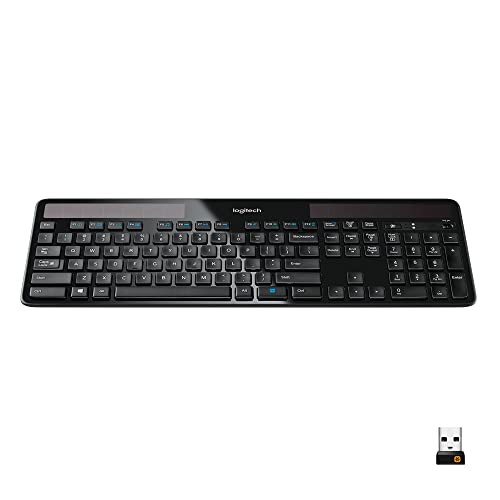
Logitech K750 Wireless Solar Keyboard
Best for: light-powered Windows typing without charging cables
- Form Factor
- full-size
- Connectivity
- 2.4 GHz wireless, USB Unifying receiver
- Color
- Black
- Operating System
- Windows
- Dimensions
- 7.87 × 1.38 × 19.1 inches
- Weight
- 1.68 pounds
View on Amazon: Logitech K750 Wireless Solar Keyboard (paid link)
The Logitech K750 Wireless Solar Keyboard is an ultra-thin, full-size wireless keyboard designed for Windows setups. It features built-in solar panels that charge under any light source, providing at least three months of power in total darkness without charging cables or battery swaps. You connect using the included 2.4 GHz USB Unifying receiver with a range of up to 33 feet, giving you a clean desk without cord clutter.
Pros
- Solar-powered design charges from ambient room light or sunlight
- Operates for at least three months in total darkness
- Logitech Unifying USB receiver pairs up to six compatible devices
- Full-size layout with low-profile, concave keycaps
Cons
- Lacks built-in Bluetooth connectivity
- Designated only for Windows operating systems
Good fit if
- You want a low-maintenance wireless keyboard that charges via light.
- You use Windows and want a dedicated 2.4 GHz USB Unifying receiver.
- You prefer an ultra-thin, full-size board with low-profile keys.
Skip if
- You need direct Bluetooth connectivity without using a USB receiver.
- You work on non-Windows operating systems.
Verdict: Logitech K750 Wireless Solar Keyboard provides light-powered battery maintenance and an ultra-thin full-size layout for Windows users. It delivers dependable 2.4 GHz wireless connectivity up to 33 feet without the need for traditional charging cables.

Logitech K750 Wireless Solar Keyboard
Best for: light-powered wireless desktop setups
- Connectivity
- 2.4GHz wireless, USB
- Color
- Black
- Dimensions
- 17 × 17 × 6.25 inches
- Weight
- 2.03 pounds
View on Amazon: Logitech K750 Wireless Solar Keyboard (paid link)
The Logitech K750 is a full-size wireless keyboard that runs on solar energy. You connect it using a 2.4GHz wireless USB receiver, which eliminates the need for charging cables or battery swaps. At 17 inches wide and weighing 2.03 pounds, it provides a stable desktop presence. This model suits you if you want a cable-free desktop setup powered entirely by ambient light.
Pros
- Integrated solar panels power operation without manual charging
- 2.4GHz wireless connectivity via USB interface
- 2.03-pound weight provides stationary desk stability
- Full 17-inch frame accommodates dedicated layout spacing
Cons
- No mechanical switches specified in hardware data
- No backlighting listed for low-light use
- Layout is fixed to English (Canada)
Good fit if
- You want continuous wireless operation powered by ambient light.
- You need a 2.4GHz wireless connection through a USB port.
- You prefer a full 17-inch desktop keyboard profile.
Skip if
- You require dedicated mechanical switches for typing or gaming.
- You work in dark environments and need backlit keys.
- You need a standard US keyboard layout.
Verdict: Logitech K750 Wireless Solar Keyboard delivers cable-free 2.4GHz operation powered entirely by built-in solar panels. It provides a maintenance-free typing setup if you do not require mechanical switches or key illumination.

Realforce R4 TKL Silent Wireless Keyboard
Best for: quiet office typing with adjustable actuation
- Switch Type
- Silent Topre capacitive
- Form Factor
- TKL
- Connectivity
- Bluetooth 5.0, USB-C
- Keycap Material
- Dye-sub PBT
- Color
- White
View on Amazon: Realforce R4 TKL Silent Wireless Keyboard (paid link)
The Realforce R4 TKL Silent Wireless Keyboard pairs silent Topre electro-capacitive switches with dye-sub PBT keycaps in a tenkeyless layout. You get dual connectivity through wired USB-C or Bluetooth 5.0, plus proximity sensors that wake the board via hand motion. It lets you customize actuation points between 0.8mm and 3.0mm in 0.1mm increments directly to onboard memory. This suits you if you need quiet typing with fine switch control.
Pros
- Genuine silent Topre capacitive switches
- Adjustable actuation points from 0.8mm to 3.0mm in 0.1mm steps
- Bluetooth 5.0 and USB-C dual connectivity
- Durable dye-sublimated PBT keycaps
- Onboard memory stores custom keymaps and switch profiles
Cons
- No 2.4GHz wireless adapter included
- No key backlighting listed in specifications
- Tenkeyless layout lacks a dedicated numeric keypad
Good fit if
- You need quiet capacitive switches for shared workspaces.
- You want to fine-tune key actuation depth and save profiles to onboard memory.
- You prefer a tenkeyless layout with Bluetooth and wired options.
Skip if
- You require a full-size layout with an integrated numeric keypad.
- You want a 2.4GHz wireless dongle instead of Bluetooth.
Verdict: Realforce R4 TKL Silent Wireless Keyboard delivers quiet electro-capacitive typing with granular actuation adjustments. It gives you flexible Bluetooth connectivity and durable dye-sub PBT keycaps in a space-saving layout.
Specifications side by side
| Spec | Corsair K100 RGB Optical-Mechanical Keyboard | Keychron Q6 HE Full-Size Wireless Magnetic Keyboard | Razer Huntsman V3 Pro TKL Sentinels Edition | Logitech K750 Wireless Solar Keyboard | Logitech K750 Wireless Solar Keyboard | Realforce R4 TKL Silent Wireless Keyboard |
|---|---|---|---|---|---|---|
| Switch Type | CORSAIR OPX Optical-Mechanical | Hall Effect Gateron magnetic | Razer Analog Optical Gen-2 | not specified | not specified | Silent Topre capacitive |
| Form Factor | not specified | 100% Full-Size | Tenkeyless (TKL) | full-size | not specified | TKL |
| Connectivity | Wired | 2.4 GHz, Bluetooth 5.2, Type-C wired | not specified | 2.4 GHz wireless, USB Unifying receiver | 2.4GHz wireless, USB | Bluetooth 5.0, USB-C |
| Backlighting | RGB | not specified | Razer Chroma RGB | not specified | not specified | not specified |
| Keycap Material | Double-shot PBT | not specified | Doubleshot PBT | not specified | not specified | Dye-sub PBT |
| Case Material | Aluminum | All-aluminum | Aluminum top plate | not specified | not specified | not specified |
| Use | Gaming | not specified | Gaming | not specified | not specified | not specified |
| Color | Black | Carbon Black | not specified | Black | Black | White |
| Operating System | not specified | not specified | not specified | Windows | not specified | not specified |
| Noise Level | not specified | not specified | not specified | not specified | not specified | Silent |
| Dimensions | 19.3 × 3.2 × 9.4 inches | 17.6 × 5.39 × 1.22 inches | not specified | 7.87 × 1.38 × 19.1 inches | 17 × 17 × 6.25 inches | not specified |
| Weight | 2.9 pounds | not specified | not specified | 1.68 pounds | 2.03 pounds | not specified |
| Size | OPX- Optical Switch | not specified | not specified | One Size | not specified | not specified |
| Model | CH-912A01A-NA | Q6H-M1 | RZ03-05521800-R3U1 | 920-002912 | FBA_920-002912 | R4HD21 |
Hardware Trade-Offs Under $300
Choosing a keyboard Under $300 requires balancing specialized hardware against broad feature sets. High-polling models with 4,000Hz or 8,000Hz rates lack wireless connectivity, keeping you tied to a desk. Meanwhile, wireless and silent productivity keyboards omit gaming-grade polling rates and dedicated macro keys. You also see split form factor options, limited to either standard full-size frames or tenkeyless footprints. Key illumination specs remain inconsistent across models, meaning you often must choose between specialized switch technology and integrated RGB backlighting.
- Connectivity: High-speed polling switches require fixed wired cables instead of wireless freedom.
- Backlighting: RGB illumination is absent from silent and wireless productivity listings.
- Form Factor: Selection is restricted to full-size builds or tenkeyless layouts.
If you also track frequency response and driver sizes for your desk setup, examine published specifications for headphones under 300.
How We Picked These Keyboards
This guide tracks 6 models from Amazon listings matching Under $300. You see only one variant per product family to avoid duplicate hardware. Products are ordered with products in stock first, then by Amazon sales rank (better-selling products first). All details come strictly from published specifications and feature lists; products are not physically handled.
Live stock and pricing refresh at least daily on the page. A keyboard belongs in this guide only when its current price remains Under $300. As listings shift throughout 2026, products move onto or off the list to match those changes.
How to Choose the Right Keyboard
-
Choose Your Form Factor
Check the form factor spec before you buy. Full-size layouts include a dedicated number pad and navigation cluster, which helps if you enter numbers frequently or manage spreadsheets. Smaller formats like tenkeyless remove the number block to clear desk area for mouse movement. If your everyday work requires rapid numerical data entry, look for a full-size build like the Keychron Q6 HE. You should measure your available desk space first so the keyboard fits comfortably alongside your mouse and other work equipment.
-
Inspect the Keycap Material
Review the keycap material specified on the listing. Keycaps made from polybutylene terephthalate, or PBT, resist finger oils, surface shine, and physical wear over years of heavy daily typing. Lesser plastic formulations tend to develop slick patches and faded key legends under sustained friction. If you plan to type extensively without swapping parts later, seek out boards equipped with standard PBT keycaps such as the Corsair K100. Choosing durable materials directly at purchase ensures your key legends stay clear and legible without extra replacement steps.
-
Evaluate Acoustic Noise Levels
Check the noise level rating if you share an office or bedroom. Mechanical switches produce distinct downstroke and upstroke sounds that can disrupt phone calls, shared workrooms, or voice recordings. If you need quiet operation during typing sessions, focus on models marked with silent acoustic profiles. The Realforce R4 TKL Silent provides electro-capacitive switches designed to suppress typing clicks while preserving tactile responsiveness. Selecting a quiet switch profile lets you type during late hours or busy conference calls without generating distracting ambient noise for other people nearby.
-
Verify Battery Maintenance Requirements
Consider how you prefer to maintain wireless hardware before deciding on a model. Standard wireless units rely on internal rechargeable batteries or replaceable dry cells that require periodic cable charging or manual battery swaps. If you want a maintenance-free desk setup, review alternative energy designs. The Logitech K750 uses integrated solar panels to draw operating power from ambient room lighting, eliminating charging cables completely. Check whether your desk receives adequate indoor or natural light so the power cells remain charged without manual intervention during regular work.
-
Compare Hardware Polling Rates
Examine the polling rate specification if you play fast-paced competitive games. Standard office and casual keyboards report keystrokes at 1,000Hz, which refreshes key data every millisecond. Advanced gaming models push reporting intervals up to 8,000Hz, sending input packets every eighth of a millisecond to reduce transmission lag. The Razer Huntsman V3 Pro TKL provides this 8,000Hz rate for near-instant signal processing. If you prioritize rapid keystroke transmission in twitch-reaction gaming, look for higher polling numbers. For daily writing, standard baseline reporting frequencies remain completely adequate.
Frequently asked questions
What is the advantage of magnetic switches over standard mechanical switches?
Magnetic switches allow you to adjust the exact actuation point and enable rapid-trigger resets without waiting for physical contact plates. The Keychron Q6 HE uses these Hall Effect switches to provide fine-grained key travel tuning. Because movement is detected through magnetic fields rather than physical contacts, you can customize reset points dynamically for faster repetitive keystrokes in competitive gaming.
How do optical keyboard switches function compared to traditional mechanical switches?
Optical switches register keypresses using light beams instead of metal contact leaves. When you press a key on a board like the Corsair K100 RGB, the switch stem interrupts an infrared light signal to register an input instantly at a 1.0mm actuation depth. This physical design removes contact bounce, allowing low latency and high durability during intense typing or gaming sessions.
Does an 8,000Hz polling rate make a difference for keyboard input?
An 8,000Hz polling rate sends keyboard input data to your computer every 0.125 milliseconds, compared to 1 millisecond on standard 1,000Hz boards. Models such as the Razer Huntsman V3 Pro TKL use this high transmission speed to minimize latency between key contact and on-screen response. You benefit most from this speed in fast-paced competitive games where split-second reaction times matter.
What are the benefits of electro-capacitive silent switches?
Electro-capacitive switches detect key actuation through electrical charge changes beneath a rubber dome rather than physical switch contacts. The Realforce R4 TKL Silent uses this switch design to produce a muted, silent noise profile suitable for quiet offices. This mechanism also lets you adjust actuation depth across keys while delivering smooth, tactile bottom-outs without harsh physical impact noise.
Can a wireless keyboard run without standard rechargeable batteries or charging cables?
Yes, specific wireless keyboards run entirely on light power using integrated solar cells. The Logitech K750 Wireless Solar Keyboard features built-in solar panels that maintain internal battery power using ambient indoor light or direct sunlight. It operates over a 2.4 GHz wireless connection up to 33 feet away, removing the need for conventional USB charging cables or disposable battery replacements.
Why choose PBT keycaps instead of ABS keycaps?
PBT keycaps provide superior resistance against surface wear, finger oil, and shining over long periods of typing. Keyboards like the Corsair K100 RGB and the Realforce R4 TKL feature durable PBT plastic caps, often paired with dye-sublimated legends on premium models. This material maintains a textured, matte finish and prevents letters from fading or wearing away during heavy daily use.
How do analog switches differ from standard digital keyboard switches?
Analog switches measure the entire downward travel of a keypress rather than just an on-or-off state. The Razer Huntsman V3 Pro TKL uses adjustable analog switches to grant precise physical control over actuation depths directly on the hardware. This design allows you to assign multiple actions to different travel depths or simulate joystick-like variable input for driving and movement in games.