13 Best Hot-Swappable Mechanical Keyboards in 2026
As an Amazon Associate we earn from qualifying purchases. Links on this page are affiliate links.
A hot-swappable keyboard lets you pull out a switch and fit a new one with no soldering, so you can change the feel without replacing the whole board. Our top pick is the AULA F75 Pro, which accepts 3-pin and 5-pin switches and adds a knob, side-printed PBT keycaps and tri-mode wireless. If you want to spend very little, the MageGee MK-Box supports both pin types for $26.99 at our last check. These 13 picks come from published specs and current prices. We have not tried swapping switches on them ourselves.
Our top pick: AULA 75% Wireless Mechanical Keyboard.
Helpful first: What Is Hot-Swap Support? A Guide for Mechanical Keyboards Buyers (2026)
Quick picks
The best fit for you
- You want a well-rounded board AULA 75% Wireless Mechanical Keyboard 3-pin and 5-pin support, a knob and tri-mode wireless in a 75% layout.
- You want the lowest price MageGee 60% Hot-Swappable Mini Keyboard 3-pin and 5-pin support with RGB in a 68-key layout.
- You want spares in the box Redragon Hot-Swappable Wired Mechanical Keyboard It includes 4 spare switches and 2 keycaps.
- You want a wireless number pad board Redragon 108-Key Wireless Mechanical Keyboard 108 keys with support for nearly all 3-pin and 5-pin switches.
- You want a magnetic hot-swap board CORBOBO Aula 60% Magnetic Gaming Keyboard Hot-swappable magnetic switches and rapid trigger in a small layout.
Our 13 picks

AULA 75% Wireless Mechanical Keyboard
Best for: A first customizable keyboard
- Hot-Swap Support
- Hot-Swappable (what this guide is about)
- Switch Type
- LEOBOG Reaper
- Form Factor
- 75% (81-key)
- Connectivity
- Bluetooth 5.0, 2.4GHz wireless, USB
- Backlighting
- 16.8 Million RGB
- Keycap Material
- Double injection sublimation PBT
View on Amazon: AULA 75% Wireless Mechanical Keyboard Affiliate link
The AULA F75 Pro is our top pick. Its hot-swappable base supports 3-pin or 5-pin switches, and AULA pitches it as easy for beginners to customize. It has a knob, side-printed PBT keycaps, pre-lubricated stabilizers, LEOBOG Reaper switches and tri-mode connection to five devices.
Pros
- 3-pin and 5-pin support
- Control knob
- Side-printed PBT keycaps
- Connects to up to five devices
Cons
- Side-printed legends may be harder to read
- No number pad
Good fit if
- This is your first custom-style keyboard
- You want wireless and a compact layout
Skip if
- You need a number pad
- You want legends on top of keys
Verdict: A strong, easy starting point for customizing.

Redragon 108-Key Wireless Mechanical Keyboard
Best for: Full-size wireless hot-swap
- Hot-Swap Support
- Hot-Swappable (what this guide is about)
- Switch Type
- Linear
- Form Factor
- Full-size (108-key)
- Connectivity
- 2.4GHz, Bluetooth 5.0/3.0, USB-C
- Backlighting
- RGB
- Use
- Gaming
View on Amazon: Redragon 108-Key Wireless Mechanical Keyboard Affiliate link
The Redragon K771 supports nearly all 3-pin and 5-pin switches in a 108-key wireless layout. It has an 8000mAh battery, a gasket mount with 5 dampening layers and 4 hotkeys. Keep in mind that replacing every switch on a 108-key board costs more.
Pros
- Supports nearly all 3-pin and 5-pin switches
- 8000mAh battery
- Tri-mode for up to 5 devices
- 4 dedicated hotkeys
Cons
- More switches to buy for a full swap
- Dimensions are not listed
Good fit if
- You want a number pad and wireless
- You may replace switches gradually
Skip if
- You have a small desk
- You want a neutral color
Verdict: An excellent value if you want everything in a full-size board.

Redragon Hot-Swappable Wired Mechanical Keyboard
Best for: Learning to swap switches
- Hot-Swap Support
- Hot-Swappable (what this guide is about)
- Switch Type
- Linear Red
- Connectivity
- Wired
- Backlighting
- LED
- Keycap Material
- Double-shot PBT, double injection ABS
- Use
- Gaming
View on Amazon: Redragon Hot-Swappable Wired Mechanical Keyboard Affiliate link
The Redragon K671 is a low-cost wired board that includes 4 spare switches and 2 keycaps, which makes it easy to test the swapping process. It has linear red switches, 11 backlight modes and software for macros. The listing mixes PBT in its title with ABS in its details.
Pros
- 4 spare switches included
- Low price
- Macro and key remapping
- 24-month warranty listed
Cons
- Backlight color cannot be changed
- Keycap material is inconsistent in the listing
Good fit if
- You want a cheap way to try hot-swap
- You like red switches
Skip if
- You want wireless
- You want custom backlight colors
Verdict: A cheap, practical way to learn how swapping works.

CORBOBO Aula 60% Magnetic Gaming Keyboard
Best for: Competitive gaming
- Hot-Swap Support
- Hot-Swappable (what this guide is about)
- Switch Type
- Hall Effect Magnetic
- Form Factor
- 60%
- Connectivity
- Wired
- Backlighting
- RGB
- Keycap Material
- PBT
View on Amazon: CORBOBO Aula 60% Magnetic Gaming Keyboard Affiliate link
The Aula WIN60 HE has hot-swappable magnetic switches, rapid trigger and up to 8000Hz polling in a 60% layout about 11 inches long. It suits fast games, but because it uses magnetic switches, your replacement options are different from a standard mechanical board.
Pros
- Hot-swappable magnetic switches
- Rapid trigger
- 8000Hz polling
- Very compact
Cons
- Needs compatible magnetic switches
- Wired only
Good fit if
- You play fast competitive games
- You want more mouse room
Skip if
- You want to use standard mechanical switches
- You need a full layout
Verdict: Buy it for gaming speed, and not for the widest switch choice.

AULA F99 96% Wireless Mechanical Keyboard
Best for: Starting out with tools included
- Hot-Swap Support
- Hot-Swappable (what this guide is about)
- Switch Type
- Pre-lubed linear (Graywood)
- Form Factor
- 96%
- Connectivity
- Bluetooth 5.0, 2.4GHz, USB-C
- Backlighting
- RGB
- Keycap Material
- Double-shot PBT
View on Amazon: AULA F99 96% Wireless Mechanical Keyboard Affiliate link
The AULA F99 includes a keycap and switch puller, so you can start swapping right away. Its hot-swap PCB takes 3-pin or 5-pin switches, and it has 99 keys with a number pad, pre-lubed linear switches, an 8000mAh battery and PBT keycaps. It weighs 3.31 pounds.
Pros
- Puller included
- 3-pin and 5-pin support
- Number pad
- 8000mAh battery
Cons
- Heavy at 3.31 pounds
- More switches to replace than on small boards
Good fit if
- You want tools in the box
- You need a number pad
Skip if
- You want a light board
- You want a knob
Verdict: A convenient choice for people ready to start right away.

GravaStar Mercury 75% Wireless Keyboard
Best for: Premium builds
- Hot-Swap Support
- Hot-Swappable (what this guide is about)
- Switch Type
- GravaStar x Kailh linear
- Form Factor
- 75%
- Connectivity
- USB-C, Bluetooth 5.0, 2.4GHz
- Backlighting
- RGB
- Case Material
- Aluminum alloy
View on Amazon: GravaStar Mercury 75% Wireless Keyboard Affiliate link
The GravaStar Mercury K1 is the premium option, with an aluminum alloy exoskeleton, a gasket mount and a polycarbonate plate. It has hot-swappable Kailh linear switches at 40gf, five foam layers and tri-mode wireless. It costs far more than most boards here.
Pros
- Aluminum alloy exoskeleton
- Gasket mount
- Polycarbonate plate
- Tri-mode connection
Cons
- Most expensive board here
- Bold look
Good fit if
- You want premium materials
- You like its futuristic style
Skip if
- You are on a budget
- You prefer a plain design
Verdict: Worth considering only if the design and materials are what you want.

MageGee 60% Hot-Swappable Mini Keyboard
Best for: Budget hot-swap
- Hot-Swap Support
- Hot-Swappable (what this guide is about)
- Switch Type
- Blue Whale Switch (Linear)
- Form Factor
- 60%
- Connectivity
- Wired USB
- Backlighting
- RGB
- Keycap Material
- Double-color injection
View on Amazon: MageGee 60% Hot-Swappable Mini Keyboard Affiliate link
The MageGee MK-Box was the lowest-priced board here at our last check. It supports 3-pin and 5-pin switches and comes with quiet linear Blue Whale switches, an EVA silicone pad and about 19 RGB backlight modes. It has 68 keys with separate arrows and F1-F12.
Pros
- Lowest price here at last check
- 3-pin and 5-pin support
- EVA silicone pad
- Separate arrow keys
Cons
- Wired only
- Listing does not publish dimensions
Good fit if
- You want a cheap first hot-swap board
- You have a small desk
Skip if
- You need wireless
- You need a number pad
Verdict: Remarkable value on paper for trying switches on a budget.

YUNZII B98 PRO 96% Wireless Keyboard
Best for: Customizing switches and keys
- Hot-Swap Support
- Hot-Swappable (what this guide is about)
- Switch Type
- Candy Linear
- Form Factor
- 96%
- Connectivity
- Bluetooth 5.0, 2.4 GHz, USB-C
- Backlighting
- RGB
- Mounting Style
- Gasket Mount
View on Amazon: YUNZII B98 PRO 96% Wireless Keyboard Affiliate link
The YUNZII B98 PRO pairs hot-swap support with QMK/VIA, so you can customize both the switches and the key layout. It has a number pad in a 96% design, a gasket mount, five filling layers and two swappable knob styles, and connects to up to 5 devices.
Pros
- Hot-swap and QMK/VIA
- Number pad in a 96% layout
- Two knob styles
- Five filling layers
Cons
- Costs more than basic hot-swap boards
- 2.43 pounds
Good fit if
- You enjoy customizing every detail
- You need a number pad
Skip if
- You want a simple board
- You want the lowest price
Verdict: A fine pick if you want to customize both software and hardware.

Kisnt 75% Tri-Mode Wireless Keyboard
Best for: Typing-focused setups
- Hot-Swap Support
- Hot-Swappable (what this guide is about)
- Switch Type
- Pre-lubed Bsun linear
- Form Factor
- 75%
- Connectivity
- Bluetooth 5.0, 2.4 GHz, USB-C
- Backlighting
- RGB
- Keycap Material
- PBT
View on Amazon: Kisnt 75% Tri-Mode Wireless Keyboard Affiliate link
The Kisnt KN85 is aimed at people who care about typing. It has pre-lubed Bsun linear switches at 45-50gf, a gasket mount and support for 3-pin and 5-pin switches. Its 85-key layout keeps F-keys and arrows, and it connects by USB-C, 2.4GHz or Bluetooth.
Pros
- 3-pin and 5-pin support
- Gasket mount
- Keeps F-keys and arrows
- Tri-mode connection
Cons
- No number pad
- Bluetooth has the highest listed latency
Good fit if
- You want a soft typing feel
- You want wireless at a low price
Skip if
- You need a number pad
- You want tactile switches out of the box
Verdict: A very good value for typists who want room to experiment.
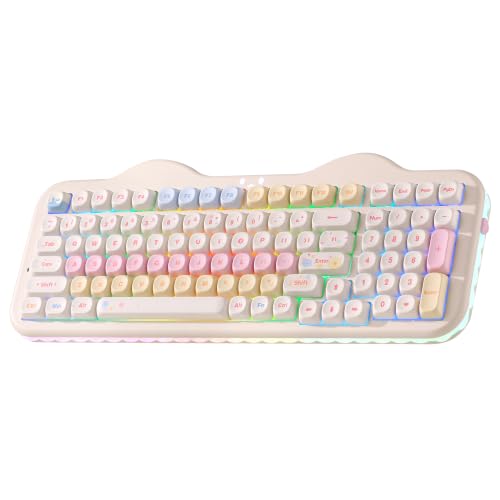
YUNZII C98 96% Wireless Mechanical Keyboard
Best for: Themed desk setups
- Hot-Swap Support
- Hot-Swappable (what this guide is about)
- Switch Type
- Candy linear
- Form Factor
- 96%
- Connectivity
- Bluetooth 5.0, 2.4GHz, USB-C wired
- Backlighting
- RGB
- Keycap Material
- Dye-sub PBT
View on Amazon: YUNZII C98 96% Wireless Mechanical Keyboard Affiliate link
The YUNZII C98 in beige has a cake-themed design, a number pad and dye-sub PBT MOA keycaps, with a hot-swappable PCB for 3-pin or 5-pin switches. It uses a gasket mount and connects to as many as 5 devices. It costs more than many similar boards here.
Pros
- Distinctive cake design
- 3-pin and 5-pin support
- Number pad
- Connects to up to 5 devices
Cons
- Priced higher than many similar boards
- Theme will not suit everyone
Good fit if
- You want a themed setup
- You want a number pad
Skip if
- You prefer a plain board
- You are on a budget
Verdict: Buy it mainly for how it looks.

AULA Full-Size Wireless Mechanical Keyboard
Best for: Clean full-size wireless
- Hot-Swap Support
- Hot-Swappable (what this guide is about)
- Form Factor
- Full-size (108 keys)
- Connectivity
- Bluetooth 5.0, 2.4GHz, USB-C
- Backlighting
- RGB
- Keycap Material
- Two-color injection-molded PBT
- Use
- Gaming
View on Amazon: AULA Full-Size Wireless Mechanical Keyboard Affiliate link
The AULA F108 is a full 108-key wireless board with side-printed PBT keycaps and a base for 3-pin or 5-pin switches. It can save up to five devices and offers 1000Hz on 2.4GHz and USB-C. A larger board means more switches to buy if you replace them all.
Pros
- Full 108-key layout
- Side-printed PBT keycaps
- 3-pin and 5-pin support
- Stores up to five devices
Cons
- More switches to buy for a full swap
- Side-printed legends can be harder to read
Good fit if
- You want a clean look with a number pad
- You connect several devices
Skip if
- You have a narrow desk
- You want legends on top of keys
Verdict: A tidy full-size pick if you like side-printed keycaps.

Redragon Full-Size Hot-Swap Mechanical Keyboard
Best for: Low-cost full-size hot-swap
- Hot-Swap Support
- Hot-Swappable (what this guide is about)
- Switch Type
- Red linear
- Form Factor
- Full-size (108-key)
- Connectivity
- Wired
- Backlighting
- RGB
- Use
- Gaming
View on Amazon: Redragon Full-Size Hot-Swap Mechanical Keyboard Affiliate link
The Redragon K668 is a low-cost wired 108-key board with an upgraded socket for almost any 3-pin or 5-pin switch. Its red switches are listed as discreet for shared spaces, and it includes 2 sets of mixed-color keycaps and 4 extra hotkeys.
Pros
- Accepts almost any 3-pin or 5-pin switch
- 2 keycap sets included
- 4 extra hotkeys
- Low price
Cons
- Wired only
- Mixed-color style will not suit everyone
Good fit if
- You want a cheap full-size hot-swap board
- You share a room
Skip if
- You need wireless
- You want a plain look
Verdict: A great-value full-size choice if a cable is fine.

Womier 75% Keyboard with Color Screen
Best for: A low-cost display board
- Hot-Swap Support
- Hot-Swappable (what this guide is about)
- Switch Type
- Pre-lubed linear
- Form Factor
- 75%
- Connectivity
- Wired (detachable Type-C)
- Backlighting
- RGB
- Mounting Style
- Gasket Mount
View on Amazon: Womier 75% Keyboard with Color Screen Affiliate link
The Womier SK80 adds a color multimedia display to a wired 75% board with a gasket mount. The hot-swappable PCB comes with pre-lubed linear switches, and the screen can show GIFs and status details. Software customizes lighting, macros and the display.
Pros
- Color multimedia display
- Gasket mount
- Hot-swappable PCB
- Pre-lubed linear switches
Cons
- Wired only
- Theme keycaps are a matter of taste
Good fit if
- You want a screen at a low price
- You like themed keycaps
Skip if
- You need wireless
- You prefer plain keycaps
Verdict: A fun extra for a modest price, if you want a screen.
Specifications side by side
| Spec | AULA 75% Wireless Mechanical Keyboard | Redragon 108-Key Wireless Mechanical Keyboard | Redragon Hot-Swappable Wired Mechanical Keyboard | CORBOBO Aula 60% Magnetic Gaming Keyboard | AULA F99 96% Wireless Mechanical Keyboard | GravaStar Mercury 75% Wireless Keyboard | MageGee 60% Hot-Swappable Mini Keyboard | YUNZII B98 PRO 96% Wireless Keyboard | Kisnt 75% Tri-Mode Wireless Keyboard | YUNZII C98 96% Wireless Mechanical Keyboard | AULA Full-Size Wireless Mechanical Keyboard | Redragon Full-Size Hot-Swap Mechanical Keyboard | Womier 75% Keyboard with Color Screen |
|---|---|---|---|---|---|---|---|---|---|---|---|---|---|
| Switch Type | LEOBOG Reaper | Linear | Linear Red | Hall Effect Magnetic | Pre-lubed linear (Graywood) | GravaStar x Kailh linear | Blue Whale Switch (Linear) | Candy Linear | Pre-lubed Bsun linear | Candy linear | not stated | Red linear | Pre-lubed linear |
| Form Factor | 75% (81-key) | Full-size (108-key) | not stated | 60% | 96% | 75% | 60% | 96% | 75% | 96% | Full-size (108 keys) | Full-size (108-key) | 75% |
| Connectivity | Bluetooth 5.0, 2.4GHz wireless, USB | 2.4GHz, Bluetooth 5.0/3.0, USB-C | Wired | Wired | Bluetooth 5.0, 2.4GHz, USB-C | USB-C, Bluetooth 5.0, 2.4GHz | Wired USB | Bluetooth 5.0, 2.4 GHz, USB-C | Bluetooth 5.0, 2.4 GHz, USB-C | Bluetooth 5.0, 2.4GHz, USB-C wired | Bluetooth 5.0, 2.4GHz, USB-C | Wired | Wired (detachable Type-C) |
| Hot-Swap Support | Yes (3-pin or 5-pin) | not stated | not stated | not stated | Yes (3-pin and 5-pin) | not stated | not stated | not stated | not stated | not stated | not stated | Yes (3-pin or 5-pin) | Yes (3-pin or 5-pin) |
| Backlighting | 16.8 Million RGB | RGB | LED | RGB | RGB | RGB | RGB | RGB | RGB | RGB | RGB | RGB | RGB |
| Keycap Material | Double injection sublimation PBT | not stated | Double-shot PBT, double injection ABS | PBT | Double-shot PBT | not stated | Double-color injection | not stated | PBT | Dye-sub PBT | Two-color injection-molded PBT | not stated | not stated |
| Case Material | not stated | not stated | not stated | not stated | not stated | Aluminum alloy | not stated | not stated | not stated | not stated | not stated | not stated | not stated |
| Mounting Style | not stated | not stated | not stated | not stated | not stated | Gasket Mount | not stated | Gasket Mount | not stated | Gasket Mount | not stated | not stated | Gasket Mount |
| Media Controls | Volume Knob | not stated | not stated | not stated | not stated | not stated | not stated | Volume Knob | not stated | not stated | not stated | not stated | not stated |
| Use | Gaming | Gaming | Gaming | Gaming | Gaming | Gaming | Gaming | Gaming | Gaming | not stated | Gaming | Gaming | Gaming |
| Color | F75 Pro-Black | Blue-White | Black | Black | Black&Grey&White | Gradient Black | Klein Blue/Blue Whale Switch | Black | Retro Beige | Beige | Side Print Black | Gemini Eclipse | SK80-Black |
| Operating System | not stated | Mac | Mac | not stated | not stated | Mac, Windows | Mac | Mac, Windows | not stated | Mac, Windows | not stated | not stated | Mac, Windows |
| Dimensions | 12.7 × 5.64 × 1.7 inches | not stated | 17.1 × 4.88 × 1.42 inches | 11 × 5 × 1.1 inches | 5.78 × 1.67 × 15.4 inches | 13.5 × 6.14 × 1.81 inches | not stated | 16.3 × 5.59 × 1.93 inches | 13.9 × 5.51 × 1.77 inches | 16 × 6.6 × 1.73 inches | 17.5 × 5.55 × 1.65 inches | 17.3 × 4.7 × 17.3 inches | 12.8 × 5.31 × 1.38 inches |
| Weight | 2.25 pounds | not stated | not stated | not stated | 3.31 pounds | 2.34 pounds | not stated | 2.43 pounds | 1.98 pounds | 2.43 pounds | 2.6 pounds | 1.94 pounds | not stated |
| Model | F75 Pro | K771WBN-WL | K671 | WIN60 HE | Grey+White - Graywood Switch | Mercury K1 | MK-Box | B98 PRO | KN85 | C98 | F108 | K668 | S-K80 |
| Size | not stated | not stated | Wired | not stated | not stated | not stated | not stated | Candy Linear Switch | not stated | Candy Linear Switch | not stated | not stated | Kanagawa Theme |
Is hot-swap worth paying for?
Hot-swap support is now common even on budget boards, so you often pay little extra for it. It is useful if you are unsure which switch you like, want to replace a faulty switch or enjoy trying new ones. If you are happy with the stock switch for the life of the keyboard, you may never use it.
Worth it if
- You want to try different switches later.
- You want an easy way to replace a single faulty switch.
Skip it if
- You never plan to open your keyboard.
- You want a magnetic or specialist feature more than switch choice.
If you need lower typing angles for wrist comfort, you can evaluate surface dimensions across the best standing desks with keyboard tray for your setup.
How we chose these keyboards
We checked that each listing mentions hot-swap support, then reviewed current prices and specs. We removed two near-duplicate versions of the AULA F75, keeping the F75 Pro. We do not test keyboards or try switches ourselves, so compatibility details come from the listings.
The list is ordered by availability and Amazon sales rank, so the order reflects popularity. Badges point out what each listing does well.
How to choose a hot-swappable keyboard
-
Budget for the switches too
If you plan to replace a whole set, remember you may need around as many switches as your board has keys, plus a few spares. That can matter more on a 108-key Redragon K771 than on a 68-key MageGee MK-Box. Spares may be handy, as on the Redragon K671.
-
Look for a puller in the box
Removing switches requires the right tool. The AULA F99 lists a keycap and switch puller in the package, which can save you a separate purchase. If a listing does not mention one, assume you may need to buy it.
-
Think beyond the switches
Switches are only part of the sound and feel. Boards with gasket mounts and foam layers, such as the Redragon K771 and YUNZII B98 PRO, can change how a key press sounds, whichever switch you fit.
-
Choose your connection
Wireless options include the AULA F75 Pro, Redragon K771 and Kisnt KN85. If you would rather not charge a keyboard, the Redragon K668, Redragon K671 and Womier SK80 are wired hot-swap boards at lower prices.
Frequently asked questions
What does hot-swappable mean on a keyboard?
It means you can pull out a switch and fit another by hand, without soldering. You usually need a switch puller, and the new switch must be compatible with the board.
What is the best hot-swappable keyboard?
The AULA F75 Pro is our top pick for most people, with 3-pin and 5-pin support, a knob and tri-mode wireless. The Redragon K771 is a strong option if you need a number pad.
What is the cheapest hot-swappable keyboard here?
At our last check, the MageGee MK-Box with Blue Whale switches was the lowest at $26.99. It supports 3-pin and 5-pin switches.
What is the difference between 3-pin and 5-pin switches?
Five-pin switches have two extra plastic pins for stability. Boards that support both give you more choice. If a board supports only 3-pin switches, you may need to trim the extra pins on 5-pin switches, so check first.
Can I hot-swap a magnetic keyboard?
Some, including the Aula WIN60 HE, are hot-swappable, but they need compatible magnetic switches rather than standard mechanical ones. Check the listing before you buy.