13 Best Mechanical Keyboards with Blue Switches in 2026
As an Amazon Associate we earn from qualifying purchases. Links on this page are affiliate links.
Blue switches give you a tactile bump and a loud click on every press, which many typists love and many roommates do not. Our top pick is the Redragon K580, because it pairs blue switches with a socket for trying other switches later, five on-board macro keys and media controls. For a small desk, the MageGee MK-Box keeps separate arrow keys in 68 keys. These 13 keyboards all list blue switches, and we chose them from published specs and current prices. We have not typed on them, so we cannot compare how they sound.
Our top pick: Redragon Full-Size Blue Switch Keyboard.
Helpful first: Switch Type Explained: What It Means for Mechanical Keyboards
Quick picks
The best fit for you
- You want flexibility and macros Redragon Full-Size Blue Switch Keyboard A swap-ready socket, five macro keys and media controls.
- You want the lowest price CACKBIRD 60% Wired Mechanical Keyboard Blue switches, rainbow lighting and 61 keys at the lowest price here.
- You want retro style RK Royal Kludge Retro Typewriter Mechanical Keyboard Round keycaps, RGB sidelights and a detachable wrist rest.
- You want wireless clicks DIERYA Compact 60% Blue Switch Keyboard 2.4GHz, Bluetooth 5.0 and wired modes in a 63-key layout.
- You travel with your keyboard NuPhy Air60 V2 Low Profile 60% A low-profile 64-key board that weighs 1.02 pounds.
Our 13 picks
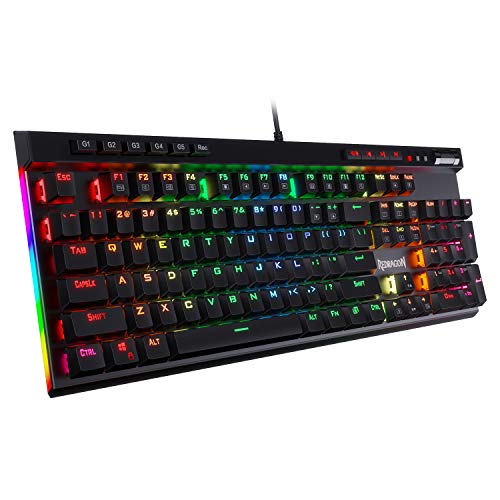
Redragon Full-Size Blue Switch Keyboard
Best for: Gaming and typing with room to change
- Switch Type
- Blue Switch (what this guide is about)
- Form Factor
- Full-size
- Connectivity
- Wired
- Backlighting
- RGB
- Keycap Material
- Double-shot
- Use
- Gaming
View on Amazon: Redragon Full-Size Blue Switch Keyboard Affiliate link
The Redragon K580 is our top pick for its mix of clicks and flexibility. It has five macro keys that record combos with no software, dedicated media controls, double-shot keycaps and a socket that accepts almost any switch. Its blue switches are rated for 50 million keystrokes.
Pros
- 5 on-board macro keys
- Swap-ready socket
- Dedicated media controls
- Double-shot keycaps
Cons
- Heavy at 2.65 pounds
- Full size takes up desk space
Good fit if
- You want macros and media keys
- You may want a different switch later
Skip if
- You have a small desk
- You do not need macro keys
Verdict: The most versatile blue switch board here.

MageGee MK-Box 68-Key Blue Switch Keyboard
Best for: Small desks that need arrows
- Switch Type
- Blue Switch (what this guide is about)
- Form Factor
- 60%
- Connectivity
- Wired
- Backlighting
- Blue LED
- Keycap Material
- Double-color injection
- Use
- Gaming
View on Amazon: MageGee MK-Box 68-Key Blue Switch Keyboard Affiliate link
The MageGee MK-Box keeps separate arrow keys and F-key functions in a 68-key layout about 12.1 inches long. It is light at 1.12 pounds, has a detachable USB cable, and needs no drivers. Lighting is limited to blue LEDs with about 15 modes.
Pros
- Separate arrow keys
- Detachable USB cable
- Double kickstand feet
- Works without drivers
Cons
- Blue backlight only
- No hot-swap support listed
Good fit if
- You want a small, low-cost board
- You move it between desks
Skip if
- You want RGB
- You may want to swap switches
Verdict: A simple, cheap way to get clicky switches on a small desk.

RK Royal Kludge Retro Typewriter Mechanical Keyboard
Best for: Retro style with RGB
- Switch Type
- Blue Switch (what this guide is about)
- Form Factor
- Full size (108 keys)
- Connectivity
- Wired
- Backlighting
- RGB
- Case Material
- Aluminium alloy
- Use
- Gaming
View on Amazon: RK Royal Kludge Retro Typewriter Mechanical Keyboard Affiliate link
The RK S108 brings typewriter style to a 108-key layout, with round keycaps, a metal panel, a detachable wrist rest and RGB sidelights. RK lists up to 168 lighting modes and non-conflicting keys. It is plug and play on Windows, Linux and Mac.
Pros
- Round typewriter keycaps
- Detachable wrist rest
- Metal panel
- Up to 168 lighting modes
Cons
- Round keycaps are not for everyone
- Large, at about 17.4 inches long
Good fit if
- You like retro style
- You need a number pad
Skip if
- You prefer standard keycaps
- You have a narrow desk
Verdict: A fun full-size pick if the retro look is the appeal.
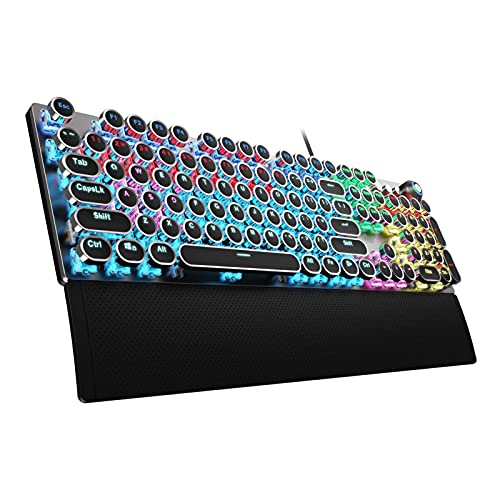
AULA Typewriter Mechanical Keyboard with Blue Switches
Best for: Retro typing with wrist support
- Switch Type
- Blue Switch (what this guide is about)
- Form Factor
- 104 Keys
- Connectivity
- USB wired
- Backlighting
- Rainbow LED
- Keycap Material
- Double-shot injection molded
- Case Material
- Aluminium alloy
View on Amazon: AULA Typewriter Mechanical Keyboard with Blue Switches Affiliate link
The AULA F2088 pairs round typewriter keycaps with an aluminum alloy panel and a magnetic wrist rest. It has 104 keys, dedicated media controls and rainbow LED lighting, and it weighs 2.25 pounds. It costs less than the RK S108 at our last check.
Pros
- Magnetic wrist rest
- Aluminum alloy panel
- Dedicated media controls
- Lower price than the RK S108
Cons
- Rainbow lighting, not full RGB
- Round keycaps are a matter of taste
Good fit if
- You want a retro board with a wrist rest
- You want media controls
Skip if
- You want per-key RGB
- You prefer modern keycaps
Verdict: A good value alternative for retro fans.

Redragon TKL Hot-Swap Blue Switch Keyboard
Best for: A durable TKL at a low price
- Switch Type
- Blue Switch (what this guide is about)
- Form Factor
- TKL (87-key)
- Connectivity
- Wired
- Hot-Swap Support
- Yes (3-pin)
- Backlighting
- RGB
- Keycap Material
- Double-shot PBT
View on Amazon: Redragon TKL Hot-Swap Blue Switch Keyboard Affiliate link
The Redragon K552P is an 87-key TKL with hot-swappable blue switches, a metal frame, a spill-resistant design and double-shot PBT keycaps. It offers 18 RGB modes, N-key rollover and a Windows key lock. Stock was low at our last check.
Pros
- Hot-swappable blue switches
- Double-shot PBT keycaps
- Metal frame
- N-key rollover
Cons
- Stock was low at last check
- Heavy for its size at 2.2 pounds
Good fit if
- You want a TKL layout
- You want quality keycaps at a low price
Skip if
- You need a number pad
- You need it in stock now
Verdict: Excellent value on paper if it is available.

YSCP 104-Key Retro Typewriter Keyboard
Best for: Budget retro style
- Switch Type
- Blue Switch (what this guide is about)
- Form Factor
- 104 Keys
- Connectivity
- Wired USB
- Backlighting
- Rainbow / RGB
- Keycap Material
- Dual-color injection-molded
- Use
- Gaming
View on Amazon: YSCP 104-Key Retro Typewriter Keyboard Affiliate link
The YSCP HJK917 is a low-cost typewriter-style board with round dual-color keycaps, RGB lighting and adjustable sidelights. It lists 26-key anti-ghosting and wide system support. The listing says 104 keys but gives a 13.8-inch length, so check its size.
Pros
- Low-cost retro style
- Adjustable sidelights
- Dual-color injection keycaps
- Works with many systems
Cons
- Size details conflict in the listing
- Anti-ghosting limited to 26 keys
Good fit if
- You want the typewriter look for less
- You use several systems
Skip if
- You need certain dimensions
- You need full key rollover
Verdict: A cheap way to try the retro style, once you have checked the size.

DIERYA Compact 60% Blue Switch Keyboard
Best for: Low-cost wireless clicks
- Switch Type
- Blue Switch (what this guide is about)
- Form Factor
- 60%
- Connectivity
- Bluetooth 5.0, 2.4G, wired USB
- Backlighting
- RGB
- Use
- Gaming
- Color
- Black
View on Amazon: DIERYA Compact 60% Blue Switch Keyboard Affiliate link
The DIERYA DK63 is a wireless 63-key board with directional keys and 2.4GHz, Bluetooth 5.0 and USB modes. It lists a 3000mAh battery, about 8 hours at maximum backlight, and 18 RGB modes. Its blue switches list 50g of force and about 65dB.
Pros
- Three connection modes
- Includes directional keys
- 18 RGB modes
- Light at 1.41 pounds
Cons
- Short listed runtime at full backlight
- Listing is focused on Windows
Good fit if
- You want clicky switches without a cable
- You want a small board
Skip if
- You want longer runtime with lights on
- You mainly use a Mac
Verdict: An affordable wireless option if you can keep the lights low.
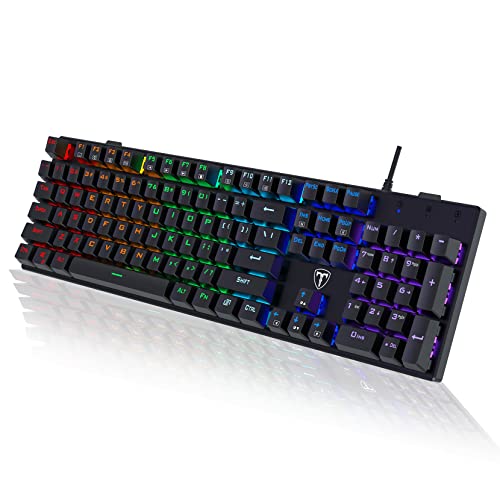
RisoPhy Full-Size Wired Blue Switch Keyboard
Best for: Low-cost full-size typing
- Switch Type
- Blue Switch (what this guide is about)
- Form Factor
- Full-size
- Connectivity
- USB Wired
- Backlighting
- Rainbow LED
- Keycap Material
- Double injection ABS
- Use
- Gaming
View on Amazon: RisoPhy Full-Size Wired Blue Switch Keyboard Affiliate link
The RisoPhy is a low-priced 104-key full-size board with ABS keycaps, nine backlight modes and four drainage holes. A keycap puller is included, and it has foldable feet and rubber pads. It is about 16.9 inches long.
Pros
- Low price for full-size
- Includes a keycap puller
- Four drainage holes
- Foldable rear feet
Cons
- ABS keycaps
- No hot-swap support listed
Good fit if
- You want a cheap full-size board
- You use a number pad
Skip if
- You want PBT keycaps
- You want to swap switches
Verdict: Good basic value if you need a number pad.

DIERYA 68-Key Blue Switch Mini Keyboard
Best for: Compact Windows setups
- Switch Type
- Blue Switch (what this guide is about)
- Form Factor
- 60%
- Connectivity
- Bluetooth 5.0, 2.4GHz, USB-C wired
- Backlighting
- Blue LED
- Use
- Gaming
- Dimensions
- 11.4 × 3.89 × 1.37 inches
View on Amazon: DIERYA 68-Key Blue Switch Mini Keyboard Affiliate link
The DIERYA T68SE has 68 keys and blue switches in about 11.4 inches, with 19 lighting modes on a blue LED backlight. It lists Windows and Linux support, with Mac only partly compatible. Its title says wired, though one listing feature mentions tri-mode wireless.
Pros
- Very compact
- Full anti-ghosting
- 19 lighting modes
- Low price
Cons
- Listing conflicts on wireless
- Mac only partly compatible
Good fit if
- You use Windows or Linux
- You want a small wired board
Skip if
- You rely on a Mac
- You need wireless for certain
Verdict: A decent small board, but assume it is wired unless the seller confirms otherwise.
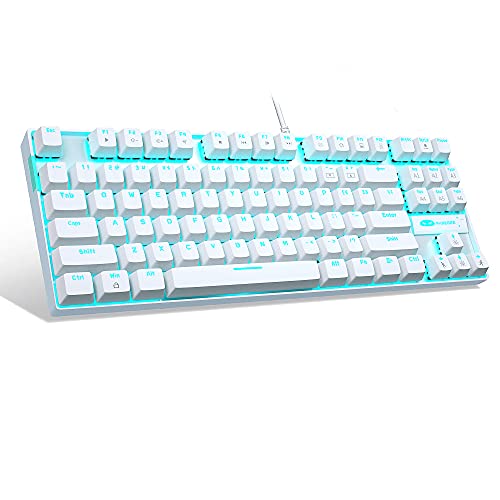
MageGee 87-Key Wired Mechanical Keyboard
Best for: Low-cost metal-panel TKL
- Switch Type
- Blue Switch (what this guide is about)
- Form Factor
- Compact 87-key
- Connectivity
- USB 2.0 wired
- Backlighting
- LED Ice Blue
- Keycap Material
- Double-shot injection
- Case Material
- Metal panel
View on Amazon: MageGee 87-Key Wired Mechanical Keyboard Affiliate link
The MageGee MK-Star is an 87-key wired board with a metal panel, a splash-proof design and double-shot keycaps. It has 21 ice blue backlight modes and 12 multimedia keys, and works without drivers on Windows, Linux and Mac. It is about 13.9 inches long.
Pros
- Metal panel
- Splash-proof design
- 12 multimedia keys
- Very low price
Cons
- Ice blue lighting only
- Listed height looks too low, so check it
Good fit if
- You want a low-cost TKL
- You want multimedia keys
Skip if
- You want RGB
- You need hot-swap support
Verdict: Strong basic value for a metal-paneled TKL.
CACKBIRD 60% Wired Mechanical Keyboard
Best for: Trying blue switches for less
- Switch Type
- Blue Switch (what this guide is about)
- Form Factor
- 60%
- Connectivity
- Wired Type-C
- Backlighting
- 18 LED Rainbow
- Keycap Material
- Double injection ABS
- Use
- Gaming
View on Amazon: CACKBIRD 60% Wired Mechanical Keyboard Affiliate link
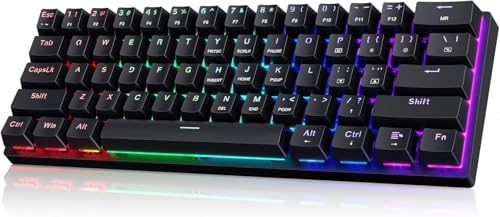
This 61-key CACKBIRD board was the lowest-priced pick at our last check. It has blue mechanical switches, a long detachable cable, 18 rainbow backlight effects and full-key anti-ghosting, and works without drivers on Windows and Mac OS.
Pros
- Lowest price here at last check
- 18 lighting effects
- Detachable cable
- No drivers required
Cons
- No dedicated arrow keys on a 61-key layout
- Limited brand detail in the listing
Good fit if
- You want to try blue switches cheaply
- You want a compact board
Skip if
- You want dedicated arrows
- You prefer a known brand
Verdict: A low-risk way to find out whether you like blue switches.

NuPhy Air60 V2 Low Profile 60%
Best for: Portable clicky typing
- Switch Type
- Blue Switch (what this guide is about)
- Form Factor
- 60%
- Connectivity
- Bluetooth 5.1, 2.4GHz, USB-C
- Backlighting
- RGB
- Case Material
- Aluminum
- Color
- Black
View on Amazon: NuPhy Air60 V2 Low Profile 60% Affiliate link
The NuPhy Air60 V2 with Gateron Blue switches is a portable 64-key board with a low profile, weighing 1.02 pounds. It has QMK/VIA, Bluetooth 5.1, 2.4GHz and USB-C, and a 2500mAh battery, and NuPhy lists 30-90 hours with all lights on. Stock was low at our last check.
Pros
- Very light and low profile
- QMK/VIA
- Three connection modes
- Connects to up to 4 devices
Cons
- No function row
- Stock was low at last check
- Most expensive board here
Good fit if
- You want a portable clicky board
- You use more than one device
Skip if
- You use function keys often
- You want a low price
Verdict: The clear choice here if you want to travel with clicky switches.

DIERYA DK61se 60% Blue Switch Keyboard
Best for: Maximum mouse room
- Switch Type
- Blue Switch (what this guide is about)
- Form Factor
- 60%
- Connectivity
- Wired
- Backlighting
- LED
- Use
- Gaming
- Color
- Black
View on Amazon: DIERYA DK61se 60% Blue Switch Keyboard Affiliate link
The DIERYA DK61se is a 61-key wired board that handles many functions through FN combinations. It has a fixed backlight color with 19 modes, full anti-ghosting and stair-style keycaps. It is about 11.5 inches long and weighs 1.6 pounds.
Pros
- Very compact 61-key layout
- Full anti-ghosting
- 19 backlight modes
- Low price
Cons
- Fixed backlight color
- Arrows and other functions rely on FN combinations
Good fit if
- You want the most mouse room
- You do not mind learning FN shortcuts
Skip if
- You use arrows constantly
- You want RGB
Verdict: A straightforward small board if you are happy using FN combinations.
Specifications side by side
| Spec | Redragon Full-Size Blue Switch Keyboard | MageGee MK-Box 68-Key Blue Switch Keyboard | RK Royal Kludge Retro Typewriter Mechanical Keyboard | AULA Typewriter Mechanical Keyboard with Blue Switches | Redragon TKL Hot-Swap Blue Switch Keyboard | YSCP 104-Key Retro Typewriter Keyboard | DIERYA Compact 60% Blue Switch Keyboard | RisoPhy Full-Size Wired Blue Switch Keyboard | DIERYA 68-Key Blue Switch Mini Keyboard | MageGee 87-Key Wired Mechanical Keyboard | CACKBIRD 60% Wired Mechanical Keyboard | NuPhy Air60 V2 Low Profile 60% | DIERYA DK61se 60% Blue Switch Keyboard |
|---|---|---|---|---|---|---|---|---|---|---|---|---|---|
| Switch Type | Tactile Blue | Mechanical blue switch | Mechanical Blue | Mechanical blue | Clicky Blue | Blue Switch | Blue Switch (Tactile & Clicky) | Blue | Clicky Blue Switch | Mechanical Blue | Blue switch | Gateron Blue | Mechanical Blue (tactile and clicky) |
| Form Factor | Full-size | 60% | Full size (108 keys) | 104 Keys | TKL (87-key) | 104 Keys | 60% | Full-size | 60% | Compact 87-key | 60% | 60% | 60% |
| Connectivity | Wired | Wired | Wired | USB wired | Wired | Wired USB | Bluetooth 5.0, 2.4G, wired USB | USB Wired | Bluetooth 5.0, 2.4GHz, USB-C wired | USB 2.0 wired | Wired Type-C | Bluetooth 5.1, 2.4GHz, USB-C | Wired |
| Hot-Swap Support | not stated | not stated | not stated | not stated | Yes (3-pin) | not stated | not stated | not stated | not stated | not stated | not stated | not stated | not stated |
| Backlighting | RGB | Blue LED | RGB | Rainbow LED | RGB | Rainbow / RGB | RGB | Rainbow LED | Blue LED | LED Ice Blue | 18 LED Rainbow | RGB | LED |
| Keycap Material | Double-shot | Double-color injection | not stated | Double-shot injection molded | Double-shot PBT | Dual-color injection-molded | not stated | Double injection ABS | not stated | Double-shot injection | Double injection ABS | not stated | not stated |
| Case Material | not stated | not stated | Aluminium alloy | Aluminium alloy | Metal frame | not stated | not stated | not stated | not stated | Metal panel | not stated | Aluminum | not stated |
| Media Controls | not stated | not stated | not stated | Volume Knob | not stated | not stated | not stated | not stated | not stated | not stated | not stated | not stated | not stated |
| Use | Gaming | Gaming | Gaming | Gaming | Gaming | Gaming | Gaming | Gaming | Gaming | Gaming | Gaming | not stated | Gaming |
| Design | not stated | not stated | Typewriter | Typewriter | Ergonomic | Typewriter | not stated | not stated | not stated | not stated | not stated | not stated | not stated |
| Color | Blue Switch | Grey/Blue Switch | Black | Black | Clicky Blue Switches | White RGB | Cool Black | Black | Black | White/Blue Switch | White/Blue Switch | Premium Black | Black | Black |
| Game Genre | MMO | not stated | not stated | not stated | not stated | not stated | not stated | not stated | not stated | not stated | not stated | not stated | not stated |
| Operating System | not stated | Mac, Windows | not stated | not stated | not stated | not stated | Windows | Mac | not stated | Windows | Mac | Mac, Windows | Windows |
| Ergonomic Features | not stated | not stated | Wrist Rest | Wrist Rest | not stated | not stated | not stated | not stated | not stated | not stated | not stated | not stated | not stated |
| Dimensions | 0.98 × 5.91 × 15.7 inches | 12.1 × 3.9 × 1.5 inches | 17.4 × 7.2 × 1.6 inches | 17.1 × 4.84 × 1.5 inches | 13.9 × 4.84 × 1.46 inches | 13.8 × 4.96 × 1.38 inches | 11.5 × 4.02 × 0.98 inches | 16.9 × 4.72 × 0.98 inches | 11.4 × 3.89 × 1.37 inches | 13.9 × 5.1 × 0.55 inches | 12.2 × 5.43 × 1.57 inches | 11.7 × 4.21 × 0.79 inches | 11.5 × 4.02 × 1.65 inches |
| Weight | 2.65 pounds | 1.12 pounds | 2.2 pounds | 2.25 pounds | 2.2 pounds | 1.1 pounds | 1.41 pounds | not stated | not stated | 1.96 pounds | not stated | 1.02 pounds | 1.6 pounds |
| Size | Full Size | not stated | blue switch | Round Keycaps | Wired RGB | not stated | Blue Switch | Full-size | Wired | not stated | not stated | Gateron Blue Switch | Blue Clicky Switch |
| Model | K580 | MKBox | 108 | F2088 | K552W-RGB | HJK917-7 | DK63 | not stated | Dk68 | MK-Star White | not stated | Air60 V2 | DK61se |
Are blue switches worth it?
Blue switches are worth it if you enjoy clear feedback and work somewhere noise is not a problem. Listings describe a tactile bump plus an audible click, so you know when a key registers. They are a poor choice for shared spaces, and many fast gamers prefer smoother linear switches.
Worth it if
- You type alone and like hearing each key press.
- You want strong tactile feedback when typing.
Skip it if
- You share a room or use a microphone often.
- You prefer a quiet or smooth key press.
If you also evaluate kitchen appliances by their hardware specifications, you can compare motor and capacity data for a blue stand mixer.
How we chose these keyboards
We checked each listing for blue switches and looked at current prices and specs. We removed a one-handed keypad and an AJAZZ listing whose details conflict on whether it has blue or red switches. We do not test keyboards, so comments about sound come from the listings.
The Redragon K580 is our editorial top pick. The others are ordered by availability and Amazon sales rank, so position reflects popularity and not typing quality.
How to choose a blue switch keyboard
-
Choose a layout you can live with
Blue switch boards here range from the 61-key DIERYA DK61se to the 108-key RK S108. Smaller boards leave more mouse room, but the DK61se handles many functions through an FN key combination. If you want arrows in a small frame, check the MageGee MK-Box or DIERYA DK63.
-
Decide if you may want to swap switches
Blue switches are a strong preference, so an escape route can be useful. The Redragon K580 accepts almost any switch and the K552P is listed as hot-swappable. Boards with no hot-swap support mean you are keeping those blue switches.
-
Compare wireless battery life
Wireless is not common here. The DIERYA DK63 lists a 3000mAh battery and about 8 hours at maximum backlight, and the NuPhy Air60 V2 lists 30-90 hours with lights on. Lower brightness should help, but check the listing for details.
-
Double-check conflicting listings
Budget listings sometimes contradict themselves. The DIERYA T68SE's title says wired while one feature describes tri-mode wireless, and the YSCP lists 104 keys but only a 13.8-inch length. If one of those details matters, confirm it before you buy.
Frequently asked questions
What is the best keyboard with blue switches?
The Redragon K580 is our top pick thanks to its switch socket, macro keys and media controls. Choose the MageGee MK-Box if you want a smaller, cheaper board.
Are blue switches too loud for an office?
Usually, yes. They are designed to click on every press. DIERYA lists about 65dB for the DK63, so check with the people around you, or consider a quieter switch type.
What is the cheapest blue switch keyboard here?
At our last check, the 61-key CACKBIRD board was the lowest at $22.99. It is wired and includes 18 rainbow backlight effects.
Are blue switches good for gaming?
They work for gaming, and the clear feedback can be satisfying, but many players prefer linear switches for fast repeated presses. It comes down to personal preference.
Can I replace blue switches later?
Only on some boards. The Redragon K580 and K552P are listed as hot-swappable. Check socket type and compatibility first, since not every board here supports swapping.