Best Mechanical Keyboards with Tactile Switch: 15 Spec-Based Picks
As an Amazon Associate we earn from qualifying purchases. Links on this page are affiliate links.
A mechanical keyboard with tactile switch hardware delivers physical actuation feedback without loud clicks. We compared 15 options based strictly on specifications published on their product listings. The RK Royal Kludge 75% Gasket Mechanical Keyboard takes the top spot because its gasket mount construction, hot-swappable tactile switches, and integrated volume knob offer flexible control in a compact 75% frame.
This guide helps you choose the right balance of layout size, mounting style, and wired or wireless connectivity for your desk setup.
Quick picks
The best fit for you
- You want a compact wired board with volume control RK Royal Kludge 75% Gasket Mechanical Keyboard It features a 75% form factor, wired connectivity, and a dedicated volume knob.
- You want a low-profile wireless tenkeyless board Logitech G515 Lightspeed TKL Tactile Keyboard It provides wireless connectivity in a tenkeyless layout measuring 0.87 inches in height.
- You need a full-size wired board for typing RK Royal Kludge R104 Full-Size Tactile Keyboard It provides a full-size layout with wired connectivity and gasket mounting.
- You want an advanced split ergonomic keyboard design Kinesis Advantage360 Split Ergonomic Keyboard It features an ergonomic split design with PBT keycaps and tactile switches.
Our 15 picks

RK Royal Kludge 75% Gasket Mechanical Keyboard
Best for: compact wired setups needing dedicated audio control
- Switch Type
- Tactile Switch
- Form Factor
- 75%
- Connectivity
- Wired
- Backlighting
- RGB
- Keycap Material
- PBT
- Hot-Swap Support
- Hot-Swappable
View on Amazon: RK Royal Kludge 75% Gasket Mechanical Keyboard
The RK Royal Kludge R75 is a compact 75% wired mechanical keyboard designed for desktop setups. It pairs tactile switches with a gasket-mounted design and internal dampening layers to reduce key vibration. The 3-pin and 5-pin hot-swappable PCB lets you swap switches without soldering, while the built-in CNC aluminum volume knob gives you direct audio control. It suits typists and gamers who want dedicated navigation keys without sacrificing desk space.
Pros
- Gasket mount structure with multi-layer dampening foam and silicone
- Hot-swappable PCB compatible with 3-pin and 5-pin switches
- Durable MDA profile PBT keycaps
- Dedicated CNC aluminum volume control knob
- South-facing RGB backlighting with 18 lighting modes
Cons
- Wired-only connectivity with no wireless options
- Lacks a dedicated tenkey number pad
Good fit if
- You want a compact 75% layout with dedicated arrow keys and an aluminum volume knob.
- You plan to swap switches using a 3-pin or 5-pin hot-swap PCB.
- You prefer thick PBT keycaps with sound-dampening gasket mounting.
Skip if
- You need a wireless keyboard for cable-free desk setups.
- You rely on a full-size number pad for daily data entry.
Verdict: RK Royal Kludge R75 75% Gasket Keyboard balances space-saving 75% proportions with hot-swappable flexibility and layered acoustic dampening. It provides comprehensive desk-bound typing features without excess bulk.

RK Royal Kludge 96% Mechanical Keyboard
Best for: compact desk setups needing a number pad
- Switch Type
- Tactile Switch
- Form Factor
- 96%
- Connectivity
- Wired
- Backlighting
- RGB
- Keycap Material
- Double shot PBT
- Hot-Swap Support
- Hot-Swappable
The RK Royal Kludge 96% Mechanical Keyboard gives you a compact 98-key layout that retains the numeric keypad. It features pre-lubed tactile beige switches mounted in a gasket design with five layers of sound dampening foam. The hot-swappable circuit board supports both 3-pin and 5-pin switches, paired with double-shot PBT keycaps in an MDA profile. It suits you if you need tactile typing feedback and full number entry within a space-saving wired setup.
Pros
- Hot-swappable PCB compatible with 3-pin and 5-pin switches
- Gasket mount structure with five layers of sound-absorbing foam
- Detachable aluminum volume knob and dedicated number pad
- Durable double-shot PBT keycaps in an MDA profile
Cons
- Wired-only connection without wireless operation
- Lacks an included wrist rest
Good fit if
- You need a dedicated numeric keypad in a compact 98-key form factor.
- You want pre-lubed tactile switches with hot-swap flexibility.
- You prefer a wired gasket-mounted keyboard with physical volume controls.
Skip if
- You require wireless connectivity for a cable-free desk.
- You prefer linear switches without tactile bump feedback.
Verdict: RK Royal Kludge 96% Mechanical Keyboard balances a space-saving 98-key layout with tactile switches, gasket dampening, and hot-swap versatility. It provides reliable wired operation and physical audio control without sacrificing the number pad.

Razer BlackWidow V4 Pro Tactile Gaming Keyboard
Best for: macro-heavy gaming and dedicated hardware control
- Switch Type
- Tactile Switch
- Backlighting
- Per-key Razer Chroma RGB
- Keycap Material
- Doubleshot ABS
- Use
- Gaming
- Color
- Black
- Dimensions
- 18.4 × 6.01 × 1.73 inches
View on Amazon: Razer BlackWidow V4 Pro Tactile Gaming Keyboard
The Razer BlackWidow V4 Pro is a full-size mechanical keyboard equipped with Razer Green tactile switches that provide physical keypress feedback. It features a programmable command dial, eight dedicated macro keys, and doubleshot ABS keycaps. The chassis measures 18.36 inches long, weighs 3.61 pounds, and includes a magnetic leatherette wrist rest with integrated underglow lighting. You will find it suits your setup if you require dedicated macro inputs and tactile hardware controls.
Pros
- Razer Green tactile switches for physical key feedback
- Programmable command dial and 8 dedicated macro keys
- Magnetic plush leatherette wrist rest with integrated underglow
- Doubleshot ABS keycaps with extra-thick walls
Cons
- Length of 18.36 inches takes up significant desk area
- Weight of 3.61 pounds reduces portability
- Three-side underglow requires attaching the wrist rest
Good fit if
- You want tactile key switches paired with a programmable dial and 8 macro keys.
- You need a full-size gaming keyboard with an included magnetic wrist rest.
- You prefer per-key backlighting combined with chassis underglow.
Skip if
- You have limited desk space and cannot fit an 18.36-inch keyboard.
- You need a lightweight board that is easy to travel with.
Verdict: Razer BlackWidow V4 Pro Tactile Keyboard delivers comprehensive physical input options through tactile switches, dedicated macro keys, and a programmable dial. It serves as a feature-dense gaming centerpiece for desks with ample space.

Logitech G515 Lightspeed TKL Tactile Keyboard
Best for: low-profile wireless tenkeyless gaming setups
- Switch Type
- Tactile Switch
- Form Factor
- TKL
- Connectivity
- LIGHTSPEED wireless, Bluetooth, wired
- Backlighting
- LIGHTSYNC RGB
- Keycap Material
- Double-shot PBT
- Use
- Gaming
View on Amazon: Logitech G515 Lightspeed TKL Tactile Keyboard
The Logitech G515 TKL Wireless Tactile Keyboard provides a low-profile tenkeyless layout built with factory-lubed GL Brown tactile switches and double-shot PBT keycaps. You get tri-mode connectivity through 1 ms LIGHTSPEED wireless, Bluetooth, or wired USB, along with up to 36 hours of continuous play. It suits you if you need a slim, space-saving tactile deck for gaming and multi-device setups.
Pros
- Tri-mode connectivity via 1 ms LIGHTSPEED wireless, Bluetooth, or wired USB
- Factory-lubed low-profile GL Brown tactile switches
- Durable double-shot PBT keycaps
- KEYCONTROL software support for up to 15 functions per key
Cons
- Continuous battery life rated at up to 36 hours
- No numeric keypad due to tenkeyless form factor
Good fit if
- You want a low-profile tenkeyless build with tactile switches.
- You need tri-mode wireless and Bluetooth switching between systems.
- You want double-shot PBT keycaps and per-key function programming.
Skip if
- You need a dedicated numeric keypad for data entry.
- You need wireless battery life longer than 36 continuous hours.
Verdict: Logitech G515 TKL Wireless Tactile Keyboard delivers low-profile tactile switching and tri-mode wireless in a durable, compact frame. It is an efficient choice when desk clearance and responsive wireless connections are your top priorities.
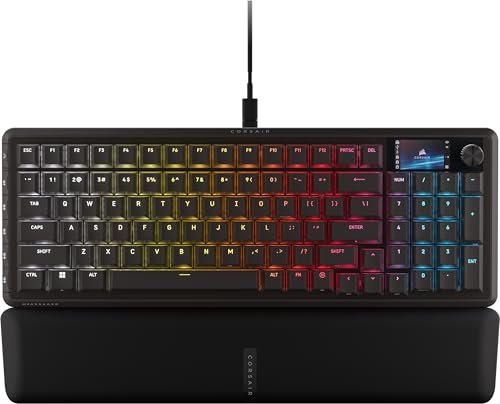
Corsair Vanguard 96 RGB Tactile Keyboard
Best for: Gamers and streamers wanting compact tactile control
- Switch Type
- Tactile Switch
- Form Factor
- 96%
- Connectivity
- Wired
- Backlighting
- RGB
- Use
- Gaming
- Color
- Black
The Corsair Vanguard 96 RGB Tactile Keyboard gives you a 96% layout equipped with tactile switches, retaining a tenkey number pad and dedicated arrow keys in a compact frame. It features an integrated 1.9-inch LCD screen, six programmable G-keys with Elgato Virtual Stream Deck integration, and an 8,000Hz polling rate over a wired connection. This setup suits gamers and desktop streamers who want fast tactile input without sacrificing numeric data entry.
Pros
- 8,000Hz hyper-polling rate
- Built-in 1.9-inch color LCD screen and rotary dial
- Six dedicated G-keys with Elgato Virtual Stream Deck support
- 96% layout includes number pad and arrow keys
Cons
- Wired-only connection with no wireless support
- No wrist rest listed in specifications
Good fit if
- You need a dedicated number pad within a condensed desk footprint.
- You want an 8,000Hz polling rate and dedicated macro keys for streaming.
Skip if
- You require wireless connectivity via Bluetooth or 2.4GHz.
- You prefer a compact layout without extra macro columns.
Verdict: Corsair Vanguard 96 RGB Tactile Keyboard delivers high-speed 8,000Hz wired performance and streaming shortcuts in a condensed 96% form factor.

RK Royal Kludge R98 Pro Wireless Keyboard
Best for: wireless multi-device typing with a compact number pad
- Switch Type
- Tactile Switch
- Form Factor
- 98%
- Connectivity
- Bluetooth, 2.4GHz wireless, USB-C
- Backlighting
- RGB
- Keycap Material
- PBT
- Hot-Swap Support
- Hot-Swappable
The RK Royal Kludge R98 Pro is a 98% wireless mechanical keyboard configured with pre-lubed tactile Beige switches. Its gasket-mounted build incorporates five cushioning layers and MDA-profile PBT keycaps to balance tactile feedback with dampening. You can connect across Bluetooth, 2.4GHz wireless, or USB-C. Powered by a 7500mAh battery, it suits you if you need a number pad, volume knob, and hot-swappable hardware.
Pros
- Tri-mode connectivity via Bluetooth, 2.4GHz wireless, and USB-C
- Hot-swappable PCB compatible with 3-pin and 5-pin switches
- Large 7500mAh battery rated up to 365 hours without backlighting
- Gasket mount with 5 sound-dampening cushioning layers
- MDA-profile PBT keycaps and swappable volume knob
Cons
- 98% layout takes up more desk width than 75% or TKL formats
- No included wrist rest
Good fit if
- You want a tactile keyboard with a number pad and volume knob in a compact 98% footprint.
- You need tri-mode wireless connectivity with long battery runtimes between charges.
- You plan to swap switches easily using 3-pin or 5-pin hot-swap sockets.
Skip if
- You want an ultra-compact 60% or 75% layout to maximize mouse space.
- You prefer a keyboard with an integrated wrist rest.
Verdict: RK Royal Kludge R98 Pro Wireless Keyboard delivers versatile tri-mode connectivity, deep switch customization, and tactile switches inside an efficient 98% frame. It balances full-size utility with gasket-mounted typing dampening.

DIERYA 60% Wired Tactile Keyboard
Best for: compact desktop setups needing tactile switches
- Switch Type
- Tactile Switch
- Form Factor
- 60%
- Connectivity
- Wired
- Backlighting
- LED
- Use
- Gaming
- Color
- Black
The DIERYA 60% Wired Tactile Keyboard gives you a compact 61-key footprint measuring 11.52 by 4.02 inches. It features mechanical brown tactile switches that deliver subtle feedback without loud clicks. A wired connection handles inputs alongside full anti-ghosting across all keys. Single-color LED backlighting offers 19 preset modes. You will find this layout practical if you need maximum desk space for mouse movement during gaming or typing on Windows.
Pros
- Mechanical brown switches provide tactile feedback
- Compact 61-key layout maximizes desk room
- Full anti-ghosting prevents key conflicts
- 19 built-in LED backlight modes
Cons
- Fixed-color LED lighting lacks RGB customization
- Wired-only connection with no wireless options
- Requires FN key combinations for missing dedicated keys
Good fit if
- You want a space-saving 61-key layout for wider mouse clearance.
- You prefer tactile brown switches for gaming and everyday typing.
- You rely on full anti-ghosting for concurrent key presses.
Skip if
- You need dedicated arrow keys, function keys, or a number pad.
- You require multi-color RGB lighting instead of a fixed backlight color.
- You want wireless Bluetooth or 2.4 GHz connectivity.
Verdict: DIERYA 60% Wired Tactile Keyboard delivers core tactile switch performance and full anti-ghosting in an ultra-compact footprint. It covers essential gaming and typing needs if you do not require wireless connectivity or dedicated navigation keys.

Corsair K65 Plus Wireless 75% Tactile Keyboard
Best for: compact wireless tactile gaming setups
- Switch Type
- Tactile Switch
- Form Factor
- 75%
- Connectivity
- Bluetooth, 2.4GHz wireless, USB wired
- Backlighting
- RGB
- Keycap Material
- Double-shot PBT
- Hot-Swap Support
- Hot-Swappable
View on Amazon: Corsair K65 Plus Wireless 75% Tactile Keyboard
The Corsair K65 Plus Wireless is a compact 75% gaming keyboard equipped with pre-lubricated MLX Fusion tactile switches. Its hot-swappable circuit board lets you change switch hardware without soldering, while double-shot PBT keycaps preserve surface texture during daily typing. It provides three connection modes: low-latency 2.4GHz wireless, Bluetooth, and wired USB. This compact setup suits you if you want tactile feedback and wireless flexibility while saving desk space.
Pros
- Pre-lubricated Corsair MLX Fusion tactile switches
- Hot-swappable PCB for solder-free switch replacement
- Tri-mode connectivity: 2.4GHz wireless, Bluetooth, and wired USB
- Durable PBT double-shot keycaps with per-key RGB shine-through
Cons
- Lacks dedicated numeric keypad due to 75% layout
- Does not include an integrated wrist rest
Good fit if
- You want pre-lubed tactile switches with a hot-swappable PCB.
- You need versatile connectivity across 2.4GHz wireless, Bluetooth, and USB wired.
- You prefer a 75% compact footprint to leave extra room for mouse movement.
Skip if
- You need a full-size layout with a dedicated number pad.
- You prefer linear switches instead of tactile feedback.
Verdict: Corsair K65 Plus Wireless 75% Tactile Keyboard delivers versatile tri-mode wireless connectivity and pre-lubed tactile switches in a compact, hot-swappable format. It provides solid customizability and durable PBT keycaps for space-conscious setups.

Logitech G 75% TMR Tactile Keyboard
Best for: gamers wanting hybrid analog and tactile control
- Switch Type
- Tactile Switch
- Form Factor
- 75%
- Backlighting
- LIGHTSYNC RGB
- Keycap Material
- Double-shot PBT
- Case Material
- Recycled plastic
- Use
- Gaming
This 75-percent gaming keyboard combines tactile mechanical switches with 39 dedicated TMR analog switch beds. It includes nine Gateron K20 analog switches, allowing you to configure rapid trigger and actuation distances between 0.1 and 4.0 mm. You get up to an 8,000 Hz report rate, double-shot PBT keycaps, and a silicone gasket mount. It suits you if you want compact tactile typing alongside modular analog controls for gaming.
Pros
- Up to 8,000 Hz report rate with 0.125 ms response time
- Adjustable actuation from 0.1 to 4.0 mm with Rapid Trigger support
- Silicone gasket mount design with double-shot PBT keycaps
- Includes 9 Gateron K20 analog switches for 39 TMR sockets
Cons
- Only 9 analog switches included for 39 compatible sockets
- 75-percent layout lacks a dedicated numeric keypad
- No wireless connectivity listed
Good fit if
- You want adjustable actuation depths and Rapid Trigger on select keys.
- You need an 8,000 Hz report rate for low-latency input.
- You prefer a compact 75-percent layout with double-shot PBT keycaps.
Skip if
- You need a full-size layout with a dedicated numpad.
- You require wireless connectivity.
Verdict: Logitech G 75% TMR Tactile Keyboard delivers high-speed 8,000 Hz reporting and customizable analog actuation in a compact gasket-mounted frame. It serves well if you want standard tactile typing paired with modular analog inputs.
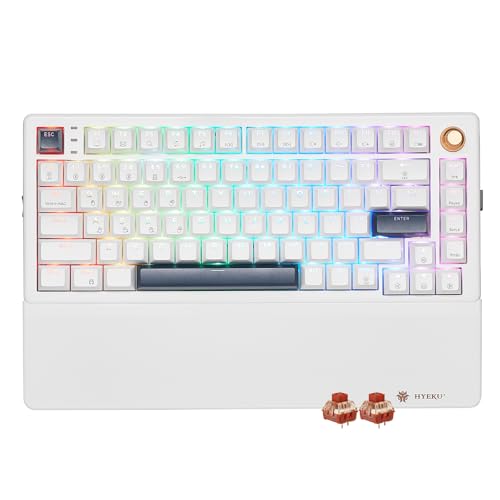
Hexgears 75% Wireless Tactile Mechanical Keyboard
Best for: tactile typing with included magnetic wrist support
- Switch Type
- Tactile Switch
- Form Factor
- 75%
- Connectivity
- Bluetooth 5.0, 2.4GHz, USB wired
- Backlighting
- RGB
- Keycap Material
- PBT
- Hot-Swap Support
- Hot-Swappable
View on Amazon: Hexgears 75% Wireless Tactile Mechanical Keyboard
You get an 82-key compact 75% layout equipped with pre-lubed Smoky Desert tactile switches and a magnetic wrist rest. The board supports tri-mode connectivity across Bluetooth 5.0, 2.4GHz wireless, and USB wired setups, backed by a 4600mAh battery. Gasket mounting and a single-key slotted PCB soften keystrokes. It suits typists and gamers wanting dedicated media knob control, hot-swap flexibility, and integrated ergonomic wrist support in a compact footprint.
Pros
- Includes detachable magnetic wrist rest and dual-stage kickstands
- Tri-mode connectivity across 2.4GHz wireless, Bluetooth 5.0, and USB
- Hot-swappable PCB compatible with 3-pin and 5-pin switches
- Integrated rotary media knob for quick volume adjustment
- Internal 4600mAh rechargeable battery
Cons
- 82-key compact layout lacks a dedicated numeric keypad
- Macro programming and custom lighting require standalone driver software
Good fit if
- You want an included magnetic wrist rest for wrist support.
- You need tri-mode wireless switching across multiple devices.
- You prefer a compact 75% layout with physical arrow keys and a volume knob.
Skip if
- You need a full-size number pad for data entry.
- You prefer an exclusively wired setup without battery maintenance.
Verdict: Hexgears 75% Wireless Tactile Mechanical Keyboard combines hot-swappable tactile switches, multi-device wireless pairing, and an included magnetic wrist rest into a compact desk footprint.

RK Royal Kludge R104 Full-Size Tactile Keyboard
Best for: full-size desktop typing with tactile switches
- Switch Type
- Tactile Switch
- Form Factor
- Full-size (104-key)
- Connectivity
- Wired
- Backlighting
- RGB
- Keycap Material
- Double-shot PBT
- Mounting Style
- Gasket Mount
View on Amazon: RK Royal Kludge R104 Full-Size Tactile Keyboard
The RK Royal Kludge R104 is a full-size wired mechanical keyboard equipped with pre-lubed Snowfall tactile switches. It features a gasket-mount build with internal dampening layers to reduce typing vibration, alongside durable double-shot PBT keycaps. You also get a dedicated hardware toggle to switch between Windows and macOS systems, plus full N-key rollover. It suits typists and professionals who need a full 104-key layout with a tactile bump.
Pros
- Full 104-key layout with dedicated number pad
- Gasket-mounted structure with internal dampening layers
- Pre-lubed Snowfall tactile switches
- Double-shot PBT keycaps
- Hardware switch for Windows and macOS modes
Cons
- Wired-only setup with no wireless options
- PCB is limited to 3-pin sleeve mechanical switches
Good fit if
- You need a dedicated number pad and standard 104-key layout.
- You want a gasket-mounted board with pre-lubed tactile switches.
- You frequently alternate between Windows and macOS computers.
Skip if
- You want wireless Bluetooth or 2.4 GHz connectivity.
- You plan to swap in standard 5-pin mechanical switches.
Verdict: RK Royal Kludge R104 Full-Size Tactile Keyboard delivers a cushioned gasket-mounted typing experience with a complete 104-key layout. It provides noticeable tactile feedback and direct dual-OS switching for desktop productivity.

Kinesis Advantage360 Split Ergonomic Keyboard
Best for: typists seeking advanced split ergonomics and programmability
- Switch Type
- Tactile Switch
- Form Factor
- Split ergonomic
- Connectivity
- USB-C
- Keycap Material
- PBT
- Dimensions
- 15 × 8 × 3 inches
- Weight
- 3.2 pounds
View on Amazon: Kinesis Advantage360 Split Ergonomic Keyboard
The Kinesis Advantage360 Split Ergonomic Keyboard features tactile Gateron Brown switches with a 50-million-press rating and durable PBT keycaps. Its design uses concave key wells, an orthogonal layout, thumb keys, and integrated tenting with three height settings. You can separate the two modules up to 10 inches using the included link cable. This setup suits you if you want deep ergonomic adjustments and hardware macro programming saved directly to onboard memory.
Pros
- Gateron Brown tactile switches rated for 50 million presses
- Split concave key wells with orthogonal layout and thumb clusters
- Three adjustable tenting height settings with 10-inch separation
- Onboard SmartSet engine with 9 profiles, 5 layers, and 8MB storage
- Durable PBT keycaps resist shine
Cons
- Requires wired USB connection for operation
- Separation limited to 10 inches with included cable
- Padded palm rests sold separately
Good fit if
- You need a contoured orthogonal layout with dedicated thumb keys.
- You want tactile key switches paired with adjustable tenting angles.
- You require onboard macro programming stored across multiple profiles.
Skip if
- You prefer a standard staggered key arrangement.
- You want a wireless Bluetooth setup.
Verdict: Kinesis Advantage360 Split Ergonomic Keyboard provides deep posture customization with tactile Gateron Brown switches and an orthogonal split design. It delivers extensive onboard remapping for typists moving away from conventional flat layouts.

Perixx Full-Size Retro Tactile Keyboard
Best for: retro desktop setups needing tactile switches
- Switch Type
- Tactile Switch
- Form Factor
- Full-size
- Connectivity
- USB wired
- Dimensions
- 18 × 6.65 × 1.34 inches
The Perixx Full-Size Retro Tactile Keyboard gives you a classic beige desktop layout paired with Gateron brown tactile switches. Its full-size build measures 17.95 by 6.65 inches and features curved SA spherical keycaps shaped for your fingertips. Because it uses a wired USB connection for Windows systems, you get continuous tactile feedback without managing batteries or wireless pairings.
Pros
- Gateron brown tactile mechanical switches
- Removable curved SA spherical keycaps
- Full-size 108-key layout with dedicated number pad
- Wired USB connection requires no battery charging
Cons
- No wireless connectivity options
- Only lists compatibility with Windows operating systems
Good fit if
- You want a full-size mechanical board with Gateron brown tactile switches.
- You prefer retro styling with tall, spherical SA-profile keycaps.
- You type on a Windows PC with an available USB-A port.
Skip if
- You need a compact tenkeyless footprint or wireless connectivity.
- You use macOS or other non-Windows operating systems.
Verdict: Perixx Full-Size Retro Tactile Keyboard delivers Gateron brown tactile switches and tall SA keycaps in a traditional wired format. It fits work spaces that need a dedicated number pad and retro aesthetics over compact portability.

Kinesis Freestyle Edge RGB Plus Tactile Split Keyboard
Best for: ergonomic split typing with Mac support
- Switch Type
- Tactile Switch
- Backlighting
- RGB
- Hot-Swap Support
- Hot-Swappable
- Design
- Ergonomic
- Operating System
- Mac
View on Amazon: Kinesis Freestyle Edge RGB Plus Tactile Split Keyboard
The Kinesis Freestyle Edge RGB Plus Tactile Split Keyboard delivers an ergonomic split configuration equipped with hot-swappable tactile switches. You get built-in RGB backlighting for key illumination alongside an included lift kit for angle adjustment. It lists Mac operating system support right out of the box. This design suits typists wanting tactile feedback paired with separated ergonomic modules to adjust shoulder and wrist alignment at your desk.
Pros
- Hot-swappable tactile switch sockets
- Ergonomic split-module design
- Per-key RGB backlighting
- Includes lift kit configuration
Cons
- Operating system support lists Mac only
- No wireless connectivity specified
- Lacks an integrated numeric keypad
Good fit if
- You need an ergonomic split layout with tactile feedback.
- You use a Mac operating system.
- You want switch-swapping capability and RGB lighting.
Skip if
- You require wireless connectivity options.
- You prefer a unified standard one-piece keyboard layout.
- You need an integrated number pad.
Verdict: Kinesis Freestyle Edge RGB Plus Tactile Split Keyboard pairs tactile hot-swappable switches with an adjustable split ergonomic layout. It offers Mac compatibility and RGB backlighting for users prioritizing posture.

Perixx Wireless Ergonomic Mechanical Keyboard
Best for: multi-device ergonomic typing setups
- Switch Type
- Tactile Switch
- Form Factor
- Split-key
- Connectivity
- Wired, 2.4 GHz, Bluetooth
- Backlighting
- RGB
- Design
- Ergonomic
- Color
- Black
View on Amazon: Perixx Wireless Ergonomic Mechanical Keyboard
The Perixx Wireless Ergonomic Mechanical Keyboard pairs low-profile brown tactile switches with a fixed one-piece split layout. You get multi-device connectivity across four devices using wired USB-C, 2.4 GHz wireless, and two Bluetooth channels. It features a built-in 3000 mAh battery, customizable RGB backlighting, and programmable macro keys. This board suits you if you type for long stretches across multiple systems and want an ergonomic posture.
Pros
- Quad connectivity via wired USB-C, 2.4 GHz wireless, and two Bluetooth profiles
- Low-profile brown tactile switches designed for quiet feedback
- Built-in 3000 mAh battery lasts up to one month of daily use
- Split-key layout designed to reduce wrist bending
Cons
- Wide 18.66-inch chassis requires substantial desk space
- Fixed one-piece design prevents adjusting the distance between key clusters
Good fit if
- You switch frequently between up to four devices across Windows and Mac.
- You want low-profile tactile brown switches in a split ergonomic format.
- You prefer a single unibody split frame over separate keyboard halves.
Skip if
- You have limited desk area for an 18.66-inch wide keyboard.
- You need independently positioned left and right keyboard modules.
Verdict: Perixx Wireless Ergonomic Mechanical Keyboard delivers tactile typing comfort through a fixed split layout and low-profile brown switches. Its flexible four-device wireless connectivity makes it a capable ergonomic choice for multi-screen workflows.
Specifications side by side
| Spec | RK Royal Kludge 75% Gasket Mechanical Keyboard | RK Royal Kludge 96% Mechanical Keyboard | Razer BlackWidow V4 Pro Tactile Gaming Keyboard | Logitech G515 Lightspeed TKL Tactile Keyboard | Corsair Vanguard 96 RGB Tactile Keyboard | RK Royal Kludge R98 Pro Wireless Keyboard | DIERYA 60% Wired Tactile Keyboard | Corsair K65 Plus Wireless 75% Tactile Keyboard | Logitech G 75% TMR Tactile Keyboard | Hexgears 75% Wireless Tactile Mechanical Keyboard | RK Royal Kludge R104 Full-Size Tactile Keyboard | Kinesis Advantage360 Split Ergonomic Keyboard | Perixx Full-Size Retro Tactile Keyboard | Kinesis Freestyle Edge RGB Plus Tactile Split Keyboard | Perixx Wireless Ergonomic Mechanical Keyboard |
|---|---|---|---|---|---|---|---|---|---|---|---|---|---|---|---|
| Switch Type | Silver Pro | Pre-lubed tactile beige | Green tactile mechanical | Low-profile GL Brown Tactile | not specified | Tactile Beige | Mechanical Brown (tactile) | CORSAIR MLX Fusion tactile | Tactile | Smoky Desert Switch - Tactile | Snowfall Tactile | Gateron Brown | Gateron Brown Tactile | Tactile | Low-profile brown tactile |
| Form Factor | 75% | 96% | not specified | TKL | 96% | 98% | 60% | 75% | 75% | 75% | Full-size (104-key) | Split ergonomic | Full-size | not specified | Split-key |
| Connectivity | Wired | Wired | not specified | LIGHTSPEED wireless, Bluetooth, wired | Wired | Bluetooth, 2.4GHz wireless, USB-C | Wired | Bluetooth, 2.4GHz wireless, USB wired | not specified | Bluetooth 5.0, 2.4GHz, USB wired | Wired | USB-C | USB wired | not specified | Wired, 2.4 GHz, Bluetooth |
| Backlighting | RGB | RGB | Per-key Razer Chroma RGB | LIGHTSYNC RGB | RGB | RGB | LED | RGB | LIGHTSYNC RGB | RGB | RGB | not specified | not specified | RGB | RGB |
| Keycap Material | PBT | Double shot PBT | Doubleshot ABS | Double-shot PBT | not specified | PBT | not specified | Double-shot PBT | Double-shot PBT | PBT | Double-shot PBT | PBT | not specified | not specified | not specified |
| Case Material | not specified | not specified | not specified | not specified | not specified | not specified | not specified | not specified | Recycled plastic | not specified | not specified | not specified | not specified | not specified | not specified |
| Hot-Swap Support | Hot-Swappable | Hot-Swappable | not specified | not specified | not specified | Hot-Swappable | not specified | Hot-Swappable | not specified | Hot-Swappable | not specified | not specified | not specified | Hot-Swappable | not specified |
| Mounting Style | Gasket Mount | Gasket Mount | not specified | not specified | not specified | Gasket Mount | not specified | not specified | not specified | Gasket Mount | Gasket Mount | not specified | not specified | not specified | not specified |
| Media Controls | Volume Knob | Volume Knob | not specified | not specified | not specified | Volume Knob | not specified | not specified | not specified | Volume Knob | not specified | not specified | not specified | not specified | not specified |
| Use | not specified | Gaming | Gaming | Gaming | Gaming | Gaming | Gaming | Gaming | Gaming | Gaming | not specified | not specified | not specified | not specified | not specified |
| Design | not specified | not specified | not specified | not specified | not specified | not specified | not specified | not specified | not specified | not specified | not specified | Ergonomic | not specified | Ergonomic | Ergonomic |
| Color | Green | Cyan | Black | White | Black | Cyan | Black | Black | White | White-82keys | Retro Grey | Dark Gray | Beige | Hotswap Tactile + Lift Kit | Black |
| Operating System | not specified | not specified | not specified | not specified | not specified | not specified | Windows | not specified | not specified | Mac, Windows | not specified | not specified | not specified | Mac | Mac, Windows |
| Ergonomic Features | not specified | not specified | not specified | not specified | not specified | not specified | not specified | not specified | not specified | Wrist Rest | not specified | not specified | not specified | not specified | not specified |
| Dimensions | 5.59 × 1.65 × 12.7 inches | 12.7 × 5.63 × 1.65 inches | 18.4 × 6.01 × 1.73 inches | 14.5 × 5.91 × 0.87 inches | 15.3 × 5.55 × 1.69 inches | 5.49 × 1.61 × 15.3 inches | 11.5 × 4.02 × 1.65 inches | 12.6 × 5.35 × 1.37 inches | 13 × 6.11 × 1.83 inches | not specified | 17.6 × 5.4 × 1.6 inches | 15 × 8 × 3 inches | 18 × 6.65 × 1.34 inches | not specified | 18.7 × 18.7 × 1.73 inches |
| Weight | not specified | 1.96 pounds | 3.61 pounds | 5.29 ounces | 2.19 pounds | not specified | not specified | 2.02 pounds | 2.2 pounds | not specified | 3 pounds | 3.2 pounds | not specified | not specified | not specified |
| Size | Hot-swap Switch | Hot Swappable Beige Switch | not specified | 1 Count (Pack of 1) | 8 khz | Tactile Beige Switches | Brown Tactile Switch | not specified | 75 percent | Tactile | not specified | not specified | not specified | not specified | not specified |
| Model | R75 | R98 Pro | RZ03-04680200-R3U1 | 920-012535 | CH-91E901F-NA | not specified | DK61se | CH-91D441F-NA | 920-013948 | not specified | R104-02 | KB360-GBR | 12335 | not specified | not specified |
Are Tactile Switches Worth It?
Tactile switches provide a physical bump during key travel to confirm each actuation. This physical response helps you register key inputs without needing to bottom out every stroke.
Specifications across these models pair tactile switches with fast 8,000Hz polling rates, anti-ghosting, and gasket-mounted acoustic dampening. You can find them in low-profile builds, ergonomic split frames, and hot-swappable boards. If your daily typing or gaming benefits from physical confirmation on every keypress, tactile switches deliver that balance across wired and wireless setups.
Worth it if
- You want physical keypress confirmation for typing or gaming.
- You prefer switches compatible with hot-swappable sockets for easy replacement.
- You need tactile feedback in low-profile or ergonomic split layouts.
Skip it if
- You prefer smooth linear switches with uninterrupted key travel.
- You require analog switches with customizable actuation depth.
If you need automated lighting controls for your desk setup, you can compare specifications for a smart switch with alexa across key hardware metrics.
How We Picked Tactile Keyboards
You see 15 mechanical keyboards chosen strictly by published specifications. Each model qualifies when its listing title or feature list specifies a tactile switch type. No keyboards are physically tested. All details come directly from published manufacturer specifications and listing data. You see only one size or layout variant per product family to keep comparisons clear.
The selections are ordered with products in stock first, then by Amazon sales rank (better-selling products first). Stock data refreshes daily on the page. You can compare key hardware specifications directly, including connectivity, mounting style, keycap material, and layout dimensions across every listed model.
Selecting the Best Tactile Mechanical Keyboard
-
Check the Mounting Style
Gasket mounts use layered dampening to soften bottom-out impacts and reduce casing vibration. Look for Gasket Mount under mounting style specs if you want softer keypresses during long typing sessions. If you prefer a firmer, stiffer key bottoming response, choose conventional mounting designs. The RK Royal Kludge 75% Gasket Mechanical Keyboard specifies a gasket mount build to reduce internal hollow sounds during tactile actuation.
-
Verify Hot-Swap Sockets
Check the switch socket specifications if you plan to alter your switch resistance or replace damaged components later. Keyboards labeled as hot-swappable let you pull switches directly from the board and press new ones into place without soldering tools. Fixed boards permanently solder switches into the circuit board, locking you into one switch model. The Corsair K65 Plus Wireless 75% Tactile Keyboard lists hot-swappable sockets, letting you swap switches without rebuilding the base board.
-
Review Keycap Material Specs
Examine keycap plastic composition before choosing your board. Listings specifying PBT keycaps use denser plastic blends that resist surface shine, oil absorption, and texture smoothing across extended typing periods. Boards without PBT designations commonly use basic ABS plastics, which develop polished spots quicker under high-frequency key striking. If you prioritize long-term surface texture and durability without buying secondary replacement keycap sets, confirm PBT construction in the specifications. The RK Royal Kludge 96% Mechanical Keyboard includes PBT keycaps directly in its standard configuration.
-
Check Physical Media Controls
Determine whether you need direct audio adjustments without using software key combinations. Hardware volume knobs let you rotate an integrated dial to increase, decrease, or mute desktop audio instantly while gaming or working in fullscreen applications. Keyboards lacking dedicated media hardware require multi-key function shortcuts or operating system taskbar adjustments to change output sound levels. If frequent sound adjustments are essential to your workflow, verify hardware knobs on the specification sheet. The Hexgears 75% Wireless Tactile Mechanical Keyboard includes a dedicated volume knob built into its top casing.
-
Evaluate Ergonomic Split Formats
Check the board design attribute if forearm rotation or shoulder width causes typing discomfort on standard horizontal keyboards. Models designated with split ergonomic designs divide the key clusters into separate modules or angled segments, letting you position your hands at natural shoulder-width intervals. Standard one-piece boards keep your wrists locked at an inward angle across long sessions. If you need adjustable arm spacing and contoured typing geometry, look specifically for ergonomic design listings. The Kinesis Advantage360 Split Ergonomic Keyboard specifies an ergonomic split structure designed for customized arm positions.
-
Confirm Operating System Support
Check the supported operating systems before finalizing a purchase, especially if you switch between desktop platforms. While most USB keyboards register core alphabetic typing universally, functional key mapping and system shortcuts differ across platforms. Boards specifying compatibility with both Mac and Windows provide proper Command and Option modifier layouts without third-party key remapping utilities. Keyboards restricted to Windows might lack native Apple modifier support out of the box. The Perixx Wireless Ergonomic Mechanical Keyboard explicitly lists compatibility for both Mac and Windows operating systems.
Frequently asked questions
Are tactile mechanical keyboards suitable for typing and office environments?
Yes, tactile keyboards work well for typing tasks because they provide physical feedback without loud audible clicks. The noticeable tactile bump indicates keystroke registration before bottoming out. Models like the RK Royal Kludge R104 Full-Size feature traditional layouts for office tasks, while gasket-mounted units offer cushioned typing feel across long work days.
Can you change tactile switches on a hot-swappable keyboard without soldering?
Yes, hot-swappable sockets let you remove and replace switch modules directly with a puller tool. You do not need soldering equipment to swap or test components. Boards such as the RK Royal Kludge R75, Corsair K65 Plus Wireless, and Hexgears 75% include hot-swap support, allowing you to install different compatible switches effortlessly.
How do polling rates impact tactile gaming keyboards?
Polling rates determine how frequently the keyboard reports input signals back to your computer. Standard models report at 1,000Hz, while high-performance gaming boards reach 8,000Hz. The Corsair Vanguard 96 RGB and Logitech G 75% TMR feature 8,000Hz reporting to transmit tactile key actuations with lower latency during competitive play.
Which ergonomic keyboard styles feature tactile mechanical switches?
Ergonomic tactile keyboards come in both fixed split and fully separated split layouts. The Perixx Wireless Ergonomic Mechanical Keyboard provides a fixed split design with low-profile brown switches. For adjustable spacing, models like the Kinesis Advantage360 and Kinesis Freestyle Edge RGB Plus offer split configurations designed to support natural wrist angles.
What keycap materials are available on tactile keyboards?
Many tactile mechanical keyboards feature PBT keycaps. PBT is a dense plastic valued for structural rigidity and wear resistance over extended typing sessions. Models in this guide equipped with PBT keycaps include the RK Royal Kludge R75, RK Royal Kludge R98 Pro, Corsair K65 Plus Wireless, and Kinesis Advantage360.
Do tactile mechanical keyboards support both Windows and Mac operating systems?
Several tactile keyboards offer dual-operating system compatibility across Windows and Mac platforms. The Hexgears 75% Wireless and Perixx Wireless Ergonomic keyboard explicitly list support for both Mac and Windows systems. Additionally, dedicated options like the Kinesis Freestyle Edge RGB Plus provide direct Mac compatibility for versatile desktop setups.
What connectivity options are available for tactile keyboards?
Tactile mechanical keyboards provide either wired connections or multi-mode wireless pairing. Wired options like the Razer BlackWidow V4 Pro and Corsair Vanguard 96 deliver direct cable setups. Wireless models such as the Logitech G515 Lightspeed TKL and Corsair K65 Plus offer cable-free desk placement, while the Hexgears 75% uses Bluetooth connectivity.