Best Mechanical Keyboards with Gasket Mount: 15 Spec-Based Picks
As an Amazon Associate we earn from qualifying purchases. Links on this page are affiliate links.
A mechanical keyboard with gasket mount cushions your keystrokes by placing dampening material between the switch plate and the case. This guide compares 15 models strictly using specifications published on the listings. The AULA 99-Key Wireless Gasket Keyboard leads the list because it combines an 8000mAh battery with a 99-key layout and linear switches.
Different designs balance board dimensions, battery capacities, and switch types for specific typing environments. This guide helps you decide which layout, connectivity mode, and internal dampening setup best fits your desktop needs.
Quick picks
The best fit for you
- You want long wireless runtime and a number pad. AULA 99-Key Wireless Gasket Keyboard Its 99-key layout features an 8000mAh battery, linear switches, and hot-swap support.
- You require silent keys for shared office spaces. SOLAKAKA 96% Wireless Gasket Mechanical Keyboard It features a silent noise level specification, 96% layout, and a 10,000mAh battery.
- You want a compact keyboard with media controls. SOLAKAKA A75 Compact Wireless Keyboard Its compact form factor includes an 81-key layout, wireless connectivity, and an integrated volume knob.
- You prefer a wired setup with tactile switches. RK Royal Kludge 75% Gasket Mechanical Keyboard It delivers a wired connection with factory tactile switches, PBT keycaps, and an onboard volume knob.
Our 15 picks

AULA 99-Key Wireless Gasket Keyboard
Best for: everyday wireless productivity with a number pad
- Mounting Style
- Gasket Mount (what this guide is about)
- Switch Type
- Pre-lubed linear
- Form Factor
- 96%
- Connectivity
- BT5.0, 2.4GHz wireless, USB wired
- Backlighting
- RGB
- Keycap Material
- Double shot PBT
The AULA 99-Key Wireless Gasket Keyboard provides a compact 96% layout with a dedicated number pad and arrow keys. It uses a gasket mounting structure paired with single-key PCB slotting and five sound-dampening layers. You get tri-mode connectivity covering 2.4GHz wireless, Bluetooth 5.0 across five devices, and wired USB-C. An 8000mAh rechargeable battery, hot-swappable switch sockets, and double-shot PBT keycaps make it suitable if you want a quiet, full-featured workspace keyboard.
Pros
- Gasket mount with single-key PCB slotting and five internal dampening layers
- High-capacity 8000mAh rechargeable battery
- Tri-mode connectivity supporting up to five devices via Bluetooth 5.0, 2.4GHz, and USB-C
- Hot-swappable PCB compatible with 3-pin and 5-pin switches
- Durable double-shot PBT keycaps
Cons
- Weighs 3.21 pounds, making it heavy for travel
- No built-in display screen or dedicated volume knob
Good fit if
- You need a compact 96% layout that keeps both arrow keys and a numeric keypad.
- You want multi-device wireless pairing with a large 8000mAh battery.
- You plan to swap 3-pin or 5-pin mechanical switches without soldering.
Skip if
- You prefer a lightweight keyboard for travel instead of a 3.21-pound unit.
- You require a built-in display screen or a physical volume knob.
Verdict: AULA 99-Key Wireless Gasket Keyboard pairs an 8000mAh battery with a cushioned, five-layer gasket mount design. It is a solid pick if you need numpad functionality and multi-device wireless connectivity.

Redragon Full-Size Gasket Tri-Mode Keyboard
Best for: full-size wireless typing with shortcut keys
- Mounting Style
- Gasket Mount (what this guide is about)
- Form Factor
- Full-size (108-key)
- Connectivity
- Bluetooth, 2.4 GHz wireless, USB-C
- Hot-Swap Support
- Yes (3-pin or 5-pin)
- Backlighting
- RGB
- Keycap Material
- Translucent PBT
This full-size board gives you a gasket-mounted design paired with five layers of internal sound dampening. You get 108 keys, including four dedicated hotkeys for mute, calculator, screen lock, and desktop shortcuts. It connects using USB-C, 2.4GHz wireless, or Bluetooth across multiple devices. Hot-swappable sockets support both three-pin and five-pin mechanical switches. It suits you if you need a complete numpad layout alongside cushioned typing feel and wireless flexibility.
Pros
- Gasket-mounted build with 5-layer internal noise dampening
- Tri-mode connectivity supporting USB-C, Bluetooth, and 2.4GHz wireless
- Hot-swappable sockets compatible with 3-pin and 5-pin switches
- Full-size 108-key layout with 4 dedicated shortcut keys
Cons
- Wide 18.9-inch length requires substantial desk surface
- No integrated rotary volume knob or display screen listed
Good fit if
- You need a dedicated number pad and direct shortcut keys for daily productivity.
- You switch between multiple systems using Bluetooth, 2.4GHz, and wired connections.
- You want to customize switch types using standard 3-pin or 5-pin replacements.
Skip if
- You want a compact desk footprint without a numeric keypad.
- You require dedicated hardware controls such as a physical volume knob.
Verdict: Redragon Full-Size Tri-Mode Gasket Keyboard delivers a complete 108-key setup with multi-device wireless and cushioned five-layer sound dampening. It provides standard desktop utility without sacrificing hot-swap switch customization.

Redragon Full-Size Gasket Wireless Keyboard
Best for: full-size productivity and tri-mode wireless typing
- Mounting Style
- Gasket Mount (what this guide is about)
- Form Factor
- Full-size 108-Key
- Connectivity
- USB-C, Bluetooth, 2.4GHz wireless
- Backlighting
- RGB
- Keycap Material
- PBT
- Use
- Gaming
This full-size board provides a 108-key layout with gasket mounting and three-layer noise dampening. You get tri-mode connectivity across USB-C, 2.4GHz, and Bluetooth to link multiple devices without re-pairing. Sockets support both 3-pin and 5-pin switches for solder-free replacements, paired with round PBT keycaps and customizable RGB backlighting. It suits you if you need a dedicated numpad, extra shortcut keys, and cushioned typing on an uncluttered desk.
Pros
- Tri-mode wireless via Bluetooth, 2.4GHz, and wired USB-C
- Gasket-mounted build with 3-layer internal sound dampening
- Hot-swappable sockets compatible with 3-pin and 5-pin switches
- 108-key full-size layout with 4 dedicated shortcut keys
Cons
- Large 17.7-inch footprint takes up significant desk space
- No built-in display screen or rotary volume knob listed
Good fit if
- You want a full 108-key layout with dedicated numpad and shortcut keys.
- You switch between multiple devices using Bluetooth, 2.4GHz wireless, or USB-C.
- You prefer hot-swappable switch sockets that accept both 3-pin and 5-pin options.
Skip if
- You need a compact layout to maximize mouse space on a small desk.
- You want hardware extras like a built-in LCD screen or volume knob.
Verdict: Redragon Full-Size Wireless Gasket Keyboard delivers a complete 108-key layout with gasket dampening, tri-mode wireless flexibility, and broad hot-swap switch compatibility. It gives you full desktop utility without needing a wired-only connection.

EPOMAKER Aula F75 75% Wireless Keyboard
Best for: compact desks needing cushioned acoustic typing
- Mounting Style
- Gasket Mount (what this guide is about)
- Switch Type
- LEOBOG Reaper Switch
- Form Factor
- 75%
- Connectivity
- Bluetooth, 2.4GHz, USB-C
- Backlighting
- RGB
- Keycap Material
- Double-shot PBT
The EPOMAKER Aula 75% Gasket Keyboard provides a compact 75-percent layout built around a gasket mount structure and a five-layer sound-absorbing internal system. It combines a 1.2 mm single-key slotted circuit board with pre-lubricated switches and double-shot PBT keycaps. Featuring Bluetooth, 2.4 GHz wireless, and wired USB modes powered by a 4000 mAh battery, it suits you if you want a cushioned acoustic profile on a smaller desk.
Pros
- Gasket mount structure backed by five layers of internal sound-absorbing padding
- Tri-mode connectivity supporting Bluetooth, 2.4 GHz wireless, and wired USB
- Hot-swappable single-key slotted PCB with an integrated multimedia control knob
- Internal 4000 mAh rechargeable battery
Cons
- Lacks a dedicated number pad due to the compact 75% form factor
- Weighs 2.2 pounds, making it relatively heavy to pack for travel
Good fit if
- You want a compact 75% keyboard with multi-layer acoustic dampening.
- You need tri-mode wireless connectivity paired with a 4000 mAh battery.
- You want a physical multimedia knob for immediate volume control.
Skip if
- You require a full numeric keypad for regular number input.
- You prefer an ultra-lightweight peripheral for frequent commuting.
Verdict: EPOMAKER Aula 75% Gasket Keyboard pairs flexible internal mounting with multi-layer dampening and versatile tri-mode wireless connectivity. It provides consistent keystroke absorption in a space-saving desk footprint.

Redragon 81-Key Wireless Gasket Keyboard
Best for: compact wireless setups needing media knob controls
- Mounting Style
- Gasket Mount (what this guide is about)
- Form Factor
- 81-Key
- Connectivity
- USB-C, Bluetooth, 2.4GHz wireless
- Backlighting
- RGB
- Media Controls
- Volume Knob
- Use
- Gaming
This 81-key wireless board gives you gasket-mounted construction paired with five layers of internal sound-dampening material for a softened typing feel. You can connect across three modes via 2.4GHz wireless, Bluetooth, or wired USB-C, while hot-swappable sockets support both 3-pin and 5-pin mechanical switches. A dedicated scroll knob controls volume and lighting directly. It suits you if you want a compact desk layout with flexible connectivity and customizable hardware.
Pros
- Gasket-mounted build with 5-layer noise dampening
- Tri-mode connectivity: Bluetooth, 2.4GHz wireless, and USB-C
- Hot-swappable sockets compatible with 3-pin and 5-pin switches
- Multi-function knob adjusts volume and RGB backlighting
Cons
- Lacks a dedicated numeric keypad
- Does not include the built-in LCD screen available on alternate models
Good fit if
- You want a gasket-mounted keyboard with five layers of sound dampening.
- You need tri-mode wireless switching between multiple devices.
- You prefer a physical knob to manage volume and lighting.
Skip if
- You require a numeric keypad for number-entry tasks.
- You want an onboard LCD display screen on your keyboard.
Verdict: Redragon 81-Key Wireless Gasket Keyboard delivers flexible tri-mode connectivity and hot-swappable switch sockets inside a damped, gasket-mounted chassis. It is a solid choice if you need a compact, knob-equipped layout without the bulk of a full-size deck.

Redragon 95-Key Gasket Wireless Keyboard
Best for: compact desk setups needing a screen and numpad
- Mounting Style
- Gasket Mount (what this guide is about)
- Switch Type
- Linear
- Form Factor
- 95-Key
- Connectivity
- USB-C, Bluetooth, 2.4GHz wireless
- Backlighting
- RGB
- Media Controls
- Volume Knob
This 95-key keyboard pairs a gasket-mounted design with five-layer noise dampening and pre-lubed linear switches to provide cushioned keystrokes. It includes tri-mode connectivity covering 2.4GHz wireless, Bluetooth, and USB-C, alongside a built-in TFT display and an integrated control knob. It suits you if you want a compact layout with a numpad, visual status readouts, and cushioned typing for gaming.
Pros
- Gasket-mounted plate with 5-layer noise dampening
- Tri-mode wireless via 2.4GHz, Bluetooth, and USB-C
- Built-in TFT screen shows battery, connection status, and custom GIFs
- Dedicated hardware knob controls backlight brightness and media
- Hot-swappable switch sockets
Cons
- 95-key layout condenses dedicated navigation keys
- Ships only with linear switches pre-installed
Good fit if
- You want a gasket-mounted board with an onboard TFT screen and control knob.
- You need tri-mode wireless switching between PC, laptop, and mobile devices.
- You prefer linear switches paired with internal sound dampening.
Skip if
- You require a traditional 104-key or 108-key full-size layout.
- You prefer tactile or clicky switches directly out of the box.
Verdict: Redragon 95-Key Gasket Keyboard with TFT Screen delivers a cushioned typing feel with multi-layer dampening, versatile tri-mode wireless connectivity, and onboard screen feedback. It serves as a balanced 95-key option for desktop setups that need both compact spacing and media controls.

SOLAKAKA 96% Wireless Mechanical Keyboard
Best for: compact desks needing a number pad
- Mounting Style
- Gasket Mount (what this guide is about)
- Form Factor
- 96%
- Connectivity
- 2.4GHz, BT 5.0, USB-C
- Backlighting
- RGB
- Keycap Material
- Double-shot PBT
- Hot-Swap Support
- Hot-Swappable
The SOLAKAKA 96% Gasket Mechanical Keyboard gives you a 97-key layout with a dedicated number pad, a built-in LCD screen, and a multifunctional metal knob. Its gasket structure uses single-key PCB slotting and five layers of internal sound dampening. With tri-mode wireless connectivity and an 8000mAh battery, it suits you if you want a compact desk setup with full numerical entry and visible status readouts.
Pros
- Gasket structure with single-key PCB slotting and five dampening layers
- 8000mAh rechargeable battery providing up to 170 hours of non-backlit use
- Onboard LCD display monitors battery level, connection mode, and system status
- Tri-mode wireless pairing across up to five devices
- Hot-swappable switch sockets compatible with 3-pin and 5-pin switches
Cons
- Web driver customization requires a wired USB-C connection
- Battery life drops to approximately 61 hours with RGB backlighting turned on
- 96% layout condenses the arrow and navigation keys compared to standard full-size boards
Good fit if
- You need a dedicated numeric keypad within a condensed 97-key desktop footprint.
- You want battery percentage and connection mode displayed directly on your keyboard.
- You switch regularly between up to five devices across Windows, Mac, iOS, or Android.
Skip if
- You prefer modifying keyboard macros and keymaps completely over a wireless connection.
- You want standard desktop spacing between the alphanumeric keys, arrows, and navigation cluster.
Verdict: SOLAKAKA 96% Gasket Mechanical Keyboard pairs a cushioned gasket build with an 8000mAh battery and an onboard LCD screen. It delivers full numeric functionality in a condensed footprint for multi-device setups.

Logitech Alto Keys Wireless Gasket Keyboard
Best for: wireless office productivity with a number pad
- Mounting Style
- Gasket Mount (what this guide is about)
- Switch Type
- Clicky (Marble Switches)
- Form Factor
- Compact 1800 (98-key)
- Connectivity
- Bluetooth, Logi Bolt USB
- Backlighting
- White
- Dimensions
- 15.8 × 5.79 × 1.56 inches
This wireless 98-key mechanical keyboard uses Logitech's UniCushion gasket mount to dampen typing vibrations. You get hot-swappable Marble switches, a compact 1800 layout with a numpad, and static white backlighting instead of RGB. It connects across Windows and macOS via Bluetooth Low Energy or the Logi Bolt receiver. It suits you if you need a cushioned typing feel with office-focused software mapping and extended battery life.
Pros
- UniCushion gasket mount dampens vibrations for softer typing
- Dual wireless connectivity via Bluetooth Low Energy and Logi Bolt
- Hot-swappable Marble switches with concave keycaps
- Up to 12 months of wireless battery life on a single charge
Cons
- White backlighting only with no RGB color options
- Compact 1800 layout condenses the standard navigation cluster
Good fit if
- You want a gasket-mounted keyboard with a dedicated number pad.
- You switch between Windows and macOS setups using Bluetooth or Logi Bolt.
- You prefer clean white backlighting rather than RGB lighting.
Skip if
- You require multi-color RGB backlighting for your desk setup.
- You prefer a traditional full-size 104-key layout with standard key spacing.
Verdict: Logitech Alto Keys 98-Key Gasket Keyboard pairs vibration-absorbing gasket construction with long wireless battery life and dual-OS compatibility. It gives you a clean office-focused layout with swappable switches and dedicated numpad keys.

RK Royal Kludge 75% Gasket Mechanical Keyboard
Best for: compact wired typing with hardware volume control
- Mounting Style
- Gasket Mount (what this guide is about)
- Switch Type
- Silver Pro
- Form Factor
- 75%
- Connectivity
- Wired
- Backlighting
- RGB
- Keycap Material
- PBT
View on Amazon: RK Royal Kludge 75% Gasket Mechanical Keyboard
This RK Royal Kludge keyboard gives you a 75% layout with a gasket-mounted interior. It incorporates an IXPE dampener pad, dual sound-absorbing foam layers, and a silicone base pad to soften keystrokes and dampen internal resonance. You also get a CNC aluminum volume knob, PBT keycaps in an MDA profile, and a hot-swappable PCB supporting 3-pin and 5-pin switches. It suits you if you want a compact, wired typing setup.
Pros
- Gasket mount design with IXPE pad, dual foam layers, and silicone dampener
- Hot-swappable PCB compatible with 3-pin and 5-pin switches
- PBT keycaps in an MDA profile
- Dedicated CNC aluminum volume knob
- South-facing RGB backlighting with 18 lighting modes
Cons
- Wired-only connection without Bluetooth or 2.4GHz wireless support
- 75% layout omits a dedicated numeric keypad
Good fit if
- You want a gasket-mounted 75% keyboard with multiple dampening layers.
- You prefer hot-swappable switch sockets compatible with 3-pin and 5-pin hardware.
- You want hardware audio adjustment via an integrated volume knob.
Skip if
- You need a wireless keyboard for cable-free setups.
- You require a full numeric keypad for daily work.
Verdict: RK Royal Kludge 75% Gasket Mount Keyboard delivers multi-layer internal dampening and hot-swap switch support in a space-saving layout. It is a practical wired pick if you want tactile audio control and compact desk dimensions.
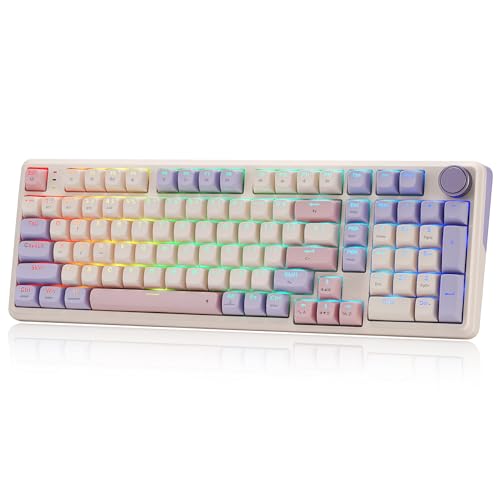
Redragon 100-Key Wireless Gasket Keyboard
Best for: long battery life and compact number-pad utility
- Mounting Style
- Gasket Mount (what this guide is about)
- Switch Type
- Linear
- Form Factor
- 100-key
- Connectivity
- Bluetooth, 2.4GHz wireless, USB-C
- Hot-Swap Support
- Yes (3-pin or 5-pin)
- Backlighting
- RGB
The Redragon 100-Key Wireless Gasket Keyboard pairs a cushioned gasket mount with a high-capacity 8000mAh battery. You get tri-mode connectivity across 2.4GHz wireless, Bluetooth, and wired USB-C, alongside hot-swappable sockets compatible with 3-pin and 5-pin switches. A dedicated control knob handles media playback and backlight brightness directly from the board. This compact full-size layout suits you if you need a numeric keypad without giving up desk space or wireless endurance.
Pros
- 8000mAh battery provides extended wireless runtime
- Tri-mode connectivity supports 2.4GHz, Bluetooth, and USB-C
- Hot-swap sockets accept both 3-pin and 5-pin mechanical switches
- Multifunction control knob adjusts volume and backlight brightness
Cons
- Condensed 100-key layout lacks spacing around arrow and navigation keys
- Base version lacks an integrated screen
Good fit if
- You want an 8000mAh battery for extended wireless work and play.
- You need a compact layout that still preserves the number pad.
- You plan to customize your typing feel using 3-pin or 5-pin switches.
Skip if
- You prefer standard key spacing on a traditional 104-key board.
- You require an integrated display screen on the base color option.
Verdict: Redragon 100-Key Wireless Gasket Keyboard combines a dense 100-key layout, gasket-mounted switches, and a massive 8000mAh battery for reliable wireless typing. It offers versatile tri-mode connectivity and hot-swap flexibility in a space-saving footprint.
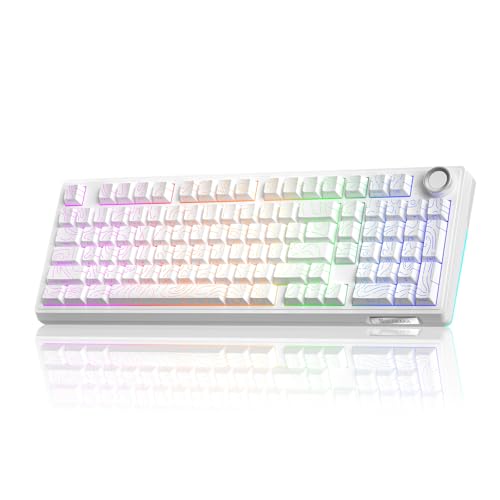
SOLAKAKA 96% Wireless Gasket Mechanical Keyboard
Best for: quiet office and gaming setups with numpads
- Mounting Style
- Gasket Mount (what this guide is about)
- Form Factor
- 96%
- Connectivity
- Bluetooth 5.0, 2.4GHz, USB-C wired
- Backlighting
- RGB
- Keycap Material
- Double-shot PBT
- Hot-Swap Support
- Hot-Swappable
View on Amazon: SOLAKAKA 96% Wireless Gasket Mechanical Keyboard
This 96% wireless mechanical keyboard features a gasket mount paired with five layers of sound-dampening foam and a 1.2mm flex-cut PC board for a dampened, quieter keystroke. You get tri-mode connectivity across Bluetooth 5.0, 2.4GHz, and USB-C, powered by a large 10,000mAh battery. With hot-swappable 3-pin and 5-pin switch sockets and a multi-function control knob, it fits users who need a quiet, full-function setup with a dedicated number pad.
Pros
- 10,000mAh rechargeable battery
- Five-layer noise reduction structure with flex-cut PC board
- Hot-swappable PCB supporting 3-pin and 5-pin switches
- Tri-mode connection via 2.4GHz, Bluetooth 5.0, and USB-C
- Multi-function knob for audio, media, and RGB brightness control
Cons
- Compact 96% layout reduces spacing between the arrow cluster and numpad
- No integrated display screen for status monitoring
Good fit if
- You want a cushioned gasket typing feel with multi-layer noise damping.
- You need long runtimes between charges via a 10,000mAh battery.
- You want a compact desk footprint without sacrificing the number pad.
Skip if
- You prefer a built-in LCD or TFT status screen.
- You want a smaller 75% or tenkeyless footprint to maximize mouse space.
Verdict: SOLAKAKA 96% Gasket Wireless Mechanical Keyboard combines multi-layer acoustic dampening with a massive 10,000mAh battery. It delivers a quiet, cushioned typing feel in a space-saving layout with a full numpad.

SOLAKAKA A75 Compact Wireless Keyboard
Best for: compact wireless multi-device desk setups
- Mounting Style
- Gasket Mount (what this guide is about)
- Switch Type
- LEOBOG reaper
- Form Factor
- 75%
- Connectivity
- 2.4GHz, Bluetooth 5.0, USB-C wired
- Backlighting
- RGB
- Keycap Material
- Double injection, heat sublimation PBT
The SOLAKAKA A75 is a compact 75% mechanical keyboard with an 81-key layout, built on a multi-layer gasket mount system with single-key PCB slots. It offers tri-mode connectivity across 2.4GHz wireless, Bluetooth 5.0, and USB-C, alongside a 4,000mAh battery. You get hot-swappable sockets for 3-pin and 5-pin switches, a multi-function metal knob, and side-etched PBT keycaps. It suits you if you need a space-saving wireless desk setup.
Pros
- Gasket structure with five sound-dampening layers and single-key slotted PCB
- Tri-mode wireless connectivity pairing with up to five devices
- Hot-swappable switch sockets compatible with 3-pin and 5-pin switches
- Dual-mode metal knob controls volume and RGB lighting
Cons
- Configuration software works only on Windows systems
- Driver settings require a wired USB connection to program
- Compact 81-key layout lacks a dedicated numeric keypad
Good fit if
- You want an 81-key compact layout with dedicated arrow keys and a volume knob.
- You switch between multiple Bluetooth, 2.4GHz, and wired devices regularly.
- You plan to swap mechanical switches without soldering.
Skip if
- You need a dedicated numeric keypad for data entry.
- You configure keyboard macros on macOS or Linux systems.
Verdict: SOLAKAKA A75 Compact Wireless Keyboard delivers multi-layer gasket dampening, versatile three-mode connectivity, and hot-swap customization in a condensed 81-key footprint. It provides full gaming and typing control while conserving desk space.

EPOMAKER 75% Wireless Gasket Keyboard with Screen
Best for: compact desk setups wanting hardware media controls
- Mounting Style
- Gasket Mount (what this guide is about)
- Switch Type
- Linear Reaper switch
- Form Factor
- 75%
- Connectivity
- Bluetooth, 2.4GHz wireless, wired
- Backlighting
- RGB
- Hot-Swap Support
- Hot-Swappable
View on Amazon: EPOMAKER 75% Wireless Gasket Keyboard with Screen
This 75% wireless gasket-mount keyboard features an 80-key layout, a customizable TFT display, and a dedicated volume knob. A flex-cut polycarbonate plate works alongside interior acoustic foams, a silicone pad, and factory-lubed linear switches to soften bottom-out impact. You get triple-mode connectivity across Bluetooth, 2.4GHz wireless, and USB-C with a 1000Hz polling rate. It suits you if you need a compact, hot-swappable board with dedicated media hardware.
Pros
- Gasket mount with a flex-cut polycarbonate plate
- Tri-mode connectivity via Bluetooth, 2.4GHz wireless, and USB-C
- Built-in customizable TFT display and volume knob
- Hot-swappable PCB supporting 3-pin and 5-pin switches
- 1000Hz polling rate in 2.4GHz and wired modes
Cons
- Compact 80-key layout lacks a numeric keypad
- Comes with plate-mount stabilizers rather than screw-in hardware
Good fit if
- You want a 75% gasket-mounted keyboard with an onboard status screen and volume knob.
- You need 1000Hz polling over 2.4GHz wireless or wired connections.
- You swap between 3-pin and 5-pin mechanical switches.
Skip if
- You require a dedicated numeric keypad for data entry.
- You prefer factory-installed screw-in stabilizers.
Verdict: EPOMAKER 75% Wireless Gasket Keyboard with Screen delivers flexible gasket mounting, versatile tri-mode connectivity, and onboard hardware controls in an 80-key footprint. It provides extensive switch compatibility and dampening layers without taking up full-desk space.

RK Royal Kludge 96% Mechanical Keyboard
Best for: tactile typing with a dedicated number pad
- Mounting Style
- Gasket Mount (what this guide is about)
- Switch Type
- Pre-lubed tactile beige
- Form Factor
- 96%
- Connectivity
- Wired
- Backlighting
- RGB
- Keycap Material
- Double shot PBT
This keyboard from RK Royal Kludge is a wired 96% gasket-mount mechanical keyboard built with a 98-key layout. It features five layers of sound-absorbing foam, pre-lubed tactile switches, and double-shot PBT keycaps in an MDA profile. A detachable aluminum volume knob sits in the corner, and the hot-swap PCB supports both 3-pin and 5-pin switches. It suits you if you want a compact desk footprint while keeping a dedicated number pad.
Pros
- Gasket mount structure with five layers of sound-absorbing foam
- Hot-swappable PCB supports both 3-pin and 5-pin switches
- Detachable CNC aluminum volume knob
- Double-shot PBT keycaps in sculpted MDA profile
- Compact 98-key layout retains number pad and arrow cluster
Cons
- Wired connectivity only without wireless or Bluetooth modes
- No integrated LCD or TFT display screen
Good fit if
- You want a gasket-mount typing feel with a retained number pad.
- You prefer pre-lubed tactile switches with 3-pin and 5-pin hot-swap support.
- You use a permanent wired desktop setup and want hardware volume control.
Skip if
- You need wireless connectivity via 2.4 GHz or Bluetooth.
- You require an integrated display screen for status monitoring.
Verdict: RK Royal Kludge 96% Gasket Mechanical Keyboard delivers a cushioned typing feel and tactile switches in a space-saving 98-key layout. It is a practical wired pick if you need number pad functionality without the footprint of a full-size board.

Redragon 98-Key Wireless Gasket Keyboard
Best for: 98-key wireless setups needing hot-swappable switches
- Mounting Style
- Gasket Mount (what this guide is about)
- Connectivity
- USB-C, Bluetooth, 2.4GHz wireless
- Backlighting
- RGB
- Keycap Material
- 5-side dye-sub PBT
- Use
- Gaming
- Dimensions
- 16.5 × 7.48 × 2.36 inches
This 98-key gaming keyboard pairs a gasket-mounted design with five layers of sound dampening to soften your keypresses. You get three connection methods via USB-C, 2.4GHz wireless, and Bluetooth to switch among your devices. Its hot-swappable sockets support both 3-pin and 5-pin switches without soldering. A dedicated hardware knob controls RGB brightness and volume directly. It fits you if you want a dampened typing feel with an integrated number pad.
Pros
- Gasket mount with 5-layer internal noise dampening
- Tri-mode connectivity via USB-C, Bluetooth, and 2.4GHz wireless
- Hot-swappable sockets compatible with 3-pin and 5-pin switches
- Single hardware knob controls volume and backlighting
- 5-side dye-sublimated PBT keycaps
Cons
- No integrated LCD or TFT screen
- Length exceeds 16 inches, taking more space than 75% models
Good fit if
- You want a 98-key layout with a dedicated number pad and volume knob.
- You need tri-mode wireless connections across multiple devices.
- You plan to hot-swap between 3-pin and 5-pin switches.
Skip if
- You prefer a more compact 75% or tenkeyless footprint.
- You require an onboard display screen for system stats.
Verdict: Redragon 98-Key Wireless Gasket Keyboard combines five-layer noise dampening, tri-mode wireless switching, and hot-swappable sockets in a 98-key format. It provides flexible connectivity and dedicated hardware controls for users who need a number pad.
Specifications side by side
| Spec | AULA 99-Key Wireless Gasket Keyboard | Redragon Full-Size Gasket Tri-Mode Keyboard | Redragon Full-Size Gasket Wireless Keyboard | EPOMAKER Aula F75 75% Wireless Keyboard | Redragon 81-Key Wireless Gasket Keyboard | Redragon 95-Key Gasket Wireless Keyboard | SOLAKAKA 96% Wireless Mechanical Keyboard | Logitech Alto Keys Wireless Gasket Keyboard | RK Royal Kludge 75% Gasket Mechanical Keyboard | Redragon 100-Key Wireless Gasket Keyboard | SOLAKAKA 96% Wireless Gasket Mechanical Keyboard | SOLAKAKA A75 Compact Wireless Keyboard | EPOMAKER 75% Wireless Gasket Keyboard with Screen | RK Royal Kludge 96% Mechanical Keyboard | Redragon 98-Key Wireless Gasket Keyboard |
|---|---|---|---|---|---|---|---|---|---|---|---|---|---|---|---|
| Switch Type | Pre-lubed linear | not specified | not specified | LEOBOG Reaper Switch | not specified | Linear | not specified | Clicky (Marble Switches) | Silver Pro | Linear | not specified | LEOBOG reaper | Linear Reaper switch | Pre-lubed tactile beige | not specified |
| Form Factor | 96% | Full-size (108-key) | Full-size 108-Key | 75% | 81-Key | 95-Key | 96% | Compact 1800 (98-key) | 75% | 100-key | 96% | 75% | 75% | 96% | not specified |
| Connectivity | BT5.0, 2.4GHz wireless, USB wired | Bluetooth, 2.4 GHz wireless, USB-C | USB-C, Bluetooth, 2.4GHz wireless | Bluetooth, 2.4GHz, USB-C | USB-C, Bluetooth, 2.4GHz wireless | USB-C, Bluetooth, 2.4GHz wireless | 2.4GHz, BT 5.0, USB-C | Bluetooth, Logi Bolt USB | Wired | Bluetooth, 2.4GHz wireless, USB-C | Bluetooth 5.0, 2.4GHz, USB-C wired | 2.4GHz, Bluetooth 5.0, USB-C wired | Bluetooth, 2.4GHz wireless, wired | Wired | USB-C, Bluetooth, 2.4GHz wireless |
| Hot-Swap Support | not specified | Yes (3-pin or 5-pin) | not specified | not specified | not specified | not specified | not specified | not specified | not specified | Yes (3-pin or 5-pin) | not specified | not specified | not specified | not specified | not specified |
| Backlighting | RGB | RGB | RGB | RGB | RGB | RGB | RGB | White | RGB | RGB | RGB | RGB | RGB | RGB | RGB |
| Keycap Material | Double shot PBT | Translucent PBT | PBT | Double-shot PBT | not specified | not specified | Double-shot PBT | not specified | PBT | PBT | Double-shot PBT | Double injection, heat sublimation PBT | not specified | Double shot PBT | 5-side dye-sub PBT |
| Mounting Style | Gasket Mount | Gasket Mount | Gasket Mount | Gasket Mount | Gasket Mount | Gasket Mount | Gasket Mount | Gasket Mount | Gasket Mount | Gasket Mount | Gasket Mount | Gasket Mount | Gasket Mount | Gasket Mount | Gasket Mount |
| Media Controls | not specified | not specified | not specified | Volume Knob | Volume Knob | Volume Knob | Volume Knob | not specified | Volume Knob | Volume Knob | not specified | Volume Knob | Volume Knob | Volume Knob | not specified |
| Use | Gaming | Gaming | Gaming | Gaming | Gaming | Gaming | Gaming | not specified | not specified | Gaming | Gaming | Gaming | Gaming | Gaming | Gaming |
| Color | Blue&Purple&White | Abyssal Blue | Black Tangerine | Green | Abyssal Blue | Jade Cloud | Milk Coffee Brown | Lilac | Green | Lilac Land | Contour-Style White | Gradient-BluePurple | Black Gradient | Cyan | Eisa's Paradox (Anime Version) |
| Operating System | not specified | not specified | not specified | not specified | not specified | not specified | Mac, Windows | not specified | not specified | not specified | not specified | Mac, Windows | Mac | not specified | not specified |
| Noise Level | not specified | not specified | not specified | not specified | not specified | not specified | not specified | not specified | not specified | not specified | Silent | not specified | not specified | not specified | not specified |
| Dimensions | 5.78 × 1.67 × 15.4 inches | 18.9 × 8.7 × 5.5 inches | 17.7 × 7.09 × 1.97 inches | 12.6 × 5.51 × 1.69 inches | 13.2 × 13.2 × 1.46 inches | not specified | not specified | 15.8 × 5.79 × 1.56 inches | 5.59 × 1.65 × 12.7 inches | not specified | not specified | 12.8 × 5.51 × 1.73 inches | 5.62 × 1.69 × 12.9 inches | 12.7 × 5.63 × 1.65 inches | 16.5 × 7.48 × 2.36 inches |
| Weight | 3.21 pounds | 1.94 pounds | 1.94 pounds | 2.2 pounds | 1.1 pounds | 1.83 pounds | not specified | 2.43 pounds | not specified | not specified | not specified | not specified | not specified | 1.96 pounds | not specified |
| Model | F99 | K745 PRO | K689 PRO | F75 | K673 | K719 | A99 Pro | 920-013577 | R75 | K768 PRO | KI99PRO | A75-Gradient-BluePurple | F75 MAX | R98 Pro | K686 PRO |
| Size | not specified | 108 Keys | not specified | LEOBOG Reaper Switch | 81 Keys + No LCD Screen | not specified | not specified | 1.90 | Hot-swap Switch | not specified | Non-Silent Version | not specified | not specified | Hot Swappable Beige Switch | 98 Keys |
Is a Gasket Mount Keyboard Worth It?
Gasket mounting separates the switch plate from direct contact with the keyboard chassis. Manufacturers specify multi-layer dampening designs to absorb keystroke vibrations directly inside the frame. In everyday typing, this arrangement cushions the impact when keys bottom out, softening physical feedback compared to rigid plate assemblies. It also alters case acoustics by minimizing hollow internal reverberation during fast input. If you spend extended hours typing or gaming, this mounting structure provides vibration absorption and consistent key travel feel straight out of the box.
Worth it if
- You want cushioned keystroke absorption and multi-layer internal dampening to soften finger impact during long sessions.
- You prefer a typing feel that isolates the plate and switches from direct contact with the outer case.
Skip it if
- You prefer a completely rigid, unyielding bottom-out feel when pressing your keys.
- You prioritize external layout dimensions over internal multi-layer acoustic dampening.
If you want ergonomic clearance for your keyboard profile, specs for the best standing desks with keyboard tray detail tray depth and height ranges.
How We Picked Gasket Keyboards
We identified keyboards for this guide by checking published Amazon listings for a gasket mount design in the product title or feature specifications. Every detail comes directly from manufacturer data without physical testing or handling. To give you a varied selection, we show only one size or variant from each product family across the 15 picks for 2026.
The products are ordered with products in stock first, then by Amazon sales rank (better-selling products first). Live prices and availability update at least daily on the page. This allows you to compare connectivity, switch options, and dimensions strictly through verified published specifications.
How to Choose a Gasket Keyboard
-
Assess Connectivity and Battery Size
Decide whether you need wireless mobility or a fixed desk setup. Wired models connect directly through a USB cable and eliminate battery management completely. Wireless options give you a clutter-free desk and pair across multiple machines. If you choose wireless, examine the rated battery capacity. Capacities range from standard packs up to massive cells. For example, the SOLAKAKA 96% Wireless Gasket Mechanical Keyboard lists a 10,000mAh battery. Higher milliamp-hour ratings let you run continuous RGB backlighting for longer spans before you need to plug in.
-
Match Your Switch Mechanics
Check the switch type specified on the product listing to ensure it matches your typing habits. Linear switches offer a smooth, uninterrupted downward travel without tactile resistance, making them popular for fast gaming keystrokes. Tactile switches incorporate a physical bump midway through the press to confirm key registration without needing to bottom out. If you prefer positive physical feedback while drafting text, look for boards like the RK Royal Kludge 96% Mechanical Keyboard, which specifies tactile switches. Matching the switch style to your input preferences prevents finger fatigue.
-
Verify Hot-Swap Socket Support
Examine whether the keyboard specifications list hot-swappable switch sockets. Hot-swap PCB sockets let you pull out individual switches and press new ones into place without using a soldering iron. This feature provides two major benefits. First, you can replace a worn or failing switch instantly rather than replacing the whole deck. Second, it allows you to experiment with different mechanical switch brands and weights later. The Redragon 98-Key Wireless Gasket Keyboard specifies hot-swap support, making maintenance and long-term customization straightforward if you decide to change switch feel.
-
Look for Hardware Media Controls
Determine if you need onboard hardware controls such as rotary dials or digital screens. Volume knobs let you adjust system audio or mute sound directly on the chassis without memorizing secondary function shortcuts or breaking focus during work. Some models also integrate visual displays right into the top case. For instance, the EPOMAKER 75% Wireless Gasket Keyboard with Screen includes both a hardware knob and a display to show settings. If you frequently change volume levels or monitor battery status, check the spec list for dedicated media controls.
-
Confirm Operating System Compatibility
Always verify the operating system specifications before purchasing, especially if you toggle between Apple and Windows machines. While standard typing inputs generally work over USB, system modifier keys like Command, Option, Windows, and Alt require correct firmware support for proper mapping. Keyboards like the SOLAKAKA A75 Compact Wireless Keyboard explicitly state dual compatibility with Mac and Windows. Choosing a model with listed cross-platform support ensures that function-row shortcuts, media commands, and modifier keys behave properly without requiring third-party key remapping software on your computer.
-
Review Keycap Material Specifications
Check the listed keycap material to gauge surface durability. Standard plastic caps often develop a polished, shiny surface and faded legends after heavy typing sessions. PBT keycaps feature a denser material composition that resists finger oil, surface wear, and smoothing over time. The RK Royal Kludge 75% Gasket Mechanical Keyboard specifically advertises PBT keycaps out of the box. If you log long typing hours and want the keycap surface texture to remain uniform, confirm that PBT is specified on the spec sheet.
Frequently asked questions
What switches come installed in gasket mount keyboards?
Preinstalled switches vary by model across linear and tactile options. For example, the AULA F99 ships with linear switches, while the RK Royal Kludge R75 and R98 Pro include tactile switches. Other models specify proprietary components, such as the LEOBOG Reaper switches installed in the EPOMAKER F75. Always verify the manufacturer specifications if you prefer a smooth actuation or a distinct tactile bump.
Can you swap switches on a gasket keyboard without soldering?
Yes, you can swap switches easily if the keyboard specifies hot-swap support. Keyboards such as the EPOMAKER F75, SOLAKAKA A75, and RK Royal Kludge R75 feature hot-swappable sockets directly on their circuit boards. This hardware design lets you remove and replace mechanical switches using a simple puller tool, so you never need a soldering iron to customize your typing feel or replace damaged switches.
Are gasket mount mechanical keyboards suitable for gaming?
Yes, multiple gasket mount models are designed specifically for gaming use. Options like the Redragon K673, SOLAKAKA A99 Pro, and EPOMAKER F75 MAX list gaming as their primary use attribute. These keyboards also provide RGB backlighting for visibility in low light, alongside compact layout dimensions that preserve open desk area for mouse movements during fast-paced play.
Do gasket mount keyboards include dedicated volume knobs?
Many gasket mount designs include a physical rotary knob for media control. The EPOMAKER F75, RK Royal Kludge R75, Redragon K673, and SOLAKAKA A99 Pro all specify a volume knob directly in their hardware configuration. This physical dial lets you adjust audio levels or mute sound instantly without pressing key combinations or minimizing your active desktop application.
Which operating systems are compatible with wireless gasket keyboards?
Most wireless gasket keyboards support both Windows and macOS platforms. Listed models like the SOLAKAKA 96% A99 Pro and SOLAKAKA A75 explicitly include Windows and Mac compatibility in their published specifications. Other variants, such as the EPOMAKER F75 MAX, state Mac support directly. Check the operating system listing for each keyboard to confirm that media commands and modifier keys align with your computer setup.
What keycap materials do gasket mount keyboards use?
Several gasket mount keyboards feature PBT keycaps straight from the factory. For instance, the RK Royal Kludge R75 and RK Royal Kludge R98 Pro specifically document PBT keycap material in their attributes. PBT plastic resists surface shine from finger oils and maintains textured legends over extended typing sessions, making it a common hardware choice for both compact and number-pad layouts.
How much do gasket mount keyboards weigh?
Chassis weights vary significantly depending on layout size, internal battery capacity, and case materials. In this guide, compact options like the Redragon K673 weigh approximately 1.10 pounds, whereas larger models like the Logitech Alto Keys reach 2.43 pounds. Heavier options like the AULA F99 reach 3.21 pounds, providing solid desktop stability that keeps the keyboard firmly planted during intense typing sessions.