Best Mechanical Keyboards Under $100: 15 Spec-Based Picks
As an Amazon Associate we earn from qualifying purchases. Links on this page are affiliate links.
Finding the best mechanical keyboards under 100 requires balancing layout size, switch hardware, and desk connectivity. To simplify your search, this guide evaluates 15 models based strictly on the specifications published on their product listings.
The AULA F75 Pro Wireless Mechanical Keyboard leads the rankings because of its compact 75% layout, hot-swappable linear switches, and durable PBT keycaps. This guide helps you identify the right form factor, switch type, and wireless features for your typing and gaming setup.
Quick picks
The best fit for you
- You want a compact wireless board with hot-swap switches AULA F75 Pro Wireless Mechanical Keyboard Its 75% 81-key layout features tri-mode wireless connectivity, linear switches, and hot-swappable hardware.
- You want an ultra-slim, low-profile wireless build Keychron K3 75% Wireless Low-Profile Keyboard It measures 0.79 inches tall and features low-profile Keychron Red linear switches.
- You need rapid trigger response for competitive gaming Redragon Full-Size Magnetic Switch Keyboard It provides customizable magnetic switches and an 8,000Hz polling rate over a wired connection.
- You want a full-size layout with massive battery life EPOMAKER TH108 Full-Size Keyboard with Screen It pairs a 104-key full-size layout with an integrated screen and a 10,000mAh battery.
Our 15 picks

AULA F75 Pro Wireless Mechanical Keyboard
Best for: compact multi-device desktop typing and gaming
- Switch Type
- LEOBOG star vector linear
- Form Factor
- 75%
- Connectivity
- Bluetooth 5.0, 2.4GHz, USB wired
- Backlighting
- RGB
- Keycap Material
- PBT
- Hot-Swap Support
- Hot-Swappable
The AULA F75 Pro is a compact 75-percent wireless mechanical keyboard built with an 81-key layout. You get tri-mode connectivity covering Bluetooth 5.0, 2.4GHz wireless, and USB wired options, backed by a 4000mAh internal battery. It includes hot-swappable sockets for three-pin and five-pin switches, side-printed PBT keycaps, and a dedicated multi-function control knob. This setup suits you if you want a compact desk footprint without losing dedicated arrows.
Pros
- Tri-mode connectivity via Bluetooth 5.0, 2.4GHz wireless, and USB wired
- Hot-swappable PCB compatible with 3-pin and 5-pin switches
- Internal 4000mAh rechargeable battery
- Multi-function rotary knob for media and backlight controls
Cons
- Lacks a dedicated number pad
- Weighs 2.25 pounds, which adds bulk for travel
Good fit if
- You switch frequently between multiple wireless and wired devices.
- You want to customize switches without soldering.
- You prefer a 75% compact layout with dedicated arrow keys.
Skip if
- You need a dedicated numeric keypad for data entry.
- You require an ultra-lightweight board for portable use.
Verdict: AULA F75 Pro 75% Wireless Mechanical Keyboard delivers versatile tri-mode wireless connections, hot-swap hardware, and an integrated control knob in an 81-key design. It is a well-rounded foundation for compact multi-device setups.

Logitech G TKL Mechanical Keyboard and Wireless Mouse
Best for: compact gaming setups needing a matched mouse
- Switch Type
- Mechanical
- Form Factor
- TKL
- Keycap Material
- PBT
- Connectivity
- Wireless
- Use
- Gaming
View on Amazon: Logitech G TKL Mechanical Keyboard and Wireless Mouse
This bundle gives you a tenkeyless mechanical keyboard paired with a wireless mouse. The keyboard features wear-resistant PBT keycaps and mechanical switches on a compact frame. The bundled mouse provides a 12000 DPI sensor with 400 IPS tracking alongside a 1ms wireless report rate. You gain space-saving desk gear built for gaming performance without unneeded extra bulk.
Pros
- Durable heat- and wear-resistant PBT keycaps
- Compact tenkeyless form factor saves desk space
- Wireless mouse with 1ms report rate
- Mouse sensor supports up to 12000 DPI and 400 IPS
Cons
- Lacks a dedicated numeric keypad
- Specific mechanical switch variant not listed
Good fit if
- You want a tenkeyless mechanical keyboard with PBT keycaps.
- You need a matched high-DPI wireless mouse in the same setup.
- You prefer a compact footprint without a numpad.
Skip if
- You require a full-size keyboard with a dedicated number pad.
- You need specific switch actuation specs before purchasing.
Verdict: Logitech G TKL Mechanical Keyboard and Mouse pairs a durable tenkeyless deck with a fast wireless peripheral. The combination provides core gaming performance with PBT keycaps and a 12000 DPI sensor.
AULA Full-Size Wireless Keyboard with Screen
Best for: full-size wireless productivity and multi-device setups
- Form Factor
- Full-size (104 keys)
- Connectivity
- Bluetooth 5.0, 2.4GHz, USB-C
- Backlighting
- RGB
- Keycap Material
- Two-color injection-molded PBT
- Hot-Swap Support
- Hot-Swappable
- Media Controls
- Volume Knob
View on Amazon: AULA Full-Size Wireless Keyboard with Screen
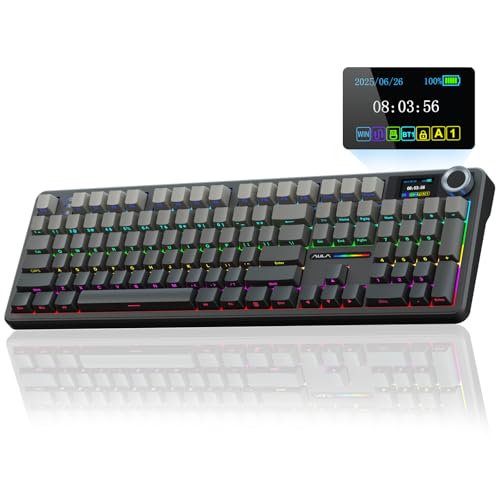
The AULA Full-Size Wireless Mechanical Keyboard provides a 104-key layout with an integrated TFT screen and multi-function knob. It features tri-mode connectivity across 2.4GHz, Bluetooth 5.0, and USB-C, powered by an 8000mAh battery. Inside, a five-layer sound-dampening structure pairs with hot-swappable 3-pin and 5-pin switch sockets. This keyboard suits you if you need a dedicated number pad, long wireless endurance, and on-board hardware controls for everyday productivity or gaming.
Pros
- Built-in 8000mAh rechargeable battery
- Tri-mode connectivity across Bluetooth 5.0, 2.4GHz, and USB-C
- Hot-swappable PCB compatible with 3-pin and 5-pin switches
- Built-in TFT color display screen and control knob
- Two-color injection-molded PBT keycaps with south-facing RGB
Cons
- Screen customization and macro software require a wired Windows connection
- Full-size 17.5-inch width takes up significant desk space
- Linux driver incompatibilities can cause abnormal function-row behavior
Good fit if
- You want a full-size 104-key layout with a dedicated number pad.
- You need multi-device wireless pairing with extended battery life.
- You prefer direct hardware adjustments for status and volume using a screen and knob.
Skip if
- You have limited workspace and need a compact desk footprint.
- You run non-Windows operating systems and need full software customization.
Verdict: AULA Full-Size Wireless Mechanical Keyboard delivers complete 104-key utility with extensive wireless battery life and integrated hardware monitoring. It gives you flexible connectivity and switch hot-swapping without sacrificing numeric keypad functionality.

RK Royal Kludge 96% Pink Wireless Keyboard
Best for: numpad users wanting wireless screen control
- Switch Type
- Linear Cream
- Form Factor
- 96%
- Connectivity
- Bluetooth 5.0, 2.4GHz, USB-C
- Backlighting
- RGB
- Keycap Material
- Side-Print Shine-Through PBT
- Media Controls
- Volume Knob
This 96% mechanical keyboard packs 98 keys into a compact footprint with a dedicated number pad. You get tri-mode connectivity covering Bluetooth 5.0, 2.4GHz wireless, and USB-C, alongside a customizable TFT smart display and control knob. With five-layer sound dampening and hot-swappable switch sockets, it suits you if you need full number entry, desktop switch customization, and organized workspace setups.
Pros
- Smart TFT display and multifunctional knob for quick status checks and adjustments
- Tri-mode wireless connectivity with Bluetooth 5.0, 2.4GHz, and USB-C
- Hot-swappable PCB compatible with 3-pin and 5-pin switches
- Built-in USB-A passthrough port for desktop accessories
Cons
- Three-pound weight makes transport less convenient
- Sixteen-inch footprint requires more surface area than smaller layouts
Good fit if
- You need a dedicated number pad within a condensed layout.
- You want visual on-board status tracking via a TFT screen.
- You switch between 2.4GHz, Bluetooth, and wired connections.
Skip if
- You want an ultralight keyboard to travel with regularly.
- You prefer traditional top-printed legends over side-print keycaps.
Verdict: RK Royal Kludge 96% Wireless Mechanical Keyboard delivers tri-mode connectivity, an integrated status screen, and hot-swap customization in a dense 98-key format. It provides dedicated numpad utility without taking up full-size desk space.

EPOMAKER TH108 Full-Size Keyboard with Screen
Best for: full-size desk setups needing maximum wireless endurance
- Switch Type
- Creamy Jade
- Form Factor
- Full-size
- Connectivity
- Tri-mode wireless, 2.4GHz, wired
- Backlighting
- RGB
- Keycap Material
- Double-shot PBT
- Case Material
- ABS plastic
View on Amazon: EPOMAKER TH108 Full-Size Keyboard with Screen
The EPOMAKER Full-Size Wireless Keyboard with Screen gives you a 104-key layout equipped with a customizable smart display and volume knob. It features a massive 10,000mAh battery that delivers up to 200 hours of wireless use, alongside tri-mode connectivity across Bluetooth, 2.4GHz, and USB. With five-layer gasket sound dampening and hot-swappable switch sockets, it suits you if you need a complete number pad, long runtime, and full desktop media controls.
Pros
- 10,000mAh battery rated for up to 200 hours of wireless use
- Smart display supports custom images and status readouts via web software
- Tri-mode connectivity pairs with up to 5 devices
- Five-layer gasket-mount structure with double-shot PBT keycaps
Cons
- ABS plastic case rather than an aluminum build
- Full 17.5-inch length requires significant desk space
Good fit if
- You need a full number pad along with a dedicated display screen and knob.
- You want weeks of use between charges via a 10,000mAh internal battery.
- You plan to hot-swap standard 5-pin mechanical switches.
Skip if
- You prefer an aluminum or metal keyboard housing.
- You need a compact layout to free up mouse space.
Verdict: EPOMAKER Full-Size Wireless Keyboard with Screen pairs full 104-key functionality with an integrated screen and a high-capacity 10,000mAh battery. It is a practical centerpiece for workspaces requiring uninterrupted wireless endurance and a dedicated number pad.

Redragon Full-Size Magnetic Switch Keyboard
Best for: competitive players seeking rapid trigger magnetic switches
- Switch Type
- UltraMag magnetic
- Form Factor
- 60%
- Connectivity
- USB wired
- Case Material
- Aluminum
- Use
- Gaming
The Redragon 60% Wired Magnetic Gaming Keyboard is a compact 61-key keyboard built with an aluminum mesh base and magnetic switches. It features an 8,000Hz polling rate for a 0.125ms response time, along with adjustable actuation depths between 0.1mm and 3.4mm via software. If you play competitive games that demand rapid trigger resets and fine key control, this wired setup delivers high-speed input in a space-saving footprint.
Pros
- Native 8,000Hz polling rate provides 0.125ms input latency
- Adjustable actuation points from 0.1mm to 3.4mm with rapid trigger technology
- Durable aluminum base with hollow-out mesh design
- UltraMag magnetic switches with full-POM construction
Cons
- Wired-only connection with no wireless or Bluetooth capability
- Compact 60% layout omits dedicated arrow keys and numeric keypad
Good fit if
- You want an 8,000Hz polling rate and rapid trigger magnetic switches for fast-paced gaming.
- You prefer a compact 60% footprint to maximize mouse room on your desk.
- You want customizable actuation depths between 0.1mm and 3.4mm.
Skip if
- You require wireless connectivity or multi-device Bluetooth pairing.
- You need dedicated arrow keys, function rows, or a number pad for daily typing.
Verdict: Redragon 60% Wired Magnetic Gaming Keyboard pairs an 8,000Hz polling rate with customizable magnetic switches in an ultra-compact aluminum frame. It gives competitive players precise actuation control and rapid trigger resets over a dedicated wired connection.

GravaStar Mercury K1 Lite 75% Wireless Keyboard
Best for: compact wireless setups needing smooth linear switches
- Switch Type
- GravaStar x BSUN linear
- Form Factor
- 75%
- Connectivity
- Wired, Bluetooth, 2.4GHz wireless
- Backlighting
- RGB
- Use
- Gaming
- Dimensions
- 13.5 × 6.14 × 1.81 inches
View on Amazon: GravaStar Mercury K1 Lite 75% Wireless Keyboard
The GravaStar Mercury K1 Lite is a compact 75% mechanical keyboard with an 80-key layout and a transparent polycarbonate chassis. It features GravaStar x BSUN linear switches with a 40gf actuation force, gasket mounting with five-layer foam dampening, and tri-mode connectivity covering Bluetooth, 2.4GHz wireless, and wired USB-C. A built-in 4000mAh battery powers the hardware. You get a space-saving desk footprint suited for desktop gaming setups and multi-device workspaces.
Pros
- Tri-mode connectivity supporting 2.4GHz wireless, Bluetooth, and wired USB-C
- Gasket-mounted plate structure with 5-layer acoustic foam dampening
- GravaStar x BSUN linear switches with 40gf actuation and 3.6mm total travel
- 4000mAh rechargeable onboard battery
Cons
- Lacks a dedicated number pad or rotary volume knob
- Hot-swappable switch sockets are not listed in the specifications
Good fit if
- You want a compact 80-key layout with lightweight linear switches
- You switch between multiple devices using Bluetooth, 2.4GHz, and wired connections
- You prefer a gasket-mounted assembly with internal dampening foam
Skip if
- You need a full-size keyboard with a dedicated number pad for data entry
- You want built-in hardware controls like a physical volume knob or status screen
Verdict: GravaStar Mercury K1 Lite 75% Wireless Keyboard pairs custom linear switches and gasket mounting with versatile tri-mode connectivity in a compact transparent chassis. It delivers responsive inputs and multi-layer dampening without taking up excess desk space.

Razer BlackWidow V4 X Linear Keyboard
Best for: gamers wanting dedicated macros and linear switches
- Switch Type
- Yellow mechanical linear
- Backlighting
- Chroma RGB
- Keycap Material
- Doubleshot ABS
- Use
- Gaming
- Color
- Black
- Dimensions
- 18.4 × 6.01 × 1.71 inches
The Razer BlackWidow V4 X is a full-size mechanical keyboard equipped with linear Yellow switches that actuate at 1.2 mm with 45 g of force. You get six dedicated macro keys, a multi-function roller, and per-key Chroma RGB backlighting. Internal sound-dampening foam and lubricated stabilizers quiet key presses, while doubleshot ABS keycaps prevent legend wear. It suits you if you need fast linear inputs and dedicated shortcut keys.
Pros
- Yellow linear switches with 1.2 mm actuation and 45 g force
- Six dedicated macro keys alongside a multi-function roller
- Internal foam layer and lubricated stabilizers to dampen noise
- Per-key Chroma RGB lighting with 16.8 million colors
- Doubleshot ABS keycaps that resist legend wear
Cons
- Keycaps are ABS rather than PBT plastic
- Large 18.4-inch length takes up substantial desk space
- No wireless connectivity option listed
Good fit if
- You want fast linear switches with a shallow 1.2 mm actuation point.
- You need dedicated macro keys and physical media roller controls.
- You prefer per-key customizable RGB lighting on a full-size board.
Skip if
- You want a wireless connection for a cable-free setup.
- You prefer PBT keycaps instead of doubleshot ABS.
Verdict: Razer BlackWidow V4 X Linear Keyboard provides rapid-actuating switches, dedicated macro controls, and acoustic foam dampening in a full-size layout. It gives you comprehensive hardware controls if you have the desk space for an 18.4-inch frame.

Logitech G PRO X 60 Wireless Optical Keyboard
Best for: minimalist desk setups and fast wireless gaming
- Switch Type
- GX tactile optical
- Form Factor
- 60%
- Connectivity
- LIGHTSPEED, Bluetooth, USB
- Backlighting
- LIGHTSYNC RGB
- Use
- Gaming
- Color
- White
View on Amazon: Logitech G PRO X 60 Wireless Optical Keyboard
The Logitech G PRO X 60 Wireless Optical Keyboard is an ultra-compact 60% layout keyboard built to maximize your desk space for mouse movement. It features GX tactile optical switches for zero debounce delay and fast actuation. You get three connection modes: 1 ms LIGHTSPEED wireless, Bluetooth, and detachable USB. This build suits you if you need low-latency gaming performance and five customizable layers in a travel-friendly footprint.
Pros
- Tri-mode connectivity via 1 ms LIGHTSPEED wireless, Bluetooth, or USB
- GX tactile optical switches with zero debounce delay
- KEYCONTROL software supports up to five custom key layers
- Includes dedicated volume roller and protective carrying case
Cons
- Compact 60% layout lacks dedicated arrow keys and number pad
- Substantial weight at 3.04 pounds for a mini keyboard
Good fit if
- You need maximum open desk clearance for wide mouse sweeps.
- You switch between low-latency 2.4GHz wireless, Bluetooth, and wired setups.
- You travel frequently and want an included hard carrying case.
Skip if
- You rely on a physical numpad or dedicated navigation keys.
- You want a featherweight travel keyboard under two pounds.
Verdict: Logitech G PRO X 60 Wireless Optical Keyboard delivers responsive optical switches and versatile wireless connectivity in a compact, travel-ready design. It gives you maximum desk area for mouse movement while retaining deep key remapping across five layers.

EPOMAKER TH99 96% Wireless Keyboard
Best for: extended battery life with number pad utility
- Switch Type
- Sea Salt Silent
- Form Factor
- 96%
- Connectivity
- Tri-mode
- Backlighting
- RGB
- Keycap Material
- PBT
- Media Controls
- Volume Knob
The EPOMAKER 96% Wireless Mechanical Keyboard with Screen provides a compact 98-key layout with a built-in number pad, a glass display, and a dedicated volume knob. It features tri-mode connectivity, hot-swappable switches, and a 10,000mAh battery that delivers up to 200 hours of runtime with RGB lighting turned off. You get multi-layer gasket sound dampening and durable PBT keycaps, making it suitable if you need full number entry without taking up full-desk space.
Pros
- 10,000mAh battery offers up to 200 hours of use with RGB off
- Tri-mode wireless connectivity with hot-swappable switch sockets
- Glass display screen monitors battery, time, and RGB settings
- Multi-layer gasket mount design with PORON, Latex, and IXPE dampening
Cons
- Heavier build weighing over 1.2 kg
- Tall 1.85-inch profile height
Good fit if
- You want a 96% 98-key layout with a dedicated number pad and volume knob.
- You need multi-day battery life supported by a 10,000mAh cell.
- You prefer hot-swappable silent or linear switches with gasket dampening.
Skip if
- You prefer an ultra-light keyboard for frequent travel.
- You want a low-profile case thinner than 1.85 inches.
Verdict: EPOMAKER 96% Wireless Mechanical Keyboard with Screen pairs an expansive 10,000mAh battery with a space-saving 98-key layout, glass info display, and quiet gasket mounting. It gives you comprehensive productivity controls without occupying standard full-size desk space.

EPOMAKER 75% Wireless Gasket Keyboard with Screen
Best for: dampened gasket-mount typing with display controls
- Switch Type
- Linear Reaper switch
- Form Factor
- 75%
- Connectivity
- Bluetooth, 2.4GHz wireless, wired
- Backlighting
- RGB
- Hot-Swap Support
- Hot-Swappable
- Mounting Style
- Gasket Mount
View on Amazon: EPOMAKER 75% Wireless Gasket Keyboard with Screen
The EPOMAKER Aula 75% Gasket Mechanical Keyboard gives you an 80-key compact layout built with a flex-cut PC plate and multi-layer silicone damping. It features tri-mode connectivity across Bluetooth, 2.4GHz, and wired USB, reaching a 1000Hz polling rate in gaming modes. With hot-swappable linear switches, a volume knob, and a customizable TFT screen, this board suits you if you need a cushioned typing feel with desktop controls.
Pros
- Gasket-mount build with flex-cut PC plate and silicone dampening
- Tri-mode connectivity with 1000Hz polling rate in 2.4GHz and wired modes
- Onboard TFT smart screen with dedicated volume control knob
- Hot-swappable PCB supporting 3-pin and 5-pin mechanical switches
Cons
- Compact 80-key layout lacks a dedicated numeric keypad
- Ships with plate-mount rather than preinstalled screw-in stabilizers
Good fit if
- You want a gasket-mounted keyboard with internal acoustic foam layers.
- You need hardware status readouts and volume control directly on your desk.
- You plan to swap between 3-pin or 5-pin switches without soldering.
Skip if
- You rely on a dedicated number pad for frequent calculation work.
- You prefer low-profile switches over standard Cherry-profile keycaps.
Verdict: EPOMAKER Aula 75% Gasket Mechanical Keyboard delivers cushioned keystrokes paired with tri-mode wireless connectivity and an integrated display screen. It provides deep sound dampening and high polling rates in an efficient desk footprint.

YUNZII 98% Clear Wireless Keyboard
Best for: multi-device desks needing a number pad
- Switch Type
- Snow Switch
- Form Factor
- 98%
- Connectivity
- Wired, 2.4GHz, Bluetooth
- Backlighting
- RGB
- Media Controls
- Volume Knob
- Color
- Pink
This keyboard gives you a 98% layout with a dedicated volume knob and transparent chassis. You get tri-mode connectivity covering USB-C wired, 2.4GHz wireless, and Bluetooth for up to five devices. Internally, a gasket-mounted build uses five sound-dampening layers paired with pre-lubed Snow linear switches. Full QMK and VIA compatibility enables layout remapping. It suits you if you need a number pad, wireless flexibility, and deep software customization.
Pros
- Tri-mode wireless supports 2.4GHz, Bluetooth, and wired USB-C across five devices
- QMK and VIA open-source firmware compatibility with a programmable rotary knob
- Hot-swappable PCB supports both 3-pin and 5-pin mechanical switches
- Five-layer gasket-mounted dampening structure with Poron, IXPE, and silicone
Cons
- Battery capacity rating omitted from official specifications
- Tall 1.7-inch front height may require a separate wrist rest
- 15-inch width occupies more desk area than 75% or 60% layouts
Good fit if
- You need a number pad and volume knob in an efficient 98% footprint.
- You want open-source QMK/VIA firmware support for custom keymaps and macros.
- You switch between multiple wireless devices across Bluetooth and 2.4GHz.
Skip if
- You prefer an opaque case design over transparent polycarbonate.
- You need an ultra-compact keyboard to maximize mouse space on small desks.
Verdict: YUNZII Clear 98% Wireless Mechanical Keyboard delivers full number-pad utility, tri-mode wireless pairing, and rare QMK/VIA remapping in a transparent gasket-mounted build.
YUNZII 75% Wireless Pink Keyboard
Best for: multi-device wireless typing with custom switches
- Switch Type
- Pre-lubed linear (Milk V2)
- Form Factor
- 75%
- Connectivity
- Bluetooth 5.0, 2.4GHz wireless, USB-C
- Hot-Swap Support
- Yes (3-pin and 5-pin)
- Backlighting
- RGB
- Color
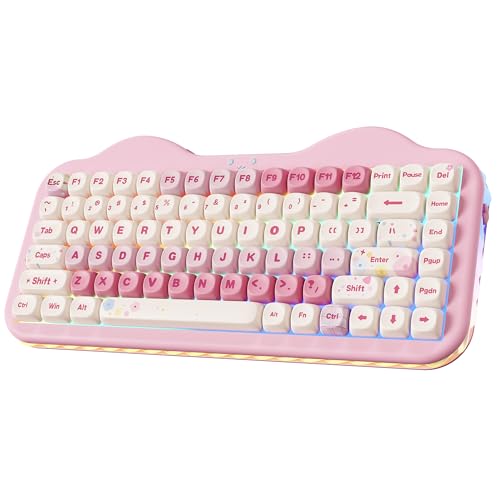
- Pink
The YUNZII 75% Wireless Mechanical Keyboard provides a compact layout with dedicated arrow keys and function rows. It features tri-mode connectivity across 2.4GHz wireless, Bluetooth 5.0, and USB-C, pairing with up to five devices. The gasket-mounted design houses hot-swappable sockets compatible with 3-pin and 5-pin switches, powered by a 5500mAh internal battery. This keyboard suits you if you need a flexible wireless setup with customizable switches for multi-device workspaces.
Pros
- 5500mAh rechargeable battery
- Tri-mode connectivity supporting 2.4GHz, Bluetooth 5.0, and USB-C
- Hot-swappable PCB compatible with 3-pin and 5-pin switches
- Gasket mount structure with multi-layer sound dampening
Cons
- Lacks a dedicated numeric keypad
- No integrated rotary knob or display screen
Good fit if
- You switch between multiple Bluetooth, 2.4GHz, and wired devices regularly.
- You want a hot-swappable 75% keyboard with a large 5500mAh battery.
- You prefer pre-lubed linear switches inside a gasket-mounted chassis.
Skip if
- You need a full-size layout with a numeric keypad for data entry.
- You require dedicated hardware controls like a volume wheel or status screen.
Verdict: YUNZII 75% Wireless Mechanical Keyboard delivers versatile tri-mode wireless pairing, universal hot-swap sockets, and extended runtime via a 5500mAh battery in a compact form factor.

EPOMAKER Full-Size Pink Mechanical Keyboard
Best for: full-size productivity and long battery life
- Switch Type
- Sea Salt Silent
- Form Factor
- Full-size
- Connectivity
- Tri-mode
- Backlighting
- RGB
- Media Controls
- Volume Knob
- Color
- Pink
The EPOMAKER Full-Size Wireless Keyboard with Screen provides a 104-key layout with a dedicated number pad, an integrated display screen, and a rotary knob. It features tri-mode connectivity, south-facing RGB lighting, and a 10,000mAh battery rated for up to 200 hours of continuous runtime. Layered gasket dampening softens keystrokes. This board suits you if you need a complete layout with macro customization, media controls, and extended wireless battery life.
Pros
- 10,000mAh battery provides up to 200 hours of continuous use
- Tri-mode wireless connectivity with quick three-device switching
- Built-in display screen and customizable rotary knob
- Full 104-key layout with dedicated number pad and PBT keycaps
Cons
- Wide 17.6-inch footprint and weight over 1kg require ample desk space
- Tall 1.73-inch profile has no wrist rest listed in specifications
Good fit if
- You want a full-size layout with a numpad and dedicated rotary knob.
- You need multi-device wireless pairing backed by a high-capacity 10,000mAh battery.
- You want an onboard screen to monitor settings and view custom graphics.
Skip if
- You have limited desk space and need a compact tenkeyless or 75% format.
- You prefer a low-profile board with a flatter typing angle.
Verdict: EPOMAKER Full-Size Wireless Keyboard with Screen delivers extensive multi-device connectivity, long battery life, and physical controls in a traditional 104-key footprint. It gives you comprehensive desktop utility without sacrificing sound dampening or typing feel.

Keychron K3 75% Wireless Low-Profile Keyboard
Best for: slim multi-device setups needing red switches
- Switch Type
- Keychron Red Switch
- Form Factor
- 75%
- Connectivity
- Bluetooth 5.1, Wireless
- Backlighting
- White
- Case Material
- Aluminum body, plastic bottom frame
- Dimensions
- 11.8 × 4.57 × 0.79 inches
View on Amazon: Keychron K3 75% Wireless Low-Profile Keyboard
The Keychron K3 gives you a low-profile 75% layout measuring just 0.79 inches tall and weighing 1.1 pounds. It uses Keychron Red switches and features open-source QMK firmware for key remapping and macros via the Keychron Launcher web app. Bluetooth 5.1 lets you switch across three devices, while the aluminum top frame suits you if you want linear switches in a slim footprint.
Pros
- Low-profile 0.79-inch height and 1.1-pound weight
- Linear Keychron Red switches
- Open-source QMK firmware for layout customization
- Bluetooth 5.1 pairing for up to three devices
Cons
- Monochrome white backlighting without RGB options
- Plastic bottom frame rather than all-metal construction
- No 2.4 GHz USB receiver included
Good fit if
- You want an ultra-slim desk footprint with linear Keychron Red switches.
- You switch between up to three Mac and Windows systems over Bluetooth.
- You require custom keymaps and macros via open-source QMK firmware.
Skip if
- You prefer full-height mechanical switches with deep key travel.
- You want full RGB lighting rather than single-color white backlighting.
- You need a dedicated volume knob or built-in display screen.
Verdict: Keychron K3 Low-Profile 75% Keyboard pairs linear Keychron Red switches with an ultra-slim 0.79-inch build. Its multi-device Bluetooth 5.1 connection and QMK remapping make it a practical choice for compact workstations.
Specifications side by side
| Spec | AULA F75 Pro Wireless Mechanical Keyboard | Logitech G TKL Mechanical Keyboard and Wireless Mouse | AULA Full-Size Wireless Keyboard with Screen | RK Royal Kludge 96% Pink Wireless Keyboard | EPOMAKER TH108 Full-Size Keyboard with Screen | Redragon Full-Size Magnetic Switch Keyboard | GravaStar Mercury K1 Lite 75% Wireless Keyboard | Razer BlackWidow V4 X Linear Keyboard | Logitech G PRO X 60 Wireless Optical Keyboard | EPOMAKER TH99 96% Wireless Keyboard | EPOMAKER 75% Wireless Gasket Keyboard with Screen | YUNZII 98% Clear Wireless Keyboard | YUNZII 75% Wireless Pink Keyboard | EPOMAKER Full-Size Pink Mechanical Keyboard | Keychron K3 75% Wireless Low-Profile Keyboard |
|---|---|---|---|---|---|---|---|---|---|---|---|---|---|---|---|
| Switch Type | LEOBOG star vector linear | Mechanical | not specified | Linear Cream | Creamy Jade | UltraMag magnetic | GravaStar x BSUN linear | Yellow mechanical linear | GX tactile optical | Sea Salt Silent | Linear Reaper switch | Snow Switch | Pre-lubed linear (Milk V2) | Sea Salt Silent | Keychron Red Switch |
| Form Factor | 75% | TKL | Full-size (104 keys) | 96% | Full-size | 60% | 75% | not specified | 60% | 96% | 75% | 98% | 75% | Full-size | 75% |
| Connectivity | Bluetooth 5.0, 2.4GHz, USB wired | not specified | Bluetooth 5.0, 2.4GHz, USB-C | Bluetooth 5.0, 2.4GHz, USB-C | Tri-mode wireless, 2.4GHz, wired | USB wired | Wired, Bluetooth, 2.4GHz wireless | not specified | LIGHTSPEED, Bluetooth, USB | Tri-mode | Bluetooth, 2.4GHz wireless, wired | Wired, 2.4GHz, Bluetooth | Bluetooth 5.0, 2.4GHz wireless, USB-C | Tri-mode | Bluetooth 5.1, Wireless |
| Hot-Swap Support | not specified | not specified | not specified | not specified | not specified | not specified | not specified | not specified | not specified | not specified | not specified | not specified | Yes (3-pin and 5-pin) | not specified | not specified |
| Backlighting | RGB | not specified | RGB | RGB | RGB | not specified | RGB | Chroma RGB | LIGHTSYNC RGB | RGB | RGB | RGB | RGB | RGB | White |
| Keycap Material | PBT | PBT | Two-color injection-molded PBT | Side-Print Shine-Through PBT | Double-shot PBT | not specified | not specified | Doubleshot ABS | not specified | PBT | not specified | not specified | not specified | not specified | not specified |
| Case Material | not specified | not specified | not specified | not specified | ABS plastic | Aluminum | not specified | not specified | not specified | not specified | not specified | not specified | not specified | not specified | Aluminum body, plastic bottom frame |
| Mounting Style | not specified | not specified | not specified | not specified | not specified | not specified | not specified | not specified | not specified | not specified | Gasket Mount | not specified | not specified | not specified | not specified |
| Media Controls | not specified | not specified | Volume Knob | Volume Knob | Volume Knob | not specified | not specified | not specified | not specified | Volume Knob | Volume Knob | Volume Knob | not specified | Volume Knob | not specified |
| Use | Gaming | Gaming | Gaming | not specified | not specified | Gaming | Gaming | Gaming | Gaming | not specified | Gaming | not specified | not specified | not specified | not specified |
| Color | F75 Pro-Gradient Purple | G413 TLK SE Black | Gradient Black | Pink | White | Hype Red (CNC HE Version) | Transparent Black | Black | White | Pink | Black Gradient | Pink | Pink | Pink | Keychron Red Switch |
| Operating System | not specified | not specified | not specified | not specified | not specified | not specified | not specified | not specified | not specified | not specified | Mac | not specified | not specified | not specified | not specified |
| Noise Level | not specified | not specified | not specified | not specified | not specified | not specified | not specified | not specified | not specified | Silent | not specified | not specified | not specified | Silent | not specified |
| Dimensions | 12.7 × 5.64 × 1.7 inches | not specified | 17.5 × 5.55 × 1.65 inches | 16.1 × 5.51 × 1.69 inches | 17.5 × 5.51 × 1.65 inches | not specified | 13.5 × 6.14 × 1.81 inches | 18.4 × 6.01 × 1.71 inches | 15.2 × 5.9 × 0.9 inches | 16.1 × 5.71 × 1.85 inches | 5.62 × 1.69 × 12.9 inches | 15 × 5.6 × 1.7 inches | 13.2 × 6.38 × 1.73 inches | 5.51 × 17.6 × 1.73 inches | 11.8 × 4.57 × 0.79 inches |
| Weight | 2.25 pounds | not specified | 2.65 pounds | 3 pounds | not specified | not specified | 1.87 pounds | 2.51 pounds | 3.04 pounds | not specified | not specified | not specified | 2.23 pounds | not specified | 1.1 pounds |
| Model | F75 Pro | not specified | AULA F108 | RK S98 | TH108 PRO | K753 | GS K1 LITE | RZ03-04701900-R3U1 | 920-011921 | TH99 PRO | F75 MAX | X98 | C75 | TH108 V2 PRO | K3A1 |
| Size | not specified | TKL | not specified | Linear Cream Switch | Creamy Jade | not specified | not specified | 20.5 x 8 x 2 Inch | 60% - Wireless | Sea Salt Silent | not specified | Snow Switch | Milk V2 Switch | Sea Salt Silent | 75% |
Trade-Offs Across Keyboards Under $100
Keyboards in the Under $100 category frequently provide wireless connectivity and mechanical linear switches across layouts from 60% to full-size. You will find that specific hardware features vary significantly between models. Hot-swap support appears on options like the AULA F75 Pro but is omitted on boards like the Razer BlackWidow V4 X. Gasket mount designs and dedicated volume knobs exist on certain productivity models, yet remain absent on standard gaming builds. You also see that specialized switch types like magnetic actuation appear only on isolated entries across the list.
- Hot-swap support: Sockets for swapping switches are omitted on several gaming models.
- Mounting style: Gasket mount sound dampening is limited to select models rather than universal.
- Media controls: Physical volume knobs and status screens are absent on compact and competitive layouts.
- Switch type: Advanced magnetic and optical switches remain restricted to specific niche picks.
When you need matching audio gear for your desk setup, compare driver sizes and impedance ratings across headphones under 100.
How We Picked These Keyboards
We select 15 keyboards using published specifications from Amazon listings that match Under $100. You see only one size or variant per product family to keep options distinct. We do not physically test or handle products; every comparison relies strictly on published technical data and feature lists.
The list shows products in stock first, then by Amazon sales rank, placing better-selling products first. Availability updates live at least daily on the page. Keyboards move into or out of this guide as catalog details change around the Under $100 boundary.
Key Specs to Check Before Buying
-
Choose Your Switch Technology
Standard mechanical switches rely on physical metal contacts that actuate at a set travel depth. If you play competitive games requiring rapid resets, look for magnetic switches instead. The Redragon Full-Size Magnetic Switch Keyboard uses magnetic sensors that enable rapid trigger functionality and high polling rates up to 8,000Hz. This mechanism registers key resets the instant your finger moves upward rather than waiting for a fixed reset point. For general typing and office work, standard mechanical switches offer predictable tactile or linear travel without requiring software configuration.
-
Compare Internal Battery Capacities
Wireless keyboards rely on internal rechargeable batteries, and their runtime depends heavily on milliampere-hour ratings. If you plan to leave your board unplugged for weeks, prioritize models with high-capacity batteries. The EPOMAKER TH108 Full-Size Keyboard with Screen includes a 10,000mAh battery designed to maintain power across extended sessions. Smaller wireless models typically provide smaller capacities, such as 5,500mAh, which save overall weight but require more frequent charging cycles. Check listing specifications for exact battery capacities before buying, particularly if you run backlighting or integrated hardware screens continuously during the workday.
-
Evaluate Gasket Mounting Designs
Keyboard mounting styles dictate the firmness and sound profile of your keystrokes. Traditional tray or plate mounts screw directly into the frame, creating a stiff typing surface. Gasket-mounted builds use cushioning materials between the switch plate and chassis to absorb impact shock. The GravaStar Mercury K1 Lite 75% Wireless Keyboard incorporates gasket mounting to cushion keystroke bottom-outs and soften typing resonance. If you spend hours typing daily or prefer a deeper acoustic profile, select gasket-mounted boards. If you want maximum structural rigidity and zero plate movement, traditional rigid mounts remain suitable.
-
Verify Keycap Material Quality
Keycaps wear down over time depending on the plastic compound used during molding. Standard ABS keycaps often develop a shiny, smooth surface after heavy contact with skin oils. Polybutylene terephthalate, or PBT, is a denser thermoplastic that resists surface shine and texture degradation over extended use. The AULA F75 Pro Wireless Mechanical Keyboard provides PBT keycaps straight from the factory. If you type daily and want lettering and surface texture to remain uniform for years, look specifically for PBT in the material specifications. For easily replaceable sets, standard plastic remains adequate.
-
Check Physical Chassis Height
Chassis height directly impacts wrist comfort during typing. Standard mechanical boards typically measure between 1.6 and 1.8 inches tall, which often requires an external wrist rest to prevent strain. Low-profile alternatives use shortened switch stems and flatter cases to reduce overall elevation. The Keychron K3 75% Wireless Low-Profile Keyboard measures only 0.79 inches tall, keeping your hands at a flatter angle relative to your desk surface. If you want portable dimensions or dislike angled wrist rests, check the vertical height specification before you commit to standard full-height hardware.
-
Look for Hardware Screens
Hardware interfaces on mechanical boards extend beyond standard typing keys. Some models incorporate dedicated rotary knobs for direct audio adjustments, while others include small display screens. The RK Royal Kludge 96% Pink Wireless Keyboard features an integrated status screen alongside a control knob to monitor connection status and battery levels at a glance. If you frequently swap between paired Bluetooth devices or adjust audio output levels, these physical controls save you from opening companion desktop software. If you prefer a clean aesthetic and minimal distractions, choose boards without active screens.
Frequently asked questions
What mechanical keyboard layouts include a dedicated number pad?
Full-size and 96 percent layouts provide a dedicated number pad for numerical tasks. A full-size deck like the EPOMAKER TH108 offers 104 keys across a wide 17.5-inch footprint. If you want a more compact desk setup, 96 percent options like the RK Royal Kludge S98 pack 98 keys into a 16.1-inch frame, keeping the tenkey pad while saving lateral room.
How do optical and magnetic switches compare to standard mechanical switches?
Standard mechanical switches rely on physical metal contacts, while optical and magnetic designs actuate via light or magnetic fields. The Logitech G PRO X 60 features optical switches for rapid inputs, whereas the Redragon K753 uses magnetic switches capable of rapid triggers and an 8,000Hz polling rate. Both eliminate physical contact degradation, giving you faster actuation tracking for fast-paced gaming sessions.
Why should you choose a hot-swappable mechanical keyboard?
A hot-swappable mechanical keyboard allows you to change key switches without soldering. Boards like the AULA F75 Pro and YUNZII C75 let you unplug switches directly from the PCB sockets when you want different linear or silent keystroke profiles. This hardware design simplifies switch maintenance, lets you replace worn individual components easily, and helps customize typing feel across your entire deck.
What battery capacity should you expect on a wireless mechanical keyboard?
Wireless battery sizes vary widely depending on the board layout and features. The YUNZII C75 includes a 5,500mAh internal battery in a 75 percent form factor. For longer multi-device sessions, 96 percent and full-size models like the EPOMAKER TH99 and TH108 incorporate 10,000mAh cells. These larger batteries power integrated hardware status screens, RGB lighting, and wireless radios between charges.
What benefits do built-in volume knobs and screens provide?
Integrated knobs and displays give you direct hardware control without opening background software. Rotary knobs on models like the AULA F108 and EPOMAKER F75 MAX adjust master system volume immediately. Accompanying display screens on models like the RK Royal Kludge S98 or EPOMAKER TH99 show connection modes, remaining battery capacity, and profile states directly on your desk surface.
What is the advantage of choosing a low-profile mechanical keyboard?
Low-profile mechanical keyboards reduce overall desk height to promote flatter wrist positioning. The Keychron K3 measures just 0.79 inches tall and weighs 1.1 pounds, making it noticeably thinner than traditional mechanical frames that exceed 1.6 inches. This slim design pairs shorter key switch travel with easier portability if you transport your keyboard between home and office desks.
How does key remapping firmware work on these keyboards?
Firmware remapping allows you to customize key bindings, functions, and layout layers directly on the board. The YUNZII X98 supports open-source QMK/VIA software, letting you change key commands through an active browser window. Similarly, the Logitech G PRO X 60 features internal firmware that supports up to five custom functional layers, ensuring your key shortcuts persist across different connected computers.