Attoe Vertical Wireless Mouse Alternatives: 6 Similar Picks Compared
As an Amazon Associate we earn from qualifying purchases. Links on this page are affiliate links.
If you are looking for attoe vertical mouse alternatives, this guide compares 6 similar picks based on their published specifications. The Attoe Vertical Wireless Mouse stands out for its tri-mode connectivity and ergonomic vertical shape. It features an OLED display that shows DPI and battery levels, along with a 4000 DPI sensor and 1000Hz polling rate. The 800mAh battery supports USB-C charging and pass-through use. These specs make it a strong choice for users who need multi-device switching and wrist-friendly design.
However, you might prefer a different form factor or weight. Some buyers seek lighter mice for gaming or simpler connectivity without complex displays. The alternatives in this list were chosen because their specs overlap with the original, covering similar connectivity options like Bluetooth and 2.4GHz. We also included wired and lightweight gaming mice for users who prioritize speed over vertical ergonomics. Each pick is ranked by how well its specifications match your potential needs, whether you want precision, battery life, or a specific shape. You can compare the dimensions, DPI, and button counts to find the best fit for your setup.
How alternatives compare to Attoe
Attack Shark X3 Lightweight Wireless Mouse
The Attack Shark X3 shifts focus from ergonomic comfort to raw gaming speed. Unlike the Attoe’s vertical design, this mouse uses a standard shape optimized for competitive FPS play. It prioritizes an ultralight body and flagship sensor performance over wrist health features. You give up the neutral handshake grip and the OLED status display found on the Attoe. However, you gain connectivity flexibility and a form factor built for rapid movements. This pick suits gamers who value speed and precision over ergonomic support. It is a strong choice if you need high performance without the vertical constraint, accepting the trade-off in wrist alignment for better gaming responsiveness.
MEETION Wireless Ergonomic Vertical Mouse
The MEETION Wireless Ergonomic Vertical Mouse offers a simpler approach to vertical comfort. Like the Attoe, it features a vertical shape designed for right-handed users seeking ergonomic relief. However, it lacks the tri-mode connectivity and advanced features like the OLED display or programmable buttons. You get reliable wireless connectivity and precise control but sacrifice multi-device switching and detailed status feedback. This mouse suits office workers who prioritize battery life and basic ergonomic comfort over advanced customization. It is a practical choice if you want vertical support without the complexity of gaming specs. You trade flexibility for a straightforward, comfortable experience focused on wrist health and daily productivity tasks.
SOLAKAKA Green Honeycomb Wired Gaming Mouse
The SOLAKAKA Green Honeycomb Wired Gaming Mouse abandons wireless convenience for lightweight wired performance. Unlike the Attoe’s rechargeable battery and tri-mode options, this mouse requires a constant USB connection. It features a honeycomb shell design to reduce weight significantly, targeting gamers who prioritize low mass over ergonomic vertical grip. You give up the healthy wrist angle and wireless freedom for reduced fatigue during long gaming sessions. The high DPI and low weight make it ideal for fast movements. This pick suits users who do not mind a cable and want a lightweight tool for gaming. It offers a different kind of comfort through weight reduction rather than ergonomic shaping.
NSYCA Tri-Mode Wireless RGB Gaming Mouse
The NSYCA Tri-Mode Wireless RGB Gaming Mouse focuses on lightweight gaming and multi-device setups. Like the Attoe, it supports multiple connection modes, but it lacks the vertical ergonomic design. Instead, it offers a standard shape with RGB backlighting and a lightweight body for gaming precision. You gain flexible connectivity and visual customization but lose the wrist-health benefits of the vertical grip. This mouse suits gamers who need tri-mode flexibility without the vertical form factor. It is a practical choice for users who prioritize sensor precision and low weight over ergonomic support. The trade-off is clear: you choose gaming performance and connectivity variety over the neutral hand position provided by the Attoe.
EPOMAKER Click Lite Lightweight Wireless Mouse
The EPOMAKER Click Lite Lightweight Wireless Mouse offers a balanced option for wireless gaming and work. It shares the rechargeable battery feature with the Attoe but uses a standard shape rather than a vertical design. You get solid precision and connectivity flexibility for both gaming and office tasks. However, you sacrifice the ergonomic vertical grip and the OLED display that provides real-time status feedback. This mouse suits users who value battery life and lightweight comfort without needing specific ergonomic support. It is a practical choice for those who want a versatile wireless mouse. The trade-off involves giving up wrist health features for a more traditional, lightweight form factor suitable for diverse use cases.
Techsea Honeycomb Wired Gaming Mouse
The Techsea Honeycomb Wired Gaming Mouse prioritizes lightweight wired reliability over wireless versatility. Unlike the Attoe’s tri-mode connectivity and rechargeable battery, this mouse requires a USB cable. It features a honeycomb shell design to minimize weight, catering to gamers who value low mass and high DPI. You give up the convenience of wireless use and the ergonomic vertical shape for reduced hand fatigue during extended gaming. This pick suits users who prefer wired connections for stability and want a lightweight tool. It offers a different comfort profile focused on weight reduction. The trade-off is clear: you accept a cable and standard shape for a highly responsive, lightweight gaming experience.
Quick picks
Our 7 picks

Attoe Vertical Wireless Mouse
Best for: Ergonomic productivity and multi-device use
- Connectivity
- 2.4GHz, Bluetooth, USB-C wired
- Maximum DPI
- 4000 DPI
- Programmable Buttons
- 7
- Polling Rate
- 1000Hz
- Design
- Ergonomic
- Color
- Purple
View on Amazon: Attoe Vertical Wireless Mouse Affiliate link
The Attoe Vertical Mouse uses a tri-mode connection with 2.4GHz, Bluetooth 5.0, and USB-C wired options. It features a 4000 DPI optical sensor and a 1000Hz polling rate for responsive tracking. The 800mAh battery supports long use, and the OLED display shows real-time settings. This ergonomic design targets users seeking a neutral wrist position to reduce strain during extended work or gaming sessions.
Pros
- Tri-mode connectivity for flexible device switching
- OLED screen displays DPI and battery status
- 7 programmable buttons for workflow customization
- 800mAh rechargeable battery with USB-C charging
Cons
- Maximum 4000 DPI limits high-speed gaming
- Macro programming requires 2.4GHz or wired mode
- No mention of dedicated software for RGB customization
Good fit if
- You want a neutral wrist posture to reduce strain
- You need to switch between multiple devices easily
- You prefer seeing battery and DPI levels on the mouse
Skip if
- You require high DPI for competitive esports
- You need macro programming via Bluetooth
- You prefer a standard horizontal mouse shape
Verdict: Attoe Vertical Wireless Mouse offers a practical ergonomic solution with clear status feedback. It suits professionals who value wrist health and multi-device flexibility over raw gaming speed.

Attack Shark X3 Lightweight Wireless Mouse
Best for: Competitive FPS gamers needing speed
- Connectivity
- 2.4GHz, USB-C, Bluetooth
- Maximum DPI
- 26,000 DPI
- Weight
- 49g
- Programmable Buttons
- 5
- Sensor
- PixArt PAW3395
- Polling Rate
- 1000Hz
View on Amazon: Attack Shark X3 Lightweight Wireless Mouse Affiliate link
The Attack Shark X3 is a 49g ultralight wireless gaming mouse designed for speed and precision. It features the PAW3395 flagship sensor with up to 26,000 DPI and 650 IPS tracking. You get tri-mode connectivity via 2.4G, Bluetooth 5.2, or USB-C wired. Kailh GM8.0 switches offer a 80-million-click lifespan. It includes anti-slip grip tape. This pick suits gamers who prioritize low weight and high-end sensor performance.
Pros
- PAW3395 sensor with 26,000 DPI and 650 IPS tracking
- 49g ultralight weight reduces hand fatigue
- Tri-mode connectivity: 2.4G, Bluetooth 5.2, and USB-C wired
- Kailh GM8.0 switches rated for 80 million clicks
Cons
- No dedicated software for customizing DPI or button mapping
- Grip tape may wear out or lose adhesion over time
- Ergonomic shape may not suit all hand sizes or grip styles
Good fit if
- You want a lightweight mouse under 50g for fast movements
- You need high-precision tracking for competitive gaming
- You use multiple devices and want Bluetooth and wired options
Skip if
- You require a vertical ergonomic design for wrist health
- You need a mouse with a built-in display or screen
- You prefer a heavy mouse for stable, slow aiming
Verdict: Attack Shark X3 Lightweight Wireless Mouse delivers flagship sensor performance in an ultralight body, making it a strong choice for competitive gamers who value speed and connectivity flexibility over ergonomic vertical designs.

MEETION Wireless Ergonomic Vertical Mouse
Best for: Right-handed users seeking ergonomic comfort
- Connectivity
- 2.4GHz, Bluetooth 5.2, USB
- Maximum DPI
- 2400 DPI
- Design
- Ergonomic
- Shape
- Vertical
- Operating System
- Mac, Windows
- Power Source
- Rechargeable
View on Amazon: MEETION Wireless Ergonomic Vertical Mouse Affiliate link
This MEETION vertical mouse uses an ergonomic shape to reduce hand strain during long work sessions. It offers dual Bluetooth and 2.4G wireless connectivity for seamless device switching. You get four DPI settings up to 2400 for precise control. The USB-C rechargeable battery lasts two to three months on a single charge. It is right-handed only and weighs 7.37 ounces. The pink color option adds a distinct style to your desk.
Pros
- Vertical ergonomic design reduces hand strain
- Dual Bluetooth and 2.4G wireless connectivity
- Four adjustable DPI settings up to 2400
- USB-C rechargeable battery with 2-3 month life
Cons
- Right-handed only design limits left-hand users
- 2400 DPI is lower than many gaming mice
- 7.37 ounces is heavier than lightweight alternatives
Good fit if
- You want a vertical mouse for ergonomic comfort
- You need multi-device connectivity via Bluetooth
- You prefer a rechargeable mouse with long battery life
Skip if
- You are a left-handed user
- You need high DPI for competitive gaming
- You prefer a lightweight mouse under 7 ounces
Verdict: MEETION Vertical Wireless Mouse is a practical choice for right-handed users seeking ergonomic comfort and reliable wireless connectivity. It suits office workers who value battery life and precise control over raw gaming performance.

SOLAKAKA Green Honeycomb Wired Gaming Mouse
Best for: lightweight wired gaming
- Connectivity
- Wired USB
- Maximum DPI
- 12800 DPI
- Programmable Buttons
- 7
- Polling Rate
- 1000Hz
- Use
- Gaming
- Design
- Ergonomic
View on Amazon: SOLAKAKA Green Honeycomb Wired Gaming Mouse Affiliate link
The SOLAKAKA SM900 is a wired gaming mouse featuring a green honeycomb shell. It offers a maximum DPI of 12800 and a 1000Hz polling rate. You get seven programmable buttons and adjustable RGB lighting. The design aims to reduce weight and improve breathability. This mouse suits gamers who prefer a lightweight feel and wired reliability over wireless freedom.
Pros
- 12800 DPI maximum sensitivity
- 1000Hz polling rate
- Seven programmable buttons
- Honeycomb shell design
- Adjustable RGB backlighting
Cons
- Wired USB connection limits mobility
- Honeycomb shell collects dust
- Requires software for macro settings
Good fit if
- You want a lightweight mouse for long sessions
- You prefer wired stability for gaming
- You like green hardware accents
Skip if
- You need wireless connectivity
- You dislike open shell designs
- You want plug-and-play simplicity without software
Verdict: SOLAKAKA SM900 Green Honeycomb Wired Mouse fits gamers who prioritize low weight and high DPI. It is a solid choice for those who do not mind a cable.

NSYCA Tri-Mode Wireless RGB Gaming Mouse
Best for: Lightweight gaming and multi-device setups
- Connectivity
- 2.4GHz wireless, BT5.1, USB-C wired
- Maximum DPI
- 22000 DPI
- Weight
- 2.36 ounces
- Sensor
- PAW3311
- Backlighting
- RGB
- Use
- Gaming
View on Amazon: NSYCA Tri-Mode Wireless RGB Gaming Mouse Affiliate link
The NSYCA G11 is a lightweight wireless gaming mouse featuring a honeycomb shell and ergonomic design. It uses the PAW3311 sensor with adjustable DPI up to 22000. You get tri-mode connectivity via Bluetooth 5.1, 2.4GHz, and USB-C. The mouse includes customizable RGB lighting and programmable buttons. It weighs 2.36 ounces and supports Mac operating systems for multi-device use.
Pros
- Tri-mode connectivity with Bluetooth 5.1, 2.4GHz, and USB-C
- PAW3311 optical sensor with adjustable DPI up to 22000
- Lightweight honeycomb shell weighs only 2.36 ounces
- Customizable RGB lighting and programmable buttons via driver software
Cons
- Honeycomb shell design may collect dust and debris
- Requires dedicated driver software for full customization
- No explicit vertical ergonomic shape like the Attoe
Good fit if
- You want a lightweight mouse for long gaming sessions
- You need multi-device connectivity across PC and Mac
- You prefer customizable RGB lighting for your setup
Skip if
- You require a vertical ergonomic grip for wrist health
- You prefer a solid shell that is easy to clean
- You want a mouse that works without installing drivers
Verdict: The NSYCA G11 Lightweight Wireless Mouse fits gamers who prioritize low weight and high sensor precision. It suits users who need flexible connectivity options and do not require a vertical grip.

EPOMAKER Click Lite Lightweight Wireless Mouse
Best for: Lightweight wireless gaming and multi-device use
- Connectivity
- 2.4GHz, BT, USB-C
- Maximum DPI
- 12,000 DPI
- Weight
- 59g
- Programmable Buttons
- 5
- Sensor
- PAW3311
- Polling Rate
- 1000Hz
View on Amazon: EPOMAKER Click Lite Lightweight Wireless Mouse Affiliate link
The EPOMAKER Click Lite is a lightweight wireless gaming mouse featuring a PAW3311 sensor and 12,000 DPI. It offers tri-mode connectivity via 2.4GHz, Bluetooth, or USB-C. Weighing 59 grams, it reduces wrist strain during long sessions. The 500mAh battery provides 78 hours of use. This mouse suits users who need precision and portability for gaming or productivity across multiple devices.
Pros
- PAW3311 sensor with 12,000 DPI and 1000Hz polling rate
- Lightweight 59g design minimizes wrist strain
- Tri-mode connectivity: 2.4GHz, Bluetooth, and USB-C
- 500mAh battery delivers 78 hours of continuous use
- Five programmable buttons for customization
Cons
- Only five programmable buttons limit complex macro setups
- No dedicated software for advanced DPI tuning mentioned
- Basic optical sensor may lack features of high-end gaming mice
Good fit if
- You want a lightweight mouse for extended gaming sessions
- You need tri-mode connectivity for multiple devices
- You prioritize long battery life over advanced features
Skip if
- You require more than five programmable buttons
- You need a vertical ergonomic design
- You prefer a wired-only connection for zero latency
Verdict: The EPOMAKER Click Lite Wireless Gaming Mouse fits users who need a lightweight, long-lasting wireless option with solid precision for gaming or work. It is a practical choice for those who value battery life and connectivity flexibility over advanced customization.
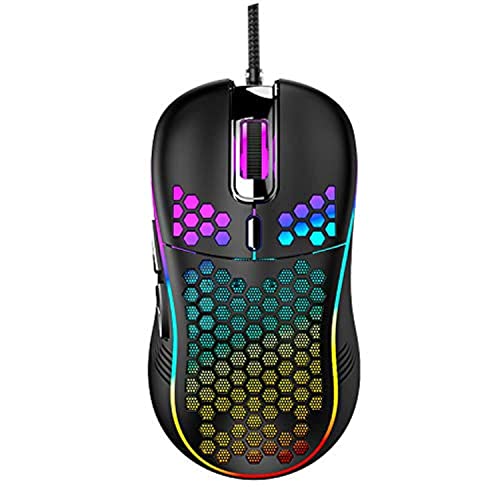
Techsea Honeycomb Wired Gaming Mouse
Best for: Lightweight wired gaming setups
- Connectivity
- Wired
- Maximum DPI
- 7200 DPI
- Backlighting
- RGB
- Use
- Gaming
- Design
- Ergonomic
- Color
- Black
View on Amazon: Techsea Honeycomb Wired Gaming Mouse Affiliate link
This Techsea mouse features a honeycomb shell design that reduces weight to 4.8 ounces for extended comfort. It uses a wired connection for consistent performance and includes an ergonomic shape. You get adjustable DPI settings up to 7200 and RGB lighting with an on/off switch. It works with Windows and macOS systems. This black model suits gamers who prefer lightweight peripherals and wired reliability.
Pros
- Honeycomb shell design reduces weight to 4.8 ounces
- Adjustable DPI settings up to 7200
- RGB lighting with physical on/off switch
- Compatible with Windows and macOS
Cons
- Wired connection limits cable-free movement
- Maximum DPI is lower than some gaming alternatives
- No Bluetooth or wireless capability
Good fit if
- You want a lightweight mouse for long sessions
- You prefer wired connections for stability
- You like customizable RGB lighting
Skip if
- You need wireless freedom
- You require DPI higher than 7200
- You want a vertical ergonomic design
Verdict: Techsea Honeycomb Wired Gaming Mouse is a solid pick for gamers who value low weight and wired reliability. It fits users who want a lightweight, wired mouse with adjustable sensitivity.
Specifications side by side
| Spec | Attoe Vertical Wireless Mouse | Attack Shark X3 Lightweight Wireless Mouse | MEETION Wireless Ergonomic Vertical Mouse | SOLAKAKA Green Honeycomb Wired Gaming Mouse | NSYCA Tri-Mode Wireless RGB Gaming Mouse | EPOMAKER Click Lite Lightweight Wireless Mouse | Techsea Honeycomb Wired Gaming Mouse |
|---|---|---|---|---|---|---|---|
| Connectivity | 2.4GHz, Bluetooth, USB-C wired | 2.4GHz, USB-C, Bluetooth | 2.4GHz, Bluetooth 5.2, USB | Wired USB | 2.4GHz wireless, BT5.1, USB-C wired | 2.4GHz, BT, USB-C | Wired |
| Maximum DPI | 4000 DPI | 26,000 DPI | 2400 DPI | 12800 DPI | 22000 DPI | 12,000 DPI | 7200 DPI |
| Weight | not stated | 49g | not stated | not stated | 2.36 ounces | 59g | not stated |
| Programmable Buttons | 7 | 5 | not stated | 7 | not stated | 5 | not stated |
| Sensor | not stated | PixArt PAW3395 | not stated | not stated | PAW3311 | PAW3311 | not stated |
| Polling Rate | 1000Hz | 1000Hz | not stated | 1000Hz | not stated | 1000Hz | not stated |
| Battery Life | not stated | not stated | not stated | not stated | not stated | 78 hours | not stated |
| Backlighting | not stated | not stated | not stated | not stated | RGB | not stated | RGB |
| Use | not stated | Gaming | not stated | Gaming | Gaming | Gaming | Gaming |
| Design | Ergonomic | not stated | Ergonomic | Ergonomic | not stated | not stated | Ergonomic |
| Color | Purple | Purple | Right Pink | Green | Line White | White | Black |
| Shape | Vertical | not stated | Vertical | not stated | not stated | not stated | not stated |
| Shell Design | not stated | not stated | not stated | Honeycomb | not stated | not stated | Honeycomb |
| Operating System | Mac | Mac, Windows | Mac, Windows | Mac, Windows | Mac | Mac | Mac |
| Power Source | Rechargeable | not stated | Rechargeable | not stated | not stated | Rechargeable | not stated |
| Length | 4 inches | not stated | not stated | 4.88 inches | not stated | 4.76 inches | not stated |
| Width | 2 inches | not stated | not stated | 2.76 inches | not stated | 2.5 inches | not stated |
| Dimensions | not stated | not stated | not stated | not stated | not stated | not stated | 4.96 × 2.68 × 0.1 inches |
| Model | B52-CZSB-F | dc8b44fc-2387-4547-8600-fb7d0934d0d4 | not stated | SM900 | G11 | Click Lite Mouse | not stated |
| Size | not stated | Mouse&Anti-slip sticker | Right-Handed | Wired | not stated | 12.1*6.36*3.87cm | not stated |
If you want to clear desk space, evaluate abovetek vertical laptop stand alternatives by slot width.
Frequently asked questions
Can I use an Attoe vertical mouse alternative with my Mac?
Yes, several alternatives support macOS. The Attoe Vertical Wireless Mouse and Attack Shark X3 are both compatible with Mac systems. The MEETION Wireless Ergonomic Vertical Mouse also works with Mac. The SOLAKAKA and NSYCA mice support Mac as well. This ensures you can use these devices regardless of your computer's operating system.
Which alternative mouse is the lightest?
The NSYCA Tri-Mode Wireless RGB Gaming Mouse is the lightest option at 2.36 ounces. The SOLAKAKA Green Honeycomb Wired Gaming Mouse follows closely at 4.66 ounces. The Techsea Honeycomb Wired Gaming Mouse weighs 4.8 ounces. These lightweight designs reduce hand fatigue during long sessions. Heavier options like the EPOMAKER Click Lite weigh over 7 ounces.
Do these alternatives offer wireless connectivity?
Most alternatives provide wireless options. The Attoe, Attack Shark, MEETION, NSYCA, and EPOMAKER mice all feature wireless connectivity. The NSYCA model specifically offers tri-mode connectivity for maximum flexibility. However, the SOLAKAKA and Techsea mice are wired-only. If you need a cable-free setup, stick to the wireless models listed.
Are these mice suitable for gaming?
Several models are designed for gaming. The Attack Shark X3 is best for competitive FPS games. The NSYCA and EPOMAKER Click Lite are also optimized for gaming with lightweight builds. The SOLAKAKA and Techsea mice are wired gaming options. The Attoe and MEETION mice prioritize ergonomics over raw speed, making them better for productivity than intense gaming.
What is the difference between vertical and standard mouse shapes?
Vertical mice, like the Attoe and MEETION options, hold your hand in a handshake position. This design reduces wrist strain and promotes a more natural arm alignment. Standard mice, such as the Attack Shark and NSYCA, require a flat hand grip. Vertical shapes are ideal for ergonomic comfort, while standard shapes are preferred for gaming precision and speed.
Do any alternatives have an OLED display?
The provided data does not mention an OLED display for the listed alternatives. The intro notes the Attoe has one, but the specifications for the other six picks do not include display features. You should check the product pages for visual status indicators if this feature is critical for your workflow.
Which mouse is best for right-handed users?
The MEETION Wireless Ergonomic Vertical Mouse is explicitly sized for right-handed users. Its design focuses on ergonomic comfort for the right hand. While other mice may fit right-handed users, the MEETION option is tailored for this specific need. If you are left-handed, you may need to verify compatibility with the standard-shaped alternatives.