Best Rechargeable Mechanical Keyboards in 2026: 15 Picks Ranked by Specs
As an Amazon Associate we earn from qualifying purchases. Links on this page are affiliate links.
Choosing the right rechargeable mechanical keyboard helps you eliminate disposable batteries and keep your desk workspace organized. We compared 15 models based strictly on the specifications published on their listings. The RedThunder 60% Wireless Keyboard and Mouse Combo takes the top position because its compact 2-in-1 form factor provides a rechargeable RGB keyboard alongside a matching wireless mouse.
This guide helps you decide which physical layout, wireless connection type, and switch design best match your computing habits and desktop space.
Quick picks
The best fit for you
- You want a compact keyboard bundled with a wireless mouse. RedThunder 60% Wireless Keyboard and Mouse Combo This 60% compact layout includes a matching wireless mouse and internal rechargeable power.
- You need quiet typing with dedicated hardware media controls. LexonElec 90% Wireless Membrane Keyboard It features a silent membrane switch design, a built-in volume knob, and durable PBT keycaps.
- You want swappable mechanical switches in a 100-key layout. Merdia 100-Key Hot-Swap Mechanical Keyboard Its 100-key chassis includes hot-swappable sockets equipped with linear red mechanical switches.
- You prioritize the slimmest possible desk profile for Windows. Arteck Slim Stainless Steel Wireless Keyboard The stainless steel frame measures just 0.16 inches high and connects via wireless receiver.
Our 15 picks

RedThunder 60% Wireless Keyboard and Mouse Combo
Best for: compact desk setups needing bundled wireless peripherals
- Power Source
- Rechargeable (what this guide is about)
- Switch Type
- Mechanical feel
- Form Factor
- 60%
- Connectivity
- 2.4GHz wireless
- Backlighting
- RGB
- Keycap Material
- Two-color injection molded ABS
View on Amazon: RedThunder 60% Wireless Keyboard and Mouse Combo
This wireless combo pairs a compact 60% keyboard with a lightweight honeycomb mouse using a single shared 2.4GHz USB receiver. The keyboard houses an 1850 mAh rechargeable battery providing up to 8 hours of continuous use with lighting enabled, alongside an automatic two-minute sleep mode to preserve power. With no number pad, it gives you extra desk space, making it a functional option if you want an uncluttered gaming or typing setup.
Pros
- Keyboard houses an 1850 mAh rechargeable battery
- Shared 2.4GHz USB receiver operates both peripherals
- Compact 60% footprint maximizes desk space for mouse movement
- Offers four RGB backlight modes with four brightness levels
Cons
- Eight-hour runtime with active backlighting requires frequent recharging
- Lacks a dedicated ten-key numeric keypad
- Mouse scroll wheel illumination only functions while charging
Good fit if
- You want a wireless keyboard and mouse that share a single USB port
- You prefer a compact 60% layout without a numeric keypad
- You want built-in rechargeable batteries instead of replaceable cells
Skip if
- You require a dedicated number pad for data entry
- You need several days of continuous battery life with lighting active
- You want Bluetooth multi-device switching capabilities
Verdict: RedThunder 60% Wireless Keyboard and Mouse Combo delivers an ultra-compact desk setup powered by internal rechargeable batteries and a unified 2.4GHz receiver. It stands out among 15 picks in 2026 for users prioritizing space savings and bundled wireless connectivity.

RedThunder 75% Wireless Keyboard and Mouse Combo
Best for: compact two-in-one wireless peripheral setups
- Power Source
- Rechargeable (what this guide is about)
- Form Factor
- 75%
- Connectivity
- 2.4G wireless
- Backlighting
- RGB rainbow
- Keycap Material
- Two-color injection ABS
- Use
- Gaming
View on Amazon: RedThunder 75% Wireless Keyboard and Mouse Combo
This RedThunder bundle gives you a compact 75% wireless keyboard paired with an ultralight honeycomb mouse using a single shared 2.4GHz USB receiver. For power, the 84-key board houses an 1850 mAh rechargeable battery rated for eight hours of continuous lit use, while the mouse holds 500 mAh. It suits you if you need a space-saving desktop setup that keeps dedicated arrow keys without managing separate wireless dongles.
Pros
- Keyboard packs an 1850 mAh rechargeable battery and mouse holds 500 mAh
- Includes 65g lightweight honeycomb mouse sharing one USB receiver
- Compact 84-key layout retains dedicated arrow keys and media shortcuts
- Double-shot injection ABS keycaps rated for 10 million keystrokes
Cons
- Continuous battery life is limited to 8 hours with backlighting enabled
- Mouse RGB lighting cycles automatically and cannot be adjusted manually
- Lacks a dedicated tenkey number pad
Good fit if
- You want a single 2.4GHz USB receiver to run both your keyboard and mouse.
- You prefer a compact 75% layout that preserves dedicated navigation arrows.
- You want an included ultralight honeycomb mouse paired with your keyboard.
Skip if
- You require a full-size 10-key numeric keypad for data entry.
- You need keyboard lighting that lasts longer than eight hours on a charge.
- You want manual software control over the mouse RGB lighting modes.
Verdict: RedThunder 75% Wireless Keyboard and Mouse Combo delivers a practical rechargeable peripheral pair with dedicated arrow keys and a shared dongle. Its compact design saves desk room, though eight hours of lit runtime means regular recharging.

LexonElec 90% Wireless Membrane Keyboard
Best for: quiet typing with battery status monitoring
- Power Source
- Rechargeable (what this guide is about)
- Switch Type
- Membrane
- Form Factor
- 90%
- Connectivity
- Bluetooth 5.0/3.0, 2.4GHz wireless
- Backlighting
- RGB
- Keycap Material
- PBT
The LexonElec 90% Silent Wireless Keyboard gives you quiet typing in a compact 94-key layout. It pairs a 3000 mAh rechargeable battery with dual-mode connectivity across Bluetooth and 2.4GHz wireless. A built-in smart screen monitors battery levels, while the integrated knob manages volume and backlighting. Note that this model uses membrane switches with PBT keycaps rather than true mechanical switches, making it suitable if you want quiet office or gaming input.
Pros
- 3000 mAh battery lasts up to 200 hours without backlighting
- Integrated smart display shows battery status
- Rotary knob controls volume and backlighting
- Dual wireless connectivity supports Bluetooth and 2.4GHz
- Durable three-color PBT keycaps
Cons
- Membrane construction lacks physical mechanical switches
- Limited to 26-key anti-ghosting instead of full rollover
- No wired data mode listed
Good fit if
- You want silent membrane keystrokes rather than loud mechanical switches.
- You need a multi-device wireless setup with an integrated battery readout screen.
- You prefer rotary knob controls for audio volume and backlight brightness.
Skip if
- You require true mechanical switches with swappable components.
- You need full N-key rollover for complex gaming inputs.
Verdict: LexonElec 90% Silent Wireless Keyboard provides quiet membrane operation alongside dual-mode wireless connectivity and an onboard status screen. It prioritizes low typing noise and battery life over authentic mechanical switches.

Merdia 100-Key Hot-Swap Mechanical Keyboard
Best for: hot-swappable typing across multiple wireless devices
- Power Source
- Rechargeable (what this guide is about)
- Switch Type
- Red switch
- Connectivity
- 2.4GHz, Bluetooth, USB Type-C
- Backlighting
- Ice-blue
- Keycap Material
- ABS
- Case Material
- Plastic
The Merdia 100-Key Hot-Swap Mechanical Keyboard is a rechargeable input device designed for gaming and office work. It connects via 2.4GHz wireless, Bluetooth, or wired USB Type-C, allowing you to link with computers, tablets, or phones. The 100-key chassis measures 15.35 inches long and houses hot-swappable sockets compatible with MX-style switches. This keyboard fits your setup if you want a compact number-pad arrangement with swappable switches and multiple wireless connection options.
Pros
- Triple-mode connectivity via 2.4GHz wireless, Bluetooth, and wired USB Type-C
- Hot-swappable switch sockets compatible with Cherry, Gateron, and other MX-style switches
- Built-in storage slot on the right side for the 2.4GHz wireless receiver
- Foldable feet and rubber pads for angled desk placement
Cons
- Illumination is limited to single-color ice-blue backlighting rather than RGB
- Keycaps are made from standard ABS plastic rather than PBT
Good fit if
- You want hot-swappable switch sockets compatible with MX-style switches.
- You need triple-mode connectivity across Bluetooth, 2.4GHz wireless, and USB-C.
- You prefer a 100-key layout that retains a number pad in a 15.35-inch frame.
Skip if
- You require multi-color RGB backlighting instead of static ice-blue light.
- You prefer factory PBT keycaps over ABS plastic.
Verdict: Merdia 100-Key Hot-Swap Mechanical Keyboard delivers versatile triple-mode wireless connectivity and hot-swappable switch sockets in an efficient 100-key footprint. It suits multi-device workstations well, provided you do not require RGB lighting customization.

Ziyou Lang 82-Key Wireless Keyboard
Best for: budget wireless setups needing visual battery monitoring
- Power Source
- Rechargeable (what this guide is about)
- Switch Type
- Membrane
- Form Factor
- 60%
- Connectivity
- Bluetooth 5.0/3.0, 2.4GHz
- Backlighting
- RGB
- Keycap Material
- PBT
The Ziyou Lang 82-Key Wireless Keyboard is a compact 82-key semi-mechanical board with a rechargeable 2000mAh battery. For battery management, it includes an integrated smart display and rotary knob. It runs up to 40 hours with RGB backlighting active and up to 200 hours without lights. Dual-mode wireless connects via Bluetooth 5.0/3.0 or a 2.4GHz dongle. This fits you if you want multi-device switching and dedicated battery readouts on your desk.
Pros
- 2000mAh battery runs up to 200 hours with backlighting turned off
- Integrated smart display shows real-time battery status
- Dual-mode wireless connects up to 3 devices via Bluetooth or 2.4GHz
- Durable gradient PBT keycaps on an 82-key layout
Cons
- Uses membrane switch construction rather than true mechanical switches
- Rollover is limited to 26 keys
Good fit if
- You want an on-board screen to check your remaining battery level.
- You need to switch between multiple wireless devices.
- You prefer textured PBT keycaps in an 82-key compact layout.
Skip if
- You require true mechanical switches instead of semi-mechanical membrane switches.
- You need full N-key rollover for complex key combinations.
Verdict: Ziyou Lang 82-Key Wireless Keyboard delivers long rechargeable battery life and multi-device pairing in a compact layout, though it relies on membrane switches rather than individual mechanical switches.

RisoPhy Full-Size Triple-Mode Mechanical Keyboard
Best for: multi-device desks needing a full number pad
- Power Source
- Rechargeable (what this guide is about)
- Switch Type
- Mechanical Red
- Form Factor
- 104 Keys
- Connectivity
- 2.4G, Bluetooth, USB-C
- Backlighting
- RGB
- Keycap Material
- Dye-sublimated PBT
View on Amazon: RisoPhy Full-Size Triple-Mode Mechanical Keyboard
The RisoPhy Full-Size Triple-Mode Mechanical Keyboard gives you a complete 104-key layout with linear red switches and dye-sublimated PBT keycaps. You can connect across five devices using 2.4GHz wireless, Bluetooth, or the detachable USB-C cable that charges the internal battery while typing. Every key is programmable via software and features full N-key rollover. It suits you if you need a rechargeable mechanical board with dedicated number keys and multi-system flexibility.
Pros
- Triple-mode connectivity supports 2.4GHz wireless, Bluetooth, and wired USB-C
- Full 104-key layout with N-key rollover and programmable macro support
- Durable dye-sublimated PBT keycaps with linear mechanical red switches
- Customizable per-key RGB backlighting with 20 preset modes
Cons
- Full 16.9-inch footprint occupies more desk surface than compact layouts
- Only available with linear red switches
Good fit if
- You need a dedicated number pad alongside full macro programmability.
- You want to toggle wireless connections among up to five paired devices.
- You prefer linear, non-tactile red mechanical switches for quiet typing.
Skip if
- You prefer a compact tenkeyless or 60 percent desk footprint.
- You want clicky or tactile mechanical switches with physical feedback.
Verdict: RisoPhy Full-Size Triple-Mode Mechanical Keyboard delivers full-size utility, versatile multi-device pairing, and durable PBT keycaps in a rechargeable design.
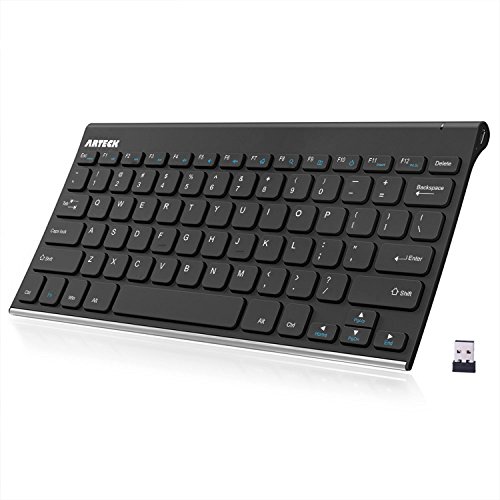
Arteck Slim Stainless Steel Wireless Keyboard
Best for: ultra-slim rechargeable typing on Windows
- Power Source
- Rechargeable (what this guide is about)
- Connectivity
- 2.4GHz wireless
- Case Material
- Stainless steel
- Color
- Black
- Operating System
- Windows
- Dimensions
- 11.1 × 5.3 × 0.16 inches
View on Amazon: Arteck Slim Stainless Steel Wireless Keyboard
This Arteck keyboard gives you a low-profile typing layout with a stainless steel body. It measures 0.16 inches thin and weighs 10.2 ounces, connecting via a 2.4 GHz nano USB receiver. The built-in rechargeable lithium battery is rated for up to six months of operation on a single charge with two hours of daily use. It suits you if you need a compact, low-profile typing surface for Windows setups without managing disposable batteries.
Pros
- Rechargeable lithium battery lasts up to six months based on two hours of daily use
- Compact 0.16-inch thickness and 10.2-ounce weight for easy transport
- Stainless steel material provides a rigid, heavy-duty build
- Includes a dedicated nano USB receiver and USB charging cable
Cons
- Requires an open USB port for the nano receiver with no Bluetooth option
- Operating system compatibility is limited to Windows
- Compact 11.1-inch width lacks a dedicated number pad
Good fit if
- You want an ultra-slim desk footprint measuring 0.16 inches high.
- You prefer an internal rechargeable battery over replacing disposable cells.
- You use a Windows PC with an available USB-A port.
Skip if
- You require Bluetooth connectivity without a USB dongle.
- You need a full-size layout with a numeric keypad.
- You prefer full-height mechanical switches over low-profile keys.
Verdict: Arteck Slim Stainless Steel Wireless Keyboard delivers an ultra-thin 0.16-inch profile and rechargeable power for compact Windows workstations. Its stainless steel frame provides rigid structure while the 2.4 GHz nano receiver handles wireless connectivity.

Macally Full-Size Wireless Bluetooth Keyboard
Best for: multi-device low-profile desktop typing
- Power Source
- Rechargeable (what this guide is about)
- Switch Type
- Scissor
- Form Factor
- Full-size
- Connectivity
- Bluetooth
- Color
- White
- Operating System
- Mac
View on Amazon: Macally Full-Size Wireless Bluetooth Keyboard
The Macally Full-Size Wireless Bluetooth Keyboard gives you an ultra-slim 110-key layout with a dedicated number pad and 20 shortcut keys. It runs on a built-in rechargeable battery that provides up to three months of use at three hours daily. With Bluetooth pairing across three devices and scissor-switch keys, you can switch between hardware without wires. It suits you if you want a quiet, low-profile typing setup.
Pros
- Pairs with up to 3 Bluetooth devices simultaneously
- Built-in rechargeable battery lasts up to 3 months at 3 hours daily
- Full-size 110-key layout with 20 shortcut keys and number pad
- Slim 15-millimeter profile with scissor-switch keys
Cons
- Uses scissor switches instead of mechanical switches
- Lacks a 2.4GHz wireless USB dongle
Good fit if
- You need to switch between up to three Bluetooth devices without re-pairing.
- You prefer an ultra-slim full-size layout with a dedicated number pad.
Skip if
- You require traditional mechanical switches rather than low-profile scissor keys.
- You need a dedicated 2.4GHz USB wireless receiver connection.
Verdict: Macally Full-Size Wireless Bluetooth Keyboard delivers multi-device Bluetooth pairing and rechargeable battery life in a slim frame. It serves users who prioritize quiet, low-profile typing over mechanical key switches.

Arteck Full-Size Solar Wireless Keyboard
Best for: desks with consistent ambient room lighting
- Power Source
- Rechargeable (what this guide is about)
- Form Factor
- Full Size
- Connectivity
- 2.4G Wireless
- Case Material
- Stainless metal
- Operating System
- Windows
- Dimensions
- 17.3 × 6.1 × 0.2 inches
This full-size wireless keyboard recharges using any ambient light source through its built-in solar hardware. A full charge lasts six months in total darkness based on two hours of daily use. It links to your Windows PC via an included nano USB receiver and features low-profile keys, a number pad, and a stainless metal front panel measuring 0.2 inches thin. It suits you if you want continuous ambient recharging without plug-in cables.
Pros
- Recharges under any light source
- Up to 6-month battery life in darkness based on 2 hours daily use
- Slim 0.2-inch profile with stainless metal front panel
- Full-size layout with integrated number pad and arrow keys
- Includes 2.4G nano USB wireless receiver
Cons
- Only lists Windows operating system support
- No Bluetooth connectivity specified
- No wired connection option listed
Good fit if
- You work near light sources to maintain continuous solar charging.
- You need a full-size layout with a dedicated number pad.
- You prefer an ultra-thin 0.2-inch keyboard with low-profile keys.
Skip if
- You use non-Windows operating systems.
- You require a direct Bluetooth connection without a USB receiver.
Verdict: Arteck Full-Size Solar Wireless Keyboard delivers continuous ambient recharging and a full layout with low-profile keys. It eliminates regular cable charging for Windows setups through its built-in solar panel and nano USB receiver.

Arteck Full-Size Stainless Steel Bluetooth Keyboard
Best for: multi-device Bluetooth typing with a number pad
- Power Source
- Rechargeable (what this guide is about)
- Form Factor
- Full size
- Connectivity
- Bluetooth
- Case Material
- Stainless steel
- Operating System
- Windows
- Dimensions
- 16.9 × 4.9 × 0.6 inches
View on Amazon: Arteck Full-Size Stainless Steel Bluetooth Keyboard
The Arteck Full-Size Stainless Steel Bluetooth Keyboard gives you a slim 0.6-inch profile with an integrated number pad and dedicated arrow keys. Its rechargeable lithium battery lasts up to six months based on two hours of daily use, charging through an included USB cable. You can pair and switch between three devices across Windows, Mac, Android, and iOS. It suits you if you need multi-device pairing and full-size numeric input.
Pros
- Pairs with up to three devices simultaneously with single-key switching
- Rechargeable lithium battery rated for up to six months at two hours of daily use
- Full-size layout including dedicated arrow keys and number pad
- Slim 0.6-inch height with stainless steel body
Cons
- Bluetooth only with no included 2.4 GHz wireless USB receiver
- Full 16.9-inch length requires substantial desk space
Good fit if
- You switch typing tasks between up to three Bluetooth-enabled devices.
- You need a dedicated number pad and arrow keys for spreadsheet or data work.
- You want a slim 0.6-inch profile made from stainless steel.
Skip if
- You require a 2.4 GHz USB dongle for computers lacking Bluetooth.
- You want a compact or tenkeyless layout to conserve desk room.
Verdict: Arteck Full-Size Stainless Steel Bluetooth Keyboard delivers multi-device switching and full-size data entry in a low-profile 0.6-inch body. It operates up to six months per charge for straightforward typing across multiple operating systems.
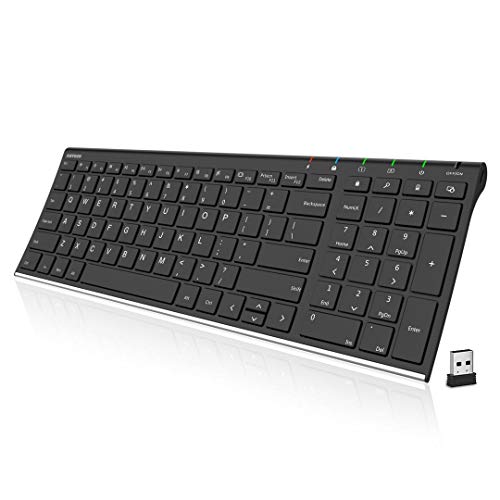
Arteck Ultra Slim Stainless Wireless Keyboard
Best for: compact rechargeable Windows setups needing number pads
- Power Source
- Rechargeable (what this guide is about)
- Connectivity
- 2.4G Wireless
- Case Material
- Stainless steel
- Color
- Black
- Operating System
- Windows
- Dimensions
- 14.5 × 4.9 × 0.6 inches
View on Amazon: Arteck Ultra Slim Stainless Wireless Keyboard
This keyboard features a rechargeable lithium battery rated for up to six months of use per charge based on two hours daily. It connects via a 2.4G nano USB receiver and includes a dedicated numeric keypad within a slim 14.5-inch footprint. The body uses stainless steel construction and weighs under 0.8 pounds. It suits you if you need a lightweight, rechargeable desktop layout for Windows systems.
Pros
- Rechargeable lithium battery lasts up to 6 months based on two hours of daily use
- Stainless steel build with a 0.6-inch thin profile
- Includes full numeric keypad and shortcut keys at 12.7 ounces
- Nano USB receiver enables instant plug-and-play pairing
Cons
- Requires a free USB port for the wireless nano receiver
- Official operating system support is listed only for Windows
Good fit if
- You want a slim rechargeable keyboard with a built-in number pad.
- You prefer a lightweight stainless steel frame for Windows PCs.
Skip if
- You need direct Bluetooth pairing without a USB dongle.
- You use an operating system other than Windows.
Verdict: Arteck Ultra Slim Stainless Wireless Keyboard provides a compact rechargeable option with a built-in number pad for Windows users. Its steel base and six-month battery rating keep desk setups tidy without frequent charging.

Arteck Full-Size Stainless Steel Bluetooth Keyboard
Best for: multi-device office typing on a slim layout
- Power Source
- Rechargeable (what this guide is about)
- Form Factor
- Full Size
- Connectivity
- Bluetooth
- Case Material
- Stainless steel
- Color
- Black
- Operating System
- Windows
View on Amazon: Arteck Full-Size Stainless Steel Bluetooth Keyboard
This full-size wireless keyboard pairs up to three devices via Bluetooth with single-key switching. Powered by a rechargeable lithium battery rated for six months of use at two hours per day, it eliminates disposable cells and recharges through an included USB cable. The stainless steel body measures 0.6 inches thick and includes low-profile keys alongside a dedicated number pad. It suits you if you juggle multiple systems on a slim full desktop layout.
Pros
- Rechargeable battery rated for up to six months at two hours of daily use
- Pairs with and toggles between three Bluetooth devices via single-key switching
- Full-size footprint with integrated number pad and low-profile keys
- Slim 0.6-inch profile with rigid stainless steel casing
Cons
- Bluetooth only with no 2.4 GHz USB wireless receiver included
- No key backlighting listed in specifications
Good fit if
- You switch frequently between up to three Bluetooth devices.
- You need a dedicated number pad within a slim 0.6-inch frame.
- You want a rechargeable lithium battery that recharges via USB.
Skip if
- You require a 2.4 GHz USB receiver or wired data connection.
- You need backlit keys for working in low light.
Verdict: Arteck Full-Size Stainless Steel Bluetooth Keyboard delivers multi-device switching and an integrated number pad within an ultra-slim 0.6-inch chassis. Its rechargeable lithium battery keeps desk setups wireless without frequent recharges.

Arteck Compact Wireless Keyboard
Best for: portable, low-profile Windows desktop setups
- Power Source
- Rechargeable (what this guide is about)
- Switch Type
- Scissor
- Form Factor
- Compact
- Connectivity
- 2.4GHz Wireless
- Color
- Black
- Operating System
- Windows
The Arteck Compact Wireless Keyboard gives you a portable typing setup for Windows. It features a rechargeable lithium battery rated for six months of use at two hours per day. At 0.24 inches thick and 12.1 ounces, this board slips easily into bags. Scissor-switch keys offer quiet, low-profile travel. It pairs via an included 2.4G nano USB receiver, making it suitable if you need a lightweight, rechargeable desktop keyboard for daily typing.
Pros
- Rechargeable battery lasts up to six months based on two hours of daily use
- Slim 0.24-inch profile and 12.1-ounce weight
- Scissor X key structure for low-profile typing
- Includes nano USB receiver and USB-C charging cable
Cons
- Lacks Bluetooth connectivity
- Compact layout omits a dedicated numeric keypad
- Requires a free USB port for the wireless receiver
Good fit if
- You want a slim, lightweight keyboard weighing 12.1 ounces.
- You prefer low-profile scissor switches over tall mechanical switches.
- You need a rechargeable battery that charges via USB-C.
Skip if
- You require Bluetooth connectivity for multi-device pairing.
- You need a full-size layout with a numeric keypad.
Verdict: Arteck Compact Wireless Keyboard delivers slim dimensions and a long-lasting rechargeable battery for basic Windows productivity. Its low-profile scissor layout suits desk setups where saving space is the primary goal.

Arteck Slim Full-Size Wireless Keyboard
Best for: full-size low-profile Windows office typing
- Power Source
- Rechargeable (what this guide is about)
- Switch Type
- Scissor
- Form Factor
- Full-size
- Connectivity
- 2.4GHz Wireless
- Color
- Black
- Operating System
- Windows
The Arteck Slim Full-Size Wireless Keyboard gives you a complete desktop layout in a low-profile design. It connects via an included 2.4G nano USB receiver and features low-profile scissor switches with dedicated numeric keys and media shortcuts. The internal lithium battery recharges through USB-C, providing up to six months of run time at two hours of daily typing. This setup suits you if you need a quiet full-size board for Windows.
Pros
- Rechargeable lithium battery lasts up to 6 months at 2 hours daily use
- Full-size layout with dedicated numeric keypad and media hotkeys
- Scissor-switch key structure provides low-profile typing
- Includes USB-C charging cable and nano USB receiver
Cons
- Requires a USB port for the receiver with no Bluetooth connectivity listed
- Operating system compatibility is listed only for Windows
- No key backlighting listed
Good fit if
- You need a full-size layout with a numeric keypad and media shortcuts.
- You want a rechargeable keyboard that plugs in via USB-C.
- You prefer low-profile scissor keys on a Windows computer.
Skip if
- You need Bluetooth pairing for devices without a standard USB port.
- You use macOS or another non-Windows operating system.
- You require backlit keys for low-light environments.
Verdict: Arteck Slim Full-Size Wireless Keyboard pairs a low-profile scissor-key layout with long rechargeable battery life for Windows setups. It delivers full numeric input without requiring disposable batteries.

Arteck Full-Size Solar Bluetooth Keyboard
Best for: multi-device desks needing continuous solar power
- Power Source
- Rechargeable (what this guide is about)
- Form Factor
- Full Size
- Connectivity
- Bluetooth
- Operating System
- Windows
Arteck Full-Size Solar Bluetooth Keyboard is a full-size wireless keyboard powered by ambient light. Its integrated solar panel charges the internal battery under any light source, keeping the board running even in darkness. You can pair it with up to three Bluetooth devices simultaneously and switch between them with a single keystroke. It suits you if you want a complete layout without plugging in charging cables.
Pros
- Solar recharging operates under any ambient light source
- Pairs with and toggles between up to three Bluetooth devices
- Full-size layout includes dedicated number pad and arrow keys
- Compatible with Windows, Mac OS, iOS, and Android
Cons
- No USB wireless dongle included
- Requires native Bluetooth support on your host device
Good fit if
- You want continuous solar recharging without managing charging cables.
- You need to toggle between three separate Bluetooth devices.
- You require a full-size layout with integrated arrow keys and a number pad.
Skip if
- You need a USB receiver for hardware without built-in Bluetooth.
- You prefer a compact footprint over a full-size frame.
Verdict: Arteck Full-Size Solar Bluetooth Keyboard provides a cable-free typing experience powered by ambient light and supports multi-device pairing. It gives you a complete desktop layout for up to three Bluetooth systems.
Specifications side by side
| Spec | RedThunder 60% Wireless Keyboard and Mouse Combo | RedThunder 75% Wireless Keyboard and Mouse Combo | LexonElec 90% Wireless Membrane Keyboard | Merdia 100-Key Hot-Swap Mechanical Keyboard | Ziyou Lang 82-Key Wireless Keyboard | RisoPhy Full-Size Triple-Mode Mechanical Keyboard | Arteck Slim Stainless Steel Wireless Keyboard | Macally Full-Size Wireless Bluetooth Keyboard | Arteck Full-Size Solar Wireless Keyboard | Arteck Full-Size Stainless Steel Bluetooth Keyboard | Arteck Ultra Slim Stainless Wireless Keyboard | Arteck Full-Size Stainless Steel Bluetooth Keyboard | Arteck Compact Wireless Keyboard | Arteck Slim Full-Size Wireless Keyboard | Arteck Full-Size Solar Bluetooth Keyboard |
|---|---|---|---|---|---|---|---|---|---|---|---|---|---|---|---|
| Switch Type | Mechanical feel | not specified | Membrane | Red switch | Membrane | Mechanical Red | not specified | Scissor | not specified | not specified | not specified | not specified | Scissor | Scissor | not specified |
| Form Factor | 60% | 75% | 90% | not specified | 60% | 104 Keys | not specified | Full-size | Full Size | Full size | not specified | Full Size | Compact | Full-size | Full Size |
| Connectivity | 2.4GHz wireless | 2.4G wireless | Bluetooth 5.0/3.0, 2.4GHz wireless | 2.4GHz, Bluetooth, USB Type-C | Bluetooth 5.0/3.0, 2.4GHz | 2.4G, Bluetooth, USB-C | 2.4GHz wireless | Bluetooth | 2.4G Wireless | Bluetooth | 2.4G Wireless | Bluetooth | 2.4GHz Wireless | 2.4GHz Wireless | Bluetooth |
| Backlighting | RGB | RGB rainbow | RGB | Ice-blue | RGB | RGB | not specified | not specified | not specified | not specified | not specified | not specified | not specified | not specified | not specified |
| Keycap Material | Two-color injection molded ABS | Two-color injection ABS | PBT | ABS | PBT | Dye-sublimated PBT | not specified | not specified | not specified | not specified | not specified | not specified | not specified | not specified | not specified |
| Case Material | not specified | not specified | not specified | Plastic | not specified | not specified | Stainless steel | not specified | Stainless metal | Stainless steel | Stainless steel | Stainless steel | not specified | not specified | not specified |
| Media Controls | not specified | not specified | Volume Knob | not specified | Volume Knob | not specified | not specified | not specified | not specified | not specified | not specified | not specified | not specified | not specified | not specified |
| Use | Gaming | Gaming | Gaming | Gaming | Gaming | Gaming | not specified | not specified | not specified | not specified | not specified | not specified | not specified | not specified | not specified |
| Color | Black | Black | Grape Purple | Red switch ice-blue backlight | Blueberry | White | Black | White | not specified | Stainless Steel | Black | Black | Black | Black | not specified |
| Shell Design | Honeycomb | Honeycomb | not specified | not specified | not specified | not specified | not specified | not specified | not specified | not specified | not specified | not specified | not specified | not specified | not specified |
| Operating System | not specified | not specified | Mac, Windows | not specified | Mac | not specified | Windows | Mac | Windows | Windows | Windows | Windows | Windows | Windows | Windows |
| Noise Level | not specified | not specified | Silent | not specified | not specified | not specified | not specified | not specified | not specified | not specified | not specified | not specified | not specified | not specified | not specified |
| Power Source | Rechargeable | Rechargeable | Rechargeable | Rechargeable | Rechargeable | Rechargeable | Rechargeable | Rechargeable | Rechargeable | Rechargeable | Rechargeable | Rechargeable | Rechargeable | Rechargeable | Rechargeable |
| Weight | not specified | 1.43 pounds | not specified | 1.67 pounds | not specified | not specified | 10.8 ounces | 1.35 pounds | not specified | not specified | 12.7 ounces | not specified | not specified | not specified | not specified |
| Dimensions | not specified | not specified | 15.7 × 6.5 × 1.77 inches | 15.4 × 5.55 × 1.61 inches | 14.2 × 5.12 × 1.18 inches | 16.9 × 4.72 × 0.98 inches | 11.1 × 5.3 × 0.16 inches | 6.5 × 0.98 × 17.1 inches | 17.3 × 6.1 × 0.2 inches | 16.9 × 4.9 × 0.6 inches | 14.5 × 4.9 × 0.6 inches | 14.5 × 4.9 × 0.6 inches | 11.1 × 4.5 × 0.24 inches | 16.8 × 4.61 × 0.84 inches | not specified |
| Size | 2-in-1 Wireless Keyboard + Mouse | 84-Key | not specified | not specified | not specified | not specified | not specified | Full-size (Multisync|bluetooth) | not specified | not specified | not specified | not specified | not specified | not specified | not specified |
| Model | K62 | K84 | M96 | not specified | M75 | RisoPhy | HW086 | ACEBTKEY | HW126 | not specified | HW193 | not specified | HW305 | HW305-3 | not specified |
Is a Rechargeable Keyboard Worth It?
Built-in rechargeable batteries power your wireless connection without external battery swaps. Daily runtime varies depending on hardware features. Units with active backlighting, such as the RedThunder 75%, deliver eight hours of runtime before needing a cable recharge. In contrast, low-profile unlit models like Arteck full-size keyboards specify up to six months of operation per charge. Some boards include onboard screens for visual battery monitoring, while solar models continuously recharge under ambient room light. Choosing rechargeable hardware means balancing your backlight preferences against cable recharge intervals.
Worth it if
- You want continuous solar recharging or long-life lithium batteries that avoid replacement cells.
- You choose unlit office layouts that offer runtimes of up to six months per charge.
- You rely on integrated status screens to view remaining battery levels directly.
Skip it if
- You intend to run active RGB lighting constantly and dislike eight-hour charging intervals.
- You prefer permanent wired setups that never require monitoring charge levels.
If you need air control, see our list of the best dehumidifiers with rechargeable batteries.
How We Selected These Keyboards
You find rechargeable keyboards by checking published specifications and feature lists on Amazon listings. Each model enters this guide when its listing confirms a rechargeable power source in the title or specifications. We do not physically handle or test products. All details come directly from published manufacturer specifications. The list shows only one size or variant per product family.
The 15 picks appear with products in stock first, then by Amazon sales rank (better-selling products first). You can compare published technical details like connectivity, form factor, switch type, and physical dimensions. Live stock availability refreshes at least daily on the page. This direct specification comparison helps you identify the right layout for your workspace in 2026.
How to Choose a Rechargeable Keyboard
-
Select the Layout Size
Form factor determines desk clearance and key availability. Compact designs omit the numeric keypad to grant your mouse extra tracking room. Full-size layouts provide a complete numeric block, which benefits data entry and spreadsheet workflows. If you need dedicated arrow keys and function rows without taking up excessive desk width, intermediate layouts bridge that gap. The RisoPhy Full-Size Triple-Mode Mechanical Keyboard suits workspaces with dedicated room for numeric input. Check published width dimensions against your desk clearance before choosing.
-
Choose Your Wireless Protocol
Wireless keyboards use either 2.4 GHz USB receivers or Bluetooth. A 2.4 GHz USB dongle establishes a direct connection that requires an open USB-A port on your computer. Bluetooth pairs directly to host hardware without taking up a port, making it practical for tablets and laptops. Bluetooth also supports switching among multiple paired devices using onboard hotkeys. The Arteck Full-Size Stainless Steel Bluetooth Keyboard fits multi-device workstations that switch across computers. Check whether your computer has open USB ports before selecting a wireless protocol.
-
Verify Operating System Support
Operating system compatibility dictates whether modifier keys match your computer. Windows keyboards feature dedicated Windows and Alt keys, while macOS systems expect Command and Option layouts. Some keyboards offer dual-system legends or automatic mode switching, whereas others target a single platform exclusively. The Macally Full-Size Wireless Bluetooth Keyboard is configured specifically for Mac systems with native platform modifier rows and shortcut functions. Check the listed operating system attribute to ensure modifier keys and top-row function shortcuts match your primary machine without requiring manual key remapping software.
-
Examine Keycap Material Specs
Keycap material influences surface texture and resistance to long-term wear. Many stock keyboards use basic plastic that develops a smooth, shiny surface from fingertip friction over extended use. PBT keycaps feature a denser material composition with a textured surface that resists finger oil and surface shine over years of typing. The Ziyou Lang 82-Key Wireless Keyboard specifies PBT keycaps for improved surface durability during daily productivity. Look at the keycap material attribute if you want legends and keycap surfaces that maintain their matte texture without wearing slick over time.
-
Check for Hardware Media Controls
Media controls determine how quickly you can adjust audio volume without interrupting full-screen applications. Most standard keyboards require two-key combinations, using a Function key alongside standard function-row keys to alter sound levels. Keyboards with dedicated rotary hardware allow instant adjustments with a single hand motion. The LexonElec 90% Wireless Membrane Keyboard includes a physical volume knob on the chassis for direct audio control. If you listen to media while working or gaming, check the media controls specification to avoid navigating software menus or relying on two-key combinations.
-
Consider Solar Versus Cable Recharging
Rechargeable keyboards differ in how their internal cells recover power. Standard models require connecting a USB cable to your computer or wall adapter whenever the battery depletes. Solar-equipped options integrate photovoltaic panels across the top frame to continuously absorb ambient indoor lighting or daylight while you work. The Arteck Full-Size Solar Wireless Keyboard uses ambient room lighting to keep its internal battery charged without cable tethering. If your desk receives consistent room lighting and you prefer avoiding charging cords entirely, check for solar power in the listing attributes.
Frequently asked questions
Which wireless connectivity options do rechargeable mechanical keyboards offer?
You can choose between Bluetooth and 2.4GHz wireless connections. Models like the Merdia 100-Key and RisoPhy Full-Size support Bluetooth setups for syncing multiple systems. If you prefer a dedicated USB connection without navigating pairing menus, options like the RedThunder 60% use a 2.4GHz wireless receiver to connect directly to your computer.
Can you find solar-powered rechargeable keyboards?
Yes, certain rechargeable models use built-in solar panels to charge from ambient room lighting. The Arteck Full-Size Solar Wireless Keyboard and Arteck Full-Size Solar Bluetooth Keyboard capture light continuously, removing the need for regular charging cables. This hardware design maintains battery levels automatically on desks that receive steady natural or overhead room lighting.
What switch types are available in rechargeable keyboards?
Listed models feature either mechanical or membrane hardware. If you require genuine mechanical typing, options like the RisoPhy Full-Size and Merdia 100-Key come equipped with mechanical Red switches. In contrast, boards such as the LexonElec 90% and Ziyou Lang 82-Key use silent membrane mechanisms paired with mechanical-style keycaps for quieter operation.
How do you know when a rechargeable keyboard needs to be charged?
Most keyboards feature built-in hardware indicators to display remaining power. Several units, such as the LexonElec 90% and Ziyou Lang 82-Key, incorporate dedicated onboard status screens that let you visually monitor battery levels. Other models rely on basic LED indicators or power management settings in your operating system to signal a low battery.
What materials are used for keycaps on rechargeable keyboards?
Several rechargeable keyboards feature durable PBT plastic keycaps. For example, the LexonElec 90%, Ziyou Lang 82-Key, and RisoPhy Full-Size use PBT keycap material. PBT resists surface shine and wear from finger friction over extended daily typing sessions compared to standard ABS plastics, which helps preserve the original matte finish on your keycaps.
Are rechargeable keyboards compatible with both Mac and Windows?
Operating system support depends on the specific hardware controller in each model. The LexonElec 90% lists dual compatibility for both Mac and Windows. Other boards are platform-specific; the Arteck series, including the HW086 and HW193, is specified strictly for Windows, whereas the Macally Full-Size Wireless Keyboard targets Mac environments.
What dedicated media controls can you find on rechargeable keyboards?
Some wireless layouts feature physical knobs alongside standard function row shortcuts. Models like the LexonElec 90% and Ziyou Lang 82-Key include a dedicated hardware volume knob directly on the chassis. This control allows you to adjust audio output instantly without needing to use multi-key software combinations or secondary function layer toggles.