Best White Mechanical Keyboards in 2026: 15 Picks Ranked by Specs
As an Amazon Associate we earn from qualifying purchases. Links on this page are affiliate links.
Finding the right white mechanical keyboard comes down to matching switch types, layouts, and connectivity specs to your desk space. This guide ranks 15 products based strictly on the specifications published on their listings.
The CORBOBO 60% Magnetic Switch Keyboard earns the top position because its 8000Hz magnetic switches and rapid trigger hardware deliver high-speed performance in a compact wired build. This comparison helps you decide which form factor, switch type, and wireless or wired connection fits your desk setup.
Quick picks
The best fit for you
- You need rapid trigger switches for competitive gaming CORBOBO 60% Magnetic Switch Keyboard This compact wired model delivers 8000Hz polling and adjustable magnetic switches for fast actuation.
- You need a full-size wireless layout with magnetic switches Keychron K10 HE Full-Size Wireless Magnetic Keyboard It provides a full-size design with wireless connectivity and customizable Hall Effect rapid trigger switches.
- You want a matching white keyboard and mouse bundle RedThunder 60% White Keyboard and Mouse Combo This set combines a compact 61-key wired keyboard with a 7200 DPI honeycomb mouse.
- You want retro typewriter styling with red linear switches RK Royal Kludge Full-Size Typewriter Keyboard It pairs a full-size layout and round keycaps with red linear switches and an included wrist rest.
Our 15 picks

CORBOBO 60% Magnetic Switch Keyboard
Best for: competitive gaming setups needing fast magnetic switches
- Color
- White (what this guide is about)
- Switch Type
- Hall Effect magnetic
- Form Factor
- 60%
- Connectivity
- Wired
- Backlighting
- RGB
- Keycap Material
- Side-printed PBT
This compact 60% white keyboard features hot-swappable Hall Effect magnetic switches tailored for rapid gaming inputs. You get an 8000Hz polling rate and rapid trigger sensitivity down to 0.02mm, along with side-printed PBT keycaps lit by customizable RGB. Key mapping and lighting adjust directly through a web-based driver without local downloads. It suits you if you prioritize fast switch response and desk space over dedicated arrow keys and wireless mobility.
Pros
- Up to 8000Hz polling rate for fast input response
- Hot-swappable Hall Effect magnetic switches with 0.02mm rapid trigger steps
- Side-printed PBT keycaps with 16.8 million-color RGB backlighting
- Web-based driver for key remapping, macros, and lighting adjustments
Cons
- Wired-only connection with no wireless options
- 60% form factor omits dedicated arrow keys and number pad
Good fit if
- You want Hall Effect magnetic switches with an 8000Hz polling rate.
- You prefer configuring settings via a web browser without downloading software.
- You need a compact white footprint to maximize mouse space on your desk.
Skip if
- You require wireless connectivity for cable-free use.
- You rely on dedicated arrow keys or an integrated numeric keypad.
Verdict: CORBOBO 60% Magnetic Switch Keyboard delivers high-speed 8000Hz performance and precise rapid trigger switches in a minimalist white footprint. It is a focused wired option for fast-paced gaming setups that do not require dedicated navigation keys.

RedThunder 60% White Keyboard and Mouse Combo
Best for: desktop gamers wanting a compact white combo
- Color
- White (what this guide is about)
- Form Factor
- 60%
- Connectivity
- Wired USB
- Backlighting
- RGB
- Use
- Gaming
- Shell Design
- Honeycomb
View on Amazon: RedThunder 60% White Keyboard and Mouse Combo
This combo delivers a white 61-key compact keyboard paired with a matching honeycomb optical mouse. The wired keyboard features customizable RGB backlighting, a water-resistant build, and a braided USB cable with an anti-interference ring. The included symmetrical mouse operates at up to 7200 DPI with 1000Hz polling. It suits you if you want a compact desk setup with an included gaming mouse.
Pros
- Includes a 65-gram honeycomb mouse with 7200 DPI sensor and 1000Hz polling
- Compact 60% layout with 61 keys saves desk space
- RGB backlighting with adjustable lighting modes, brightness, and breathing speed
- Water-resistant keyboard design with braided USB cabling
Cons
- Lacks dedicated arrow keys and a numeric keypad
- Wired connection only with no wireless option
Good fit if
- You need a matched white keyboard and optical mouse together.
- You want an ultra-compact 61-key footprint to maximize mouse room.
- You prefer a wired setup with spill-resistant construction.
Skip if
- You need a dedicated number pad or separate arrow cluster.
- You want wireless desktop peripherals.
Verdict: RedThunder 60% White Keyboard and Mouse Combo provides a 61-key layout and a 7200 DPI honeycomb mouse for a minimal, fully wired desk setup.

Attack Shark 60% Magnetic White Keyboard
Best for: competitive gamers wanting adjustable magnetic switches
- Color
- White (what this guide is about)
- Switch Type
- Hall effect magnetic
- Form Factor
- 60%
- Connectivity
- Type-C wired
- Backlighting
- RGB
- Keycap Material
- Double-shot PBT
The Attack Shark 60% Magnetic White Keyboard is a wired 66-key gaming keyboard built with Hall effect switches. You get an 8000Hz polling rate and adjustable actuation from 0.1mm to 3.4mm with 0.01mm rapid trigger accuracy. It features double-shot PBT keycaps, an aluminum top plate, and sound-dampening foam. This keyboard suits you if you play fast-paced competitive games and want fine-tuned magnetic switch control in a compact white layout.
Pros
- 8000Hz polling rate delivers 0.125ms theoretical input latency
- Hall effect switches offer 0.1mm to 3.4mm adjustable actuation and 0.01mm rapid trigger
- Top-mount aluminum plate with double-layer PORON dampening foam
- South-facing RGB backlighting with Cherry profile double-shot PBT keycaps
- Web-based configuration tool requires no software installation
Cons
- Wired-only connection with no Bluetooth or 2.4GHz wireless support
- Compact 66-key layout lacks a dedicated function row and number pad
Good fit if
- You want rapid trigger magnetic switches with 0.01mm sensitivity adjustment
- You need an 8000Hz polling rate for fast competitive gaming
- You prefer dedicated arrow keys on a compact 60-percent footprint
Skip if
- You require wireless connectivity for a cable-free desk setup
- You need a dedicated number pad or physical function row
Verdict: Attack Shark 60% Magnetic White Keyboard delivers high-speed 8000Hz polling and adjustable Hall effect actuation in a compact desk-friendly frame. It is a focused choice if you prioritize rapid trigger responsiveness over wireless versatility.

Keychron K10 HE Full-Size Wireless Magnetic Keyboard
Best for: Full-size setups requiring rapid trigger customization
- Color
- White (what this guide is about)
- Switch Type
- Hall Effect magnetic switch
- Form Factor
- Full-size
- Connectivity
- Bluetooth 5.2, 2.4GHz, Type-C wired
- Keycap Material
- Double-shot PBT
- Dimensions
- 15.7 × 7.87 × 2.68 inches
View on Amazon: Keychron K10 HE Full-Size Wireless Magnetic Keyboard
The Keychron K10 HE is a full-size wireless keyboard finished in white with natural wood accents. It features hot-swappable Hall Effect magnetic switches with adjustable actuation depths between 0.2mm and 3.8mm at 0.1mm sensitivity. You can connect across three modes via Bluetooth 5.2, 2.4 GHz wireless, or USB Type-C. It suits you if you need a dedicated number pad paired with rapid trigger customization across Windows, macOS, or Linux systems.
Pros
- Hall Effect switches support 0.2mm to 3.8mm adjustable actuation and 0.1mm sensitivity
- Tri-mode connectivity via Bluetooth 5.2, 2.4 GHz wireless, and USB Type-C
- Hot-swappable switch design requires no soldering
- OSA-profile double-shot PBT keycaps resist surface wear and shine
Cons
- Keycaps are non-shine-through and do not illuminate letter legends
- Launcher web software requires clearing browser cache and cookies before setup
- Full-size 440.2 mm width occupies significant desktop space
Good fit if
- You want a full-size 100% layout featuring rapid trigger Hall Effect switches.
- You switch between multiple devices using Bluetooth, 2.4 GHz, or wired connections.
- You need dedicated compatibility and extra keycaps for macOS, Windows, and Linux.
Skip if
- You need shine-through keycaps for illuminated legends in the dark.
- You prefer a compact form factor without a numeric keypad to save desk room.
Verdict: Keychron K10 HE Full-Size Wireless Magnetic Keyboard combines rapid trigger Hall Effect switches with versatile tri-mode connectivity in a complete 100% layout. It delivers precise switch actuation tuning alongside natural wood side accents.

RK Royal Kludge Full-Size Typewriter Keyboard
Best for: retro typewriter styling with linear switches
- Color
- White (what this guide is about)
- Switch Type
- Mechanical red (linear)
- Form Factor
- Full size (108 keys)
- Connectivity
- Wired
- Backlighting
- RGB LED
- Case Material
- Aluminium alloy
View on Amazon: RK Royal Kludge Full-Size Typewriter Keyboard
This RK Royal Kludge keyboard gives you a full-size 108-key layout in white with round retro typewriter keycaps. It features linear mechanical red switches designed for smooth keystrokes with consistent actuation force. You also get full anti-ghosting, an aluminum alloy top panel, a detachable ABS wrist rest, and QMK/VIA online remapping. It suits you if you want linear switches and vintage styling with standard modern programmability.
Pros
- Linear mechanical red switches with uniform actuation force
- Full-size 108-key layout with complete anti-ghosting
- Configurable via QMK/VIA online driver without installed software
- Includes detachable ABS wrist rest and aluminum top plate
Cons
- Switches are not hot-swappable
- Wired connection only with no wireless options
Good fit if
- You want a full-size layout with linear red switches and retro typewriter keycaps.
- You prefer configuring keymaps and RGB lighting online through QMK/VIA without software installs.
- You need an included detachable wrist rest and full anti-ghosting across all 108 keys.
Skip if
- You want hot-swappable sockets to swap switches without soldering.
- You need wireless connectivity such as Bluetooth or 2.4 GHz.
Verdict: RK Royal Kludge Full-Size Typewriter Keyboard pairs classic round keycaps with smooth red linear switches and straightforward QMK/VIA web configuration. It provides a distinct retro aesthetic on an aluminum top plate without sacrificing full-size functionality.

Razer Huntsman V3 Pro Mini 60% Keyboard
Best for: competitive FPS players wanting adjustable analog switches
- Color
- White (what this guide is about)
- Switch Type
- Analog Optical Gen-2
- Form Factor
- 60%
- Keycap Material
- Doubleshot PBT
- Use
- Gaming
- Dimensions
- 13.8 × 6.18 × 1.81 inches
The Razer Huntsman V3 Pro Mini is a white 60-percent keyboard built around Gen-2 analog optical switches. You get adjustable actuation from 0.1 to 4.0 millimeters, Rapid Trigger, and Snap Tap input prioritization. It features textured doubleshot PBT keycaps and onboard LED indicators for settings adjustment without software. This compact 1.74-pound layout frees up desk space, making it a focused fit if you prioritize rapid FPS movement controls.
Pros
- Analog Optical Gen-2 switches with 0.1–4.0 mm adjustable actuation
- Rapid Trigger and Snap Tap input prioritization
- Onboard LED array for adjustments without software
- Textured doubleshot PBT keycaps with side-printed secondary functions
- Rated for 100 million keystrokes
Cons
- No dedicated physical arrow keys or number pad
- Snap Tap functionality requires a firmware update
- No wireless connectivity listed
Good fit if
- You want a white 60% layout to maximize mouse sweep area.
- You need analog sensitivity down to 0.1 mm with Rapid Trigger reset.
- You prefer adjusting actuation onboard without running background software.
Skip if
- You need dedicated arrow keys or a numeric keypad.
- You prefer a wireless desk setup.
Verdict: Razer Huntsman V3 Pro Mini 60% Keyboard delivers deep switch customization and rapid movement features in a clean, space-saving white chassis. It provides competitive players with precise analog control without requiring background software.

Snpurdiri 60% Wired RGB Keyboard
Best for: compact white setups prioritizing lightweight membrane portability
- Color
- White (what this guide is about)
- Switch Type
- Membrane
- Form Factor
- 60%
- Connectivity
- Wired
- Backlighting
- RGB
- Use
- Gaming
The Snpurdiri 60% Wired RGB Keyboard gives you a compact 61-key layout in a white ABS chassis. It relies on membrane switches tuned for a mechanical feel rather than physical mechanical switches. Weighing 0.89 pounds and measuring 11.5 inches long, it connects via a wired connection without driver setup. It suits you if you want a lightweight, space-saving desktop footprint with built-in RGB lighting.
Pros
- Ultra-compact 61-key layout weighing 0.89 pounds
- RGB backlighting with 6 effects and 8 color modes
- Laser-engraved ABS keycaps resist character fading
- Plug-and-play wired design with no drivers needed
Cons
- Membrane construction rather than genuine mechanical switches
- Wired-only design with no wireless functionality
- Lacks dedicated arrow keys and numeric keypad
Good fit if
- You want a very light white 60% keyboard for a small desk.
- You prefer simple plug-and-play wired operation without software.
- You want customizable RGB backlighting across multiple preset modes.
Skip if
- You require authentic physical mechanical switches.
- You need wireless connectivity for your setup.
- You frequently use dedicated arrow keys or a numpad.
Verdict: Snpurdiri 60% Wired RGB Keyboard delivers a compact white footprint and multi-mode RGB lighting in a lightweight build. It serves practical basic typing needs if you do not require true mechanical hardware.

Keychron K2 HE Wireless 75% Magnetic Keyboard
Best for: 75% wireless gaming with rapid trigger control
- Color
- White (what this guide is about)
- Switch Type
- Gateron Double-Rail Magnetic
- Form Factor
- 75%
- Connectivity
- 2.4 GHz, Bluetooth 5.2, Type-C
- Keycap Material
- Double-shot PBT
- Dimensions
- 12.5 × 4.99 × 1.6 inches
View on Amazon: Keychron K2 HE Wireless 75% Magnetic Keyboard
This white 75% wireless keyboard features Hall effect magnetic switches with adjustable actuation from 0.2 to 3.8 mm. You get rapid trigger support, 2.4 GHz wireless, Bluetooth 5.2, and USB-C connectivity. Double-shot PBT keycaps pair with natural rosewood accents on the frame. If you need a compact layout with rapid trigger performance and triple-mode wireless flexibility, it fits your setup.
Pros
- Adjustable actuation from 0.2 to 3.8 mm with 0.1 mm sensitivity
- Tri-mode connectivity via 2.4 GHz, Bluetooth 5.2, and Type-C
- Rapid trigger key travel resets for gaming
- Web-based Launcher configurator for browser-based setup
Cons
- Keycap legends are not shine-through
- Switch compatibility limited strictly to Gateron Double-Rail Magnetic switches
Good fit if
- You need rapid trigger response and customizable actuation depth.
- You switch between Mac and Windows systems over wireless connections.
- You prefer a 75% form factor with double-shot PBT keycaps.
Skip if
- You require shine-through keycaps for low-light visibility.
- You want to install standard 3-pin or 5-pin mechanical switches.
Verdict: Keychron K2 HE Wireless 75% Magnetic Keyboard combines Hall effect actuation tuning with versatile tri-mode wireless connectivity in a compact 75% form factor. It delivers precise gaming trigger controls alongside multi-device Mac and Windows support.

EPOMAKER TH108 Full-Size Keyboard with Screen
Best for: full-size wireless desktop setups needing long battery life
- Color
- White (what this guide is about)
- Switch Type
- Creamy Jade
- Form Factor
- Full-size
- Connectivity
- Tri-mode wireless, 2.4GHz, wired
- Backlighting
- RGB
- Keycap Material
- Double-shot PBT
View on Amazon: EPOMAKER TH108 Full-Size Keyboard with Screen
The EPOMAKER Full-Size Wireless Keyboard with Screen is a 104-key white mechanical keyboard built with a gasket-mounted design and an integrated customizable display. It features tri-mode connectivity across Bluetooth, 2.4GHz wireless, and USB cable, powered by a 10,000mAh battery offering up to 200 hours of runtime. With hot-swappable 5-pin switch sockets and a volume control knob, it suits you if you need a complete layout for productivity and extended wire-free operation.
Pros
- Large 10,000mAh battery providing up to 200 hours of wireless runtime
- Tri-mode connectivity supporting wired, 2.4GHz, and Bluetooth pairing across up to 5 devices
- Built-in smart screen and dual-function knob for status monitoring and volume control
- Hot-swappable PCB compatible with mainstream 5-pin mechanical switches
- Five-layer acoustic gasket mount with double-shot PBT keycaps
Cons
- Full-size footprint measuring 17.52 inches long and weighing over 1.1kg
- Screen customization relies on Chrome-based software
- Constructed with an ABS plastic chassis rather than aluminum
Good fit if
- You want a full-size layout with a dedicated number pad and media knob.
- You need multi-device wireless pairing backed by high battery capacity.
- You prefer hot-swappable sockets for easy switch replacements.
Skip if
- You have limited desk space and require a compact or tenkeyless layout.
- You prefer an all-metal keyboard enclosure instead of ABS plastic.
Verdict: EPOMAKER Full-Size Wireless Keyboard with Screen combines standard 104-key productivity with a 10,000mAh battery and customizable display hardware. It delivers extensive multi-device connectivity alongside straightforward switch swap options.

YUNZII 75% Wireless Mechanical Keyboard
Best for: compact wireless desks needing physical knob controls
- Color
- White (what this guide is about)
- Switch Type
- Cocoa Cream V2 linear
- Form Factor
- 75%
- Connectivity
- Bluetooth, 2.4GHz wireless, wired
- Backlighting
- RGB
- Keycap Material
- Double-shot
The YUNZII 75% Wireless Mechanical Keyboard brings an 82-key layout with a built-in control knob to your desk. It features tri-mode connectivity across Bluetooth, 2.4GHz wireless, and USB wired modes, powered by a 4000mAh battery. Inside, a gasket mount structure uses five layers of sound padding alongside hot-swappable switch sockets. This layout suits you if you want a compact white setup without losing dedicated arrow keys or physical volume control.
Pros
- Tri-mode connectivity with 2.4GHz wireless, Bluetooth, and wired USB
- Internal 4000mAh rechargeable battery
- Hot-swappable PCB compatible with 3-pin and 5-pin switches
- Gasket mount structure with five layers of internal padding
- Multi-function rotary knob for audio and backlight adjustments
Cons
- Key remapping and macro software functions only on Windows systems
- Lacks a dedicated number pad
Good fit if
- You want an 82-key layout with dedicated arrow keys and a hardware knob
- You switch between Bluetooth, 2.4GHz wireless, and wired setups
- You plan to swap 3-pin or 5-pin mechanical switches without soldering
Skip if
- You require a full numeric keypad for continuous data entry
- You need macro and key-remapping software on macOS
Verdict: YUNZII 75% Wireless Mechanical Keyboard pairs tri-mode wireless flexibility and a 4000mAh battery with gasket-damped acoustic layers. It offers reliable switch customization and dedicated dial controls in a space-saving white format.

ASUS ROG Strix Scope II 96 Wireless Keyboard
Best for: compact desk setups needing a numpad
- Color
- White (what this guide is about)
- Switch Type
- ROG NX Storm clicky
- Form Factor
- 96%
- Connectivity
- Bluetooth, 2.4GHz wireless, USB wired
- Backlighting
- Per-key RGB
- Use
- Gaming
View on Amazon: ASUS ROG Strix Scope II 96 Wireless Keyboard
The ASUS ROG Strix Scope II 96 Wireless Keyboard gives you a 96 percent layout packed into a frame barely wider than a standard tenkeyless board. Finished in white, it features hot-swappable mechanical switches, sound-dampening foam, and a multi-function media wheel. With tri-mode connectivity offering up to 1,500 hours over 2.4 GHz wireless, this keyboard suits you if you need a dedicated number pad without taking up full-size desk space.
Pros
- Tri-mode connectivity via Bluetooth, 2.4 GHz wireless, or USB
- Up to 1,500 hours of battery life on 2.4 GHz wireless
- Compact 96 percent layout with integrated number pad
- Hot-swappable switch sockets and factory sound-dampening foam
Cons
- Weighs 2.78 pounds, making it heavy for portable travel
- Wider than 60 percent or 75 percent compact alternatives
Good fit if
- You need a number pad in a footprint smaller than a standard full-size board.
- You want hot-swappable switches and wireless operation across multiple devices.
Skip if
- You want an ultra-compact 60 percent or 75 percent keyboard layout.
- You prefer an ultra-lightweight travel board.
Verdict: ASUS ROG Strix Scope II 96 Wireless Keyboard delivers full numpad functionality in a compact footprint with hot-swappable switches and extensive battery life. It offers balanced utility for gaming and productivity without the bulk of a standard full-size chassis.
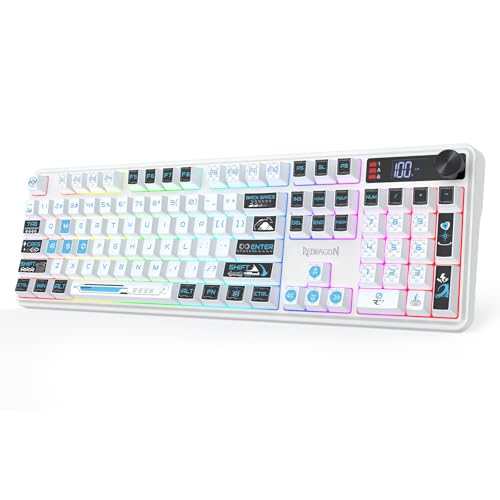
Redragon Wireless White Membrane Keyboard
Best for: quiet multi-device gaming with display feedback
- Color
- White (what this guide is about)
- Switch Type
- Membrane
- Connectivity
- USB-C, Bluetooth, 2.4GHz wireless
- Backlighting
- RGB
- Use
- Gaming
- Dimensions
- 17.5 × 5.4 × 1.38 inches
The Redragon Wireless White Membrane Keyboard provides tri-mode connectivity across USB-C, Bluetooth, and 2.4GHz wireless. A built-in LED display shows battery level and connection status, while an onboard knob adjusts volume and RGB lighting. Unlike mechanical options, this 17.5-inch board uses membrane switches with 26-key anti-ghosting. It suits you if you want a white wireless gaming keyboard with dedicated controls and screen feedback without mechanical switch noise.
Pros
- Tri-mode wireless via 2.4GHz, Bluetooth, and USB-C
- Integrated LED screen shows battery and connection status
- Multi-function knob controls volume, mute, and RGB modes
- Software support for custom macros and lighting profiles
Cons
- Membrane switch mechanism instead of mechanical switches
- Anti-ghosting capped at 26 keys rather than full N-key rollover
- Full-size footprint requiring 17.5 inches of desk length
Good fit if
- You want an integrated status screen and physical control knob.
- You switch between multiple devices using Bluetooth, 2.4GHz, and USB-C.
- You prefer quiet membrane keys over mechanical switches.
Skip if
- You require dedicated mechanical switches for tactile or linear key travel.
- You need complete N-key rollover across every key simultaneously.
- You have limited desk width to accommodate a 17.5-inch chassis.
Verdict: Redragon Wireless White Membrane Keyboard pairs multi-device wireless versatility with an integrated status display and dedicated media knob. It trades mechanical switches for quiet membrane operation and convenient hardware monitoring.

Logitech G PRO X TKL Wireless Tactile Keyboard
Best for: wireless tenkeyless tactile gaming setups
- Color
- White (what this guide is about)
- Switch Type
- GX Brown tactile
- Form Factor
- TKL
- Connectivity
- LIGHTSPEED, Bluetooth, USB
- Backlighting
- LIGHTSYNC RGB
- Keycap Material
- Dual-shot PBT
View on Amazon: Logitech G PRO X TKL Wireless Tactile Keyboard
The Logitech G PRO X TKL Wireless is a tenkeyless mechanical gaming keyboard finished in white. It features GX Brown tactile switches, dual-shot PBT keycaps, and three connection modes: Lightspeed wireless, Bluetooth, and USB cable. You also get dedicated media controls with a volume roller. It suits you if you need a tenkeyless white deck with tactile feedback and flexible wireless pairing across multiple devices.
Pros
- Tri-mode connectivity via Lightspeed wireless, Bluetooth, and USB
- GX Brown tactile mechanical switches
- Dual-shot PBT keycaps
- Dedicated media buttons with an integrated volume roller
Cons
- Tenkeyless layout omits a dedicated numeric keypad
- No wrist rest listed in specifications
Good fit if
- You want a white tenkeyless layout with tactile GX Brown switches.
- You need multiple wireless options including Lightspeed and Bluetooth.
- You prefer dedicated media buttons and an integrated volume roller.
Skip if
- You need a full-size layout with a dedicated number pad.
- You prefer ultra-compact 60% or 65% form factors for maximum desk space.
Verdict: Logitech G PRO X TKL Wireless delivers tactile typing and versatile tri-mode wireless connectivity in a clean tenkeyless white footprint. It is a practical choice if you want dedicated media buttons and dual-shot PBT caps without a full number pad.

NSYCA 60% Magnetic Gaming Keyboard
Best for: competitive gamers wanting durable PBT keycaps
- Color
- White (what this guide is about)
- Switch Type
- Linear Hall Effect magnetic
- Form Factor
- 60%
- Connectivity
- Wired
- Backlighting
- RGB
- Keycap Material
- PBT
This white 60% gaming keyboard features Hall Effect magnetic switches paired with shine-through PBT keycaps. You get an 8000Hz polling rate, adjustable actuation down to 0.01mm, and Rapid Trigger support for precise key registration. Its gasket-mounted build includes dedicated arrow keys despite the small footprint. It suits competitive players who want customizable magnetic switches and durable keycaps in a wired setup without installing local configuration software.
Pros
- PBT shine-through keycaps resist surface wear
- Adjustable actuation from 0.01mm to 4.0mm with Rapid Trigger
- 8000Hz polling rate with 0.1ms latency
- Gasket-mounted structure with internal sound-dampening foam
- Web-based driver requires no desktop installation
Cons
- Wired-only connection with no wireless options
- Hot-swappable PCB supports only 3-pin magnetic switches
- Lacks a number pad and dedicated function row
Good fit if
- You want durable shine-through PBT keycaps on a white keyboard.
- You need 8000Hz polling and Rapid Trigger for competitive gaming.
- You prefer configuring settings inside a web browser.
Skip if
- You need wireless connectivity for your setup.
- You plan to swap in standard mechanical switches.
- You require a full-size layout with a numeric keypad.
Verdict: NSYCA 60% Hall Effect Keyboard delivers fast 8000Hz magnetic switch performance and durable PBT keycaps in a compact wired format.

DIERYA 60% Wireless Mechanical Keyboard
Best for: multi-device wireless typing on a compact layout
- Color
- White (what this guide is about)
- Switch Type
- Blue Switch (Tactile & Clicky)
- Form Factor
- 60%
- Connectivity
- Bluetooth 5.0, 2.4G, wired USB
- Backlighting
- RGB
- Use
- Gaming
The DIERYA 60% Wireless Mechanical Keyboard pairs a compact 63-key white chassis with triple-mode connectivity, covering Bluetooth 5.0, 2.4GHz wireless, and wired USB. You get clicky blue mechanical switches rated for 50g actuation, dedicated arrow keys, and an 18-mode RGB backlight system. Powered by a 3000mAh battery offering up to 90 hours of run time with lights off, it suits you if you need a portable wireless setup across multiple devices.
Pros
- Tri-mode connectivity via Bluetooth 5.0, 2.4G wireless, and wired USB
- Compact 63-key layout preserves dedicated directional arrow keys
- 3000mAh battery provides up to 90 hours of use with backlighting turned off
- Dynamic RGB system with 18 lighting modes and 16.8 million colors
Cons
- Battery life drops to approximately 8 hours at maximum backlight intensity
- Switches are rated for 600,000 keystrokes
- Lacks dedicated function row keys and a numeric keypad
Good fit if
- You need Bluetooth 5.0 and 2.4G wireless switching across multiple devices.
- You prefer tactile, clicky blue switches with 50g actuation force.
- You want a compact 60% white footprint that retains physical arrow keys.
Skip if
- You need a full-size layout with a dedicated number pad.
- You require quiet switches for shared rooms rather than 65dB clicky feedback.
- You want multi-day battery life while running maximum RGB illumination.
Verdict: DIERYA 60% Wireless Mechanical Keyboard delivers versatile tri-mode connectivity and dedicated arrow keys in a compact white frame. It is an efficient choice if you want clicky tactile feedback across desktop, tablet, and mobile platforms.
Specifications side by side
| Spec | CORBOBO 60% Magnetic Switch Keyboard | RedThunder 60% White Keyboard and Mouse Combo | Attack Shark 60% Magnetic White Keyboard | Keychron K10 HE Full-Size Wireless Magnetic Keyboard | RK Royal Kludge Full-Size Typewriter Keyboard | Razer Huntsman V3 Pro Mini 60% Keyboard | Snpurdiri 60% Wired RGB Keyboard | Keychron K2 HE Wireless 75% Magnetic Keyboard | EPOMAKER TH108 Full-Size Keyboard with Screen | YUNZII 75% Wireless Mechanical Keyboard | ASUS ROG Strix Scope II 96 Wireless Keyboard | Redragon Wireless White Membrane Keyboard | Logitech G PRO X TKL Wireless Tactile Keyboard | NSYCA 60% Magnetic Gaming Keyboard | DIERYA 60% Wireless Mechanical Keyboard |
|---|---|---|---|---|---|---|---|---|---|---|---|---|---|---|---|
| Switch Type | Hall Effect magnetic | not specified | Hall effect magnetic | Hall Effect magnetic switch | Mechanical red (linear) | Analog Optical Gen-2 | Membrane | Gateron Double-Rail Magnetic | Creamy Jade | Cocoa Cream V2 linear | ROG NX Storm clicky | Membrane | GX Brown tactile | Linear Hall Effect magnetic | Blue Switch (Tactile & Clicky) |
| Form Factor | 60% | 60% | 60% | Full-size | Full size (108 keys) | 60% | 60% | 75% | Full-size | 75% | 96% | not specified | TKL | 60% | 60% |
| Connectivity | Wired | Wired USB | Type-C wired | Bluetooth 5.2, 2.4GHz, Type-C wired | Wired | not specified | Wired | 2.4 GHz, Bluetooth 5.2, Type-C | Tri-mode wireless, 2.4GHz, wired | Bluetooth, 2.4GHz wireless, wired | Bluetooth, 2.4GHz wireless, USB wired | USB-C, Bluetooth, 2.4GHz wireless | LIGHTSPEED, Bluetooth, USB | Wired | Bluetooth 5.0, 2.4G, wired USB |
| Backlighting | RGB | RGB | RGB | not specified | RGB LED | not specified | RGB | not specified | RGB | RGB | Per-key RGB | RGB | LIGHTSYNC RGB | RGB | RGB |
| Keycap Material | Side-printed PBT | not specified | Double-shot PBT | Double-shot PBT | not specified | Doubleshot PBT | not specified | Double-shot PBT | Double-shot PBT | Double-shot | not specified | not specified | Dual-shot PBT | PBT | not specified |
| Case Material | not specified | not specified | not specified | not specified | Aluminium alloy | not specified | not specified | not specified | ABS plastic | not specified | not specified | not specified | not specified | not specified | not specified |
| Hot-Swap Support | Hot-Swappable | not specified | not specified | not specified | not specified | not specified | not specified | not specified | not specified | not specified | not specified | not specified | not specified | not specified | not specified |
| Media Controls | not specified | not specified | not specified | not specified | not specified | not specified | not specified | not specified | Volume Knob | not specified | not specified | not specified | not specified | not specified | not specified |
| Use | Gaming | Gaming | Gaming | not specified | Gaming | Gaming | Gaming | not specified | not specified | not specified | Gaming | Gaming | Gaming | Gaming | Gaming |
| Design | not specified | not specified | not specified | not specified | Typewriter | not specified | not specified | not specified | not specified | not specified | not specified | not specified | not specified | not specified | not specified |
| Color | White | White | White | White | White | White | White | White | White | White | White | White | White | White | White |
| Shell Design | not specified | Honeycomb | not specified | not specified | not specified | not specified | not specified | not specified | not specified | not specified | not specified | not specified | not specified | not specified | not specified |
| Operating System | not specified | Mac | not specified | not specified | not specified | not specified | not specified | not specified | not specified | not specified | not specified | not specified | not specified | Mac | Windows |
| Ergonomic Features | not specified | not specified | not specified | not specified | Wrist Rest | not specified | not specified | not specified | not specified | not specified | not specified | not specified | not specified | not specified | not specified |
| Dimensions | 11 × 5 × 1.1 inches | not specified | not specified | 15.7 × 7.87 × 2.68 inches | 17.3 × 7.09 × 16.1 inches | 13.8 × 6.18 × 1.81 inches | 11.5 × 4 × 1.6 inches | 12.5 × 4.99 × 1.6 inches | 17.5 × 5.51 × 1.65 inches | 13 × 5.6 × 1.65 inches | 14.8 × 5.2 × 1.6 inches | 17.5 × 5.4 × 1.38 inches | 5.91 × 13.9 × 1.34 inches | not specified | 11.5 × 4.02 × 0.98 inches |
| Weight | not specified | not specified | not specified | 2.2 pounds | not specified | 1.74 pounds | 14.2 ounces | 2.13 pounds | not specified | 1.98 pounds | 2.78 pounds | not specified | 5.29 ounces | not specified | 1.41 pounds |
| Model | WIN60 HE | not specified | not specified | KBKCK10HQ1 | not specified | RZ03-04991800-R3U1 | 825027 | KBKCK2HQ1 | TH108 PRO | B75 PRO | X901 SCOPE II 96 WL/WHT/NXSM/CA/PBT | K526 PRO | 920-012143 | NSYCA WIN68 HE | DK63 |
| Size | not specified | 2-in-1 Wired Keyboard + Mouse | Keyboard | 440.2 x 129.2 mm | red switch | Mini 60% | not specified | not specified | Creamy Jade | Cocoa Cream V2 Switch | Storm Clicky | not specified | TKL - Wireless | not specified | Blue Switch |
Is a white keyboard worth it?
A white keyboard changes the visual profile of your desk setup. Across these models, a white finish covers the outer chassis, keycaps, and accompanying accessories like the bundled honeycomb mouse. This lighter surface reflects internal RGB backlighting differently than standard black frames, altering how illumination appears around the switches. Choosing white gives you access to compact 60-percent frames, tenkeyless layouts, and full-size boards without changing the internal switch specifications, polling rates, or connectivity hardware.
Worth it if
- You want a light aesthetic that coordinates with matching white peripherals.
- You prefer RGB backlighting reflecting off a bright white frame and keycaps.
Skip it if
- You prefer traditional dark hardware to match black desk equipment.
- You choose hardware strictly by switch mechanics or layout size regardless of case color.
If you prefer matching color themes across your home, you can compare listed specifications for the best white toasters.
How We Picked White Keyboards
You see 15 white mechanical keyboards selected for 2026 based on published specifications. A product is included when its listing states the white color feature in the title or feature list. Only one size or variant of each product family is shown. All listed details come strictly from the specifications and feature lists published on the listings.
Products are ordered with products in stock first, then by Amazon sales rank (better-selling products first). Prices and stock refresh at least daily on the page. You can use published specifications like switch type, form factor, and connection mode to pick the white model that fits your desk.
How to Choose the Right White Keyboard
-
Evaluate Switch Actuation Types
Check whether a model uses standard mechanical or magnetic Hall effect switches. Magnetic switches let you adjust actuation points and use rapid trigger resets for competitive gaming. If you play fast games, magnetic models like the Attack Shark 60% Magnetic White Keyboard provide adjustable responsiveness. Standard linear red switches or tactile switches deliver fixed travel distance and predictable physical feedback for daily productivity. Decide whether your tasks require customizable trigger depths or traditional physical keystroke bottoming before you buy.
-
Select Keycap Materials Carefully
Inspect the keycap material listed in the product specifications. White keycaps show oily buildup and physical wear more quickly than darker plastics. PBT keycaps offer a textured finish that resists surface shine and friction wear over long periods. The NSYCA 60% Magnetic Gaming Keyboard includes PBT keycaps directly in the box for added durability. If a keyboard listing does not specify PBT, it likely uses standard ABS plastic, which tends to develop smooth, glossy spots under continuous typing. Check the spec sheet if durability is your priority.
-
Check Dedicated Hardware Controls
Look for physical knobs and built-in screens on the chassis specs if you multitask often. Some keyboards include a hardware volume knob for instant sound management, while others integrate small status displays for connection modes. The EPOMAKER TH108 Full-Size Keyboard with Screen provides both a volume knob and an integrated display directly on its frame. These hardware additions eliminate the need to memorize layered key shortcuts or switch to software windows during work or gaming. Verify the control layout if you want instant physical media adjustments.
-
Compare Connectivity and Batteries
Decide between wired reliability and wireless portability by reviewing the connection specifications. Wired boards use a single USB cable, removing any need to monitor battery levels. Wireless models give you a cleaner desk without cords, but you must evaluate battery capacity. For instance, the YUNZII 75% Wireless Mechanical Keyboard packs a 4000mAh battery for extended untethered runtimes. Look at the stated battery capacity in milliamp-hours if you plan to run bright white or RGB lighting wirelessly, as active illumination increases overall power draw.
-
Review Physical Ergonomic Specs
Examine the physical height dimensions and ergonomic accessories in the product data. Mechanical boards stand taller off the desk than low-profile office keyboards, which can strain your wrists during typing sessions. The RK Royal Kludge Full-Size Typewriter Keyboard includes a dedicated wrist rest to support your hands at keycap level. If a keyboard does not include wrist support, check the front height measurement on the spec sheet. Taller frames over 1.5 inches may require you to add a separate wrist rest to maintain a neutral hand position.
-
Check Hot-Swap Socket Support
Verify whether the keyboard features hot-swappable switch sockets. Hot-swap support allows you to remove and replace switches without soldering tools. The CORBOBO 60% Magnetic Switch Keyboard specifies hot-swap support, letting you easily change damaged switches or customize switch feel later. If a model lacks hot-swap capabilities, you cannot alter the switch characteristics without disassembling and unsoldering the board. Look for explicit hot-swap mentions on the spec sheet if you want future maintenance flexibility and the ability to customize your typing resistance over time.
Frequently asked questions
Which white keyboards on this list include wireless connectivity?
Several models feature wireless capability if you want a clean desk free of cable clutter. The Keychron K10 HE, Keychron K2 HE, Logitech G PRO X 60, and YUNZII 75% offer wireless operation. In addition, the ASUS ROG Strix Scope II 96, EPOMAKER TH108, DIERYA 60%, and Redragon K526 PRO utilize wireless connections. These provide multi-device flexibility across 60%, 75%, 96%, and full-size form factors.
Are all white keyboards in this guide built with mechanical switches?
Not every listed model uses mechanical switches. While many options use mechanical, optical, or magnetic switches, options like the Snpurdiri 60% and the Redragon K526 PRO are membrane keyboards. Membrane boards offer quieter key travel and lighter hardware profiles, which suits typing setups that do not demand physical mechanical switch stems or individual switch customization.
Can you get a full-size white keyboard with dedicated hardware knobs or screens?
Yes, full-size options on this list provide hardware displays and rotary controls. The EPOMAKER TH108 features a customizable screen alongside a volume knob, backed by a 10,000mAh battery. For membrane users, the full-size Redragon K526 PRO incorporates an integrated status display and a media knob. These components let you control audio and view hardware status directly from your keyboard.
What switch technologies are available in compact 60-percent white keyboards?
Compact 60-percent models on this list feature several distinct switch technologies. You can select magnetic Hall effect switches on the CORBOBO WIN60 HE and Attack Shark 60%, optical switches on the Logitech G PRO X 60, or analog switches on the Razer Huntsman V3 Pro Mini. If you prefer traditional mechanical switches, the DIERYA 60% provides clicky blue switches.
Which white keyboards come with dedicated arrow keys while staying compact?
You can find dedicated arrow keys on compact formats like 75% boards and select 60% layouts. The Keychron K2 HE and YUNZII B75 PRO provide dedicated directional keys within their 75% footprints. Additionally, the DIERYA 60% maintains dedicated arrow keys within its compact frame, ensuring navigation utility without requiring the physical desk space of a standard tenkeyless or full-size layout.
How do weight specifications vary among white keyboards?
Weight varies significantly based on internal components, chassis materials, and battery size. The Snpurdiri 60% is among the lightest at 14.2 ounces, while the DIERYA 60% weighs 1.41 pounds. Larger models add substantial heft, such as the Keychron K10 HE at 2.2 pounds, the ASUS ROG Strix Scope II 96 at 2.78 pounds, and the Logitech G PRO X 60 at 3.04 pounds.
What distinctive styling features appear on these white keyboards?
Multiple models offer distinct styling beyond standard flat white frames. The RK Royal Kludge Full-Size keyboard features circular typewriter keycaps, an aluminum top plate, and an included wrist rest. The Keychron K10 HE integrates natural wood side accents along its frame, and the RedThunder combo pairs its white keyboard with an open honeycomb shell mouse.