Best Mechanical Keyboards with PBT Keycaps: 15 Spec-Based Picks
As an Amazon Associate we earn from qualifying purchases. Links on this page are affiliate links.
A mechanical keyboard with PBT Keycaps provides durable legends and textured surfaces that resist long-term wear during heavy typing or gaming. The AULA 75% Wireless Mechanical Keyboard takes the top spot by pairing a compact 75% form factor with hot-swappable switches, wireless connectivity, and a dedicated volume knob.
We compared 15 models strictly using the specifications published on their product listings. This guide helps you decide which layout, mounting style, and connection type match your daily workspace requirements.
Quick picks
The best fit for you
- You need a compact wireless layout with knob control AULA 75% Wireless Mechanical Keyboard The 75% form factor includes wireless connectivity, hot-swappable switch sockets, and a dedicated volume knob.
- You want a full-size layout with wireless connectivity AULA Full-Size Wireless Mechanical Keyboard This model features a full-size footprint with a numeric pad and wireless connectivity.
- You prefer the most compact footprint for gaming NSYCA 60% Magnetic Gaming Keyboard Its 60% form factor minimizes desk space alongside a wired gaming connection.
- You need dedicated Bluetooth channels for multiple devices Kisnt 75% Side-Printed PBT Keyboard It provides Bluetooth connectivity supporting three pairing channels within a 75% form factor.
Our 15 picks

AULA 75% Wireless Mechanical Keyboard
Best for: versatile compact desk setups needing durable keycaps
- Keycap Material
- PBT Keycaps (what this guide is about)
- Switch Type
- LEOBOG Reaper
- Form Factor
- 75% (81-key)
- Connectivity
- Bluetooth 5.0, 2.4GHz wireless, USB
- Hot-Swap Support
- Yes (3-pin or 5-pin)
- Backlighting
- 16.8 Million RGB
The AULA F75 Pro 75% Wireless Mechanical Keyboard is a compact 81-key board built with side-printed PBT keycaps and hot-swappable switch sockets. It connects via 2.4GHz wireless, Bluetooth 5.0, or a wired USB connection, powered by a 4000mAh battery. The layout retains dedicated arrow keys and adds a multifunction control knob for media and lighting. This configuration suits you if you want durable PBT keycaps and flexible connectivity on a crowded desk.
Pros
- Side-printed PBT keycaps with shine-through lettering
- Tri-mode connectivity supporting 2.4GHz wireless, Bluetooth 5.0, and USB wired
- Hot-swappable PCB compatible with 3-pin and 5-pin switches
- Multifunction knob for adjusting volume and RGB lighting
- Internal 4000mAh rechargeable battery
Cons
- Compact 81-key layout lacks a dedicated numeric keypad
- Macro programming and rhythm lighting effects require software installation
- Board weighs 2.25 pounds, making it heavier than typical compact options
Good fit if
- You want side-printed PBT keycaps that resist sweat and wear.
- You switch between multiple systems using Bluetooth, 2.4GHz wireless, or wired USB.
- You prefer an 81-key compact form factor with a physical control knob.
Skip if
- You need a dedicated number pad for data entry.
- You want an ultralight keyboard for travel.
Verdict: AULA F75 Pro 75% Wireless Mechanical Keyboard pairs durable side-printed PBT keycaps with versatile tri-mode connectivity in an efficient 81-key footprint. Its hot-swappable sockets and multifunction knob give you extensive hardware flexibility without sacrificing desk space.

Redragon Hot-Swappable Wired Mechanical Keyboard
Best for: wired gaming setups needing hot-swappable switches
- Keycap Material
- PBT Keycaps (what this guide is about)
- Switch Type
- Linear Red
- Connectivity
- Wired
- Backlighting
- LED
- Hot-Swap Support
- Hot-Swappable
- Use
- Gaming
View on Amazon: Redragon Hot-Swappable Wired Mechanical Keyboard
This Redragon wired mechanical keyboard features PBT keycaps paired with hot-swappable linear red switches. At 17.1 inches long, the full-size frame provides dedicated space for typing and gaming, complete with full-key anti-ghosting and 12 multimedia shortcuts. It includes macro programming and 11 preset backlight modes with five brightness levels. You get a reliable wired desk setup suited for gaming and daily productivity without battery charging routines.
Pros
- Hot-swappable linear red switches with four spare switches included
- Durable PBT keycaps
- Full-key anti-ghosting with 12 dedicated multimedia shortcuts
- Software support for macro editing and key remapping
Cons
- Wired-only design lacks Bluetooth or 2.4GHz wireless connectivity
- Backlight LED color cannot be changed in software
Good fit if
- You want hot-swappable linear switches with spare parts in the box.
- You prefer a permanent wired connection without battery charging requirements.
- You need full-key anti-ghosting and macro remapping for gaming tasks.
Skip if
- You need a wireless keyboard for cordless desk setups.
- You want full RGB lighting with custom per-key color tuning.
Verdict: Redragon Wired Hot-Swappable Mechanical Keyboard delivers durable PBT keycaps and easily replaceable linear switches for a straightforward wired desk setup. It offers dependable full-key anti-ghosting and programmable macros without wireless complexity.

AULA Full-Size Wireless Mechanical Keyboard
Best for: full-size desk setups needing a numeric pad
- Keycap Material
- PBT Keycaps (what this guide is about)
- Form Factor
- Full-size (108 keys)
- Connectivity
- Bluetooth 5.0, 2.4GHz, USB-C
- Backlighting
- RGB
- Hot-Swap Support
- Hot-Swappable
- Use
- Gaming
The AULA Full-Size Wireless Mechanical Keyboard delivers a complete 108-key layout with two-color injection-molded PBT keycaps and hot-swappable 3-pin and 5-pin switch sockets. You get connectivity across Bluetooth 5.0, 2.4GHz wireless, and wired USB-C modes, pairing with up to five devices. Its five-layer internal sound-dampening structure softens key resonance. This board suits you if you handle extensive numeric work and need durable keycaps on an expansive desktop footprint.
Pros
- Two-color injection-molded PBT keycaps resist fading and surface sweat
- Tri-mode connectivity supports Bluetooth 5.0, 2.4GHz wireless, and USB-C
- Hot-swappable PCB accepts both 3-pin and 5-pin mechanical switches
- South-facing RGB backlighting includes additional side light bars
Cons
- Configuration software requires a Windows PC and a wired USB connection
- Footprint measures over 17.5 inches wide and weighs 2.6 pounds
Good fit if
- You need a dedicated numeric pad and standard 108-key layout for daily work.
- You want hot-swappable switch sockets that require no soldering.
- You switch between multiple Bluetooth, 2.4GHz wireless, and wired devices.
Skip if
- You require macro and lighting software support on macOS or Linux.
- You have limited workspace and need a compact tenkeyless or 75% layout.
Verdict: AULA Full-Size Wireless Mechanical Keyboard provides durable PBT keycaps and versatile multi-device wireless pairing in a traditional layout. It delivers flexible switch customization for users who rely on a dedicated number pad.

MageGee 68-Key PBT Mechanical Keyboard
Best for: compact desktop setups needing illuminated pudding keycaps
- Keycap Material
- PBT Keycaps (what this guide is about)
- Switch Type
- Linear Red
- Form Factor
- 60% (68 keys)
- Connectivity
- USB 2.0 wired
- Backlighting
- RGB
- Use
- Gaming
The MageGee MK-Box is a compact 68-key wired mechanical keyboard built for space-conscious setups. It features double-shot PBT pudding keycaps with translucent sides, pairing high wear resistance with enhanced RGB lighting. Linear red switches provide smooth keystrokes without a tactile bump. You retain dedicated arrow keys despite the small footprint. It suits you if you need a portable, plug-and-play desktop keyboard with durable PBT keycaps.
Pros
- Double-shot PBT pudding keycaps resist wear and amplify RGB backlighting
- Compact 68-key layout preserves dedicated arrow keys
- Linear red switches deliver smooth key travel with no tactile bump
- 16 preset RGB backlight modes with 9 selectable color settings
Cons
- Wired USB connection only with no wireless modes
- Lacks a dedicated numeric keypad
Good fit if
- You want double-shot PBT pudding keycaps to maximize RGB lighting.
- You prefer smooth, linear red switches in a compact desk footprint.
- You need dedicated arrow keys on a smaller 68-key layout.
Skip if
- You require a wireless connection for cable-free use.
- You rely on a full-size number pad for daily data entry.
Verdict: MageGee MK-Box 68-Key Mechanical Keyboard delivers durable double-shot PBT pudding keycaps and linear switches in a space-saving layout. It gives you dedicated arrow keys and vibrant lighting without crowding your workspace.

Kisnt 75% Side-Printed PBT Keyboard
Best for: multi-device wireless setups needing three Bluetooth channels
- Keycap Material
- PBT Keycaps (what this guide is about)
- Switch Type
- Bsun linear
- Form Factor
- 75%
- Connectivity
- Bluetooth 5.0, 2.4GHz, USB-C
- Backlighting
- RGB
- Hot-Swap Support
- Hot-Swappable
This 75-percent keyboard features an 85-key layout with side-printed PBT keycaps designed to protect legends from surface wear. It connects through Bluetooth 5.0 with three profiles, 2.4GHz wireless, or a detachable USB-C cable. Inside, you get pre-lubed Bsun linear switches mounted on a gasket plate with 3-pin and 5-pin hot-swap support. A 4000mAh battery powers the wireless modes, making it a functional option if you rotate between multiple workstations.
Pros
- Tri-mode connectivity with three distinct Bluetooth channels
- Side-printed PBT keycaps with shine-through RGB lighting
- Hot-swappable PCB compatible with 3-pin and 5-pin switches
- Gasket-mount structure paired with pre-lubed linear switches
Cons
- Configuration software is limited to Windows in wired or 2.4GHz mode
- Full recharge requires seven to eight hours using standard 5V 1A power
- Incompatible with fast chargers
Good fit if
- You switch typing tasks across up to three Bluetooth devices regularly.
- You prefer side-facing keycap legends that avoid surface finger contact.
- You want a compact 75-percent desk footprint with arrow keys retained.
Skip if
- You need key remapping or macro software support on macOS.
- You require a dedicated numeric keypad for continuous numerical work.
- You rely on fast charging to quickly refill device batteries.
Verdict: Kisnt 75% Side-Printed PBT Keyboard delivers versatile multi-device pairing through three Bluetooth channels and durable front-facing legends. It provides gasket-cushioned typing and hot-swap flexibility in a space-saving footprint.

RK Royal Kludge 75% Gasket Mechanical Keyboard
Best for: compact green setups wanting durable PBT keycaps
- Keycap Material
- PBT Keycaps (what this guide is about)
- Switch Type
- Silver Pro
- Form Factor
- 75%
- Connectivity
- Wired
- Backlighting
- RGB
- Hot-Swap Support
- Hot-Swappable
View on Amazon: RK Royal Kludge 75% Gasket Mechanical Keyboard
The RK Royal Kludge 75% Gasket Keyboard gives you a wired compact layout featuring durable MDA profile PBT keycaps that resist wear and surface shine. Its gasket-mounted build combines multiple sound-dampening foam layers with hot-swappable switch sockets that accept both 3-pin and 5-pin hardware. A dedicated aluminum knob handles volume directly. This setup suits you if you want a reliable desk keyboard with space-saving arrow keys and swappable components.
Pros
- Thick PBT keycaps in an MDA spherical profile
- Hot-swappable PCB compatible with 3-pin and 5-pin switches
- Gasket mount structure with multiple acoustic foam layers
- Integrated CNC aluminum knob for volume control
Cons
- Wired connection only with no wireless or Bluetooth support
- 75% layout lacks a dedicated numeric keypad
Good fit if
- You want MDA profile PBT keycaps on a space-saving 75% layout.
- You prefer a wired gasket-mounted keyboard with physical knob controls.
- You plan to swap switches using 3-pin or 5-pin components without soldering.
Skip if
- You need wireless connectivity for cable-free desk setups.
- You rely on a full numeric keypad for frequent data entry.
Verdict: RK Royal Kludge 75% Gasket Keyboard provides a reliable wired typing platform with durable PBT keycaps and a cushioned gasket structure. Its hot-swappable switch design and hardware volume dial make it a practical choice for focused desk workstations.

Redragon Wireless Aluminum Mechanical Keyboard
Best for: heavy-duty wireless setups with durable PBT keycaps
- Keycap Material
- PBT Keycaps (what this guide is about)
- Switch Type
- Custom Switch
- Connectivity
- 2.4GHz, Bluetooth, USB-C
- Backlighting
- RGB
- Case Material
- Brushed aluminum
- Use
- Gaming
View on Amazon: Redragon Wireless Aluminum Mechanical Keyboard
This keyboard features a brushed aluminum frame paired with fade-resistant gradient PBT keycaps and layered noise dampening. It provides tri-mode connectivity across 2.4GHz wireless, Bluetooth, and USB-C. Sockets support hot-swapping 3-pin or 5-pin switches with south-facing RGB backlighting. Measuring 17.1 inches long and weighing over 2.3 pounds, it suits you if you need a rigid, stationary wireless deck with durable keycaps.
Pros
- Brushed aluminum plate with layered interior sound dampening
- Tri-mode connectivity via 2.4GHz wireless, Bluetooth, and USB-C
- Hot-swappable south-facing sockets compatible with 3-pin and 5-pin switches
- Fade-resistant gradient PBT keycaps
Cons
- Spans 17.1 inches and weighs 2.37 pounds
- Advanced macro and custom RGB programming require companion software
- No wrist rest listed in specifications
Good fit if
- You want an aluminum build with textured PBT keycaps.
- You switch between 2.4GHz wireless, Bluetooth, and wired connections.
- You plan to customize switches using 3-pin or 5-pin hardware.
Skip if
- You need a compact or lightweight travel keyboard rather than a 17.1-inch board.
- You prefer configuring macros entirely on-device without companion software.
Verdict: Redragon Wireless Aluminum Mechanical Keyboard delivers a rigid metal frame, versatile tri-mode wireless connectivity, and durable PBT keycaps for a stable desk setup.

SOLAKAKA 75% Wireless Mechanical Keyboard
Best for: compact multi-device wireless setups with knob control
- Keycap Material
- PBT Keycaps (what this guide is about)
- Switch Type
- LEOBOG reaper
- Form Factor
- 75%
- Connectivity
- 2.4GHz, Bluetooth 5.0, USB-C wired
- Backlighting
- RGB
- Hot-Swap Support
- Hot-Swappable
This compact 81-key mechanical keyboard features double-injection PBT keycaps paired with a gasket-mounted design and hot-swappable switch sockets. It offers tri-mode connectivity via 2.4GHz wireless, Bluetooth 5.0, or USB-C, supported by an internal 4000mAh battery. A dual-mode metal knob handles volume control and RGB lighting adjustments. If you want a desk-saving 75 percent setup with durable keycaps and flexible wireless pairing across multiple devices, this board fits your workspace.
Pros
- Double-shot PBT keycaps resist wear and surface shine
- Tri-mode connectivity supports 2.4GHz, Bluetooth 5.0, and USB-C
- Hot-swappable PCB accommodates both 3-pin and 5-pin switches
- Internal multi-layer gasket structure cushions keystrokes
- Multifunction rotary knob toggles between volume and lighting modes
Cons
- Configuration software requires a wired connection on Windows
- Compact 81-key layout omits a dedicated numeric keypad
Good fit if
- You switch between multiple wireless devices across Windows, Mac, or mobile platforms
- You want durable PBT keycaps on a gasket-mounted hot-swappable base
- You prefer hardware knob controls for quick audio and backlight adjustments
Skip if
- You require a numeric keypad for accounting or data entry tasks
- You need driver customization tools on macOS or Linux systems
Verdict: SOLAKAKA 75% Wireless Mechanical Keyboard pairs double-shot PBT keycaps with versatile tri-mode wireless connectivity and gasket-mounted acoustics. It delivers a customizable layout with an integrated hardware knob without occupying excess desk space.
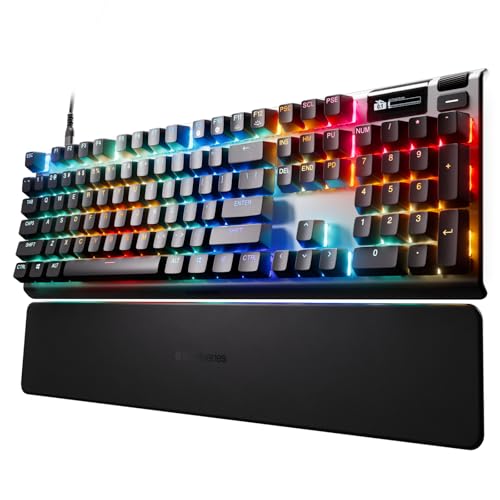
SteelSeries Apex Pro Gen 3 Full-Size Wired Keyboard
Best for: gamers wanting adjustable actuation and full-size keys
- Keycap Material
- PBT Keycaps (what this guide is about)
- Switch Type
- OmniPoint 3.0 Hall Effect
- Form Factor
- Full Size
- Connectivity
- USB-C
- Backlighting
- RGB
- Color
- Black
View on Amazon: SteelSeries Apex Pro Gen 3 Full-Size Wired Keyboard
The SteelSeries Apex Pro Gen 3 is a full-size wired mechanical keyboard built with PBT keycaps and OmniPoint 3.0 Hall Effect switches. It offers 40 levels of adjustable actuation alongside Rapid Trigger, Rapid Tap, and an integrated OLED smart display. Dynamic per-key RGB backlighting illuminates the board. This model suits you if you need a standard layout combined with fine switch actuation controls and durable keycaps.
Pros
- OmniPoint 3.0 Hall Effect switches with 40 adjustable actuation levels
- Durable PBT keycaps
- Built-in OLED Smart Display for on-board settings
- Rapid Trigger and Rapid Tap input registration
Cons
- Wired connectivity with no wireless operation
- Large full-size footprint requires significant desk space
Good fit if
- You want adjustable magnetic switches paired with durable PBT keycaps.
- You prefer a full-size layout with a dedicated OLED display screen.
- You rely on Rapid Trigger and Rapid Tap for rapid key resets.
Skip if
- You need a wireless keyboard for cable-free setups.
- You prefer compact form factors like 60% or 75% to save desk space.
Verdict: SteelSeries Apex Pro Gen 3 Full-Size Keyboard pairs durable PBT keycaps with highly customizable Hall Effect switches and an on-board OLED display. It delivers precise input tuning across a traditional full-size wired footprint.

ASUS ROG Strix Scope II 96 Wireless
Best for: compact desk setups requiring a number pad
- Keycap Material
- PBT Keycaps (what this guide is about)
- Switch Type
- ROG NX Snow linear
- Form Factor
- 96%
- Connectivity
- Bluetooth, 2.4GHz wireless, USB wired
- Backlighting
- RGB
- Hot-Swap Support
- Hot-Swappable
The ASUS ROG Strix Scope II 96 Wireless Keyboard gives you a 96% layout with durable PBT keycaps, packing a full number pad into a frame barely wider than a tenkeyless board. It connects via 2.4GHz wireless, Bluetooth across three devices, or USB cable, and reaches up to 1,500 hours of battery life. Pre-lubed, hot-swappable switches and built-in sound dampening suit users who need numeric entry without sacrificing desk space.
Pros
- Tri-mode connectivity with Bluetooth, 2.4GHz wireless, and USB
- Rated for up to 1,500 hours of battery life on 2.4GHz wireless
- Hot-swappable switch sockets with factory-lubricated linear switches
- Multi-function wheel and included detachable wrist rest
Cons
- Weighs 2.78 pounds, making it heavy for portable use
- Condensed 96% layout clusters keys closer than standard full-size spacing
Good fit if
- You want a dedicated number pad in a compact desk footprint.
- You switch between multiple systems using Bluetooth and 2.4GHz wireless.
- You prefer hot-swappable switches for easy replacement.
Skip if
- You want a lightweight board to carry in a travel bag.
- You prefer traditional spacing around arrow keys and the numpad.
Verdict: ASUS ROG Strix Scope II 96 Wireless Keyboard delivers a space-saving 96% form factor with durable PBT keycaps and massive battery life. It is an adaptable pick if you need full number pad utility alongside flexible tri-mode wireless connections.

NSYCA 60% Magnetic Gaming Keyboard
Best for: competitive gamers wanting compact Hall Effect performance
- Keycap Material
- PBT Keycaps (what this guide is about)
- Switch Type
- Linear Hall Effect magnetic
- Form Factor
- 60%
- Connectivity
- Wired
- Backlighting
- RGB
- Use
- Gaming
The NSYCA 60% Magnetic Gaming Keyboard gives you a compact footprint with shine-through PBT keycaps and dedicated arrow keys. Its Hall Effect switches support adjustable 0.01mm to 4.0mm actuation alongside an 8000Hz polling rate for rapid input response. A gasket mount structure with sound-dampening foam cushions keystrokes. It suits competitive gamers who need maximum desk space, durable PBT caps, and rapid-trigger magnetic performance over a wired connection.
Pros
- PBT shine-through keycaps resist wear and surface shine
- 8000Hz polling rate and 0.1ms latency
- Hall Effect magnetic switches with 0.01mm to 4.0mm adjustable actuation
- Compact 60% layout retains dedicated arrow keys
- Gasket mount structure with layered sound-dampening foam
Cons
- Wired connectivity only without wireless options
- Hot-swap PCB supports only 3-pin magnetic switches
Good fit if
- You want an 8000Hz polling rate with adjustable magnetic actuation.
- You prefer a 60% desk footprint that retains dedicated arrow keys.
- You need durable PBT keycaps with shine-through backlighting.
Skip if
- You require wireless Bluetooth or 2.4GHz connections.
- You plan to install standard mechanical switches instead of magnetic ones.
- You need a dedicated numeric keypad or discrete function row.
Verdict: NSYCA 60% Magnetic Gaming Keyboard delivers ultra-responsive Hall Effect switches and PBT keycaps in an efficient space-saving design. It serves competitive players who prioritize low latency and custom actuation points over wireless mobility.

Redragon 99-Key Wireless Gasket Keyboard
Best for: compact wireless desks needing number pads
- Keycap Material
- PBT Keycaps (what this guide is about)
- Switch Type
- Custom Mint Mambo Linear
- Form Factor
- 99 Keys
- Connectivity
- USB-C wired, BT 3.0/5.0, 2.4Ghz wireless
- Backlighting
- RGB
- Hot-Swap Support
- Hot-Swappable
The Redragon 99-Key Wireless Gasket Keyboard is a compact board that retains number pad functionality while reducing desk space. For this guide, it features shine-through PBT round keycaps paired with RGB lighting, tri-mode connectivity across 2.4 GHz, Bluetooth, and wired USB-C, and a multi-layer gasket structure. It suits you if you want cushioned typing acoustics and dedicated numerical keys without the bulk of a standard full-size board.
Pros
- Tri-mode connectivity: USB-C, 2.4 GHz, and Bluetooth 3.0/5.0
- Five-layer noise dampening with PO foam, IXPE switch foam, and silicone
- Hot-swappable PCB supporting both 3-pin and 5-pin switches
- Shine-through PBT round keycaps paired with RGB backlighting
Cons
- Round keycap profile differs from traditional sculpted shapes
- No dedicated physical volume knob or rotary wheel
Good fit if
- You need a number pad in a layout 20% smaller than full-size.
- You want shine-through PBT keycaps to illuminate key legends.
- You alternate between wired, Bluetooth, and 2.4 GHz connections.
Skip if
- You prefer standard square keycap profiles over round keycaps.
- You require a traditional 100% full-size layout with standard spacing.
Verdict: Redragon 99-Key Wireless Gasket Keyboard combines shine-through PBT keycaps with flexible tri-mode wireless and heavy internal acoustic dampening. It provides full numerical input in a desk-saving layout.

Ajazz 75% Gasket Mount Keyboard
Best for: wired TKL gaming with volume control
- Keycap Material
- PBT Keycaps (what this guide is about)
- Switch Type
- Pre-lubed linear
- Form Factor
- 75%
- Connectivity
- USB-C wired
- Hot-Swap Support
- Yes (3-pin and 5-pin)
- Backlighting
- RGB
This 82-key TKL mechanical keyboard features double-shot PBT keycaps, a gasket-mounted design, and factory-lubricated linear switches. You get sound-dampening Poron foam layers and a single-key slotted PCB that accepts both 3-pin and 5-pin hot-swap switches. It includes south-facing RGB lighting and an integrated metal volume knob over a wired USB-C connection. It suits you if you want a compact desk layout with dedicated audio controls and customizable switches.
Pros
- Double-shot PBT keycaps resist surface shine
- Gasket mount with multi-layer Poron and high-density foam
- Hot-swappable PCB supports 3-pin and 5-pin switches
- Built-in metal volume knob for quick audio adjustments
Cons
- Requires a wired USB-C connection with no wireless options
- Lacks a dedicated numeric keypad
Good fit if
- You want an 82-key layout with durable PBT keycaps and a physical volume knob.
- You plan to swap between 3-pin and 5-pin mechanical switches.
- You prioritize a gasket-mounted design for cushioned keystrokes.
Skip if
- You require a wireless connection for cable-free setups.
- You need a standard numpad for frequent numerical tasks.
Verdict: DAIDAI TKL Gasket Mechanical Keyboard delivers an 82-key layout with durable double-shot PBT keycaps and flexible switch swapping. Its wired USB-C setup and built-in volume knob provide responsive desktop performance.

SteelSeries Apex Pro TKL Gen 3 Keyboard
Best for: gamers wanting adjustable magnetic switches
- Keycap Material
- PBT Keycaps (what this guide is about)
- Form Factor
- TKL
- Connectivity
- USB-C
- Backlighting
- RGB
The SteelSeries Apex Pro TKL Gen 3 pairs durable PBT keycaps with OmniPoint 3.0 Hall Effect magnetic switches in a tenkeyless footprint. You get 40 levels of adjustable actuation, Rapid Trigger support, and an integrated OLED Smart Display for adjusting settings directly. Wired USB-C connectivity keeps input straightforward. This board suits competitive players who need fine-tuned switch sensitivity, RGB lighting, and wear-resistant PBT caps without a numpad taking up desk space.
Pros
- OmniPoint 3.0 switches with 40 adjustable actuation levels
- Rapid Trigger, Rapid Tap, and Protection Mode support
- Integrated OLED Smart Display
- Durable PBT keycaps
- Compact TKL layout with RGB backlighting
Cons
- Wired USB-C connection only with no wireless mode
- Lacks a dedicated number pad
Good fit if
- You want adjustable magnetic switch actuation with Rapid Trigger.
- You prefer a tenkeyless form factor with PBT keycaps.
- You want an onboard OLED screen for quick settings management.
Skip if
- You need 2.4GHz or Bluetooth wireless connectivity.
- You require a full-size layout with a numeric keypad.
Verdict: SteelSeries Apex Pro TKL Gen 3 delivers granular magnetic switch tuning and PBT durability in a compact wired layout. It is built for gamers who prioritize adjustable actuation and onboard display controls over wireless portability.

MOKURU 75% Wireless Mechanical Keyboard with LCD
Best for: desk setups needing compact wireless status monitoring
- Keycap Material
- PBT Keycaps (what this guide is about)
- Switch Type
- Linear
- Form Factor
- 75%
- Connectivity
- Bluetooth, 2.4GHz, USB wired
- Backlighting
- RGB
- Hot-Swap Support
- Hot-Swappable
View on Amazon: MOKURU 75% Wireless Mechanical Keyboard with LCD
The MOKURU 75% Wireless Mechanical Keyboard with LCD combines PBT keycaps with a 79-key layout designed to save desk space. It offers tri-mode connectivity across Bluetooth, 2.4GHz wireless, and USB-C, powered by a 4000mAh rechargeable battery. You get hot-swappable sockets compatible with 3-pin and 5-pin switches, a built-in LCD screen for status tracking, and a dedicated volume knob. It suits you if you want customizable wireless hardware with onboard visual metrics.
Pros
- Tri-mode connectivity via Bluetooth, 2.4GHz wireless, and wired USB-C
- Hot-swappable switch sockets supporting both 3-pin and 5-pin switches
- Built-in LCD screen displays date, time, battery level, and connection mode
- Integrated 4000mAh rechargeable battery
- Dedicated control knob handles volume adjustment and muting
Cons
- Dedicated software required to configure GIF uploads and calibrate date or time
- Compact 79-key layout lacks a dedicated numeric keypad
- Height profile reaches 1.85 inches without an included wrist rest
Good fit if
- You want an onboard LCD screen to monitor battery life and connection status.
- You need tri-mode connectivity to switch between Bluetooth, 2.4GHz, and wired setups.
- You plan to swap 3-pin or 5-pin switches without soldering.
Skip if
- You require a full numeric keypad for data entry.
- You prefer setting screen details without using proprietary configuration software.
Verdict: MOKURU 75% Wireless Mechanical Keyboard with LCD delivers versatile tri-mode wireless connectivity, hot-swap switch compatibility, and real-time status tracking via its onboard screen. It is an adaptable 79-key option for desks where compact size and hardware monitoring take priority.
Specifications side by side
| Spec | AULA 75% Wireless Mechanical Keyboard | Redragon Hot-Swappable Wired Mechanical Keyboard | AULA Full-Size Wireless Mechanical Keyboard | MageGee 68-Key PBT Mechanical Keyboard | Kisnt 75% Side-Printed PBT Keyboard | RK Royal Kludge 75% Gasket Mechanical Keyboard | Redragon Wireless Aluminum Mechanical Keyboard | SOLAKAKA 75% Wireless Mechanical Keyboard | SteelSeries Apex Pro Gen 3 Full-Size Wired Keyboard | ASUS ROG Strix Scope II 96 Wireless | NSYCA 60% Magnetic Gaming Keyboard | Redragon 99-Key Wireless Gasket Keyboard | Ajazz 75% Gasket Mount Keyboard | SteelSeries Apex Pro TKL Gen 3 Keyboard | MOKURU 75% Wireless Mechanical Keyboard with LCD |
|---|---|---|---|---|---|---|---|---|---|---|---|---|---|---|---|
| Switch Type | LEOBOG Reaper | Linear Red | not specified | Linear Red | Bsun linear | Silver Pro | Custom Switch | LEOBOG reaper | OmniPoint 3.0 Hall Effect | ROG NX Snow linear | Linear Hall Effect magnetic | Custom Mint Mambo Linear | Pre-lubed linear | not specified | Linear |
| Form Factor | 75% (81-key) | not specified | Full-size (108 keys) | 60% (68 keys) | 75% | 75% | not specified | 75% | Full Size | 96% | 60% | 99 Keys | 75% | TKL | 75% |
| Connectivity | Bluetooth 5.0, 2.4GHz wireless, USB | Wired | Bluetooth 5.0, 2.4GHz, USB-C | USB 2.0 wired | Bluetooth 5.0, 2.4GHz, USB-C | Wired | 2.4GHz, Bluetooth, USB-C | 2.4GHz, Bluetooth 5.0, USB-C wired | USB-C | Bluetooth, 2.4GHz wireless, USB wired | Wired | USB-C wired, BT 3.0/5.0, 2.4Ghz wireless | USB-C wired | USB-C | Bluetooth, 2.4GHz, USB wired |
| Hot-Swap Support | Yes (3-pin or 5-pin) | not specified | not specified | not specified | not specified | not specified | not specified | not specified | not specified | not specified | not specified | not specified | Yes (3-pin and 5-pin) | not specified | not specified |
| Backlighting | 16.8 Million RGB | LED | RGB | RGB | RGB | RGB | RGB | RGB | RGB | RGB | RGB | RGB | RGB | RGB | RGB |
| Keycap Material | Double injection sublimation PBT | Double-shot PBT, double injection ABS | Two-color injection-molded PBT | Double Shot PBT Pudding | Side-printed PBT | PBT | PBT | Double injection PBT | PBT | PBT | PBT | PBT | Double-shot PBT | PBT | PBT |
| Case Material | not specified | not specified | not specified | not specified | not specified | not specified | Brushed aluminum | not specified | not specified | not specified | not specified | not specified | not specified | not specified | not specified |
| Mounting Style | not specified | not specified | not specified | not specified | not specified | Gasket Mount | not specified | Gasket Mount | not specified | not specified | not specified | Gasket Mount | Gasket Mount | not specified | not specified |
| Media Controls | Volume Knob | not specified | not specified | not specified | not specified | Volume Knob | not specified | Volume Knob | not specified | not specified | not specified | not specified | Volume Knob | not specified | Volume Knob |
| Use | Gaming | Gaming | Gaming | Gaming | Gaming | not specified | Gaming | Gaming | not specified | Gaming | Gaming | Gaming | Gaming | not specified | not specified |
| Color | F75 Pro-Black | Black | Side Print Black | Ivory White /Red Switch | Gradient Gray | Green | Gradient Gray | Whtie&Black&Grey | Black | Black | White | Cerulean Polar | Purple White | not specified | Comic PBT |
| Operating System | not specified | Mac | not specified | Windows | not specified | not specified | not specified | Mac, Windows | not specified | Mac | Mac | not specified | not specified | not specified | Mac, Windows |
| Dimensions | 12.7 × 5.64 × 1.7 inches | 17.1 × 4.88 × 1.42 inches | 17.5 × 5.55 × 1.65 inches | 12.1 × 3.98 × 1.54 inches | 13.9 × 5.51 × 1.77 inches | 5.59 × 1.65 × 12.7 inches | 17.1 × 4.9 × 1.1 inches | 12.8 × 5.51 × 1.73 inches | 17.2 × 17.2 × 1.61 inches | 14.8 × 5.16 × 1.57 inches | not specified | not specified | 12.9 × 5.35 × 1.57 inches | not specified | 13.2 × 5.56 × 1.85 inches |
| Weight | 2.25 pounds | not specified | 2.6 pounds | not specified | 1.98 pounds | not specified | 2.37 pounds | not specified | not specified | 2.78 pounds | not specified | not specified | not specified | not specified | not specified |
| Model | F75 Pro | K671 | F108 | BOX-white-bd | KN85 | R75 | K556 | not specified | 64660 | X901 STRIX SCOPE II 96 WL/NXSW/CA/PBT | NSYCA WIN68 HE | K744 PRO | AK820 | not specified | not specified |
| Size | not specified | Wired | not specified | not specified | not specified | Hot-swap Switch | Custom Switch | not specified | Pro Full Size | Snow Linear | not specified | 99 Keys | not specified | TKL | not specified |
Are PBT Keycaps Worth It?
Keyboards with PBT keycaps provide durable hardware across diverse layouts. The models in this guide feature double-shot PBT keycaps, side-printed legends, shine-through caps, or pudding designs built for RGB backlighting. Side-printed and front-facing legends leave top key surfaces clean, while double-shot caps maintain durable markings. You find these keycaps paired with linear, tactile, and Hall Effect magnetic switches across 60%, 75%, 96%, and full-size frames. This feature gives you durable keycaps directly out of the box.
Worth it if
- You want durable double-shot, pudding, or shine-through keycaps out of the box.
- You prefer side-printed or front-facing legends for clean key surfaces.
Skip it if
- You plan to replace the stock keycaps with your own custom keycap set.
- You prioritize switch hardware, like Hall Effect magnetic sensors, over keycap plastics.
If you need a dedicated surface to position your setup at elbow height, review measurements for the best standing desks with keyboard tray.
How We Picked PBT Keyboards
You find qualifying keyboards from Amazon listings matching the PBT Keycaps specification. A keyboard joins the list only when the product title or feature list explicitly specifies PBT keycap material. Every specification comes directly from published listing data. The products are never physically handled. You see only one size or variant for each product family.
The 15 models are ordered with products in stock first, then by Amazon sales rank, with better-selling products first. You can compare specs like form factor, switch type, hot-swap support, and connectivity across the rankings. Pricing and inventory update live on the page at least daily.
How to Choose a PBT Mechanical Keyboard
-
Evaluate Switch Type and Feedback
Linear switches offer smooth, straight key travel without physical bumps, making them popular for rapid inputs in gaming. Tactile switches deliver a noticeable bump during actuation, giving direct physical confirmation without bottoming out. Specialized boards feature magnetic Hall Effect sensors that allow adjustable actuation depth. If you want tactile feedback during typing sessions, models like the RK Royal Kludge 75% Gasket Mechanical Keyboard provide tactile switches right out of the box. Compare actuation style, spring resistance, and switch technology before buying.
-
Check Internal Mounting Construction
Keyboard mounting structure directly changes bottom-out feel and keystroke acoustic resonance. Tray-mounted designs screw the switch plate directly to the bottom case, creating a stiff, solid impact. Gasket-mounted designs suspend the plate within silicone or foam dampeners, absorbing finger impact and lowering hollow case vibration. If you type for extended hours and prefer a softer typing stroke, target keyboards with explicit gasket mount specifications. The SOLAKAKA 75% Wireless Mechanical Keyboard features gasket mounting paired with internal acoustic layers to reduce harsh bottom-out impact across everyday typing routines.
-
Compare Wired and Wireless Modes
Decide whether your desk demands wireless mobility or permanent cable stability. Wired models eliminate battery management, charging routines, and signal dropouts, making them dependable fixtures for single-computer desks. Wireless designs allow clutter-free workspaces and multi-device rotation through Bluetooth or 2.4 GHz wireless links. If you switch between a laptop, desktop, and tablet during the day, look for dedicated multi-channel pairing specifications. The Kisnt 75% Side-Printed PBT Keyboard provides three Bluetooth channels to toggle between separate hardware devices without requiring constant cable swapping or re-pairing procedures at your desk.
-
Assess Onboard Controls and Displays
Quick-access controls reduce reliance on software menus and complex function key shortcuts. Rotary hardware knobs let you adjust master system audio or toggle lighting modes with an immediate physical turn. Integrated screens present system diagnostics, connection status, and battery levels directly on the casing. If you value real-time feedback without alt-tabbing away from active applications, verify onboard screen and dial specifications. The MOKURU 75% Wireless Mechanical Keyboard with LCD includes an integrated status display and a rotary control dial to monitor hardware performance and handle audio adjustments directly from the deck.
-
Verify Operating System Support
Check listed operating system compatibility before selecting a keyboard to avoid modifier key confusion. Keyboards tailored exclusively for Windows may lack Command and Option markings or functional media mappings when connected to Apple computers. Conversely, boards with cross-platform specifications include dedicated hardware toggle switches or replacement keycaps to adapt modifier layouts seamlessly. The Redragon Hot-Swappable Wired Mechanical Keyboard explicitly lists Mac compatibility, ensuring key mappings and function rows register accurately. Review whether the product specifications verify native support for your specific desktop platform to avoid tedious manual key remapping.
-
Examine Frame Material and Weight
Chassis materials influence desk stability, sound dampening, and overall keyboard durability. Standard ABS plastic enclosures keep hardware lightweight, which benefits portable setups, but they can shift across desk mats during energetic typing. Aluminum top plates or full metal casings add significant structural mass that firmly anchors the keyboard in place. The Redragon Wireless Aluminum Mechanical Keyboard incorporates an aluminum frame weighing over 2.3 pounds to eliminate flex and prevent unwanted desk movement. If you keep your keyboard permanently positioned at a workstation, prioritize heavier metal frames over lightweight plastic shells.
Frequently asked questions
Which PBT mechanical keyboards support tri-mode wireless connectivity?
Several models feature wireless connections alongside standard cables. The AULA F75 Pro, Redragon K556, SOLAKAKA 75%, and Redragon K744 PRO feature wireless connectivity for multi-device setups. You can also look at the ASUS ROG Strix Scope II 96 or Kisnt 75%, which provides three Bluetooth channels. These wireless options let you connect laptops, tablets, and desktop computers without running cables across your desk surface.
Can you replace the switches on a mechanical keyboard with PBT keycaps?
Yes, many keyboards with PBT keycaps feature hot-swappable sockets. Models like the AULA F75 Pro, Redragon K671, Kisnt 75%, RK Royal Kludge R75, DAIDAI AK820, and RK R98 Pro let you pull out switches and press in replacements without desoldering. This specification allows you to alternate between linear switches and tactile switches whenever you want to change your typing feel or replace individual switch hardware.
Which PBT mechanical keyboards feature dedicated hardware volume knobs?
Hardware volume knobs are standard on several compact and full-size models in this guide. You will find built-in dials on the AULA F75 Pro, RK Royal Kludge R75, MOKURU 75%, SOLAKAKA 75%, RK R98 Pro, and DAIDAI AK820. These rotary controls let you adjust desktop audio or mute sound directly on the keyboard frame without navigating software panels or pressing multi-key function shortcuts during use.
Are mechanical keyboards with PBT keycaps compatible with Mac operating systems?
Yes, multiple keyboards with PBT keycaps specifically list Mac support in their hardware specifications. The Redragon K671, MOKURU 75%, SOLAKAKA 75%, ASUS ROG Strix Scope II 96, and NSYCA WIN68 HE operate across Mac setups. Models like the MOKURU and SOLAKAKA also support Windows, making them suitable if you regularly switch your keyboard connection between different operating systems throughout the workday.
What layout sizes are available on PBT mechanical keyboards?
You can choose from compact 60% layouts up to full-size models. The NSYCA WIN68 HE provides an ultra-compact 60% footprint, while 75% boards like the AULA F75 Pro and DAIDAI AK820 save desk space. If you need a numeric pad, the RK R98 Pro and Redragon K744 PRO offer 96% and 99-key layouts, while the AULA F108 and SteelSeries Apex Pro Gen 3 provide standard full-size frames.
Which PBT mechanical keyboards include Hall Effect magnetic switches?
The SteelSeries Apex Pro Gen 3 and NSYCA 60% Magnetic Gaming Keyboard both feature Hall Effect magnetic switches paired with PBT keycaps. These switches utilize magnetic sensors rather than standard mechanical contacts. This design allows you to adjust actuation points directly on the board. The SteelSeries Apex Pro Gen 3 pairs these switches with an OLED display, while the NSYCA offers them in a wired 60% format.
What mounting styles are used in these PBT mechanical keyboards?
Several keyboards in this guide use gasket mounting structures beneath the keycaps. Models such as the RK Royal Kludge R75, SOLAKAKA 75%, RK R98 Pro, Redragon K744 PRO, DAIDAI AK820, and Kisnt KN85 feature gasket mount designs. This construction cushions the switch plate inside the keyboard casing, dampening keystroke vibrations and altering the sound profile compared to rigid, plate-mounted mechanical keyboard designs.