Best Left-Handed Mechanical Keyboards: 7 Spec-Based Picks
As an Amazon Associate we earn from qualifying purchases. Links on this page are affiliate links.
Finding the best left handed mechanical keyboards requires looking closely at layout design and port connectivity. We evaluated 7 models based on the specifications published on their listings to identify ergonomic options tailored for left-handed typing.
The A4tech Left-Handed Ergonomic Keyboard takes the top spot for left-handed data entry and accounting work because of its dedicated left-side numeric keypad, A-shaped key structure, and dual PS/2 and USB support. This guide helps you compare switch types, integrated USB hubs, and physical dimensions so you can choose the right keyboard for your workspace.
Quick picks
The best fit for you
- You need left-side number entry and dual connection options A4tech Left-Handed Ergonomic Keyboard Its A-shaped key layout pairs a left-side numeric keypad with dual PS/2 and USB support.
- You want dedicated multimedia hotkey shortcuts on your keyboard A4tech Ergonomic Left-Handed Wired Keyboard This model features eight multimedia hotkeys alongside a wired USB connection.
- You prefer low-profile scissor switches with built-in USB ports Sanpyl 109-Key Left-Handed Scissor Keyboard It combines low-profile scissor switches with two integrated USB hub ports.
- You use a Mac and need integrated USB hubs M MC Saite Left-Handed Ultra-Thin Scissor Keyboard It provides verified Mac operating system compatibility and built-in USB hubs.
Our 7 picks

A4tech Left-Handed Ergonomic Keyboard
Best for: left-handed data entry and accounting work
- Design
- Ergonomic, Left-Handed (what this guide is about)
- Connectivity
- ps/2+ USB
- Color
- Black
- Dimensions
- 8.2 × 1.8 × 18 inches
- Weight
- 1.9 pounds
The A4tech Ergonomic Left-Handed Keyboard is a full-size wired board designed with the numeric keypad positioned on the left side. It features an A-shaped key structure designed for hand posture, laser-inscribed keycaps, and dual PS/2 and USB connectivity options. If you do extensive data entry or accounting and want direct left-hand access to your number pad without losing standard desktop controls, this layout fits your daily workflow.
Pros
- Dedicated left-side numeric keypad layout
- Dual PS/2 and USB wired connectivity
- Patented natural_A shape key structure
- Software utility to manage 8 multimedia hotkeys
Cons
- No wireless connectivity options
- Large footprint measuring 18.72 inches long
Good fit if
- You need a dedicated left-handed number pad for accounting or data entry.
- You require connectivity through either a legacy PS/2 or a USB port.
- You run Windows or Mac OS X systems.
Skip if
- You need a wireless keyboard to keep your desk clear of cables.
- You have limited workspace that cannot accommodate an 18.72-inch chassis.
Verdict: A4tech Ergonomic Left-Handed Keyboard delivers a dedicated left-side numeric keypad and dual PS/2 and USB support for accounting and office desks. Its A-shaped key structure provides left-handed typists direct number entry on the left side.
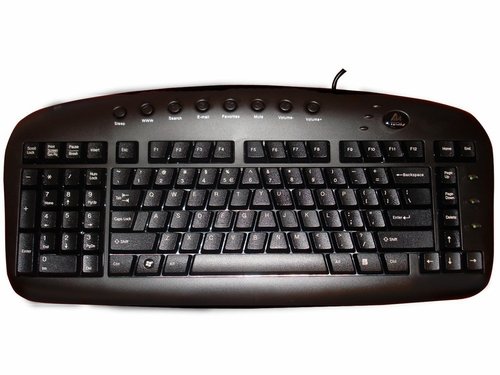
Ergoguys Left-Handed Ergonomic Keyboard
Best for: left-handed users needing a wired ergonomic layout
- Design
- Ergonomic, Left-Handed (what this guide is about)
- Connectivity
- Wired
- Color
- Black
The Ergoguys Left-Handed Ergonomic Wired Keyboard provides a dedicated left-handed setup for your desk. Its ergonomic layout targets comfortable typing positions during long daily sessions. A wired connection supplies continuous power and removes the need for battery replacements or wireless pairing steps. The black finish matches standard workstation equipment. You get a specialized, plug-in tool built directly for left-handed use.
Pros
- Ergonomic left-handed layout
- Wired connectivity eliminates battery management
- Neutral black finish
Cons
- No wireless connectivity option listed
- Color options limited to black
Good fit if
- You need an ergonomic layout designed specifically for left-handed typing.
- You prefer a direct wired connection instead of battery maintenance.
Skip if
- You need wireless connectivity for your workstation setup.
- You want keyboard color choices other than black.
Verdict: Ergoguys Left-Handed Ergonomic Wired Keyboard delivers an ergonomic, left-hand-oriented layout with reliable wired connectivity. It suits users who prioritize dedicated physical ergonomics over wireless portability.
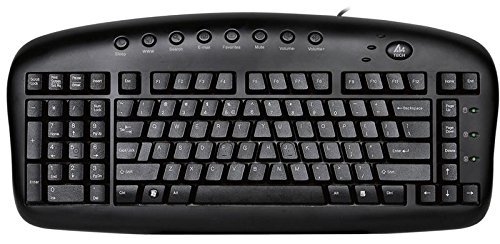
A4tech Ergonomic Left-Handed Wired Keyboard
Best for: left-handed users needing wired hotkey access
- Design
- Ergonomic, Left-Handed (what this guide is about)
- Connectivity
- Wired USB
- Color
- Black
- Dimensions
- 18 × 8.25 × 1.75 inches
- Weight
- 1.85 pounds
The A4tech Ergonomic Left-Handed Wired Keyboard provides a dedicated left-handed layout in a full-sized black chassis. It connects to your computer via a standard wired USB cable. Measuring 18 by 8.25 inches and standing 1.75 inches tall, this 1.85-pound unit includes 8 multimedia hotkeys across the top. It suits you if you need a wired, left-oriented typing setup for desk-bound business or data-entry tasks.
Pros
- Dedicated left-handed ergonomic layout
- 8 multimedia hotkeys for quick controls
- Direct wired USB connectivity
- 1.85-pound weight for stable desktop placement
Cons
- No wireless connectivity option listed
- Large footprint requiring at least 18 inches of desk width
Good fit if
- You want a dedicated left-handed ergonomic key arrangement.
- You prefer a wired USB connection without battery upkeep.
- You frequently use dedicated multimedia hotkeys.
Skip if
- You need a wireless keyboard for a cable-free setup.
- You have limited workspace unable to fit an 18-inch keyboard.
Verdict: A4tech Ergonomic Left-Handed Wired Keyboard delivers a specialized left-handed ergonomic design with reliable wired USB connectivity. Its 18-inch frame and 8 multimedia hotkeys provide dedicated shortcut access for desktop workstations.

Sanpyl 109-Key Left-Handed Scissor Keyboard
Best for: left-handed data entry with integrated USB expansion
- Design
- Ergonomic, Left-Handed (what this guide is about)
- Switch Type
- Scissor
- Form Factor
- 109 Keys
- Connectivity
- USB wired
The Sanpyl 109-Key Left-Handed Scissor Keyboard puts the numeric keypad on the left side to keep your primary hand free. It uses low-profile scissor switches and connects directly via a USB wired cable. You also get two integrated USB hub ports to attach extra peripherals or move data. This model suits spreadsheet operators, engineers, and left-handed typists who need an integrated keypad layout alongside built-in peripheral connectivity on their work desk.
Pros
- Left-side numeric keypad layout
- Two integrated USB hub ports
- Responsive scissor-switch mechanism
- Plug-and-play wired USB interface
Cons
- Scissor switches instead of mechanical switches
- Tethered USB wired connection with no wireless option
- No listed backlight or key remapping support
Good fit if
- You need a left-side numpad for data entry or left-handed typing.
- You want built-in USB hub ports to plug accessories into your keyboard.
- You prefer low-profile scissor switches over deep mechanical key switches.
Skip if
- You require genuine mechanical key switches.
- You want wireless Bluetooth or 2.4 GHz connectivity.
Verdict: Sanpyl 109-Key Left-Handed Scissor Keyboard provides a dedicated left-side numpad and dual USB hub ports for streamlined desktop data entry. It replaces traditional mechanical switches with scissor switches for a low-profile typing feel.

Serounder Left-Handed Ergonomic Keyboard
Best for: office workstations needing extra USB peripheral ports
- Design
- Ergonomic, Left-Handed (what this guide is about)
- Form Factor
- 109 Keys
- Connectivity
- Micro USB
- Case Material
- ABS
- Use
- Office
The Serounder 109-Key Left-Handed Keyboard pairs a left-side numeric keypad with an ABS plastic case for office environments. It connects through a Micro USB interface and provides two built-in USB ports for extra peripherals. If you handle regular data entry and need to keep your right hand free for mouse navigation, this 109-key plug-and-play layout gives you dedicated accounting keys on the left side without requiring driver installation.
Pros
- 109-key layout with dedicated left-side numeric keypad
- Two built-in USB interfaces for connecting peripheral devices
- Plug-and-play setup with no drivers required
- Rigid ABS plastic housing
Cons
- Uses older Micro USB interface instead of USB-C
- No wireless connectivity option listed
Good fit if
- You need a dedicated left-handed numpad for data entry or accounting tasks.
- You want built-in USB ports to connect peripheral accessories directly.
- You prefer a wired plug-and-play unit that works without software installation.
Skip if
- You require a modern USB-C connection.
- You want a wireless keyboard for your desk.
Verdict: Serounder 109-Key Left-Handed Keyboard provides a practical 109-key layout with two USB hub ports and a left numpad for office data entry. Its standard ABS construction and plug-and-play Micro USB connection make it simple to deploy at any workstation.

Generic 109-Key Left-Handed Ergonomic Keyboard
Best for: Left-hand data entry with peripheral USB pass-through
- Design
- Ergonomic, Left-Handed (what this guide is about)
- Form Factor
- 109 Keys
- Connectivity
- Micro USB
- Case Material
- ABS
View on Amazon: Generic 109-Key Left-Handed Ergonomic Keyboard
This full-size 109-key ergonomic keyboard places the numeric keypad on the left side, keeping your right hand free for mouse navigation. Built from ABS plastic, it connects via Micro USB and includes two additional USB ports for peripheral devices. With plug-and-play functionality, you get immediate desktop integration without driver software. It suits data entry workers and accountants who prioritize left-hand numeric input.
Pros
- Left-side numeric keypad layout with 109 keys
- Two built-in USB pass-through ports for peripherals
- Plug-and-play operation with no drivers required
- ABS plastic housing construction
Cons
- Relies on a wired Micro USB connection with no wireless option
- No adjustable feet or wrist rest listed in specifications
- No backlighting or switch type details provided
Good fit if
- You want a dedicated left-handed numpad to keep your right hand on a mouse.
- You need extra USB ports directly on your keyboard for peripherals.
- You prefer a simple plug-and-play wired setup without software configuration.
Skip if
- You require wireless connectivity like Bluetooth or 2.4 GHz RF.
- You need illuminated keys or backlighting for dark environments.
Verdict: Generic 109-Key Left-Handed Ergonomic Keyboard delivers a practical left-numpad layout and integrated USB ports for straightforward data entry. It offers a solid wired option if you want direct peripheral access and full numpad functionality on your left.

M MC Saite Left-Handed Ultra-Thin Scissor Keyboard
Best for: Mac users needing left-handed layout and hubs
- Design
- Left-Handed (what this guide is about)
- Switch Type
- Scissors foot structure
- Connectivity
- Wired USB
- Color
- Black
- Operating System
- Mac
View on Amazon: M MC Saite Left-Handed Ultra-Thin Scissor Keyboard
This M MC Saite wired keyboard gives you a dedicated left-handed layout across a full 109-key profile. It uses low-profile scissor switches rated for 15 million keystrokes, and it includes two built-in USB hub ports for attaching extra accessories. It functions directly with Mac, Windows, and Chrome OS setups. It suits you if you need Mac compatibility alongside left-side controls and extra ports at your desk.
Pros
- Native compatibility with Mac, Windows, and Chrome OS
- Two built-in USB hub ports for peripheral devices
- Full 109-key layout with dedicated left-handed orientation
- Scissor foot switch structure rated for 15 million keystrokes
Cons
- Uses scissor-foot switches instead of mechanical switches
- Requires a wired USB connection with no wireless option
Good fit if
- You use Mac OS and need dedicated left-handed key placement
- You want integrated USB pass-through ports directly on your keyboard
- You prefer low-profile scissor switches over tall mechanical keys
Skip if
- You require true mechanical key switches for typing
- You need a wireless setup to eliminate desk cables
Verdict: M MC Saite Left-Handed Ultra-Thin Scissor Keyboard pairs full left-side key access with integrated USB hubs and verified Mac support. It delivers a slim, low-profile typing platform for left-handed multi-platform workspaces.
Specifications side by side
| Spec | A4tech Left-Handed Ergonomic Keyboard | Ergoguys Left-Handed Ergonomic Keyboard | A4tech Ergonomic Left-Handed Wired Keyboard | Sanpyl 109-Key Left-Handed Scissor Keyboard | Serounder Left-Handed Ergonomic Keyboard | Generic 109-Key Left-Handed Ergonomic Keyboard | M MC Saite Left-Handed Ultra-Thin Scissor Keyboard |
|---|---|---|---|---|---|---|---|
| Switch Type | not specified | not specified | not specified | Scissor | not specified | not specified | Scissors foot structure |
| Form Factor | not specified | not specified | not specified | 109 Keys | 109 Keys | 109 Keys | not specified |
| Connectivity | ps/2+ USB | Wired | Wired USB | USB wired | Micro USB | Micro USB | Wired USB |
| Case Material | not specified | not specified | not specified | not specified | ABS | ABS | not specified |
| Use | not specified | not specified | not specified | not specified | Office | not specified | not specified |
| Design | Ergonomic, Left-Handed | Ergonomic, Left-Handed | Ergonomic, Left-Handed | Ergonomic, Left-Handed | Ergonomic, Left-Handed | Ergonomic, Left-Handed | Left-Handed |
| Color | Black | Black | Black | not specified | not specified | not specified | Black |
| Operating System | not specified | not specified | not specified | not specified | not specified | not specified | Mac |
| Dimensions | 8.2 × 1.8 × 18 inches | not specified | 18 × 8.25 × 1.75 inches | not specified | not specified | not specified | not specified |
| Weight | 1.9 pounds | not specified | 1.85 pounds | not specified | not specified | not specified | not specified |
| Model | KBS-29BLK | not specified | KBS-29BLK | Sanpyl2y865zhvpk | Serounderce8g4nvtk6 | Genericiuy60r71h5 | not specified |
Is a Left-Handed Keyboard Layout Worth It?
A left-handed keyboard shifts the numeric keypad and core calculation keys to the left side of the board. This configuration changes your daily hand positioning across the typing deck. Your left hand manages dedicated numeric input directly on 109-key or ergonomic frames, leaving the right side clear. It also alters your workstation layout, as the 7 models measure between 8.2 and 18 inches in length. Selecting this design changes key reach by placing secondary functions, navigation clusters, and number keys within primary reach of your left hand.
Worth it if
- You enter numeric data primarily with your left hand.
- You require a dedicated 109-key layout with left-hand number alignment.
- You want an ergonomic A-shaped key structure built for left-handed typing.
Skip it if
- You prefer standard right-side numpad placement for data entry.
- You do not use a dedicated numeric keypad for your daily typing tasks.
If you also play music, you can review specifications for the best left handed electric guitars.
How We Picked These Keyboards
To find the 7 keyboards for this guide, we selected models where the product title or feature list states a left-handed design. All details come directly from published manufacturer specifications rather than physical testing. We use these specifications to confirm key features such as left-side numeric keypads and connection types. Only one variant from each product family appears on the list.
We display products in stock first so you can view currently available options right away. You can evaluate the published layout dimensions, switch types, and USB port specifications to select the model that fits your desk setup.
How to Choose a Left-Handed Keyboard
-
Verify Operating System Support
Check whether the board explicitly lists driver or layout support for your operating system. Some left-handed keyboards target standard PC systems, while others declare explicit platform compatibility. If you work on Apple hardware, check the specs for listed Mac support before choosing a layout. The M MC Saite Left-Handed Ultra-Thin Scissor Keyboard lists Mac compatibility directly in its attributes. Choosing a model with stated platform support prevents modifier key misalignments and ensures your function keys register properly without extra software configuration.
-
Measure Desk Surface Space
Evaluate the physical footprint before buying. Full-size left-handed keyboards often feature wide chassis designs to accommodate the left-side number pad and function rows. For example, the A4tech Left-Handed Ergonomic Keyboard measures 18 inches across and 8.2 inches deep, weighing 1.9 pounds. Check your available desk width and mouse clearance against these measurements. Typists with compact desks or narrow keyboard trays need to verify that an 18-inch frame fits comfortably alongside their mouse, avoiding cramped wrist positioning during extended daily typing sessions.
-
Check Cable Interface Types
Review the exact wired connection required for your computer. While most modern peripherals rely on standard USB-A connections, certain left-handed models use different wired interfaces. For instance, the Serounder Left-Handed Ergonomic Keyboard lists a plug-and-play Micro USB connection. Other models provide legacy PS/2 support alongside standard USB cables. Inspect your computer ports or docking station to ensure you have the correct receptacle available. Selecting the matching connector avoids the need for external adapters, keeping your setup clean and preserving consistent power delivery to the board.
-
Compare Key Switch Types
Check the key switch construction listed in the product specifications. Left-handed boards commonly offer either low-profile scissor switches or standard full-travel key mechanisms. Models like the Sanpyl 109-Key Left-Handed Scissor Keyboard use scissor switches to provide a flatter profile and shorter key travel distance. If you prefer low-effort finger movement and minimal key height, prioritize scissor-switch designs. Users who prefer distinct structural layouts should examine listings specifying standard key travel or specialized A-shaped key layouts to find the typing response that matches their preferred finger motion.
-
Review Multimedia Hotkey Specs
Determine whether you need dedicated physical controls for audio and application shortcuts. Some left-handed keyboards stick strictly to standard alphanumeric and numpad arrangements, while others integrate specialized shortcut rows. The A4tech Ergonomic Left-Handed Wired Keyboard features 8 multimedia hotkeys to manage tasks without combining key presses. If your daily workflow involves frequent media adjustment or rapid desktop navigation, look for keyboards that explicitly list hotkeys in their specs. If you want a minimalist layout without extra top-row buttons, choose a model that omits secondary shortcut rows.
-
Confirm Total Key Count
Examine the listed key count to match your daily data entry needs. Full-format left-handed boards frequently feature 109 keys, incorporating extra functional commands alongside the left-aligned numeric cluster. The Generic 109-Key Left-Handed Ergonomic Keyboard specifies a full 109-key arrangement for straightforward office input. Typists who rely heavily on specialized symbols or direct calculation keys should check that the keyboard lists all 109 keys. If you require standard 104-key spacing, reviewing the key count specification ensures you do not end up with an unfamiliar key layout.
Frequently asked questions
What switch types do left-handed keyboards use?
Left-handed keyboards feature several switch mechanisms depending on the chassis profile. Models like the Sanpyl and M MC Saite use low-profile scissor switches, which provide shallow key travel. Other models rely on specialized desktop structures, such as the A-shaped key layout on the A4tech KBS-29BLK. You should select switch styles based on whether you prefer thin scissor action or angled desktop keycaps.
How do left-handed keyboards connect to a computer?
Most left-handed keyboards rely on standard wired connections for continuous power and input stability. Several boards, including the Ergoguys and A4tech wired models, utilize traditional USB cables, while the Serounder incorporates a Micro USB connection. Additionally, the A4tech KBS-29BLK supports dual connectivity through both USB and legacy PS/2 ports. These wired interfaces ensure steady communication without requiring battery management or wireless pairing.
Can you connect other accessories directly to a left-handed keyboard?
Yes, several left-handed keyboards include integrated USB hub ports that let you plug in external desktop accessories. The Sanpyl 109-key keyboard, Serounder, and Generic 109-key models feature dual USB ports directly on the board housing. M MC Saite also builds USB hubs into its chassis. These ports allow you to connect mice, flash drives, or other peripherals without routing extra cables directly to your computer tower.
What is the typical key count on a left-handed keyboard?
Left-handed keyboards commonly feature full-sized layouts containing 109 keys. Models from Sanpyl, Serounder, and Generic all specify a 109-key arrangement that places the number pad on the left while retaining navigation keys and function rows. Other designs, such as the wired A4tech model, supplement full layouts with eight dedicated multimedia hotkeys. These configurations ensure you retain standard keys while moving the numeric block to the left.
How large and heavy are left-handed ergonomic keyboards?
Left-handed ergonomic keyboards typically match standard desktop board dimensions, measuring around 18 inches across. For instance, the A4tech KBS-29BLK measures 18 inches in length, roughly 8.2 inches in width, and 1.8 inches in height, weighing approximately 1.9 pounds. The wired A4tech variant has similar specs at 18 by 8.25 inches and 1.85 pounds. Ultra-thin options like the M MC Saite provide lower profiles for smaller desk setups.
What materials are left-handed keyboards made from?
Left-handed keyboards primarily use standard ABS plastic construction for their outer casing and keycaps. For example, the Serounder 109-key model specifically lists ABS material for its body to handle daily office typing. Most options in this category, including units from Ergoguys, A4tech, and M MC Saite, feature durable black plastic finishes. These standard industrial plastics keep overall keyboard weight low while providing structured support across wider 18-inch desk footprints.
Are there left-handed keyboards designed for Mac computers?
Yes, specific models list explicit operating system compatibility for Apple hardware. The M MC Saite Left-Handed Ultra-Thin Scissor Keyboard explicitly lists Mac support alongside its low-profile scissor switches and integrated USB hub. While generic wired USB keyboards usually register keystrokes across platforms, checking for designated Mac compatibility ensures proper recognition of command keys and system hotkeys. Reviewing system specifications before selecting a board helps avoid key remapping issues.