Best Mechanical Keyboards with Wrist Rest: 15 Spec-Based Picks
As an Amazon Associate we earn from qualifying purchases. Links on this page are affiliate links.
Choosing a mechanical keyboard with wrist rest helps support neutral hand positioning during long typing and gaming sessions. To find the top options, 15 products were compared based strictly on the specifications published on their listings.
The Redragon Wireless RGB Gaming Keyboard leads the list by combining silent keys and wireless connectivity with a 4,000 mAh battery and integrated wrist support. This guide helps you decide on the right switch mechanism, connection type, and physical footprint for your workspace.
Quick picks
The best fit for you
- You want silent wireless typing with wrist support Redragon Wireless RGB Gaming Keyboard Its silent operation and wireless connectivity pair with a 4,000 mAh battery for daily typing.
- You want clicky feedback paired with typewriter styling RK Royal Kludge Retro Typewriter Mechanical Keyboard It features clicky blue switches, a typewriter design, and a detachable wrist rest.
- You need a compact hot-swappable keyboard with support Hexgears 75% Mechanical Keyboard with Wrist Rest The compact 75-percent 82-key frame includes hot-swappable linear switches and a magnetic wrist rest.
- You prefer a wireless split layout with wrist cushioning Logitech Ergo K860 Wireless Split Keyboard A wireless split ergonomic layout provides typing alignment alongside an integrated memory foam wrist rest.
Our 15 picks

Redragon Wireless RGB Gaming Keyboard
Best for: silent wireless typing with wrist support
- Ergonomic Features
- Wrist Rest (what this guide is about)
- Switch Type
- Silent Membrane
- Connectivity
- 2.4GHz wireless, Bluetooth, USB wired
- Backlighting
- RGB LED
- Use
- Gaming
- Operating System
- Windows
The Redragon Tri-Mode Wireless Keyboard with Wrist Rest combines an integrated wrist rest with flexible triple-mode connectivity across Bluetooth, 2.4GHz wireless, and USB-C wired modes. It features a 4,000 mAh rechargeable battery delivering up to 300 hours of runtime with RGB lighting turned off. With 10 dedicated multimedia keys, splash resistance, and silent operation, it fits your desk if you need full-size wrist support and wireless multi-device pairing.
Pros
- Tri-mode connectivity supporting 2.4GHz wireless, Bluetooth, and wired USB-C
- 4,000 mAh rechargeable battery provides up to 300 hours with backlighting off
- Built-in wrist rest paired with silent keys and splash resistance
- 10 dedicated multimedia keys and 12 combination shortcut keys
Cons
- Anti-ghosting is limited to 25 keys rather than full N-key rollover
- Large desk footprint measuring 17.5 inches long and 7.9 inches wide
Good fit if
- You want an integrated wrist rest with silent switch operation
- You switch between Bluetooth, 2.4GHz wireless, and USB-C connections across devices
- You require dedicated media keys and programmable macro support
Skip if
- You need full N-key rollover across all keys simultaneously
- You have limited desk space for a 17.5-inch long board with an attached rest
Verdict: Redragon Tri-Mode Wireless Keyboard with Wrist Rest delivers quiet typing and integrated wrist support alongside versatile tri-mode wireless connectivity. Its 4,000 mAh battery and dedicated media controls make it a practical daily choice.

RK Royal Kludge Retro Typewriter Mechanical Keyboard
Best for: retro aesthetics with clicky blue switches
- Ergonomic Features
- Wrist Rest (what this guide is about)
- Switch Type
- Mechanical Blue
- Form Factor
- Full size (108 keys)
- Connectivity
- Wired
- Backlighting
- RGB
- Case Material
- Aluminium alloy
View on Amazon: RK Royal Kludge Retro Typewriter Mechanical Keyboard
The RK Royal Kludge Typewriter Blue Switch Keyboard is a full-size wired board paired with a detachable ABS wrist rest to ease joint strain while typing. It features tactile blue mechanical switches that deliver medium resistance and an audible click. An aluminum alloy top panel anchors the 108 non-conflict keys and round vintage keycaps. This layout suits you if you want a complete number pad, clicky feedback, and wrist support.
Pros
- Detachable ABS wrist rest supports wrists at an elevated angle
- Tactile blue switches provide medium resistance and audible click feedback
- Full-size 108-key layout with full anti-ghosting non-conflict registration
- Rigid aluminum alloy top panel with matte finish
Cons
- Wired-only connection with no wireless or Bluetooth modes
- ABS wrist rest lacks soft cushioning or padding
Good fit if
- You prefer loud, clicky mechanical blue switches with tactile resistance.
- You need a dedicated number pad and full 108-key layout.
- You want a detachable wrist rest to support elevated typing angles.
Skip if
- You require a silent or low-noise switch for shared spaces.
- You want a wireless keyboard or multi-device Bluetooth connectivity.
Verdict: RK Royal Kludge Typewriter Blue Switch Keyboard delivers tactile, clicky keystrokes on a rigid aluminum deck paired with a detachable wrist rest. It provides dependable full-size ergonomics for loud, responsive typing sessions.

Corsair K70 CORE Mechanical Keyboard with Palmrest
Best for: desk gaming with magnetic palm support
- Ergonomic Features
- Wrist Rest (what this guide is about)
- Switch Type
- Pre-lubed MLX Red linear
- Connectivity
- Wired
- Backlighting
- RGB
- Keycap Material
- ABS double-shot
- Case Material
- Aluminum top plate
View on Amazon: Corsair K70 CORE Mechanical Keyboard with Palmrest
The Corsair K70 CORE is a wired mechanical gaming keyboard featuring a magnetic detachable soft-touch palm rest for wrist support. It includes pre-lubed CORSAIR Red linear switches paired with two sound-dampening layers, an aluminum top plate, and ABS double-shot keycaps. You also get a multi-function rotary dial for media management. This setup suits you if you want linear desktop typing with a dedicated magnetic wrist rest and onboard hardware controls.
Pros
- Magnetic detachable soft-touch palm rest included
- Pre-lubricated CORSAIR Red linear mechanical switches
- Durable aluminum top plate with two sound-dampening layers
- Multi-function rotary dial and programmable media button
Cons
- Wired connectivity only with no wireless options
- ABS keycaps instead of PBT material
Good fit if
- You want a magnetic detachable soft-touch palm rest for wrist support.
- You prefer smooth linear switches with integrated sound dampening.
- You need a physical rotary dial for volume and media controls.
Skip if
- You need a wireless keyboard for cable-free desk setups.
- You prefer tactile or clicky switches over smooth linear travel.
Verdict: Corsair K70 CORE Mechanical Keyboard with Palm Rest delivers quiet linear typing, an aluminum frame, and magnetic wrist support. It is a solid full-featured pick if you want reliable wired performance with built-in ergonomic cushioning.

Razer BlackWidow V4 Green Switch Keyboard
Best for: tactile clicky switches and dedicated macro keys
- Ergonomic Features
- Wrist Rest (what this guide is about)
- Switch Type
- Green tactile & clicky
- Backlighting
- Razer Chroma RGB
- Use
- Gaming
- Dimensions
- 18.4 × 6.01 × 1.71 inches
- Weight
- 3.27 pounds
The Razer BlackWidow V4 Green Switch Keyboard is a gaming keyboard built with tactile, clicky mechanical switches. For ergonomic support, you receive a magnetic plush leatherette wrist rest that connects directly to the frame. The board also supplies six dedicated macro keys, media keys, a multi-functional roller, and RGB backlighting. It suits you if you need audible actuation alongside direct hardware controls for desktop gaming.
Pros
- Magnetic plush leatherette wrist rest included
- Tactile and clicky Green mechanical switches
- Six dedicated macro keys plus media keys
- Multi-functional roller for shortcuts
Cons
- Weighs 3.27 pounds, limiting portability
- Large 18.36-inch length requires substantial desk space
Good fit if
- You want tactile, clicky feedback from Razer Green switches.
- You need a magnetic plush leatherette wrist rest for wrist support.
- You rely on dedicated macro keys and a control roller.
Skip if
- You prefer silent or linear switches over clicky keys.
- You have tight desk space that cannot fit an 18.36-inch board.
Verdict: Razer BlackWidow V4 Green Switch Keyboard pairs clicky switches with dedicated macro buttons and an included magnetic plush wrist rest. It delivers extensive physical inputs if you have space for its 18.36-inch length.
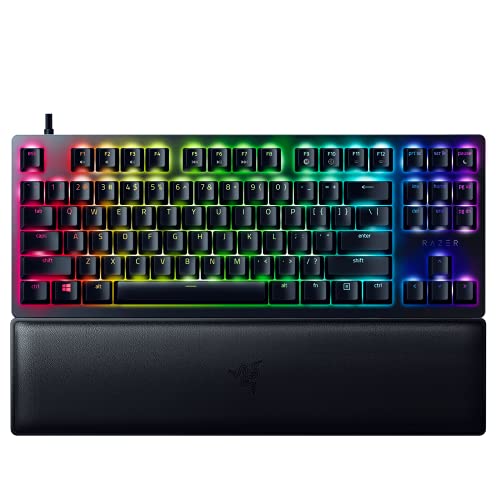
Razer Huntsman V2 TKL Optical Keyboard
Best for: gamers wanting tactile switches and wrist support
- Ergonomic Features
- Wrist Rest (what this guide is about)
- Switch Type
- Razer Clicky Optical
- Form Factor
- Tenkeyless (TKL)
- Connectivity
- Detachable Type-C
- Keycap Material
- Doubleshot PBT
- Use
- Gaming
This tenkeyless keyboard pairs Razer clicky optical switches with a sturdy ergonomic wrist rest. Doubleshot PBT keycaps resist wear and fading. The detachable Type-C cable simplifies transport. An 8000Hz polling rate reduces input latency. Cloud storage supports up to five on-board profiles. It suits gamers who want tactile feedback and wrist support in a compact layout.
Pros
- Ergonomic wrist rest relieves pressure
- Doubleshot PBT keycaps resist shine
- 8000Hz polling rate for low latency
- Detachable Type-C cable
- 5 on-board memory profiles
Cons
- Wired only, no Bluetooth or wireless options
- Tenkeyless layout lacks number pad
- Clicky switches may be too loud for shared spaces
Good fit if
- You want a compact keyboard with a built-in wrist rest
- You prefer tactile clicky switches for gaming
- You need durable PBT keycaps that resist wear
Skip if
- You require wireless connectivity or Bluetooth
- You need a full-size keyboard with a number pad
- You prefer quiet linear switches over clicky ones
Verdict: Razer Huntsman V2 TKL with Wrist Rest fits gamers who want tactile clicky switches and a sturdy wrist rest in a compact, wired layout. It is not suitable if you need wireless freedom or a full-size number pad.

Hexgears 75% Mechanical Keyboard with Wrist Rest
Best for: compact wireless setups needing magnetic wrist support
- Ergonomic Features
- Wrist Rest (what this guide is about)
- Switch Type
- Scarlet Cloud Switch - Linear
- Form Factor
- 75%
- Connectivity
- Bluetooth 5.0, 2.4GHz, USB wired
- Backlighting
- RGB
- Keycap Material
- PBT
View on Amazon: Hexgears 75% Mechanical Keyboard with Wrist Rest
This Hexgears compact 75% mechanical keyboard includes a detachable magnetic wrist rest and dual-stage kickstands to support your typing posture. It features an 82-key layout, hot-swappable switch sockets compatible with 3-pin and 5-pin switches, and tri-mode wireless connectivity via Bluetooth 5.0, 2.4GHz, or USB. It suits you if you need a space-saving desk setup with dedicated palm support, multi-device wireless pairing, and built-in media controls.
Pros
- Includes a detachable magnetic wrist rest and dual-stage kickstands
- Tri-mode connectivity supporting Bluetooth 5.0, 2.4GHz, and USB wired
- Hot-swappable PCB compatible with 3-pin and 5-pin switches
- Internal rechargeable 4600mAh battery
- Built-in multifunction knob for media and volume control
Cons
- Compact 82-key layout omits a dedicated numeric keypad
- Custom lighting profiles and macro configuration require external driver software
Good fit if
- You want a compact 75% layout paired with a dedicated magnetic wrist rest
- You switch among up to five devices across Bluetooth, 2.4GHz wireless, and USB wired connections
- You prefer hot-swappable switch sockets to change switches without soldering
Skip if
- You need a dedicated number pad for frequent numerical entry
- You prefer an integrated, fixed split ergonomic layout
Verdict: Hexgears 75% Mechanical Keyboard with Wrist Rest combines compact 82-key dimensions with ergonomic magnetic wrist support and hot-swappable hardware. Its tri-mode wireless options and integrated volume dial provide high utility in small desktop footprints.

Razer Huntsman V3 Pro TKL Keyboard
Best for: competitive gamers seeking adjustable actuation and wrist support
- Ergonomic Features
- Wrist Rest (what this guide is about)
- Switch Type
- Analog Optical Gen-2
- Form Factor
- TKL
- Keycap Material
- Doubleshot PBT
- Case Material
- Brushed aluminum top plate
- Use
- Gaming
The Razer Huntsman V3 Pro TKL is a tenkeyless gaming keyboard featuring Gen-2 analog optical switches and a magnetic firm leatherette wrist rest. You get an adjustable actuation range from 0.1 mm to 4.0 mm, onboard Rapid Trigger controls, and doubleshot PBT keycaps over an aluminum top plate. It suits you if you need compact desk dimensions combined with customizable switch travel and dedicated ergonomic wrist support.
Pros
- Magnetic firm leatherette wrist rest included
- Gen-2 analog optical switches with 0.1–4.0 mm adjustable actuation
- Rapid Trigger support with onboard LED indicator adjustments
- Textured doubleshot PBT keycaps and aluminum top plate
Cons
- Tenkeyless layout lacks dedicated numpad
- No wireless connectivity options listed
Good fit if
- You want analog switches with customizable 0.1–4.0 mm actuation points.
- You need a detachable magnetic wrist rest with a compact TKL layout.
- You prefer configuring settings directly onboard without software.
Skip if
- You require a dedicated numeric keypad for data entry.
- You prefer a wireless connection for your setup.
Verdict: Razer Huntsman V3 Pro TKL Analog Optical Keyboard delivers customizable analog actuation and Rapid Trigger functionality in a compact build with a magnetic wrist rest.

Razer Huntsman V3 Pro Full-Size Optical Keyboard
Best for: gamers wanting adjustable actuation and wrist support
- Ergonomic Features
- Wrist Rest (what this guide is about)
- Switch Type
- Analog Optical Gen-2
- Form Factor
- Full Size
- Keycap Material
- Doubleshot PBT
- Case Material
- Brushed Aluminum Top Plate
- Use
- Gaming
View on Amazon: Razer Huntsman V3 Pro Full-Size Optical Keyboard
The Razer Huntsman V3 Pro is a full-size gaming keyboard equipped with a magnetic firm leatherette wrist rest for wrist support during long sessions. It features Gen-2 analog optical switches with an adjustable 0.1 to 4.0 mm actuation range and Rapid Trigger inputs. You also get textured doubleshot PBT keycaps and a multi-function digital dial. It suits you if you need competitive gaming features paired with dedicated palm support.
Pros
- Magnetic firm leatherette wrist rest snaps directly to the keyboard
- Analog optical switches with 0.1 to 4.0 mm adjustable actuation and Rapid Trigger
- Multi-function digital dial and three dedicated buttons for media and macros
- Textured doubleshot PBT keycaps on a brushed aluminum top plate
Cons
- Full-size footprint takes up substantial desk space
- No wireless connectivity options listed in specifications
- Wrist rest is firm leatherette rather than soft plush foam
Good fit if
- You want adjustable switch actuation and Rapid Trigger for competitive gaming.
- You need a full-size keyboard with a volume dial and dedicated media buttons.
- You prefer a magnetic snap-on leatherette wrist rest for palm support.
Skip if
- You want a wireless keyboard to keep your desk clear of cables.
- You prefer a compact or tenkeyless layout to maximize mouse space.
- You require a soft cushioned palm rest instead of a firm surface.
Verdict: Razer Huntsman V3 Pro Full-Size Optical Keyboard combines rapid analog optical switches with an included magnetic wrist rest for high-precision play. It offers extensive physical controls and onboard tuning without sacrificing full-size functionality.

Razer Huntsman V3 Pro TKL White Optical Keyboard
Best for: white tenkeyless setups needing adjustable switch actuation
- Ergonomic Features
- Wrist Rest (what this guide is about)
- Switch Type
- Analog Optical Gen-2
- Form Factor
- TKL
- Keycap Material
- Doubleshot PBT
- Use
- Gaming
- Color
- White
View on Amazon: Razer Huntsman V3 Pro TKL White Optical Keyboard
The Razer Huntsman V3 Pro TKL White Optical Keyboard pairs a tenkeyless footprint with a magnetic firm leatherette wrist rest for ergonomic palm support. You get second-generation analog optical switches offering adjustable 0.1 to 4.0 mm actuation, Rapid Trigger, and Snap Tap input prioritization. Textured doubleshot PBT keycaps resist wear, while onboard LEDs and a digital dial manage settings directly. It suits competitive players wanting an all-white setup with tunable switch sensitivity.
Pros
- Magnetic firm leatherette wrist rest snaps directly to keyboard
- Gen-2 analog optical switches with 0.1–4.0 mm adjustable actuation and Rapid Trigger
- Textured doubleshot PBT keycaps with 100 million keystroke lifespan
- Multi-function digital dial and dedicated buttons for onboard settings
Cons
- Tenkeyless layout lacks an integrated number pad
- Snap Tap feature requires installing the latest firmware update
Good fit if
- You want an all-white tenkeyless gaming layout paired with a detachable magnetic wrist rest.
- You need hardware-based actuation adjustments between 0.1 mm and 4.0 mm.
Skip if
- You need a full-size layout with a dedicated numeric keypad.
- You prefer a soft plush wrist rest over a firm leatherette surface.
Verdict: Razer Huntsman V3 Pro TKL White Optical Keyboard combines a compact tenkeyless form factor with responsive analog optical switches and a magnetic leatherette wrist rest. It gives competitive players precise actuation tuning and ergonomic support in a clean white finish.

Razer BlackWidow TE V2 TKL Mechanical Keyboard
Best for: compact desks needing quiet switches and palm support
- Ergonomic Features
- Wrist Rest (what this guide is about)
- Switch Type
- Razer Yellow
- Form Factor
- Tenkeyless
- Connectivity
- Detachable USB wired
- Backlighting
- Chroma RGB
- Use
- Gaming
View on Amazon: Razer BlackWidow TE V2 TKL Mechanical Keyboard
The Razer BlackWidow TE V2 TKL is a tenkeyless mechanical gaming keyboard built with a detachable magnetic wrist rest. It features linear, silent Razer Yellow switches that require 45 grams of force for actuation. Its compact TKL layout saves desk space, while the plush leatherette rest supports your hands during long sessions. This setup suits you if you need a portable, quieter mechanical board with dedicated wrist support.
Pros
- Magnetic plush leatherette wrist rest
- Linear, silent Razer Yellow switches with 45 g actuation force
- Tenkeyless layout with detachable USB cable
- Individually backlit RGB keys with full macro programmability
Cons
- Lacks a dedicated number pad
- No wireless connectivity option listed
Good fit if
- You want a compact tenkeyless footprint paired with a padded magnetic wrist rest.
- You prefer quiet, linear key switches with light actuation force.
- You travel frequently and need a detachable cable design.
Skip if
- You need a dedicated numeric keypad for data entry.
- You prefer wireless desk setups.
Verdict: Razer BlackWidow TE V2 TKL Mechanical Keyboard delivers silent linear typing and cushioned magnetic wrist support in a portable tenkeyless design.

Razer Huntsman Elite Optical Gaming Keyboard
Best for: plush wrist support with clicky optical switches
- Ergonomic Features
- Wrist Rest (what this guide is about)
- Switch Type
- Clicky Optical
- Backlighting
- Razer Chroma RGB
- Keycap Material
- Regular ABS
- Case Material
- Aluminum top frame
- Use
- Gaming
View on Amazon: Razer Huntsman Elite Optical Gaming Keyboard
The Razer Huntsman Elite is a full-size gaming keyboard built with clicky optical switches and an aluminum top frame. Its key ergonomic feature is a detachable magnetic wrist rest made of plush leatherette, complete with integrated Chroma underglow lighting. The optical switches actuate at 1.5 millimeters for responsive inputs. If you want full-size typing support with dedicated wrist cushioning and high-durability hardware, this board gives you solid specs for your desk.
Pros
- Magnetic plush leatherette wrist rest with built-in underglow lighting
- Clicky optical switches with a 1.5 mm actuation distance
- Matte aluminum top frame construction
- Rated switch durability up to 100 million clicks
Cons
- Fitted with regular ABS keycaps rather than PBT
- Heavier desktop footprint at 3.76 pounds
Good fit if
- You want a magnetic leatherette wrist rest that includes underglow lighting.
- You prefer clicky switches with a short 1.5 mm actuation distance.
- You need full-key macro remapping across every keypress combination.
Skip if
- You want PBT keycaps out of the box instead of regular ABS.
- You need a lightweight or compact board for portable use.
Verdict: Razer Huntsman Elite Optical Gaming Keyboard pairs light-based optical actuation with a plush, illuminated magnetic wrist rest for supported desktop gaming.

Perixx PERIBOARD Split Ergonomic Keyboard
Best for: split-layout ergonomic typing with deep key travel
- Ergonomic Features
- Wrist Rest (what this guide is about)
- Switch Type
- Membrane
- Connectivity
- Wired USB
- Design
- Ergonomic
- Color
- Black
- Dimensions
- 18.9 × 9.2 × 1.72 inches
This wired keyboard from Perixx combines an integrated wrist rest with an arched split-key layout to keep your hands and wrists in a neutral posture. Instead of mechanical switches, it uses tactile membrane switches with deep 4.2 mm key travel rated for 20 million keystrokes. Measuring 18.92 inches wide, it suits office workers who want palm support and split ergonomics in a traditional wired setup.
Pros
- Integrated wrist rest paired with a one-piece split key layout
- Deep 4.2 mm key travel with tactile and audible feedback
- Switches rated for durability up to 20 million keystrokes
- Stepped, curved key rows designed for natural finger reach
Cons
- Uses membrane switches instead of true mechanical switches
- Wide 18.92-inch footprint occupies significant desk space
- Wired USB connection limits placement options
Good fit if
- You want an integrated wrist rest combined with a split-key layout.
- You prefer long 4.2 mm key travel with tactile feedback.
- You want a wired USB keyboard that requires no battery charging.
Skip if
- You insist on authentic mechanical key switches.
- You have limited desk space for a keyboard over 18 inches wide.
- You need wireless connectivity for your setup.
Verdict: Perixx Split Ergonomic Wired Keyboard provides a built-in wrist rest and deep 4.2 mm key travel across a contoured split layout. It is a practical pick if you prioritize wrist support and posture over genuine mechanical switches.

Logitech Ergo K860 Wireless Split Keyboard
Best for: ergonomic wireless typing with integrated wrist cushioning
- Ergonomic Features
- Wrist Rest (what this guide is about)
- Switch Type
- Perfect Stroke
- Form Factor
- Full-size split
- Connectivity
- Bluetooth, USB receiver
- Case Material
- Plastic
- Design
- Ergonomic
The Logitech Ergo K860 Wireless Ergonomic Keyboard features a curved, split keyframe paired with an integrated pillowed wrist rest layered with memory foam. It includes adjustable palm lift legs offering 0, -4, and -7 degree tilts to keep your wrists neutral. With dual Bluetooth and USB receiver connectivity plus scooped Perfect Stroke keys, this full-size setup suits you if you prioritize forearm alignment and cushioned wrist support during long typing sessions.
Pros
- Pillowed wrist rest with built-in memory foam layer
- Adjustable palm lift legs with 0, -4, and -7 degree angles
- Dual wireless connectivity using Bluetooth or USB receiver
- Curved split keyframe with scooped Perfect Stroke keys
Cons
- Large footprint spanning roughly 18 inches wide and 9 inches deep
- Uses quiet low-profile keys instead of standard mechanical switches
- Integrated wrist rest is non-detachable
Good fit if
- You need a curved split layout with integrated memory foam wrist support.
- You want negative-tilt adjustment options for sitting or standing work.
- You prefer dual wireless pairing via Bluetooth and USB receiver.
Skip if
- You require traditional mechanical switches rather than quiet keys.
- You have limited desk depth for a 9.17-inch deep chassis.
- You want a removable palm rest.
Verdict: Logitech Ergo K860 Wireless Ergonomic Keyboard provides structured split-layout support with negative tilt legs and a memory foam wrist rest. It is a solid wireless choice if you prioritize neutral hand alignment over traditional mechanical switches.

Perixx Wireless Mini Split Keyboard and Vertical Mouse
Best for: compact ergonomic setups needing integrated wrist support
- Ergonomic Features
- Wrist Rest (what this guide is about)
- Switch Type
- Membrane low profile
- Form Factor
- Mini
- Connectivity
- 2.4 GHz wireless
- Design
- Ergonomic
- Color
- Black
View on Amazon: Perixx Wireless Mini Split Keyboard and Vertical Mouse
This setup pairs a compact split-key wireless keyboard with a vertical mouse. You get an integrated adjustable palm rest stand, curved key layout, and no number pad to save desk space. It connects via a 2.4 GHz USB nano receiver with a 33-foot range. At 13.82 inches wide and 1.6 pounds, it suits you if you need ergonomic wrist support in a smaller footprint.
Pros
- Integrated adjustable palm rest with magnetic height stand
- Split-key layout without a number pad to reduce outward wrist bending
- Single 2.4 GHz USB nano receiver covers both keyboard and mouse
- Bundled 5-button vertical mouse with 800, 1200, and 1600 DPI settings
Cons
- Lacks a built-in number pad
- Requires Windows operating systems (Windows 7 through 11)
- No Bluetooth connectivity listed
Good fit if
- You want a split ergonomic layout without a tenkey number pad.
- You prefer an integrated palm rest with magnetic tilt adjustment.
- You need a matched vertical mouse that shares a single USB port.
Skip if
- You need a dedicated number pad for frequent numeric entry.
- You operate on macOS or Linux systems.
- You prefer direct Bluetooth pairing without a USB-A receiver.
Verdict: Perixx Wireless Compact Split Keyboard combines an integrated adjustable palm rest with a compact split-key profile and matching vertical mouse. It provides targeted ergonomic positioning for Windows users who want to conserve desk surface area.

Arteck Split Ergonomic Wireless Keyboard
Best for: Windows users wanting cushioned ergonomic wrist support
- Ergonomic Features
- Wrist Rest (what this guide is about)
- Connectivity
- 2.4G USB wireless
- Design
- Ergonomic
- Color
- Black
- Dimensions
- 16.5 × 9.6 × 1.02 inches
The Arteck Split Ergonomic Wireless Keyboard pairs a split-key layout with an integrated cushioned palm and wrist rest to support natural forearm alignment. It connects wirelessly using a 2.4G nano USB receiver and runs on an internal rechargeable battery offering up to six months of runtime at two hours daily. This board suits you if you need dedicated wrist support and full wireless freedom for Windows desktop setups.
Pros
- Integrated soft cushioned wrist and palm rest
- Rechargeable battery with USB-C charging cable included
- 2.4G wireless connection with stowable nano receiver
- Split ergonomic key layout
Cons
- No Bluetooth connectivity listed
- Compatibility listed only for Windows systems
- No key backlighting listed in specifications
Good fit if
- You want a split layout with a built-in cushioned wrist rest.
- You prefer a rechargeable wireless connection via a 2.4G USB receiver.
- You work on a Windows desktop or laptop.
Skip if
- You need Bluetooth connectivity for devices without standard USB ports.
- You require backlit keys for low-light typing.
Verdict: Arteck Split Ergonomic Wireless Keyboard provides a split typing layout and an integrated cushioned rest powered by a rechargeable wireless battery. It delivers continuous forearm support for standard Windows workspaces.
Specifications side by side
| Spec | Redragon Wireless RGB Gaming Keyboard | RK Royal Kludge Retro Typewriter Mechanical Keyboard | Corsair K70 CORE Mechanical Keyboard with Palmrest | Razer BlackWidow V4 Green Switch Keyboard | Razer Huntsman V2 TKL Optical Keyboard | Hexgears 75% Mechanical Keyboard with Wrist Rest | Razer Huntsman V3 Pro TKL Keyboard | Razer Huntsman V3 Pro Full-Size Optical Keyboard | Razer Huntsman V3 Pro TKL White Optical Keyboard | Razer BlackWidow TE V2 TKL Mechanical Keyboard | Razer Huntsman Elite Optical Gaming Keyboard | Perixx PERIBOARD Split Ergonomic Keyboard | Logitech Ergo K860 Wireless Split Keyboard | Perixx Wireless Mini Split Keyboard and Vertical Mouse | Arteck Split Ergonomic Wireless Keyboard |
|---|---|---|---|---|---|---|---|---|---|---|---|---|---|---|---|
| Switch Type | Silent Membrane | Mechanical Blue | Pre-lubed MLX Red linear | Green tactile & clicky | Razer Clicky Optical | Scarlet Cloud Switch - Linear | Analog Optical Gen-2 | Analog Optical Gen-2 | Analog Optical Gen-2 | Razer Yellow | Clicky Optical | Membrane | Perfect Stroke | Membrane low profile | not specified |
| Form Factor | not specified | Full size (108 keys) | not specified | not specified | Tenkeyless (TKL) | 75% | TKL | Full Size | TKL | Tenkeyless | not specified | not specified | Full-size split | Mini | not specified |
| Connectivity | 2.4GHz wireless, Bluetooth, USB wired | Wired | Wired | not specified | Detachable Type-C | Bluetooth 5.0, 2.4GHz, USB wired | not specified | not specified | not specified | Detachable USB wired | not specified | Wired USB | Bluetooth, USB receiver | 2.4 GHz wireless | 2.4G USB wireless |
| Backlighting | RGB LED | RGB | RGB | Razer Chroma RGB | not specified | RGB | not specified | not specified | not specified | Chroma RGB | Razer Chroma RGB | not specified | not specified | not specified | not specified |
| Keycap Material | not specified | not specified | ABS double-shot | not specified | Doubleshot PBT | PBT | Doubleshot PBT | Doubleshot PBT | Doubleshot PBT | not specified | Regular ABS | not specified | not specified | not specified | not specified |
| Case Material | not specified | Aluminium alloy | Aluminum top plate | not specified | not specified | not specified | Brushed aluminum top plate | Brushed Aluminum Top Plate | not specified | not specified | Aluminum top frame | not specified | Plastic | not specified | not specified |
| Hot-Swap Support | not specified | not specified | not specified | not specified | not specified | Hot-Swappable | not specified | not specified | not specified | not specified | not specified | not specified | not specified | not specified | not specified |
| Media Controls | not specified | not specified | not specified | not specified | not specified | Volume Knob | not specified | not specified | not specified | not specified | not specified | not specified | not specified | not specified | not specified |
| Use | Gaming | Gaming | Gaming | Gaming | Gaming | Gaming | Gaming | Gaming | Gaming | Gaming | Gaming | not specified | not specified | not specified | not specified |
| Design | not specified | Typewriter | not specified | not specified | Ergonomic | not specified | not specified | not specified | not specified | not specified | not specified | Ergonomic | Ergonomic | Ergonomic | Ergonomic |
| Color | Blue-Black | Black | Black | Green | Black | White-82keys | Black | Black | White | Black | Black | Black | Graphite | Black | Black |
| Shape | not specified | not specified | not specified | not specified | not specified | not specified | not specified | not specified | not specified | not specified | not specified | not specified | not specified | Vertical | not specified |
| Operating System | Windows | not specified | not specified | not specified | not specified | Mac, Windows | not specified | not specified | not specified | not specified | not specified | not specified | not specified | not specified | not specified |
| Ergonomic Features | Wrist Rest | Wrist Rest | Wrist Rest | Wrist Rest | Wrist Rest | Wrist Rest | Wrist Rest | Wrist Rest | Wrist Rest | Wrist Rest | Wrist Rest | Wrist Rest | Wrist Rest | Wrist Rest | Wrist Rest |
| Noise Level | Silent | not specified | not specified | not specified | not specified | not specified | not specified | not specified | not specified | Silent | not specified | not specified | not specified | not specified | not specified |
| Dimensions | 17.5 × 7.9 × 1.18 inches | 17.4 × 7.2 × 1.6 inches | 17.6 × 6.02 × 1.39 inches | 18.4 × 6.01 × 1.71 inches | 14.3 × 5.54 × 1.36 inches | not specified | 16.4 × 10 × 2.72 inches | not specified | not specified | 8.12 × 14.6 × 0.16 inches | 9.22 × 17.6 × 1.42 inches | 18.9 × 9.2 × 1.72 inches | 9.17 × 18 × 1.89 inches | 13.8 × 8.94 × 2.56 inches | 16.5 × 9.6 × 1.02 inches |
| Weight | not specified | 2.2 pounds | 2.06 pounds | 3.27 pounds | 2.03 pounds | not specified | 3.04 pounds | not specified | not specified | 2.73 pounds | 3.76 pounds | 2.28 pounds | 2.56 pounds | 1.6 pounds | not specified |
| Size | K503KS | blue switch | With Palmrest | not specified | Huntsman V2 TKL | Linear | TKL | Full Size | TKL | Keyboard | Keyboard | not specified | One Size | compact | not specified |
| Model | K503KS | 108 | CH-910981E-NA | Blackwidow V4 | RZ03-03940400-R3U1 | not specified | Huntsman V3 Pro | Huntsman V3 Pro | RZ03-04981700-R3M1 | RZ03-02190900-R3U1 | RZ03-01870200-R3U1 | 11525 | 920-009166 | 11660 | HW315 |
Is an Included Wrist Rest Worth It?
A wrist rest alters keyboard footprint and forearm elevation. Listed designs provide integrated, detachable, or magnetic attachments. Materials vary from firm plastics to memory foam and plush leatherette. Units like the Logitech Ergo K860 feature built-in palm rests with negative tilt legs, while boards like the Razer Huntsman Elite use detachable magnetic rests. An attached rest increases total front-to-back depth, requiring stable clearance on your desk. Magnetic styles allow quick detachment, whereas integrated rests permanently lock the typing angle and overall keyboard length.
Worth it if
- You want cushioned memory foam or plush leatherette support aligned flush to your keyboard frame.
- You prefer magnetic or detachable connections that allow quick removal for compact storage.
- You use contoured split layouts that require elevated palm positioning to reach the keys.
Skip it if
- You work on a shallow desk surface where added front-to-back depth restricts mouse movement.
- You dislike fixed typing angles on models featuring permanent, non-detachable rests.
If you need cooling, see our best window air conditioners with mechanical picks ranked by specs.
How We Picked These Keyboards
You find keyboards with an included or integrated wrist rest based strictly on manufacturer specifications and published Amazon feature lists. A keyboard qualifies when its listing states wrist rest support directly in the title or attribute table. To give you a diverse selection, each product family appears only once across the 15 picks.
No products are physically handled or tested. The guide orders keyboards by stock availability first, followed by Amazon sales rank, placing better-selling models earlier on the list. Specs such as switch type, form factor, and connectivity help you compare the remaining options. Live inventory and pricing refresh daily on the page.
How to Choose the Best Wrist Rest Keyboard
-
Select Your Switch Mechanism
Switch mechanism defines keystroke feel and sound. Linear switches move straight down quietly with no tactile bump, which suits fast keypresses in shared rooms. Blue switches provide loud audible clicks and distinct tactile feedback with every keystroke. Optical switches use light beams to register inputs, reducing physical contact inside the housing. If you want optical activation rather than physical metal leaf contacts, the Razer Huntsman V2 Optical Keyboard uses optical switches. Check whether the specifications indicate linear, clicky, or optical before choosing.
-
Check Connectivity and Power
Choose between wired stability and wireless cable management based on your desk setup. Wired models connect directly through USB cables, eliminating charging routines and battery degradation. Wireless models remove desk clutter and allow flexible repositioning across your workspace. When choosing a wireless keyboard, verify the battery capacity specification to confirm how long it operates between charges. For example, the Redragon Wireless RGB Gaming Keyboard includes a 4,000 mAh rechargeable battery. Select wired hardware for permanent desk placement, or pick high-capacity wireless models for portable desks.
-
Look for Hot-Swap Sockets
Hot-swappable switch sockets let you replace individual mechanical switches without desoldering components from the printed circuit board. This feature allows you to change failed switches or experiment with different switch weights and profiles later. Keyboards without hot-swap capability solder switches permanently to the board, requiring complete replacement or technical rework if an individual switch breaks. The Hexgears 75% Mechanical Keyboard with Wrist Rest lists hot-swappable support directly in its hardware specifications. Check for hot-swap compatibility if you plan to customize your typing resistance or replace switches yourself.
-
Inspect Keycap Material
Keycap plastic composition directly impacts long-term surface texture and durability. Standard ABS plastics can smooth down and develop a shiny finish from finger oils after continuous typing. By contrast, PBT keycaps feature dense, textured thermoplastic that resists surface shine and maintains structural rigidity through repeated use. Listings specify PBT Keycaps under their physical attributes when upgraded plastics are installed from the factory. If you type frequently and want textured plastic that retains its matte finish over time, check for models like the Razer Huntsman V3 Pro Full-Size Optical Keyboard that include PBT keycaps.
-
Verify Operating System Support
Always verify operating system compatibility before selecting a keyboard. While basic USB typing often works across platforms, dedicated function rows, navigation clusters, and modifier keys rely on firmware alignment. Some keyboards strictly specify Windows support in their attribute listings, which means key labels match Windows layouts and alt or start commands. Other units specify dual compatibility for both Mac and Windows, providing functional support across different computer setups. Review the operating system spec row to confirm that your target computer matches the listed platform requirements before you buy.
-
Evaluate Dedicated Media Controls
Consider whether you need dedicated physical hardware for audio adjustment. Standard keyboards require two-key function combinations to change volume or play and pause media, which interrupts full-screen workflows. Certain models incorporate dedicated volume knobs, roller dials, or independent media buttons directly above the primary layout. These physical dials provide immediate audio adjustment without leaving your active window or switching application views. Check the media controls attribute in the keyboard specifications if direct volume management is a priority for your daily desktop setup.
Frequently asked questions
Which keyboards on this list feature wireless connectivity and wrist rests?
You can pick wireless models such as the Redragon K503KS, Hexgears 75%, Logitech Ergo K860, Perixx Wireless Mini, and Arteck HW315. The Redragon offers tri-mode wireless typing supported by a 4,000 mAh battery. The Hexgears 75% delivers wireless convenience with an 82-key form factor, while the Arteck HW315 uses an internal rechargeable battery.
Can you find a tenkeyless keyboard that includes a wrist rest?
Yes, you can choose tenkeyless designs like the Razer Huntsman V3 Pro TKL and the Razer BlackWidow TE V2 TKL. The Huntsman V3 Pro TKL features analog optical switches, PBT keycaps, and a magnetic wrist rest. The BlackWidow TE V2 TKL provides silent switches and cushioned palm support within a compact 14.58-inch frame.
Which mechanical models feature optical switches and wrist support?
Several Razer models combine optical switches with wrist rests, including the Huntsman V2, Huntsman Elite, and Huntsman V3 Pro series. The Huntsman V2 features linear optical switches and durable PBT keycaps. The Huntsman Elite pairs optical actuation with an illuminated plush magnetic wrist rest, while the Huntsman V3 Pro utilizes rapid analog optical switches.
Which keyboard with a wrist rest offers hot-swappable switches?
The Hexgears 75% Mechanical Keyboard is the model that lists hot-swappable switch support. This feature allows you to replace its stock linear switches directly without soldering. The keyboard also includes an ergonomic magnetic wrist rest, an 82-key layout, tri-mode wireless connectivity, a volume knob, and full compatibility across Mac and Windows systems.
Are there keyboards with wrist rests that have dedicated macros or physical knobs?
Yes, specific models offer physical control extras. The Razer BlackWidow V4 includes dedicated macro keys alongside clicky green switches and a magnetic plush wrist rest. For volume management, the Hexgears 75% integrates a dedicated volume knob, and the Redragon K503KS provides dedicated media control keys alongside its built-in wrist support.
Which keyboards with wrist rests come standard with PBT keycaps?
PBT keycaps come equipped on several Razer models across this guide. The Razer Huntsman V2, Huntsman V3 Pro Full-Size, Huntsman V3 Pro TKL, and Huntsman V3 Pro TKL White all specify durable PBT keycaps. These keycaps resist wear over time and pair directly with included magnetic or ergonomic wrist rests.
Which wrist rest keyboards support operating systems other than Windows?
The Hexgears 75% Mechanical Keyboard explicitly lists compatibility with both Mac and Windows operating systems. Most other models in this category, such as the Redragon K503KS, state support specifically for Windows. If you switch between platforms, the Hexgears board maintains its wireless, media knob, and wrist rest functionality across both environments.