Best Mechanical Keyboards with Clicky Switch: 8 Spec-Based Picks
As an Amazon Associate we earn from qualifying purchases. Links on this page are affiliate links.
You need the best mechanical keyboards with clicky switch to get clear auditory feedback during typing. We compared 8 options based on the specifications published on the listings. The ASUS ROG Azoth 75% Wireless Mechanical Keyboard leads because it offers an OLED control panel and tri-mode connectivity for enthusiast setups. This guide helps you decide which layout and connectivity type fit your desk and workflow.
Quick picks
The best fit for you
- You want the best overall wireless clicky keyboard ASUS ROG Azoth 75% Wireless Mechanical Keyboard It offers tri-mode connectivity and an OLED panel for versatile multi-device use.
- You prefer low-profile keys for faster actuation Razer BlackWidow V4 Low Profile Wireless This model features a 1.2 mm actuation distance in an aluminum chassis.
- You need a compact layout with a wrist rest Hexgears 99-Key Wireless Clicky Keyboard It includes a magnetic wrist rest and hot-swap support in a 99-key design.
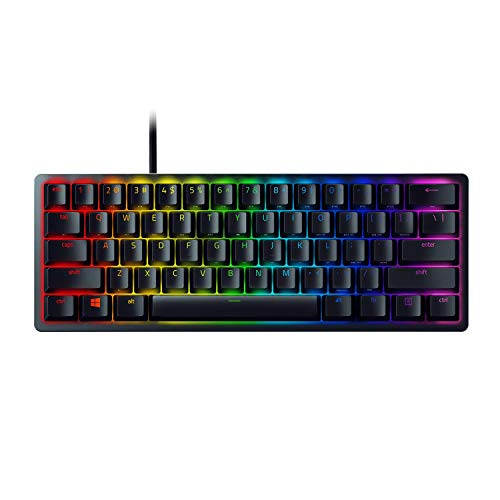
- You want the smallest wired option for gaming Razer Huntsman Mini 60% Clicky Optical Keyboard The 60% form factor uses optical switches for rapid 1.5 mm actuation.
- You need a full-size layout with a number pad HyperX Alloy Origins PBT Clicky Keyboard It provides a 100% layout with durable PBT keycaps in a compact footprint.
Our 8 picks

ASUS ROG Azoth 75% Wireless Mechanical Keyboard
Best for: enthusiast typing and wireless multi-device setups
- Switch Type
- Clicky Switch (what this guide is about)
- Form Factor
- 75% TKL
- Connectivity
- Bluetooth, 2.4 GHz RF, USB
- Hot-Swap Support
- Yes (3-pin)
- Backlighting
- RGB
- Keycap Material
- Double-shot PBT
View on Amazon: ASUS ROG Azoth 75% Wireless Mechanical Keyboard
The ASUS ROG Azoth is a 75% wireless mechanical keyboard equipped with ROG NX Storm clicky switches. For a clicky setup, it pairs audible, tactile feedback with a silicone gasket mount, three sound-dampening foam layers, and PBT doubleshot keycaps to reduce case ping. You also get tri-mode connectivity, hot-swap 3-pin switch sockets, and an integrated 2-inch OLED screen with a media knob. It suits you if you want customizable clicky switches with full wireless freedom.
Pros
- Hot-swappable PCB compatible with 3-pin switches
- Tri-mode connectivity via 2.4 GHz RF, Bluetooth for three devices, or wired USB
- Gasket mount paired with three layers of dampening foam to reduce ping
- Built-in 2-inch OLED display and multi-function control knob
- Includes lubrication kit, switch puller, keycap puller, and extra switches
Cons
- Hot-swap sockets only support 3-pin switch mounting natively
- Heavy build at 4.03 pounds limits portability
- 75% layout omits a dedicated tenkey number pad
Good fit if
- You want tactile clicky switches paired with sound-dampening gasket construction.
- You need versatile tri-mode wireless switching across multiple Windows and Mac devices.
- You plan to customize or maintain switches using the bundled lubrication kit.
Skip if
- You require a full-size layout with a numeric keypad for data entry.
- You want a lightweight keyboard intended for travel rather than a stationary desk setup.
Verdict: ASUS ROG Azoth 75% Clicky Wireless Keyboard brings enthusiast-grade gasket dampening, an OLED control panel, and versatile tri-mode connectivity to clicky mechanical switches. It delivers a comprehensive feature set for tactile, audible typing without requiring a permanent cable.

Razer BlackWidow V4 Low Profile Wireless
Best for: low-profile wireless gaming and multi-device productivity
- Switch Type
- Clicky Switch (what this guide is about)
- Connectivity
- 2.4GHz wireless, Bluetooth
- Keycap Material
- Doubleshot PBT
- Case Material
- 5052 aluminum alloy top case
- Use
- Gaming
- Color
- Black
The Razer BlackWidow V4 Low Profile Wireless Keyboard is a full-size clicky keyboard featuring Low Profile Green mechanical switches with a 1.2 mm actuation distance and 45 g actuation force. It connects through 2.4 GHz HyperSpeed wireless or Bluetooth across three paired devices. With its 18.5 mm front height, sound-dampening foam, and textured doubleshot PBT keycaps, you get fast, tactile inputs in an ultra-slim aluminum build suited for desktop gaming and typing setups.
Pros
- Low Profile Green switches actuate at 1.2 mm with 45 g of force
- Dual connectivity via 2.4 GHz HyperSpeed wireless and 3-device Bluetooth
- Up to 980 hours of battery life in Power Saving Mode
- Solid 5052 aluminum alloy top case with dual sound-dampening foam layers
- Includes a multi-function roller, 11 control buttons, and 4 dedicated macro keys
Cons
- Full 18.12-inch length requires considerable desk clearance
- Maximum 980-hour battery life requires Power Saving Mode
Good fit if
- You want clicky tactile switches with a low-profile 1.2 mm actuation point.
- You need to toggle wireless connections across up to three Bluetooth devices and a 2.4 GHz receiver.
- You want dedicated hardware macro keys, control buttons, and a media roller.
Skip if
- You want a compact tenkeyless or 60 percent keyboard format to preserve desk room.
- You prefer standard full-height mechanical switches over low-profile switches.
Verdict: Razer BlackWidow V4 Low Profile Wireless Keyboard delivers rapid 1.2 mm clicky actuation and multi-device wireless pairing in an aluminum chassis. Dedicated macro and media controls provide direct physical input without requiring extra desktop peripherals.

Hexgears 99-Key Wireless Clicky Keyboard
Best for: compact multi-device typing with clicky feedback
- Switch Type
- Clicky Switch (what this guide is about)
- Form Factor
- 99-key compact
- Connectivity
- Bluetooth 5.0, 2.4GHz, USB wired
- Backlighting
- RGB
- Keycap Material
- PBT
- Hot-Swap Support
- Hot-Swappable
The Hexgears 99-Key Wireless Clicky Keyboard delivers tactile and auditory typing via pre-lubricated Azure Ridges clicky switches. You get a hot-swappable PCB supporting 3-pin and 5-pin switches, tri-mode connectivity covering 2.4GHz wireless, Bluetooth 5.0, and USB wired mode, plus an integrated 4600mAh rechargeable battery. It includes a magnetic wrist rest, shinethrough PBT keycaps, and internal sound-dampening silicone. This keyboard suits you if you want full numeric keys without taking up full-size desk space.
Pros
- Tri-mode connectivity supporting 2.4GHz, Bluetooth 5.0, and wired USB
- Hot-swappable sockets compatible with 3-pin and 5-pin switches
- Internal silicone dampening and single-key slotted PCB structure
- Includes magnetic wrist rest and dual-stage kickstands
Cons
- Compact 99-key layout condenses standard arrow and navigation clusters
- Custom RGB configuration requires a separate software download
Good fit if
- You need a number pad in a space-saving 99-key footprint.
- You switch between multiple Bluetooth, 2.4GHz, and wired devices.
- You want hot-swappable switch sockets for solder-free customization.
Skip if
- You prefer a traditional spaced 104-key full-size layout.
- You want a sub-75-percent form factor without numeric keys.
Verdict: Hexgears 99-Key Wireless Clicky Keyboard combines hot-swap versatility and multi-device tri-mode connectivity into a condensed layout. It provides distinct clicky feedback alongside an included magnetic wrist rest and a 4600mAh battery.
Razer Huntsman Mini 60% Clicky Optical Keyboard
Best for: compact wired setups needing fast optical actuation
- Switch Type
- Clicky Switch (what this guide is about)
- Form Factor
- 60%
- Connectivity
- Wired
- Backlighting
- RGB
- Keycap Material
- Doubleshot PBT
- Case Material
- Aluminum
View on Amazon: Razer Huntsman Mini 60% Clicky Optical Keyboard
The Razer Huntsman Mini is a compact 60-percent wired gaming keyboard built with Razer optical clicky switches. These switches actuate via light at a 1.5 mm distance to provide tactile clicky feedback. It features textured doubleshot PBT keycaps, an aluminum top plate, and individual Chroma RGB lighting. This keyboard suits you if you want a minimalist wired setup with fast optical actuation and durable keycaps without sacrificing desk space.
Pros
- Optical clicky switches with 1.5 mm light-based actuation
- Doubleshot PBT keycaps resist oil and grime buildup
- Matte aluminum top frame for structural rigidity
- Per-key Razer Chroma RGB backlighting with 16.8 million colors
Cons
- Wired-only connection with no wireless support
- Compact 60% layout omits dedicated arrow keys and numpad
Good fit if
- You want optical clicky switches with a short 1.5 mm actuation point.
- You prefer a compact 60% layout that frees up mouse room on your desk.
- You want durable doubleshot PBT keycaps and an aluminum top frame.
Skip if
- You need wireless connectivity for cable-free desk use.
- You rely on dedicated arrow keys, navigation clusters, or a number pad.
Verdict: Razer Huntsman Mini 60% Wired Optical Clicky Keyboard delivers rapid 1.5 mm optical actuation and durable PBT keycaps in an ultra-compact wired design. It provides solid aluminum construction and deep RGB personalization for focused desk spaces.

Razer BlackWidow V3 TKL Clicky Mechanical Keyboard
Best for: compact desks needing tactile clicky switches
- Switch Type
- Clicky Switch (what this guide is about)
- Form Factor
- Tenkeyless
- Backlighting
- Razer Chroma RGB
- Case Material
- Metal top plate
- Use
- Gaming
- Color
- Black
View on Amazon: Razer BlackWidow V3 TKL Clicky Mechanical Keyboard
The Razer BlackWidow V3 TKL Clicky Keyboard is a tenkeyless mechanical board designed for compact desk setups. You get Razer Green switches rated for 50 grams of actuation force and an 80-million-click lifespan. It features individual key RGB backlighting and a metal top plate weighing 1.85 pounds. This keyboard suits you if you want audible tactile feedback and programmable macro layers without taking up desk space for a number pad.
Pros
- Razer Green switches with 50 g actuation force and clicky sound
- Metal top plate with switches rated up to 80 million clicks
- Per-key RGB backlighting with 16.8 million colors
- Razer Hypershift for full macro programming
Cons
- No numeric keypad included
- No wireless connectivity option listed
- No wrist rest included in specifications
Good fit if
- You want clicky feedback with a 50 g actuation force.
- You need a compact tenkeyless footprint to save desk space.
- You require fully remappable keys and custom macro profiles.
Skip if
- You need a dedicated number pad for data entry.
- You prefer a wireless connection for your setup.
Verdict: Razer BlackWidow V3 TKL Clicky Keyboard provides tactile green switches and durable metal construction in a compact footprint. It delivers reliable clicky performance for typists and gamers who do not require a number pad.

Perixx Wireless Ergonomic Clicky Mechanical Keyboard
Best for: ergonomic typing across multiple wireless devices
- Switch Type
- Clicky Switch (what this guide is about)
- Form Factor
- Split-key
- Connectivity
- Wired, 2.4 GHz, Bluetooth
- Backlighting
- RGB
- Design
- Ergonomic
- Color
- Black
View on Amazon: Perixx Wireless Ergonomic Clicky Mechanical Keyboard
This is a full-size wireless ergonomic keyboard built with low-profile clicky mechanical switches. You get a split-key layout to reduce wrist bending, paired with an integrated 3000 mAh rechargeable battery. It connects to four devices via wired USB-C, 2.4 GHz wireless, and Bluetooth. If you need audible tactile feedback during long daily typing sessions across multiple systems, this split board fits your workflow.
Pros
- Split-key ergonomic layout separates typing zones
- Low-profile clicky mechanical switches with tactile feedback
- Connects to 4 devices via USB-C, 2.4 GHz, and Bluetooth
- 3000 mAh battery lasts up to one month
Cons
- Large footprint measuring 18.66 inches wide
- Heavy build weighing 2.47 pounds
- Macro storage limited to 10 entries
Good fit if
- You want a split-zone ergonomic layout with tactile, clicky switches.
- You switch frequently between up to four devices across Windows and Mac.
- You prefer low-profile keys powered by a rechargeable internal battery.
Skip if
- You have limited desk space for an 18.66-inch wide keyboard.
- You need a compact, lightweight keyboard for travel.
Verdict: Perixx Wireless Ergonomic Clicky Mechanical Keyboard delivers audible switch feedback on a split layout built for multi-device setups. Its wide frame and low-profile keys provide stable ergonomic typing across desktop and mobile devices.

Perixx PERIBOARD-735BL Ergonomic Clicky Keyboard
Best for: Typists wanting split ergonomic comfort with clicky switches
- Switch Type
- Clicky Switch (what this guide is about)
- Form Factor
- Split
- Connectivity
- USB-C, 2.4GHz, Bluetooth
- Design
- Ergonomic
- Color
- Black
- Operating System
- Mac, Windows
View on Amazon: Perixx PERIBOARD-735BL Ergonomic Clicky Keyboard
This wireless ergonomic keyboard features a split layout with low-profile blue clicky switches. It supports tri-mode connectivity via Bluetooth, 2.4 GHz, or USB-C. The 3000 mAh battery offers up to one month of use. N-key rollover ensures accurate input. The curved key rows and split design aim to reduce wrist strain during long typing sessions.
Pros
- Split-key ergonomic design reduces wrist bending
- Low-profile blue clicky switches provide tactile feedback
- Tri-mode connectivity for multiple devices
- 3000 mAh battery lasts up to one month
Cons
- Ergonomic shape requires a 1-2 week adjustment period
- Low-profile design differs from traditional tall mechanical switches
- Programmable keys require visiting the Perixx website for configuration
Good fit if
- You want clicky feedback in a low-profile form factor
- You need a split layout to improve typing posture
- You switch between multiple devices frequently
Skip if
- You prefer standard tall mechanical switches
- You need immediate ergonomic comfort without adjustment
- You want a compact 60% layout
Verdict: Perixx PERIBOARD-735BL Ergonomic Clicky Keyboard suits typists seeking a split design with tactile clicky switches. It fits users who prioritize wrist comfort and multi-device connectivity over traditional switch heights.

HyperX Alloy Origins PBT Clicky Keyboard
Best for: full-size layouts with minimal desk footprint
- Switch Type
- Clicky Switch (what this guide is about)
- Form Factor
- Full-sized (100%)
- Backlighting
- RGB
- Keycap Material
- PBT
- Case Material
- Aircraft-grade aluminum
- Use
- Gaming
The HyperX Alloy Origins PBT brings a full-sized 100 percent layout into a slim 17.4-inch aluminum frame. You get clicky mechanical switches rated for 80 million actuations, paired with exposed-LED RGB backlighting for extra brightness. Its textured PBT keycaps feature side-printed legends to prevent surface wear over time. If you need a complete number pad, durable metal housing, and clicky keys without excess desktop bulk, this board suits your typing setup.
Pros
- Aircraft-grade aluminum body provides rigid structural stability
- Side-printed PBT keycaps eliminate legend contact wear
- Switches rated for 80 million keypresses
- Exposed switch LEDs enhance RGB lighting brightness
Cons
- No wireless connectivity options listed
- Weighs 2.43 pounds, reducing portability
- Full 17.4-inch length takes more space than 60 percent models
Good fit if
- You want a full 100 percent key layout housed in a slim footprint.
- You prefer durable, textured PBT keycaps with side-printed legends.
- You need high-durability clicky switches rated for 80 million actuations.
Skip if
- You need Bluetooth or 2.4GHz wireless connectivity.
- You prefer ultra-compact 60 percent or 65 percent form factors.
Verdict: HyperX Alloy Origins PBT Clicky Keyboard delivers durable aluminum construction, wear-resistant keycaps, and clicky switches in a streamlined full-size layout. It provides a complete number pad without taking up unnecessary desktop space.
Specifications side by side
| Spec | ASUS ROG Azoth 75% Wireless Mechanical Keyboard | Razer BlackWidow V4 Low Profile Wireless | Hexgears 99-Key Wireless Clicky Keyboard | Razer Huntsman Mini 60% Clicky Optical Keyboard | Razer BlackWidow V3 TKL Clicky Mechanical Keyboard | Perixx Wireless Ergonomic Clicky Mechanical Keyboard | Perixx PERIBOARD-735BL Ergonomic Clicky Keyboard | HyperX Alloy Origins PBT Clicky Keyboard |
|---|---|---|---|---|---|---|---|---|
| Switch Type | ROG NX Storm clicky | Low Profile Green tactile mechanical | Azure Ridges Switch - Clicky | Razer Optical Clicky | Razer Green (tactile & clicky) | Low-profile blue clicky | Low-Profile Blue Clicky | HyperX Mechanical Clicky |
| Form Factor | 75% TKL | not specified | 99-key compact | 60% | Tenkeyless | Split-key | Split | Full-sized (100%) |
| Connectivity | Bluetooth, 2.4 GHz RF, USB | 2.4GHz wireless, Bluetooth | Bluetooth 5.0, 2.4GHz, USB wired | Wired | not specified | Wired, 2.4 GHz, Bluetooth | USB-C, 2.4GHz, Bluetooth | not specified |
| Hot-Swap Support | Yes (3-pin) | not specified | not specified | not specified | not specified | not specified | not specified | not specified |
| Backlighting | RGB | not specified | RGB | RGB | Razer Chroma RGB | RGB | not specified | RGB |
| Keycap Material | Double-shot PBT | Doubleshot PBT | PBT | Doubleshot PBT | not specified | not specified | not specified | PBT |
| Case Material | not specified | 5052 aluminum alloy top case | not specified | Aluminum | Metal top plate | not specified | not specified | Aircraft-grade aluminum |
| Use | Gaming | Gaming | Gaming | Gaming | Gaming | not specified | not specified | Gaming |
| Design | not specified | not specified | not specified | not specified | not specified | Ergonomic | Ergonomic | not specified |
| Color | White | Black | White-99keys | Black | Black | Black | Black | Black PBT |
| Operating System | Mac | not specified | not specified | not specified | not specified | Mac, Windows | Mac, Windows | not specified |
| Ergonomic Features | not specified | not specified | Wrist Rest | not specified | not specified | not specified | not specified | not specified |
| Dimensions | 9.84 × 7.87 × 3.15 inches | 18.1 × 6.32 × 1.37 inches | not specified | 19.8 × 2.6 × 10.8 inches | 14.3 × 6.1 × 1.62 inches | 18.7 × 18.7 × 1.73 inches | 18.7 × 18.7 × 1.73 inches | 17.4 × 5.2 × 1.5 inches |
| Weight | 4.03 pounds | not specified | not specified | 1 pounds | 1.85 pounds | not specified | not specified | 2.43 pounds |
| Size | Storm Clicky (Mechanical) | not specified | Clicky | Keyboard | Keyboard | not specified | not specified | 100% |
| Model | M701 ROG AZOTH/NXSM/CA/PBT/WHT | RZ03-05270200-R3U1 | not specified | RZ03-03390500-R3U1-cr | RZ03-03490200-R3U1 | not specified | 12438 | 639N4AA#ABA |
Is a clicky switch right for your typing?
Clicky switches provide distinct auditory feedback with every keystroke. This audible confirmation helps you verify input without looking at the keys. The listed models use mechanical or optical clicky switches to deliver this sound. You get tactile resistance paired with an audible click. This setup suits those who enjoy sensory feedback during typing sessions. It creates a rhythmic experience for focused work.
Worth it if
- You want audible confirmation of each keystroke
- You enjoy tactile resistance paired with sound
- You type in a private or quiet space
Skip it if
- You need silent operation for shared offices
- You prefer low-profile keys without loud clicks
- You dislike auditory feedback during typing
How We Selected Clicky Keyboards
We identified keyboards with clicky switches by scanning Amazon listings for that specific switch type in the title or feature list. Only one size or variant from each product family was included to keep the guide focused on your primary need for audible feedback.
The 8 products are ordered by availability first. Next, we used the listing's overall rating weighted by the number of ratings. Finally, we ranked them by how many of our guide's criteria the specifications meet. All details come from published specs. We do not handle or test these products.
Key Specs to Compare for Clicky Keyboards
-
Check connectivity options
You should verify if the keyboard supports tri-mode wireless or wired-only connections. Tri-mode models like the ASUS ROG Azoth allow pairing with multiple devices via Bluetooth or 2.4GHz dongles. This is useful if you switch between a desktop and laptop. Wired options like the Razer Huntsman Mini eliminate battery concerns. Ensure the connectivity matches your desk setup and device count for a seamless experience.
-
Evaluate form factor size
Select a layout that fits your available desk space. TKL models like the ASUS ROG Azoth save room by removing the number pad. Full-size layouts like the HyperX Alloy Origins keep the numpad for data entry. Compact 60% designs like the Razer Huntsman Mini maximize mouse movement area. Choose the size that balances key availability with your physical workspace constraints.
-
Review keycap material quality
PBT keycaps offer superior durability and resistance to shine over time. Models like the ASUS ROG Azoth and Razer Huntsman Mini include PBT keycaps for long-term use. These materials feel rougher and grip your fingers better than ABS. Check the specifications for PBT construction if you type heavily. This spec ensures the keycaps remain legible and comfortable during extended sessions.
-
Consider hot-swap capability
Hot-swappable sockets let you change switches without soldering. The ASUS ROG Azoth and Hexgears 99-Key support this feature. You can swap clicky switches for linear or tactile ones later. This adds versatility to your setup. Verify the socket type in the specs before buying. This flexibility allows you to customize the typing feel without purchasing a new keyboard.
-
Assess ergonomic design needs
Split or ergonomic layouts reduce wrist strain during long typing sessions. The Perixx Wireless Ergonomic and PERIBOARD-735BL models feature split designs. These separate the left and right hand clusters. Low-profile keys on the Razer BlackWidow V4 also alter hand angle. Choose an ergonomic form if you prioritize comfort over traditional keyboard shapes.
Frequently asked questions
Do clicky keyboards work well for gaming?
Yes, many listed models are rated for gaming. The Razer BlackWidow V4 Low Profile features a 1.2 mm actuation point for rapid input. The ASUS ROG Azoth includes an OLED panel for quick status checks. These specs support fast, responsive gameplay alongside the audible feedback.
Which clicky keyboard is best for a small desk?
The Razer Huntsman Mini 60% Clicky Optical Keyboard is designed for compact setups. It measures 19.8 inches in length and weighs only 1 pound. Its mini form factor leaves more room for mouse movement while still providing durable PBT keycaps and RGB backlighting for your space.
Are there ergonomic options with clicky switches?
Yes, Perixx offers ergonomic clicky keyboards with split designs. The PERIBOARD-735BL features a wide frame measuring 18.7 inches by 18.7 inches to support natural wrist positioning. It connects wirelessly and supports both Mac and Windows operating systems for comfortable, multi-device typing sessions.
Can I swap switches on these clicky keyboards?
Some models allow you to change the switches. The ASUS ROG Azoth and Hexgears 99-Key Wireless Clicky Keyboard both support hot-swappable sockets. This feature lets you replace the clicky mechanism with other types without soldering, giving you flexibility to customize your typing feel later.
Do wireless clicky keyboards have good battery life?
Battery performance varies by model. The Hexgears 99-Key includes a large 4600mAh battery to sustain wireless use. Other models like the Razer BlackWidow V4 Low Profile prioritize connectivity options over specific capacity data. You should check the manufacturer’s specifications for exact endurance times for each device.
What is the difference between mechanical and optical clicky switches?
Optical switches use light beams to register keystrokes, while mechanical ones use physical contacts. The Razer Huntsman Mini uses optical clicky switches with a 1.5 mm actuation distance. This design can offer faster response times and potentially greater durability compared to traditional mechanical clicky mechanisms found in other models.