Best 75% Mechanical Keyboards in 2026: 15 Picks Ranked by Specs
As an Amazon Associate we earn from qualifying purchases. Links on this page are affiliate links.
A 75 mechanical keyboard offers a compact layout that keeps dedicated arrow keys while freeing up desk space. This guide compares 15 models strictly using the specifications published on their listings.
The AULA 75% Wireless Mechanical Keyboard takes the top spot because it combines hot-swappable switches, wireless connectivity, PBT keycaps, and a dedicated volume knob in an 81-key layout. Reviewing these practical specs helps you choose the right board for your typing habits, switch preferences, and connectivity needs.
Quick picks
The best fit for you
- You want a balanced wireless keyboard with hot-swappable switches AULA 75% Wireless Mechanical Keyboard This model combines wireless connectivity, hot-swappable switches, PBT keycaps, and a dedicated volume knob.
- You want a dedicated wired keyboard with tactile switches RK Royal Kludge 75% Gasket Mechanical Keyboard Its wired connectivity eliminates battery management while providing a gasket-mount build and tactile switches.
- You need a wireless keyboard built for quiet typing Razer BlackWidow V4 Pro 75% Wireless Keyboard This keyboard specifies a silent noise level profile paired with 75% wireless gaming functionality.
- You want magnetic switches for rapid trigger gaming response Keychron K2 HE 75% Magnetic Keyboard The specs feature magnetic switch technology offering rapid trigger capabilities in a wireless layout.
Our 15 picks

AULA 75% Wireless Mechanical Keyboard
Best for: overall 75% wireless typing and gaming
- Form Factor
- 75% (what this guide is about)
- Switch Type
- LEOBOG Reaper
- Connectivity
- Bluetooth 5.0, 2.4GHz wireless, USB
- Hot-Swap Support
- Yes (3-pin or 5-pin)
- Backlighting
- 16.8 Million RGB
- Keycap Material
- Double injection sublimation PBT
The AULA F75 Pro 75% Wireless Keyboard gives you an 81-key layout with tri-mode connectivity covering Bluetooth 5.0, 2.4GHz wireless, and USB wired connections. It features hot-swappable sockets for 3-pin and 5-pin switches, a 4000mAh battery, and a dedicated multi-function control knob for lighting and volume adjustments. Five internal silencing layers and PCB single-key slotting dampen typing sounds. This compact model fits you if you want customizable typing and desktop space savings.
Pros
- Tri-mode connectivity via Bluetooth 5.0, 2.4GHz, and USB wired
- Hot-swappable PCB compatible with 3-pin and 5-pin switches
- Built-in 4000mAh rechargeable battery
- Multi-function knob controls media volume and RGB lighting
- Five-layer internal sound-dampening structure
Cons
- Weighs 2.25 pounds, limiting portable use
- 81-key layout lacks a dedicated numeric keypad
- Music rhythm lighting effects require software driver support
Good fit if
- You need tri-mode wireless switching across up to five devices.
- You want to swap 3-pin or 5-pin mechanical switches without soldering.
- You prefer hardware knob controls for volume and backlight adjustments.
Skip if
- You need a dedicated number pad for numerical data entry.
- You prefer a lightweight travel keyboard under two pounds.
Verdict: AULA F75 Pro 75% Wireless Keyboard delivers versatile multi-device connectivity, hot-swap flexibility, and dedicated knob controls in a space-saving 81-key design. It is a solid core choice if you want customized mechanical typing without sacrificing arrow keys.

AULA F75 Wireless 75% Mechanical Keyboard
Best for: multi-device wireless setups needing hot-swappable switches
- Form Factor
- 75% (what this guide is about)
- Switch Type
- LEOBOG reaper
- Connectivity
- BT5.0, 2.4GHz wireless, USB wired
- Backlighting
- RGB
- Hot-Swap Support
- Hot-Swappable
- Use
- Gaming
The AULA F75 is an 81-key mechanical keyboard featuring tri-mode connectivity across 2.4GHz wireless, Bluetooth 5.0, and USB wired modes. It includes a 4,000mAh rechargeable battery and a hot-swappable circuit board compatible with 3-pin and 5-pin mechanical switches. Five internal dampening layers minimize acoustic case ping. A dual-purpose rotary knob manages audio volume and lighting controls directly. It suits you if you require multi-device pairing alongside switch customization.
Pros
- Tri-mode connectivity supporting Bluetooth 5.0, 2.4GHz wireless, and USB wired
- Hot-swappable PCB compatible with both 3-pin and 5-pin mechanical switches
- Internal five-layer sound-dampening structure with single-key PCB slotting
- 4,000mAh rechargeable battery for cordless operation
- Dual-function physical knob toggles between volume control and lighting adjustments
Cons
- Weighs 2.15 pounds, making it heavy for portable travel use
- Macro programming and audio rhythm lighting modes require external driver software
- Lacks an integrated display screen
Good fit if
- You want to swap between 3-pin and 5-pin switches without soldering
- You need to pair and switch between up to five devices wirelessly
- You prefer dedicated hardware knob control for volume and illumination
Skip if
- You need a lightweight keyboard under two pounds for frequent travel
- You require an onboard display screen for battery and connection tracking
Verdict: AULA F75 Wireless Hot-Swappable Keyboard delivers versatile tri-mode connectivity, multi-layer acoustic dampening, and flexible switch compatibility in an 81-key footprint. It gives you dependable multi-device management paired with dedicated hardware media controls.

GravaStar Mercury 75% Wireless Keyboard
Best for: metal-frame desktop setups needing versatile wireless connectivity
- Form Factor
- 75% (what this guide is about)
- Switch Type
- GravaStar x Kailh linear
- Connectivity
- Wired USB-C, Bluetooth 5.0, 2.4GHz
- Backlighting
- RGB
- Case Material
- Aluminum alloy
- Use
- Gaming
The GravaStar Mercury K1 is a 75% wireless mechanical keyboard built with an aluminum alloy exoskeleton. For typing performance and sound management, it includes a gasket mount, a polycarbonate plate, and five dampening foam layers. It pairs custom Kailh linear switches with tri-mode connectivity, supporting Bluetooth 5.0, 2.4GHz wireless, and USB-C. This design suits you if you want a compact desk layout with dedicated multi-device switching and fast switch actuation.
Pros
- Tri-mode connectivity via Bluetooth 5.0, 2.4GHz wireless, and wired USB-C
- Gasket-mounted polycarbonate plate with five sound-dampening foam layers
- Custom Kailh linear switches with 40gf actuation and 1.5mm pre-travel
- Dual independent RGB lighting systems with 13 backlight modes
Cons
- Carries a heavier 2.34-pound weight and 1.81-inch height
- No integrated hardware media screen or control knob listed
Good fit if
- You want an aluminum exoskeleton frame with layered acoustic foam.
- You need tri-mode wireless switching between Windows and Mac systems.
- You prefer light 40gf linear switches with short 1.5mm pre-travel.
Skip if
- You need a lightweight, low-profile keyboard for travel.
- You want physical hardware controls like an onboard display or volume knob.
Verdict: GravaStar Mercury K1 Aluminum 75% Keyboard delivers a rigid metal chassis paired with multi-layer dampening and responsive Kailh linear switches. It provides solid tri-mode versatility for multi-device desktop gaming.

EPOMAKER Aula F75 75% Wireless Keyboard
Best for: quiet, wireless multi-device typing and gaming
- Form Factor
- 75% (what this guide is about)
- Switch Type
- LEOBOG Reaper Switch
- Connectivity
- Bluetooth, 2.4GHz, USB-C
- Backlighting
- RGB
- Keycap Material
- Double-shot PBT
- Hot-Swap Support
- Hot-Swappable
The EPOMAKER Aula 75% Wireless Gasket Keyboard gives you a compact 75-percent layout built with a gasket-mounted design and five internal dampening layers. It features three-way connectivity across Bluetooth, 2.4GHz wireless, and wired USB, powered by a 4000mAh rechargeable battery. It includes a built-in media knob, hot-swappable switch sockets, and double-shot PBT keycaps. This board suits you if you want versatile wireless connections with quiet typing dampening on a smaller desk footprint.
Pros
- Tri-mode connectivity via Bluetooth, 2.4GHz wireless, and wired USB
- Large 4000mAh rechargeable battery capacity
- Five-layer acoustic padding including Poron, IXPE, PET, and silicone
- Full-key hot-swappable PCB with pre-lubricated switches
- Cherry-profile double-shot PBT keycaps and integrated control knob
Cons
- Lacks an integrated display screen
- Thick 1.69-inch height without an included wrist rest
- Omits a dedicated number pad
Good fit if
- You switch between Bluetooth, 2.4GHz wireless, and wired connections.
- You want heavy acoustic dampening and a flexible gasket-mounted typing feel.
- You prefer adjusting audio volume using an onboard physical dial.
Skip if
- You need a dedicated numeric keypad for daily number entry.
- You want a built-in screen to monitor system status directly on the keyboard.
Verdict: EPOMAKER Aula 75% Wireless Gasket Keyboard delivers flexible tri-mode wireless connectivity, a 4000mAh battery, and robust five-layer acoustic padding in a compact desk-friendly form factor. It provides a reliable, customizable typing setup without cable clutter.

GravaStar Mercury K1 Lite 75% Wireless Keyboard
Best for: gamers wanting light switches and transparent aesthetics
- Form Factor
- 75% (what this guide is about)
- Switch Type
- GravaStar x BSUN linear
- Connectivity
- Wired, Bluetooth, 2.4GHz wireless
- Backlighting
- RGB
- Use
- Gaming
- Dimensions
- 13.5 × 6.14 × 1.81 inches
View on Amazon: GravaStar Mercury K1 Lite 75% Wireless Keyboard
The GravaStar Mercury K1 Lite is an 80-key, 75% layout wireless mechanical keyboard built around a transparent polycarbonate chassis. It features custom BSUN linear switches with a 40gf actuation force, gasket mounting with five-layer sound-dampening foam, and a 4000mAh battery. You get three connection options: 2.4GHz wireless, Bluetooth, and wired USB-C. This design suits you if you want lightweight switches, full RGB illumination, and multi-device desktop flexibility.
Pros
- Tri-mode connectivity supporting 2.4GHz wireless, Bluetooth, and USB-C
- Gasket-mounted plate structure with 5-layer acoustic dampening foam
- Custom BSUN linear switches with 40gf actuation and 3.6mm total travel
- 4000mAh internal rechargeable battery
Cons
- No hot-swappable switch sockets listed in specifications
- No physical media knob or display screen
Good fit if
- You want light 40gf linear switches paired with five-layer gasket dampening.
- You need tri-mode wireless switching between Windows and macOS systems.
- You prefer an all-clear chassis and keycaps designed to maximize RGB lighting.
Skip if
- You require hot-swappable sockets to swap switches without soldering.
- You prefer onboard rotary knobs or OLED displays for settings control.
Verdict: GravaStar Mercury K1 Lite 75% Wireless Keyboard delivers responsive 40gf linear actuation, gasket dampening, and multi-device tri-mode connectivity in a transparent 80-key frame. It gives you balanced acoustics and clear RGB backlighting without taking up excess desk space.

Womier 75% Keyboard with Color Screen
Best for: Wired setups needing screen customization and hot-swappability
- Form Factor
- 75% (what this guide is about)
- Switch Type
- Linear
- Connectivity
- Detachable Type-C
- Backlighting
- RGB
- Use
- Gaming
- Dimensions
- 12.8 × 5.31 × 1.38 inches
The Womier 75% Keyboard with Color Screen is a compact gasket-mounted mechanical keyboard built for gaming and everyday desktop use. It features an angled color multimedia display for custom GIFs and system stats, paired with an EVA-damped gasket mount for softened typing. With hot-swappable 3-pin and 5-pin switch sockets, south-facing RGB backlighting, and a detachable Type-C wired connection, it suits you if you want visual hardware feedback and switch flexibility.
Pros
- Color multimedia display with an 11-degree tilt for GIF and setting readouts
- Gasket mount structure with EVA plate and bottom foam dampening
- Hot-swappable PCB compatible with 3-pin and 5-pin mechanical switches
- South-facing RGB backlighting with 19 effects and 9 colors
Cons
- Wired connection only via detachable Type-C cable without built-in wireless
- Driver customization software required for GIF uploads and macro configuration
Good fit if
- You want an integrated display screen to track settings or show custom animations.
- You plan to swap in your own 3-pin or 5-pin mechanical switches.
- You prefer a gasket-mounted design with EVA dampening layers.
Skip if
- You need wireless connectivity such as Bluetooth or 2.4 GHz.
- You require a full-size layout with a dedicated numeric keypad.
Verdict: Womier 75% Keyboard with Color Screen delivers a versatile gasket-mount layout complete with hot-swap sockets and an informative built-in display. It provides dependable wired performance for desks that do not need battery-powered wireless operation.

Kisnt 75% Tri-Mode Wireless Keyboard
Best for: Multi-device wireless setups needing linear switches
- Form Factor
- 75% (what this guide is about)
- Switch Type
- Pre-lubed Bsun linear
- Connectivity
- Bluetooth 5.0, 2.4 GHz, USB-C
- Backlighting
- RGB
- Keycap Material
- PBT
- Hot-Swap Support
- Hot-Swappable
The Kisnt 75% Wireless Mechanical Keyboard provides an 85-key layout with tri-mode connectivity across USB-C, 2.4GHz wireless, and Bluetooth 5.0. It features hot-swappable switch sockets for 3-pin and 5-pin parts, pre-lubed Bsun linear switches, and a gasket mount. A 4000mAh battery supplies wireless power. This setup suits you if you want multi-device switching and easily customizable mechanical switches in a compact, space-saving desktop footprint.
Pros
- Tri-mode connectivity supports USB-C, 2.4GHz wireless, and Bluetooth 5.0 across three devices.
- Hot-swappable PCB accepts both 3-pin and 5-pin mechanical switches.
- Gasket mount structure pairs with pre-lubed Bsun linear switches.
- Internal 4000mAh rechargeable battery supports cordless use.
Cons
- Configuration software requires Windows and works only in wired or 2.4GHz mode.
- Recharging takes roughly 7 to 8 hours and is incompatible with fast chargers.
- Height of 1.77 inches may require an external wrist rest.
Good fit if
- You switch frequently between multiple systems using 2.4GHz and Bluetooth connections.
- You plan to swap 3-pin or 5-pin mechanical switches without soldering.
Skip if
- You need companion software support on macOS or while connected over Bluetooth.
- You require a dedicated numeric keypad for regular data entry.
Verdict: Kisnt 75% Wireless Mechanical Keyboard combines versatile tri-mode wireless connections with hot-swappable switch sockets and a cushioned gasket mount. It delivers strong core functionality for multi-device setups as long as you do not need macOS driver support.

RK Royal Kludge 75% Gasket Mechanical Keyboard
Best for: wired desk setups needing dedicated volume control
- Form Factor
- 75% (what this guide is about)
- Switch Type
- Silver Pro
- Connectivity
- Wired
- Backlighting
- RGB
- Keycap Material
- PBT
- Hot-Swap Support
- Hot-Swappable
View on Amazon: RK Royal Kludge 75% Gasket Mechanical Keyboard
The RK Royal Kludge R75 is a compact 75% keyboard built with a direct wired connection. It features a gasket-mounted design packed with IXPE and silicone dampening pads to reduce typing noise. You get a hot-swappable PCB supporting 3-pin and 5-pin switches, thick MDA-profile PBT keycaps, and a dedicated CNC aluminum volume knob. It suits you if you want reliable wired performance without managing wireless batteries.
Pros
- Gasket-mounted structure with multiple dampening foam and silicone layers
- Hot-swappable PCB compatible with both 3-pin and 5-pin switches
- Integrated CNC aluminum volume control knob
- Durable thick-walled MDA profile PBT keycaps
- South-facing RGB lighting with 18 preset modes
Cons
- Wired-only connectivity with no Bluetooth or 2.4GHz wireless support
- No integrated display screen
Good fit if
- You prefer a permanent wired connection with zero battery maintenance.
- You want gasket-mount dampening with hot-swappable switch sockets.
- You use a dedicated physical knob for quick volume adjustments.
Skip if
- You need wireless connectivity like 2.4GHz or Bluetooth for your setup.
- You require a built-in TFT or LCD display screen on your board.
Verdict: RK Royal Kludge R75 Wired Keyboard delivers a reliable wired layout with acoustic gasket dampening and hot-swap versatility. It provides tactile desktop control via its aluminum knob while eliminating battery concerns.

SOLAKAKA 75% Wireless Gasket Keyboard
Best for: multi-device desk setups wanting hot-swappable gasket typing
- Form Factor
- 75% (what this guide is about)
- Switch Type
- LEOBOG Caramel Latte
- Connectivity
- 2.4GHz, Bluetooth 5.0, USB-C
- Backlighting
- RGB
- Keycap Material
- PC and ABS
- Hot-Swap Support
- Hot-Swappable
The SOLAKAKA 75% Wireless Gasket Keyboard features an 81-key layout with tri-mode connectivity across Bluetooth 5.0, 2.4GHz wireless, and USB-C. It includes a multi-layer sound-dampened gasket mount, hot-swappable sockets for 3-pin and 5-pin switches, and a 4000mAh battery. A dual-mode knob handles volume and RGB adjustments. This keyboard suits you if you need multi-device wireless pairing alongside flexible switch swapping and dedicated media controls in a compact desktop footprint.
Pros
- Tri-mode connectivity supports 2.4GHz, Bluetooth 5.0, and USB-C across five devices
- Hot-swappable PCB accepts both 3-pin and 5-pin mechanical switches
- Five-layer acoustic damping with slotted PC plate and gasket mounting
- Multi-function rotary knob toggles volume control and RGB lighting adjustments
- Built-in 4000mAh rechargeable battery
Cons
- Height reaches 1.73 inches, which may require a separate wrist rest
- Keycaps use PC and ABS materials rather than PBT
- Compact 81-key layout lacks a dedicated numeric keypad
Good fit if
- You switch between multiple systems including Windows, Mac, and iOS.
- You want hot-swappable switches and gasket mounting without soldering.
- You prefer hardware knob controls for quick audio and backlight adjustments.
Skip if
- You need a dedicated numeric keypad for daily number entry.
- You prefer standard textured PBT keycaps over PC and ABS crystal keycaps.
- You want an ultra-low-profile board under 1.73 inches in total height.
Verdict: SOLAKAKA 75% Wireless Gasket Keyboard combines versatile tri-mode connectivity and five-device pairing with a sound-dampened gasket mount. It delivers broad customizability through hot-swappable switch sockets and programmable driver software.

Keychron K2 HE 75% Magnetic Keyboard
Best for: rapid-trigger gaming and multi-device productivity
- Form Factor
- 75% (what this guide is about)
- Switch Type
- Gateron Double-Rail Magnetic
- Connectivity
- Bluetooth 5.2, 2.4 GHz, USB-C
- Keycap Material
- Double-shot PBT
- Color
- Black
- Dimensions
- 12.5 × 4.99 × 1.6 inches
The Keychron K2 HE is a 75% wireless mechanical keyboard equipped with Hall effect magnetic switches. You get adjustable actuation points ranging from 0.2 mm to 3.8 mm, rapid trigger functionality, and a 1000 Hz polling rate. It offers triple-mode connectivity across 2.4 GHz, Bluetooth 5.2, and USB-C. This keyboard suits you if you need fine-grained key travel adjustments for gaming alongside dedicated Mac and Windows support.
Pros
- Adjustable actuation from 0.2 mm to 3.8 mm with rapid trigger support
- Triple-mode connectivity via 2.4 GHz, Bluetooth 5.2, and USB-C
- Web-based Launcher configurator for remapping and actuation settings
- Includes dedicated keycaps for both macOS and Windows
Cons
- Hot-swap sockets only accept Gateron Double-Rail Magnetic switches
- Keycap legends are not shine-through for dark environments
Good fit if
- You want Hall effect switches with customizable actuation depths.
- You need triple-mode connectivity across Windows and macOS setups.
- You prefer configuring keys and macros via a web browser.
Skip if
- You want shine-through keycap legends for low-light visibility.
- You plan to swap in standard mechanical 3-pin or 5-pin switches.
Verdict: Keychron K2 HE 75% Magnetic Switch Keyboard delivers customizable Hall effect actuation and rapid trigger response. It combines multi-device wireless versatility with dedicated cross-platform support.

YUNZII 75% Wireless Mechanical Keyboard
Best for: grey setups needing tri-mode wireless connectivity
- Form Factor
- 75% (what this guide is about)
- Switch Type
- Pre-lubed linear (Milk Switch)
- Connectivity
- Bluetooth, 2.4GHz wireless, wired
- Backlighting
- RGB
- Keycap Material
- Double-shot
- Color
- Grey
The YUNZII 75% Wireless Mechanical Keyboard provides an 82-key layout with tri-mode connectivity across Bluetooth, 2.4GHz wireless, and wired modes. Built with a five-layer padded gasket mount and south-facing RGB LEDs, it includes a multi-function control knob for volume and lighting adjustments. It houses a 4000mAh battery and a hot-swappable circuit board compatible with three-pin and five-pin switches. This setup suits you if you want a versatile grey desk setup with pre-lubed linear switches.
Pros
- Tri-mode connectivity via Bluetooth, 2.4GHz wireless, and wired USB
- Hot-swappable PCB compatible with 3-pin and 5-pin switches
- Gasket mount structure with 5-layer internal padding
- High-capacity 4000mAh built-in battery
- Hardware control knob for volume and backlight adjustments
Cons
- Software programming and macro settings require a Windows system
- Total weight of 1.98 pounds limits ultra-light travel portability
Good fit if
- You need tri-mode wireless flexibility between Bluetooth, 2.4GHz, and USB.
- You want a 75% layout with dedicated knob controls and hot-swap switch sockets.
Skip if
- You require macro and key programming software that runs on macOS.
- You want an ultra-light keyboard designed specifically for daily travel.
Verdict: YUNZII 75% Wireless Mechanical Keyboard combines a padded gasket structure, a 4000mAh battery, and tri-mode wireless options into an 82-key grey format. It delivers hot-swappable custom switch options and physical knob adjustments without requiring wired-only operation.

EPOMAKER 75% Wireless Gasket Keyboard with Screen
Best for: compact setups needing an onboard status screen
- Form Factor
- 75% (what this guide is about)
- Switch Type
- Linear Reaper switch
- Connectivity
- Bluetooth, 2.4GHz wireless, wired
- Backlighting
- RGB
- Hot-Swap Support
- Hot-Swappable
- Mounting Style
- Gasket Mount
View on Amazon: EPOMAKER 75% Wireless Gasket Keyboard with Screen
The EPOMAKER F75 MAX is an 80-key, 75% gasket-mounted mechanical keyboard built for desktop setups needing compact control. It features tri-mode wireless connectivity, a customizable TFT smart display for system status and GIFs, and a dedicated volume knob. With south-facing RGB backlighting, factory-lubed linear switches, and a 1,000Hz polling rate over 2.4GHz or USB, you get responsive inputs tailored for gaming and high-volume daily typing.
Pros
- TFT smart display shows connection status, battery levels, and custom animations
- Tri-mode connectivity with 1,000Hz polling rate via 2.4GHz wireless and wired USB
- Gasket-mount structure with flex-cut PC plate and multi-layer sound dampening
- Hot-swappable PCB compatible with both 3-pin and 5-pin mechanical switches
Cons
- Comes installed with plate-mounted rather than screw-in stabilizers
- 1,000Hz polling rate is limited to USB and 2.4GHz connections, excluding Bluetooth
Good fit if
- You want an onboard screen to monitor battery life and connection status at a glance.
- You need flexible tri-mode connectivity across Windows, Mac, Linux, or Android devices.
- You prefer a gasket-mounted typing feel with factory-lubed switches and sound dampening.
Skip if
- You require high-polling-rate performance specifically over a Bluetooth connection.
- You prefer a minimalist layout without an integrated display screen or rotary knob.
Verdict: EPOMAKER F75 MAX 75% Wireless Keyboard delivers versatile tri-mode wireless flexibility, gasket-mounted acoustic dampening, and a built-in TFT display for quick status monitoring. It provides deep hardware customization for users who want visual feedback and hot-swappable switches in a compact footprint.

Razer BlackWidow V4 Pro 75% Wireless Keyboard
Best for: silent wireless gaming and quiet desktop setups
- Form Factor
- 75% (what this guide is about)
- Switch Type
- Orange
- Connectivity
- Wireless, Bluetooth 5.1
- Backlighting
- Per-key lighting
- Use
- Gaming
- Color
- Black
View on Amazon: Razer BlackWidow V4 Pro 75% Wireless Keyboard
The Razer BlackWidow V4 Pro 75% Wireless Keyboard gives you a compact 75% layout equipped with factory-dampened acoustic hardware and silent-rated tactile Orange switches. It features high-speed 4K Hz wireless polling alongside Bluetooth 5.1 for up to three devices. With its gasket-mounted FR4 plate, sound-dampening dual foam layers, hot-swappable PCB, and integrated OLED command dial, it suits gamers and typists needing low noise and high responsiveness.
Pros
- 4K Hz wireless polling and Bluetooth 5.1 connectivity
- Hot-swappable PCB compatible with 3-pin and 5-pin switches
- Built-in OLED display paired with a multi-mode command dial
- Gasket-mounted FR4 plate with two layers of sound-dampening foam
Cons
- Heavy build at nearly 3.44 pounds
- Tall profile measuring 3.03 inches in height
Good fit if
- You need a silent 75% layout with sound-dampening foam and quiet tactile switches.
- You want 4K Hz wireless polling and 3-device Bluetooth 5.1 switching.
- You prefer on-board OLED system metrics and a physical command dial.
Skip if
- You want a lightweight, portable board under 3 pounds.
- You prefer a low-profile board under 3 inches tall.
Verdict: Razer BlackWidow V4 Pro 75% Wireless Keyboard pairs silent tactile switches and dual-layer acoustic dampening with ultra-fast 4K Hz wireless polling. It delivers quiet operation alongside an integrated OLED screen and customizable command dial.
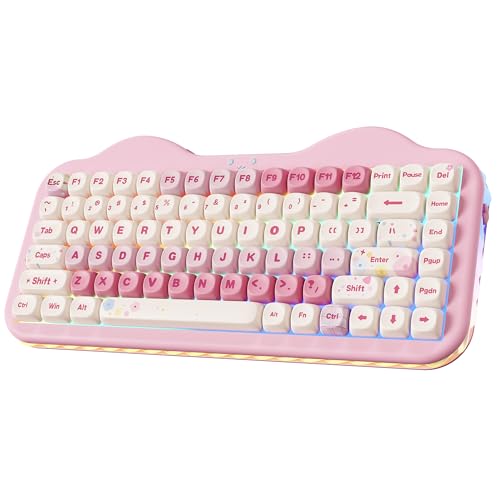
YUNZII 75% Wireless Pink Keyboard
Best for: pink setups needing multi-device wireless pairing
- Form Factor
- 75% (what this guide is about)
- Switch Type
- Pre-lubed linear (Milk V2)
- Connectivity
- Bluetooth 5.0, 2.4GHz wireless, USB-C
- Hot-Swap Support
- Yes (3-pin and 5-pin)
- Backlighting
- RGB
- Color
- Pink
The YUNZII 75% Wireless Pink Keyboard is a compact mechanical keyboard built for multi-device setups. It features tri-mode connectivity across Bluetooth 5.0, 2.4GHz wireless, and USB-C wired mode, supporting up to five devices. The board includes a gasket structure, a hot-swappable PCB accepting 3-pin and 5-pin switches, and a 5500mAh rechargeable battery. It suits you if you want a dedicated pink aesthetic with programmable three-zone RGB lighting.
Pros
- High-capacity 5500mAh rechargeable battery
- Tri-mode connectivity with pairing support for up to 5 devices
- Hot-swappable PCB compatible with 3-pin and 5-pin switches
- Gasket structure with internal sound-absorbing layers and pre-lubed switches
- Three-zone RGB lighting for keys, emblem, and side underglow
Cons
- Lacks an integrated control knob or display screen
- Weighs 2.23 pounds, making it heavier for portable use
- Tall 1.73-inch height without an included wrist rest
Good fit if
- You want a pink 75% mechanical keyboard with three-zone RGB lighting.
- You switch frequently among up to five devices across Windows, Mac, iOS, or Android.
- You want a hot-swappable board with a large 5500mAh internal battery.
Skip if
- You require a physical volume knob or built-in status screen.
- You prefer an ultra-lightweight travel board under two pounds.
- You need a low-profile typing deck without high front edges.
Verdict: YUNZII 75% Wireless Pink Keyboard pairs a high-capacity 5500mAh battery with flexible tri-mode wireless switching for up to five devices. Its gasket-mounted build and hot-swappable PCB provide standard mechanical customization in a distinct pink case.

DAIDAI 75% Wired Gasket Mechanical Keyboard
Best for: Desk setups prioritizing hot-swappable gasket typing
- Form Factor
- 75% (what this guide is about)
- Switch Type
- Linear
- Connectivity
- USB-C wired
- Backlighting
- RGB
- Keycap Material
- PBT
- Hot-Swap Support
- Hot-Swappable
The DAIDAI 75% Wired Gasket Mechanical Keyboard provides an 82-key setup with a dedicated aluminum volume knob. It features a gasket-mounted design with five sound-dampening layers, hot-swappable sockets supporting both 3-pin and 5-pin linear switches, and south-facing RGB backlighting under PBT keycaps. You connect exclusively through a detachable USB-C cable. This board fits you if you want a mod-friendly, damped typing deck at your desk without managing wireless batteries.
Pros
- Gasket mount with 5-layer sound dampening (Poron, IXPE, PET, and foam)
- Hot-swappable PCB supports both 3-pin and 5-pin switches
- South-facing RGB lighting with wear-resistant PBT keycaps
- Dedicated aluminum volume knob for direct audio adjustments
Cons
- Wired USB-C only with no Bluetooth or 2.4GHz wireless support
- Compact 82-key layout lacks a dedicated numeric keypad
Good fit if
- You prefer a wired USB-C connection over battery-powered wireless gear.
- You want hot-swappable 3-pin or 5-pin switch compatibility and gasket mounting.
- You need quick desktop audio adjustment via a dedicated rotary knob.
Skip if
- You require wireless connectivity like Bluetooth or 2.4GHz RF.
- You need a full-size number pad for numeric data entry.
Verdict: DAIDAI 75% Wired Gasket Mechanical Keyboard delivers a thoroughly damped 82-key typing platform with pre-lubed switches and an aluminum knob. It offers a solid wired foundation if you prioritize hot-swap customizability and acoustic layering over wireless freedom.
Specifications side by side
| Spec | AULA 75% Wireless Mechanical Keyboard | AULA F75 Wireless 75% Mechanical Keyboard | GravaStar Mercury 75% Wireless Keyboard | EPOMAKER Aula F75 75% Wireless Keyboard | GravaStar Mercury K1 Lite 75% Wireless Keyboard | Womier 75% Keyboard with Color Screen | Kisnt 75% Tri-Mode Wireless Keyboard | RK Royal Kludge 75% Gasket Mechanical Keyboard | SOLAKAKA 75% Wireless Gasket Keyboard | Keychron K2 HE 75% Magnetic Keyboard | YUNZII 75% Wireless Mechanical Keyboard | EPOMAKER 75% Wireless Gasket Keyboard with Screen | Razer BlackWidow V4 Pro 75% Wireless Keyboard | YUNZII 75% Wireless Pink Keyboard | DAIDAI 75% Wired Gasket Mechanical Keyboard |
|---|---|---|---|---|---|---|---|---|---|---|---|---|---|---|---|
| Switch Type | LEOBOG Reaper | LEOBOG reaper | GravaStar x Kailh linear | LEOBOG Reaper Switch | GravaStar x BSUN linear | Linear | Pre-lubed Bsun linear | Silver Pro | LEOBOG Caramel Latte | Gateron Double-Rail Magnetic | Pre-lubed linear (Milk Switch) | Linear Reaper switch | Orange | Pre-lubed linear (Milk V2) | Linear |
| Form Factor | 75% (81-key) | 75% | 75% | 75% | 75% | 75% | 75% | 75% | 75% | 75% | 75% | 75% | 75% | 75% | 75% |
| Connectivity | Bluetooth 5.0, 2.4GHz wireless, USB | BT5.0, 2.4GHz wireless, USB wired | Wired USB-C, Bluetooth 5.0, 2.4GHz | Bluetooth, 2.4GHz, USB-C | Wired, Bluetooth, 2.4GHz wireless | Detachable Type-C | Bluetooth 5.0, 2.4 GHz, USB-C | Wired | 2.4GHz, Bluetooth 5.0, USB-C | Bluetooth 5.2, 2.4 GHz, USB-C | Bluetooth, 2.4GHz wireless, wired | Bluetooth, 2.4GHz wireless, wired | Wireless, Bluetooth 5.1 | Bluetooth 5.0, 2.4GHz wireless, USB-C | USB-C wired |
| Hot-Swap Support | Yes (3-pin or 5-pin) | not specified | not specified | not specified | not specified | not specified | not specified | not specified | not specified | not specified | not specified | not specified | not specified | Yes (3-pin and 5-pin) | not specified |
| Backlighting | 16.8 Million RGB | RGB | RGB | RGB | RGB | RGB | RGB | RGB | RGB | not specified | RGB | RGB | Per-key lighting | RGB | RGB |
| Keycap Material | Double injection sublimation PBT | not specified | not specified | Double-shot PBT | not specified | not specified | PBT | PBT | PC and ABS | Double-shot PBT | Double-shot | not specified | not specified | not specified | PBT |
| Case Material | not specified | not specified | Aluminum alloy | not specified | not specified | not specified | not specified | not specified | not specified | not specified | not specified | not specified | not specified | not specified | not specified |
| Mounting Style | not specified | not specified | not specified | Gasket Mount | not specified | not specified | not specified | Gasket Mount | Gasket Mount | not specified | not specified | Gasket Mount | not specified | not specified | Gasket Mount |
| Media Controls | Volume Knob | not specified | not specified | Volume Knob | not specified | not specified | not specified | Volume Knob | Volume Knob | not specified | not specified | Volume Knob | not specified | not specified | Volume Knob |
| Use | Gaming | Gaming | Gaming | Gaming | Gaming | Gaming | Gaming | not specified | Gaming | not specified | not specified | Gaming | Gaming | not specified | Gaming |
| Color | F75 Pro-Black | Glacial Blue | Gradient Black | Green | Transparent Black | Black | Retro Beige | Green | Crystal-Pink | Black | Grey | Black Gradient | Black | Pink | Gray White |
| Operating System | not specified | not specified | not specified | not specified | not specified | not specified | not specified | not specified | Mac | not specified | not specified | Mac | not specified | not specified | not specified |
| Noise Level | not specified | not specified | not specified | not specified | not specified | not specified | not specified | not specified | not specified | not specified | not specified | not specified | Silent | not specified | not specified |
| Dimensions | 12.7 × 5.64 × 1.7 inches | 12.7 × 5.64 × 1.7 inches | 13.5 × 6.14 × 1.81 inches | 12.6 × 5.51 × 1.69 inches | 13.5 × 6.14 × 1.81 inches | 12.8 × 5.31 × 1.38 inches | 13.9 × 5.51 × 1.77 inches | 5.59 × 1.65 × 12.7 inches | not specified | 12.5 × 4.99 × 1.6 inches | 13 × 5.6 × 1.65 inches | 5.62 × 1.69 × 12.9 inches | 14.9 × 8.86 × 3.03 inches | 13.2 × 6.38 × 1.73 inches | 12 × 4 × 1 inches |
| Weight | 2.25 pounds | 2.15 pounds | 2.34 pounds | 2.2 pounds | 1.87 pounds | not specified | 1.98 pounds | not specified | not specified | 2.13 pounds | 1.98 pounds | not specified | 3.44 pounds | 2.23 pounds | not specified |
| Model | F75 Pro | F75 | Mercury K1 | F75 | GS K1 LITE | S-K80 | KN85 | R75 | not specified | KBKCK2HF1 | B75 PRO | F75 MAX | RZ03-05130200-R3U1 | C75 | AK820 |
| Size | not specified | F75 | not specified | LEOBOG Reaper Switch | not specified | Kanagawa Theme | not specified | Hot-swap Switch | not specified | not specified | Milk Switch | not specified | not specified | Milk V2 Switch | not specified |
Is a 75% Keyboard Layout Worth It?
A 75% form factor reduces keyboard length to roughly 12.5 to 13.9 inches by grouping 79 to 82 keys into a tight layout. This design removes the traditional numeric keypad, which creates extra horizontal room for mouse movement during gaming or typing. You still retain standard function keys, dedicated arrow clusters, and essential navigation buttons without learning complex modifier layers. Many models also use this compressed footprint to integrate hardware extras, such as rotary volume knobs or compact status screens, into the top-right corner.
Worth it if
- You need a compact 79- to 82-key frame under 14 inches long to free up desk space for mouse movement.
- You want dedicated arrow and function keys without relying on secondary function layers.
- You prefer hardware extras like rotary volume knobs or built-in display screens integrated directly onto your keyboard.
Skip it if
- You require a dedicated numeric keypad for high-volume numerical data entry.
- You prefer wide physical spacing between your arrow keys, navigation keys, and alphanumeric block.
If you want to adjust typing height for better wrist alignment, you can pair your compact keyboard with the best standing desks with keyboard tray.
How We Picked 75% Keyboards
To find these 75% mechanical keyboards, you get models identified directly by their published specifications. A product qualifies when the manufacturer lists a 75% form factor in the product title or feature list. This layout retains dedicated arrow keys while saving desk space. Only one variant from each product family appears on the list.
The 15 picks for 2026 are ordered with products in stock first, then by Amazon sales rank, placing better-selling products first. All details rely entirely on published specifications, comparing connectivity, mounting style, and dimensions without physical testing. Stock availability refreshes daily on the page.
How to Choose a 75% Mechanical Keyboard
-
Check Battery Capacity Ratings
Look at the internal milliamp-hour rating if you need extended cordless uptime between recharges. Portable boards require enough power to run active wireless connections and onboard illumination. The YUNZII 75% Wireless Pink Keyboard lists a 5500mAh battery for multi-device desktop operation. Smaller batteries require more frequent charging cycles, while higher ratings maintain uninterrupted wireless performance during lengthy sessions. Verify the exact milliamp-hour figure on the specification sheet before selecting a wireless keyboard for your desk setup.
-
Evaluate Onboard Display Screens
Examine whether the keyboard includes an integrated visual display for real-time hardware tracking. An integrated screen lets you monitor device status, battery levels, or active connections directly on the keyboard frame without checking desktop utility software. The EPOMAKER 75% Wireless Gasket Keyboard with Screen features a built-in TFT display for quick status monitoring. If you prefer a simpler top surface without extra interface components, choose a standard layout without an onboard screen. Review the hardware attributes to confirm display integration.
-
Check Dedicated Media Controls
Check whether the 75% layout incorporates physical media controls. Dedicated hardware knobs give you immediate volume adjustment without pressing multi-key function shortcuts or opening desktop audio menus. The AULA 75% Wireless Mechanical Keyboard includes a dedicated volume knob alongside its 81-key layout. If you adjust audio levels frequently during gaming or typing tasks, prioritize boards listing dedicated media controls in their published specifications. Desks needing maximum key area rather than rotary controls can bypass this hardware feature.
-
Verify Keycap Material Specs
Look at the specified keycap material to understand key texture and long-term surface durability. Keycaps molded from PBT resist wear, surface shine, and finger oils over extended daily typing sessions compared to basic plastics. The MOKURU 75% Wireless Mechanical Keyboard with LCD lists PBT keycaps directly in its hardware attributes. If you want textured key surfaces that retain their original matte finish under heavy use, look for PBT specified on the spec sheet before finalizing your choice.
-
Check Mounting Style Construction
Review the mounting style listed in the specifications to determine typing feel and acoustic dampening. Gasket-mounted boards isolate the switch plate with soft padding, reducing internal vibrations and harsh bottom-out impacts when typing. The SOLAKAKA 75% Wireless Gasket Keyboard lists a sound-dampened gasket mount design in its published specifications. If you prefer a softer keystroke sensation and lower typing reverberation, look for gasket mount construction. Desks requiring a stiffer, rigid mechanical feel can opt for traditional integrated plate designs.
-
Confirm Operating System Compatibility
Examine the operating system specifications to ensure complete layout and software compatibility with your computer setup. Some keyboards provide dual compatibility for both Windows and Mac platforms, while others lack driver support for specific systems. The Kisnt 75% Tri-Mode Wireless Keyboard provides multi-device wireless functionality but notes a lack of macOS driver support. Check the operating system listings if you require dedicated Mac modifier keys or system-specific configuration software to customize key bindings and lighting profiles.
Frequently asked questions
Which 75% mechanical keyboards include built-in screens?
Several 75% mechanical keyboards integrate digital displays for monitoring hardware profiles and keyboard settings. The Womier S-K80 features a customizable color screen, and the MOKURU keyboard includes an LCD status display. If you prefer high-end panel types, the EPOMAKER F75 MAX provides a built-in TFT screen, whereas the Razer BlackWidow V4 Pro uses an onboard OLED display paired with its command dial.
What switch types are available on 75% mechanical keyboards?
You can find linear, tactile, and magnetic switch options across different 75% models. The Kisnt KN85 and GravaStar Mercury K1 feature smooth linear switches, with the Mercury K1 Lite specifying 40gf actuation. For tactile feedback, the RK Royal Kludge R75 provides tactile switches, and the Razer BlackWidow V4 Pro features silent tactile switches. The Keychron K2 HE offers magnetic Hall effect switches with rapid-trigger actuation.
Do 75% mechanical keyboards support Mac operating systems?
Yes, several 75% mechanical keyboards offer dedicated macOS compatibility, though software support varies by brand. The MOKURU keyboard explicitly lists compatibility for both Mac and Windows, while models from SOLAKAKA and EPOMAKER note Mac support. The Keychron K2 HE also includes cross-platform compatibility. However, certain options like the Kisnt KN85 do not include macOS driver support, limiting software customization if you use an Apple computer.
What media controls are common on 75% keyboards?
Dedicated rotary knobs are the most frequent physical media control built into 75% keyboards. Models like the AULA F75 Pro, EPOMAKER Aula F75, RK Royal Kludge R75, and SOLAKAKA integrate an onboard volume knob for quick audio adjustments without using software shortcuts. Some advanced designs expand on this functionality, such as the Razer BlackWidow V4 Pro, which features a customizable multi-function command dial alongside its display.
How does gasket mounting work on a 75% keyboard?
Gasket mounting suspends the keyboard plate using cushioned material instead of screwing it directly into the case. This construction softens key bottom-out impact and reduces harsh vibrations. On models like the EPOMAKER Aula F75, the gasket setup pairs with five-layer acoustic padding to isolate sound. Other keyboards, such as the SOLAKAKA and GravaStar Mercury K1 Lite, combine gasket dampening with hot-swappable switches to fine-tune acoustic performance.
How much do 75% mechanical keyboards weigh?
Most 75% keyboards weigh between 1.8 and 3.5 pounds, depending on case materials and internal hardware. Lightweight options like the transparent GravaStar Mercury K1 Lite weigh 1.87 pounds, while the YUNZII B75 PRO lists at 1.98 pounds. Keyboards with heavier chassis or internal components weigh more. For example, the aluminum GravaStar Mercury K1 weighs 2.34 pounds, and the feature-dense Razer BlackWidow V4 Pro reaches 3.44 pounds.
What is the benefit of magnetic switches over mechanical switches?
Magnetic switches use Hall effect sensors to register keystrokes via magnetic fields rather than physical metallic contact points. This design enables features like rapid trigger response and customizable actuation depth. For example, the Keychron K2 HE uses magnetic switches to allow fast reset points during competitive gaming. Traditional mechanical switches, whether linear or tactile, rely on physical contact leaves with fixed actuation points and reset travels.