13 Best Green Mechanical Keyboards, Compared
As an Amazon Associate we earn from qualifying purchases. Links on this page are affiliate links.
Finding the right green mechanical keyboard depends on balancing your switch preferences, desk space, and connection requirements. This guide compares 13 models based strictly on the specifications published on their listings. The EPOMAKER Aula F75 75% Wireless Keyboard leads the list because it pairs gasket-mounted acoustics with a dedicated volume knob and a 4,000mAh battery in a compact 75% layout.
Whether you prioritize hot-swap sockets, tactile feedback, or an integrated display screen, this guide helps you decide which hardware configuration best fits your workspace.
Quick picks
The best fit for you
- You need a wireless 75% layout with volume controls EPOMAKER Aula F75 75% Wireless Keyboard This keyboard features a 75% wireless gasket-mount design, volume knob, hot-swappable sockets, and a 4,000mAh battery.
- You want a full-size ergonomic layout with wrist support ProtoArc Full-Size Ergonomic Wireless Keyboard It combines a full-size split ergonomic design, cushioned wrist support, and Bluetooth connectivity with a 2000mAh battery.
- You prefer clicky blue switches and typewriter styling RK Royal Kludge Full-Size Typewriter Keyboard This wired 108-key board features clicky blue switches, typewriter styling, an included wrist rest, and a dedicated volume knob.
- You want extended battery runtime in a tenkeyless layout MCHOSE Wireless TKL Mechanical Keyboard It offers a tenkeyless form factor, hot-swappable linear switches, and a large 8000mAh battery for wireless setups.
Our 13 picks

EPOMAKER Aula F75 75% Wireless Keyboard
Best for: compact wireless setups needing dedicated media control
- Color
- Green (what this guide is about)
- Switch Type
- LEOBOG Reaper Switch
- Form Factor
- 75%
- Connectivity
- Bluetooth, 2.4GHz, USB-C
- Backlighting
- RGB
- Keycap Material
- Double-shot PBT
This green 75-percent mechanical keyboard pairs a compact footprint with triple-mode connectivity, supporting Bluetooth, 2.4GHz wireless, and USB wired connections. It features a gasket-mounted interior paired with five layers of sound-dampening padding, a 4,000mAh rechargeable battery, and full-key hot-swap sockets. It suits you if you want a dedicated volume knob and durable double-shot PBT keycaps without taking up full-desk space.
Pros
- Triple-mode connectivity via Bluetooth, 2.4GHz wireless, and wired USB
- Gasket mount structure with five sound-absorbing foam and silicone layers
- Full-key hot-swappable PCB with factory-lubricated switches
- Integrated multimedia control knob for audio adjustments
- Cherry profile double-shot PBT keycaps
Cons
- Lacks a dedicated numeric keypad
- Omits an integrated status display screen
- Weighs over 2.2 pounds, making it heavy for daily travel
Good fit if
- You want a 75-percent layout with a physical volume knob.
- You need tri-mode switching between Bluetooth, 2.4GHz, and USB connections.
- You prefer hot-swappable switch sockets for easy maintenance.
Skip if
- You require a dedicated numeric keypad for numeric input.
- You need a lightweight keyboard designed primarily for mobile travel.
Verdict: EPOMAKER 75% Wireless Gasket Mechanical Keyboard balances triple-mode wireless connectivity and gasket-mounted acoustics in a space-saving green chassis. It offers reliable build specs including pre-lubricated switches, durable PBT keycaps, and a 4,000mAh battery.

RK Royal Kludge 75% Gasket Mechanical Keyboard
Best for: wired desks wanting sound-dampened 75% typing
- Color
- Green (what this guide is about)
- Switch Type
- Silver Pro
- Form Factor
- 75%
- Connectivity
- Wired
- Backlighting
- RGB
- Keycap Material
- PBT
View on Amazon: RK Royal Kludge 75% Gasket Mechanical Keyboard
The RK Royal Kludge 75% Gasket Keyboard is a compact wired keyboard with a green finish. It features a gasket-mounted design packed with sound-dampening foam, hot-swappable sockets compatible with 3-pin and 5-pin switches, and durable PBT keycaps in an MDA profile. A dedicated CNC aluminum knob gives you direct volume control. It suits you if you want a mod-friendly typing base with sound-absorbing layers on a standard wired desk setup.
Pros
- Gasket-mount structure with multiple silicone and foam dampening layers
- Hot-swappable PCB compatible with 3-pin and 5-pin switches
- South-facing RGB backlighting with 18 preset modes
- Dedicated CNC aluminum volume control knob
- Durable MDA profile PBT keycaps
Cons
- Wired-only connection with no Bluetooth or 2.4 GHz wireless options
- Lacks a dedicated numeric keypad due to the 75% layout
Good fit if
- You want a wired gasket-mounted keyboard with integrated dampening foam.
- You plan to swap mechanical switches using standard 3-pin or 5-pin hardware.
- You prefer hardware audio adjustment through a built-in volume knob.
Skip if
- You need wireless connectivity for cable-free operation.
- You require a full number pad for daily numeric input.
Verdict: RK Royal Kludge 75% Gasket Keyboard provides multi-layer acoustic dampening, hot-swap flexibility, and dedicated volume control in a wired 75% footprint. It delivers essential mechanical keyboard customization features for everyday desk setups.

RK Royal Kludge Full-Size Typewriter Keyboard
Best for: typewriter aesthetics with clicky blue switches
- Color
- Green (what this guide is about)
- Switch Type
- Blue Switch
- Form Factor
- Full-size
- Connectivity
- Wired
- Backlighting
- RGB
- Case Material
- Aluminium alloy
View on Amazon: RK Royal Kludge Full-Size Typewriter Keyboard
This full-size green keyboard features a retro typewriter design with round keycaps and clicky blue mechanical switches. It gives you 108 non-conflict keys, an aluminum alloy top plate, and dynamic per-key RGB backlighting with sidelights. A built-in aluminum volume knob and foldable wrist rest assist desk ergonomics. It suits you if you want tactile feedback, a complete numpad, and vintage styling over a standard wired connection.
Pros
- Audible click blue mechanical switches with tactile feedback
- Full-size 108-key layout with dedicated numeric keypad
- Aluminum CNC volume knob and foldable wrist rest
- Per-key RGB backlighting with customizable sidelights
Cons
- Switches are not hot-swappable
- Wired-only connectivity with no wireless options
Good fit if
- You want loud, tactile blue switches paired with typewriter-style keycaps.
- You need a dedicated number pad and 108-key anti-ghosting.
- You prefer a wired keyboard with hardware volume controls and a wrist rest.
Skip if
- You need wireless connectivity for your setup.
- You want to swap switches without desoldering.
Verdict: RK Royal Kludge Full-Size Typewriter Keyboard delivers distinct typewriter styling and clicky blue switch feedback in a wired 108-key layout. It is a solid full-size option if you do not require wireless support or hot-swappable switches.

Razer BlackWidow V4 X Mechanical Keyboard
Best for: gamers needing dedicated macro keys and clicky switches
- Color
- Green (what this guide is about)
- Switch Type
- Green mechanical clicky
- Backlighting
- Chroma RGB per-key
- Keycap Material
- Doubleshot ABS
- Use
- Gaming
- Dimensions
- 18.4 × 6.01 × 1.71 inches
The Razer BlackWidow V4 X is a gaming keyboard built in green with tactile, clicky mechanical switches. These switches feature a 1.9mm actuation point and require 50g of actuation force. You also get six dedicated macro keys, doubleshot ABS keycaps, and a multi-function roller for media controls. It suits you if you want a clicky feel, dedicated macro buttons, and per-key RGB backlighting.
Pros
- Green clicky switches with 1.9mm actuation point and 50g actuation force
- Six dedicated programmable macro keys
- Multi-function roller and secondary media keys
- Per-key Chroma RGB lighting with 16.8 million colors
Cons
- Large footprint measuring 18.36 inches long by 6.01 inches wide
- Heavier chassis weighing 2.51 pounds
Good fit if
- You want tactile, clicky switches with 50g actuation force.
- You need six dedicated macro keys for rapid command inputs.
- You prefer hardware controls like a multi-function roller.
Skip if
- You have limited desk space for an 18.36-inch keyboard.
- You prefer silent or linear switches over clicky keys.
Verdict: Razer BlackWidow V4 X Mechanical Keyboard pairs clicky 50g green switches with six dedicated macro keys and a multi-function roller. It suits desktop setups where you want direct macro access and full-size media controls.

Womier 75% Wireless Wood Keyboard
Best for: Premium desktop setups needing QMK/VIA customizability
- Color
- Green (what this guide is about)
- Switch Type
- Full POM linear
- Form Factor
- 75%
- Connectivity
- USB-C wired, BT 3.0/5.0, 2.4GHz wireless
- Backlighting
- RGB
- Case Material
- Walnut wood
This 75% mechanical keyboard pairs a walnut wood case with translucent green keycaps and tri-mode connectivity. You get Bluetooth, 2.4GHz wireless, and USB-C wired options supported by an 8000mAh battery. It features factory full-POM linear switches with a 55 gf actuation force and hot-swappable 3-pin or 5-pin sockets. It suits you if you want open-source QMK and VIA firmware remapping alongside south-facing RGB lighting in a compact desk footprint.
Pros
- Tri-mode connectivity via Bluetooth 3.0/5.0, 2.4GHz wireless, and USB-C
- High-capacity 8000mAh battery
- Open-source QMK/VIA firmware support for key remapping and macros
- Hot-swappable PCB compatible with 3-pin and 5-pin mechanical switches
- Solid walnut wood case paired with south-facing RGB LEDs
Cons
- Key remapping through QMK/VIA requires a wired USB connection
- 75% compact layout omits a dedicated numeric keypad
Good fit if
- You need open-source QMK/VIA remapping across macOS, Windows, or Linux.
- You want an 8000mAh battery for extended tri-mode wireless operation.
- You prefer linear switches paired with a natural walnut wood chassis.
Skip if
- You require a full-size layout with an integrated number pad.
- You want to configure key mappings wirelessly without attaching a cable.
Verdict: Womier 75% Wireless Wood Keyboard combines open-source VIA programmability, hot-swappable sockets, and an 8000mAh battery inside a walnut wood enclosure. It is a solid choice if you want compact tri-mode typing without a numpad.

Womier 98-Key Wireless Keyboard with Screen
Best for: users wanting a screen and number pad
- Color
- Green (what this guide is about)
- Switch Type
- POM creamy
- Form Factor
- 98%
- Connectivity
- BT5.0, 2.4GHz wireless, USB-C wired
- Hot-Swap Support
- Yes (3 pins / 5 pins)
- Backlighting
- RGB
The Womier 98-Key Wireless Keyboard with Screen provides a 98% layout with a numeric keypad, hot-swappable POM switches, and a gasket mount in green. It features tri-mode connectivity via Bluetooth 5.0, 2.4GHz, and USB-C, alongside a large 8000mAh battery and a built-in color TFT multimedia screen. You will appreciate this model if you want full number pad functionality and deep wireless battery life on your desk.
Pros
- Tri-mode wireless pairing across Bluetooth 5.0, 2.4GHz, and USB-C
- High-capacity 8000mAh internal battery
- Built-in color TFT multimedia screen for status and GIF display
- Hot-swappable PCB compatible with 3-pin and 5-pin switches
- Gasket mount structure with pre-installed POM switches
Cons
- Configuration software and custom GIF uploads require Windows
- Screen customization requires a wired USB connection
- Driver incompatibilities can affect F-row keys on Linux
Good fit if
- You need a dedicated number pad alongside wireless connectivity.
- You want an integrated TFT screen to monitor status and animations.
- You prioritize long battery life with an 8000mAh capacity.
Skip if
- You use macOS or Linux as your primary operating system for custom software setups.
- You want to configure your screen and macros without plugging in a cable.
Verdict: Womier 98-Key Wireless Keyboard with Screen delivers a 98% green layout with hot-swap flexibility and an 8000mAh battery. It is a capable choice if you need a numeric keypad and a status screen on Windows systems.

RK Royal Kludge M75 75% Wireless Keyboard
Best for: compact setups needing an OLED status display
- Color
- Green (what this guide is about)
- Switch Type
- Viridian linear
- Form Factor
- 75%
- Connectivity
- USB-C wired, 2.4GHz, Bluetooth 5.1
- Backlighting
- RGB
- Keycap Material
- Double-shot PBT
The RK Royal Kludge M75 is a compact 75% mechanical keyboard finished in green with an 81-key gasket-mount layout. It features an integrated OLED smart display alongside a rotary knob to monitor battery level and toggle between Bluetooth 5.1, 2.4GHz wireless, and USB-C wired connections. Hot-swappable Viridian linear switches and double-shot PBT keycaps offer a responsive typing feel, making it suitable if you want compact desktop functionality with dedicated hardware controls.
Pros
- OLED screen displays battery level, operating system, and connection mode
- Tri-mode connectivity supports USB-C wired, 2.4GHz wireless, and Bluetooth 5.1
- Hot-swappable Viridian switches with 3.40mm travel and 40gf actuation force
- South-facing RGB lighting paired with double-shot PBT keycaps
Cons
- 75% layout lacks a dedicated numeric keypad
- 81-key footprint omits some full-size navigation keys
Good fit if
- You want an integrated OLED screen to track battery status and connection modes
- You need tri-mode wireless connectivity across multiple devices
- You prefer linear switches paired with a cushioned gasket mount
Skip if
- You require a full-size layout with a dedicated number pad
- You prefer clicky or heavy tactile switches over light linear switches
Verdict: RK Royal Kludge M75 75% Wireless Keyboard combines triple-mode wireless connectivity, gasket-mounted dampening, and a built-in OLED display into a compact green chassis. It provides direct hardware monitoring and smooth linear typing without taking up full-desk space.

MCHOSE Wireless TKL Mechanical Keyboard
Best for: extended wireless runtime in a tenkeyless layout
- Color
- Green (what this guide is about)
- Switch Type
- Linear mechanical
- Form Factor
- 75%
- Connectivity
- Bluetooth 5.0, 2.4 GHz, USB-C
- Backlighting
- RGB
- Keycap Material
- Double-shot PBT
The MCHOSE Wireless TKL Mechanical Keyboard provides an 82-key layout in green with a five-layer gasket mount. You get tri-mode connectivity covering Bluetooth 5.0, 2.4GHz wireless, and USB-C, paired with an 8000mAh battery rated for up to 400 hours. It features hot-swappable sockets for 3-pin and 5-pin switches plus double-shot PBT keycaps. This board suits you if you want tenkeyless desk clearance and substantial wireless runtime.
Pros
- 8000mAh battery rated for up to 400 hours
- Tri-mode connectivity via Bluetooth 5.0, 2.4GHz, and USB-C
- Hot-swappable PCB compatible with 3-pin and 5-pin switches
- Double-shot PBT keycaps resist shine
Cons
- Lacks a dedicated tenkey number pad
- Weighs 2.51 pounds without accessories
Good fit if
- You want extended wireless endurance from an 8000mAh battery.
- You plan to swap 3-pin or 5-pin switches without soldering.
- You need to switch between three wireless devices and wired USB-C.
Skip if
- You require a dedicated number pad for daily numerical input.
- You prefer a lightweight board under two pounds for commuting.
Verdict: MCHOSE Wireless TKL Mechanical Keyboard combines an 8000mAh battery with versatile tri-mode connectivity and hot-swappable hardware. It gives you full switch customization in a space-saving green footprint.

ProtoArc Full-Size Ergonomic Wireless Keyboard
Best for: full-size ergonomic desktop setups
- Color
- Green (what this guide is about)
- Form Factor
- Full Size
- Connectivity
- Bluetooth, 2.4G
- Backlighting
- White LED
- Design
- Ergonomic
View on Amazon: ProtoArc Full-Size Ergonomic Wireless Keyboard
This green full-size wireless keyboard pairs a curved split-frame layout with a built-in cushioned wrist rest. It features white LED backlighting with three brightness settings, a 2000mAh rechargeable battery, and four adjustable tilt feet offering three typing angles. Connecting through Bluetooth and 2.4G wireless, it suits you if you need an ergonomic typing setup with a dedicated numeric keypad for your desk.
Pros
- Full-size split-frame ergonomic layout with cushioned wrist rest
- 2000mAh rechargeable battery with auto-sleep functionality
- Three-level white backlighting with up to 100 days runtime turned off
- Four adjustable tilt feet with three distinct typing angles
Cons
- Keys are not programmable
- Function keys do not work properly on Mac or iOS in 2.4G mode
- Larger full-size footprint requires extra desk space
Good fit if
- You want a full-size split layout with an integrated wrist rest.
- You need a rechargeable wireless board with white backlighting.
- You prefer multiple tilt adjustments for sitting or standing work.
Skip if
- You require custom key remapping or macro programming.
- You plan to use 2.4G wireless mode with macOS or iOS devices.
- You have limited workspace to accommodate a wide keyboard.
Verdict: ProtoArc Full-Size Ergonomic Wireless Keyboard combines a split layout, cushioned wrist support, and a 2000mAh battery into a full-size green build. It provides dedicated numeric keys and multi-angle adjustment for daily desk comfort.
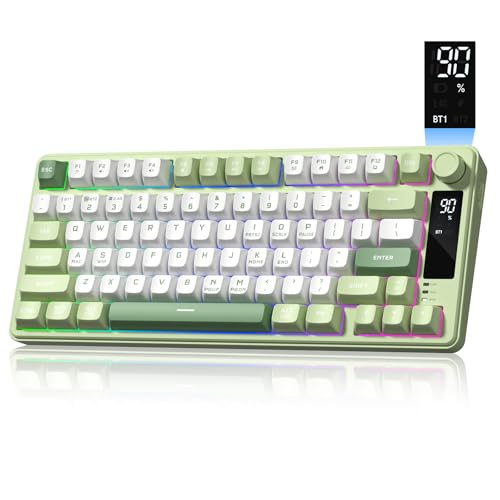
Womier DK75 75% Wireless Keyboard
Best for: quiet typing with onboard screen controls
- Color
- Green (what this guide is about)
- Switch Type
- Silent membrane
- Form Factor
- 75%
- Connectivity
- Bluetooth 5.0, 2.4 GHz, USB wired
- Backlighting
- RGB
- Keycap Material
- PBT
The Womier DK75 is a compact 75% green keyboard featuring triple-mode connectivity via Bluetooth 5.0, 2.4GHz wireless, and USB wired. It pairs silent membrane switches with mechanical-style PBT keycaps, giving you quiet typing in shared spaces. It includes a built-in status screen, a rotary control knob, customizable RGB lighting, and a 4000mAh battery. You will find it suits everyday typing and gaming if you want mechanical aesthetics without key switch noise.
Pros
- Triple-mode connectivity: Bluetooth 5.0, 2.4GHz wireless, and USB wired
- Smart screen displays battery level and connection status
- Rotary knob controls volume, lighting effects, and brightness
- Durable, oil-resistant PBT keycaps
- Large 4000mAh rechargeable battery with auto-sleep function
Cons
- Uses membrane switches instead of true mechanical switches
- Lighting adjustments rely on onboard shortcuts without software support
Good fit if
- You need silent, cushioned membrane typing for shared work spaces or late nights.
- You want an onboard status screen and physical rotary control knob.
- You switch between multiple devices across Bluetooth, 2.4GHz, and wired connections.
Skip if
- You require genuine mechanical switches or hot-swappable switch sockets.
- You prefer desktop software for advanced key mapping and complex macros.
Verdict: Womier DK75 75% Wireless Keyboard combines a compact 75% layout, status screen, and versatile triple-mode wireless connectivity with quiet membrane operation. It provides mechanical styling and durable PBT keycaps for desks where silent keys are necessary.

Womier SK80 75% Screen Mechanical Keyboard
Best for: users wanting an integrated color status screen
- Color
- Green (what this guide is about)
- Switch Type
- Full POM
- Form Factor
- 75%
- Connectivity
- Detachable Type-C
- Backlighting
- RGB
- Dimensions
- 13.4 × 6.69 × 1.38 inches
The Womier SK80 is a 75% wired mechanical keyboard finished in green with a gasket mount design and an integrated color display screen. Set at an 11-degree angle, the screen tracks settings, volume, and custom GIFs. It comes with full POM switches and a 3-pin or 5-pin hot-swap PCB. You get customizable RGB lighting and macro support, making it a functional pick if you want visual status monitoring on your desk.
Pros
- Angled 11° color display screen for GIFs, volume, and system status
- Hot-swappable PCB compatible with 3-pin and 5-pin switches
- Gasket mount structure paired with pre-installed full POM switches
- RGB backlighting featuring 19 lighting effects and 9 colors
Cons
- Customization software is compatible with Windows only and does not support macOS
- Limited to a wired setup using the detachable Type-C cable
Good fit if
- You want an integrated display screen for hardware stats and animated GIFs.
- You prefer hot-swappable switches with a sound-dampening gasket mount.
- You use a Windows computer and want full driver software control.
Skip if
- You require driver software customization on macOS.
- You want a wireless keyboard without desk cables.
Verdict: Womier SK80 75% Screen Mechanical Keyboard combines gasket mounting and hot-swap sockets with an angled color display for instant status readouts. It delivers strong hardware versatility for Windows-based desk setups.
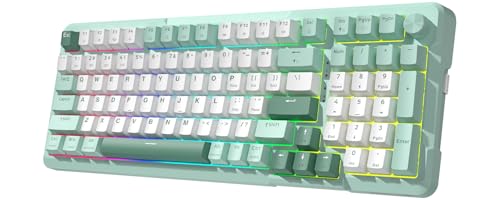
Redragon 98% Wireless Mechanical Keyboard with Knob
Best for: Desk setups requiring a numpad and QMK/VIA
- Color
- Green (what this guide is about)
- Switch Type
- Linear (Redragon RPC POM)
- Form Factor
- 98%
- Connectivity
- Bluetooth 5.0, 2.4GHz, USB-C
- Keycap Material
- Double-shot PBT
- Media Controls
- Volume Knob
View on Amazon: Redragon 98% Wireless Mechanical Keyboard with Knob
The Redragon 98% Wireless Mechanical Keyboard with Knob combines a green finish with a space-saving 98% layout and dedicated rotary control. It features tri-mode wireless connectivity, hot-swappable sockets for 3-pin and 5-pin switches, and full QMK/VIA remapping support. A gasket mount with five sound-absorbing layers softens keystrokes. It suits you if you need a number pad, multi-device pairing, and flexible open-source firmware customization.
Pros
- Tri-mode connectivity across Bluetooth 5.0, 2.4GHz wireless, and USB-C
- Hot-swappable PCB compatible with 3-pin and 5-pin switches
- Full key remapping and macro support through QMK/VIA
- Gasket mount structure with five layers of sound-absorbing padding
Cons
- Battery life drops to 16 hours with backlighting enabled
- Requires contacting customer support to receive the VIA JSON configuration file
Good fit if
- You need a dedicated number pad while retaining extra desk clearance.
- You want open-source QMK/VIA firmware for custom layer and macro programming.
- You switch between up to three connected devices across different platforms.
Skip if
- You want multi-day wireless battery life with backlighting turned on continuously.
- You prefer tactile or clicky switches over pre-installed linear switches.
Verdict: Redragon 98% Wireless Mechanical Keyboard with Knob delivers deep customization and a cushioned typing feel in an efficient green layout. It offers solid multi-device utility if you need a number pad without the footprint of a full-size board.

TECKNET Compact Wireless Keyboard
Best for: lightweight travel and compact workspaces
- Color
- Green (what this guide is about)
- Connectivity
- 2.4GHz wireless
- Form Factor
- Compact
The TECKNET Compact Wireless Keyboard gives you a portable green typing option measuring 11.5 by 4.9 inches and weighing 10.4 ounces. It links across Windows, Mac, Chrome OS, or Linux via a 2.4G USB receiver up to 32.8 feet away. Low-profile chocolate keycaps offer quiet operation with reduced key travel. This unit suits you if you need a lightweight layout for travel, coffee shops, or compact desks.
Pros
- Weighs 10.4 ounces with an 11.5 by 4.9-inch footprint
- Up to 12 months of battery life on two AAA batteries
- 2.4G wireless connection with up to 32.8 feet of range
- Quiet chocolate keycaps with reduced key travel
Cons
- Requires two AAA batteries that are not included
- No Bluetooth or wired connection option
- Lacks backlighting
Good fit if
- You want a lightweight 10.4-ounce keyboard for portable use.
- You prefer quiet chocolate keycaps with short travel distance.
- You use 2.4G USB connectivity across Windows, Mac, Chrome OS, or Linux.
Skip if
- You prefer a rechargeable built-in battery over AAA cells.
- You need Bluetooth pairing for devices without USB ports.
- You need backlit keys for typing in dark rooms.
Verdict: TECKNET Compact Wireless Keyboard provides a lightweight 10.4-ounce build with dependable 2.4G wireless range for everyday typing on the move. It requires two AAA batteries and omits Bluetooth pairing, making it best suited for simple single-device portable setups.
Specifications side by side
| Spec | EPOMAKER Aula F75 75% Wireless Keyboard | RK Royal Kludge 75% Gasket Mechanical Keyboard | RK Royal Kludge Full-Size Typewriter Keyboard | Razer BlackWidow V4 X Mechanical Keyboard | Womier 75% Wireless Wood Keyboard | Womier 98-Key Wireless Keyboard with Screen | RK Royal Kludge M75 75% Wireless Keyboard | MCHOSE Wireless TKL Mechanical Keyboard | ProtoArc Full-Size Ergonomic Wireless Keyboard | Womier DK75 75% Wireless Keyboard | Womier SK80 75% Screen Mechanical Keyboard | Redragon 98% Wireless Mechanical Keyboard with Knob | TECKNET Compact Wireless Keyboard |
|---|---|---|---|---|---|---|---|---|---|---|---|---|---|
| Switch Type | LEOBOG Reaper Switch | Silver Pro | Blue Switch | Green mechanical clicky | Full POM linear | POM creamy | Viridian linear | Linear mechanical | not specified | Silent membrane | Full POM | Linear (Redragon RPC POM) | not specified |
| Form Factor | 75% | 75% | Full-size | not specified | 75% | 98% | 75% | 75% | Full Size | 75% | 75% | 98% | not specified |
| Connectivity | Bluetooth, 2.4GHz, USB-C | Wired | Wired | not specified | USB-C wired, BT 3.0/5.0, 2.4GHz wireless | BT5.0, 2.4GHz wireless, USB-C wired | USB-C wired, 2.4GHz, Bluetooth 5.1 | Bluetooth 5.0, 2.4 GHz, USB-C | Bluetooth, 2.4G | Bluetooth 5.0, 2.4 GHz, USB wired | Detachable Type-C | Bluetooth 5.0, 2.4GHz, USB-C | 2.4GHz wireless |
| Hot-Swap Support | not specified | not specified | not specified | not specified | not specified | Yes (3 pins / 5 pins) | not specified | not specified | not specified | not specified | not specified | not specified | not specified |
| Backlighting | RGB | RGB | RGB | Chroma RGB per-key | RGB | RGB | RGB | RGB | White LED | RGB | RGB | not specified | not specified |
| Keycap Material | Double-shot PBT | PBT | not specified | Doubleshot ABS | not specified | not specified | Double-shot PBT | Double-shot PBT | not specified | PBT | not specified | Double-shot PBT | not specified |
| Case Material | not specified | not specified | Aluminium alloy | not specified | Walnut wood | not specified | not specified | not specified | not specified | not specified | not specified | not specified | not specified |
| Mounting Style | Gasket Mount | Gasket Mount | not specified | not specified | not specified | not specified | not specified | not specified | not specified | not specified | not specified | not specified | not specified |
| Media Controls | Volume Knob | Volume Knob | Volume Knob | not specified | not specified | not specified | Volume Knob | not specified | not specified | not specified | not specified | Volume Knob | not specified |
| Use | Gaming | not specified | Gaming | Gaming | not specified | not specified | not specified | not specified | not specified | Gaming | not specified | Gaming | not specified |
| Design | not specified | not specified | Typewriter | not specified | not specified | not specified | not specified | not specified | Ergonomic | not specified | not specified | not specified | not specified |
| Color | Green | Green | Green | Green | Green | Green | Green | Green | Green | Green | Green | Green | Green |
| Ergonomic Features | not specified | not specified | Wrist Rest | not specified | not specified | not specified | not specified | not specified | not specified | not specified | not specified | not specified | not specified |
| Dimensions | 12.6 × 5.51 × 1.69 inches | 5.59 × 1.65 × 12.7 inches | 7.17 × 1.61 × 17.4 inches | 18.4 × 6.01 × 1.71 inches | 13.4 × 6.69 × 1.38 inches | 13.4 × 6.69 × 1.38 inches | 12.9 × 5.47 × 1.65 inches | 12.6 × 5.4 × 1.06 inches | not specified | not specified | 13.4 × 6.69 × 1.38 inches | 15.1 × 5.67 × 1.54 inches | not specified |
| Weight | 2.2 pounds | not specified | 2.6 pounds | 2.51 pounds | not specified | not specified | not specified | 2.51 pounds | not specified | 1.6 pounds | not specified | not specified | not specified |
| Size | LEOBOG Reaper Switch | Hot-swap Switch | blue switch | not specified | not specified | not specified | Viridian Switch | not specified | not specified | not specified | not specified | not specified | not specified |
| Model | F75 | R75 | RKX108 | Blackwidow V4 X | JM-AZ-129 | Womier L98 | M75-14-01 | G75 PRO | EK01 Plus | womier DK75 | JM-AZ-129 | K742 | X315 |
Is a green keyboard worth it?
Choosing a green keyboard alters the appearance of your desk setup without restricting your functional hardware options. The green models in this guide span compact 75% layouts, tenkeyless frames, 98% setups, and full-size ergonomic boards. You can find green cases paired with mechanical linear, tactile, clicky, or membrane switches, as well as wood enclosures and typewriter styles. Selecting green gives you a distinct colored case and matching keycaps, but it does not limit connectivity choices between wired USB, Bluetooth, or 2.4GHz wireless.
Worth it if
- You want a distinct colored case and matching keycaps directly out of the box.
- You want a specific aesthetic theme across compact, ergonomic, or full-size layouts.
Skip it if
- You require a neutral black or white frame to match existing office equipment.
- You plan to install aftermarket keycaps that clash with a green chassis.
If you prefer caffeine over clicks, see our list of the best green coffee machines.
How We Picked Green Keyboards
You find green mechanical keyboards here based strictly on published manufacturer specifications. We identify each model by confirming the green color designation in its title or feature list. Only one variant per product family is included. We do not physically test keyboards. All details come directly from published listing data.
The guide displays 13 keyboards ordered with products in stock first, then by Amazon sales rank (better-selling products first). Listings must also meet technical criteria covering form factor, switch type, and connectivity. Availability and live prices update automatically on the page at least daily.
How to Choose the Best Green Keyboard
-
Select Your Switch Mechanism
Check switch specifications before you buy. Linear switches offer smooth, quiet keypresses for fast typing without physical interruptions. Tactile switches deliver a physical bump at actuation, while clicky switches provide audible snap feedback with every keystroke. Membrane designs prioritize quiet typing over mechanical stems. If you work in shared spaces, pick linear or membrane mechanisms to reduce noise. When typing accuracy and physical feedback matter most, verify whether the listing specifies tactile switches or clicky variants.
-
Evaluate Gasket Mounting Structures
Mounting style alters your typing sensation and acoustic profile. Look for gasket-mounted builds if you prefer cushioned keystrokes with lower chassis resonance. Gasket construction cushions the internal switch plate with silicone or foam tabs, isolating switch impacts from the outer frame. Keyboards without gasket mounts feel noticeably stiffer beneath your fingers. If you type for extended sessions, check the spec list for multi-layer acoustic dampening and gasket mounting, as seen on the RK Royal Kludge 75% Gasket Mechanical Keyboard.
-
Compare Wireless Battery Capacities
Battery specifications dictate how often you must plug in a wireless model. Check the milliampere-hour rating on wireless listings. Built-in battery capacities range from modest 2,000mAh packs up to high-capacity 8,000mAh cells. Larger capacities sustain active RGB backlighting and wireless operation longer between recharges. Some compact travel models even rely on replaceable AAA cells instead of internal batteries. Choose an 8,000mAh battery like the one on the MCHOSE Wireless TKL Mechanical Keyboard for minimal charging interruptions.
-
Assess Hardware Media Controls
Inspect the keyboard frame for dedicated onboard physical controls. Hardware components such as rotary volume knobs, multi-function rollers, and onboard status screens streamline your daily desktop operation. Knobs and rollers grant immediate audio volume adjustments without requiring multi-key function shortcuts. Status screens display battery level and active wireless modes at a glance. If direct media control and macro shortcuts are priorities for your desk, consider a model equipped with dedicated rollers like the Razer BlackWidow V4 X Mechanical Keyboard.
-
Check Keycap Material Durability
Examine the plastic composition specified for the keycaps. Keycaps molded from polybutylene terephthalate, known as PBT, provide a textured surface that resists friction wear and natural skin oils over time. Keyboards using standard non-PBT plastic caps often develop slick, shiny contact areas after regular typing. If you want the green key legends and surface texture to stay crisp through long daily work sessions, verify that the board includes factory PBT keycaps like the EPOMAKER Aula F75 75% Wireless Keyboard.
-
Look for Open Firmware
Review the software specifications if you customize key assignments. Keyboards with QMK or VIA open-source support allow you to remap keys, build macros, and configure operational layers directly inside a web browser. This setup saves keymaps directly to onboard keyboard memory, removing the need for proprietary background utility software. If you swap hardware between multiple desktop platforms, choose a board with VIA programmability like the Womier 75% Wireless Wood Keyboard to retain your custom bindings on any operating system.
Frequently asked questions
Which green mechanical keyboards include a physical volume knob?
Several green models include dedicated hardware dials for audio control. The EPOMAKER Aula F75 and RK Royal Kludge R75 feature volume knobs alongside their compact 75% layouts. If you prefer larger boards, the RK Royal Kludge Full-Size Typewriter keyboard includes a volume knob, while the Razer BlackWidow V4 X provides a multi-function roller for onboard sound adjustment.
What battery sizes can you expect in wireless green mechanical keyboards?
Battery capacities vary widely across wireless green designs depending on their features. Models like the Womier 98-Key, Womier 75% Wood, and MCHOSE Wireless TKL carry 8,000mAh batteries for extended wireless use. In contrast, the EPOMAKER Aula F75 uses a 4,000mAh cell, the ProtoArc Full-Size Ergonomic has a 2,000mAh pack, and the TECKNET Compact operates on two AAA batteries.
Are there green mechanical keyboards that feature built-in display screens?
Yes, several green keyboards incorporate hardware screens to monitor keyboard settings. The RK Royal Kludge M75 includes a built-in OLED display for hardware readouts alongside its 75% layout. You can also find onboard screens on the Womier 98-Key, the Womier SK80 with its angled color display, and the Womier DK75, which pairs screen controls with quiet membrane typing.
Can you program green keyboards using open-source QMK or VIA firmware?
Certain green keyboards offer full open-source customization through QMK or VIA tools. The Womier 75% Wireless Wood keyboard features native VIA programmability, allowing you to remap keys and create custom layers directly. Additionally, the Redragon 98% Wireless Mechanical Keyboard provides QMK and VIA support for deep layout adjustments while keeping dedicated number pad functionality.
Do any green mechanical keyboards come with ergonomic designs or wrist rests?
Yes, specific green keyboards incorporate dedicated ergonomic hardware. The ProtoArc Full-Size keyboard features an ergonomic split layout accompanied by integrated cushioned wrist support and multi-angle adjustments. If you want a gaming board with typewriter styling, the RK Royal Kludge Full-Size Typewriter keyboard also includes an integrated wrist rest to support your hands during long typing sessions.
Which green keyboards offer dedicated macro keys for gaming?
The Razer BlackWidow V4 X includes six dedicated macro keys along its left edge for quick custom commands. Most other green mechanical models rely on standard key remaps or function layers rather than standalone macro hardware. The BlackWidow V4 X pairs these macro keys with clicky 50g Razer green switches and RGB backlighting.
What keycap materials are used on green mechanical keyboards?
Many green mechanical keyboards come equipped with durable PBT keycaps. For example, the EPOMAKER Aula F75, RK Royal Kludge 75%, and MCHOSE Wireless TKL all list factory PBT keycaps, which resist surface shine and oil over time. The Womier DK75 also uses PBT keycaps, while other models specify custom aesthetics such as circular typewriter caps or wood casing.