The Best ASUS Mechanical Keyboards in 2026: 4 Picks
As an Amazon Associate we earn from qualifying purchases. Links on this page are affiliate links.
Finding the best ASUS mechanical keyboards requires looking at specific build details. This guide compares 4 models based on their published specifications. ASUS offers options in various form factors, including compact 65% layouts and full-size boards with numpads. Most feature RGB backlighting and PBT keycaps for durability. The top pick is the ASUS ROG Strix Scope II 96 Wireless, which leads for users needing a compact layout with a numpad and tri-mode wireless connectivity. These picks are ranked strictly by the data provided in each listing.
Quick picks
| # | Product | Best for | Price |
|---|---|---|---|
| 1 | ASUS ROG Strix Scope II 96 Wireless Best overall | compact layouts with numpad and tri-mode wireless | Check price of ASUS ROG Strix Scope II 96 Wireless on Amazon |
| 2 | ASUS ROG Azoth 75% Wireless Mechanical Keyboard Best premium | Customization-focused wireless typists | Check price of ASUS ROG Azoth 75% Wireless Mechanical Keyboard on Amazon |
| 3 | ASUS ROG Strix Scope II X Full-Size Wired Keyboard Best budget | Users needing a full-size wired mechanical keyboard | Check price of ASUS ROG Strix Scope II X Full-Size Wired Keyboard on Amazon |
| 4 | ASUS ROG Falchion Ace HFX 65% TKL Best magnetic switch | FPS gamers needing rapid trigger and compact size | Check price of ASUS ROG Falchion Ace HFX 65% TKL on Amazon |
Our 4 picks

ASUS ROG Strix Scope II 96 Wireless
Best for: compact layouts with numpad and tri-mode wireless
- Switch Type
- ROG NX Snow linear
- Form Factor
- 96%
- Connectivity
- Bluetooth, 2.4GHz wireless, USB wired
- Backlighting
- RGB
- Keycap Material
- PBT
- Hot-Swap Support
- Hot-Swappable
View on Amazon: ASUS ROG Strix Scope II 96 Wireless Affiliate link
This 96% keyboard keeps a numpad in a compact frame. You get tri-mode connectivity with Bluetooth, 2.4GHz wireless, or USB wired. It uses hot-swappable ROG NX Snow linear switches with factory lubrication. PBT keycaps and sound-dampening foam improve the feel and sound. A multi-function wheel and detachable wrist rest add comfort for long sessions.
Pros
- Tri-mode connectivity supports Bluetooth, 2.4GHz wireless, and USB wired connections
- Hot-swappable ROG NX Snow linear switches allow for easy customization
- PBT keycaps and integrated sound-dampening foam enhance durability and acoustics
- Multi-function wheel provides quick media and lighting adjustments
Cons
- Lacks per-key RGB lighting customization software in the provided data
- Heavier build at 2.78 pounds reduces portability
- No dedicated macro keys beyond programmable F1-F5 hotkeys
Good fit if
- You want a compact layout that still includes a number pad
- You prefer linear switches with a smooth, factory-lubricated feel
- You need reliable wireless connectivity with low latency options
Skip if
- You require a full-size board with a separate numpad
- You prefer tactile or clicky switches over linear ones
- You need a lightweight keyboard for frequent travel
Verdict: ASUS ROG Strix Scope II 96 Wireless suits users who need a compact 96% layout with a numpad and tri-mode connectivity. It is ideal for those who value hot-swappable linear switches and sound-dampening features for gaming or work.

ASUS ROG Azoth 75% Wireless Mechanical Keyboard
Best for: Customization-focused wireless typists
- Switch Type
- ROG NX Snow linear
- Form Factor
- 75% TKL
- Connectivity
- Bluetooth, 2.4 GHz RF, USB
- Hot-Swap Support
- Yes (3-pin)
- Backlighting
- RGB
- Keycap Material
- Double-shot PBT
View on Amazon: ASUS ROG Azoth 75% Wireless Mechanical Keyboard Affiliate link
The ASUS ROG Azoth in white offers a 75% layout with tri-mode connectivity. It features a gasket mount for a flex-free feel and hot-swappable ROG NX Snow linear switches. An integrated OLED screen and control knob allow real-time monitoring of system stats and media playback. You get pre-lubed switches and a full DIY kit for customization. This model suits users who want a premium, customizable wireless typing experience.
Pros
- Tri-mode connectivity via Bluetooth, 2.4 GHz RF, and USB
- Gasket mount with dampening foam for sound tuning
- Hot-swappable 3-pin PCB with pre-lubed linear switches
- Integrated 2-inch OLED screen for stats and settings
- Includes complete DIY modding kit with lubricant and tools
Cons
- 2.6-pound weight makes it less portable than lighter boards
- OLED screen and RGB lighting reduce battery life if left on
- 75% layout omits dedicated media keys and a numpad
Good fit if
- You want a customizable wireless keyboard with a premium build
- You prefer linear switches with a smooth, thocky sound
- You need to monitor system stats via an OLED display
Skip if
- You require a full-sized keyboard with a number pad
- You need maximum battery life without turning off the screen
- You prefer a compact 60% or 65% layout
Verdict: The ASUS ROG Azoth White 75% Wireless is a robust option for enthusiasts who value customization and tactile feedback. It fits users who want a premium wireless typing experience with a dedicated OLED display for system monitoring.
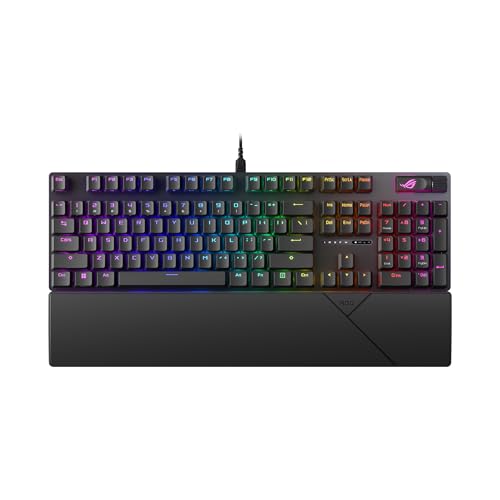
ASUS ROG Strix Scope II X Full-Size Wired Keyboard
Best for: Users needing a full-size wired mechanical keyboard
- Switch Type
- ROG NX Snow V2 Linear
- Form Factor
- 100% Full-Size
- Connectivity
- Wired USB-C
- Backlighting
- RGB
- Keycap Material
- Doubleshot PBT
- Case Material
- Aluminum top plate
View on Amazon: ASUS ROG Strix Scope II X Full-Size Wired Keyboard Affiliate link
The ASUS ROG Strix Scope II X is a 100% full-size mechanical keyboard designed for desktop use. It features a durable aluminum top plate and doubleshot PBT keycaps for long-term wear resistance. You get hot-swappable ROG NX Snow V2 linear switches with integrated sound-dampening foam for better acoustics. A multi-function wheel and detachable wrist rest add ergonomic comfort and control. This wired USB-C model suits users who need a complete numpad layout.
Pros
- 100% full-size layout with integrated number pad
- Hot-swappable ROG NX Snow V2 linear switches
- Aluminum top plate with doubleshot PBT keycaps
- Integrated sound-dampening foam for improved acoustics
- Multi-function wheel for media and lighting control
Cons
- Wired USB-C connectivity limits desk mobility
- No wireless or Bluetooth support for portability
- Full-size footprint requires significant desk space
Good fit if
- You need a full number pad for data entry
- You prefer a wired connection for stable latency
- You want hot-swappable switches for customization
Skip if
- You require wireless connectivity for a clean desk
- You have limited desk space for a full-size board
- You prefer tactile or clicky switch options
Verdict: ASUS ROG Strix Scope II X Full-Size Keyboard is a sturdy, wired option for users who need a numpad and durable materials. It fits those who prioritize acoustic quality and switch customization over wireless freedom.

ASUS ROG Falchion Ace HFX 65% TKL
Best for: FPS gamers needing rapid trigger and compact size
- Switch Type
- ROG HFX magnetic
- Form Factor
- 65% TKL
- Connectivity
- Dual USB-C wired
- Keycap Material
- PBT
- Use
- Gaming
- Color
- Black
View on Amazon: ASUS ROG Falchion Ace HFX 65% TKL Affiliate link
The ASUS ROG Falchion Ace HFX is a 65% wired keyboard featuring HFX magnetic switches. It offers an adjustable actuation range from 0.1 to 4.0 mm and an 8000 Hz polling rate for minimal input delay. The compact 12.4-inch design saves desk space, while dual USB-C ports allow easy switching between two PCs. It includes PBT keycaps and a multi-function touch panel for intuitive control.
Pros
- ROG HFX magnetic switches with adjustable 0.1 to 4.0 mm actuation
- 8000 Hz polling rate reduces input delay to 0.125 ms
- Dual USB-C ports for connecting two PCs simultaneously
- Compact 65% layout fits on small desks
Cons
- Wired-only connection limits portability without a cable
- 65% layout lacks dedicated arrow keys and navigation cluster
- No wireless or Bluetooth connectivity options available
Good fit if
- You want magnetic switches for rapid trigger adjustments
- You need a compact board to maximize mouse space
- You frequently switch between two computers via USB-C
Skip if
- You require wireless or Bluetooth connectivity
- You need a full-sized keyboard with numpad
- You prefer traditional mechanical switch feel
Verdict: ASUS ROG Falchion Ace HFX 65% suits FPS players who need precise actuation control and a wired, space-saving setup. It is not for those who prioritize wireless freedom or standard layout keys.
Specifications side by side
| Spec | ASUS ROG Strix Scope II 96 Wireless | ASUS ROG Azoth 75% Wireless Mechanical Keyboard | ASUS ROG Strix Scope II X Full-Size Wired Keyboard | ASUS ROG Falchion Ace HFX 65% TKL |
|---|---|---|---|---|
| Switch Type | ROG NX Snow linear | ROG NX Snow linear | ROG NX Snow V2 Linear | ROG HFX magnetic |
| Form Factor | 96% | 75% TKL | 100% Full-Size | 65% TKL |
| Connectivity | Bluetooth, 2.4GHz wireless, USB wired | Bluetooth, 2.4 GHz RF, USB | Wired USB-C | Dual USB-C wired |
| Hot-Swap Support | not stated | Yes (3-pin) | not stated | not stated |
| Backlighting | RGB | RGB | RGB | not stated |
| Keycap Material | PBT | Double-shot PBT | Doubleshot PBT | PBT |
| Case Material | not stated | not stated | Aluminum top plate | not stated |
| Use | Gaming | Gaming | Gaming | Gaming |
| Color | Black | White | Black | Black |
| Operating System | Mac | Mac | Mac | not stated |
| Dimensions | 14.8 × 5.16 × 1.57 inches | 12.8 × 5.3 × 1.5 inches | 17.2 × 5.1 × 1.5 inches | 4.5 × 1.4 × 12.4 inches |
| Weight | 2.78 pounds | 2.6 pounds | 2.1 pounds | 1.42 pounds |
| Size | Snow Linear | Snow Linear (Mechanical) | NX Snow V2 Linear Switch | HFX V1 (Hall Effect) |
| Model | X901 STRIX SCOPE II 96 WL/NXSW/CA/PBT | M701 ROG AZOTH/NXSW/CA/PBT/WHT | XA14 ROG STRIX SCOPE II X/NXSWV2/CA/PBT | M605 ROG FALCHION ACE HFX/HFX/CA/PBT |
ASUS Keyboard Lineup Overview
Connectivity defines the primary split. The ASUS ROG Strix Scope II 96 Wireless offers tri-mode wireless for flexible setups. The ASUS ROG Strix Scope II X Full-Size Wired Keyboard suits users who prefer a stable wired connection without batteries. Both provide full-size layouts with numpads. The ASUS ROG Azoth 75% Wireless adds an OLED display for system monitoring, targeting typists who want customization. Switch type matters for performance. The ASUS ROG Falchion Ace HFX 65% TKL uses magnetic switches for rapid trigger response, ideal for FPS gamers. It is wired and compact. Most boards feature RGB backlighting and hot-swappable sockets. PBT keycaps are common across the range. Choose based on your need for wireless freedom or wired reliability. Consider the form factor size for your desk space. Magnetic switches offer unique actuation control for competitive play.
Where ASUS fits your needs
ASUS covers sizes from compact 65% to full-size layouts. You get RGB backlighting and PBT keycaps across the range. Most models use linear switches, with one option featuring magnetic Hall Effect switches for rapid trigger. The lineup includes wireless and wired connectivity choices. Hot-swappable sockets allow switch customization. You will not find standard tactile or clicky switches in these picks. There are no full-size wired options without a numpad listed. The brand focuses on gaming-centric features like OLED displays and compact form factors for desk space savings.
If you want a portable setup, compare the best ASUS laptops by their primary hardware specifications.
How to choose the right ASUS keyboard
-
Check connectivity needs
Decide if you need wireless freedom or wired stability. The ASUS ROG Strix Scope II 96 Wireless supports tri-mode connections, allowing you to switch between Bluetooth, 2.4GHz, and USB. This flexibility suits mixed setups. If you prefer zero latency and no charging, the ASUS ROG Strix Scope II X Full-Size Wired Keyboard is the better choice. It eliminates battery concerns entirely. Choose wireless for desk flexibility and wired for consistent performance without interruption.
-
Select the right form factor
Your desk space and typing habits dictate the size. The ASUS ROG Strix Scope II 96 Wireless offers a 96% layout, keeping the numpad in a compact footprint. This is ideal for users who need number keys but lack space. For a more minimal desk, the ASUS ROG Falchion Ace HFX 65% TKL removes the numpad entirely. It saves significant desk area. Choose based on whether you frequently use numeric inputs or prioritize a cleaner surface for mouse movement.
-
Evaluate switch technology
Switch type changes the feel and speed. Most models here use linear switches for smooth, quiet keystrokes. The ASUS ROG Falchion Ace HFX 65% TKL stands out with magnetic Hall Effect switches. These allow rapid trigger and adjustable actuation points, which benefit FPS gamers needing precise control. Standard linear switches suit general typing and gaming equally well. Choose magnetic switches only if you require hardware-level customization for actuation distance and rapid input registration.
-
Consider hot-swap capability
Hot-swappable sockets let you change switches without soldering. All listed models support this feature, giving you the freedom to experiment with different switch types later. This is valuable if you want to try tactile or clicky switches after starting with linear ones. It extends the keyboard's lifespan. You can customize the feel without buying a new board. Ensure you have the tools and compatible switches ready for easy swaps whenever you want to change the typing experience.
-
Verify keycap material
PBT keycaps are standard across all listed ASUS models. This material is thicker and more durable than ABS, resisting shine and wear over time. It provides a textured feel that reduces finger slippage. Since every option here uses PBT, you do not need to worry about keycap degradation. This ensures long-term comfort and consistent typing feel. It is a practical choice for heavy users who type for many hours daily without needing frequent replacements.
Frequently asked questions
Which ASUS keyboard is best for compact layouts with a numpad?
The ASUS ROG Strix Scope II 96 Wireless is the top choice for this need. It features a 96% layout that keeps the numpad while saving desk space. You get tri-mode wireless connectivity and hot-swappable linear switches. The board also includes sound-dampening features for a cleaner typing experience during gaming or work sessions.
What is the best wireless option for customization enthusiasts?
The ASUS ROG Azoth 75% Wireless is ideal for users who value deep customization. It includes a dedicated OLED display for system monitoring. You get hot-swappable linear switches and PBT keycaps for durability. The compact 75% form factor offers a premium typing experience without the bulk of a full-size board.
Is there a durable wired full-size ASUS keyboard available?
Yes, the ASUS ROG Strix Scope II X Full-Size Wired Keyboard is a sturdy option. It provides a full layout with a numpad for users who prefer wired stability. You get hot-swappable linear switches and PBT keycaps. This model prioritizes acoustic quality and switch customization over wireless convenience.
Which ASUS keyboard supports rapid trigger for FPS gaming?
The ASUS ROG Falchion Ace HFX 65% TKL supports rapid trigger via magnetic switches. It uses Hall Effect technology for precise actuation control. The compact 65% size saves desk space for mouse movement. This wired keyboard is designed specifically for FPS players who need speed and accuracy.
Do ASUS mechanical keyboards support Mac operating systems?
Most models in this lineup support Mac operating systems. The ASUS ROG Strix Scope II 96 Wireless, Azoth, and Strix Scope II X all list Mac compatibility. You can use these keyboards with Apple computers without needing additional drivers. Check the specific model attributes to confirm support for your setup.
What keycap material do these ASUS keyboards use?
All listed ASUS keyboards feature PBT keycaps. PBT material is known for its durability and resistance to shine over time. You get a textured feel that improves grip during long typing sessions. This material choice is consistent across the Strix Scope, Azoth, and Falchion Ace models.
Which model offers the most compact form factor?
The ASUS ROG Falchion Ace HFX 65% TKL is the most compact option. It measures 12.4 inches in length and weighs just 1.42 pounds. The 65% layout removes the numpad and function row to save space. This makes it ideal for users with limited desk real estate.