Best Corsair Mechanical Keyboards with Linear Switch in 2026: 6 Picks
As an Amazon Associate we earn from qualifying purchases. Links on this page are affiliate links.
Finding the best corsair mechanical keyboards with linear switch requires looking at published specs rather than hype. We compared 6 models to help you choose. Our top pick is the Corsair K70 CORE Mechanical Keyboard with Palmrest. It leads because it includes a wrist rest for added comfort during long sessions. These picks are based strictly on the specifications published on the listings. This guide helps you decide which keyboard fits your desk setup and typing needs.
Quick picks
The best fit for you
- You want comfort with wired linear switches Corsair K70 CORE Mechanical Keyboard with Palmrest It includes a wrist rest and uses linear switches for smooth key presses.
- You need a compact wireless keyboard with PBT keycaps Corsair K65 Plus Wireless 75% Keyboard This 75% layout features durable PBT keycaps and wireless connectivity for portability.
- You want to customize switches without buying a new board Corsair K65 Plus Wireless 75% Hot-Swap Keyboard It supports hot-swappable switches, allowing you to change linear switches easily.
Our 6 picks

Corsair K70 CORE Mechanical Keyboard with Palmrest
Best for: Gamers wanting wired linear switches and comfort
- Switch Type
- Linear Switch (what this guide is about)
- Form Factor
- Full Size
- Connectivity
- Wired
- Backlighting
- RGB
- Keycap Material
- ABS Double-Shot
- Case Material
- Aluminum top plate
View on Amazon: Corsair K70 CORE Mechanical Keyboard with Palmrest Affiliate link
This wired Corsair keyboard features pre-lubed MLX Red linear switches for smooth keystrokes. It includes an aluminum top plate and double-shot ABS keycaps for durability. A magnetic soft-touch palm rest adds comfort. The rotary dial and media button allow quick volume control. It suits gamers who want a sturdy, responsive board with included ergonomic support.
Pros
- Pre-lubed MLX Red linear switches
- Magnetic detachable soft-touch palm rest
- Aluminum top plate for stability
- Multi-function rotary dial for media control
Cons
- Wired connectivity only
- ABS keycaps instead of PBT
- No wireless option available
Good fit if
- You want a wired board with included palm rest
- You prefer linear switches for gaming
- You value aluminum build quality
Skip if
- You need wireless connectivity
- You prefer PBT keycaps
- You do not want a palm rest
Verdict: Corsair K70 CORE RGB with Palmrest is a solid wired option for gamers who value linear switches and included comfort features. It fits users who prioritize tactile smoothness and sturdy construction over wireless freedom.

Corsair K65 Plus Wireless 75% Keyboard
Best for: Compact wireless gaming setups with linear switches
- Switch Type
- Linear Switch (what this guide is about)
- Form Factor
- 75%
- Connectivity
- 2.4GHz wireless, Bluetooth, USB wired
- Backlighting
- RGB
- Keycap Material
- Dye-sub PBT
- Use
- Gaming
View on Amazon: Corsair K65 Plus Wireless 75% Keyboard Affiliate link
The Corsair K65 Plus Wireless is a compact 75% mechanical keyboard featuring pre-lubricated MLX Red linear switches. It supports 2.4GHz wireless, Bluetooth, and USB wired connections. The build includes durable PBT dye-sublimated keycaps and a multi-function rotary dial. You get up to 266 hours of battery life with RGB lighting off. This setup suits gamers who want fast, smooth keypresses without the bulk of a full-size board.
Pros
- Pre-lubricated MLX Red linear switches for smooth actuation
- Triple connectivity: 2.4GHz wireless, Bluetooth, and USB wired
- Durable PBT dye-sublimated keycaps resist shine and wear
- Multi-function rotary dial for media and app control
- Up to 266 hours of battery life with RGB off
Cons
- Smaller 75% form factor lacks a dedicated number pad
- Battery life drops significantly if RGB backlighting is enabled
- No dedicated macro keys or programmable shortcuts mentioned
Good fit if
- You prefer a compact layout that saves desk space
- You want wireless flexibility with both Bluetooth and 2.4GHz options
- You value durable PBT keycaps over ABS plastic
Skip if
- You require a full-size keyboard with a numeric keypad
- You need wired-only connectivity for zero latency
- You want a keyboard with dedicated macro keys
Verdict: Corsair K65 Plus Wireless 75% PBT delivers a compact, wireless-ready typing experience with smooth linear switches. It fits users who prioritize portability and durable keycaps over full-size layouts.
Corsair K65 Plus Wireless 75% Mechanical Keyboard
Best for: Gamers wanting compact wireless flexibility
- Switch Type
- Linear Switch (what this guide is about)
- Form Factor
- 75%
- Connectivity
- 2.4GHz wireless, Bluetooth, USB wired
- Backlighting
- RGB
- Keycap Material
- PBT dye-sublimated
- Hot-Swap Support
- Hot-Swappable
View on Amazon: Corsair K65 Plus Wireless 75% Mechanical Keyboard Affiliate link
The Corsair K65 Plus Wireless is a 75% mechanical keyboard featuring pre-lubricated MLX Red linear switches. It supports 2.4GHz wireless, Bluetooth, and USB wired connections. The unit includes a multi-function dial and sturdy PBT dye-sublimated keycaps. It offers up to 266 hours of battery life with RGB lighting off. This compact design suits users who want wireless flexibility without sacrificing a full number row.
Pros
- Pre-lubricated MLX Red linear switches for smooth keystrokes
- Triple connectivity via 2.4GHz wireless, Bluetooth, and USB wired
- Durable PBT dye-sublimated keycaps resist shine and wear
- Multi-function rotary dial for media and app control
Cons
- 2.02-pound weight makes it less portable than lighter models
- No mention of onboard memory for profile storage
- Battery life drops significantly if RGB lighting is enabled
Good fit if
- You need a compact 75% layout with a number row
- You want wireless freedom with both Bluetooth and 2.4GHz options
- You prefer tactile consistency from pre-lubricated linear switches
Skip if
- You require a full-size 100% layout
- You need a wired-only connection without wireless capability
- You prefer a lighter keyboard for easy transport
Verdict: Corsair K65 Plus Wireless 75% Keyboard delivers reliable wireless performance and smooth linear switches for gamers who value a compact form factor with a number row.
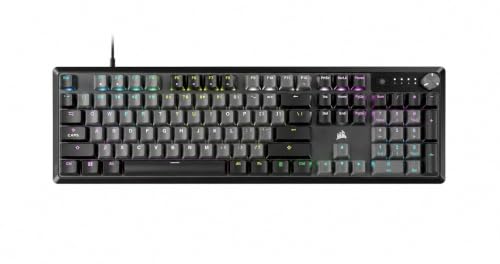
Corsair K70 CORE Wired Linear Mechanical Keyboard
Best for: Gamers wanting pre-lubed linear switches
- Switch Type
- Linear Switch (what this guide is about)
- Connectivity
- Wired
- Backlighting
- RGB
- Keycap Material
- ABS double-shot
- Case Material
- Aluminum top plate
- Use
- Gaming
View on Amazon: Corsair K70 CORE Wired Linear Mechanical Keyboard Affiliate link
This Corsair K70 CORE RGB is a wired mechanical keyboard featuring pre-lubed MLX Red linear switches. It includes a durable aluminum top plate and ABS double-shot keycaps. The design incorporates two layers of sound dampening for smoother keystrokes. You get a rotary dial for media control and onboard storage for five custom profiles. It is a solid option for gamers who prefer tactile feedback without the noise of clicky switches.
Pros
- Pre-lubed MLX Red linear switches
- Aluminum top plate for stability
- ABS double-shot keycaps
- Rotary media dial
- Onboard profile storage
Cons
- Wired connectivity limits portability
- No wireless option available
- ABS keycaps may wear over time
Good fit if
- You want pre-lubed switches
- You prefer a wired connection
- You need media controls
Skip if
- You require wireless connectivity
- You prefer PBT keycaps
- You need a compact layout
Verdict: Corsair K70 CORE RGB Pre-Lubed is a reliable wired choice for gamers who value smooth, pre-lubed switches and a sturdy aluminum build. It suits those who want dedicated media controls and onboard storage without needing wireless freedom.

Corsair K70 CORE Linear Mechanical Keyboard
Best for: Wired gamers wanting media controls
- Switch Type
- Linear Switch (what this guide is about)
- Connectivity
- Wired
- Backlighting
- RGB
- Keycap Material
- ABS double-shot
- Case Material
- Aluminum top plate
- Use
- Gaming
View on Amazon: Corsair K70 CORE Linear Mechanical Keyboard Affiliate link
The Corsair K70 CORE RGB is a wired mechanical keyboard featuring pre-lubed MLX Red linear switches. It includes an aluminum top plate and ABS double-shot keycaps for durability. A rotary dial provides media control, and onboard memory stores five profiles. This model is designed for gamers who want smooth keystrokes and robust build quality without wireless connectivity.
Pros
- Pre-lubed MLX Red linear switches for smooth keystrokes
- Aluminum top plate for stability
- Multi-function rotary dial for media control
- Onboard memory for five profile settings
Cons
- Wired connectivity only
- ABS keycaps instead of PBT
- No wireless option available
Good fit if
- You prefer wired connections for consistent response
- You want tactile media controls via a dial
- You need onboard profile storage
Skip if
- You require wireless freedom
- You prefer PBT keycaps
- You need Bluetooth connectivity
Verdict: Corsair K70 CORE RGB Wired Linear suits gamers who value wired reliability and media controls. It offers a sturdy aluminum build and smooth linear switches for focused desk setups.

Corsair K65 Plus Wireless 75% Hot-Swap Keyboard
Best for: Switch customization and wireless flexibility
- Switch Type
- Linear Switch (what this guide is about)
- Form Factor
- 75%
- Connectivity
- 2.4GHz wireless, Bluetooth, USB
- Backlighting
- RGB
- Hot-Swap Support
- Hot-Swappable
- Use
- Gaming
View on Amazon: Corsair K65 Plus Wireless 75% Hot-Swap Keyboard Affiliate link
The Corsair K65 Plus Wireless is a 75% mechanical keyboard featuring pre-lubricated MLX Red v2 linear switches. It supports hot-swappable sockets, letting you change switches without soldering. You can connect via 2.4GHz wireless, Bluetooth, or USB cable. The white chassis includes RGB backlighting and lasts up to 266 hours on a single charge with lights off. It suits users wanting modular customization in a compact layout.
Pros
- Hot-swappable switch sockets for easy customization
- Pre-lubricated MLX Red v2 linear switches
- Triple connectivity via 2.4GHz, Bluetooth, and USB
- 266-hour battery life with RGB off
Cons
- Single-color default lighting limits RGB effects
- 2.03-pound weight adds desk bulk
- No dedicated media keys listed in specs
Good fit if
- You want to swap switches without soldering
- You prefer a compact 75% layout
- You need wireless freedom with wired backup
Skip if
- You require full-size numpad layouts
- You want per-key RGB customization
- You prefer tactile or clicky switches
Verdict: Corsair K65 Plus Wireless 75% Hot-Swap delivers modular switch flexibility and reliable wireless performance for users who value customization. It fits those who want to tweak their typing feel without buying new keyboards.
Specifications side by side
| Spec | Corsair K70 CORE Mechanical Keyboard with Palmrest | Corsair K65 Plus Wireless 75% Keyboard | Corsair K65 Plus Wireless 75% Mechanical Keyboard | Corsair K70 CORE Wired Linear Mechanical Keyboard | Corsair K70 CORE Linear Mechanical Keyboard | Corsair K65 Plus Wireless 75% Hot-Swap Keyboard |
|---|---|---|---|---|---|---|
| Switch Type | MLX Red Linear | Corsair MLX Red linear mechanical | CORSAIR MLX Red linear | CORSAIR Red linear | Pre-lubed MLX Red linear | CORSAIR MLX Red v2 Linear |
| Form Factor | Full Size | 75% | 75% | not stated | not stated | 75% |
| Connectivity | Wired | 2.4GHz wireless, Bluetooth, USB wired | 2.4GHz wireless, Bluetooth, USB wired | Wired | Wired | 2.4GHz wireless, Bluetooth, USB |
| Backlighting | RGB | RGB | RGB | RGB | RGB | RGB |
| Keycap Material | ABS Double-Shot | Dye-sub PBT | PBT dye-sublimated | ABS double-shot | ABS double-shot | not stated |
| Case Material | Aluminum top plate | not stated | not stated | Aluminum top plate | Aluminum top plate | not stated |
| Hot-Swap Support | not stated | not stated | Hot-Swappable | not stated | not stated | Hot-Swappable |
| Use | Gaming | Gaming | Gaming | Gaming | Gaming | Gaming |
| Color | Black | Black/Gray | Black/Gray | Black | Black | White |
| Operating System | not stated | Mac | not stated | not stated | not stated | Mac |
| Ergonomic Features | Wrist Rest | not stated | not stated | not stated | not stated | not stated |
| Noise Level | Silent | not stated | Silent | not stated | not stated | not stated |
| Dimensions | 17.6 × 6.02 × 1.39 inches | 12.6 × 5.35 × 1.37 inches | 12.6 × 5.35 × 1.37 inches | 18 × 6.8 × 2.1 inches | 17.6 × 6.02 × 1.39 inches | 12.6 × 5.35 × 1.37 inches |
| Weight | 2.06 pounds | 2.02 pounds | 2.02 pounds | 2.06 pounds | 2.06 pounds | 2.03 pounds |
| Size | With Palmrest | Compact | Compact | not stated | Without Palmrest | not stated |
| Model | CH-910981E-NA | not stated | RGP0156 | CH-910991E-NA-Cr | CH-910971E-NA | CH-91D451E-NA |
How to choose linear keyboard specs
-
Check connectivity needs
Decide between wired and wireless based on your desk setup. Wired options like the Corsair K70 CORE provide stable connections without battery concerns. Wireless models, such as the K65 Plus, offer portability and a cleaner desk look. If you prioritize zero latency and no charging, choose wired. If you value freedom of movement and fewer cables, select a wireless model with reliable performance.
-
Select form factor size
Form factor determines how much space the keyboard occupies. Full-size layouts like the K70 CORE include a number row for data entry. Compact 75% layouts, found in the K65 Plus series, save desk space while retaining essential keys. Measure your available desk area before buying. If you need numeric keys for spreadsheets, choose a full-size model. If you want more mouse space, pick a compact 75% layout.
-
Verify hot-swap capability
Hot-swappable sockets allow you to change switches without soldering. The K65 Plus Wireless Hot-Swap model features this flexibility. This spec lets you experiment with different switch types later. If you plan to customize your typing feel over time, choose a hot-swappable board. If you are happy with the included switches and want a simpler setup, a non-hot-swap model is sufficient and often more affordable.
-
Consider ergonomic features
Ergonomic accessories can improve long-term comfort during extended sessions. The K70 CORE with Palmrest includes a wrist rest for support. This feature reduces strain on your wrists while typing or gaming. If you type for many hours daily, check if the model includes a wrist rest. If you prefer a minimalist setup or already have a separate pad, you might skip this feature to save space and cost.
-
Review keycap material
Keycap material affects durability and texture. PBT keycaps, used in the K65 Plus Wireless, are known for being durable and resistant to shine. ABS keycaps can feel smoother initially but may wear faster. If you want long-lasting keycaps that resist wear, look for PBT material. If texture is less important to you, standard keycaps may suffice. Always check the specifications for the exact material used in the model you are considering.
Frequently asked questions
Which Corsair keyboard is best for gamers who want comfort?
The Corsair K70 CORE with Palmrest is the top choice for comfort. It includes a built-in wrist rest to support your hands during long sessions. The keyboard uses linear switches for smooth, consistent key presses. It connects via wired USB, ensuring stable performance without latency. This model is designed for gamers who prioritize tactile smoothness and physical support over wireless freedom.
What is the most compact Corsair linear keyboard option?
The Corsair K65 Plus Wireless 75% Keyboard is the most compact option listed. It features a 75% form factor that retains a number row while saving desk space. The keyboard connects wirelessly, offering portability and a cleaner setup. It uses linear switches for smooth typing. The compact size makes it ideal for users who need flexibility and do not require a full-size layout.
Can I swap switches on a Corsair linear keyboard?
Yes, the Corsair K65 Plus Wireless 75% Hot-Swap Keyboard allows switch customization. It supports hot-swappable sockets, meaning you can change switches without soldering. This feature lets you tweak your typing feel or repair broken switches easily. The keyboard maintains wireless connectivity and linear switch performance. It is ideal for users who want modular flexibility in their gaming setup.
Does the Corsair K70 CORE have media controls?
The Corsair K70 CORE RGB Pre-Lubed model includes dedicated media controls. These controls allow you to adjust volume and manage playback without using software. The keyboard uses pre-lubed linear switches for a smooth, consistent actuation. It connects via wired USB and features an aluminum build for durability. This model suits users who want convenient hardware controls alongside reliable wired performance.
What keycap material does the budget Corsair keyboard use?
The Corsair K65 Plus Wireless 75% Keyboard with PBT uses durable PBT keycaps. PBT material is known for its resistance to shine and wear compared to ABS. The keyboard offers wireless connectivity and a compact 75% layout. It features linear switches for smooth key presses. This combination of materials and form factor makes it a solid budget choice for users prioritizing keycap longevity and portability.
Is the Corsair K70 CORE available without a palm rest?
Yes, the Corsair K70 CORE Linear Mechanical Keyboard is available without a palm rest. This version omits the included wrist rest found in the other K70 CORE model. It retains the same linear switches and wired connectivity. The keyboard measures 17.6 inches in length. It is suitable for users who prefer a slimmer profile or already have a separate wrist support.