Best Gaming Mice Under $30: 15 Spec-Based Picks
As an Amazon Associate we earn from qualifying purchases. Links on this page are affiliate links.
Finding the best gaming mice under $30 requires looking directly at hardware metrics like sensor resolution, weight, and connectivity. This guide evaluates 15 models based strictly on the specifications published on their listings.
The Logitech G305 Lightspeed Wireless Gaming Mouse takes the top spot due to its 12,000 DPI HERO sensor and 1 ms wireless connectivity powered by a single AA battery. Use this comparison to decide which button layout, shell weight, and connection type best suit your hand size and playstyle.
Quick picks
The best fit for you
- You want low latency wireless gaming on AA power Logitech G305 Lightspeed Wireless Gaming Mouse It delivers 1 ms wireless reporting and a 12,000 DPI HERO sensor powered by AA batteries.
- You need many thumb buttons for MMO game macros Redragon Impact Ergonomic MMO Mouse It packs 12 programmable thumb buttons and a 12,400 DPI PixArt PAW3327 sensor.
- You want a lightweight wireless mouse for your setup Razer Orochi V2 Wireless Gaming Mouse It weighs 2.08 ounces and offers dual wireless connectivity without charging cables.
- You want an ergonomic vertical shape with Bluetooth connectivity Attoe Vertical Wireless Mouse It provides a vertical ergonomic design, an OLED status screen, and Bluetooth support.
Our 15 picks

Logitech G305 Lightspeed Wireless Gaming Mouse
Best for: reliable low-latency wireless gaming on AA power
- Connectivity
- LIGHTSPEED Wireless
- Maximum DPI
- 12,000 DPI
- Weight
- 3.36 ounces
- Sensor
- HERO
- Battery Life
- 250 hours
- Use
- Gaming
View on Amazon: Logitech G305 Lightspeed Wireless Gaming Mouse
The Logitech G305 Lightspeed is a compact wireless gaming mouse built around a 12,000 DPI HERO optical sensor. You get a 1 ms report rate over dedicated wireless connectivity and up to 250 hours of continuous run time from a single AA battery. Weighing 3.36 ounces with built-in receiver storage, it suits players who want dependable wireless tracking and long battery life without frequent charging cables cluttering the desk.
Pros
- HERO optical sensor with up to 12,000 DPI and 400 IPS tracking
- Up to 250 hours of continuous run time on a single AA battery
- LIGHTSPEED wireless connection with a 1 ms report rate
- Built-in internal storage for the USB nano receiver
Cons
- Uses replaceable AA batteries rather than internal USB recharging
- Weighs 3.36 ounces, making it heavier than ultra-light competitors
- No Bluetooth connectivity option listed
Good fit if
- You want a wireless gaming mouse that runs for hundreds of hours on one AA battery.
- You need a fast 1 ms report rate and tracking up to 12,000 DPI.
- You travel frequently and want dedicated onboard storage for your USB receiver.
Skip if
- You prefer an ultra-lightweight gaming mouse weighing under 2.5 ounces.
- You want a rechargeable mouse that plugs in via USB cable.
Verdict: Logitech G305 Lightspeed Wireless Gaming Mouse pairs a 12,000 DPI HERO sensor with low-latency 1 ms wireless performance and long AA battery longevity. It delivers precise, dependable tracking in a compact portable build.

Redragon Impact Ergonomic MMO Mouse
Best for: MMO players needing complex thumb-key macros
- Connectivity
- Wired USB
- Maximum DPI
- 12400 DPI
- Programmable Buttons
- 18
- Sensor
- PixArt PAW3327
- Polling Rate
- 1000 Hz
- Backlighting
- RGB
The Redragon Impact Wired MMO Mouse is a dedicated multi-button controller built for macro-heavy gaming. You get 18 programmable buttons, highlighted by a 12-button side cluster for complex keybinds. Its PixArt PAW3327 optical sensor tracks up to 12,400 DPI with a 1,000 Hz polling rate. At 6.17 ounces with an eight-piece weight tuning system, it suits you if you prefer substantial heft, palm support, and complete command layout over lightweight agility.
Pros
- 18 programmable buttons, including a 12-button side grid
- PixArt PAW3327 optical sensor reaching up to 12,400 DPI
- Removable eight-piece weight tuning set (2.4 grams each)
- Onboard storage for 5 profiles with 1,000 Hz polling rate
Cons
- Heavy 6.17-ounce total weight
- Button programming software is incompatible with macOS
- Wired-only USB design lacks wireless mobility
Good fit if
- You need extensive macro shortcuts across 12 dedicated thumb keys.
- You prefer a heavier, wider mouse with adjustable physical weights.
- You use Windows to configure and save multiple onboard profiles.
Skip if
- You want a lightweight mouse built for fast-paced FPS gaming.
- You need a wireless setup without cable drag.
- You use macOS and require full software button remapping.
Verdict: Redragon Impact Wired MMO Mouse offers exceptional input versatility with its 12 thumb buttons and customizable weight set. It delivers reliable tracking via its PixArt PAW3327 sensor for players who prioritize macro density over light weight.

Razer Orochi V2 Wireless Gaming Mouse
Best for: long-lasting dual wireless gaming
- Connectivity
- Bluetooth, Razer HyperSpeed Wireless
- Maximum DPI
- 18K DPI
- Weight
- 60g
- Sensor
- Razer 5G Advanced
- Battery Life
- Up to 950 hours
- Use
- Gaming
The Razer Orochi V2 is a compact wireless gaming mouse built for travel and desk setups alike. You get an 18,000 DPI optical sensor, dual-mode connectivity across HyperSpeed Wireless and Bluetooth, and mechanical switches rated for 60 million clicks. Weighing under 60 grams before adding a battery, it runs for up to 950 hours on standard cells. It suits you if you need reliable wireless tracking and massive battery life.
Pros
- Up to 950 hours battery life via Bluetooth and 425 hours via HyperSpeed Wireless
- Razer 5G Advanced optical sensor with up to 18,000 DPI
- Dual-mode connectivity with 2.4GHz wireless and Bluetooth
- Hybrid battery slot accepts either a single AA or AAA battery
- Mechanical switches rated for up to 60 million clicks
Cons
- Requires AA or AAA batteries instead of an integrated rechargeable cell
- 60g weight spec excludes the required battery
- No wired connection mode listed
Good fit if
- You want exceptional battery life reaching up to 950 hours.
- You switch between 2.4GHz gaming and Bluetooth productivity.
- You prefer using replaceable AA or AAA batteries.
Skip if
- You prefer a mouse with an integrated rechargeable battery.
- You require a direct wired connection option.
Verdict: Razer Orochi V2 Wireless Gaming Mouse provides top-tier sensor specs and dual-wireless versatility without charging cables. It offers an ultra-efficient wireless setup for your desk in 2026.

Aula Lightweight Tri-Mode Wireless Gaming Mouse
Best for: Multi-device setups requiring dedicated shortcut buttons
- Connectivity
- 2.4GHz wireless, BT5.3, wired USB
- Maximum DPI
- 12000 DPI
- Weight
- 67g
- Programmable Buttons
- 7
- Polling Rate
- 1000Hz
- Backlighting
- RGB
View on Amazon: Aula Lightweight Tri-Mode Wireless Gaming Mouse
The Strikonx Aula Tri-Mode Wireless Gaming Mouse delivers triple-mode connectivity across 2.4GHz wireless, Bluetooth 5.3, and wired USB-C connections. At 67 grams, it reaches up to 12,000 DPI alongside a 1000Hz polling rate and dynamic RGB backlighting. It suits you if you need a lightweight design that stores up to four devices and includes seven programmable buttons with a dedicated fire button for fast command execution.
Pros
- Triple-mode connectivity covering 2.4GHz, Bluetooth 5.3, and wired USB
- Lightweight 67g frame with hollowed-out RGB shell
- Stores up to 4 devices for multi-system switching
- Seven programmable buttons including a dedicated fire button
Cons
- Driver software customization does not function over Bluetooth mode
- Button programming and driver features only support Windows systems
Good fit if
- You switch frequently between up to four separate devices across wireless and wired modes.
- You prefer a lightweight 67g build suited for palm, claw, or fingertip grips.
- You want a dedicated fire button for single-click macros and shortcuts.
Skip if
- You plan to customize DPI or button mapping while connected via Bluetooth.
- You need driver configuration software on macOS, Linux, or Android.
Verdict: Strikonx Aula Tri-Mode Wireless Gaming Mouse provides strong multi-device flexibility and low-latency 1000Hz wireless tracking in a 67g chassis. It balances versatile connectivity with seven programmable inputs, provided you program your macros on a Windows system.

Redragon MMO Gaming Mouse with 19 Buttons
Best for: MMO players needing extensive side macro keys
- Maximum DPI
- 12400 DPI
- Programmable Buttons
- 19
- Polling Rate
- 125Hz-1000Hz
- Backlighting
- RGB
- Use
- Gaming
- Game Genre
- MMO
This Redragon mouse is built for MMO setups, pairing an adjustable sensor reaching up to 12400 DPI with 19 programmable macro buttons, including 12 thumb keys. You can adjust the internal balance using eight removable 2.4-gram weights and switch between five onboard profiles. If you need extensive hotkey access, adjustable weight tuning, and polling rates up to 1000Hz without wireless complexity, this wired mouse fits your desk.
Pros
- 19 programmable buttons, including 12 dedicated side keys
- Eight removable 2.4g weights for internal balance tuning
- Adjustable tracking from 100 to 12400 DPI with 40G acceleration
- Five onboard memory profiles with two quick-switch modes
Cons
- No wireless connectivity option listed
- Heavier MMO profile unsuitable for ultralight preferences
Good fit if
- You need 12 dedicated thumb buttons for MMO keybinds and macros.
- You want physical weight tuning with removable 2.4g weights.
- You rely on onboard memory profiles to switch button configurations.
Skip if
- You prefer a lightweight build designed for rapid FPS tracking.
- You require a wireless connection for a cable-free setup.
Verdict: Redragon MMO Gaming Mouse with 19 Buttons provides extensive macro customization and physical weight adjustment for complex keybind-heavy games. It offers reliable wired performance with up to 12400 DPI and a 1000Hz polling rate.

Glorious Model O Eternal Wired Gaming Mouse
Best for: ultralight wired gaming with durable switches
- Connectivity
- Wired
- Maximum DPI
- 12K DPI
- Weight
- 55g
- Programmable Buttons
- 6
- Backlighting
- RGB
- Use
- Gaming
The GLORIOUS Model O Eternal is a wired gaming mouse featuring a symmetrical honeycomb shell that weighs 55 grams. It provides up to 12K DPI, dual-zone side RGB lighting, and mechanical switches rated for 80 million clicks. You also get six remappable buttons configurable through Glorious CORE software. This mouse suits you if you prefer a lightweight wired pointer with customizable inputs.
Pros
- Ultralight 55-gram honeycomb shell
- Mechanical switches rated for 80 million clicks
- Up to 12K DPI tracking resolution
- 6 remappable buttons with Glorious CORE support
Cons
- Wired-only design with no wireless option
- Honeycomb shell leaves internal board exposed
- Fewer programmable buttons than dedicated MMO mice
Good fit if
- You want an ultralight 55g symmetrical mouse for fast swipes.
- You prioritize mechanical switches rated for 80 million clicks.
- You need software-customizable RGB lighting and 6 remappable buttons.
Skip if
- You want a cordless battery-operated setup.
- You require dozens of side macro keys for complex MMOs.
- You prefer a fully closed mouse body instead of an open honeycomb shell.
Verdict: GLORIOUS Model O Eternal Wired Mouse delivers a lightweight 55g symmetrical build with 80-million-click mechanical switches and 12K DPI tracking. It provides dependable wired control and 6 remappable buttons for fast-paced play.
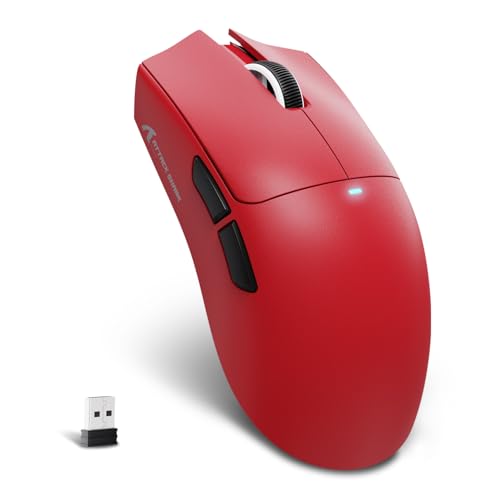
Attack Shark Ultra-Light Wireless Mouse
Best for: lightweight tri-mode wireless gaming setups
- Connectivity
- Wireless
- Use
- Gaming
The Attack Shark Ultra-Light Wireless Mouse is a 59-gram gaming mouse designed for swift movement across various grip styles. You get tri-mode connectivity via 2.4GHz wireless, Bluetooth, and wired USB-C, driven by a PixArt PAW3311 optical sensor capable of 22,000 DPI and 400 IPS tracking. Configuration handles directly through a web-based cloud driver without local software installation. This setup suits players who want lightweight handling and versatile wireless pairing.
Pros
- Weighs 59 grams for low-fatigue movement
- Tri-mode connectivity via 2.4GHz wireless, Bluetooth, and wired USB-C
- PixArt PAW3311 sensor with up to 22,000 DPI and 400 IPS tracking
- Web-based cloud configuration requires no desktop software download
Cons
- Does not include a charging base
- Switches rated for 20 million clicks rather than higher optical ratings
Good fit if
- You want a sub-60g shell compatible with palm, claw, or fingertip grips.
- You swap between devices using 2.4GHz, Bluetooth, and wired USB-C connections.
- You prefer configuring mouse profiles in a browser without local software.
Skip if
- You prefer a mouse package with an included charging dock.
- You want offline desktop management software instead of a cloud driver.
Verdict: Attack Shark Ultra-Light Wireless Mouse provides versatile tri-mode connectivity and a fast PixArt sensor inside a lightweight 59-gram chassis. It gives you flexible web-based setup and multi-grip comfort without desktop utility downloads.

TMKB Falcon Wireless Gaming Mouse
Best for: multi-device gaming with browser-based software setup
- Connectivity
- 2.4GHz, BT5.2, USB-C
- Maximum DPI
- 24,000 DPI
- Weight
- 90 ±2g
- Programmable Buttons
- 6
- Polling Rate
- 125-1000Hz
- Battery Life
- 180 hours
The TMKB Falcon Honeycomb Wireless Mouse is a tri-mode gaming mouse connecting via 2.4GHz, Bluetooth 5.2, or USB-C. It features a sensor scaling from 200 up to 24,000 DPI with a 1,000Hz maximum polling rate. The 1,000mAh internal battery provides up to 180 hours of runtime in ECO mode. Weighing 90 grams with a ventilated shell, it suits you if you want web-based profile customization without background software installations on PC or Mac.
Pros
- Tri-mode connectivity across 2.4GHz, Bluetooth 5.2, and USB-C
- Up to 180 hours of runtime in ECO mode on a 1-hour charge
- Zero-install web driver for setting DPI, polling rate, and macros
- Broad tracking range up to 24,000 DPI, 300 IPS, and 35G acceleration
Cons
- Weighs 90 grams, heavier than ultra-light competitors
- Battery life drops from 180 hours to 48 hours with RGB lighting active
Good fit if
- You switch between multiple PCs or laptops using Bluetooth and 2.4GHz wireless.
- You prefer configuring mouse settings in a web browser without background utilities.
- You want broad sensitivity adjustments up to 24,000 DPI with a 1,000Hz polling rate.
Skip if
- You want an ultra-lightweight gaming mouse weighing under 60 grams.
- You need more than six programmable buttons for complex macro controls.
Verdict: TMKB Falcon Honeycomb Wireless Mouse delivers versatile tri-mode connectivity, browser-based customization, and tracking up to 24,000 DPI. It provides dependable multi-device performance for players who do not need a sub-60-gram shell.
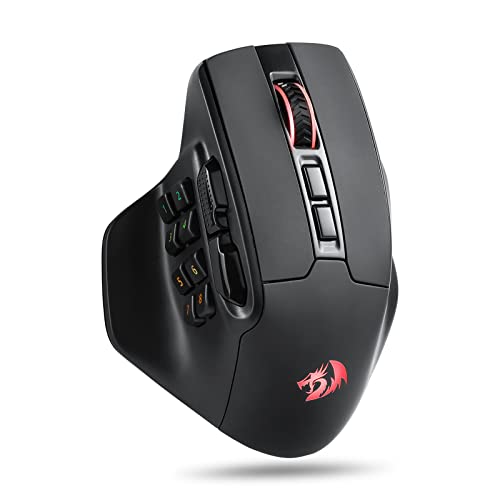
Redragon Wireless MMO Gaming Mouse
Best for: MMO players needing extensive programmable buttons
- Connectivity
- 2.4GHz wireless
- Maximum DPI
- 26000 DPI
- Programmable Buttons
- 15
- Backlighting
- RGB
- Use
- Gaming
- Color
- Black
The Redragon Wireless MMO Gaming Mouse is a 2.4GHz wireless peripheral built for complex key mapping. It features 15 programmable buttons, including an eight-button side cluster for tactical commands. Its tracking reaches up to 26,000 DPI across five default steps, with custom steps down to 100 DPI in software. Weighing 5.22 ounces, this design suits you if you require extensive physical hotkeys and prefer a larger, heavier frame.
Pros
- 15 fully programmable buttons with dedicated side layout
- High sensitivity range up to 26,000 DPI
- Cordless 2.4GHz wireless connection
- RGB backlighting with 5 dynamic modes
Cons
- Heavy 5.22-ounce total weight
- No Bluetooth connectivity listed
Good fit if
- You play MMO titles that require up to 15 mapped keybinds.
- You prefer a wider mouse body measuring 3.38 inches across.
- You need sensitivity customization reaching 26,000 DPI.
Skip if
- You want an ultralight mouse for fast FPS flicks.
- You need Bluetooth support for multi-device setups.
Verdict: Redragon Wireless MMO Gaming Mouse delivers high input density with 15 remappable buttons and 26,000 DPI over 2.4GHz wireless. It serves keybind-heavy games well if you prefer a wider, substantial ergonomic shell.

NSYCA Tri-Mode Wireless Mouse
Best for: multi-device gaming with flexible tri-mode connectivity
- Connectivity
- Bluetooth 5.1, 2.4GHz, USB-C
- Maximum DPI
- 22,000 DPI
- Programmable Buttons
- 6
- Sensor
- PAW3311
- Polling Rate
- Up to 1000Hz
- Backlighting
- RGB
The NSYCA Honeycomb Wireless Gaming Mouse gives you tri-mode connectivity across 2.4GHz wireless, Bluetooth 5.1, and wired USB-C. It features a PAW3311 optical sensor capable of up to 22,000 DPI alongside a 1000Hz polling rate. At 2.36 ounces with an open honeycomb shell, it also includes six programmable buttons and a dedicated fast-trigger button. This setup suits you if you switch between work and competitive shooting games across multiple devices.
Pros
- Tri-mode connectivity via 2.4GHz, Bluetooth 5.1, and USB-C
- PAW3311 optical sensor supporting up to 22,000 DPI
- 1000Hz maximum polling rate
- Six programmable buttons including three side buttons
- Rechargeable 500mAh battery with play-while-charging capability
Cons
- Open honeycomb shell exposes internals to dust and debris
- Weight of 2.36 ounces is heavier than sub-60-gram ultralight alternatives
Good fit if
- You want three connection methods to switch easily between desktop and mobile devices.
- You need a dedicated hardware fast-trigger button for rapid inputs.
- You prefer a ventilated honeycomb exterior to reduce palm sweat during long sessions.
Skip if
- You prefer an enclosed, solid-shell chassis without cutouts.
- You want an ultralight mouse that weighs under 60 grams.
Verdict: NSYCA Honeycomb Wireless Gaming Mouse pairs flexible tri-mode connectivity with a 22,000 DPI optical sensor and customizable controls. It gives multi-device users solid tracking performance and lightweight handling.
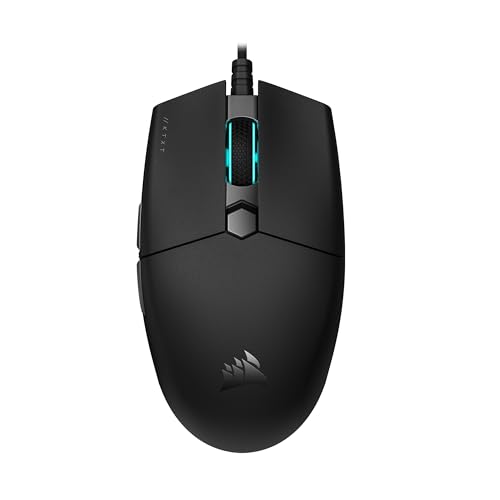
Corsair KATAR PRO XT Wired Gaming Mouse
Best for: Claw and fingertip grip FPS gamers
- Connectivity
- Wired
- Maximum DPI
- 18,000 DPI
- Weight
- 73 g
- Sensor
- Custom PixArt optical sensor
- Use
- Gaming
- Color
- Black
The Corsair KATAR PRO XT is a wired gaming mouse built with a compact symmetric shell measuring 115.8 by 64.2 by 37.8 millimeters. You get an 18,000 DPI custom PixArt optical sensor adjustable in single-step increments, spring-loaded buttons, and a drag-reducing paracord cable. At 73 grams, it gives you a lightweight wired build suited for claw or fingertip grips during fast-paced FPS and MOBA matches.
Pros
- Custom PixArt optical sensor adjustable up to 18,000 DPI in 1 DPI steps
- Lightweight 73-gram symmetric body
- Spring-loaded quickstrike buttons with zero-gap switch design
- Drag-reducing paracord cable
Cons
- Wired connection only
- Compact dimensions not tailored for palm grip styles
Good fit if
- You use a claw or fingertip grip style.
- You want fine sensor control with 1 DPI step customization.
- You prefer a wired setup with a flexible paracord cable.
Skip if
- You require a wireless connection for your setup.
- You prefer a larger mouse designed for palm grips.
Verdict: Corsair KATAR PRO XT Wired Gaming Mouse delivers precise 1 DPI tracking adjustments and responsive spring-loaded switches in a lightweight wired frame. It offers consistent control for claw and fingertip players who do not need wireless connectivity.
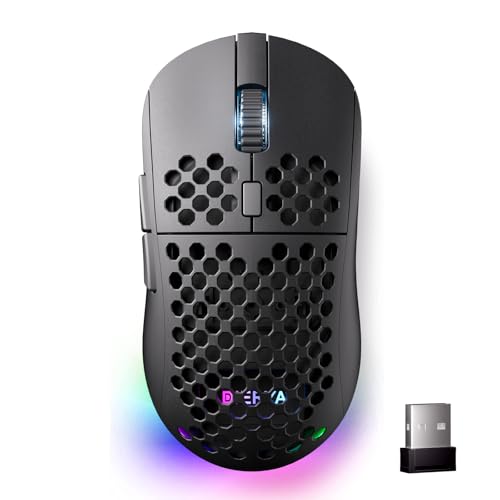
DIERYA Wireless RGB Gaming Mouse
Best for: multi-device setups needing long battery life
- Connectivity
- 2.4GHz, Bluetooth 5.2, USB-C
- Maximum DPI
- 24,000 DPI
- Weight
- 90g
- Programmable Buttons
- 6
- Polling Rate
- 125-1000Hz
- Battery Life
- 180 hours
The DIERYA Tri-Mode Wireless Gaming Mouse gives you flexible tri-mode connectivity across 2.4GHz wireless, Bluetooth 5.2, and USB-C wired connections. It features a 24,000 DPI optical sensor, a 1000Hz maximum polling rate, and an internal 1000mAh battery that lasts up to 180 hours in ECO mode. Weighing 90 grams with a symmetrical body and six programmable buttons, this mouse suits you if you need multi-device pairing and extended battery longevity.
Pros
- Tri-mode connectivity across 2.4GHz, Bluetooth 5.2, and USB-C
- Internal 1000mAh battery lasts up to 180 hours in ECO mode
- Sensor scales up to 24,000 DPI with 300 IPS tracking
- Six fully programmable buttons with onboard profile storage
Cons
- Weight of 90 grams is heavier than ultralight alternatives
- Bluetooth mode polling rate is limited to 125Hz
- Battery life decreases to 48 hours with full RGB lighting
Good fit if
- You need to toggle between up to four devices across Bluetooth and 2.4GHz.
- You want up to 180 hours of run time with fast one-hour recharging.
- You prefer a 90-gram symmetrical shell with 24,000 DPI tracking headroom.
Skip if
- You want an ultralight mouse weighing under 60 grams.
- You require a 1000Hz polling rate while connected over Bluetooth.
Verdict: DIERYA Tri-Mode Wireless Gaming Mouse delivers versatile multi-device connectivity, long battery runtimes, and high sensor headroom in a balanced 90-gram chassis.

SOLAKAKA Wireless Mouse with Charging Dock
Best for: desk setups needing dock-based wireless charging
- Connectivity
- 2.4GHz wireless, BT5.0, USB-C wired
- Maximum DPI
- 24,000 DPI
- Weight
- 62g
- Programmable Buttons
- 5
- Sensor
- PAW3311
- Polling Rate
- 1000Hz
This SOLAKAKA mouse pairs a 62-gram body with a magnetic RGB charging dock and tri-mode connectivity. It features a PAW3311 optical sensor with tracking up to 300 IPS, a 1000Hz polling rate, and up to 24,000 DPI via software. You can switch between 2.4GHz wireless, Bluetooth 5.0, and USB-C wired modes. It suits you if you want a lightweight desktop mouse that recharges directly on an included stand without dealing with loose cables.
Pros
- Includes magnetic RGB charging dock with USB receiver slot
- Lightweight 62g shell
- Tri-mode connectivity via 2.4GHz wireless, Bluetooth 5.0, and USB-C
- PAW3311 sensor with 1000Hz polling rate and 300 IPS tracking
Cons
- Configuration software requires Windows and a wired USB connection
- Offers only 5 programmable buttons
Good fit if
- You want an included magnetic dock to store and recharge your mouse.
- You switch frequently between 2.4GHz wireless, Bluetooth, and wired connections.
- You prefer a lightweight 62g build for desktop use.
Skip if
- You configure macros or button maps on non-Windows operating systems.
- You need more than 5 programmable buttons for your games.
Verdict: SOLAKAKA Wireless Mouse with Charging Dock delivers solid PAW3311 tracking performance and versatile tri-mode wireless operation with the convenience of a dedicated magnetic base. It provides a lightweight 62g option for gamers who want easy drop-and-charge convenience without extra cables.

EPOMAKER Click Lite Lightweight Wireless Mouse
Best for: lightweight tri-mode wireless gaming setups
- Connectivity
- 2.4GHz wireless, BT, USB-C
- Maximum DPI
- 12,000 DPI
- Weight
- 59g
- Programmable Buttons
- 5
- Sensor
- PAW3311
- Polling Rate
- 1000Hz
View on Amazon: EPOMAKER Click Lite Lightweight Wireless Mouse
The EPOMAKER Click Lite is a 59-gram wireless gaming mouse built for fast movement and low wrist fatigue. It features a PixArt PAW3311 optical sensor reaching up to 12,000 DPI, a 1000Hz polling rate, and tri-mode connectivity via 2.4GHz, Bluetooth, or USB-C. With 78 hours of battery life and five programmable buttons, it suits you if you want a featherweight shell with flexible connection options across multiple devices.
Pros
- Weighs 59 grams for minimal hand fatigue
- Tri-mode connectivity via 2.4GHz wireless, Bluetooth, and USB-C
- PAW3311 sensor with 1000Hz polling rate and 300 IPS tracking
- Up to 78 hours of run time on a 500mAh rechargeable battery
Cons
- Maximum sensitivity tops out at 12,000 DPI
- Limited to five programmable buttons
Good fit if
- You want a sub-60g shell for rapid, low-effort mouse sweeps.
- You switch frequently between multiple systems using 2.4GHz and Bluetooth.
- You prefer a rechargeable internal battery over replaceable AA cells.
Skip if
- You require more than five buttons for complex macros or MMO keybinds.
- You need sensor sensitivity levels exceeding 12,000 DPI.
Verdict: EPOMAKER Click Lite Lightweight Wireless Mouse delivers a 59-gram build, versatile tri-mode connectivity, and dependable tracking with its PAW3311 sensor. It provides balanced competitive specs for everyday gaming without unnecessary bulk.

Attoe Vertical Wireless Mouse
Best for: purple ergonomic vertical setups
- Connectivity
- 2.4GHz, Bluetooth, USB-C wired
- Maximum DPI
- 4000 DPI
- Programmable Buttons
- 7
- Polling Rate
- 1000Hz
- Design
- Ergonomic
- Color
- Purple
The Attoe Wireless Ergonomic Vertical Mouse gives you a handshake-grip design paired with tri-mode wireless connectivity. It features an onboard OLED display showing active DPI, connection status, and battery percentage. Tracking reaches up to 4000 DPI with a 1000Hz report rate across five preset levels. You also get an 800mAh rechargeable battery and seven programmable buttons. It suits you if you want ergonomic vertical handling with wireless multi-device switching.
Pros
- Tri-mode connectivity via 2.4GHz, Bluetooth, and USB-C
- Built-in OLED screen displays battery level, DPI, and connection mode
- 1000Hz polling rate with five DPI steps up to 4000 DPI
- Rechargeable 800mAh battery with USB-C pass-through charging
Cons
- Maximum sensitivity tops out at 4000 DPI
- Macro programming works only in 2.4GHz and wired modes
Good fit if
- You want an ergonomic handshake grip with a purple finish.
- You need an integrated OLED screen to track DPI and battery life.
- You switch between up to three devices across Bluetooth and 2.4GHz.
Skip if
- You need a mouse with sensitivity higher than 4000 DPI.
- You require macro programming while connected over Bluetooth.
Verdict: Attoe Wireless Ergonomic Vertical Mouse pairs an ergonomic handshake form factor with tri-mode connectivity and a handy OLED status screen. It offers reliable 1000Hz reporting for everyday gaming and productivity, though its maximum sensor resolution stops at 4000 DPI.
Specifications side by side
| Spec | Logitech G305 Lightspeed Wireless Gaming Mouse | Redragon Impact Ergonomic MMO Mouse | Razer Orochi V2 Wireless Gaming Mouse | Aula Lightweight Tri-Mode Wireless Gaming Mouse | Redragon MMO Gaming Mouse with 19 Buttons | Glorious Model O Eternal Wired Gaming Mouse | Attack Shark Ultra-Light Wireless Mouse | TMKB Falcon Wireless Gaming Mouse | Redragon Wireless MMO Gaming Mouse | NSYCA Tri-Mode Wireless Mouse | Corsair KATAR PRO XT Wired Gaming Mouse | DIERYA Wireless RGB Gaming Mouse | SOLAKAKA Wireless Mouse with Charging Dock | EPOMAKER Click Lite Lightweight Wireless Mouse | Attoe Vertical Wireless Mouse |
|---|---|---|---|---|---|---|---|---|---|---|---|---|---|---|---|
| Connectivity | LIGHTSPEED Wireless | Wired USB | Bluetooth, Razer HyperSpeed Wireless | 2.4GHz wireless, BT5.3, wired USB | not specified | Wired | not specified | 2.4GHz, BT5.2, USB-C | 2.4GHz wireless | Bluetooth 5.1, 2.4GHz, USB-C | Wired | 2.4GHz, Bluetooth 5.2, USB-C | 2.4GHz wireless, BT5.0, USB-C wired | 2.4GHz wireless, BT, USB-C | 2.4GHz, Bluetooth, USB-C wired |
| Maximum DPI | 12,000 DPI | 12400 DPI | 18K DPI | 12000 DPI | 12400 DPI | 12K DPI | not specified | 24,000 DPI | 26000 DPI | 22,000 DPI | 18,000 DPI | 24,000 DPI | 24,000 DPI | 12,000 DPI | 4000 DPI |
| Weight | 3.36 ounces | not specified | 60g | 67g | not specified | 55g | not specified | 90 ±2g | not specified | not specified | 73 g | 90g | 62g | 59g | not specified |
| Programmable Buttons | not specified | 18 | not specified | 7 | 19 | 6 | not specified | 6 | 15 | 6 | not specified | 6 | 5 | 5 | 7 |
| Sensor | HERO | PixArt PAW3327 | Razer 5G Advanced | not specified | not specified | not specified | not specified | not specified | not specified | PAW3311 | Custom PixArt optical sensor | not specified | PAW3311 | PAW3311 | not specified |
| Polling Rate | not specified | 1000 Hz | not specified | 1000Hz | 125Hz-1000Hz | not specified | not specified | 125-1000Hz | not specified | Up to 1000Hz | not specified | 125-1000Hz | 1000Hz | 1000Hz | 1000Hz |
| Battery Life | 250 hours | not specified | Up to 950 hours | not specified | not specified | not specified | not specified | 180 hours | not specified | not specified | not specified | 180 hours | not specified | 78 hours | not specified |
| Backlighting | not specified | RGB | not specified | RGB | RGB | RGB | not specified | not specified | RGB | RGB | not specified | RGB | not specified | not specified | not specified |
| Use | Gaming | Gaming | Gaming | Gaming | Gaming | Gaming | Gaming | Gaming | Gaming | Gaming | Gaming | Gaming | Gaming | Gaming | not specified |
| Design | not specified | Ergonomic | not specified | not specified | not specified | not specified | not specified | not specified | not specified | not specified | not specified | not specified | not specified | not specified | Ergonomic |
| Color | Black | White | White | Line Black | Black-k | Matte Black | Red | Matte Black | Black | Black | Black | Black | Black | Black | Purple |
| Shape | not specified | not specified | not specified | not specified | not specified | not specified | not specified | not specified | not specified | not specified | not specified | not specified | not specified | not specified | Vertical |
| Game Genre | not specified | MMO | not specified | not specified | MMO | not specified | not specified | not specified | not specified | not specified | not specified | not specified | not specified | not specified | not specified |
| Operating System | not specified | not specified | not specified | Mac | not specified | Mac | not specified | not specified | not specified | Mac | not specified | Mac | not specified | Mac | Mac |
| Power Source | not specified | not specified | not specified | not specified | not specified | not specified | not specified | not specified | not specified | not specified | not specified | not specified | not specified | Rechargeable | Rechargeable |
| Dimensions | 2.45 × 1.5 × 4.6 inches | 5.12 × 3.94 × 1.57 inches | 4.26 × 1.52 × 2.47 inches | not specified | not specified | not specified | not specified | not specified | not specified | not specified | 8 × 6 × 0.1 inches | not specified | not specified | not specified | not specified |
| Length | not specified | not specified | not specified | not specified | not specified | not specified | not specified | 4.39 inches | 4.84 inches | not specified | not specified | 4.39 inches | not specified | 4.76 inches | 4 inches |
| Width | not specified | not specified | not specified | not specified | not specified | not specified | not specified | 2.48 inches | 3.38 inches | not specified | not specified | 2.48 inches | not specified | 2.5 inches | 2 inches |
| Size | 1.90 | Wired M908 | Mouse | not specified | M901K | 1 Count (Pack of 1) | 128*64*40mm | not specified | M811 Wireless | not specified | 115.8 x 64.2 x 37.8 millimeters | not specified | SM822 | 12.1*6.36*3.87cm | not specified |
| Model | 910-005280 | M908 | RZ01-03730400-R3U1 | SC620 | M901K | GLO-OE-W-BLK | not specified | M1 | M811 PRO | G11 | CH-930C111-NA | M1 | SM822 | Click Lite | B52-CZSB-F |
If you need compact audio for your desk, the guide covering best earbuds under 30 compares driver sizes, wireless latency, and microphone specifications.
How to Choose the Right Gaming Mouse
-
Evaluate Battery Power Types
You should verify whether a wireless mouse relies on disposable cells or an integrated rechargeable battery. Standard AA batteries eliminate the need to wait on charging cables, allowing you to swap in fresh cells immediately during a match. Integrated batteries charge via cables or dedicated accessories, eliminating battery replacement tasks entirely. For instance, the SOLAKAKA Lightweight Wireless Gaming Mouse with Dock includes a dedicated magnetic base for recharging between sessions. Review the power source specification to match your preferred desk routine.
-
Assess Maximum Sensor DPI
Sensor resolution measures how many pixels your cursor moves per inch of physical travel. High DPI ratings provide greater tracking headroom for high-resolution monitors or rapid, low-movement flick inputs. Lower ratings still satisfy typical gaming sensitivities, but a broad range ensures you can dial in precise sensitivity steps to match your display resolution. The TMKB Falcon Wireless Gaming Mouse supports up to 24,000 DPI, giving you wide latitude for hardware sensitivity adjustment. Check the maximum DPI attribute to confirm the sensor matches your tracking style.
-
Check Wireless Polling Rate
Polling rate specifies how frequently the mouse reports position updates to your operating system. A 1000Hz polling rate delivers position updates every single millisecond, reducing tracking delay and cursor jitter during fast hand sweeps. Standard office mice often operate at lower report frequencies, which can introduce noticeable micro-stutter on high-refresh displays. The Aula Lightweight Tri-Mode Wireless Gaming Mouse specifies a 1000Hz polling rate for low-latency wireless tracking. Look for published 1000Hz or 1 ms report rate specifications to guarantee smooth pointer motion.
-
Review Switch Durability Ratings
Button switches handle thousands of actuations every session, making switch construction a key factor in overall hardware lifespan. Mechanical switches with published click ratings indicate expected operating durability before switch degradation or register errors occur. Higher click ratings assure consistent tactile feedback over prolonged ownership. For example, the Glorious Model O Eternal Wired Gaming Mouse specifies 80-million-click mechanical switches alongside six remappable buttons. Inspect the switch rating details in the product specs to ensure the primary left and right clickers withstand intensive use over time.
-
Verify Software Configuration Methods
Adjusting macros, button remaps, and sensor profiles requires compatible configuration software. Some models depend on local desktop utility programs that only function on Windows, limiting custom functionality if you game on macOS. Other designs offer browser-based tools that allow you to modify settings directly inside a web browser without installing background utilities. The Attack Shark Ultra-Light Wireless Mouse provides web-based configuration for managing its 22,000 DPI sensor across different platforms. Check the operating system attributes and configuration methods to ensure setup works smoothly with your computer.
-
Compare Shell Ventilation Styles
Chassis construction influences both airflow and upkeep requirements during gaming sessions. Perforated honeycomb patterns reduce shell material to promote passive palm ventilation, which helps if your hands perspire during intense gameplay. However, open exterior shells allow dust and debris to enter the internal cavity, requiring periodic cleaning compared to enclosed solid bodies. The SOLAKAKA Wireless Honeycomb Gaming Mouse features a ventilated honeycomb structure across its body. Consider whether you prefer the airflow benefits of a ventilated exterior or the easier maintenance of a sealed solid chassis.
Frequently asked questions
What is the highest DPI sensor available among these gaming mice?
The highest sensor resolution belongs to the Redragon Wireless MMO Gaming Mouse, which offers up to 26,000 DPI. Other high-resolution options include the TMKB Falcon, DIERYA Wireless RGB Gaming Mouse, and SOLAKAKA SM822, which each reach 24,000 DPI. Higher maximum sensor resolutions give you greater headroom to configure rapid cursor movement across high-resolution monitors without sacrificing precision.
Which gaming mouse models offer the lightest physical weight?
The Glorious Model O Eternal is the lightest wired model in this group at 55 grams. If you prefer wireless operation, both the EPOMAKER Click Lite and the Attack Shark Ultra-Light weigh 59 grams. Additionally, the Razer Orochi V2 lists a weight of 2.08 ounces. Lower weight allows for faster directional changes and reduces hand fatigue during long gaming sessions.
Can you find an ergonomic vertical mouse suitable for gaming?
Yes, the Attoe Vertical Wireless Mouse provides an ergonomic handshake form factor designed to reduce forearm twist. It features a built-in OLED status screen, tri-mode wireless connectivity, and a 1000Hz polling rate. Its sensor tops out at 4000 DPI, which provides sufficient tracking speed for casual gaming, general desktop navigation, and office productivity.
Which gaming mice feature a dedicated charging dock?
The SOLAKAKA Wireless Mouse includes a dedicated magnetic charging base right in the box. This dock allows you to drop the mouse down to recharge between play sessions without plugging in extra cords. The mouse also features a PixArt PAW3311 sensor scaling up to 24,000 DPI, tri-mode wireless options, and a lightweight 62-gram frame.
Which gaming mice support macOS compatibility?
Several models explicitly list Mac compatibility, including the Glorious Model O Eternal, NSYCA Tri-Mode Wireless Mouse, and DIERYA Wireless RGB Gaming Mouse. The Aula Lightweight Wireless Mouse, EPOMAKER Click Lite, and Attoe Vertical Mouse also support macOS. Keep in mind that some models, such as the Aula, require a Windows computer to configure macro button software.
How many programmable buttons can you get on an MMO gaming mouse?
You can find up to 15 or 19 button configurations designed specifically for macro-heavy titles. The Redragon MMO Gaming Mouse with 19 Buttons includes 12 programmable thumb keys, 12,400 DPI, and physical tuning weights. If you want wireless freedom, the Redragon Wireless MMO Gaming Mouse provides 15 remappable buttons alongside a 26,000 DPI sensor for complex keybind setups.
What connectivity options do tri-mode wireless gaming mice provide?
Tri-mode wireless mice support low-latency 2.4GHz wireless, Bluetooth, and wired connections. Models such as the Attack Shark Ultra-Light, TMKB Falcon, and EPOMAKER Click Lite include this flexibility. The 2.4GHz wireless band ensures responsive tracking for gaming, while Bluetooth allows you to switch between multiple computers or mobile devices without swapping USB receivers.