Best Keyboard and Mouse Combos Under $150: 4 Spec-Based Picks
As an Amazon Associate we earn from qualifying purchases. Links on this page are affiliate links.
Finding the best keyboard and mouse combos under $150 requires looking at specific hardware details. We compared 4 options based strictly on published specifications. The Logitech Wave Keys & Lift Left-Handed Wireless Combo leads because it includes a wrist rest and vertical design for left-handed users. This guide helps you decide which setup matches your ergonomic needs and connectivity preferences without guessing.
Quick picks
| # | Product | Best for | Price |
|---|---|---|---|
| 1 | Logitech Wave Keys & Lift Left-Handed Wireless Combo Best overall | Left-handed users needing ergonomic relief | Check price of Logitech Wave Keys & Lift Left-Handed Wireless Combo on Amazon |
| 2 | Logitech Signature Slim Wireless Keyboard and Mouse Best budget | Quiet multi-device switching | Check price of Logitech Signature Slim Wireless Keyboard and Mouse on Amazon |
| 3 | Logitech Signature MK650 Wireless Combo Also great | enterprise security and cross-platform use | Check price of Logitech Signature MK650 Wireless Combo on Amazon |
| 4 | Logitech MK345 Wireless Combo with Palm Rest Best premium | Right-handed users needing a wrist rest | Check price of Logitech MK345 Wireless Combo with Palm Rest on Amazon |
The best fit for you
- You are left-handed and need ergonomic relief Logitech Wave Keys & Lift Left-Handed Wireless Combo This combo features a vertical mouse and wavy keyboard designed specifically for left-handed users.
- You type quietly across multiple devices Logitech Signature Slim Wireless Keyboard and Mouse It offers silent keys and Bluetooth connectivity for switching between Mac and Windows systems.
- You need enterprise security for work Logitech Signature MK650 Wireless Combo This business combo includes bundled security software and secure Bluetooth connectivity for professional use.
- You want a full-size keyboard with a wrist rest Logitech MK345 Wireless Combo with Palm Rest It provides a palm rest and reliable wireless performance for Windows, macOS, or ChromeOS.
Our 4 picks
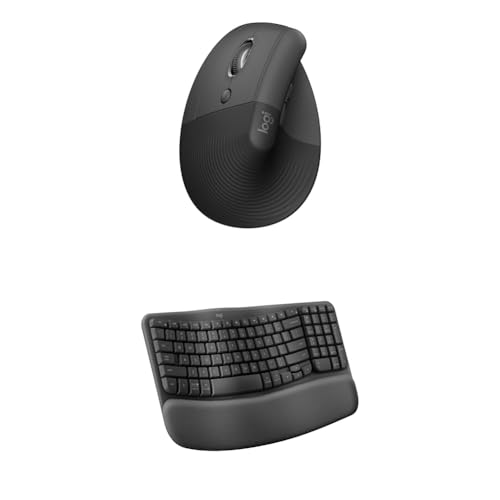
Logitech Wave Keys & Lift Left-Handed Wireless Combo
Best for: Left-handed users needing ergonomic relief
- Connectivity
- Wireless
- Keyboard Form Factor
- Compact
- Ergonomic Features
- Wave layout, palm rest, vertical mouse
- Design
- Ergonomic, Left-Handed
- Operating System
- Mac, Windows
View on Amazon: Logitech Wave Keys & Lift Left-Handed Wireless Combo Affiliate link
This wireless ergonomic combo pairs a compact keyboard with a vertical mouse designed for left-handed users. The Wave Keys feature a wavy layout and memory foam palm rest to support natural wrist positioning. The Lift mouse uses a 57-degree vertical shape and textured grip to promote forearm comfort. It works with both Windows and Mac operating systems, offering a specialized setup for users seeking reduced strain during extended typing sessions.
Pros
- Wireless connectivity for flexible desk placement
- Wave layout aligns hands and wrists naturally
- Memory foam palm rest for added support
- Vertical mouse shape reduces forearm twist
- Compatible with Windows and Mac systems
Cons
- Mouse is sculpted specifically for left hands
- Compact keyboard form factor limits full-size keys
- No mention of multi-device switching capability
Good fit if
- You prefer ergonomic designs that reduce wrist strain
- You use a left-handed mouse setup
- You need a wireless solution for Windows or Mac
Skip if
- You require a right-handed mouse configuration
- You need a full-size keyboard with a number pad
- You prioritize high-speed gaming performance over ergonomics
Verdict: Logitech Wave Keys & Lift Vertical Mouse suits left-handed users seeking a specialized ergonomic setup. Its vertical mouse and wavy keyboard layout address specific comfort needs for daily typing tasks.

Logitech Signature Slim Wireless Keyboard and Mouse
Best for: Quiet multi-device switching
- Connectivity
- Bluetooth
- Keyboard Form Factor
- Full-size
- Multi-Device Pairing
- 3 devices
- Operating System
- Mac, Windows
- Noise Level
- Silent
View on Amazon: Logitech Signature Slim Wireless Keyboard and Mouse Affiliate link
The Logitech MK955 is a full-size wireless keyboard and mouse combo built for quiet typing. It connects via Bluetooth and pairs with up to three devices, letting you switch between computers easily. The set includes customizable keys and a mouse made from recycled plastic. It suits users who value a silent, multi-device workflow and a sleek, solid build for their desk.
Pros
- Silent noise level for quiet typing
- Full-size keyboard form factor
- Bluetooth connectivity for easy pairing
- Multi-device pairing for three devices
Cons
- Requires Logi Options+ app for customization
- No mention of 2.4 GHz dongle connectivity
- Mouse is made of recycled plastic
Good fit if
- You need silent typing for shared spaces
- You switch between multiple computers
- You prefer a full-size keyboard layout
Skip if
- You require a wired connection for zero latency
- You prefer a compact tenkeyless layout
- You want immediate plug-and-play without an app
Verdict: The Logitech MK955 Slim Wireless Combo offers a quiet, multi-device experience ideal for users who type silently across several machines. It fits those who prioritize a full-size layout and Bluetooth flexibility over dongle-based wireless connections.

Logitech Signature MK650 Wireless Combo
Best for: enterprise security and cross-platform use
- Connectivity
- Logi Bolt USB receiver, Bluetooth LE
View on Amazon: Logitech Signature MK650 Wireless Combo Affiliate link
The Logitech MK650 Combo for Business offers dual connectivity via Logi Bolt USB receiver and Bluetooth Low Energy. It includes a Graphite keyboard and mouse, designed for IT departments needing secure wireless connections. The package bundles McAfee Total Protection for antivirus, identity monitoring, and VPN access. This setup suits end-users who prioritize security and cross-platform flexibility during long work hours.
Pros
- Dual connectivity with Logi Bolt USB receiver and Bluetooth LE
- Enterprise-grade security with Secure Connections Only Mode
- Includes McAfee Total Protection antivirus and VPN
- Graphite color finish
Cons
- No mention of mechanical switches or tactile feedback
- No dedicated media keys or volume controls listed
- Requires separate purchase for non-bundle variations
Good fit if
- You need secure wireless connections for enterprise environments
- You want cross-platform flexibility with Bluetooth LE
- You require bundled antivirus and VPN protection
Skip if
- You prefer mechanical keyboards with tactile feedback
- You do not need antivirus software bundled
- You want a standalone keyboard without a mouse
Verdict: Logitech MK650 Business Combo provides secure connectivity and bundled security software for enterprise users. It fits professionals who value data protection and cross-platform wireless options.

Logitech MK345 Wireless Combo with Palm Rest
Best for: Right-handed users needing a wrist rest
- Connectivity
- 2.4 GHz USB receiver
- Keyboard Form Factor
- Full-size
- Ergonomic Features
- Palm rest
- Power Source
- Batteries included
- Color
- Black
- Dimensions
- 20 × 7.52 × 1.73 inches
View on Amazon: Logitech MK345 Wireless Combo with Palm Rest Affiliate link
This full-size wireless keyboard and mouse combo connects via a 2.4 GHz USB receiver with a range up to 10 meters. It includes a palm rest for comfort and features a spill-resistant design. The keyboard lasts up to 3 years on battery, while the mouse lasts 18 months. It works with Windows, macOS, and ChromeOS. The black mouse has a contoured shape for right-handed users.
Pros
- Includes a palm rest for typing comfort
- Keyboard battery life up to 3 years
- Spill-resistant keyboard design
- Works with Windows, macOS, and ChromeOS
Cons
- Only supports right-handed mouse usage
- No Bluetooth connectivity mentioned
- Single USB receiver for both devices
Good fit if
- You want a full-size layout with a wrist rest
- You use Windows, macOS, or ChromeOS
- You prefer a black color scheme
Skip if
- You need Bluetooth connectivity
- You require a left-handed mouse
- You want a slim profile without a palm rest
Verdict: Logitech MK345 Wireless Combo Black is a reliable full-size option for users who need a palm rest and long battery life on Windows, macOS, or ChromeOS.
Specifications side by side
| Spec | Logitech Wave Keys & Lift Left-Handed Wireless Combo | Logitech Signature Slim Wireless Keyboard and Mouse | Logitech Signature MK650 Wireless Combo | Logitech MK345 Wireless Combo with Palm Rest |
|---|---|---|---|---|
| Connectivity | Wireless | Bluetooth | Logi Bolt USB receiver, Bluetooth LE | 2.4 GHz USB receiver |
| Keyboard Form Factor | Compact | Full-size | not stated | Full-size |
| Ergonomic Features | Wave layout, palm rest, vertical mouse | not stated | not stated | Palm rest |
| Multi-Device Pairing | not stated | 3 devices | not stated | not stated |
| Power Source | not stated | not stated | not stated | Batteries included |
| Design | Ergonomic, Left-Handed | not stated | not stated | not stated |
| Color | Graphite | Graphite | Graphite | Black |
| Shape | Vertical | not stated | not stated | not stated |
| Operating System | Mac, Windows | Mac, Windows | not stated | not stated |
| Noise Level | not stated | Silent | not stated | not stated |
| Dimensions | not stated | not stated | not stated | 20 × 7.52 × 1.73 inches |
| Weight | not stated | not stated | not stated | 4.41 pounds |
| Size | Combo | not stated | not stated | 4 Pack |
| Model | not stated | not stated | not stated | 920-006481 |
Check specs for your workflow
-
Match the connectivity type
Most combos in this range use Bluetooth for easy multi-device switching. This allows you to toggle between Mac and Windows systems without extra hardware. If you prefer a dedicated receiver, check the attributes for a wireless dongle. The Logitech MK345 uses a wireless connection that does not rely on Bluetooth. Verify which method your desk setup supports before buying. Some users find Bluetooth more convenient for travel, while others prefer the stability of a dedicated receiver for gaming or precise cursor movement.
-
Verify ergonomic features
Comfort depends heavily on physical design. Look for wrist rests or vertical shapes if you type for many hours. The Logitech Wave Keys & Lift features a vertical mouse designed for left-handed users. It also includes a wavy keyboard layout to reduce strain. The Logitech MK345 includes a palm rest for right-handed typists. Check the ergonomic attributes to see if the device supports your natural hand position. Proper support prevents fatigue during long work sessions. Choose a shape that aligns with your specific comfort needs.
-
Check noise levels
Shared workspaces benefit from quiet typing. Some keyboards feature silent switches to minimize sound. The Logitech Signature Slim Wireless Keyboard and Mouse offers silent keys for quiet environments. This is ideal if you work in an office or live with others. Check the noise level specifications before purchasing. Standard keyboards can be loud and distracting. Silent options allow you to type without disturbing people nearby. Verify this spec if acoustics matter to your daily routine. It is a small detail that impacts long-term comfort significantly.
-
Confirm operating system support
Ensure the combo works with your computer. Most options listed support both Mac and Windows. This cross-platform flexibility is useful for users who switch devices. The Logitech Signature MK650 is noted for enterprise security and cross-platform use. Verify the operating system attributes to avoid compatibility issues. Some features may vary between macOS and Windows. Check the documentation for specific key mappings if you use a non-standard system. Compatibility ensures you can use all functions without extra drivers or adapters.
-
Review physical dimensions
Size matters for desk space. The Logitech MK345 is listed as a 4-pack with specific dimensions. It measures 20 inches in length and 7.52 inches in width. Check the weight and size if you have limited desk space. Larger combos may require more room for movement. Smaller setups might feel cramped. Verify the length and width in the specs. This helps you plan your workspace layout. Proper sizing ensures you have enough room for mouse movement and other peripherals. Measure your desk area before deciding.
Frequently asked questions
Are there keyboard and mouse combos designed for left-handed users?
Yes, the Logitech Wave Keys & Lift Left-Handed Wireless Combo is built specifically for left-handed ergonomics. It features a vertical mouse shape and a wavy keyboard layout. This design helps reduce strain for users who type with their left hand. The set includes a wrist rest for added comfort during daily tasks.
Which wireless combo offers the quietest typing experience?
The Logitech Signature Slim Wireless Keyboard and Mouse is designed for silent operation. It features silent keys, making it ideal for shared workspaces. The mouse also operates quietly. This combo uses Bluetooth connectivity, allowing you to switch between Mac and Windows systems without extra dongles.
Do these combos include wrist rests for comfort?
Several options provide ergonomic support through included wrist rests. The Logitech Wave Keys & Lift Left-Handed Wireless Combo features a wrist rest for left-handed users. The Logitech MK345 Wireless Combo with Palm Rest also includes a dedicated wrist rest. These features help reduce fatigue during long typing sessions.
Can I use these combos with both Mac and Windows?
Most of the selected combos support both Mac and Windows operating systems. The Logitech Wave Keys & Lift, Signature Slim, and MK345 models are compatible with both platforms. This flexibility allows you to use the same hardware across different computers without needing separate devices for each system.
Is there a wireless combo suitable for enterprise security needs?
The Logitech Signature MK650 Wireless Combo is tailored for enterprise environments. It provides secure connectivity and includes bundled security software. This makes it a strong choice for professionals who prioritize data protection. It supports Bluetooth connectivity for seamless pairing across Mac and Windows devices.
What connectivity options are available for multi-device switching?
Bluetooth connectivity is the primary method for multi-device switching in these combos. The Logitech Signature Slim and MK650 use Bluetooth to connect to multiple machines. This allows you to toggle between devices easily. Some models also support wireless connections via dedicated receivers for stable performance.