KINESIS Mechanical Keyboards: 3 Picks Ranked by Specs
As an Amazon Associate we earn from qualifying purchases. Links on this page are affiliate links.
KINESIS designs ergonomic split keyboards for users prioritizing comfort and customization. This guide ranks the best KINESIS mechanical keyboards based strictly on published specifications. We compared 3 models to help you find the right fit. The Kinesis Freestyle2 Split Keyboard with VIP3 Lifters leads because it includes tenting and membrane switches. Other options offer tactile switches, RGB lighting, or hot-swap capabilities. Each pick addresses specific needs, from Mac compatibility to adjustable layouts. You can review the detailed specs below to see how each design supports your typing style.
Quick picks
| # | Product | Best for | Price |
|---|---|---|---|
| 1 | Kinesis Freestyle2 Split Keyboard with VIP3 Lifters Best overall | Users wanting included tenting and membrane switches | Check price of Kinesis Freestyle2 Split Keyboard with VIP3 Lifters on Amazon |
| 2 | Kinesis Advantage360 Split Ergonomic Keyboard Best budget | users needing adjustable split layout and tactile switches | Check price of Kinesis Advantage360 Split Ergonomic Keyboard on Amazon |
| 3 | Kinesis Freestyle Edge RGB Plus Tactile Split Keyboard Best rgb | Mac users wanting hot-swap RGB | Check price of Kinesis Freestyle Edge RGB Plus Tactile Split Keyboard on Amazon |
Our 3 picks
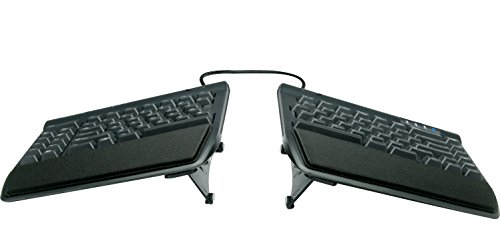
Kinesis Freestyle2 Split Keyboard with VIP3 Lifters
Best for: Users wanting included tenting and membrane switches
- Switch Type
- custom membrane
- Connectivity
- USB-A
- Design
- Ergonomic
- Color
- Black
- Dimensions
- 19 × 12.5 × 3.5 inches
- Weight
- 2 pounds
View on Amazon: Kinesis Freestyle2 Split Keyboard with VIP3 Lifters Affiliate link
The Kinesis Freestyle2 is a split ergonomic keyboard designed for PC users. It features a standard Windows layout with an embedded numeric keypad. The design allows key modules to separate up to 9 inches. It includes pre-installed VIP3 tenting for 5, 10, or 15 degrees of adjustment. The custom membrane switches offer low activation force. This model connects via USB-A and weighs 2 pounds.
Pros
- Split design separates up to 9 inches
- Pre-installed VIP3 tenting with 5, 10, or 15 degrees
- Standard Windows layout with numeric keypad
- Low-force custom membrane switches
- No software or drivers required
Cons
- Uses membrane switches instead of mechanical
- Connects via USB-A only
- Lacks backlighting
Good fit if
- You want a split keyboard with tenting included
- You prefer low-force membrane switches
- You need a standard Windows layout with numpad
Skip if
- You require mechanical switches
- You need USB-C connectivity
- You want RGB lighting
Verdict: Kinesis Freestyle2 Ergonomic Keyboard is a practical split keyboard for users who value included tenting and low-force membrane switches. It suits those who need a standard Windows layout with a numeric keypad and do not require mechanical switches or modern USB-C connections.

Kinesis Advantage360 Split Ergonomic Keyboard
Best for: users needing adjustable split layout and tactile switches
- Switch Type
- Gateron Brown
- Form Factor
- Split ergonomic
- Connectivity
- USB-C
- Keycap Material
- PBT
- Dimensions
- 15 × 8 × 3 inches
- Weight
- 3.2 pounds
View on Amazon: Kinesis Advantage360 Split Ergonomic Keyboard Affiliate link
The Kinesis Advantage360 is a split ergonomic keyboard with a contoured shape and mechanical switches. It uses Gateron Brown tactile switches and PBT keycaps for a durable typing experience. The device connects via USB-C and includes a programmable SmartSet engine with onboard profiles. It separates up to 10 inches and offers three tenting heights. This model suits users seeking customizable hardware with a focus on comfort and layout flexibility.
Pros
- Split ergonomic design with concave key wells
- Gateron Brown tactile switches rated for 50 million presses
- PBT keycaps resist shine and improve feel
- Separates up to 10 inches with included cable
- Three adjustable tenting heights for body type accommodation
Cons
- Premium palm pads are sold separately
- Requires SmartSet App or onboard programming for full customization
- Weight of 3.2 pounds makes it less portable
Good fit if
- You want a split keyboard with adjustable tenting
- You prefer tactile switches with a distinct bump
- You need a durable PBT keycap material
Skip if
- You require a compact tenkeyless layout
- You need wireless Bluetooth connectivity for this specific model
- You want included premium palm pads
Verdict: Kinesis Advantage360 Split Ergonomic Keyboard offers a highly customizable split layout with durable tactile switches. It fits users who prioritize ergonomic separation and programmable features over portability.

Kinesis Freestyle Edge RGB Plus Tactile Split Keyboard
Best for: Mac users wanting hot-swap RGB
- Switch Type
- Tactile
- Backlighting
- RGB
- Hot-Swap Support
- Hot-Swappable
- Design
- Ergonomic
- Operating System
- Mac
View on Amazon: Kinesis Freestyle Edge RGB Plus Tactile Split Keyboard Affiliate link
This split ergonomic keyboard uses tactile mechanical switches and features RGB backlighting. It supports hot-swappable switches, allowing you to change them without soldering. The lift kit helps adjust your typing angle. It is designed for Mac operating systems. This model suits users who want customizable switches and visual customization in an ergonomic layout.
Pros
- Tactile mechanical switches
- RGB backlighting
- Hot-swappable switch support
- Includes lift kit
Cons
- Mac operating system compatibility only
- No USB-C connection mentioned
- No Bluetooth wireless capability listed
Good fit if
- You want tactile feedback
- You need RGB lighting
- You use a Mac
Skip if
- You need Windows compatibility
- You want wireless connectivity
- You prefer linear switches
Verdict: Kinesis Freestyle Edge RGB Plus offers tactile switches and RGB lighting for Mac users. It fits those who want hot-swap flexibility and an ergonomic split design.
Specifications side by side
| Spec | Kinesis Freestyle2 Split Keyboard with VIP3 Lifters | Kinesis Advantage360 Split Ergonomic Keyboard | Kinesis Freestyle Edge RGB Plus Tactile Split Keyboard |
|---|---|---|---|
| Switch Type | custom membrane | Gateron Brown | Tactile |
| Form Factor | not stated | Split ergonomic | not stated |
| Connectivity | USB-A | USB-C | not stated |
| Backlighting | not stated | not stated | RGB |
| Keycap Material | not stated | PBT | not stated |
| Hot-Swap Support | not stated | not stated | Hot-Swappable |
| Design | Ergonomic | Ergonomic | Ergonomic |
| Color | Black | Dark Gray | Hotswap Tactile + Lift Kit |
| Operating System | not stated | not stated | Mac |
| Dimensions | 19 × 12.5 × 3.5 inches | 15 × 8 × 3 inches | not stated |
| Weight | 2 pounds | 3.2 pounds | not stated |
| Size | 1 Count (Pack of 1) | not stated | not stated |
| Model | KB820PB-US | KB360-GBR | not stated |
Kinesis Keyboards Ranked by Specs
The Kinesis Freestyle2 Split Keyboard with VIP3 Lifters suits users who want included tenting and membrane switches. It features a standard Windows layout with a numeric keypad. This model measures 19 inches long and weighs 2 pounds. It is a practical choice for those who do not require mechanical switches or modern USB-C connections.
The Kinesis Advantage360 offers adjustable split layout and tactile switches. It fits users who prioritize ergonomic separation and programmable features over portability. For Mac users wanting hot-swap RGB, the Kinesis Freestyle Edge RGB Plus Tactile Split Keyboard is ideal. It provides tactile switches and RGB lighting. These options cover different needs in connectivity, backlighting, and switch type.
Who KINESIS Keyboards Suit You
KINESIS targets users needing split ergonomic designs. The range spans from the compact Freestyle2 to the larger Advantage360. You can choose between membrane switches for low force or tactile mechanical options. The Edge RGB Plus adds hot-swappable switches and lighting for Mac users. All models prioritize comfort through tenting or concave keypads. However, none offer Bluetooth connectivity or modern USB-C ports in this list. You also will not find compact tenkeyless layouts here. The brand focuses on full-size or split forms that support dedicated numeric keypads or advanced programmability for desk-bound typing.
If you need an integrated screen instead of a standalone unit, you can examine the best tablets with keyboard.
Choose Your Kinesis Keyboard By Specs
-
Check Switch Feel
Decide between membrane and mechanical tactile switches based on your typing preference. The Freestyle2 uses low-force membrane keys for quiet, soft keystrokes. The Advantage360 and Edge RGB Plus offer tactile mechanical switches for distinct feedback. Tactile switches provide a noticeable bump during actuation. This helps confirm key presses without bottoming out. Choose membrane for silent office use. Select tactile for satisfying, responsive typing. Your choice impacts long-term comfort and auditory experience significantly during daily work sessions.
-
Verify Operating System
Ensure the keyboard layout matches your computer system. The Freestyle2 features a standard Windows layout with a numeric keypad. It suits users comfortable with Windows key arrangements. The Edge RGB Plus is explicitly designed for Mac users. It includes Mac-specific key mappings and layout adjustments. Check the operating system specification before purchasing. Mismatched layouts can cause confusion with modifier keys. Select the model that aligns with your primary device to ensure seamless integration and efficient workflow without relearning key positions.
-
Assess Hot-Swap Needs
Determine if you want the ability to change switches easily. The Edge RGB Plus supports hot-swappable switches. This allows you to swap switch types without soldering. It offers flexibility for customization and future upgrades. The other models do not list hot-swap capabilities. If you prefer a fixed switch type, hot-swap is unnecessary. Hot-swap support adds versatility for testing different feels. Consider this feature if you enjoy modifying your keyboard setup regularly or want to experiment with various switch characteristics over time.
-
Review Physical Dimensions
Measure your desk space against the keyboard dimensions. The Freestyle2 measures 19 inches long and 12.5 inches wide. It weighs 2 pounds and requires substantial desk area. The Advantage360 is more compact at 15 inches long and 8 inches wide. It weighs 3.2 pounds, making it slightly heavier. Consider your available workspace carefully. Larger split keyboards need more room for arm movement. Smaller models fit tighter setups. Check width and length specs to ensure the keyboard fits your desk without crowding other peripherals or limiting mouse movement.
-
Consider Backlighting
Check if you need illuminated keys for low-light environments. The Edge RGB Plus includes RGB backlighting. This provides customizable lighting for visibility in dark rooms. The Freestyle2 and Advantage360 do not list backlighting features. They rely on ambient light for key visibility. If you type in dim conditions, RGB support is essential. Non-backlit models are suitable for well-lit offices. Backlighting adds aesthetic appeal and functional utility. Verify the backlighting specification if night typing is part of your routine or if you prefer a lit interface for visual clarity.
Frequently asked questions
Does the Kinesis Freestyle2 include tenting pads?
Yes, the Kinesis Freestyle2 Split Keyboard with VIP3 Lifters includes included tenting. This feature helps you position your hands at a comfortable angle to reduce wrist strain. The package comes with VIP3 lifters that attach to the keyboard base. You do not need to buy these accessories separately. This makes it a practical choice for users who want immediate ergonomic support without extra setup.
Is the Kinesis Advantage360 a good budget option?
The Kinesis Advantage360 Split Ergonomic Keyboard is ranked as the best budget pick. It offers a highly customizable split layout with durable tactile switches. This model measures 15 inches long and weighs 3.2 pounds. It fits users who prioritize ergonomic separation and programmable features over portability. You get a robust mechanical experience without the higher cost of premium gaming peripherals.
Can I change the switches on the Freestyle Edge RGB Plus?
Yes, the Kinesis Freestyle Edge RGB Plus Tactile Split Keyboard features hot-swap support. This allows you to remove and replace switches without soldering. It comes with tactile switches pre-installed. This flexibility lets you customize the typing feel to your preference. You can experiment with different switch types to find the perfect balance of feedback and speed for your workflow.
Does the Freestyle Edge RGB Plus work with Mac?
Yes, the Kinesis Freestyle Edge RGB Plus is designed for Mac operating systems. It includes RGB lighting and tactile switches for Mac users. The keyboard supports hot-swappable switches for customization. This makes it a versatile option if you use an Apple computer. You get ergonomic benefits and modern features tailored to your specific platform needs.
Which Kinesis keyboard has the largest physical footprint?
The Kinesis Freestyle2 Split Keyboard with VIP3 Lifters has the largest dimensions. It measures 19 inches in length and 12.5 inches in width. This size accommodates a standard Windows layout with a numeric keypad. In comparison, the Advantage360 is 15 inches long. If you need extra space for a number pad, the Freestyle2 is the larger option.
What type of switches does the Advantage360 use?
The Kinesis Advantage360 uses tactile mechanical switches. These provide distinct feedback with each keystroke, which many typists prefer for accuracy. The keyboard also features PBT keycaps for durability. This combination offers a sturdy and responsive typing experience. It is ideal for users who want a mechanical feel with the ergonomic benefits of a split design.
Does the Freestyle2 use mechanical switches?
No, the Kinesis Freestyle2 uses membrane switches. It features low-force membrane keys for quiet and soft keystrokes. This differs from the Advantage360 and Edge RGB Plus, which use tactile mechanical switches. Membrane switches are often preferred for their quiet operation and lighter actuation force. It suits users who prioritize silence and comfort over mechanical feedback.
Which keyboard is the heaviest?
The Kinesis Advantage360 Split Ergonomic Keyboard is the heaviest model. It weighs 3.2 pounds. The Freestyle2 weighs 2 pounds. The Edge RGB Plus weight is not specified in the data. The higher weight of the Advantage360 may provide more stability on your desk. This can prevent the keyboard from sliding during intense typing sessions.