Best Kisnt Mechanical Keyboards: 2 Models Compared
As an Amazon Associate we earn from qualifying purchases. Links on this page are affiliate links.
This guide covers the best kisnt mechanical keyboards for users seeking compact or full-sized layouts. Kisnt offers 75% and full-size models with RGB backlighting, linear switches, and hot-swap support. The top pick is the Kisnt 75% Tri-Mode Wireless Keyboard, which leads for compact setups with multi-device needs. We compared 2 products based strictly on published specifications. Each model’s connectivity, dimensions, and features are detailed below to help you choose the right fit for your desk.
Quick picks
| # | Product | Best for | Price |
|---|---|---|---|
| 1 | Kisnt 75% Tri-Mode Wireless Keyboard Best overall | compact setups with multi-device needs | Check price of Kisnt 75% Tri-Mode Wireless Keyboard on Amazon |
| 2 | Kisnt Full-Size Wireless Mechanical Keyboard Best budget | Heavy data entry and multi-device setups | Check price of Kisnt Full-Size Wireless Mechanical Keyboard on Amazon |
Our 2 picks

Kisnt 75% Tri-Mode Wireless Keyboard
Best for: compact setups with multi-device needs
- Switch Type
- Pre-lubed Bsun linear
- Form Factor
- 75%
- Connectivity
- Bluetooth 5.0, 2.4 GHz, USB-C
- Backlighting
- RGB
- Keycap Material
- PBT
- Hot-Swap Support
- Hot-Swappable
View on Amazon: Kisnt 75% Tri-Mode Wireless Keyboard Affiliate link
The Kisnt KN85 is a 75% mechanical keyboard with a compact 85-key layout that saves desk space while retaining arrow keys and function rows. It features tri-mode connectivity via Bluetooth 5.0, 2.4GHz wireless, or USB-C wired. The unit includes a 4000mAh battery, hot-swappable pre-lubed linear switches, and PBT keycaps with RGB backlighting. It suits users who need a versatile, space-efficient typing solution for mixed device workflows.
Pros
- 75% layout retains F-keys and arrows while saving 25% desk space
- Tri-mode connectivity supports Bluetooth 5.0, 2.4GHz, and USB-C wired connections
- Hot-swappable PCB allows easy switch replacement for 3-pin and 5-pin switches
- 4000mAh battery supports extended wireless use and pass-through charging
- Gasket mount design reduces vibration and hollow echo for a mellow sound
Cons
- Programmable driver software is restricted to Windows operating systems
- Bluetooth latency is higher at 11ms compared to 2.4GHz wireless
- Keyboard weighs 1.98 pounds, which may limit portability for some users
Good fit if
- You need a compact keyboard that keeps essential keys like arrows and F-row
- You frequently switch between multiple devices using Bluetooth or 2.4GHz wireless
- You want to customize your typing feel by swapping switches without soldering
Skip if
- You require a full-size numpad for heavy numerical data entry
- You use a Mac computer and need full programmable software support
- You prefer a wired-only connection without wireless battery maintenance
Verdict: The Kisnt KN85 75% Wireless Keyboard offers a balanced mix of compact design and versatile connectivity for users who value desk space and multi-device support. It is ideal for hybrid workers and gamers who want customizable switches and reliable wireless performance.
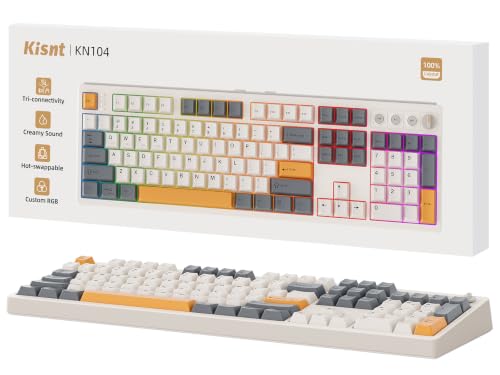
Kisnt Full-Size Wireless Mechanical Keyboard
Best for: Heavy data entry and multi-device setups
- Switch Type
- Bsun linear
- Form Factor
- 100% full-size
- Connectivity
- Bluetooth 5.0, 2.4 GHz, USB-C
- Hot-Swap Support
- Yes (3-pin or 5-pin)
- Backlighting
- RGB
- Keycap Material
- PBT
View on Amazon: Kisnt Full-Size Wireless Mechanical Keyboard Affiliate link
The Kisnt KN104 is a full-size mechanical keyboard with a number pad and dedicated volume knob. It offers tri-mode connectivity via Bluetooth 5.0, 2.4GHz, or USB-C. The gasket mount and pre-lubed linear switches provide a soft typing feel. Hot-swappable sockets let you change switches easily. PBT keycaps and RGB lighting add to the build. It suits heavy data entry and multi-device users.
Pros
- Full-size layout with number pad and volume knob
- Tri-mode connectivity with low latency options
- Hot-swappable 3-pin and 5-pin switch support
- Gasket mount design for reduced vibration
- 4000mAh battery for stable wireless performance
Cons
- Larger footprint requires more desk space
- Software driver limited to Windows only
- Heavier build at 2.41 pounds
Good fit if
- You need a number pad for data entry
- You want to customize switch feel without soldering
- You use multiple devices across different operating systems
Skip if
- You have limited desk space and need a compact layout
- You require Mac-compatible software for advanced customization
- You prefer a lightweight portable keyboard
Verdict: The Kisnt KN104 Full-Size Wireless Keyboard fits users who need a full number pad and flexible connectivity. Its hot-swap design and tri-mode options make it a solid choice for multi-device workflows.
Specifications side by side
| Spec | Kisnt 75% Tri-Mode Wireless Keyboard | Kisnt Full-Size Wireless Mechanical Keyboard |
|---|---|---|
| Switch Type | Pre-lubed Bsun linear | Bsun linear |
| Form Factor | 75% | 100% full-size |
| Connectivity | Bluetooth 5.0, 2.4 GHz, USB-C | Bluetooth 5.0, 2.4 GHz, USB-C |
| Hot-Swap Support | not stated | Yes (3-pin or 5-pin) |
| Backlighting | RGB | RGB |
| Keycap Material | PBT | PBT |
| Media Controls | not stated | Volume Knob |
| Use | Gaming | Gaming |
| Dimensions | 13.9 × 5.51 × 1.77 inches | 5.67 × 1.65 × 17.5 inches |
| Weight | 1.98 pounds | 2.41 pounds |
| Color | Retro Beige | Retro Beige |
| Model | KN85 | KN104 |
Kisnt Keyboard Specs Compared
These Kisnt models share tri-mode Bluetooth connectivity, RGB backlighting, and hot-swappable linear switches. Both support gaming use. The primary difference is physical layout. The Kisnt KN85 is a 75% compact board. It measures 13.9 inches long and weighs 1.98 pounds. This size saves desk space. It suits users who want a smaller footprint. The Kisnt KN104 is a full-size option. It includes a number pad and volume knob. It measures 17.5 inches long. This layout fits heavy data entry. It works well for multi-device workflows. Choose the compact model for tight desks. Choose the full-size model for maximum key access.
Who Kisnt Keyboards Suit
Kisnt’s current lineup focuses on two distinct physical footprints. You can choose between the compact 75% KN85 and the full-size KN104. Both models feature RGB backlighting and linear switches. The full-size option adds a dedicated volume knob for media control. This range suits users who need either space-saving designs or complete numeric keypads. However, the brand currently offers no tenkeyless layouts or compact 60% options. There are also no models with tactile or clicky switches in this specific collection. If you require those specific form factors or switch types, this brand’s present catalog does not cover those needs.
How to choose the right one
-
Check connectivity options
Both models offer tri-mode Bluetooth connectivity. This allows you to pair with multiple devices and switch between them. You benefit from a clutter-free desk without extra dongles. The wireless connection provides flexibility for hybrid workspaces. You can move the keyboard easily between your laptop, tablet, and desktop. Ensure your devices support Bluetooth for seamless integration. This feature is essential for users who juggle several screens or computers daily.
-
Decide on form factor
Choose between the 75% KN85 and the full-size KN104 based on your desk space. The 75% layout saves room while keeping function keys. It measures 13.9 inches long. The full-size model includes a number pad for data entry. It measures 17.5 inches long. You should pick the compact version if you game or write code. Select the larger board if you need numeric input for spreadsheets. Your physical workspace dictates the best fit.
-
Consider media controls
The full-size KN104 includes a dedicated volume knob. This allows you to adjust audio levels without using software. You gain quick access to sound settings during calls or gaming. The 75% KN85 lacks this physical control. You must rely on keyboard shortcuts or operating system menus. If you frequently change volume, the knob is a practical addition. It adds convenience to your daily workflow. Check if this feature matters for your specific use case.
-
Evaluate switch type
Both keyboards use linear switches. These switches press down smoothly without a tactile bump or audible click. You get a quiet typing experience suitable for shared offices. Linear switches are also preferred by many gamers for fast actuation. You should consider this if you dislike loud mechanical noises. The consistent feel helps with rapid key presses. Check your preference for sound and feedback. Linear switches offer a modern, smooth typing sensation for most users.
-
Verify hot-swap support
Both models feature hot-swappable sockets. This means you can change switches without soldering. You can customize your typing feel by installing different switch types later. This feature extends the keyboard's lifespan. You can repair a faulty switch easily. It also allows you to experiment with different tactile feels. Check if you plan to modify your board. Hot-swap support offers flexibility for enthusiasts who want to tweak their setup over time.
Frequently asked questions
Does the Kisnt KN85 have hot-swappable switches?
Yes, the Kisnt KN85 supports hot-swappable switches. This feature allows you to change the linear switches without soldering. You can customize the typing feel or replace faulty components easily. The keyboard retains its compact 75% form factor while offering this flexibility for personalization.
What is the difference between the KN85 and KN104 layouts?
The KN85 uses a 75% compact layout, while the KN104 is a full-size model. The KN104 includes a dedicated number pad and a volume knob for media control. The KN85 saves desk space by omitting the numpad and physical volume dial. Both share similar connectivity and backlighting specs.
Can I connect multiple devices to the Kisnt wireless keyboard?
Yes, both models offer tri-mode Bluetooth connectivity. This allows you to pair with multiple devices and switch between them seamlessly. You benefit from a clutter-free desk setup. The wireless connection supports hybrid workspaces where you might use a laptop, tablet, and desktop simultaneously.
Are the switches on Kisnt keyboards linear or tactile?
The Kisnt keyboards listed use linear switches. These switches provide a smooth keystroke without a tactile bump or audible click. This design is often preferred for gaming due to its consistent actuation. The KN85 and KN104 both feature this linear switch type for a uniform typing experience.
Does the Kisnt KN104 include a volume knob?
Yes, the Kisnt KN104 includes a dedicated volume knob. This physical control allows you to adjust audio levels quickly without using software. It is a useful feature for media control and gaming. The compact KN85 model does not include this specific hardware control.
What backlighting options do these Kisnt keyboards offer?
Both the KN85 and KN104 feature RGB backlighting. This allows you to customize the color and lighting effects on your keyboard. RGB lighting enhances visibility in low-light environments. It also adds a visual aesthetic to your gaming or workspace setup. The lighting is integrated into the keycaps.