2 Best Left-Handed Keyboard and Mouse Combos, Compared
As an Amazon Associate we earn from qualifying purchases. Links on this page are affiliate links.
Choosing the best left handed keyboard and mouse combos requires looking at specific design features. We compared 2 options based on the specifications published on the listings. The Logitech Wave Keys & Lift Left-Handed Wireless Combo leads because its vertical mouse shape and wavy keyboard layout prioritize wrist comfort. This ergonomic support suits users who need physical relief during long sessions. You can use this guide to decide which combo fits your workspace needs. We focus only on the data provided by manufacturers.
Quick picks
| # | Product | Best for | Price |
|---|---|---|---|
| 1 | Logitech Wave Keys & Lift Left-Handed Wireless Combo Best overall | left-handed users needing ergonomic support | Check price of Logitech Wave Keys & Lift Left-Handed Wireless Combo on Amazon |
| 2 | Fonicer Left-Handed Wireless Keyboard and Vertical Mouse Best budget | Left-handed users seeking ergonomic comfort | Check price of Fonicer Left-Handed Wireless Keyboard and Vertical Mouse on Amazon |
The best fit for you
- You need ergonomic support for left-handed use Logitech Wave Keys & Lift Left-Handed Wireless Combo It features a vertical mouse shape and wavy keyboard layout for wrist comfort.
- You prefer a black finish for your setup Fonicer Left-Handed Wireless Keyboard and Vertical Mouse It comes in black and includes a vertical mouse for ergonomic posture.
- You use a Mac computer with left-handed gear Fonicer Left-Handed Wireless Keyboard and Vertical Mouse It supports Mac operating systems and offers a left-handed ergonomic design.
Our 2 picks
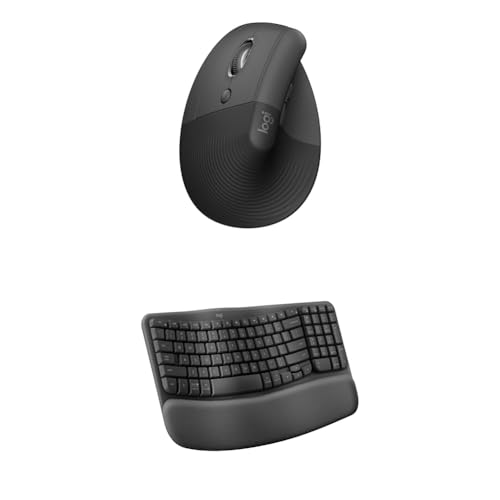
Logitech Wave Keys & Lift Left-Handed Wireless Combo
Best for: left-handed users needing ergonomic support
- Design
- Ergonomic, Left-Handed (what this guide is about)
- Connectivity
- Wireless
- Keyboard Form Factor
- Compact
- Ergonomic Features
- Wave layout, palm rest, vertical mouse
- Operating System
- Mac, Windows
View on Amazon: Logitech Wave Keys & Lift Left-Handed Wireless Combo Affiliate link
This left-handed combo pairs the Wave Keys keyboard with the Lift vertical mouse. The keyboard uses a wavy layout and includes a memory foam palm rest to support your wrists. The Lift mouse features a 57-degree vertical angle and a thumb rest shaped for left hands. It connects wirelessly and works with Windows and Mac. The graphite finish is part of a broader color range.
Pros
- Vertical mouse design promotes a natural forearm posture
- Keyboard features a wavy ergonomic layout
- Includes a cushioned memory foam palm rest
- Wireless connectivity for Mac and Windows
Cons
- Compact keyboard form factor reduces key count
- Mouse height is limited to small to medium left hands
- No Bluetooth option listed in specifications
Good fit if
- You need a left-handed ergonomic setup
- You prefer vertical mouse positioning
- You use Windows or Mac systems
Skip if
- You require a full-size keyboard layout
- You have large hands that need more mouse height
- You need Bluetooth connectivity
Verdict: Logitech Wave Keys & Lift Mouse Combo suits left-handed users seeking ergonomic support through vertical mouse angles and a wavy keyboard layout. It fits those who prioritize wrist comfort over a standard full-size key arrangement.
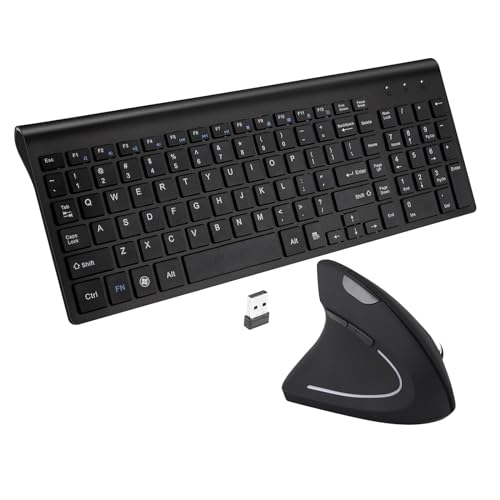
Fonicer Left-Handed Wireless Keyboard and Vertical Mouse
Best for: Left-handed users seeking ergonomic comfort
- Design
- Ergonomic, Left-Handed (what this guide is about)
- Connectivity
- 2.4 GHz wireless, Nano USB receiver
- Keyboard Form Factor
- Full size
- Ergonomic Features
- Vertical mouse
- Switch Type
- Scissor-key-switch
- Mouse DPI
- 1600 DPI
View on Amazon: Fonicer Left-Handed Wireless Keyboard and Vertical Mouse Affiliate link
This Fonicer combo targets left-handed users with a vertical ergonomic mouse and a full-size ultra-thin keyboard. The mouse features adjustable DPI settings up to 1600 for precise tracking. The keyboard uses scissor-key switches for quiet operation and connects via a single 2.4 GHz nano receiver. It is designed for neutral wrist posture and works with most Windows and Mac systems, excluding iOS.
Pros
- Vertical ergonomic mouse designed for left-handed users
- Full-size keyboard with scissor-key switches
- Single nano receiver for both devices
- 3 adjustable DPI levels up to 1600
Cons
- Hot keys only work on Windows systems
- Not compatible with iOS devices
- Limited to 1600 DPI resolution
Good fit if
- You are left-handed and need an ergonomic mouse
- You want a quiet keyboard with scissor switches
- You prefer a single receiver for connectivity
Skip if
- You use iOS devices
- You need Mac-compatible hot keys
- You require high-DPI gaming performance
Verdict: Fonicer Left-Handed Wireless Keyboard and Mouse Combo is a practical option for left-handed users who value ergonomic posture and quiet typing. It fits those who need a simple, wireless setup with a single receiver.
Specifications side by side
| Spec | Logitech Wave Keys & Lift Left-Handed Wireless Combo | Fonicer Left-Handed Wireless Keyboard and Vertical Mouse |
|---|---|---|
| Connectivity | Wireless | 2.4 GHz wireless, Nano USB receiver |
| Keyboard Form Factor | Compact | Full size |
| Ergonomic Features | Wave layout, palm rest, vertical mouse | Vertical mouse |
| Switch Type | not stated | Scissor-key-switch |
| Mouse DPI | not stated | 1600 DPI |
| Design | Ergonomic, Left-Handed | Ergonomic, Left-Handed |
| Color | Graphite | Black |
| Shape | Vertical | Vertical |
| Operating System | Mac, Windows | Mac |
| Dimensions | not stated | 14.8 × 5.4 × 1 inches |
| Weight | not stated | 1.7 pounds |
| Size | Combo | 17.72x5.91x1.57in |
| Model | not stated | Left |
Key Specs for Left-Handed Keyboard and Mouse
-
Check wireless connectivity
Both products listed use wireless connections, which removes cable clutter from your desk. This setup allows you to place the keyboard and mouse closer together or further apart based on your workspace size. You should verify if the device uses a single USB receiver or Bluetooth. A single receiver simplifies your port usage, while Bluetooth may allow pairing with multiple devices. Ensure your computer has the necessary ports or Bluetooth capability to maintain a stable connection without interference from other electronics.
-
Verify operating system support
Compatibility is critical for left-handed setups. The Logitech combo supports both Mac and Windows, offering flexibility for users with different computers. The Fonicer option is listed for Mac only. If you use a Windows PC, the Fonicer combo may not function correctly or lack driver support. Always check the published operating system requirements before purchasing. Mismatched OS support can lead to missing keys or unresponsive buttons. Confirm your system matches the product listing to ensure a seamless typing and clicking experience from day one.
-
Assess vertical mouse shape
Ergonomic design often centers on the mouse shape. Both options feature a vertical mouse, which positions your hand in a handshake posture. This angle reduces forearm twisting and can lessen wrist strain during long sessions. The Logitech model pairs this with a wavy keyboard layout for additional comfort. The Fonicer combo also emphasizes ergonomic posture through its vertical design. Consider your current wrist health and preferred hand angle. A vertical shape may require an adjustment period but offers long-term comfort benefits for left-handed users.
-
Review physical dimensions
Size matters for desk space and travel. The Fonicer keyboard measures 14.8 inches in length, 5.4 inches in width, and 1 inch in height. It weighs 1.7 pounds. These specific dimensions help you determine if the combo fits your desk layout. The Logitech combo is listed as a general size without exact measurements in the provided data. Knowing the exact footprint ensures the keyboard does not crowd your mouse or other peripherals. Measure your available space before buying to avoid fitment issues with your current workstation setup.
-
Consider wrist rest features
Support for your wrist can improve typing endurance. The Logitech Wave Keys & Lift combo explicitly includes a wrist rest as an ergonomic feature. This addition provides a padded surface to rest your wrists while typing, reducing pressure on the carpal tunnel. The Fonicer listing does not mention a wrist rest in its attributes. If you type for many hours, a built-in rest offers immediate comfort. Check the attributes list carefully to see if this feature is included. It is a significant factor for users prioritizing long-term physical comfort over a minimalist design.
Frequently asked questions
Do left-handed keyboard and mouse combos support Windows operating systems?
Yes, several options support Windows. The Logitech Wave Keys & Lift Left-Handed Wireless Combo works with both Mac and Windows. This broad compatibility ensures you can use the ergonomic design with your existing PC or laptop without driver issues. Other models may limit support to Mac only, so you must check the listed operating system requirements before purchasing.
Are wireless connections standard in left-handed keyboard and mouse sets?
Wireless connectivity is standard for the top picks. Both the Logitech and Fonicer combos use wireless connections to remove cable clutter. This allows you to position the keyboard and vertical mouse closer together for better ergonomics. You benefit from a cleaner desk setup and flexible placement based on your workspace size without being tethered to a port.
What ergonomic features do left-handed keyboard and mouse combos offer?
These combos prioritize wrist comfort through specific shapes. The Logitech option features a wavy keyboard layout and a vertical mouse to reduce strain. The Fonicer model also includes a vertical mouse shape for ergonomic posture. Both designs include wrist rest features or layouts intended to support natural hand positioning for left-handed users seeking long-term comfort.
Can I find a black left-handed keyboard and mouse combo?
You can choose a black finish for your setup. The Fonicer Left-Handed Wireless Keyboard and Vertical Mouse comes in black. This color option fits users who prefer a uniform dark aesthetic for their desk. While other models like the Logitech Wave Keys come in graphite, the Fonicer provides a distinct black option for those prioritizing visual consistency.
Is a vertical mouse shape beneficial for left-handed users?
A vertical mouse shape helps reduce wrist strain. Both listed combos feature vertical mice designed for ergonomic support. This shape keeps your hand in a neutral handshake position rather than pronating the forearm. It is particularly useful for left-handed users who need to maintain proper posture and minimize pressure on the wrist joint during extended computer sessions.
Do these combos include a wrist rest?
Yes, ergonomic support includes wrist rest features. The Logitech Wave Keys & Lift combo explicitly lists a wrist rest as an ergonomic feature. This component supports your wrist during typing to prevent fatigue. The Fonicer combo focuses on vertical mouse posture and quiet typing but also targets ergonomic comfort. Check the specific attributes to see which support style fits your needs.