Best LUKCOZMO Mechanical Macro Pads in 2026: 3 Picks Compared
As an Amazon Associate we earn from qualifying purchases. Links on this page are affiliate links.
LUKCOZMO sells small programmable macro pads rather than full keyboards, so plan to use one beside your main keyboard. Our top pick is the 6-key pad, because it adds an RGB knob and tri-mode wireless with onboard memory for $26.49 at our last check. The 4-key wired pad was the lowest at $18.99, and the 12-key pad at $31.99 gives you more room for shortcuts. All 3 store your settings on the device. These picks come from listed specs and prices, and we have not tested them.
Our top pick: LUKCOZMO 6-Key Wireless Macro Pad with Knob.
Quick picks
| # | Product | Best for | Price |
|---|---|---|---|
| 1 | LUKCOZMO 6-Key Wireless Macro Pad with Knob Best overall | Most macro pad buyers | Check price of LUKCOZMO 6-Key Wireless Macro Pad with Knob on Amazon |
| 2 | LUKCOZMO 4-Key Macro Pad Best budget | Basic shortcuts | Check price of LUKCOZMO 4-Key Macro Pad on Amazon |
| 3 | LUKCOZMO 12-Key Macro Pad Best 12-key | Lots of shortcuts | Check price of LUKCOZMO 12-Key Macro Pad on Amazon |
Our 3 picks
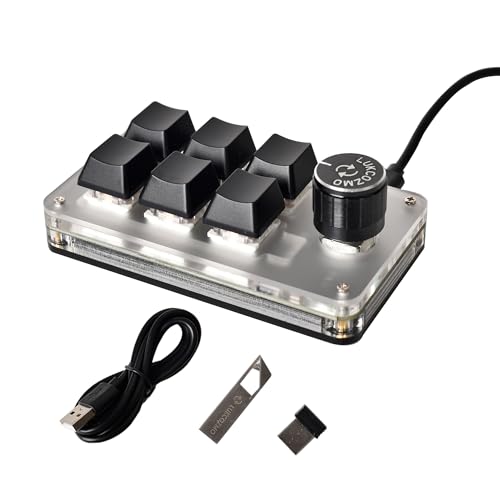
LUKCOZMO 6-Key Wireless Macro Pad with Knob
Best for: Most macro pad buyers
- Form Factor
- 6-key macro pad
- Connectivity
- Bluetooth, 2.4GHz, USB-C
- Backlighting
- RGB
- Media Controls
- Volume Knob
- Use
- Gaming
- Color
- Black
View on Amazon: LUKCOZMO 6-Key Wireless Macro Pad with Knob Affiliate link
The 6-key pad is our top pick for most people. It has an RGB knob and connects by Bluetooth, 2.4G or USB-C, with onboard memory for your settings. Configuration software comes on a USB drive and shows a floating window of key functions. Each button can use its own function mode, including one-key macros.
Pros
- Tri-mode connection
- RGB knob
- Onboard memory
- Individual function modes
Cons
- Setup described on Windows
- Only six keys
Good fit if
- You want a small wireless shortcut pad
- You use a knob for volume or scrolling
Skip if
- You need many keys
- You do not have a Windows computer
Verdict: The most useful pad here for the money.

LUKCOZMO 4-Key Macro Pad
Best for: Basic shortcuts
- Switch Type
- mechanical
- Form Factor
- 4-key
- Connectivity
- Type-C to USB wired
- Backlighting
- RGB
- Media Controls
- Volume Knob
- Use
- Gaming
View on Amazon: LUKCOZMO 4-Key Macro Pad Affiliate link
The upgraded 4-key wired pad was the lowest-priced model here at our last check. It has RGB lights, a multifunctional knob and a Type-C connection, and it stores settings on the device. Software comes on a USB drive. The listing shows a model code that also appears on the 6-key pad, so check the title before you order.
Pros
- Lowest price here at last check
- Knob and RGB lights
- Onboard memory
- Small one-handed size
Cons
- Wired version
- Only four keys
Good fit if
- You only need a few shortcuts
- You want to spend very little
Skip if
- You want wireless
- You want many shortcuts
Verdict: A cheap way to try a macro pad.

LUKCOZMO 12-Key Macro Pad
Best for: Lots of shortcuts
- Form Factor
- 12-key macro pad
- Connectivity
- Wireless, USB-C
- Backlighting
- RGB
- Media Controls
- Volume Knob
- Color
- White
- Dimensions
- 5 × 2.84 × 1.46 inches
View on Amazon: LUKCOZMO 12-Key Macro Pad Affiliate link
The 12-key pad is the largest here, with an OSU knob and wireless or Type-C connection. It has RGB backlighting and a memory function, plus software on a USB drive with a floating window for key functions. This white version weighs 4.16 ounces and works as a plug-and-play device after setup.
Pros
- Twelve keys
- OSU knob
- Wireless and Type-C
- Memory function
Cons
- Highest price here at last check
- Setup described on Windows
Good fit if
- You want many shortcuts
- You play osu!
Skip if
- You need only a few keys
- You want the lowest price
Verdict: Worth the small extra cost if you use the extra keys.
Specifications side by side
| Spec | LUKCOZMO 6-Key Wireless Macro Pad with Knob | LUKCOZMO 4-Key Macro Pad | LUKCOZMO 12-Key Macro Pad |
|---|---|---|---|
| Switch Type | not stated | mechanical | not stated |
| Form Factor | 6-key macro pad | 4-key | 12-key macro pad |
| Connectivity | Bluetooth, 2.4GHz, USB-C | Type-C to USB wired | Wireless, USB-C |
| Backlighting | RGB | RGB | RGB |
| Media Controls | Volume Knob | Volume Knob | Volume Knob |
| Use | Gaming | Gaming | not stated |
| Color | Black | Upgraded wired model with RGB lights Black | White |
| Dimensions | 4.02 × 2.24 × 1.46 inches | 4.02 × 2.24 × 1.46 inches | 5 × 2.84 × 1.46 inches |
| Weight | 4.8 ounces | 4.8 ounces | 4.16 ounces |
| Model | AX18-K06-VT1-BT-RGB | AX18-K06-VT1-BT-RGB | MQ-AX18-K12-VT2-RGB |
How LUKCOZMO's lineup breaks down
The three pads mostly differ by number of keys. The 4-key model here is the upgraded wired version with RGB lights and a knob, the 6-key adds Bluetooth and 2.4G, and the 12-key is the largest, with a knob and wireless or Type-C connection.
All three use similar configuration software, which comes on a USB drive and shows a floating window with the current key functions.
How LUKCOZMO compares with other brands
LUKCOZMO keeps these pads simple and cheap. All 3 cost under $35 at our last check, and the wireless models are unusual at this price.
The weak point is setup. These listings say you configure the pad on Windows, then it can work on Linux, Mac OS or a Pi. If you only use a Mac or Linux computer, a pad with a web-based setup tool may be easier.
If you prefer an integrated mobile display rather than a separate board, compare specs for the best tablets with keyboard.
How to choose a LUKCOZMO macro pad
-
Count your shortcuts
Four keys handle basic copy and paste. Six keys and a knob suit editing and media control. Choose 12 keys if you want shortcuts for several apps or games.
-
Decide if you need wireless
The 6-key lists Bluetooth, 2.4G and USB-C, and the 12-key lists wireless and Type-C. The 4-key version here is wired, so check the option name if you want wireless.
-
Plan to set it up on Windows
The listings describe setting up the pad on Windows. After that, the pad keeps its settings and works as a plug-and-play device on other systems.
-
Check the exact version
These pads come in several versions with similar names, and prices vary. The 4-key listing here also shows a model code that looks like the 6-key pad, so check the title before you buy.
Frequently asked questions
What is the best LUKCOZMO macro pad?
The 6-key pad is our top pick because it combines an RGB knob, tri-mode wireless and onboard memory at a low price.
Which LUKCOZMO pad is cheapest?
The upgraded 4-key wired model was the lowest at $18.99 at our last check. It has RGB lights and a knob.
Do these replace a keyboard?
No. They have between 4 and 12 keys, so use them alongside a full keyboard.
Do LUKCOZMO pads work with a Mac?
Their listings say they can be plug and play on Mac OS after you set them up on Windows. You may need a Windows computer to change the settings.
Do they save settings?
Yes. The listings describe a memory function, so you do not need to set the pad up again on the next computer.