Best MageGee Mechanical Keyboards: 4 Models Compared
As an Amazon Associate we earn from qualifying purchases. Links on this page are affiliate links.
This guide covers the 4 best MageGee mechanical keyboards currently available. We analyzed their published specifications to help you choose the right model. MageGee offers compact layouts in 60% and 87-key sizes, featuring blue switches, magnetic switches, and RGB backlighting. The top pick is the MageGee MK-Box 68-Key Blue Switch Keyboard, which leads because it provides arrow keys in a small footprint. Our selection relies strictly on the data listed on each product page. You can compare the dimensions, weight, and switch types below to find the option that fits your desk and typing style.
Quick picks
| # | Product | Best for | Price |
|---|---|---|---|
| 1 | MageGee MK-Box 68-Key Blue Switch Keyboard Best overall | Compact setups needing arrow keys | Check price of MageGee MK-Box 68-Key Blue Switch Keyboard on Amazon |
| 2 | MageGee 87-Key Wired Mechanical Keyboard Also great | Typists needing audible feedback and durability | Check price of MageGee 87-Key Wired Mechanical Keyboard on Amazon |
| 3 | MageGee 60% Compact RGB Keyboard Best budget | spill-resistant ergonomic typing | Check price of MageGee 60% Compact RGB Keyboard on Amazon |
| 4 | MageGee 60% Magnetic Switch Keyboard Best premium | competitive gaming with adjustable triggers | Check price of MageGee 60% Magnetic Switch Keyboard on Amazon |
Our 4 picks

MageGee MK-Box 68-Key Blue Switch Keyboard
Best for: Compact setups needing arrow keys
- Switch Type
- Mechanical blue switch
- Form Factor
- 60%
- Connectivity
- Wired
- Backlighting
- Blue LED
- Keycap Material
- Double-color injection
- Use
- Gaming
View on Amazon: MageGee MK-Box 68-Key Blue Switch Keyboard Affiliate link
The MageGee MK-Box is a 68-key mechanical keyboard with a 60% layout. It uses blue switches for tactile feedback and features blue LED backlighting. The design includes separate arrow keys and F-row keys, saving space while keeping essential controls. It connects via USB and works with Windows and Mac. This wired model suits users who want a compact, durable keyboard for gaming or office work.
Pros
- 68-key compact layout with separate arrow keys and F1-F12
- Mechanical blue switches provide crisp tactile feedback
- Blue LED backlighting with 15 modes and adjustable brightness
- Double-color injection keycaps for durability
- Compatible with Windows and Mac without drivers
Cons
- Wired connection limits portability compared to wireless models
- Blue switches produce loud clicking sounds
- No software customization for key mapping or lighting
Good fit if
- You need a compact keyboard with arrow keys
- You prefer tactile mechanical switches
- You use Windows or Mac computers
Skip if
- You require wireless connectivity
- You need silent switches for quiet environments
- You want software customization for lighting or macros
Verdict: MageGee MK-Box 60% Compact Keyboard fits users who need a small footprint without losing arrow keys or F-row access. It is a solid choice for desk setups where space is limited but tactile feedback is desired.
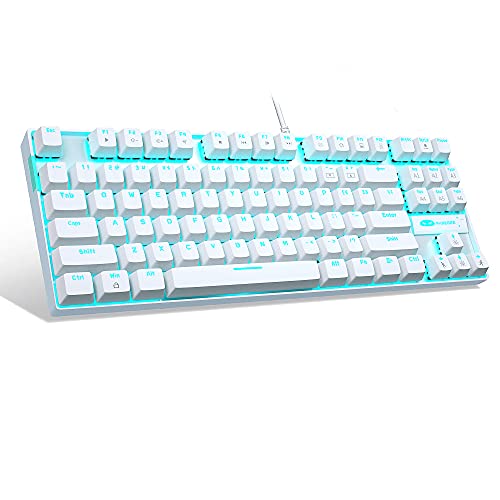
MageGee 87-Key Wired Mechanical Keyboard
Best for: Typists needing audible feedback and durability
- Switch Type
- Mechanical Blue
- Form Factor
- Compact 87-key
- Connectivity
- USB 2.0 wired
- Backlighting
- LED Ice Blue
- Keycap Material
- Double-shot injection
- Case Material
- Metal panel
View on Amazon: MageGee 87-Key Wired Mechanical Keyboard Affiliate link
The MageGee MK-Star is a compact 87-key mechanical keyboard featuring blue switches for loud, tactile feedback. It includes a durable metal panel and double-shot injection keycaps. The LED ice blue backlighting offers 21 modes and adjustable brightness. It connects via USB 2.0 wired interface. This model suits typists and gamers who prefer audible clicks and a sturdy build over silent operation.
Pros
- Mechanical blue switches provide crisp, audible tactile feedback
- Metal panel case offers scratch resistance and durability
- 21 LED backlight modes with adjustable speed and brightness
- Full anti-ghosting supports simultaneous key presses without conflict
- Double-shot injection keycaps ensure long-lasting legends
Cons
- Blue switches produce loud clicking noise unsuitable for quiet offices
- Wired USB 2.0 connection limits portability and desk setup flexibility
- Ice blue backlighting is monochromatic and lacks RGB customization
Good fit if
- You want audible confirmation for every keystroke
- You need a durable metal build for heavy use
- You prefer a compact 87-key layout over full-size
Skip if
- You require silent operation for shared workspaces
- You need wireless connectivity for a clutter-free desk
- You want customizable RGB lighting effects
Verdict: MageGee MK-Star 87-Key Mechanical Keyboard is a solid choice for users who value tactile, audible feedback and a rugged metal frame. It fits those who prioritize durable construction and clear key identification over silent, wireless convenience.

MageGee 60% Compact RGB Keyboard
Best for: spill-resistant ergonomic typing
- Switch Type
- Membrane
- Form Factor
- 60%
- Backlighting
- RGB
- Use
- Gaming
- Design
- Ergonomic
- Color
- Black
View on Amazon: MageGee 60% Compact RGB Keyboard Affiliate link
The MageGee TS91 is a compact 60% keyboard featuring an ergonomic membrane design. It offers RGB backlighting with adjustable brightness and breathing modes. The IPX4 waterproof circuit board protects against spills, making it durable for daily use. Weighing 9.28 ounces, it fits small desktops. This model suits users seeking a low-profile, spill-resistant typing experience with mechanical-like feedback.
Pros
- Ergonomic key height reduces fatigue
- IPX4 waterproof circuit board
- Adjustable RGB backlighting
- Compact 60% layout saves space
Cons
- Membrane switches lack tactile feedback
- No wireless connectivity option
- Interface is not waterproof
Good fit if
- You need a spill-resistant keyboard for desk use
- You prefer an ergonomic low-profile layout
- You want a compact board for small spaces
Skip if
- You require tactile mechanical switches
- You need wireless or Bluetooth connectivity
- You require a numpad for data entry
Verdict: The MageGee TS91 Ergonomic 60% Keyboard fits users who prioritize spill protection and ergonomic comfort in a small footprint. It serves those who value durability and space-saving design over tactile switch feel.

MageGee 60% Magnetic Switch Keyboard
Best for: competitive gaming with adjustable triggers
- Switch Type
- Hall Effect Magnetic
- Form Factor
- 60%
- Connectivity
- Wired
- Hot-Swap Support
- Yes (OUTEMU magnetic only)
- Backlighting
- RGB
- Keycap Material
- Double-color injection
View on Amazon: MageGee 60% Magnetic Switch Keyboard Affiliate link
This 60% keyboard uses Hall Effect magnetic switches for rapid trigger response. You can adjust actuation points from 0.1 mm to 4 mm for precise control. It features hot-swappable sockets compatible with OUTEMU magnetic switches and RGB backlighting. The layout includes separate arrow keys and F-row keys. It is designed for gaming on Windows systems.
Pros
- Hall Effect magnetic switches enable rapid trigger activation
- Adjustable actuation points from 0.1 mm to 4 mm
- Hot-swappable sockets support OUTEMU magnetic switches
- Separate arrow keys and F1-F12 keys included
- Full anti-ghosting with 68-key no conflict
Cons
- Hot-swap compatibility limited to OUTEMU magnetic switches only
- Proprietary driver software supports Windows systems only
- Wired connectivity restricts wireless movement
Good fit if
- You need adjustable actuation points for competitive gaming
- You want a compact 60% layout with dedicated arrow keys
- You prefer magnetic switches for rapid trigger response
Skip if
- You require wireless connectivity for your setup
- You need macOS compatibility for key customization
- You want to use third-party non-magnetic switches
Verdict: MageGee 60% Magnetic Gaming Keyboard offers precise magnetic switch control for competitive gamers who prefer a compact layout with dedicated navigation keys. It suits those who prioritize rapid trigger adjustability and wired reliability.
Specifications side by side
| Spec | MageGee MK-Box 68-Key Blue Switch Keyboard | MageGee 87-Key Wired Mechanical Keyboard | MageGee 60% Compact RGB Keyboard | MageGee 60% Magnetic Switch Keyboard |
|---|---|---|---|---|
| Switch Type | Mechanical blue switch | Mechanical Blue | Membrane | Hall Effect Magnetic |
| Form Factor | 60% | Compact 87-key | 60% | 60% |
| Connectivity | Wired | USB 2.0 wired | not stated | Wired |
| Hot-Swap Support | not stated | not stated | not stated | Yes (OUTEMU magnetic only) |
| Backlighting | Blue LED | LED Ice Blue | RGB | RGB |
| Keycap Material | Double-color injection | Double-shot injection | not stated | Double-color injection |
| Case Material | not stated | Metal panel | not stated | not stated |
| Use | Gaming | Gaming | Gaming | Gaming |
| Design | not stated | not stated | Ergonomic | not stated |
| Color | Grey/Blue Switch | White/Blue Switch | Black | White |
| Operating System | Mac, Windows | Windows | Mac | Mac, Windows |
| Dimensions | 12.1 × 3.9 × 1.5 inches | 13.9 × 5.1 × 0.55 inches | 11.5 × 4.02 × 1.57 inches | not stated |
| Weight | 1.12 pounds | 1.96 pounds | 9.28 ounces | not stated |
| Model | MKBox | MK-Star White | TS91 | not stated |
The MageGee Lineup at a Glance
MageGee keyboards split into distinct groups based on switch technology and layout. The MK-Box and MK-Star use tactile blue switches for clear feedback, while the TS91 offers an ergonomic, spill-resistant design. The magnetic switch model caters to gamers needing rapid trigger adjustability. All listed options remain wired, ensuring stable connectivity without battery concerns. You can choose between 60% compact layouts or the 87-key size for full navigation access. The MK-Box and 60% Magnetic models include dedicated arrow keys, whereas the TS91 and MK-Star follow stricter compact standards. RGB backlighting appears on select models, adding visibility in low light. Hot-swappable sockets allow easy switch replacement on the latest magnetic model. You should match your preference for tactile click, ergonomic comfort, or competitive speed to the correct category. This comparison helps you navigate the specific trade-offs in footprint and switch feel.
Where MageGee Fits Your Setup
MageGee’s range covers compact footprints from 60% to 87-key layouts. You get wired connectivity across all models, with RGB backlighting on select options. The lineup includes standard mechanical blue switches, an ergonomic spill-resistant design, and magnetic switches for rapid trigger response. Sizes range from the narrow TS91 to the wider MK-Star. Note that none of these models offer wireless capability or full-size numpads. If you need a large layout or battery power, MageGee does not currently provide those options in this specific collection.
If you prefer an integrated screen for travel, you can compare specs across the best tablets with keyboard.
Choosing Your MageGee Keyboard Specs
-
Check Wired Connectivity
All MageGee models in this guide use wired connections. This means you plug directly into your computer via USB. You get stable, low-latency input without battery worries. This is ideal for gamers who need consistent response times. It also simplifies setup since no pairing or charging is required. If you prefer wireless freedom, these models may not suit you. The trade-off is reliability and simplicity. You avoid potential interference or dead batteries during critical moments.
-
Select Switch Type
Switches define the feel and sound of every keystroke. The MK-Box and MK-Star use blue switches, which offer tactile bumps and audible clicks. This feedback helps typists confirm key presses but can be loud. The magnetic switch model provides rapid trigger adjustability for competitive gaming. It allows you to customize actuation points for faster responses. Choose blue switches for clear feedback and the magnetic option for speed control. Your preference for sound and tactile sensation should drive this choice.
-
Pick Form Factor
The layout size affects desk space and key access. The 60% models like the MK-Box and TS91 are compact, saving desk real estate. However, they may lack dedicated arrow keys or F-row access depending on the layer. The MK-Star offers an 87-key layout, retaining navigation clusters and arrow keys. This suits users who need those keys frequently without using function layers. Consider your desk size and how often you use navigation keys. A smaller footprint frees up space for mouse movement.
-
Review Backlighting
Backlighting aids visibility in low-light environments. The TS91 and the magnetic switch model feature RGB backlighting. This allows you to customize colors and effects to match your setup. The MK-Box and MK-Star do not list backlighting in their attributes. If you type in the dark or want aesthetic customization, prioritize the RGB options. Check the specific model details to confirm lighting capabilities. Proper lighting reduces eye strain and improves key identification during night sessions.
-
Verify Hot-Swap Support
Hot-swappable sockets let you change switches without soldering. The magnetic switch model explicitly supports hot-swapping. This feature allows you to experiment with different switch types easily. You can upgrade or repair switches without specialized tools. This adds longevity and customization to your keyboard. If you plan to modify your keyboard frequently, this is a key spec. Other models do not mention this feature in the provided data. Check the product specifications carefully before purchasing if you want this flexibility.
Frequently asked questions
Which MageGee keyboard is best for small desks?
The MageGee MK-Box 68-Key is the top pick for compact setups. It offers a 60% layout that saves space while retaining arrow keys and the F-row. Measuring 12.1 inches long, it fits tight areas. You get tactile blue switches for clear feedback. This model connects via wire for stable performance on Mac or Windows.
Does MageGee offer wireless mechanical keyboards?
No, all MageGee models in this guide use wired connectivity. You plug them directly into your computer via USB. This design ensures stable, low-latency input without battery concerns. It is ideal for gamers who need consistent response times. You do not need to worry about charging or signal interference with these devices.
What switch types are available in the MageGee lineup?
MageGee offers blue switches and magnetic switches. The MK-Box and MK-Star models use tactile blue switches for audible feedback. The latest 60% model features magnetic switches for adjustable triggers. These are suited for competitive gaming. You can choose based on whether you prefer traditional mechanical feel or rapid response technology.
Is the MageGee TS91 spill-resistant?
Yes, the MageGee TS91 Ergonomic Keyboard is designed for spill protection. It features a rugged build that helps resist liquid damage. This makes it a practical choice for messy environments. The model also includes RGB backlighting and an ergonomic design. It is compact and suitable for Mac users who need durability.
Which MageGee keyboard supports hot-swappable switches?
The MageGee 60% Magnetic Gaming Keyboard supports hot-swappable switches. This allows you to change switches without soldering. It is useful for customizing your typing feel. The model also features RGB lighting and wired connectivity. It is designed for Mac and Windows users who want precise control and easy maintenance.
Do MageGee keyboards work with Mac?
Most MageGee models work with both Mac and Windows. The MK-Box and the magnetic switch model explicitly support both operating systems. The MK-Star is listed for Windows use. The TS91 is noted for Mac compatibility. You should check the specific model attributes to ensure your system is supported before purchasing.
How heavy are MageGee mechanical keyboards?
Weights vary by model. The MK-Star is the heaviest at 1.96 pounds due to its metal frame. The MK-Box weighs 1.12 pounds. The TS91 is lighter at 9.28 ounces. The magnetic switch model weight is not specified. Heavier models offer more stability, while lighter ones are easier to transport.