The Best MEETION Mechanical Keyboards in 2026: 4 Picks
As an Amazon Associate we earn from qualifying purchases. Links on this page are affiliate links.
This guide covers the best MEETION mechanical keyboards available in 2026. We compared 4 models based strictly on their published specifications. MEETION offers a range of ergonomic designs, including wave keys, split layouts, and foldable forms. The MEETION Wireless Wave Ergonomic Keyboard ranks first because it provides traditional layout support with a wrist rest. You can choose from wireless, Bluetooth, or wired connectivity options. Each pick targets specific needs, such as portability or zero-lag performance. We focus only on the data provided in the listings to help you find the right fit.
Quick picks
| # | Product | Best for | Price |
|---|---|---|---|
| 1 | MEETION Wireless Wave Ergonomic Keyboard Best overall | Traditional layout users wanting ergonomic support | Check price of MEETION Wireless Wave Ergonomic Keyboard on Amazon |
| 2 | Meetion Foldable Ergonomic Bluetooth Keyboard Best premium | portable split typing on the go | Check price of Meetion Foldable Ergonomic Bluetooth Keyboard on Amazon |
| 3 | MEETION Wave Ergonomic Split Keyboard Best budget | Customizable ergonomic typing setups | Check price of MEETION Wave Ergonomic Split Keyboard on Amazon |
| 4 | MEETION Wired Ergonomic Keyboard Best wired | Ergonomic wired typing with zero lag | Check price of MEETION Wired Ergonomic Keyboard on Amazon |
Our 4 picks

MEETION Wireless Wave Ergonomic Keyboard
Best for: Traditional layout users wanting ergonomic support
- Switch Type
- membrane
- Form Factor
- full-size
- Connectivity
- 2.4GHz wireless
- Design
- Ergonomic
- Color
- Black
- Operating System
- Mac, Windows
View on Amazon: MEETION Wireless Wave Ergonomic Keyboard Affiliate link
This wireless keyboard uses a 2.4GHz receiver and membrane switches for reliable typing. Its wave-shaped keycaps follow your fingers' natural movement, while a hard plastic wrist rest keeps your wrists aligned. It supports both Windows and Mac systems. You get plug-and-play convenience without needing Bluetooth. The design helps maintain a comfortable posture during long work sessions.
Pros
- Wave-shaped keycaps guide natural finger movement
- Built-in hard plastic wrist rest for support
- 2.4GHz wireless connection with USB-A receiver
- Compatible with Windows and Mac systems
Cons
- Uses membrane switches instead of mechanical ones
- Requires two AAA batteries not included
- Not compatible with Linux, Chrome OS, or iOS
Good fit if
- You want ergonomic benefits without a steep learning curve
- You prefer a traditional layout with wave keys
- You need reliable 2.4GHz wireless connectivity
Skip if
- You require mechanical switch feedback
- You need Bluetooth connectivity
- You use Linux or Chrome OS
Verdict: MEETION Wireless Ergonomic Keyboard suits users who want ergonomic support without switching to a split layout. It delivers comfortable typing through wave keys and a wrist rest for traditional workflow users.

Meetion Foldable Ergonomic Bluetooth Keyboard
Best for: portable split typing on the go
- Connectivity
- Bluetooth
- Form Factor
- Compact
- Design
- Ergonomic
- Operating System
- Mac, Windows
- Power Source
- Rechargeable
View on Amazon: Meetion Foldable Ergonomic Bluetooth Keyboard Affiliate link
This MEETION K9880 2nd Gen is a split, foldable Bluetooth keyboard in gray. It features an ergonomic design built for portability and mobile typing. The lightweight build allows it to slide easily into bags, making it suitable for students, professionals, and digital nomads. It connects wirelessly via Bluetooth. You get two color options, gray or black. It is a compact solution for on-the-go use.
Pros
- Foldable split ergonomic design
- Bluetooth connectivity
- Lightweight portable build
- Two color options
Cons
- Foldable mechanism may feel less stable than rigid boards
- Bluetooth only, no wired option listed
- No backlighting mentioned
Good fit if
- You travel frequently and need a compact keyboard
- You prefer split ergonomic layouts for comfort
- You want a wireless connection for your device
Skip if
- You need a full-size keyboard with a number pad
- You require backlit keys for low-light environments
- You prefer a wired connection for zero latency
Verdict: MEETION Foldable Ergonomic Bluetooth Keyboard is a portable split option for travelers who prioritize compactness over traditional rigidity. It fits those who type on the move and value ergonomic separation in a small form factor.
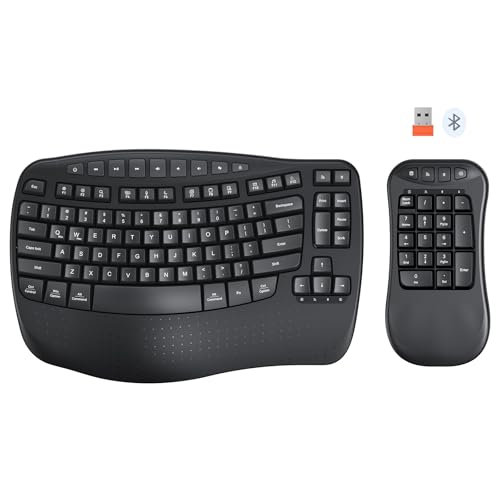
MEETION Wave Ergonomic Split Keyboard
Best for: Customizable ergonomic typing setups
- Connectivity
- 2.4 GHz, Bluetooth
- Design
- Ergonomic, Left-Handed
- Ergonomic Features
- Wrist Rest
View on Amazon: MEETION Wave Ergonomic Split Keyboard Affiliate link
The MEETION K9330 is a split ergonomic keyboard featuring a wave key layout and a separate numeric keypad. It connects via 2.4GHz USB or Bluetooth. The design includes a built-in wrist rest and adjustable tilt feet. You can rearrange the main board and keypad to suit your workspace. This setup reduces arm movement and typing fatigue for long work sessions.
Pros
- Split structure allows flexible layout combinations
- Includes separate numeric keypad for customization
- Wave key layout follows natural finger stretch
- Built-in curved wrist rest reduces fatigue
- Dual connection modes with 2.4GHz and Bluetooth
Cons
- Requires two separate connections for full functionality
- No mention of backlighting in specifications
- Wired 2.4GHz connection limits portability
Good fit if
- You want to customize your desk layout
- You type for many hours daily
- You prefer a split ergonomic design
Skip if
- You need a single-unit compact keyboard
- You require backlighting for dark environments
- You prefer a standard non-split layout
Verdict: The MEETION K9330 Ergonomic Split Keyboard suits users who need a customizable, fatigue-reducing typing setup. Its split design and separate keypad allow you to arrange your workspace for maximum comfort.

MEETION Wired Ergonomic Keyboard
Best for: Ergonomic wired typing with zero lag
- Connectivity
- Wired USB-A, USB-C adapter
- Backlighting
- RGB
- Design
- Ergonomic
- Color
- Black
- Dimensions
- 17.5 × 9.3 × 1.3 inches
View on Amazon: MEETION Wired Ergonomic Keyboard Affiliate link
The MEETION K2000 is a wired ergonomic keyboard with a split, curved layout and a built-in wrist rest. It features 7-color static backlighting and dynamic RGB modes for visibility. The USB-A connection with a USB-C adapter ensures zero input lag and no driver installation. This design reduces muscle strain and supports neutral wrist posture for extended typing sessions.
Pros
- Semi-translucent split design reduces wrist deviation
- Integrated cushioned wrist rest for comfort
- 7-color static and dynamic RGB backlighting
- Zero input lag with wired USB-A connection
Cons
- Requires a USB-A port or USB-C adapter
- No wireless or Bluetooth connectivity option
- Static lighting modes are fixed, not app-controlled
Good fit if
- You want zero input lag for typing
- You need ergonomic support for long sessions
- You prefer a wired connection over batteries
Skip if
- You need wireless or Bluetooth connectivity
- You want a compact or portable layout
- You require app-controlled lighting customization
Verdict: MEETION K2000 Ergonomic Wired Keyboard is a solid choice for users who prioritize reliable wired performance and ergonomic comfort over wireless flexibility. It suits those who type for long hours and want consistent backlighting without battery maintenance.
Specifications side by side
| Spec | MEETION Wireless Wave Ergonomic Keyboard | Meetion Foldable Ergonomic Bluetooth Keyboard | MEETION Wave Ergonomic Split Keyboard | MEETION Wired Ergonomic Keyboard |
|---|---|---|---|---|
| Switch Type | membrane | not stated | not stated | not stated |
| Form Factor | full-size | not stated | not stated | not stated |
| Connectivity | 2.4GHz wireless | Bluetooth | 2.4 GHz, Bluetooth | Wired USB-A, USB-C adapter |
| Backlighting | not stated | not stated | not stated | RGB |
| Design | Ergonomic | Ergonomic | Ergonomic, Left-Handed | Ergonomic |
| Color | Black | Gray | Wave BK2 | Black |
| Operating System | Mac, Windows | Mac, Windows | not stated | not stated |
| Ergonomic Features | Wrist Rest | not stated | Wrist Rest | not stated |
| Power Source | not stated | Rechargeable | not stated | not stated |
| Dimensions | 17.4 × 9.43 × 1.81 inches | not stated | not stated | 17.5 × 9.3 × 1.3 inches |
| Model | DirectorD-KB | K9880 2nd Gen | K9330 | K2000 |
| Size | not stated | not stated | not stated | keyboard |
MEETION Keyboard Specs at a Glance
The lineup separates clearly by connectivity and form factor. The MEETION Wireless Wave Ergonomic Keyboard and the MEETION Wired Ergonomic Keyboard both include wrist rests. The wireless model uses a wave key design, while the wired option offers stable performance without battery concerns. You should choose based on whether you prefer cable freedom or consistent wired reliability.
For portability, the Meetion Foldable Ergonomic Bluetooth Keyboard provides a compact split layout. The MEETION Wave Ergonomic Split Keyboard offers a customizable workspace with a separate keypad. These options suit travelers or users who want to arrange their setup for maximum comfort. Each model targets specific ergonomic needs through its physical dimensions and connection type.
Where Meetion Fits Your Needs
MEETION’s range spans from compact, foldable designs to full-sized ergonomic setups. You can choose between wireless, Bluetooth, or wired connections depending on your priority for mobility or stability. All listed models feature ergonomic elements like wrist rests, split layouts, or wave key profiles. The lineup covers various colors, including black and gray. However, none of these keyboards offer mechanical switches, RGB lighting, or programmable macro keys. If you need tactile feedback or advanced customization, this brand’s current selection does not include those features. Stick to these models if comfort and simple connectivity are your main goals.
If you want a mobile computing device instead of a desktop board, review specs for the best tablets with keyboard.
How to Choose the Right One
-
Check Connectivity Type
Decide if you need wireless freedom or wired reliability. The MEETION Wireless Wave Ergonomic Keyboard offers Bluetooth flexibility for a clean desk. The MEETION Wired Ergonomic Keyboard provides zero-lag performance for users who hate battery maintenance. Bluetooth models like the Foldable Ergonomic Bluetooth Keyboard connect to multiple devices easily. Wired options ensure constant power without charging cycles. Choose based on whether you prioritize mobility or consistent signal stability for your workspace.
-
Evaluate Wrist Support
Look for built-in wrist rests to reduce strain during long sessions. The MEETION Wireless Wave Ergonomic Keyboard includes a dedicated wrist rest for traditional layout users. The MEETION Wired Ergonomic Keyboard also features this support for comfort. Models like the Foldable Ergonomic Bluetooth Keyboard and the Wave Ergonomic Split Keyboard focus on layout ergonomics instead. If you type for hours, a physical wrist rest offers immediate support. Check the product attributes to confirm if this feature is included in your chosen model.
-
Consider Form Factor
Select a shape that fits your physical needs and travel habits. The MEETION Foldable Ergonomic Bluetooth Keyboard is ideal for travelers who need compactness. The MEETION Wave Ergonomic Split Keyboard allows customizable separation for fatigue reduction. Traditional users may prefer the standard layout of the MEETION Wireless Wave Ergonomic Keyboard. Your choice depends on whether you need portability, split customization, or a familiar typing experience. Match the form factor to your daily environment and physical comfort requirements.
-
Assess Customization Needs
Determine if you need a fixed layout or adjustable components. The MEETION Wave Ergonomic Split Keyboard allows you to arrange the separate keypad for maximum comfort. This setup suits users who want to customize their workspace geometry. Other models offer fixed configurations for simplicity. If you have specific ergonomic requirements, a split design with movable parts provides more control. Check the product description to see if the layout is static or fully adjustable for your specific posture.
-
Review Color Options
Match the keyboard color to your existing desk setup. The MEETION Wireless Wave Ergonomic Keyboard and MEETION Wired Ergonomic Keyboard are both black. The MEETION Foldable Ergonomic Bluetooth Keyboard comes in gray. These color choices help the device blend into various office or home environments. While color does not affect performance, it impacts aesthetic consistency. Verify the available color in the product specifications before purchasing to ensure it matches your preferred visual style.
Frequently asked questions
Does the best MEETION keyboard have a wrist rest?
Yes, the top-ranked MEETION Wireless Wave Ergonomic Keyboard includes a wrist rest. This feature supports traditional layout users who want ergonomic comfort without switching to a split design. The wired MEETION K2000 model also features a wrist rest for long typing sessions.
Which MEETION keyboard is best for portability?
The MEETION Foldable Ergonomic Bluetooth Keyboard is the best choice for portability. It features a compact, foldable design that fits travelers who prioritize small form factors. You can use it via Bluetooth for split typing on the go, making it ideal for mobile workspaces.
Can I customize the layout of a MEETION split keyboard?
Yes, the MEETION K9330 Ergonomic Split Keyboard allows for a customizable setup. Its split design and separate keypad let you arrange your workspace for maximum comfort. This model suits users who need a fatigue-reducing typing environment and want to adjust key placement to fit their needs.
Is there a MEETION keyboard with zero lag?
The MEETION Wired Ergonomic Keyboard provides zero-lag performance. It uses a wired connection to ensure reliable, consistent input without battery maintenance. This model is ideal for users who prioritize stable performance and ergonomic comfort, such as those who type for long hours without interruption.
What connectivity options are available for MEETION keyboards?
MEETION offers wireless, Bluetooth, and wired connectivity options. The top pick uses wireless technology for a clean desk setup. The budget option connects via Bluetooth, while the best wired choice uses a direct cable. You can select the connection type that matches your priority for mobility or stability.
Does the MEETION Wave keyboard have a specific key design?
Yes, the MEETION Wireless Wave Ergonomic Keyboard features wave keys. This design delivers comfortable typing for users who prefer a traditional layout but want ergonomic support. The curved key arrangement helps reduce strain, making it suitable for those who do not want to switch to a split layout.