Best Merdia Mechanical Keyboards: 2 Models Compared
As an Amazon Associate we earn from qualifying purchases. Links on this page are affiliate links.
Finding the best merdia mechanical keyboards requires comparing their specific attributes. Merdia offers compact and full-size layouts with wired or wireless connectivity. Their models feature swappable switches and customizable backlighting for different typing styles. The Merdia 104-Key Full-Size Mechanical Keyboard leads this list for users needing wired tactile typing and macros. This guide compares 2 models based strictly on published specifications. We focus on practical details like switch type, connectivity, and dimensions to help you choose.
Quick picks
| # | Product | Best for | Price |
|---|---|---|---|
| 1 | Merdia 104-Key Full-Size Mechanical Keyboard Best overall | users needing wired tactile typing and macros | Check price of Merdia 104-Key Full-Size Mechanical Keyboard on Amazon |
| 2 | Merdia 100-Key Hot-Swap Mechanical Keyboard Best budget | Wireless flexibility and switch customization | Check price of Merdia 100-Key Hot-Swap Mechanical Keyboard on Amazon |
Our 2 picks
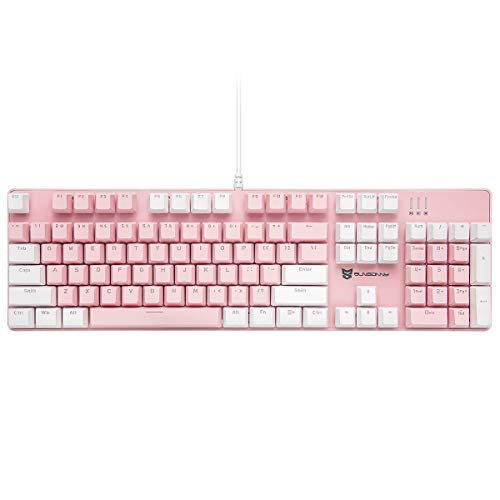
Merdia 104-Key Full-Size Mechanical Keyboard
Best for: users needing wired tactile typing and macros
- Switch Type
- Blue Switch
- Form Factor
- Full-size (104 Keys)
- Connectivity
- Wired
- Backlighting
- RGB LED
- Keycap Material
- ABS
- Hot-Swap Support
- Hot-Swappable
View on Amazon: Merdia 104-Key Full-Size Mechanical Keyboard Affiliate link
This Merdia full-size keyboard features 104 keys with blue mechanical switches and wired USB-C connectivity. It includes RGB LED backlighting with 21 customizable modes adjustable via FN shortcuts. The ABS keycaps and hot-swappable switch design allow for easy maintenance and personalization. It offers anti-ghosting and macro settings for gaming and office work. The layout fits standard desks, providing a complete typing experience without wireless complexity.
Pros
- 104-key full-size layout with anti-ghosting
- Hot-swappable blue mechanical switches
- 21 customizable RGB LED backlight modes
- Wired USB connectivity for stable input
Cons
- Wired connection limits cable management flexibility
- ABS keycaps may wear faster over time
- Lacks Bluetooth or 2.4G wireless options
Good fit if
- You want a wired keyboard for stable gaming performance
- You prefer the tactile feel of blue mechanical switches
- You need a full-size layout with a number pad
Skip if
- You require wireless connectivity for a cleaner desk
- You prefer silent or low-noise brown or red switches
- You want PBT keycaps for durability
Verdict: Merdia 104-Key Wired Mechanical Keyboard delivers a robust, wired typing experience with customizable lighting and swappable switches. It is a solid choice for users who prioritize tactile feedback and wired reliability over wireless convenience.

Merdia 100-Key Hot-Swap Mechanical Keyboard
Best for: Wireless flexibility and switch customization
- Switch Type
- Red switch
- Connectivity
- 2.4GHz, Bluetooth, USB Type-C
- Backlighting
- Ice-blue
- Keycap Material
- ABS
- Case Material
- Plastic
- Use
- Gaming
View on Amazon: Merdia 100-Key Hot-Swap Mechanical Keyboard Affiliate link
This Merdia mechanical keyboard supports triple-mode connectivity via 2.4GHz wireless, Bluetooth, and USB Type-C wired connections. It features red linear switches and ice-blue backlighting within a 100-key layout. The plastic case includes rubber pads and foldable feet for stability. You get a rechargeable battery and hot-swappable switch sockets. It suits home, office, or light gaming use across Windows, Mac, and Android devices.
Pros
- Triple-mode connectivity with 2.4GHz, Bluetooth, and USB Type-C
- Hot-swappable mechanical switch sockets
- Ice-blue backlighting with red linear switches
- Dedicated 2.4G receiver storage area
Cons
- ABS keycaps may wear over time
- Plastic case construction feels less premium
- 100-key layout reduces number pad
Good fit if
- You need wireless freedom with wired backup
- You want to customize switches easily
- You prefer linear red switches for gaming
Skip if
- You require a full-size numpad
- You prefer tactile clicky switches
- You want durable PBT keycaps
Verdict: Merdia Wireless Mechanical Keyboard offers versatile connectivity and hot-swap flexibility for users who value wireless convenience and switch customization. It is a solid option for mixed-device users who do not need a number pad.
Specifications side by side
| Spec | Merdia 104-Key Full-Size Mechanical Keyboard | Merdia 100-Key Hot-Swap Mechanical Keyboard |
|---|---|---|
| Switch Type | Blue Switch | Red switch |
| Form Factor | Full-size (104 Keys) | not stated |
| Connectivity | Wired | 2.4GHz, Bluetooth, USB Type-C |
| Backlighting | RGB LED | Ice-blue |
| Keycap Material | ABS | ABS |
| Case Material | not stated | Plastic |
| Hot-Swap Support | Hot-Swappable | not stated |
| Use | Gaming | Gaming |
| Power Source | not stated | Rechargeable |
| Dimensions | 16.9 × 5.1 × 1.5 inches | 15.4 × 5.55 × 1.61 inches |
| Weight | 2.31 pounds | 1.67 pounds |
| Color | Blue Switch Pink & White | Red switch ice-blue backlight |
| Model | JPCH00T320 | not stated |
Merdia Keyboards At A Glance
Merdia splits its lineup by connectivity and layout. The 104-Key Full-Size Mechanical Keyboard uses a wired Blue Switch for tactile feedback and macros. It includes hot-swap support and measures 16.9 inches long. This model suits users who prioritize wired reliability and a full numpad for gaming or work. It weighs 2.31 pounds and features pink and white coloring.
The 100-Key Hot-Swap Mechanical Keyboard offers wireless flexibility with Red Switches. It lacks a number pad, measuring 15.4 inches long and weighing 1.67 pounds. This model suits mixed-device users who value portability and switch customization. Both keyboards support swappable switches. You can choose based on whether you need a numpad or wireless convenience.
Where Merdia Fits Your Setup
Merdia covers two distinct form factors. You can choose a full-size 104-key layout or a compact 100-key design. The full-size model includes a number pad and uses a wired connection. The smaller option drops the numpad for wireless flexibility. Both models support hot-swappable switches, allowing you to change tactile feedback without soldering. Lighting options range from pink and white to ice-blue backlighting. You will not find tenkeyless layouts or RGB per-key customization in this specific list. If you need a mid-size board or Bluetooth connectivity, these two models do not fit. The range is best for users who want either a complete wired setup or a streamlined wireless option.
How to choose the right merdia keyboard
-
Check connectivity needs
Decide if you prefer a stable wired link or wireless freedom. The 104-Key Full-Size Mechanical Keyboard uses a wired connection for consistent performance without latency. This suits users who want reliability and do not mind cable management. The 100-Key Hot-Swap Mechanical Keyboard offers wireless flexibility. It connects without cables, reducing desk clutter. Choose wired for dedicated gaming stations. Pick wireless for a cleaner workspace or mixed-device setups. Your desk size and cable tolerance should drive this choice.
-
Select switch type
Switch type defines your typing feel and sound. The 104-Key model features Blue Switches. These provide tactile feedback and audible clicks. This is ideal for typists who want clear confirmation of each keystroke. It also supports macro programming for gaming efficiency. The 100-Key model uses Red Switches. These are linear and smooth. They require less force to actuate. This suits fast-paced gaming or quiet environments. Match the switch to your preference for feedback and noise level.
-
Choose form factor
Form factor determines the number of keys and desk space. The 104-Key model is full-size. It includes a number pad for data entry. It measures 16.9 inches long. This requires more desk width. The 100-Key model is compact. It drops the number pad. It measures 15.4 inches long. This saves space for mouse movement. Choose full-size for spreadsheet work or gaming with numpad macros. Pick compact for limited desk areas or portable setups. Measure your available space before buying.
-
Verify hot-swap support
Hot-swap support allows you to change switches without soldering. Both Merdia models include this feature. You can swap switches to customize feel later. This extends the keyboard lifespan. If you dislike a switch type, you can replace it easily. This is useful for trying different switch brands. It also allows repair if a switch fails. Check that the model explicitly lists hot-swap capability. This feature adds long-term value by letting you adapt the keyboard to changing preferences.
-
Consider backlighting style
Backlighting helps you see keys in low light. The 104-Key model offers customizable lighting. You can adjust colors and effects. This adds visual appeal to your setup. The 100-Key model features ice-blue backlighting with Red switches. This provides clear visibility. Check the color options if you want to match your theme. Backlighting is essential for night use. Ensure the brightness is adjustable. This helps reduce eye strain during late sessions. Pick a model with lighting that fits your aesthetic.
Frequently asked questions
Which Merdia keyboard is best for gaming?
Both listed models are designed for gaming. The top-ranked 104-Key Full-Size Mechanical Keyboard uses Blue Switches for tactile feedback. The second option, the 100-Key Hot-Swap Mechanical Keyboard, features Red Switches for smooth actuation. You can choose based on whether you prefer a full layout or a compact wireless design.
Can I swap switches on Merdia keyboards?
Yes, both models support hot-swappable switches. The 104-Key Full-Size Mechanical Keyboard allows you to change switches without soldering. The 100-Key Hot-Swap Mechanical Keyboard also includes this feature. This lets you customize your typing feel by installing different switch types as needed.
Does the Merdia 100-Key model have a number pad?
No, the Merdia 100-Key Hot-Swap Mechanical Keyboard does not include a number pad. It features a compact 100-key layout. The 104-Key Full-Size Mechanical Keyboard, however, includes a full number pad. Choose the 100-key model if you want a smaller footprint.
Is the Merdia wireless keyboard rechargeable?
Yes, the Merdia 100-Key Hot-Swap Mechanical Keyboard is rechargeable. It offers wireless connectivity for flexible placement. The 104-Key Full-Size Mechanical Keyboard uses a wired connection instead. You should select the wireless model if you want to avoid cable clutter and need battery power.
What are the dimensions of the Merdia full-size keyboard?
The Merdia 104-Key Full-Size Mechanical Keyboard measures 16.9 inches in length, 5.1 inches in width, and 1.5 inches in height. It weighs 2.31 pounds. These dimensions provide a standard full-size footprint. The compact 100-key model is smaller at 15.4 inches long and 1.67 pounds.
Which Merdia keyboard supports macros?
The Merdia 104-Key Full-Size Mechanical Keyboard is noted for supporting macros. It uses Blue Switches to provide tactile feedback for precise key presses. This model is ideal for users who need to program complex key sequences. The wireless 100-key model focuses more on connectivity flexibility.
How heavy is the Merdia wireless keyboard?
The Merdia 100-Key Hot-Swap Mechanical Keyboard weighs 1.67 pounds. It is lighter than the full-size wired model, which weighs 2.31 pounds. The reduced weight makes the wireless option easier to move between desks. The full-size model offers a more stable presence on your desk.