Best RGB Gaming Mice in 2026: 15 Picks Ranked by Specs
As an Amazon Associate we earn from qualifying purchases. Links on this page are affiliate links.
Finding the right RGB gaming mouse requires balancing illumination zones, sensor resolution, and physical button layouts. We evaluated 15 models using only the specifications published on their listings.
The Razer Basilisk V3 Wired Ergonomic Gaming Mouse takes top rank due to its 11-zone lighting setup, 26K DPI sensor, and 11 programmable buttons. This guide compares sensor capabilities, connectivity modes, and shell weights across each option. It helps you decide which hardware configuration and lighting style fits your gaming grip and desk arrangement.
Quick picks
The best fit for you
- You want ergonomic wired gaming with maximum sensor sensitivity Razer Basilisk V3 Wired Ergonomic Gaming Mouse This ergonomic wired mouse features a 26K DPI optical sensor and 11 programmable buttons.
- You want wireless MMO gaming with dedicated thumb buttons Redragon Wireless 12-Button MMO Mouse It combines rechargeable wireless connectivity with 12 programmable buttons for complex macro inputs.
- You want an ultralight wired chassis for quick movements Glorious Model O Eternal Wired Gaming Mouse It delivers a lightweight 55g honeycomb chassis combined with dual-zone RGB strips and wired tracking.
Our 15 picks

Razer Basilisk V3 Wired Ergonomic Gaming Mouse
Best for: customizable multi-zone RGB and macro setups
- Backlighting
- RGB (what this guide is about)
- Connectivity
- Wired
- Maximum DPI
- 26K DPI
- Programmable Buttons
- 11
- Sensor
- Focus plus
- Use
- Gaming
View on Amazon: Razer Basilisk V3 Wired Ergonomic Gaming Mouse
The Razer Basilisk V3 is a wired ergonomic gaming mouse featuring 11 customizable Razer Chroma RGB lighting zones. It includes a Focus plus 26K DPI optical sensor and 11 programmable buttons. You can toggle the HyperScroll tilt wheel between tactile and free-spin modes. Optical switches provide a 0.2ms actuation speed. This mouse suits you if you want multi-zone RGB lighting, extensive macro customization, and an ergonomic thumb rest.
Pros
- 11 Razer Chroma RGB lighting zones
- Focus plus 26K DPI optical sensor
- 11 programmable buttons
- HyperScroll tilt wheel with tactile and free-spin modes
- Gen 2 optical switches rated for 70 million clicks
Cons
- Wired connectivity only with no wireless mode
- Weighs 3.56 ounces without weight reduction options
Good fit if
- You want 11 customizable RGB lighting zones for dynamic game lighting.
- You need 11 programmable buttons and macro support on an ergonomic body.
- You prefer a wired mouse with a dual-mode tilt scroll wheel.
Skip if
- You prefer a wireless connection without a cable.
- You want a lightweight mouse weighing under 3 ounces.
Verdict: Razer Basilisk V3 RGB Wired Mouse provides 11 customizable RGB lighting zones, 11 programmable buttons, and a 26K DPI optical sensor. It is an ergonomic choice for players who want detailed lighting control and dedicated thumb support over a wired connection.

Redragon Wired MMO Mouse with Tuning Weights
Best for: MMO players needing extensive side-button macros
- Backlighting
- RGB (what this guide is about)
- Connectivity
- Wired
- Maximum DPI
- 12400 DPI
- Weight
- 6.17 ounces
- Programmable Buttons
- 18
- Sensor
- PixArt PAW3327
View on Amazon: Redragon Wired MMO Mouse with Tuning Weights
The Redragon Wired MMO RGB Mouse provides 16.8 million RGB color options across five onboard profiles, letting you identify active settings at a glance. It features a Pixart PAW3327 optical sensor reaching up to 12,400 DPI, a 1,000 Hz polling rate, and 18 programmable buttons, including a 12-button side grid. With an eight-piece weight tuning set and a six-foot braided cable, this wired mouse suits you if you play complex MMO titles.
Pros
- 18 programmable buttons including 12 MMO side buttons
- 16.8 million RGB backlighting options across 5 profiles
- Pixart PAW3327 optical sensor with up to 12,400 DPI
- Included eight-piece weight tuning set (2.4g each)
- Durable TEFLON feet and 6-foot braided cable
Cons
- Software programming is only supported on Windows operating systems
- Tethered USB connection with no wireless mode
- Heavy base weight of approximately 0.39 pounds before adding weights
Good fit if
- You need 12 dedicated thumb buttons for MMO keybindings and macros.
- You want physical weight adjustment via included tuning weights.
- You use a Windows computer and want five light-coded hardware profiles.
Skip if
- You use macOS and need remapping software for custom macros.
- You prefer an ultralight or wireless mouse design.
Verdict: Redragon Wired MMO RGB Mouse pairs extensive 18-button macro customization with dynamic RGB lighting and adjustable physical weights. It delivers deep hardware control for Windows-based MMO players seeking a dedicated macro panel.

Corsair Scimitar RGB Elite Wired MMO Mouse
Best for: MMO and MOBA macro-heavy gaming
- Backlighting
- RGB (what this guide is about)
- Connectivity
- Wired
- Maximum DPI
- 18,000 DPI
- Programmable Buttons
- 17
- Sensor
- PixArt PMW3391
- Use
- Gaming
The Corsair Scimitar RGB Elite is a wired gaming mouse with integrated RGB backlighting and 17 programmable buttons. It features an 18,000 DPI PixArt PMW3391 optical sensor adjustable in single-DPI steps, alongside Omron switches rated for 50 million clicks. Its repositionable 12-button side cluster lets you adjust the thumb layout to fit your grip, making it a functional option if you play MMO or MOBA games.
Pros
- 17 programmable buttons including a 12-button side panel
- Patented Key Slider system allows repositioning of the side keypad
- Native 18,000 DPI PixArt PMW3391 optical sensor with 1 DPI adjustment steps
- Omron switches rated for 50 million clicks
Cons
- Wired-only connectivity with no wireless options
- Right-hand contoured shell excludes left-handed use
Good fit if
- You need extensive macro capacity for MMO or MOBA titles.
- You want to adjust the physical position of side thumb buttons to match your grip.
- You prefer single-DPI sensor steps for precise tracking adjustments.
Skip if
- You want a cord-free wireless setup.
- You require an ambidextrous or left-handed mouse layout.
Verdict: Corsair Scimitar RGB Elite MMO Mouse pairs customizable RGB lighting with 17 programmable buttons and an adjustable 12-key thumb slider. It delivers precise tracking and deep macro control for players who prefer a reliable wired connection.

Aula Lightweight Tri-Mode Wireless Gaming Mouse
Best for: multi-device setups needing a lightweight RGB mouse
- Backlighting
- RGB (what this guide is about)
- Connectivity
- 2.4GHz wireless, BT5.3, wired USB
- Maximum DPI
- 12000 DPI
- Weight
- 67g
- Programmable Buttons
- 7
- Polling Rate
- 1000Hz
View on Amazon: Aula Lightweight Tri-Mode Wireless Gaming Mouse
The Strikonx Aula Lightweight Wireless RGB Mouse is a 67g gaming mouse with customizable dynamic RGB backlighting visible through a hollowed-out shell. It provides three connection options: 2.4GHz wireless, Bluetooth 5.3, and USB-C wired mode across up to four devices. You get a 12,000 DPI sensor with six preset steps, a 1000Hz polling rate, and seven programmable buttons. It suits you if you want a lightweight multi-device mouse with illuminated styling.
Pros
- Weighs 67g with a shell shaped for palm, claw, and fingertip grips
- Tri-mode connectivity supports 2.4GHz wireless, Bluetooth 5.3, and USB-C wired
- Stores up to four devices for rapid switching across setups
- Customizable dynamic RGB lighting with hollowed-out structure
- Seven programmable buttons including a dedicated fire button
Cons
- Driver programming and macro setup unavailable in Bluetooth mode
- Software customization supports only Windows operating systems
- Maximum sensitivity capped at 12,000 DPI
Good fit if
- You switch between multiple computers using Bluetooth and 2.4GHz wireless.
- You want a lightweight 67g design with hollowed-out RGB lighting accents.
- You play on Windows and want a dedicated fire button for one-click actions.
Skip if
- You need driver software and macro support while connected over Bluetooth.
- You run macOS or Linux and require driver-level button remapping.
- You need sensor sensitivity levels higher than 12,000 DPI.
Verdict: Strikonx Aula Lightweight Wireless RGB Mouse combines versatile tri-mode connectivity with bright lighting in an agile 67g frame. It delivers reliable multi-device convenience alongside a responsive 1000Hz polling rate.

Redragon Wireless 12-Button MMO Mouse
Best for: MMO players wanting wireless multi-button macro control
- Backlighting
- RGB (what this guide is about)
- Connectivity
- Wireless, wired
- Maximum DPI
- 16000 DPI
- Programmable Buttons
- 16
- Polling Rate
- 1000Hz
- Battery Life
- 70 hours
The Redragon Wireless RGB MMO Gaming Mouse is a cordless gaming pointer built for complex keybind setups. You get 16 programmable buttons, including a dedicated 12-button side cluster for macros. Its sensor scales from 100 to 16,000 DPI with polling rates between 125Hz and 1000Hz. Powered by a 1000mAh battery, it suits MMO players who need deep physical inputs without a tethered cable.
Pros
- 12 macro-programmable thumb buttons for complex bindings
- Adjustable sensor from 100 to 16,000 DPI with 40G acceleration
- Rechargeable 1000mAh battery supports play while charging
- Stores up to 5 onboard memory profiles with 2 operational modes
Cons
- 70-hour battery life rating requires turning RGB lighting off
- Heavier build at approximately 0.64 pounds
Good fit if
- You need 12 dedicated thumb buttons for MMO keybinds and macros.
- You want wireless freedom alongside wired charging pass-through.
- You store multiple custom configurations directly on 5 onboard memory profiles.
Skip if
- You prefer an ultralight mouse for fast competitive shooters.
- You want maximum battery life without disabling the RGB lighting.
Verdict: Redragon Wireless RGB MMO Gaming Mouse delivers extensive macro inputs with 16 programmable buttons and reliable wireless connectivity. It is a capable choice if you manage complex skill rotations across multiple gaming profiles.

SOLAKAKA Wireless Honeycomb Gaming Mouse
Best for: multi-device wireless gaming with quick RGB control
- Backlighting
- RGB (what this guide is about)
- Connectivity
- 2.4G wireless, BT5.1, Type-C wired
- Maximum DPI
- 13200 DPI
- Programmable Buttons
- 7
- Polling Rate
- 1000Hz
- Use
- Gaming
The SOLAKAKA Honeycomb Wireless RGB Mouse gives you tri-mode connectivity alongside dynamic lighting. It features 14 onboard RGB backlight modes toggled via a top button, six DPI settings reaching up to 13,200, and a 1000Hz polling rate. The open honeycomb shell houses a rechargeable 600 mAh battery with USB-C wired play support. It fits multi-device setups needing wireless flexibility across PC, Mac, tablets, and phones.
Pros
- Tri-mode connectivity supporting 2.4GHz wireless, Bluetooth, and USB-C wired modes
- 14 selectable RGB backlight modes with physical top-button control
- Six preset DPI levels up to 13,200 with a 1000Hz polling rate
- Seven programmable buttons customizable through configuration software
Cons
- DPI presets jump in large increments between 5,400 and 13,200
- Built-in rechargeable battery capacity is limited to 600 mAh
Good fit if
- You need to pair and switch between up to four devices across 2.4GHz, Bluetooth, and USB-C.
- You want 14 hardware-switchable RGB lighting modes without opening software.
- You prefer an open honeycomb shell for reduced weight and heat dissipation.
Skip if
- You require finely tuned DPI steps above 5,400 DPI.
- You want a fully enclosed solid shell to prevent dust ingress.
Verdict: SOLAKAKA Honeycomb Wireless RGB Mouse delivers versatile three-way connectivity and 14 distinct lighting modes in an open-shell chassis. It provides solid daily gaming functionality for players switching frequently between multiple paired devices.

GravaStar Mercury Wireless Gaming Mouse
Best for: ventilated tri-mode gaming setups
- Backlighting
- RGB (what this guide is about)
- Connectivity
- 2.4G, Bluetooth, wired
- Maximum DPI
- 26,000 DPI
- Programmable Buttons
- 5
- Sensor
- PAW3395
- Use
- Gaming
The GravaStar Mercury Wireless RGB Mouse pairs a hollowed-out airflow shell with versatile tri-mode connectivity, supporting 2.4GHz wireless, Bluetooth, and wired USB. It features a PAW3395 sensor reaching up to 26,000 DPI alongside a 1K Hz polling rate for responsive tracking. Its customizable RGB lighting offers five dynamic modes. This mouse suits you if you want high-sensitivity optical tracking and distinct illumination across multiple devices without being tied to a cable.
Pros
- Tri-mode connectivity via 2.4GHz wireless, Bluetooth, and wired USB
- PAW3395 optical sensor with sensitivity up to 26,000 DPI
- Five dynamic RGB lighting modes configurable via software
- Hollowed-out shell engineered for palm airflow
Cons
- Provides only 5 programmable buttons
- 1K Hz polling rate falls short of ultra-high-rate competitive alternatives
Good fit if
- You switch frequently between 2.4GHz wireless, Bluetooth, and wired connections.
- You want an open-chassis body designed to keep your hand cool during play.
- You need sensor resolution up to 26,000 DPI.
Skip if
- You need a large bank of thumb buttons for complex MMO keybinds.
- You prefer an enclosed, solid shell that blocks internal exposure.
Verdict: GravaStar Mercury Wireless RGB Mouse delivers high-resolution PAW3395 tracking and tri-mode wireless flexibility in a ventilated chassis. It serves as a distinct choice if you prioritize agile connectivity and custom lighting over extensive macro keys.

UtechSmart Venus Wired MMO Gaming Mouse
Best for: MMO players needing thumb buttons and weight tuning
- Backlighting
- RGB (what this guide is about)
- Connectivity
- Wired
- Maximum DPI
- 16400 DPI
- Weight
- 7.8 ounces
- Sensor
- Avago
- Polling Rate
- 1000 Hz
The UtechSmart Venus Wired MMO Mouse is a dedicated right-handed wired mouse built with an Avago sensor reaching up to 16,400 DPI. For backlighting, you get customizable RGB profiles with 16 million color options and a disable toggle. It features 12 programmable thumb buttons, an auto-fire key, and eight removable 2.4-gram weights. You will find it well suited if you need extensive keybinds and fine-tuned physical weight for MMO setups.
Pros
- 12 programmable side buttons angled for thumb access
- Adjustable weight system with eight 2.4g weights
- Avago sensor supporting up to 16,400 DPI and 1,000 Hz polling rate
- RGB lighting with 16 million colors and five profile modes
Cons
- Wired-only connection with no wireless mode
- Right-handed ergonomic shape excludes left-handed users
Good fit if
- You want 12 dedicated thumb buttons for macros and key combinations.
- You prefer adjusting mouse weight using removable 2.4g modules.
- You need custom RGB lighting profiles linked to specific button layouts.
Skip if
- You need a wireless mouse for a cable-free desk setup.
- You use your mouse with your left hand.
Verdict: UtechSmart Venus Wired MMO Mouse delivers deep customization through 12 dedicated thumb keys, tunable internal weights, and multi-profile RGB lighting. It is a practical, spec-heavy choice for MMO players who prefer a reliable wired connection.

Glorious Model O Eternal Wired Gaming Mouse
Best for: ultralight gaming with dual-zone RGB lighting
- Backlighting
- RGB (what this guide is about)
- Connectivity
- Wired
- Maximum DPI
- 12K DPI
- Weight
- 55g
- Programmable Buttons
- 6
- Use
- Gaming
The Glorious Model O Eternal is a lightweight wired gaming mouse featuring dual-zone RGB illumination across flared side panels. At 55 grams with a honeycomb shell, it provides swift handling alongside a symmetrical shape. It equips 80-million-click mechanical switches and six remappable buttons configurable via Glorious CORE software. If you want an ultralight wired mouse with customizable perimeter lighting, this model delivers clear, spec-driven speed.
Pros
- Weighs 55 grams with a ventilated honeycomb shell
- Dual-zone RGB lighting on side panels adjustable via button shortcuts or software
- Mechanical switches rated for 80 million clicks
- Six remappable buttons configured through Glorious CORE
Cons
- Tethered wired connection without wireless operation
- Limited to six buttons, offering fewer inputs than MMO models
- Open honeycomb shell leaves interior components exposed to dust
Good fit if
- You prefer a 55g ultralight chassis with a symmetrical grip
- You want side-panel dual-zone RGB lighting adjusted via hardware shortcuts or software
- You want mechanical switches rated for 80 million clicks
Skip if
- You need a wireless setup without cable management
- You require a complex thumb grid with more than six buttons
Verdict: Glorious Model O Eternal Wired Gaming Mouse pairs a 55g honeycomb chassis with dual-zone RGB strips and 80-million-click switches. It suits players focused on rapid movements who prefer a lightweight, symmetrical wired design.

SOLAKAKA Honeycomb Wired Gaming Mouse
Best for: high-DPI gaming with ventilated honeycomb RGB lighting
- Backlighting
- RGB (what this guide is about)
- Connectivity
- Wired
- Maximum DPI
- 12800 DPI
- Polling Rate
- 1000Hz
- Use
- Gaming
- Color
- Black
The SOLAKAKA Honeycomb Wired Gaming Mouse provides dedicated lighting controls and performance tuning for your desktop setup. It includes 14 RGB rainbow backlight effects, six adjustable DPI levels reaching up to 12800 DPI, and a polling rate up to 1000Hz. You can toggle between four operating modes using customizable macro software. This wired mouse suits you if you prefer a ventilated three-sided honeycomb shell made from ABS material.
Pros
- 14 adjustable RGB rainbow backlight modes
- Six-level adjustable DPI reaching up to 12800 DPI
- Polling rate reaches up to 1000Hz
- Breathable three-sided honeycomb ABS shell
- Four switchable profile modes with macro programming
Cons
- Tethered USB wired connection with no wireless support
- Gaming profiles require macro software setup rather than physical onboard toggles
- Product documentation explicitly specifies support only for Windows 7
Good fit if
- You want 14 distinct RGB rainbow lighting effects on a perforated body.
- You need sensitivity steps scaling up to 12800 DPI paired with a 1000Hz polling rate.
- You use macro configurations to switch between gaming and office profiles.
Skip if
- You want a wireless mouse to eliminate desk cord clutter.
- You prefer a solid mouse body without honeycomb perforations.
- You do not want to install macro software to access alternate gaming modes.
Verdict: SOLAKAKA Honeycomb Wired Gaming Mouse delivers extensive lighting customization with 14 RGB rainbow modes and six adjustable DPI settings up to 12800. Its three-sided perforated shell and switchable macro profiles make it a versatile wired choice.

Redragon Wired MMO Gaming Mouse
Best for: MMO players needing complex macro controls
- Backlighting
- RGB (what this guide is about)
- Connectivity
- Wired
- Maximum DPI
- 12400 DPI
- Programmable Buttons
- 15
- Use
- Gaming
- Color
- Black
This wired MMO gaming mouse gives you dynamic RGB backlighting paired with extensive keybind options. You get 15 fully programmable buttons, including an eight-button side cluster tailored for complex rotations. The optical sensor offers five hardware presets and scales up to 12400 DPI via companion software. It suits you if you need dedicated macro access alongside five customizable 16.8-million-color lighting modes for your desk setup.
Pros
- 15 programmable buttons including 8 dedicated side keys
- 5 dynamic RGB backlit modes with 16.8 million colors
- Configurable sensor resolution from 500 to 12400 DPI
- Dedicated software for remapping, media keys, and lighting
Cons
- Tethered to a wired connection
- Heavier build at approximately 0.44 pounds
Good fit if
- You want 15 remappable buttons for complex game hotkeys and macros.
- You want 5 dynamic RGB lighting modes adjustable via software.
Skip if
- You prefer an ultralight mouse for fast mouse sweeps.
- You want a wireless connection to clear cable clutter.
Verdict: Redragon Wired MMO RGB Mouse delivers deep macro utility with 15 programmable buttons and vibrant 16.8-million-color lighting for complex hotkey setups.

NSYCA Tri-Mode Wireless RGB Gaming Mouse
Best for: Multi-device setups needing Bluetooth and high DPI
- Backlighting
- RGB (what this guide is about)
- Connectivity
- Bluetooth 5.1, 2.4GHz, USB-C
- Maximum DPI
- 22000 DPI
- Sensor
- PAW3311
- Use
- Gaming
- Operating System
- Mac
The NSYCA Tri-Mode Wireless RGB Gaming Mouse gives you three connection options: Bluetooth 5.1, 2.4GHz wireless, and wired USB-C. It features a PAW3311 optical sensor capable of reaching 22,000 DPI, paired with customizable RGB lighting and programmable macro buttons. Weighing roughly 0.15 pounds with a honeycomb-inspired shell, this mouse suits you if you switch between gaming PCs, laptops, and Mac setups.
Pros
- Tri-mode connectivity via Bluetooth 5.1, 2.4GHz wireless, and USB-C
- PAW3311 optical sensor with sensitivity up to 22,000 DPI
- Rechargeable battery with USB-C wired charging support
- Programmable buttons with custom macros and polling rate adjustments
Cons
- Battery capacity and continuous runtime hours are omitted from specifications
- Software customization requires downloading drivers from an external link
Good fit if
- You want to switch between multiple devices using Bluetooth 5.1 and 2.4GHz wireless.
- You need high-sensitivity tracking up to 22,000 DPI from a PAW3311 sensor.
- You require customizable RGB lighting and macro support on Mac or PC.
Skip if
- You need verified battery life ratings in hours before purchase.
- You prefer a dedicated charging dock over a USB-C cable.
Verdict: NSYCA Tri-Mode Wireless RGB Gaming Mouse delivers flexible multi-device tracking with Bluetooth 5.1 and a 22,000 DPI PAW3311 sensor. It provides responsive RGB illumination and programmable macros for multi-system setups.

Redragon M921 Wired MMO Gaming Mouse
Best for: MMO players needing heavy macro customization
- Backlighting
- RGB (what this guide is about)
- Connectivity
- Wired
- Maximum DPI
- 12400 DPI
- Programmable Buttons
- 18
- Sensor
- PAW3327
- Polling Rate
- 1,000 Hz
The Redragon M921 is a wired MMO gaming mouse featuring dynamic RGB backlighting with five preset lighting modes and support for 16.8 million colors. It packs a PAW3327 optical sensor reaching up to 12,400 DPI, an adjustable 1,000 Hz polling rate, and an eight-piece weight tuning set. With 18 programmable buttons, including 12 side macro keys, you get extensive input control tailored specifically for complex keybind-heavy PC titles.
Pros
- 18 programmable buttons including 12 dedicated side keys and a rapid-fire button
- PAW3327 optical sensor supporting up to 12,400 DPI, 200 IPS, and 1,000 Hz polling
- Physical weight customization through eight 2.4-gram removable weights
- 16.8 million RGB color options with five onboard memory lighting profiles
Cons
- Tethered wired connection without wireless functionality
- Full DPI range customization requires proprietary driver software
Good fit if
- You need 12 thumb buttons for extensive MMO macro mapping.
- You prefer adjusting mouse balance using physical weights.
- You want RGB profiles tied to specific onboard hardware memory slots.
Skip if
- You want a wireless mouse to eliminate desk cable drag.
- You prefer an ultralight shell with a standard button layout.
Verdict: Redragon M921 RGB MMO Gaming Mouse delivers robust macro capabilities with 18 programmable buttons and modular weight adjustment for control-focused gaming. Its PAW3327 sensor and five configurable RGB profiles provide solid tracking and clear visual profile tracking.

Glorious Model O Wired Honeycomb Mouse
Best for: medium to large hands wanting lightweight wired RGB
- Backlighting
- RGB (what this guide is about)
- Connectivity
- Wired
- Weight
- 67g
- Programmable Buttons
- 6
- Sensor
- Pixart 3360
- Polling Rate
- 1000 Hz
The GLORIOUS Model O Wired RGB Mouse is an ambidextrous gaming mouse built with customizable RGB backlighting and a lightweight honeycomb chassis. You get a Pixart 3360 sensor, a 1000 Hz polling rate, and six macro-supported buttons at a weight of 67 grams. If you have medium or large hands, its 100% virgin PTFE feet and flexible paracord cable give you smooth gliding and precise tracking for competitive gaming setups.
Pros
- 67-gram lightweight honeycomb shell
- 1000 Hz polling rate with under 0.7mm lift-off distance
- 100% virgin PTFE Glorious Skates
- Omron switches rated for 20 million clicks
Cons
- Wired-only connection with no wireless mode
- Six-button layout offers fewer inputs than MMO models
- Honeycomb surface leaves internal chassis ventilated and exposed
Good fit if
- You have medium or large hands and prefer an ambidextrous shape.
- You want a lightweight wired mouse with a flexible paracord cable.
- You need 1000 Hz polling and pure PTFE feet for competitive games.
Skip if
- You want a completely enclosed shell without open perforations.
- You need a wireless mouse for a cable-free desk setup.
- You require a high button count for complex keybindings.
Verdict: GLORIOUS Model O Wired RGB Mouse delivers reliable tracking, 1000 Hz polling, and pure PTFE glide inside a ventilated 67-gram frame. It gives you balanced wired performance tailored for competitive control.
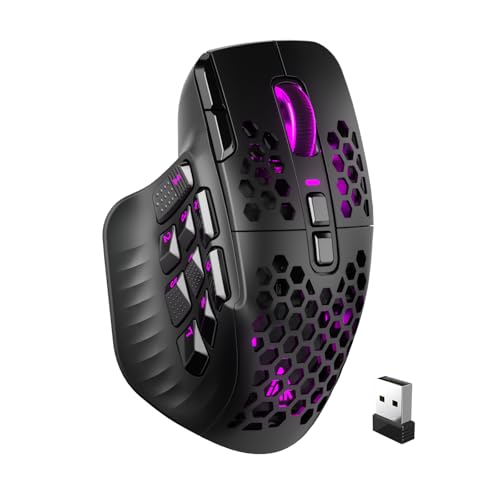
SOLAKAKA Modular Wireless MMO Mouse
Best for: MMO players wanting modular buttons and high DPI
- Backlighting
- RGB (what this guide is about)
- Connectivity
- 2.4GHz wireless, BT 5.0, USB-C wired
- Maximum DPI
- 24000 DPI
- Programmable Buttons
- 16
- Sensor
- PAW3311
- Use
- Gaming
This wireless MMO mouse pairs a 24000 DPI PAW3311 optical sensor with tri-mode connectivity, letting you link via 2.4GHz wireless, Bluetooth 5.0, or USB-C. You get 16 fully programmable buttons and four swappable magnetic side panels to customize layout and grip. Onboard memory and web-based configuration let you save macros directly without desktop software. It suits MMO players who need high sensitivity and flexible button layouts across multiple devices.
Pros
- 24000 DPI PAW3311 optical sensor with adjustable levels
- Tri-mode connectivity via 2.4GHz wireless, Bluetooth 5.0, and USB-C wired
- Four modular magnetic side plates with customizable RGB lighting
- 16 fully programmable macro buttons with onboard profile storage
- Web-based configuration tool runs directly in browsers without software downloads
Cons
- Bluetooth connectivity uses version 5.0 rather than newer standards
- Configuration relies on a web browser utility rather than an offline desktop client
Good fit if
- You need sensor sensitivity reaching up to 24000 DPI for fast cursor movement.
- You want swappable modular panels to adjust side-button layouts for MMO gaming.
- You frequently rotate between wired, 2.4GHz wireless, and Bluetooth devices.
Skip if
- You prefer an offline, downloadable desktop app for macro programming.
- You want a simple peripheral without modular side plates or multi-button setups.
Verdict: SOLAKAKA Modular Wireless MMO Gaming Mouse delivers precise 24000 DPI tracking and flexible 16-button layouts across three connection modes. Its modular side plates and driverless web configuration provide extensive customization without background software overhead.
Specifications side by side
| Spec | Razer Basilisk V3 Wired Ergonomic Gaming Mouse | Redragon Wired MMO Mouse with Tuning Weights | Corsair Scimitar RGB Elite Wired MMO Mouse | Aula Lightweight Tri-Mode Wireless Gaming Mouse | Redragon Wireless 12-Button MMO Mouse | SOLAKAKA Wireless Honeycomb Gaming Mouse | GravaStar Mercury Wireless Gaming Mouse | UtechSmart Venus Wired MMO Gaming Mouse | Glorious Model O Eternal Wired Gaming Mouse | SOLAKAKA Honeycomb Wired Gaming Mouse | Redragon Wired MMO Gaming Mouse | NSYCA Tri-Mode Wireless RGB Gaming Mouse | Redragon M921 Wired MMO Gaming Mouse | Glorious Model O Wired Honeycomb Mouse | SOLAKAKA Modular Wireless MMO Mouse |
|---|---|---|---|---|---|---|---|---|---|---|---|---|---|---|---|
| Connectivity | Wired | Wired | Wired | 2.4GHz wireless, BT5.3, wired USB | Wireless, wired | 2.4G wireless, BT5.1, Type-C wired | 2.4G, Bluetooth, wired | Wired | Wired | Wired | Wired | Bluetooth 5.1, 2.4GHz, USB-C | Wired | Wired | 2.4GHz wireless, BT 5.0, USB-C wired |
| Maximum DPI | 26K DPI | 12400 DPI | 18,000 DPI | 12000 DPI | 16000 DPI | 13200 DPI | 26,000 DPI | 16400 DPI | 12K DPI | 12800 DPI | 12400 DPI | 22000 DPI | 12400 DPI | not specified | 24000 DPI |
| Weight | not specified | 6.17 ounces | not specified | 67g | not specified | not specified | not specified | 7.8 ounces | 55g | not specified | not specified | not specified | not specified | 67g | not specified |
| Programmable Buttons | 11 | 18 | 17 | 7 | 16 | 7 | 5 | not specified | 6 | not specified | 15 | not specified | 18 | 6 | 16 |
| Sensor | Focus plus | PixArt PAW3327 | PixArt PMW3391 | not specified | not specified | not specified | PAW3395 | Avago | not specified | not specified | not specified | PAW3311 | PAW3327 | Pixart 3360 | PAW3311 |
| Polling Rate | not specified | 1000 Hz | not specified | 1000Hz | 1000Hz | 1000Hz | not specified | 1000 Hz | not specified | 1000Hz | not specified | not specified | 1,000 Hz | 1000 Hz | not specified |
| Battery Life | not specified | not specified | not specified | not specified | 70 hours | not specified | not specified | not specified | not specified | not specified | not specified | not specified | not specified | not specified | not specified |
| Backlighting | RGB | RGB | RGB | RGB | RGB | RGB | RGB | RGB | RGB | RGB | RGB | RGB | RGB | RGB | RGB |
| Use | Gaming | Gaming | Gaming | Gaming | Gaming | Gaming | Gaming | Gaming | Gaming | Gaming | Gaming | Gaming | Gaming | Gaming | Gaming |
| Design | Ergonomic | not specified | not specified | not specified | not specified | not specified | not specified | not specified | not specified | not specified | not specified | not specified | not specified | not specified | not specified |
| Color | Black | Black | Black | Line Black | Black | Black | Stealth Black | Black | Matte Black | Black | Black | Line White | not specified | Matte White | Black |
| Game Genre | not specified | MMO | MMO | not specified | MMO | not specified | not specified | MMO | not specified | not specified | MMO | not specified | MMO | not specified | MMO |
| Shell Design | not specified | not specified | not specified | not specified | not specified | not specified | not specified | not specified | not specified | Honeycomb | not specified | not specified | not specified | Honeycomb | not specified |
| Operating System | not specified | not specified | not specified | Mac | not specified | Mac | not specified | not specified | Mac | not specified | not specified | Mac | not specified | not specified | not specified |
| Power Source | not specified | not specified | not specified | not specified | Rechargeable | not specified | not specified | not specified | not specified | not specified | not specified | not specified | not specified | not specified | not specified |
| Dimensions | 2.96 × 5.12 × 1.67 inches | 4.8 × 3.62 × 1.65 inches | 6.89 × 4.49 × 0.1 inches | not specified | not specified | not specified | not specified | 4.6 × 3 × 1.5 inches | not specified | not specified | 5.98 × 2.28 × 7.95 inches | not specified | not specified | 5.04 × 2.6 × 0.1 inches | not specified |
| Length | not specified | not specified | not specified | not specified | not specified | 4.88 inches | 48.8 inches | not specified | not specified | 4.88 inches | not specified | not specified | not specified | not specified | not specified |
| Width | not specified | not specified | not specified | not specified | not specified | 2.76 inches | 25.4 inches | not specified | not specified | 2.76 inches | not specified | not specified | not specified | not specified | not specified |
| Size | Mouse | Wired M908 | 1 Count (Pack of 1) | not specified | M901PKS | SM600 | medium | not specified | 1 Count (Pack of 1) | Wired | M811 Wired | not specified | not specified | Model O Medium | SM809PRO |
| Model | RZ01-04000100-R3U1 | M908 | CH-9304211-AS | SC620 | M901P-KS | SM600 | GravaStar M2 | DS-2535 | GLO-OE-W-BLK | SM900 | M811 | G11 | 835397276 | GO-WHITE | SM809PRO |
If you also need dedicated audio gear, compare frequency response and driver specs across the best headphones for gaming to balance your desktop setup.
How to Choose the Right RGB Gaming Mouse
-
Check Connection Modes
You need to decide how your mouse connects to your computer. Wired models draw continuous power through a cable, so you never worry about recharging during play. Wireless models give you a cleaner desk without cord drag. If you switch between a desktop and a laptop, look for tri-mode models that offer 2.4GHz wireless alongside Bluetooth. The NSYCA Tri-Mode Wireless RGB Gaming Mouse includes Bluetooth 5.1, letting you pair with multiple systems quickly. Choose wired for stationary desks and multi-mode wireless if you use several devices.
-
Evaluate Shell Style
Mouse shells come in standard solid enclosures or perforated honeycomb structures. A solid shell blocks dust and hand moisture from reaching internal circuit boards, making routine wipe-downs simple. Perforated honeycomb bodies reduce overall outer material and provide passive airflow to your palm during long sessions. They also let internal RGB backlighting show directly through the casing. For instance, the SOLAKAKA Honeycomb Wired Gaming Mouse uses a three-sided perforated shell to emphasize its internal lighting. Pick solid shells for easier cleaning, or honeycomb patterns for open airflow and broad lighting visibility.
-
Check Polling Rate Specs
The polling rate measures how many times per second the mouse reports its position to your operating system. Standard office mice often report at 125Hz, but gaming mice target higher frequencies to minimize input latency. A 1000Hz polling rate delivers position updates every single millisecond, resulting in smooth cursor tracking on high-refresh monitors. The Aula Lightweight Tri-Mode Wireless Gaming Mouse specifies a 1000Hz polling rate for low-latency response. If you play fast reaction games, verify that the mouse hardware supports at least a 1000Hz reporting interval in its published technical specifications.
-
Inspect Switch Lifespan Ratings
Physical mouse switches degrade over time with repeated clicks. Manufacturers publish switch durability ratings in total millions of clicks to help you gauge mechanical longevity. Entry-level switches may wear down faster under heavy daily tapping, while reinforced switches maintain consistent tactile response across long lifespans. The Glorious Model O Eternal Wired Gaming Mouse lists 80-million-click switches in its hardware specifications. Check this click count if you play click-intensive titles or want your mouse buttons to resist switch fatigue and accidental double-clicks over several years of continuous daily operation.
-
Review Preset Lighting Modes
RGB backlighting varies from simple single-color glows to complex dynamic effects. Some mice rely entirely on software running on your operating system to manage lighting, while others feature built-in hardware controllers with selectable effect presets. Built-in presets let you change lighting patterns directly on the device without keeping background configuration utilities running. For example, the DIERYA Wireless RGB Gaming Mouse features 13 customizable RGB backlighting modes. Check whether a mouse includes onboard preset switching if you prefer managing visual illumination directly from the hardware across different connected machines.
-
Verify Operating System Compatibility
Operating system support is an essential hardware specification to confirm before buying. While primary pointing and left-right clicking function across most platforms via basic USB standards, advanced macro programming and lighting adjustments often depend on platform-specific driver support. Some mice specifically state support for macOS alongside standard Windows platforms. The SOLAKAKA Wireless Honeycomb Gaming Mouse lists Mac operating system compatibility directly in its specifications. If you operate an Apple system, check the listed OS attributes to ensure the mouse hardware and its functional controls work properly in your everyday desktop environment.
Frequently asked questions
What is the benefit of a honeycomb shell on an RGB mouse?
Honeycomb shells reduce total chassis weight and allow internal RGB illumination to shine through the body. Perforations create open pathways that lower material density while highlighting lighting effects across the frame. For example, the SOLAKAKA SM900 wired mouse uses a three-sided perforated shell to achieve a 0.15-pound weight while showcasing 14 RGB rainbow modes. The GLORIOUS Model O wired mouse similarly uses a ventilated chassis weighing 67 grams.
How do adjustable tuning weights impact mouse control?
Adjustable tuning weights let you customize the physical heft and center of gravity of your mouse to match your control preferences. Adding mass stabilizes coarse hand motions, while removing weights speeds up quick flick movements. The Redragon M908 wired MMO mouse includes physical tuning weights within its 0.38-pound base frame. The UtechSmart Venus wired mouse also features tunable internal weights, giving you modular physical resistance options for macro execution.
Can you use an RGB gaming mouse with a Mac operating system?
Yes, several RGB gaming mice explicitly list compatibility with Mac operating systems. Basic cursor movement and default hardware profiles function right away when plugged in or paired. In this guide, models such as the Strikonx Aula SC620, SOLAKAKA SM600 wireless, DIERYA M1, NSYCA G11, and GLORIOUS Model O Eternal specify Mac support in their attributes. However, full software control for advanced lighting effects can depend on cross-platform utility support.
What does sensor DPI indicate on an RGB gaming mouse?
Sensor DPI measures how many pixels the cursor moves on your screen per inch of physical mouse movement. Higher values translate to faster cursor travel with less physical hand travel. Across 15 ranked picks, sensors span various sensitivity thresholds. The Redragon M908 reaches up to 12,400 DPI, the NSYCA G11 PAW3311 sensor reaches 22,000 DPI, and the DIERYA M1 scales up to 24,000 DPI for ultra-sensitive tracking.
What is tri-mode connectivity on a wireless RGB gaming mouse?
Tri-mode connectivity gives you three separate methods to link your mouse to systems: low-latency 2.4GHz wireless, Bluetooth, and standard wired USB. This flexibility allows you to switch between desktop rigs, laptops, and mobile devices with a physical switch. Mice like the GravaStar Mercury M2, SOLAKAKA SM600, DIERYA M1, and Strikonx Aula SC620 utilize tri-mode designs, ensuring you can game cord-free or recharge with a cable without stopping.
How many programmable buttons do MMO gaming mice typically have?
MMO gaming mice typically feature between 12 and 18 programmable buttons to accommodate complex spell bars and macro rotations. Dedicated side grids allow your thumb to trigger commands without leaving primary buttons. For instance, the Redragon M901P-KS wireless mouse provides a 12-button side configuration, the Redragon M811 wired mouse offers 15 programmable buttons, and the Redragon M921 wired mouse supplies 18 programmable buttons alongside five custom RGB profiles.