Best Seenda Keyboards and Combos in 2026: 3 Picks
As an Amazon Associate we earn from qualifying purchases. Links on this page are affiliate links.
seenda makes slim full-size keyboards for people who split time between a Windows PC and a Mac or tablet. Its range is small: two keyboard and mouse sets and one keyboard sold alone, so this list has 3 picks. Our top pick is the SKM64-3 set, because both parts recharge over USB-C and the keyboard switches among a USB receiver and two Bluetooth channels. The COE200 costs less and adds a wrist rest, and the SK64-3 is the SKM64-3 keyboard without the mouse. We compared listings and published specs, not hands-on use.
Our top pick: Seenda Full-Size Multi-Device Wireless Combo.
Quick picks
| # | Product | Best for | Price |
|---|---|---|---|
| 1 | Seenda Full-Size Multi-Device Wireless Combo Best overall | Mixed Windows and Apple | Check price of Seenda Full-Size Multi-Device Wireless Combo on Amazon |
| 2 | Seenda Full-Size Bluetooth Ergonomic Combo Best budget | Long typing on a budget | Check price of Seenda Full-Size Bluetooth Ergonomic Combo on Amazon |
| 3 | Seenda SK64-3 Full-Size Bluetooth Keyboard Best keyboard only | Keyboard upgrade | Check price of Seenda SK64-3 Full-Size Bluetooth Keyboard on Amazon |
Our 3 picks
Seenda Full-Size Multi-Device Wireless Combo
Best for: Mixed Windows and Apple
- Connectivity
- 2.4G USB, Bluetooth
- Keyboard Form Factor
- Full-size
- Ergonomic Features
- Ergonomic stand
- Multi-Device Pairing
- 3 devices
- Power Source
- Built-in battery
- Switch Type
- Scissor switch
View on Amazon: Seenda Full-Size Multi-Device Wireless Combo Affiliate link
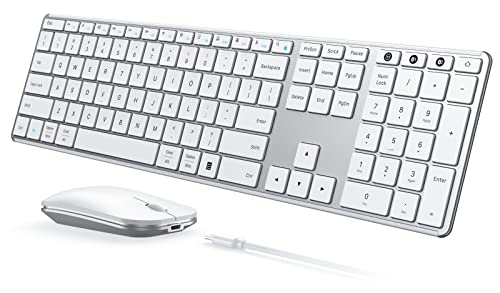
The seenda SKM64-3 is the brand's rechargeable flagship set: a slim full-size keyboard with a stainless steel top, scissor keys, a number pad and both Windows and Apple legends, plus a silent mouse (1,000, 1,600 or 2,400 DPI). It switches among a USB-A receiver and two Bluetooth channels and recharges over USB-C, rated about 200 hours per charge.
Pros
- Rechargeable keyboard and mouse
- USB receiver and two Bluetooth links
- Windows and Apple legends
Cons
- USB receiver mode is Windows only
- Low key travel
Good fit if
- You use a Windows PC and a Mac or iPad
- You want a set with no batteries to buy
Skip if
- You want a wrist rest
- You need the receiver on a Mac
Verdict: The seenda set to get if you can spend a little more.

Seenda Full-Size Bluetooth Ergonomic Combo
Best for: Long typing on a budget
- Connectivity
- Bluetooth 5.0, 2.4GHz USB
- Keyboard Form Factor
- Full-size
- Ergonomic Features
- Wrist rest
- Multi-Device Pairing
- 2 devices
- Power Source
- 1 AAA (keyboard), 1 AA (mouse)
- Mouse DPI
- 2400 DPI
View on Amazon: Seenda Full-Size Bluetooth Ergonomic Combo Affiliate link
The seenda COE200 is the cheaper set and the more comfortable one for long typing: a full-size keyboard with number pad and a built-in wrist rest, low-noise keys, and a symmetric quiet mouse (1,000, 1,600 and 2,400 DPI). It switches between the USB receiver and Bluetooth 5.0, so it covers 2 devices. It runs on 1 AAA and 1 AA, not included; this listing is the pink color.
Pros
- Built-in wrist rest
- Lowest price
- Receiver or Bluetooth
Cons
- Two devices, not three
- Batteries not included
Good fit if
- You type for hours and want wrist support
- You want a set for the least money
Skip if
- You want rechargeable parts
- You switch among 3 devices
Verdict: The low-cost, wrist-friendly seenda.

Seenda SK64-3 Full-Size Bluetooth Keyboard
Best for: Keyboard upgrade
- Connectivity
- Bluetooth
- Form Factor
- Full-Size
- Operating System
- Windows
- Noise Level
- Silent
- Power Source
- Rechargeable
- Dimensions
- 16.9 × 4.72 × 0.79 inches
View on Amazon: Seenda SK64-3 Full-Size Bluetooth Keyboard Affiliate link
The seenda SK64-3 is the keyboard half of the SKM64-3 sold alone: full size with number pad, low-profile scissor keys, and a metallic-look slim body. It connects over 2.4G USB and two Bluetooth channels to Windows, macOS, iPadOS, iOS and Android, and recharges over USB-C in 2 to 3 hours for up to 60 days of use.
Pros
- Same 3-channel switching as the set
- Rechargeable over USB-C
- Full size with number pad
Cons
- No mouse included
- No wrist rest
Good fit if
- You already own a mouse you like
- You want one keyboard for PC, Mac and tablet
Skip if
- You need a mouse too
- You want a wrist rest
Verdict: Buy this if you only need the keyboard.
Specifications side by side
| Spec | Seenda Full-Size Multi-Device Wireless Combo | Seenda Full-Size Bluetooth Ergonomic Combo | Seenda SK64-3 Full-Size Bluetooth Keyboard |
|---|---|---|---|
| Connectivity | 2.4G USB, Bluetooth | Bluetooth 5.0, 2.4GHz USB | not stated |
| Keyboard Form Factor | Full-size | Full-size | not stated |
| Ergonomic Features | Ergonomic stand | Wrist rest | not stated |
| Multi-Device Pairing | 3 devices | 2 devices | not stated |
| Power Source | Built-in battery | 1 AAA (keyboard), 1 AA (mouse) | not stated |
| Switch Type | Scissor switch | not stated | not stated |
| Mouse DPI | 2400 DPI | 2400 DPI | not stated |
| Form Factor | Full-Size | Full-Size | Full-Size |
| Design | not stated | Ergonomic | not stated |
| Color | White Silver | Pink | Black Gray |
| Operating System | Mac, Windows | Mac | Windows |
| Noise Level | Silent | Silent | Silent |
| Dimensions | 16.9 × 4.33 × 0.79 inches | not stated | 16.9 × 4.72 × 0.79 inches |
| Weight | 1.43 pounds | not stated | 1.01 pounds |
| Size | Full Size | Full Size | not stated |
| Model | JP-064-3 | COE200 | SK64-3 |
The seenda lineup
SKM64-3: slim full-size keyboard and silent mouse, both rechargeable, USB plus two Bluetooth channels. Sold in several colors (Black Gray, Black, White Silver).
COE200: full-size keyboard with built-in wrist rest and quiet mouse, USB receiver or Bluetooth, battery powered. Sold in black, white, pink, purple, green and blue.
SK64-3: the SKM64-3 keyboard on its own.
Where seenda fits
seenda competes on price and multi-device switching, not on brand name. Against the Logitech MK295 or MK345 it adds Bluetooth and, on the SKM64-3, rechargeable batteries; against the Logitech Pebble 2 it adds a number pad. It has no ergonomic split board, no backlit model and no gaming set.
If you would rather carry one device with a built-in typing option instead of pairing a separate combo, our guide to the best tablets with keyboard compares those setups.
How to choose a seenda model
-
Rechargeable or batteries
The SKM64-3 set and SK64-3 keyboard recharge over USB-C; the COE200 takes AAA and AA cells you buy separately.
-
Two or three devices
The SKM64-3 and SK64-3 switch among 3 channels; the COE200 between its receiver and one Bluetooth link.
-
Wrist support
Only the COE200 has a built-in wrist rest.
-
Mac users
On every seenda model the USB receiver is meant for Windows; pair a Mac or iPad over Bluetooth.
Frequently asked questions
Which seenda keyboard and mouse combo is best?
The SKM64-3 if you want rechargeable parts and 3 device channels; the COE200 if you want a wrist rest for less.
Does seenda sell the keyboard without the mouse?
Yes, the SK64-3 is the full-size rechargeable keyboard from the SKM64-3 set sold alone.
Do seenda keyboards work with a Mac?
Yes, over Bluetooth. The SKM64-3 has Apple legends; the USB receiver mode is for Windows.
Are seenda sets quiet?
Both sets list low-noise keys and quiet mouse clicks.