Best Wireless Keyboard and Mouse Combos: 15 Spec-Based Picks
As an Amazon Associate we earn from qualifying purchases. Links on this page are affiliate links.
A clean workspace starts with dependable cordless peripherals that fit your daily typing habits. The Redragon 75% Wireless Keyboard and Mouse Combo leads because its compact 75% layout and tri-mode wireless connectivity maximize desk space across multiple devices. We compared 15 products based strictly on the specifications published on their listings.
Options in this category range from full-size silent office boards to vertical ergonomic sets and solar-powered hardware. This guide helps you decide which form factor, battery configuration, and operating system compatibility suit your daily workstation.
Quick picks
The best fit for you
- You need a compact wireless setup for gaming. Redragon 75% Wireless Keyboard and Mouse Combo Its 75% form factor and gaming profile give you a compact footprint.
- You want an ergonomic layout for left-handed mousing. Logitech Wave Keys & Lift Left-Handed Wireless Combo The left-handed vertical mouse and built-in wrist rest support your posture.
- You need a compact layout tailored for Mac. Logitech Pebble 2 Compact Mac Keyboard and Mouse Combo Its compact form factor and Mac operating system support give you portability across Apple devices.
- You want a full-size keyboard with silent keys. Logitech MK295 Full-Size Silent Wireless Combo Its silent noise rating and full-size form factor give you quiet operation with a complete number pad.
Our 15 picks
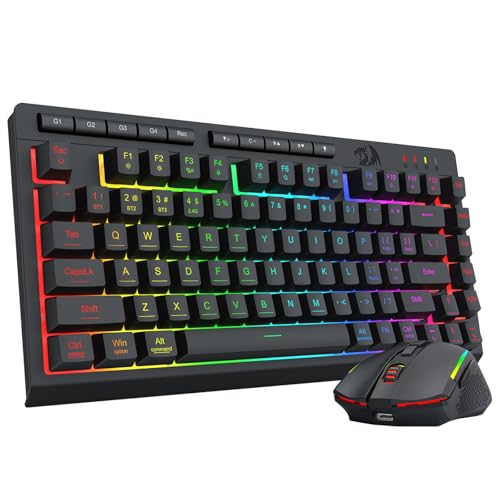
Redragon 75% Wireless Keyboard and Mouse Combo
Best for: space-saving multi-device gaming and desk setups
- Connectivity
- Wireless (what this guide is about)
- Keyboard Form Factor
- 75%
- Power Source
- Built-in rechargeable battery
- Mouse DPI
- 12800 DPI
- Backlighting
- 16.8M RGB
- Use
- Gaming
View on Amazon: Redragon 75% Wireless Keyboard and Mouse Combo
This combo pairs a 75% tenkeyless layout with a programmable mouse using a single 2-in-1 2.4GHz receiver, Bluetooth 5.0, or USB-C wired connections. You get a 4000mAh keyboard battery delivering up to 300 hours with backlighting off, alongside a mouse offering up to 12,800 DPI and a 1000Hz polling rate. It suits you if you need compact wireless gaming gear across multiple platforms without occupying extra USB ports.
Pros
- Tri-mode connectivity via Bluetooth 5.0, 2.4GHz wireless, and USB-C
- Single 2-in-1 receiver operates both keyboard and mouse
- Mouse sensor adjusts from 100 to 12,800 DPI with up to 1000Hz polling
- 4000mAh keyboard battery lasts up to 300 hours with lights off
Cons
- No dedicated numeric keypad
- Anti-ghosting covers 26 keys rather than full-key rollover
Good fit if
- You want a compact 75% layout to free up desk space for mouse movement.
- You need tri-mode wireless switching between PC, mobile, or console hardware.
- You require adjustable mouse sensitivity up to 12,800 DPI and a 1000Hz polling rate.
Skip if
- You require a dedicated numeric keypad for daily data entry.
- You need full N-key rollover across every key simultaneously.
Verdict: Redragon 75% Wireless Keyboard and Mouse Combo delivers versatile tri-mode connectivity, high-DPI mouse tracking, and space-saving portability. It balances competitive desktop specs and multi-device utility without taking up multiple USB ports.
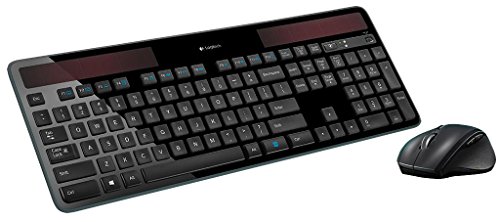
Logitech MK750 Wireless Solar Combo
Best for: low-maintenance wireless power efficiency
- Connectivity
- Wireless (what this guide is about)
- Power Source
- Solar (keyboard)
- Color
- Black
- Dimensions
- 19 × 7.9 × 1.4 inches
- Weight
- 3 pounds
The Logitech MK750 combines the K750 light-powered wireless solar keyboard with the Marathon wireless mouse. Operating via Logitech Unifying wireless technology, this black combo eliminates manual battery swaps on the keyboard while offering up to a 3-year mouse battery life. Measuring 19 inches long and weighing 3 pounds, it suits you if you want dependable power efficiency on a permanent desk setup.
Pros
- Light-powered solar keyboard charges from available light
- Marathon wireless mouse delivers up to a 3-year battery life
- Advanced wireless Unifying receiver technology
- Full-size dimensions with 19-inch width
Cons
- At 19 inches long and 3 pounds, it is not built for travel
- No Bluetooth connectivity specified in the product data
- Available only in a black finish
Good fit if
- You want a keyboard powered by light without replacing batteries.
- You prioritize extended mouse runtimes up to 3 years.
- You use Logitech Unifying wireless connections for your setup.
Skip if
- You need a compact setup smaller than 19 inches wide.
- You require Bluetooth support for mobile devices without USB ports.
Verdict: Logitech MK750 Wireless Solar Combo pairs light-driven keyboard charging with a 3-year mouse battery using Unifying wireless connectivity. It serves as a dependable desktop solution when you want long-lasting wireless power without frequent battery maintenance.

Logitech MK270 Full-Size Wireless Combo
Best for: standard office desks needing long battery life
- Connectivity
- Wireless (what this guide is about)
- Keyboard Form Factor
- Full-size
- Color
- Black
- Dimensions
- 20.1 × 6.22 × 1.81 inches
- Weight
- 1.05 pounds
The Logitech MK270 is a full-size wireless desktop setup featuring a dedicated number pad, eight multimedia hotkeys, and an ambidextrous compact mouse. It pairs using a single plug-and-play USB receiver with up to 33 feet of wireless range. Rated for 36 months of keyboard power and 12 months of mouse battery life, this set suits you if you need a dependable, low-maintenance daily typing layout for office tasks.
Pros
- Up to 36-month keyboard and 12-month mouse battery life
- Full-size layout with number pad and 8 multimedia hotkeys
- Spill-resistant keyboard build with adjustable tilt legs
- Ambidextrous compact mouse fits left- or right-handed use
Cons
- Mouse is compact rather than full-size
- Lacks an integrated palm rest
- Requires a USB receiver with no Bluetooth connectivity listed
Good fit if
- You want a full-size layout with a dedicated number pad and media keys.
- You prioritize multi-year battery life with manual on/off power switches.
- You need a spill-resistant keyboard for desk use.
Skip if
- You prefer a full-size ergonomic mouse with contoured rubber grips.
- You need Bluetooth connectivity without occupying a USB port.
Verdict: Logitech MK270 Full-Size Wireless Combo delivers essential full-size desktop functionality with long battery life and spill resistance. It provides reliable everyday typing and navigation without extra complexity.
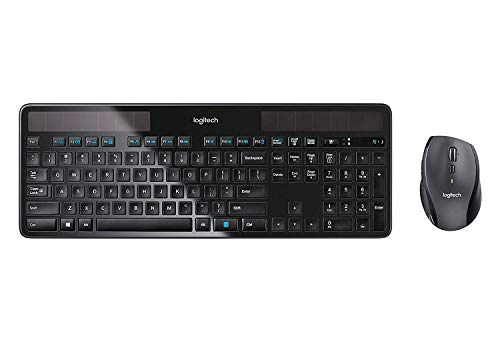
Logitech Wireless Solar Keyboard and Mouse
Best for: Windows setups needing low-maintenance solar power
- Connectivity
- Wireless (what this guide is about)
- Power Source
- Solar-powered (keyboard)
- Color
- Black
- Operating System
- Windows
- Dimensions
- 18 × 8 × 2 inches
- Weight
- 3 pounds
This wireless set includes a solar-powered keyboard and a marathon mouse. You get Logitech Unifying wireless connectivity, an 18-inch keyboard layout designed for Windows, and solar charging that works in indoor or outdoor light. The bundled mouse provides a 3-year battery life. This package suits you if you want continuous keyboard operation without battery replacements while working at a Windows workstation.
Pros
- Keyboard charges using indoor and outdoor light
- Marathon wireless mouse battery lasts up to 3 years
- Logitech Unifying wireless connectivity for paired operation
- Smart power management maintains keyboard function in low light
Cons
- Keyboard layout is designed specifically for Windows
- Mouse relies on battery power rather than solar charging
Good fit if
- You want a keyboard that stays powered using room light
- You use a Windows operating system and want matching keys
- You need a mouse with multi-year battery endurance
Skip if
- You require an operating system other than Windows
- You want a mouse that also features solar recharging
Verdict: Logitech Wireless Solar Keyboard and Mouse provides consistent desktop typing by drawing continuous power from ambient light, paired with a long-lasting companion mouse.

Logitech MK470 Slim Compact Wireless Combo
Best for: Quiet Windows productivity in compact work spaces
- Connectivity
- Wireless (what this guide is about)
- Keyboard Form Factor
- Compact
- Switch Type
- Low-profile scissor
- Mouse DPI
- 1000 DPI
- Dimensions
- 18 × 6 × 1.4 inches
- Weight
- 1.46 pounds
The Logitech MK470 Slim Compact Wireless Combo gives you a low-profile keyboard with scissor switches and an integrated number pad alongside an ambidextrous optical mouse. It links to your computer using a single 2.4 GHz USB nano receiver with up to 10 meters of range. Rated for 36 months of keyboard battery life and 18 months for the mouse, this set suits you if you want a quiet, space-saving desktop setup for Windows productivity.
Pros
- Up to 36 months keyboard and 18 months mouse battery life
- 2.4 GHz wireless connection via USB receiver with 10-meter range
- Low-profile scissor keys with an integrated number pad
- 12 customizable FN shortcuts via Logi Options software
Cons
- Mouse sensor resolution is fixed at 1000 DPI
- Uses a USB receiver with no Bluetooth connectivity listed
- Key layout is specifically optimized for Windows
Good fit if
- You need a quiet, low-profile keyboard that includes a numeric keypad.
- You work primarily on a Windows system with an available USB-A port.
- You want multi-year battery life without frequent battery replacements.
Skip if
- You require adjustable mouse DPI settings higher than 1000 DPI.
- You need Bluetooth connectivity for devices without standard USB ports.
Verdict: Logitech MK470 Slim Compact Wireless Combo pairs quiet scissor keys and an ambidextrous mouse with extended battery life for daily office tasks. Its compact footprint saves desk space while retaining a full dedicated number pad.
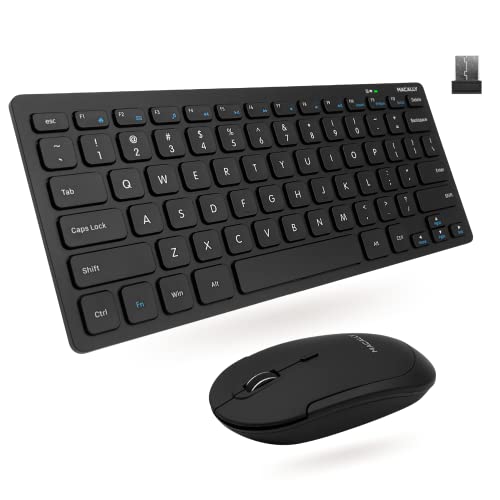
Macally Compact Wireless Keyboard and Mouse
Best for: compact PC setups needing quiet scissor keys
- Connectivity
- Wireless (what this guide is about)
- Keyboard Form Factor
- Compact
- Switch Type
- Slim scissor flex
- Mouse DPI
- 800 / 1200 / 1600 DPI
- Color
- Black
- Noise Level
- Silent
The Macally Compact Wireless Keyboard and Mouse provides a space-saving setup using a single 2.4GHz RF USB dongle with up to a 30-foot range. You get a mini 78-key keyboard featuring slim scissor-flex switches and 12 shortcuts, paired with a silent three-button mouse offering 800, 1200, and 1600 DPI settings. It suits you if you need a lightweight, quiet workstation pair for PC use.
Pros
- Operates over 2.4GHz RF up to 30 feet using a single USB receiver
- Compact 78-key layout with slim scissor-flex switches and 12 shortcut keys
- Silent mouse includes switchable 800, 1200, and 1600 DPI settings
- Total bundle weight is 0.75 pounds
Cons
- Lacks a dedicated numeric keypad
- No Bluetooth support listed, requiring an open USB port
- Mouse provides only a basic three-button configuration
Good fit if
- You want a compact 78-key footprint to conserve desk space.
- You need a mouse with adjustable DPI and quiet clicks.
- You prefer connecting both devices through a single USB dongle.
Skip if
- You require a dedicated number pad for data entry.
- You need native Bluetooth connectivity without a USB-A port.
- You want extra side buttons on your mouse for navigation.
Verdict: Macally Compact Wireless Keyboard and Mouse delivers a space-saving 78-key layout and a quiet three-button mouse through one USB receiver. It provides straightforward, low-profile typing and cursor control for PC workstations.

Logitech MK295 Full-Size Silent Wireless Combo
Best for: Quiet open-office desks running Windows or Chrome OS
- Connectivity
- Wireless (what this guide is about)
- Keyboard Form Factor
- Full-size
- Ergonomic Features
- Adjustable tilt legs
- Noise Level
- Silent
- Dimensions
- 0.7 × 17.4 × 5.86 inches
View on Amazon: Logitech MK295 Full-Size Silent Wireless Combo
Logitech MK295 Full-Size Silent Wireless Combo provides a quiet workspace setup. You get a full-size keyboard with a dedicated number pad and eight hotkeys alongside a contoured wireless mouse. Both connect through a single 2.4 GHz USB receiver with a 10-meter range. Featuring SilentTouch technology that cuts 90 percent of noise, this pair suits you if you need quiet typing and multi-year battery life in an open office.
Pros
- SilentTouch technology reduces typing and clicking noise by 90 percent
- Battery life rated at 36 months for keyboard and 18 months for mouse
- Includes eight dedicated shortcut keys and an integrated numeric keypad
- Spill-resistant keyboard build with tilt legs for height adjustment
Cons
- Official compatibility limited to Windows and Chrome OS
- Requires a USB-A port for the 2.4 GHz receiver with no Bluetooth support
Good fit if
- You want a low-noise, full-size keyboard and mouse for shared spaces.
- You prefer replaceable batteries with multi-year lifespans instead of recharging cables.
- You work on Windows or Chrome OS hardware with standard USB-A ports.
Skip if
- You require Bluetooth connectivity for devices without USB ports.
- You run macOS or another operating system outside Windows and Chrome OS.
Verdict: Logitech MK295 Full-Size Silent Wireless Combo delivers reliable 2.4 GHz wireless connectivity and significant noise reduction for shared workspaces. It pairs long battery life with a complete number pad, provided your setup uses Windows or Chrome OS.

Perixx Compact Ergonomic Wireless Keyboard and Mouse
Best for: modular Windows ergonomic typing and vertical mousing
- Connectivity
- Wireless (what this guide is about)
- Keyboard Form Factor
- Compact
- Ergonomic Features
- Vertical mouse, adjustable palm rest
- Power Source
- 4 x AAA alkaline batteries
- Switch Type
- Membrane low profile
- Mouse DPI
- 800 / 1600 DPI
View on Amazon: Perixx Compact Ergonomic Wireless Keyboard and Mouse
This 3-in-1 wireless combo includes a compact ergonomic keyboard, a standalone numeric keypad, and an upright vertical mouse. All three devices connect via a single 2.4 GHz USB nano receiver with a 30-foot range. The setup features a detachable magnetic front tilt base and an adjustable 800 or 1600 DPI mouse. It suits you if you want modular typing and vertical mousing on a Windows desktop.
Pros
- Single 2.4 GHz USB receiver connects the keyboard, keypad, and mouse
- Vertical mouse includes silent primary clicks and 800 or 1600 DPI options
- Detachable magnetic base allows customizable front tilt elevation
- Separate wireless numeric keypad includes Calculator, Tab, and 00 keys
Cons
- Requires four AAA batteries that are not included
- Official compatibility is limited to Windows systems
- Mouse scroll wheel and side buttons are not silent
Good fit if
- You want a vertical mouse paired with an ergonomic keyboard
- You prefer a separate numeric keypad you can reposition or set aside
- You run Windows 7, 8, 10, or 11 on your computer
Skip if
- You need native macOS or ChromeOS support
- You prefer rechargeable hardware over disposable AAA batteries
- You require fully silent operation on every mouse button and wheel
Verdict: Perixx Compact Ergonomic Wireless Keyboard and Mouse provides a flexible three-piece layout with a neutral-grip vertical mouse and modular keypad over a single 2.4 GHz connection. It gives Windows users a customizable ergonomic workspace without multiple USB dongles.

Logitech Pebble 2 Compact Silent Combo
Best for: multi-device users needing compact, quiet peripherals
- Connectivity
- Wireless (what this guide is about)
- Keyboard Form Factor
- Compact
- Multi-Device Pairing
- 3 devices
- Color
- Black
- Noise Level
- Silent
- Dimensions
- 14.2 × 5.3 × 1.41 inches
The Logitech Pebble 2 Silent Compact Wireless Keyboard and Mouse Combo pairs a compact keyboard with an ultra-slim mouse. You get Bluetooth connectivity for up to three devices alongside a Logi Bolt USB receiver. The keyboard provides a three-year battery life, while the mouse offers two years. Its quiet laptop-style keys and silent mouse buttons suit noise-sensitive workspaces, though the compact layout lacks a dedicated numeric keypad.
Pros
- Connects to three devices via Bluetooth with one-button switching
- Includes Logi Bolt USB receiver alongside Bluetooth
- Three-year keyboard and two-year mouse battery life
- Silent mouse clicks and quiet laptop-style keys
- Ten customizable Fn keys and programmable middle button
Cons
- Compact layout omits a dedicated numeric keypad
- No integrated key backlighting listed in specifications
- Uses replaceable batteries instead of USB recharging
Good fit if
- You switch between multiple Bluetooth devices during daily work
- You need a compact, low-noise setup for shared spaces
- You prefer multi-year runtimes over regular recharging
Skip if
- You require a dedicated numeric keypad for data entry
- You work in dim environments requiring backlit keys
- You prefer internal USB-rechargeable batteries
Verdict: Logitech Pebble 2 Compact Silent Combo delivers reliable multi-device wireless pairing and quiet operation in a portable build. It works well if you need an unobtrusive setup and do not rely on a number pad.

Logitech Pebble 2 Compact Mac Keyboard and Mouse Combo
Best for: multi-device Apple setups and mobile desks
- Connectivity
- Wireless (what this guide is about)
- Keyboard Form Factor
- Compact
- Multi-Device Pairing
- 3 devices
- Operating System
- Mac
- Dimensions
- 11 × 5 × 0.5 inches
- Weight
- 14.6 ounces
View on Amazon: Logitech Pebble 2 Compact Mac Keyboard and Mouse Combo
This compact wireless pair gives you a low-profile keyboard and mouse layout built for Apple hardware. It pairs via Bluetooth across up to three devices running macOS, iPadOS, or iOS. The set weighs 0.915 pounds and measures 11 inches long by 0.5 inches high. Battery ratings reach three years on the keyboard and two years on the mouse using included batteries. It suits mobile desk setups requiring quiet keys.
Pros
- Pairs with up to three Apple devices via Bluetooth
- Up to three-year keyboard and two-year mouse battery life
- Ten customizable Fn keys and programmable mouse middle button
- Lightweight 0.915-pound total weight and slim 0.5-inch profile
Cons
- No dedicated number pad on the compact layout
- No 2.4GHz USB receiver included for non-Bluetooth connections
Good fit if
- You switch typing tasks between a Mac, iPad, and iPhone.
- You need a portable desk set weighing under one pound.
- You prefer quiet laptop-style keys and silent clicks.
Skip if
- You enter data frequently and require a full numeric keypad.
- You need a USB receiver rather than a Bluetooth connection.
Verdict: Logitech Pebble 2 Compact Mac Keyboard and Mouse Combo delivers multi-device Bluetooth switching and multi-year battery life in an ultra-portable profile. It is a practical match if you work across several Apple displays.

Logitech Wave Keys Wireless Ergonomic Combo
Best for: ergonomic typing with cushioned palm support
- Connectivity
- Wireless (what this guide is about)
- Keyboard Form Factor
- Compact
- Ergonomic Features
- Wave layout, cushioned palm rest
- Design
- Ergonomic
- Dimensions
- 18 × 9.32 × 2.16 inches
The Logitech Wave Keys Wireless Ergonomic Combo includes a wave-shaped wireless keyboard and a Signature M550 L mouse. The keyboard features a built-in cushioned memory-foam palm rest and supports both Bluetooth and Logi Bolt wireless connections across multiple operating systems. The paired mouse features SilentTouch clicking and SmartWheel dual-mode scrolling. This setup suits you if you want an ergonomic typing angle and dedicated wrist support for desktop work.
Pros
- Cushioned memory-foam palm rest integrated into the keyboard
- Dual connectivity via Bluetooth and Logi Bolt wireless receiver
- SmartWheel mouse offers line-by-line and fast scrolling modes
- SilentTouch technology reduces mouse click noise
Cons
- Easy-Switch multi-device toggle works on the keyboard but not the mouse
- Mouse size is tailored specifically for medium to large hands
Good fit if
- You want an integrated memory-foam wrist rest to support your palms.
- You have medium to large hands suited for the M550 L mouse.
- You switch your keyboard between multiple devices using Bluetooth or Logi Bolt.
Skip if
- You need your mouse to switch seamlessly across multiple paired computers.
- You have smaller hands that find large-format mice uncomfortable.
Verdict: Logitech Wave Keys Wireless Ergonomic Combo provides structured wrist support and quiet navigation for multi-OS desktop workstations. It delivers ergonomic wave alignment and silent scrolling, though the mouse lacks the keyboard's multi-device switching.

Logitech Signature Slim Full-Size Wireless Combo
Best for: multi-device workflows across desks and laptops
- Connectivity
- Wireless (what this guide is about)
- Keyboard Form Factor
- Full-size
- Ergonomic Features
- Contoured mouse
- Multi-Device Pairing
- 3 devices (keyboard)
View on Amazon: Logitech Signature Slim Full-Size Wireless Combo
The Logitech Signature Slim Full-Size Wireless Combo pairs the K950 full-size keyboard with the M750 L quiet mouse. You connect via Bluetooth or Logi Bolt across Windows, macOS, Chrome OS, Linux, Android, and iOS. The keyboard lets you switch between three paired devices with one tap. This setup suits you if you juggle multiple computers across your workspace and want low-noise laptop-style keys alongside a contoured mouse.
Pros
- Connects via Bluetooth or Logi Bolt receiver
- Three-device pairing with one-tap keyboard switching
- M750 L mouse features SmartWheel scrolling and SilentTouch clicking
- Customizable keys and shortcuts via Logi Options+ app
Cons
- Logi Options+ customization app supports only Windows and macOS
- M750 L mouse is dimensioned specifically for larger hands
- No key backlighting listed in specifications
Good fit if
- You switch typing frequently across up to three different devices.
- You want a full-size layout with low-profile, laptop-style keys.
- You prefer a silent-click mouse designed for larger hands.
Skip if
- You need software customization on Chrome OS, Linux, or mobile platforms.
- You have smaller hands and prefer a compact mouse.
- You require backlit keys for dark working environments.
Verdict: Logitech Signature Slim Full-Size Wireless Combo delivers seamless multi-device switching and quiet operation across desktop and mobile platforms. Its full-size layout and large-handed quiet mouse make it a practical tool for cross-device workflows.
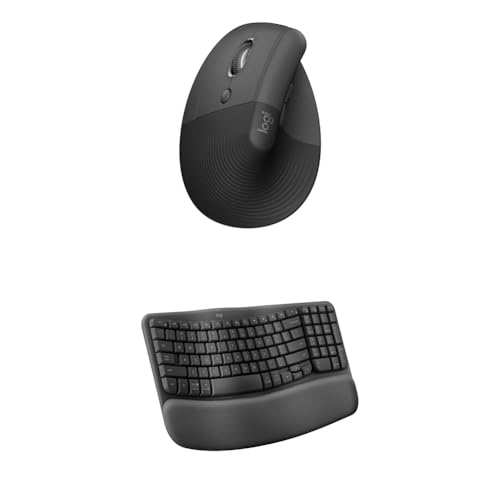
Logitech Wave Keys & Lift Left-Handed Wireless Combo
Best for: left-handed users seeking an ergonomic wireless setup
- Connectivity
- Wireless (what this guide is about)
- Keyboard Form Factor
- Compact
- Ergonomic Features
- Wave layout, palm rest, vertical mouse
- Design
- Ergonomic, Left-Handed
- Operating System
- Mac, Windows
View on Amazon: Logitech Wave Keys & Lift Left-Handed Wireless Combo
This wireless setup pairs a Wave Keys compact ergonomic keyboard with a dedicated left-handed Lift vertical mouse. You get a wavy keyboard layout with an integrated memory-foam palm rest alongside a 57-degree upright mouse shaped specifically for small-to-medium left hands. It supports both Windows and Mac operating systems, making it a tailored workspace option if you need full ergonomic wrist and forearm alignment designed for left-hand mousing.
Pros
- Dedicated left-handed vertical mouse with a 57-degree angle
- Keyboard includes an integrated cushioned palm rest with memory foam
- Dual compatibility with Windows and Mac operating systems
- Wavy ergonomic key layout designed for neutral forearm posture
Cons
- Mouse is sculpted specifically for small to medium hands
- Dedicated left-handed mouse design excludes right-handed use
Good fit if
- You are a left-handed worker with small to medium hands
- You want an ergonomic wavy keyboard with built-in memory-foam wrist support
- You need wireless multi-OS support for Windows and Mac
Skip if
- You have large hands that exceed the mouse sizing specifications
- You prefer a flat keyboard without an integrated wrist rest
Verdict: Logitech Wave Keys & Lift Left-Handed Wireless Combo delivers dedicated left-handed vertical navigation alongside a cushioned, wave-shaped ergonomic typing layout. It provides a complete posture-focused workspace for Mac and Windows users who mouse with their left hand.

TECKNET Mini Silent Wireless Combo
Best for: compact desks and travel-ready quiet typing
- Connectivity
- Wireless (what this guide is about)
- Keyboard Form Factor
- Compact
- Power Source
- AAA batteries
- Switch Type
- Scissor switch
- Mouse DPI
- 1600 DPI
- Color
- Black
This compact wireless combo pairs a mini scissor-switch keyboard with a silent mouse using a single 2.4GHz USB receiver. At 11.22 inches long and under 0.8 pounds, it takes up minimal desk space and operates up to 49 feet away. You need four AAA batteries to power both units. It suits mobile workers who need a quiet, portable setup with physical shortcut keys for standard USB-A devices.
Pros
- Shared 2.4GHz USB nano receiver with up to 49-foot range
- Lightweight 0.79-pound compact footprint measuring 11.22 inches long
- Quiet scissor-switch keys and silent mouse clicks
- 36-month manufacturer warranty
Cons
- Requires four AAA batteries that are not included
- No Bluetooth connectivity, requiring an available USB-A port
- Multimedia shortcut keys are not fully compatible with macOS
Good fit if
- You need a lightweight, travel-friendly keyboard and mouse for tight workspaces.
- You prefer silent scissor switches and quiet mouse clicks to minimize noise.
- You have an open USB-A port and want plug-and-play 2.4GHz wireless pairing.
Skip if
- You need Bluetooth connectivity for hardware without standard USB-A ports.
- You prefer a full-size keyboard layout with a numeric keypad.
- You rely on full multimedia shortcut support on macOS.
Verdict: TECKNET Mini Silent Wireless Combo delivers reliable 2.4GHz cordless operation and quiet typing in a compact, travel-ready footprint. It is an efficient choice if your workflow requires a space-saving peripheral set for USB-A systems.

SABLUTE Compact Backlit Wireless Combo
Best for: Low-light typing with compact numeric input
- Connectivity
- Wireless (what this guide is about)
- Keyboard Form Factor
- Compact
- Power Source
- Rechargeable battery
- Switch Type
- Scissor
- Backlighting
- 7-color switchable backlight
- Dimensions
- 14.8 × 5.4 × 0.78 inches
This wireless combo pairs a 102-key compact keyboard with a 6-button mouse using a single shared USB receiver. The keyboard features low-profile scissor switches, a built-in number pad, and 7-color backlighting with four brightness settings. Both devices recharge via USB-C and support Windows and Mac key layouts. It suits you if you need illuminated keys and dedicated numeric input in a slim 14.8-inch footprint.
Pros
- 7-color keyboard backlighting with 4 brightness levels
- Rechargeable battery via USB-C with auto-sleep power saving
- Compact 102-key layout includes a dedicated number pad
- 6-button mouse with forward and backward navigation buttons
Cons
- Mouse RGB changes color automatically without manual selection controls
- Requires a USB port for the shared receiver with no Bluetooth support listed
Good fit if
- You work in low-light spaces and require backlit keys.
- You want a space-saving keyboard that retains a full number pad.
- You switch between Windows and Mac systems using dedicated key shortcuts.
Skip if
- You need native Bluetooth connectivity for devices lacking USB-A ports.
- You prefer a traditional full-size layout with separated navigation clusters.
Verdict: SABLUTE Compact Backlit Wireless Combo delivers illuminated scissor keys, a number pad, and USB-C recharging in a space-saving layout. It gives you flexible typing tools across Windows and Mac environments using a single USB receiver.
Specifications side by side
| Spec | Redragon 75% Wireless Keyboard and Mouse Combo | Logitech MK750 Wireless Solar Combo | Logitech MK270 Full-Size Wireless Combo | Logitech Wireless Solar Keyboard and Mouse | Logitech MK470 Slim Compact Wireless Combo | Macally Compact Wireless Keyboard and Mouse | Logitech MK295 Full-Size Silent Wireless Combo | Perixx Compact Ergonomic Wireless Keyboard and Mouse | Logitech Pebble 2 Compact Silent Combo | Logitech Pebble 2 Compact Mac Keyboard and Mouse Combo | Logitech Wave Keys Wireless Ergonomic Combo | Logitech Signature Slim Full-Size Wireless Combo | Logitech Wave Keys & Lift Left-Handed Wireless Combo | TECKNET Mini Silent Wireless Combo | SABLUTE Compact Backlit Wireless Combo |
|---|---|---|---|---|---|---|---|---|---|---|---|---|---|---|---|
| Connectivity | Bluetooth 5.0, 2.4GHz, USB-C wired | Advanced wireless Unifying | Wireless USB receiver | Wireless Unifying | 2.4 GHz wireless (USB nano receiver) | 2.4 GHz RF (USB dongle) | 2.4 GHz USB receiver | 2.4 GHz USB receiver | Bluetooth, Logi Bolt USB receiver | Bluetooth | Bluetooth, Logi Bolt | Bluetooth, Logi Bolt | Wireless | 2.4GHz USB receiver | Shared USB receiver |
| Keyboard Form Factor | 75% | not specified | Full-size | not specified | Compact | Compact | Full-size | Compact | Compact | Compact | Compact | Full-size | Compact | Compact | Compact |
| Ergonomic Features | not specified | not specified | not specified | not specified | not specified | not specified | Adjustable tilt legs | Vertical mouse, adjustable palm rest | not specified | not specified | Wave layout, cushioned palm rest | Contoured mouse | Wave layout, palm rest, vertical mouse | not specified | not specified |
| Multi-Device Pairing | not specified | not specified | not specified | not specified | not specified | not specified | not specified | not specified | 3 devices | 3 devices | not specified | 3 devices (keyboard) | not specified | not specified | not specified |
| Power Source | Built-in rechargeable battery | Solar (keyboard) | not specified | Solar-powered (keyboard) | not specified | not specified | not specified | 4 x AAA alkaline batteries | not specified | not specified | not specified | not specified | not specified | AAA batteries | Rechargeable battery |
| Switch Type | not specified | not specified | not specified | not specified | Low-profile scissor | Slim scissor flex | not specified | Membrane low profile | not specified | not specified | not specified | not specified | not specified | Scissor switch | Scissor |
| Mouse DPI | 12800 DPI | not specified | not specified | not specified | 1000 DPI | 800 / 1200 / 1600 DPI | not specified | 800 / 1600 DPI | not specified | not specified | not specified | not specified | not specified | 1600 DPI | not specified |
| Backlighting | 16.8M RGB | not specified | not specified | not specified | not specified | not specified | not specified | not specified | not specified | not specified | not specified | not specified | not specified | not specified | 7-color switchable backlight |
| Form Factor | 75% | not specified | Full-Size | not specified | Compact | Mini | Full-Size | Compact | Compact | Compact | not specified | not specified | not specified | Mini | Compact |
| Use | Gaming | not specified | not specified | not specified | not specified | not specified | not specified | not specified | not specified | not specified | not specified | not specified | not specified | not specified | not specified |
| Design | not specified | not specified | not specified | not specified | not specified | not specified | not specified | Ergonomic | not specified | not specified | Ergonomic | not specified | Ergonomic, Left-Handed | not specified | not specified |
| Color | Gaming Combo | Black | Black | Black | Graphite | Black | Off-White | Black | Black | Tonal Graphite | Graphite | Graphite | Graphite | Black | Space Gray |
| Shape | not specified | not specified | not specified | not specified | not specified | not specified | not specified | Vertical | not specified | not specified | not specified | not specified | Vertical | not specified | not specified |
| Operating System | not specified | not specified | not specified | Windows | not specified | not specified | not specified | not specified | not specified | Mac | not specified | not specified | Mac, Windows | Mac, Windows | not specified |
| Noise Level | not specified | not specified | not specified | not specified | not specified | Silent | Silent | not specified | Silent | not specified | not specified | not specified | not specified | Silent | not specified |
| Weight | 1.13 pounds | 3 pounds | 1.05 pounds | 3 pounds | 1.46 pounds | 12 ounces | not specified | 2.58 pounds | 1.08 pounds | 14.6 ounces | not specified | not specified | not specified | 12.7 ounces | 1.52 pounds |
| Dimensions | not specified | 19 × 7.9 × 1.4 inches | 20.1 × 6.22 × 1.81 inches | 18 × 8 × 2 inches | 18 × 6 × 1.4 inches | 0.79 × 1.18 × 0.5 inches | 0.7 × 17.4 × 5.86 inches | 13.8 × 8.94 × 2.56 inches | 14.2 × 5.3 × 1.41 inches | 11 × 5 × 0.5 inches | 18 × 9.32 × 2.16 inches | not specified | not specified | 11.2 × 4.72 × 0.79 inches | 14.8 × 5.4 × 0.78 inches |
| Size | TKL | not specified | 1 Pack | not specified | 21.3 | Compact Combo | (Pack of 1) | Pack of 1 | One Size | 2 Piece Set | not specified | (Pack of 1) | Combo | Small | 14.8x5.4x0.78 inches |
| Model | S155-PRO | 920-004861 | 920-008813 | not specified | 920-009437 | RFCOMPACTKEYCB | 920-009783 | PD-606AUS-11967 | 920-012415 | 920-012200 | 920-012060 | 920-012469 | not specified | X315 | KM61PRO |
If you also need portable audio for your desk, you can review hardware specifications for the best wireless earbuds to compare battery life and Bluetooth codecs.
How to Choose Your Wireless Combo
-
Select Your Power Source
Check whether a combo uses replaceable batteries, internal rechargeable cells, or ambient light. Solar models like the Logitech Wireless Solar Keyboard and Mouse draw energy continuously from indoor lighting, eliminating battery swaps and plug-in cords entirely. Standard battery setups require keeping spares ready, while rechargeable options require occasional USB connection sessions. Review the listed power source attribute to ensure the setup matches your desk layout and maintenance habits. Choose solar or rechargeable models if you prefer minimal maintenance at your primary workstation.
-
Check Operating Noise Level
Look at acoustic ratings if you share a room or take frequent voice calls. Standard membrane or mechanical switches produce audible click feedback with every stroke. Combos with a silent noise level rating, such as the Logitech MK295 Full-Size Silent Wireless Combo, use dampening hardware to reduce key and button sounds significantly. Verify the noise level attribute on the spec sheet if you type in open-plan offices or quiet shared spaces. If working alone, acoustic reduction is less critical.
-
Evaluate Ergonomic Shape
Assess the physical design if you spend long uninterrupted hours typing and mousing. Traditional flat keyboards keep wrists straight, but ergonomic designs feature split zones, wave contours, or integrated palm rests to promote neutral arm alignment. Mouse geometry also matters: vertical shapes support a natural handshake grip rather than a flat palm position. Combos like the Perixx Compact Ergonomic Wireless Keyboard and Mouse combine vertical mice with split contours. Check the design, shape, and wrist rest specs to support your physical posture needs.
-
Verify Operating System Support
Check the supported operating system specs before buying to prevent layout mismatches. While basic typing works across platforms, specific function keys, command buttons, and modifier keys depend on OS alignment. Products like the Logitech Pebble 2 Compact Mac Keyboard and Mouse Combo are optimized specifically for Apple hardware layouts. Other models list Windows or Chrome OS compatibility directly in their attributes. Inspect the operating system specification to guarantee that shortcut actions, media controls, and modifier key labels match your computer platform natively.
-
Confirm Mouse Handedness
Examine mouse shape specifications to guarantee proper hand compatibility. Most bundled mice feature symmetrical, ambidextrous shells that work in either hand, but specialized contoured or vertical mice are strictly handed. If you navigate with your left hand, standard right-handed contours cause discomfort and strain. The Logitech Wave Keys & Lift Left-Handed Wireless Combo specifically provides an ergonomic vertical mouse shaped exclusively for left-handed grip. Always verify the mouse shape and handedness attributes so you do not receive a mouse built for the wrong hand.
Frequently asked questions
Can one USB receiver connect both a wireless keyboard and mouse?
Yes, many wireless combos use a single USB receiver to control both devices simultaneously. For example, the Macally Compact Wireless Keyboard and Mouse and the SABLUTE Compact Backlit Wireless Combo connect both peripherals through one shared USB dongle. This setup leaves your other computer ports open for external storage, charging cables, or other desktop accessories.
What operating systems work with wireless keyboard and mouse combos?
Operating system support depends on the specific combo specifications. The Logitech MK295 Silent Combo is designed to run on Windows and Chrome OS, while the Logitech Pebble 2 Mac Combo targets Apple setups. Other options, including the TECKNET Mini Silent Combo, provide native compatibility across both Windows and Mac environments without requiring separate hardware configurations.
Are silent wireless keyboard and mouse combos completely noiseless?
Silent combos reduce typing and clicking sounds significantly rather than silencing them entirely. Models like the Logitech MK295 Full-Size Silent Wireless Combo and the TECKNET Mini Silent Wireless Combo feature dampened keystrokes and quiet mouse switches. These designs lower acoustic distraction during calls, making them suitable choices when you share a workspace or work in quiet home environments.
How do ergonomic wireless combos differ from standard desktop sets?
Ergonomic combos feature specialized hardware shapes designed to reduce wrist strain and encourage neutral hand placement. The Perixx Compact Ergonomic Wireless Keyboard and Mouse includes a neutral-grip vertical mouse, wrist rest, and modular keypad layout. Similarly, the Logitech Wave Keys Wireless Ergonomic Combo provides structured palm support and a contoured key arrangement to improve typing comfort during extended desktop sessions.
Can you connect a wireless combo to multiple computers at once?
Certain wireless combos support multi-device pairing to switch control between computers, tablets, or phones. The Logitech Signature Slim Full-Size Wireless Combo provides multi-device switching across desktop and mobile platforms. The Logitech Pebble 2 Compact Silent Combo also features multi-device pairing specs, allowing you to alternate between paired screens without physically moving your wireless receiver between separate USB ports.
What is the difference between mini and full-size wireless combos?
The main differences are overall footprint, weight, and key arrangement. Full-size combos like the Logitech Signature Slim include an integrated numeric keypad for heavy data entry. In contrast, mini models like the Macally Compact feature a 78-key layout that weighs 0.75 pounds, while the TECKNET Mini weighs 0.79 pounds, leaving you more open desk area for mouse movement.
Are vertical mice included with ergonomic wireless combos ambidextrous?
Most vertical mice are molded for specific hand orientations rather than ambidextrous use. The Perixx Compact Ergonomic Wireless Keyboard and Mouse uses a neutral-grip vertical shape tailored to right-handed users. For left-handed navigation, the Logitech Wave Keys & Lift Left-Handed Wireless Combo supplies a dedicated left-handed vertical mouse alongside a cushioned wave-shaped keyboard to ensure proper wrist angle.