Best ZMX Mechanical Keyboard Kits in 2026: 3 Picks Compared
As an Amazon Associate we earn from qualifying purchases. Links on this page are affiliate links.
ZMX sells barebones kits, so plan to add your own switches and keycaps before you can type. All 3 here have a screen, VIA programming, a gasket mount, hot-swap sockets and three connection modes, so the main choice is size. Our top pick is the 80% GMK87, because it keeps a full navigation cluster and adds a knob for $68.99 at our last check. The 75% GMK81 was lower at $59.99, and the GMK104 adds a number pad for $80.99. These picks come from listed specs and prices, and we have not built them.
Our top pick: ZMX GMK87 80% Wireless Keyboard Kit.
Quick picks
| # | Product | Best for | Price |
|---|---|---|---|
| 1 | ZMX GMK87 80% Wireless Keyboard Kit Best overall | Most builders | Check price of ZMX GMK87 80% Wireless Keyboard Kit on Amazon |
| 2 | ZMX GMK81 75% Keyboard with Display Best budget | Compact builds on a budget | Check price of ZMX GMK81 75% Keyboard with Display on Amazon |
| 3 | ZMX Full-Size Wireless DIY Keyboard Kit Best full-size | Full-size builds | Check price of ZMX Full-Size Wireless DIY Keyboard Kit on Amazon |
Our 3 picks
ZMX GMK87 80% Wireless Keyboard Kit
Best for: Most builders
- Form Factor
- 80%
- Connectivity
- Bluetooth 5.0, 2.4GHz, USB-C wired
- Hot-Swap Support
- Yes (3-pin/5-pin)
- Backlighting
- RGB
- Mounting Style
- Gasket Mount
- Media Controls
- Volume Knob
View on Amazon: ZMX GMK87 80% Wireless Keyboard Kit Affiliate link
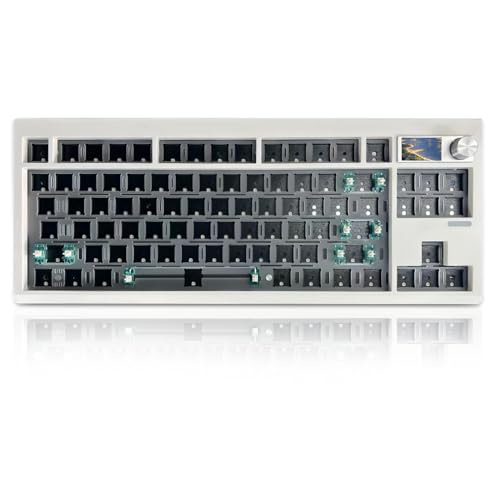
The GMK87 is our top pick for most builders. This 80% barebones kit has a TFT-LCD screen, a metal volume knob and VIA programming, plus a gasket mount and hot-swappable PCB for most 3-pin and 5-pin switches. It connects by Bluetooth 5.0, 2.4GHz or USB-C and has a 3000mAh battery and south-facing RGB.
Pros
- 80% layout with navigation keys
- TFT screen and knob
- VIA programming
- Hot-swap for 3-pin and 5-pin switches
Cons
- Switches and keycaps cost extra
- 3000mAh battery
Good fit if
- You want a familiar compact layout
- You enjoy building
Skip if
- You want a keyboard ready to type on
- You need a number pad
Verdict: The most balanced ZMX kit here.

ZMX GMK81 75% Keyboard with Display
Best for: Compact builds on a budget
- Form Factor
- 75%
- Connectivity
- Bluetooth 5.0, 2.4GHz, USB-C wired
- Hot-Swap Support
- Yes (3-pin/5-pin)
- Backlighting
- RGB
- Mounting Style
- Gasket Mount
- Use
- Gaming
View on Amazon: ZMX GMK81 75% Keyboard with Display Affiliate link
The GMK81 was the lowest-priced kit here at our last check. It is a compact 75% kit with a TFT display, VIA with three editable layers and automatic Win or Mac switching when connected. It has a gasket structure, NKRO and a 3000mAh battery, and it accepts most 3-pin and 5-pin switches.
Pros
- Lowest price here at last check
- TFT display
- Three editable layers
- Automatic Win or Mac mode
Cons
- Switches and keycaps cost extra
- Smallest layout here
Good fit if
- You want a small kit for less
- You use Windows and Mac
Skip if
- You need dedicated navigation keys
- You want a knob
Verdict: Great value for a compact build.

ZMX Full-Size Wireless DIY Keyboard Kit
Best for: Full-size builds
- Form Factor
- Full-size
- Connectivity
- Bluetooth 5.0, 2.4 GHz, USB-C wired
- Backlighting
- RGB
- Hot-Swap Support
- Hot-Swappable
- Mounting Style
- Gasket Mount
- Media Controls
- Volume Knob
View on Amazon: ZMX Full-Size Wireless DIY Keyboard Kit Affiliate link
The GMK104 is the full-size kit, with 104 keys, a number pad, a screen and a metal volume knob. It has VIA programming, NKRO, a gasket mount and hot-swappable PCB, and connects by Bluetooth 5.0, 2.4GHz or Type-C with a 4000mAh battery. It was the most expensive kit here, with stock marked low.
Pros
- Full 104-key layout
- Largest battery here
- Screen and knob
- VIA programming
Cons
- Highest price here at last check
- Needs the most switches and keycaps
Good fit if
- You need a number pad
- You want a screen on a full-size board
Skip if
- You want to keep the build cost low
- You want a small board
Verdict: The right kit if you need every key.
Specifications side by side
| Spec | ZMX GMK87 80% Wireless Keyboard Kit | ZMX GMK81 75% Keyboard with Display | ZMX Full-Size Wireless DIY Keyboard Kit |
|---|---|---|---|
| Form Factor | 80% | 75% | Full-size |
| Connectivity | Bluetooth 5.0, 2.4GHz, USB-C wired | Bluetooth 5.0, 2.4GHz, USB-C wired | Bluetooth 5.0, 2.4 GHz, USB-C wired |
| Hot-Swap Support | Yes (3-pin/5-pin) | Yes (3-pin/5-pin) | not stated |
| Backlighting | RGB | RGB | RGB |
| Mounting Style | Gasket Mount | Gasket Mount | Gasket Mount |
| Media Controls | Volume Knob | not stated | Volume Knob |
| Use | Gaming | Gaming | Gaming |
| Color | White+Knob+Screen | White+Display | Black |
| Dimensions | 14.4 × 5.8 × 1.6 inches | not stated | 14 × 5 × 1 inches |
| Weight | 1.5 pounds | 1.2 pounds | 1 pounds |
| Model | GMK87 | GMK81 | GMK104 |
How ZMX's lineup breaks down
The three kits share the same idea at different sizes. The GMK81 is a compact 75% board with a TFT screen. The GMK87 is an 80% board with a TFT screen and metal volume knob. The GMK104 is the full-size model with a number pad, screen and knob.
All three connect by Bluetooth 5.0, 2.4GHz or USB-C. The GMK81 and GMK87 list 3000mAh batteries, and the GMK104 lists 4000mAh.
How ZMX compares with other brands
ZMX kits give you a screen, VIA and wireless at a price many complete keyboards cannot match. That is useful if you already own switches and keycaps, or if you enjoy choosing them yourself.
The catch is the final cost. Once you add a full set of switches and keycaps, the total can pass the price of a ready-to-use board. If you do not want to build anything, a pre-built keyboard is the simpler choice.
If you prefer an integrated portable setup, compare hardware specs for the best tablets with keyboard.
How to choose a ZMX kit
-
Add the missing parts to your budget
These are barebones kits, so check what your chosen layout needs. The GMK104 needs the most switches and keycaps, which makes the true cost of a full-size build higher.
-
Pick your layout
Choose the GMK81 for the smallest desk footprint, the GMK87 for dedicated navigation keys, or the GMK104 if you need a number pad.
-
Confirm switch compatibility
The GMK81 and GMK87 list most 3-pin and 5-pin mechanical switches, including Cherry and Gateron styles. Check the GMK104 listing against your switches before you order.
-
Check stock and color
The GMK104 version here was marked low stock at our last check, and ZMX sells other versions at slightly different prices. Compare the options on the listing before you buy.
Frequently asked questions
What is the best ZMX keyboard kit?
The GMK87 is our top pick because it combines an 80% layout, screen, knob, VIA and three connection modes at a modest price. You still need switches and keycaps.
Which ZMX kit is cheapest?
The GMK81 was the lowest at $59.99 at our last check. It has a 75% layout, TFT screen and 3000mAh battery.
Do ZMX kits include switches and keycaps?
These are sold as barebones kits, so expect to add your own. Check the listing for the exact parts before you buy.
Which ZMX kit has a number pad?
Only the GMK104 does. It is a 104-key full-size board with a screen, knob and 4000mAh battery.
Can I program ZMX keyboards?
Yes. All 3 list VIA support for remapping keys, and the GMK81 listing adds three editable layers.