ZMX Mechanical Keyboards: 3 Picks Ranked by Specs
As an Amazon Associate we earn from qualifying purchases. Links on this page are affiliate links.
Finding the best ZMX mechanical keyboards requires looking strictly at the published specifications. ZMX offers a range of DIY kits in full-size, 80%, and 75% layouts. All models feature RGB backlighting, gasket mounting, and hot-swap support. The ZMX Full-Size Wireless DIY Keyboard Kit leads this list because it includes a dedicated volume knob for media control. We compared 3 models based solely on their technical data. This guide ranks each option by the specs provided in the product listings.
Quick picks
| # | Product | Best for | Price |
|---|---|---|---|
| 1 | ZMX Full-Size Wireless DIY Keyboard Kit Best overall | users needing full-size layout with media controls | Check price of ZMX Full-Size Wireless DIY Keyboard Kit on Amazon |
| 2 | ZMX GMK87 80% Wireless Keyboard Kit Best premium | compact wireless keyboard building | Check price of ZMX GMK87 80% Wireless Keyboard Kit on Amazon |
| 3 | ZMX GMK81 75% Keyboard with Display Best budget | compact builders wanting a built-in display | Check price of ZMX GMK81 75% Keyboard with Display on Amazon |
Our 3 picks

ZMX Full-Size Wireless DIY Keyboard Kit
Best for: users needing full-size layout with media controls
- Form Factor
- Full-size
- Connectivity
- Bluetooth 5.0, 2.4 GHz, USB-C wired
- Backlighting
- RGB
- Hot-Swap Support
- Hot-Swappable
- Mounting Style
- Gasket Mount
- Media Controls
- Volume Knob
View on Amazon: ZMX Full-Size Wireless DIY Keyboard Kit Affiliate link
The ZMX GMK104 is a full-size mechanical keyboard kit featuring a gasket mount and hot-swappable PCB. It includes a multifunctional screen and a metal volume knob for direct control. The kit supports Bluetooth 5.0, 2.4 GHz, and USB-C wired connections. A 4000mAh battery powers the device, and VIA programmability allows for deep customization. This setup suits users who want a complete feature set with a large footprint.
Pros
- Gasket mount structure with silencing pads for a cushioned typing feel
- Integrated smart display and metal volume knob for media control
- VIA programmable firmware for full key remapping and macro creation
- Triple mode connectivity with Bluetooth 5.0, 2.4 GHz, and USB-C
- Hot-swappable base supporting both 3-pin and 5-pin switches
Cons
- Full-size layout requires significant desk space
- Heavy build at 1 pound affects portability
- Barebones kit requires separate purchase of switches and keycaps
Good fit if
- You need a full-size layout with a numpad for office work
- You want physical controls like a screen and volume knob
- You prefer gasket mounting for a softer typing experience
Skip if
- You need a compact keyboard for limited desk space
- You want a pre-built keyboard without assembly
- You prioritize maximum portability and lightweight design
Verdict: The ZMX GMK104 Full-Size Mechanical Keyboard Kit is a robust option for users who value physical media controls and a spacious typing layout. It fits those who want extensive customization through VIA and gasket mounting without needing a small footprint.
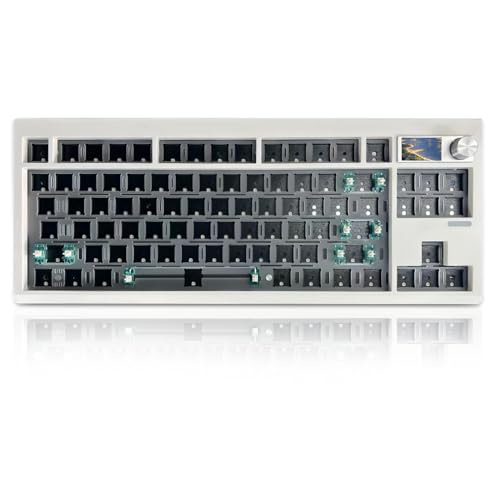
ZMX GMK87 80% Wireless Keyboard Kit
Best for: compact wireless keyboard building
- Form Factor
- 80%
- Connectivity
- Bluetooth 5.0, 2.4GHz, USB-C wired
- Hot-Swap Support
- Yes (3-pin/5-pin)
- Backlighting
- RGB
- Mounting Style
- Gasket Mount
- Media Controls
- Volume Knob
View on Amazon: ZMX GMK87 80% Wireless Keyboard Kit Affiliate link
The ZMX GMK87 is an 80% barebones kit featuring a gasket mount, hot-swappable PCB, and triple-mode connectivity. It includes a TFT-LCD screen and a metal knob for volume control. The 3000mAh battery supports Bluetooth 5.0, 2.4GHz, or wired use. VIA software allows macro customization. This compact design saves desk space while offering full functionality for typing and gaming.
Pros
- Triple-mode connectivity with Bluetooth 5.0, 2.4GHz, and USB-C wired options
- Gasket mount construction reduces vibration for a softer typing feel
- Hot-swappable PCB supports 3-pin and 5-pin mechanical switches
- Integrated metal knob and TFT-LCD screen for media and info display
- 3000mAh battery provides extended wireless usage time
Cons
- Smaller 80% layout offers fewer keys than full-size or 96% alternatives
- Barebones kit requires you to purchase switches and keycaps separately
- No mention of a dedicated remote or mobile app for screen customization
Good fit if
- You want a compact keyboard that saves desk space
- You prefer customizing switches and keycaps yourself
- You need wireless connectivity with a metal volume knob
Skip if
- You need a complete keyboard with switches and keycaps included
- You require a full-size layout with a number pad
- You want a pre-assembled device ready to use immediately
Verdict: ZMX GMK87 80% Wireless Keyboard Kit suits builders who value compact size and wireless flexibility. It fits users who enjoy tinkering with switches and want a screen and knob for quick adjustments.

ZMX GMK81 75% Keyboard with Display
Best for: compact builders wanting a built-in display
- Form Factor
- 75%
- Connectivity
- Bluetooth 5.0, 2.4GHz, USB-C wired
- Hot-Swap Support
- Yes (3-pin/5-pin)
- Backlighting
- RGB
- Mounting Style
- Gasket Mount
- Use
- Gaming
View on Amazon: ZMX GMK81 75% Keyboard with Display Affiliate link
The ZMX GMK81 is a 75% barebones kit featuring a gasket mount and a built-in TFT LCD display. It supports triple connectivity via Bluetooth 5.0, 2.4GHz, and USB-C wired modes. The hot-swappable PCB accepts 3-pin and 5-pin switches. You get south-facing RGB lighting and full VIA programmability. The 3000mAh battery supports extended wireless use. This layout offers a compact footprint with essential media keys.
Pros
- Built-in TFT LCD display for status and customization
- Gasket mount structure with sound insulation materials
- Hot-swappable PCB for 3-pin and 5-pin switches
- Triple mode connectivity: Bluetooth 5.0, 2.4GHz, and wired
- Full key programmability via VIA software
Cons
- Smaller 75% layout lacks dedicated arrow keys and numpad
- Barebones kit requires separate purchase of switches and keycaps
- No mention of physical volume knob or rotary encoder
Good fit if
- You want a compact 75% layout with a display
- You prefer gasket mounting for a softer typing feel
- You need triple connectivity for multiple devices
Skip if
- You require a full-size numpad for data entry
- You want a complete keyboard with switches included
- You prefer a traditional TKL layout without a screen
Verdict: ZMX GMK81 75% Mechanical Keyboard suits builders who want a compact, display-equipped gasket mount. It fits those prioritizing VIA programmability and triple mode connectivity over a larger footprint.
Specifications side by side
| Spec | ZMX Full-Size Wireless DIY Keyboard Kit | ZMX GMK87 80% Wireless Keyboard Kit | ZMX GMK81 75% Keyboard with Display |
|---|---|---|---|
| Form Factor | Full-size | 80% | 75% |
| Connectivity | Bluetooth 5.0, 2.4 GHz, USB-C wired | Bluetooth 5.0, 2.4GHz, USB-C wired | Bluetooth 5.0, 2.4GHz, USB-C wired |
| Hot-Swap Support | not stated | Yes (3-pin/5-pin) | Yes (3-pin/5-pin) |
| Backlighting | RGB | RGB | RGB |
| Mounting Style | Gasket Mount | Gasket Mount | Gasket Mount |
| Media Controls | Volume Knob | Volume Knob | not stated |
| Use | Gaming | Gaming | Gaming |
| Color | Black | White+Knob+Screen | White+Display |
| Dimensions | 14 × 5 × 1 inches | 14.4 × 5.8 × 1.6 inches | not stated |
| Weight | 1 pounds | 1.5 pounds | 1.2 pounds |
| Model | GMK104 | GMK87 | GMK81 |
ZMX Keyboards: Three Main Options
These kits share wireless connectivity, RGB backlighting, hot-swap support, and gasket mounting. You can choose between full-size, 80%, and 75% layouts based on your desk space. The ZMX GMK104 offers a full-size layout with a volume knob for media control. It suits users who want extensive customization and physical controls. The ZMX GMK87 provides an 80% form factor with a screen and knob. This option fits builders who value compact size and quick adjustments. The ZMX GMK81 features a 75% layout with a built-in display. It is ideal for those prioritizing VIA programmability in a smaller footprint. All models support gaming use.
Where ZMX Fits Your Build
ZMX targets builders seeking compact to full-size DIY kits. The range spans from the 75% GMK81 to the 80% GMK87 and the full-size GMK104. All models use gasket mounting and hot-swap sockets. You get RGB lighting and wireless connectivity across the board. The GMK81 adds a display, while the GMK104 and GMK87 include volume knobs. No wired-only or non-gasket options exist here. You also will not find a 60% layout or a model without a knob or screen in this specific lineup. Choose based on your preferred footprint and need for extra controls.
If you prefer an integrated portable setup, compare hardware specs for the best tablets with keyboard.
How to choose the right one
-
Check connectivity options
All listed ZMX keyboards use wireless connectivity. This means you do not need a USB cable for operation. You benefit from a cleaner desk setup. You must charge the internal battery regularly. Check the product details for battery capacity if available. Wireless latency can vary. Ensure your receiver or Bluetooth version matches your device. This choice affects how you store the keyboard when not in use.
-
Select your form factor
Layout size dictates your desk footprint. The ZMX GMK104 is a full-size layout. It includes a number pad and function row. The ZMX GMK87 is an 80% layout. It removes the number pad but keeps function keys. The ZMX GMK81 is a 75% layout. It is more compact. Choose based on your available space. Larger layouts offer more keys. Smaller layouts save desk room for mouse movement.
-
Verify hot-swap support
Hot-swap sockets allow you to change switches without soldering. All three models support this feature. You can experiment with different switch types easily. This is crucial for DIY builders. You do not need special tools to swap switches. Check the socket type if you buy third-party switches. Most use standard 3-pin or 5-pin stems. This flexibility lets you tailor the typing feel to your preference.
-
Consider mounting style
Gasket mounting isolates the PCB from the case. It reduces vibration and noise. All listed kits use this style. You get a softer, more consistent typing sound. It also protects the board from stress. This matters for durability. You do not need to adjust mounting screws often. The feel is distinct from tray mount boards. This spec is a key differentiator for typing comfort.
-
Evaluate media controls
Media controls help you manage audio quickly. The ZMX GMK104 and GMK87 include a volume knob. You can adjust volume without touching your computer. The GMK81 lacks a physical knob. It may rely on software keys. Decide if you prefer physical controls. A knob offers tactile feedback. Software controls are less intrusive. Check the attributes list for specific media features.
Frequently asked questions
Which ZMX keyboard is best for users who need a full-size layout with media controls?
The ZMX GMK104 is the top pick for this need. It features a full-size layout that includes a dedicated volume knob for easy media adjustments. This model uses gasket mounting and hot-swap sockets, allowing for extensive customization. It is designed for users who prefer a spacious typing area and physical controls over a compact footprint.
What is the most compact ZMX option with a built-in display?
The ZMX GMK81 is the best 75% choice if you want a built-in display. This kit offers a compact form factor that saves desk space while providing visual feedback through its screen. It supports VIA programmability and triple mode connectivity, making it ideal for builders who prioritize customization and a smaller footprint without sacrificing key features.
Does the ZMX GMK87 include a volume knob?
Yes, the ZMX GMK87 includes a volume knob. This 80% wireless keyboard kit is designed for builders who value compact size and quick adjustments. It also features RGB backlighting and hot-swap support, allowing you to change switches easily. The gasket mount style provides a flexible typing feel that suits many gaming and typing preferences.
Are all ZMX mechanical keyboard kits hot-swappable?
Yes, all listed ZMX kits are hot-swappable. This means you can change switches without soldering, which simplifies customization and repairs. Each model, from the full-size GMK104 to the compact GMK81, includes these sockets. This feature allows you to experiment with different switch types to find your preferred typing or gaming feel.
What mounting style do ZMX keyboards use?
ZMX keyboards use a gasket mount style. This design isolates the PCB from the case, reducing vibration and creating a softer, more consistent typing sound. All three models in this lineup share this mounting method, ensuring a comfortable and flexible typing experience regardless of whether you choose the full-size or 75% layout.
Do ZMX keyboards support wireless connectivity?
Yes, all ZMX keyboards in this list support wireless connectivity. You benefit from a cleaner desk setup without the need for a constant USB cable. Each kit includes an internal battery that requires regular charging. This wireless capability is standard across the full-size, 80%, and 75% options provided by ZMX.