Blue Switch vs Brown Switch Mechanical Keyboards: Which Should You Buy?
As an Amazon Associate we earn from qualifying purchases. Links on this page are affiliate links.
Choosing between a blue switch vs brown switch mechanical keyboard depends on your sensory preferences. Both Redragon boards offer full-size layouts with RGB backlighting and wired connectivity for gaming. The main difference lies in the switch type. One provides an audible click and tactile bump, while the other offers a softer tactile feel without noise. You should consider how much feedback you want during typing and gaming sessions.
Key differences
| Aspect | Redragon Full-Size Blue Switch Keyboard | Redragon Full-Size Aluminum Keyboard with Brown Switches |
|---|---|---|
| Switch Type | Blue Switch | Brown Switch |
| Case Material | not listed | Brushed aluminum |
| Macro Keys | 5 dedicated keys | not listed |
| Keycap Material | Double-shot | not listed |
Which one should you choose?
Choose Redragon Full-Size Blue Switch Keyboard if
- You want an audible click for clear keystroke feedback
- You prefer onboard macro recording without software
- You value double-shot keycaps for durability
Choose Redragon Full-Size Aluminum Keyboard with Brown Switches if
- You need a quieter typing experience
- You want a rigid aluminum frame for stability
- You prefer a softer tactile bump for long sessions
Verdict: Choose the Blue Switch model if you like audible feedback and dedicated macro keys. Pick the Brown Switch board if you prefer a quieter, tactile feel and a sturdy aluminum build. Both options support hot-swapping for future customization.
Blue Switch vs Brown Switch Comparison
Switch Type
The Redragon K580 features Blue switches, which deliver a distinct tactile bump and an audible click on every keystroke. This feedback is clear and sharp, making it ideal for users who enjoy sensory confirmation of their inputs. In contrast, the Redragon K556 uses Brown switches. These provide a soft tactile bump designed for all-day typing comfort without the loud noise. If you prefer silence during long sessions, the Brown switch is the practical choice. However, if you want that classic mechanical click, the Blue switch on the K580 stands out as the better option for your preference.
Build Material
Construction differs significantly between these two boards. The Redragon K556 is built with a brushed aluminum case. This tank-solid material keeps the board steady and prevents wobble during intense gaming sessions, offering a rigid feel that plastic frames often lack. The Redragon K580 does not list a specific aluminum construction in its data, implying a different material composition, likely plastic. For users who prioritize a sturdy, premium feel that resists flex, the aluminum build of the K556 offers a clear advantage. The K580 focuses more on switch replaceability rather than chassis rigidity.
Media Controls
The Redragon K580 includes dedicated media controls and a media wheel. This allows you to adjust volume or skip tracks directly on the keyboard without using software or system shortcuts. It also features five dedicated macro keys (G1-G5) for recording combos on the fly. The Redragon K556 does not mention dedicated hardware media controls or a wheel in its specifications. While it supports macro programming via companion software, it lacks the immediate physical access provided by the K580. If you frequently adjust audio levels, the K580 is more convenient.
Keycap Material
Durability of the keycaps varies. The Redragon K580 uses double-shot keycaps. This manufacturing process ensures the legends resist fading even after years of heavy use, maintaining clarity over time. The Redragon K556 does not specify its keycap material in the provided data. Without this information, you cannot verify if the legends will hold up as well as the double-shot caps on the K580. For long-term reliability and visual consistency, the double-shot construction of the K580 is a verifiable benefit that the K556 does not explicitly confirm.
Dimensions
Physical footprint and weight differ. The Redragon K580 measures 15.7 inches in height, 5.91 inches in width, and weighs 2.65 pounds. The Redragon K556 measures 17.1 inches in length, 4.88 inches in width, and weighs 2.2 pounds. The K556 is slightly longer but lighter, while the K580 is wider and heavier. These differences may affect desk space and portability. The K556’s aluminum build contributes to its density, while the K580’s weight suggests a solid base. Choose the dimensions that best fit your available desk area.
Which Redragon Keyboard Fits Your Needs
You want loud, clicky feedback for typing
The Redragon K580 uses Blue switches that produce a distinct audible click and tactile bump on every keystroke. This sensory confirmation helps you verify input accuracy without looking at the keys. The double-shot keycaps resist fading, ensuring the legends remain clear during heavy daily use. You get a sharp, satisfying sound profile that many typists prefer for rhythm and feedback.
You prefer a quiet, tactile bump
The Redragon K556 features Brown switches designed for all-day typing comfort. These switches provide a soft tactile bump without the loud click found in Blue variants. This makes them ideal for shared spaces where noise matters. The brushed aluminum build adds stability, reducing flex during intense sessions. You get a quieter experience while still maintaining clear tactile feedback for accurate typing.
You need a sturdy, wobble-free board
The Redragon K556 includes a tank-solid brushed aluminum board that keeps every keystroke steady. Unlike plastic frames, this aluminum construction prevents flex during rapid gaming or typing. The 104-key layout ensures full functionality, and the wired connection works across Windows and Mac without drivers. You benefit from a rigid platform that feels solid and reliable under fast, repeated keypresses.
Quick picks
| # | Product | Best for | Price |
|---|---|---|---|
| 1 | Redragon Full-Size Blue Switch Keyboard | Gamers seeking loud clicky feedback and macro recording | Check price of Redragon Full-Size Blue Switch Keyboard on Amazon |
| 2 | Redragon Full-Size Aluminum Keyboard with Brown Switches | Tactile typing on a sturdy aluminum board | Check price of Redragon Full-Size Aluminum Keyboard with Brown Switches on Amazon |
The products compared

Redragon Full-Size Blue Switch Keyboard
Best for: Gamers seeking loud clicky feedback and macro recording
- Switch Type
- Blue Switch (what this guide is about)
- Form Factor
- Full-size
- Connectivity
- Wired
- Backlighting
- RGB
- Keycap Material
- Double-shot
- Use
- Gaming
View on Amazon: Redragon Full-Size Blue Switch Keyboard Affiliate link
The Redragon K580 is a wired mechanical keyboard with blue switches. It offers a distinct tactile bump and audible click on every keystroke. The board includes RGB backlighting and double-shot keycaps rated for 50 million keystrokes. It features five dedicated macro keys and a media wheel. This setup suits gamers who prefer loud, clicky feedback and want to record combos without software.
Pros
- Blue switches provide a distinct tactile bump and audible click
- Double-shot keycaps resist fading and are rated for 50 million keystrokes
- Five dedicated macro keys allow on-the-fly combo recording without software
- Full anti-ghosting ensures accurate input registration during rapid multi-key combos
Cons
- Wired connectivity limits placement freedom
- Blue switches produce loud audible clicks that may disturb others
- No wireless option available in this specific model variation
Good fit if
- You prefer the loud, clicky feedback of blue switches
- You want to record macros without installing software
- You need durable double-shot keycaps for heavy gaming
Skip if
- You require a silent typing experience
- You need wireless connectivity for a cleaner desk setup
- You prefer the muted tactile bump of brown switches
Verdict: Redragon K580 Blue Switch Keyboard delivers reliable clicky feedback and durable construction for gamers who value audible keystrokes and macro customization.
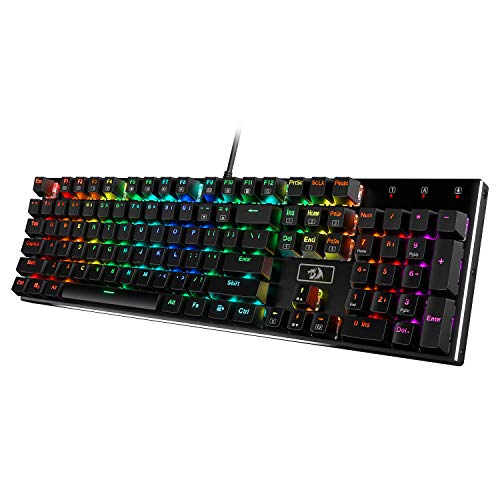
Redragon Full-Size Aluminum Keyboard with Brown Switches
Best for: Tactile typing on a sturdy aluminum board
- Switch Type
- Brown Switch (what this guide is about)
- Form Factor
- 104-Key
- Connectivity
- Wired
- Backlighting
- RGB
- Case Material
- Brushed aluminum
- Hot-Swap Support
- Hot-Swappable
View on Amazon: Redragon Full-Size Aluminum Keyboard with Brown Switches Affiliate link
This is a 104-key mechanical keyboard with a brushed aluminum case. It uses Brown switches for tactile feedback. The board features RGB backlighting and a wired connection. It supports Windows and Mac without drivers. The aluminum frame reduces wobble during typing. This model suits users who want a sturdy board with tactile keys for gaming or typing.
Pros
- Brushed aluminum case reduces wobble
- Brown switches provide tactile feedback
- 104-key layout for full functionality
- Hot-swappable sockets for switch changes
- RGB lighting with 20 preset modes
Cons
- Wired connection limits mobility
- 104-key size requires more desk space
- No wireless option available
Good fit if
- You want tactile Brown switches
- You prefer a sturdy aluminum build
- You need a full 104-key layout
Skip if
- You need wireless connectivity
- You prefer a compact 60% layout
- You want linear Red switches
Verdict: Redragon K556 Brown Switch offers a tactile typing experience with a solid aluminum frame. It fits users who value build quality and full-size layouts over portability.
Specifications side by side
| Spec | Redragon Full-Size Blue Switch Keyboard | Redragon Full-Size Aluminum Keyboard with Brown Switches |
|---|---|---|
| Switch Type | Tactile Blue | Tactile Brown |
| Form Factor | Full-size | 104-Key |
| Connectivity | Wired | Wired |
| Backlighting | RGB | RGB |
| Keycap Material | Double-shot | not stated |
| Case Material | not stated | Brushed aluminum |
| Hot-Swap Support | not stated | Hot-Swappable |
| Use | Gaming | Gaming |
| Color | Blue Switch | Black |
| Game Genre | MMO | not stated |
| Dimensions | 0.98 × 5.91 × 15.7 inches | 17.1 × 4.88 × 1.59 inches |
| Weight | 2.65 pounds | 2.2 pounds |
| Size | Full Size | Brown Switch |
| Model | K580 | K556 |
Frequently asked questions
Are blue switches louder than brown switches?
Yes, blue switches are significantly louder. They produce an audible click with every keystroke, providing clear auditory feedback. Brown switches offer a tactile bump but remain silent regarding clicks. If you prefer a quiet office environment, the brown switch is the better choice. The blue switch is ideal if you enjoy loud, distinct feedback.
Do blue switches feel clicky?
Yes, blue switches feature a distinct tactile bump combined with an audible click. This creates a sharp sensory confirmation for every input. Brown switches also have a tactile bump but lack the click. They feel more muted. The clicky nature of blue switches helps you verify accuracy without looking at the keyboard.
Can I use brown switches for gaming?
Yes, brown switches work well for gaming. The Redragon K556 uses brown switches and is rated for gaming use. The tactile bump helps you feel when a key activates without needing to press fully. While blue switches also support gaming, brown switches offer a quieter experience that may suit shared spaces better during long sessions.
Which keyboard is better for typing?
It depends on your preference for feedback. Blue switches provide audible clicks that confirm every keystroke, which many typists find satisfying. Brown switches offer a tactile bump without the noise. If you value sensory confirmation and do not mind noise, blue switches are excellent. If you prefer a quieter, smoother tactile feel, brown switches are superior.
Do these keyboards support RGB lighting?
Yes, both featured keyboards include RGB backlighting. The Redragon K580 with blue switches and the K556 with brown switches both offer this feature. RGB lighting allows you to customize the appearance of your keys. This adds visual appeal to your setup while maintaining the functional benefits of their respective switch types for your specific needs.
Are these keyboards wired or wireless?
Both listed keyboards are wired. The Redragon K580 and K556 both use wired connectivity. This ensures a stable connection without battery concerns. Wired setups often provide lower latency, which is beneficial for gaming. You will need to connect them via cable to your computer to use their full features and switch capabilities.
Is the aluminum build worth it?
The Redragon K556 features a sturdy aluminum frame. This construction adds durability and a premium feel compared to plastic boards. It fits users who value build quality over portability. The K580 uses a different construction. If you prioritize a solid, heavy board that resists flex, the aluminum model offers a more robust typing experience.
Which switch is better for a quiet office?
Brown switches are better for quiet offices. They provide a tactile bump to confirm keystrokes without the loud click of blue switches. Blue switches are very audible and may disturb colleagues. The brown switch offers a balance of feedback and silence. Choose brown if you need to minimize noise while maintaining the benefit of tactile key activation.