Das Keyboard 4 Root Review (2026): Cherry MX Brown Full-Size with Volume Knob
As an Amazon Associate we earn from qualifying purchases. Links on this page are affiliate links.
The Das Keyboard 4 Root is a wired 104-key mechanical keyboard aimed at typists and office work more than gaming. It uses Cherry MX Brown switches, which give a soft tactile bump with modest sound, rated for up to 50 million keystrokes, with factory-lubricated stabilizers on the large keys. On top you get an aluminum panel, laser-etched keycaps, a large volume knob and media keys. A 2-port USB 2.0 hub on the board lets you plug in a mouse or flash drive, and the braided cable is 6.5 ft (201 cm) with a single USB-A plug. Full N-key rollover works over USB; toggle it with Shift + Mute. There is no RGB lighting. It is our pick for writers and office users who want a plain, sturdy full-size board with a volume knob and passthrough ports. This review is based on the listing and Das Keyboard's published specs, not hands-on use.
What stands out
- Cherry MX Brown tactile switches
- Large volume knob and media keys
- 2-port USB 2.0 hub
- Aluminum top panel
- Full NKRO over USB
Who it fits
Good fit for
Typists and office users who want a clean full-size mechanical board with a knob and USB ports.
Who should skip it
Gamers who want RGB or macro software, and anyone short on desk space.
Verdict: A sturdy, no-frills typing board with practical extras.
Das Keyboard 4 Root specs
Cherry MX Brown
Soft tactile bump, quieter than clicky switches.
50M keystrokes
Switch life rating; gold-plated contacts.
2-port USB 2.0
Plug in a mouse, drive or charger at the board.
NKRO
Shift + Mute toggles full N-key rollover.
Cable
Braided, 6.5 ft, single USB-A.
Size
18 x 6.8 x 1.3 in, 2.9 lb listed.
Plain and solid
The 4 Root keeps the full 104-key layout with numpad in an 18-inch case topped with aluminum. Laser-etched legends sit on keycaps the listing describes as highly durable, without naming the plastic. The big volume knob at the top right is the standout control. A single USB-A connector feeds both the keyboard and its 2-port hub.
At the desk
Cherry MX Browns suit long typing sessions: there is a bump to feel each press without the noise of a clicky switch, so coworkers are less likely to notice. The USB 2.0 ports work for a mouse or charging a phone slowly; they are not fast enough for big file transfers. There is no backlight, so it suits a lit room.
4 Root checklist
Right for you if:
Check before you buy
- You type more than you game
- A volume knob helps your workflow
- You want USB ports on the keyboard
- An unlit board is fine
- Your desk fits an 18-inch keyboard
The product at a glance
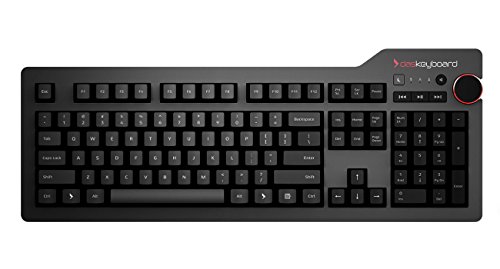
Das Keyboard 4 Root Wired Mechanical
Best for: Office typing board
- Switch Type
- Cherry MX Brown
- Form Factor
- 104 Keys
- Connectivity
- USB wired
- Keycap Material
- Laser-etched
- Case Material
- Aluminum top
- Media Controls
- Volume Knob
View on Amazon: Das Keyboard 4 Root Wired Mechanical Affiliate link
Das Keyboard 4 Root: wired 104-key mechanical keyboard with Cherry MX Brown switches, an aluminum top, a volume knob and a 2-port USB 2.0 hub.
Pros
- Volume knob and media keys
- USB passthrough ports
- Quiet-ish tactile Browns
Cons
- No backlight
- USB 2.0 speed only
- Full-size footprint
Good fit if
- You type all day
- You want a knob and USB ports
Skip if
- You want RGB
- You need a compact board
Verdict: A sturdy full-size typing board with handy extras.
Specifications side by side
| Spec | Das Keyboard 4 Root Wired Mechanical |
|---|---|
| Switch Type | Cherry MX Brown |
| Form Factor | 104 Keys |
| Connectivity | USB wired |
| Keycap Material | Laser-etched |
| Case Material | Aluminum top |
| Media Controls | Volume Knob |
| Dimensions | 18 × 6.8 × 1.3 inches |
| Weight | 2.9 pounds |
| Size | root w/ USB 2 Hub |
| Color | Soft Tactile - Cherry MX Brown Switches |
| Model | DKPKDK4P0MNS0USX |
Frequently asked questions
What switches are in the Das Keyboard 4 Root?
Cherry MX Brown, a soft tactile switch.
Does the Das Keyboard 4 Root have backlighting?
The listing does not mention any lighting.
How do I enable NKRO on the Das Keyboard 4 Root?
Press Shift + Mute to toggle full N-key rollover.
What USB ports does the Das Keyboard 4 Root have?
A 2-port USB 2.0 hub, fed by one USB-A cable.
How long is the Das Keyboard 4 Root cable?
6.5 ft (201 cm), braided.
See also
- rk royal kludge r98 pro wireless mechanical keyboard review
- rk royal kludge rk61 sage blue review
- rk royal kludge f99 review
- best mechanical keyboards under 30
- best mechanical keyboards under 50
- 12 Best Mechanical Keyboards Under $100 in 2026
- 12 Best Mechanical Keyboards Under $150, Compared
- 13 Best Mechanical Keyboards Under $200 in 2026
- qnap 4 bay das review
- rkuvpae mechanical gaming keyboard gaming review