Das Keyboard 4 Root Wired Mechanical Review (2026): A Spec-Based Look
As an Amazon Associate we earn from qualifying purchases. Links on this page are affiliate links.
This das keyboard 4 root wired mechanical keyboard review examines a device built for pure typing. It features an aluminum top case and Cherry MX Brown switches. The layout is a standard 104-key full-size configuration. You get a dedicated volume knob and two USB 2.0 ports on the board. The cable is a braided 6.5-foot USB Type-A connection. These specs define a sturdy, wired peripheral focused on tactile feedback and basic connectivity. It strips away wireless complexity for a direct, reliable connection to your computer.
What stands out
- Cherry MX Brown mechanical switches with tactile feedback
- Aluminum top case for structural rigidity
- Integrated 2-port USB 2.0 hub
- Full N-key rollover (NKRO) support
- Laser-etched keycaps rated for 50 million keystrokes
Who it fits
Good fit for
This keyboard suits typists who prefer tactile switches without loud clicks. The Cherry MX Browns offer a middle ground between tactile bump and quiet operation. Professionals who need a reliable wired connection will appreciate the USB hub for peripherals. Gamers who require full NKRO support for complex key combinations will find this board capable. The aluminum build appeals to users who want a heavy, stable desk accessory.
Who should skip it
You should look elsewhere if you need wireless connectivity. This model is wired only, requiring a direct USB connection. It lacks Bluetooth or 2.4GHz wireless options. If you prefer clicky switches for audible confirmation, the Brown switches may feel too subtle. Users needing a compact layout will find the 104-key size too large. Those wanting RGB lighting will not find it here, as the design is minimalist and functional.
Verdict: The Das Keyboard 4 Root offers a durable, wired typing experience with tactile switches and useful hub ports. It is a solid choice for users who prioritize build quality and direct connectivity over wireless convenience.
Key specs explained for this keyboard
Switch Type: Cherry MX Brown
These switches offer a soft tactile bump without a loud click. You get feedback on each press, which helps with accuracy. The brown profile sits between quiet linear switches and loud clicky ones. This makes them suitable for office environments where you want to type quietly but still feel the keystroke. They are ideal if you prefer tactile confirmation over auditory noise.
Form Factor: 104 Keys
This is a full-size layout that includes a dedicated number pad on the right. You get every standard key, including function keys and navigation clusters. This configuration is best if you frequently use spreadsheets or need numeric input. It requires more desk space than compact layouts. Choose this if you value having all keys available rather than saving room.
Keycap Material: Laser-etched
The characters are etched directly into the keycaps rather than printed on top. This method prevents the letters from wearing off over time. You get durable keycaps that remain legible even after heavy use. This is superior to printed legends which can fade. It ensures long-term clarity for your keys, making it a good choice for high-volume typists.
Case Material: Aluminum top
The upper part of the keyboard is made from aluminum. This material provides rigidity and reduces flex when you type hard. It adds weight to keep the board steady on your desk. Aluminum also feels premium and dissipates heat better than plastic. You get a sturdy platform that resists wobbling, which is beneficial for precise and fast typing sessions.
Media Controls: Volume Knob
A physical knob allows you to adjust audio levels directly. You do not need to use software or keyboard shortcuts to change volume. This provides immediate control over sound output. It is convenient for quick adjustments during calls or media playback. You get tactile feedback for volume changes, which is faster than navigating through menus on your computer screen.
Design and Build Quality
The listing describes an aluminum top case. This material choice suggests a rigid frame that resists flex during heavy typing. The base likely provides stability, keeping the unit steady on your desk. You get a 104-key layout, which is a standard full-size configuration. This means you retain a number pad and function row, useful for data entry or specific software shortcuts. The footprint measures 18 inches by 6.8 inches. It weighs 2.9 pounds. That weight helps anchor the board, preventing it from sliding when you type vigorously. A 1.3-inch height offers a moderate profile, suitable for most desk setups without requiring an aggressive wrist angle.
The keycaps are laser-etched, a finish noted for durability. According to the listing, this method ensures legends do not wear off over time, even with thousands of keystrokes. The switches are Cherry MX Brown, providing a tactile bump without loud clicks. This balance allows for feedback while remaining quiet enough for shared office spaces. You also get a dedicated volume knob for media control. The listing notes a two-port USB 2.0 hub. This adds convenience for connecting peripherals directly to the keyboard rather than your computer. The cable is a braided 6.5-foot USB type-A cord, offering flexibility in desk arrangement.
Setup and Daily Use Guide
You connect the Das Keyboard 4 Root via a single USB Type-A cable. The listing specifies a 6.5-foot braided cord, which offers ample reach for most desk layouts. There is no wireless option, so you must keep the keyboard within cable distance of your computer’s USB port. Setup is straightforward: plug the cable into your machine, and the device is ready to use immediately. No drivers or software installation is required for basic operation.
For daily use, you benefit from full N-key rollover (NKRO). This specification ensures that every keypress registers, even when you type rapidly or press multiple keys simultaneously. You can toggle this mode by pressing Shift and Mute together. This feature supports fast typists and gamers who need reliable input without ghosting.
The keyboard includes a two-port USB 2.0 hub. You can plug devices like a mouse or flash drive into these ports, reducing the number of computer ports needed. The large volume knob allows you to adjust audio levels directly on the keyboard. You do not need to use your operating system’s controls for basic volume changes. The Cherry MX Brown switches provide tactile feedback with moderate sound. This profile is suitable for office environments where you want to avoid disturbing colleagues. The laser-etched keycaps and gold-plated contacts are designed for long-term durability, supporting up to 50 million keystrokes. The aluminum top case adds rigidity, keeping the unit stable during use.
Owning the Das Keyboard 4 Root
You need a desk with enough depth for this 18-inch unit. The aluminum top adds weight, so ensure your surface is stable. You must have an available USB Type-A port for the main connection. The built-in hub helps if you lack extra ports, but it is USB 2.0, which limits speed for high-bandwidth devices. Keep the laser-etched keycaps clean with a soft cloth. Avoid harsh chemicals that might damage the finish. This keyboard sits alongside other wired options in our 1 picks. It suits those who prefer tactile feedback without loud clicks. If you need wireless freedom or compact layouts, look at other recommendations. This model is best for stationary setups where typing precision matters most. Check your monitor height to ensure the volume knob remains accessible. The braided cable is durable, but keep it away from sharp edges to prevent fraying over time.
Check before you buy
- Verify you have a free USB Type-A port for the keyboard.
- Ensure your desk can support the 2.9-pound aluminum frame.
- Check if USB 2.0 hub speed meets your peripheral needs.
- Confirm the 18-inch length fits your available desk space.
The product at a glance
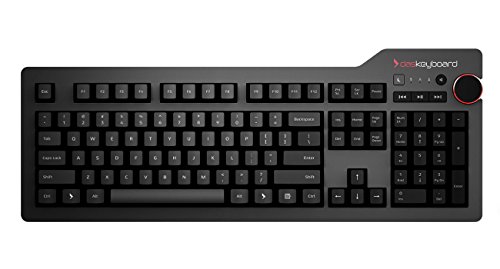
Das Keyboard 4 Root Wired Mechanical
Best for: Tactile typists who want physical media controls
- Switch Type
- Cherry MX Brown
- Form Factor
- 104 Keys
- Connectivity
- USB wired
- Keycap Material
- Laser-etched
- Case Material
- Aluminum top
- Media Controls
- Volume Knob
View on Amazon: Das Keyboard 4 Root Wired Mechanical Affiliate link
The Das Keyboard 4 Root is a 104-key wired mechanical keyboard featuring Cherry MX Brown switches and an aluminum top. It includes a built-in 2-port USB 2.0 hub and a large volume knob for media control. The laser-etched keycaps and gold-plated switches support up to 50 million keystrokes. Full N-key rollover ensures accurate input for fast typists and professionals.
Pros
- Cherry MX Brown switches provide tactile feedback with moderate sound
- Integrated 2-port USB 2.0 hub for device connectivity
- Large volume knob and dedicated media keys
- Full N-key rollover (NKRO) for simultaneous key presses
- Durable aluminum top case with laser-etched keycaps
Cons
- Wired only; no Bluetooth or wireless connectivity
- Fixed layout with no programmable macros or software customization
- 2-port USB hub limits connection options for multiple peripherals
Good fit if
- You want tactile feedback without loud clicking sounds
- You need a dedicated volume knob for quick media adjustments
- You prefer a wired connection for consistent latency
Skip if
- You require wireless freedom or Bluetooth connectivity
- You need programmable macros or dedicated software customization
- You want a compact layout to save desk space
Verdict: Das Keyboard 4 Root Wired Mechanical is a sturdy, tactile typing solution for users who value physical media controls and reliable wired performance. It suits professionals who prefer a no-nonsense, hardware-focused interface over software-heavy customization.
Specifications side by side
| Spec | Das Keyboard 4 Root Wired Mechanical |
|---|---|
| Switch Type | Cherry MX Brown |
| Form Factor | 104 Keys |
| Connectivity | USB wired |
| Keycap Material | Laser-etched |
| Case Material | Aluminum top |
| Media Controls | Volume Knob |
| Dimensions | 18 × 6.8 × 1.3 inches |
| Weight | 2.9 pounds |
| Size | root w/ USB 2 Hub |
| Color | Soft Tactile - Cherry MX Brown Switches |
| Model | DKPKDK4P0MNS0USX |
Frequently asked questions
Does the Das Keyboard 4 Root have a USB hub?
Yes, it includes a built-in USB 2.0 hub. This feature allows you to connect additional peripherals directly to the keyboard. It helps reduce cable clutter on your desk. You do not need to use a separate hub dongle. The hub shares the single USB connection from your computer.
What kind of switches does this keyboard use?
It uses Cherry MX Brown switches. These are tactile switches that provide a soft bump when pressed. They do not produce a loud click sound. This makes them suitable for office environments or shared workspaces. You get feedback without the noise of clicky alternatives.
How do you control the volume on this device?
You control volume using a dedicated physical knob. This is located on the upper right side of the keyboard. It allows for quick adjustments without using software. You can also mute audio directly from this hardware control. This provides a tactile and immediate response.
Is the Das Keyboard 4 Root wireless?
No, it is a wired keyboard only. It connects via a single USB cable. You must keep it within reach of a USB port. There is no battery or wireless transmitter. This ensures a stable connection with no latency or charging needs.
What is the size of the Das Keyboard 4 Root?
The keyboard measures 18 inches in length. It is 6.8 inches wide and 1.3 inches high. This is a full-size layout with 104 keys. You need a desk with sufficient depth to accommodate its length. The unit weighs 2.9 pounds for stability.
Who is this keyboard best suited for?
It is best for tactile typists who want physical media controls. Professionals who prefer hardware-focused interfaces over software customization will find it useful. It suits users who value sturdy build quality. The aluminum top case and tactile switches support a focused typing experience.