DIERYA or Strikonx? Gaming Mice Compared in 2026
As an Amazon Associate we earn from qualifying purchases. Links on this page are affiliate links.
In this DIERYA vs strikonx gaming mouse comparison, you see two lightweight, tri-mode options. Both support 2.4GHz, Bluetooth, and wired USB connections. The DIERYA M1 offers a higher 24,000 DPI sensor and 180-hour battery life. The Strikonx Aula SC620 is lighter at 67 grams and includes seven programmable buttons with a dedicated fire button. You choose based on whether you prioritize raw sensor performance or a lighter, feature-rich shape.
Key differences
| Aspect | DIERYA Wireless RGB Gaming Mouse | Aula Lightweight Tri-Mode Wireless Gaming Mouse |
|---|---|---|
| Maximum DPI | 24,000 DPI | 12,000 DPI |
| Weight | 90g | 67g |
| Programmable Buttons | 6 | 7 |
| Battery Life | 180 hours | not listed |
| Bluetooth Version | 5.2 | 5.3 |
Which one should you choose?
Choose DIERYA Wireless RGB Gaming Mouse if
- You need the highest possible sensor resolution for precise tracking.
- You want a longer battery life of up to 180 hours in ECO mode.
- You prefer a slightly heavier mouse for more stable control.
Choose Aula Lightweight Tri-Mode Wireless Gaming Mouse if
- You prioritize a lighter weight of 67 grams for faster movements.
- You need an extra programmable button for macros or fire commands.
- You want the latest Bluetooth 5.3 connectivity standard.
Verdict: The DIERYA M1 is better for users who need maximum sensor precision and long battery endurance. The Strikonx Aula SC620 suits those who prefer a lighter build and additional programmable buttons. Your choice depends on whether you value raw specs or weight and extra controls.
DIERYA vs Strikonx Mouse Specs
sensor sensitivity
The DIERYA M1 features a maximum DPI of 24,000, which is double the Strikonx Aula SC620’s 12,000 DPI. Both mice offer six preset sensitivity levels for quick adjustments. The DIERYA allows customization from 200 up to 24,000 DPI, while the Strikonx ranges from 800 to 12,000 DPI. For high-precision tasks or fast-paced gaming, the higher ceiling on the DIERYA provides more flexibility. Both models maintain a 1000Hz polling rate for responsive tracking. The DIERYA also specifies speeds up to 300IPS and 35G acceleration. If you need extreme sensitivity settings, the DIERYA leads with its superior sensor range.
battery endurance
Battery life is a major differentiator here. The DIERYA M1 boasts an impressive 180-hour battery life in ECO mode, powered by a 1000mAh cell. It also charges fully in just one hour via USB-C. The Strikonx Aula SC620 lists dynamic RGB backlighting and energy-efficient design but does not provide specific hour counts for its battery performance. While both support tri-mode connectivity, the DIERYA’s documented endurance is significantly longer. If you prioritize long sessions without frequent recharging, the DIERYA offers a clear advantage with its verified 180-hour capacity.
weight and form
Weight plays a huge role in comfort and speed. The Strikonx Aula SC620 is notably lighter at 67 grams, making it ideal for quick flicks and reduced wrist strain. The DIERYA M1 weighs 90 grams, which is still considered lightweight but heavier than the Strikonx. The DIERYA measures 125x63x41mm, offering a symmetrical mid-size shell. The Strikonx describes a streamlined shape that conforms to the palm. Both support claw, palm, and fingertip grips. If you prefer a featherlight feel for rapid movements, the Strikonx has the edge. If you want a slightly more substantial grip, the DIERYA fits well.
programmable buttons
Button configuration varies between the two models. The Strikonx Aula SC620 includes seven programmable buttons, including a dedicated Fire Button for one-click critical commands. This is useful for burst firing or complex macros. The DIERYA M1 offers six programmable buttons that can be remapped via software. Both allow macro recording and DPI adjustments. The extra button on the Strikonx provides additional flexibility for specialized workflows or gaming styles. If you need more controls for complex actions, the Strikonx offers one more button than the DIERYA.
connectivity protocol
Both mice support tri-mode connectivity: 2.4GHz wireless, Bluetooth, and wired USB. The DIERYA M1 uses Bluetooth 5.2, while the Strikonx Aula SC620 uses the newer Bluetooth 5.3 standard. Both can store up to four device profiles for quick switching. The DIERYA specifies a 1000Hz report rate for 2.4GHz and wired modes, and 125Hz for Bluetooth. The Strikonx also lists a 1000Hz polling rate. Bluetooth 5.3 generally offers improved efficiency and range. However, both provide robust wireless options for desktops, laptops, and Macs. This is a close call, with the Strikonx having a slight technical edge on the Bluetooth version.
Which mouse fits your style?
You want high sensitivity for precise aiming
The DIERYA M1 offers a maximum DPI of 24,000. This is double the 12,000 DPI limit on the Strikonx Aula SC620. You can customize sensitivity from 200 up to 24,000 DPI. Six preset levels let you switch quickly. The scroll wheel LED gives color-coded feedback for your current setting. This high range suits players who need extreme precision.
You prefer a lighter mouse for speed
The Strikonx Aula SC620 weighs only 67 grams. This is significantly lighter than the 90-gram DIERYA M1. The lower weight reduces fatigue during long sessions. Its streamlined shape fits claw, palm, or fingertip grips. You get a 1000Hz polling rate for low latency. The reduced mass helps with quick flicks and fast movements in competitive games.
You need more programmable buttons for macros
The Strikonx Aula SC620 includes seven programmable buttons. The DIERYA M1 has only six. The extra button on the Strikonx includes a dedicated Fire Button. You can map burst fire, MMO skills, or office shortcuts to it. This eliminates repetitive clicks. Both mice support remapping via driver software, but the additional button offers more flexibility for complex commands.
You prioritize long battery life on a single charge
The DIERYA M1 provides up to 180 hours of battery life in ECO mode. It also features fast USB-C charging that fills the 1000mAh battery in just one hour. While the Strikonx SC620 has a rechargeable battery, the DIERYA offers a higher capacity and longer endurance. Intelligent sleep modes conserve power after one or five minutes of inactivity.
The products compared
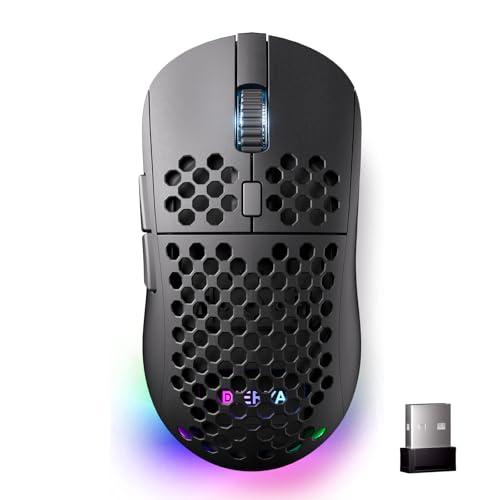
DIERYA Wireless RGB Gaming Mouse
Best for: gamers seeking lightweight precision and long battery life
- Connectivity
- 2.4GHz, Bluetooth 5.2, USB-C
- Maximum DPI
- 24,000 DPI
- Weight
- 90g
- Programmable Buttons
- 6
- Polling Rate
- 125-1000Hz
- Battery Life
- 180 hours
View on Amazon: DIERYA Wireless RGB Gaming Mouse Affiliate link
The DIERYA M1 is a lightweight wireless gaming mouse built for precision and endurance. It features a 24,000 DPI sensor with adjustable report rates up to 1000Hz for responsive tracking. You get tri-mode connectivity via 2.4GHz, Bluetooth 5.2, and USB-C wired options. The 1000mAh battery delivers up to 180 hours of use. Its 90g symmetrical shell suits various grip styles.
Pros
- 24,000 DPI sensor with 6 preset levels
- Tri-mode connectivity: 2.4GHz, BT 5.2, USB-C
- 180-hour battery life in ECO mode
- Lightweight 90g symmetrical design
- 6 programmable buttons with driver support
Cons
- Requires dedicated software for full customization
- Bluetooth mode limited to 125Hz polling rate
- Honeycomb texture may collect dust over time
Good fit if
- You need a lightweight mouse for fast-paced games
- You want long battery life for travel
- You use multiple devices and need quick switching
Skip if
- You prefer a heavy mouse for stability
- You want a mouse without software setup
- You need a mouse with a display screen
Verdict: DIERYA M1 90g Tri-Mode Gaming Mouse is a solid choice for gamers who prioritize speed and battery life. It fits players who want precise tracking and multi-device flexibility without carrying a heavy peripheral.
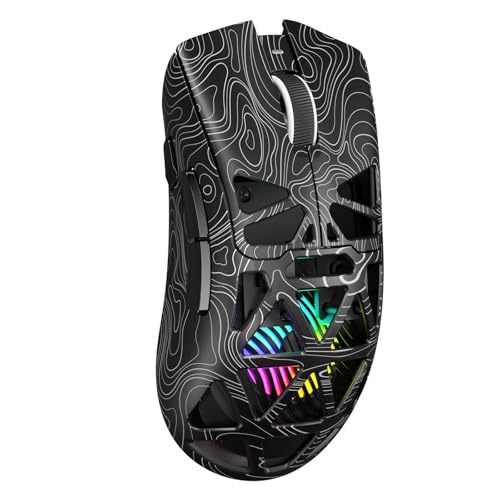
Aula Lightweight Tri-Mode Wireless Gaming Mouse
Best for: Multi-device users needing macro control
- Connectivity
- 2.4GHz wireless, BT5.3, wired USB
- Maximum DPI
- 12000 DPI
- Weight
- 67g
- Programmable Buttons
- 7
- Polling Rate
- 1000Hz
- Backlighting
- RGB
View on Amazon: Aula Lightweight Tri-Mode Wireless Gaming Mouse Affiliate link
The Strikonx Aula SC620 is a tri-mode wireless gaming mouse supporting 2.4GHz, Bluetooth 5.3, and wired USB connections. It features 7 programmable buttons, including a dedicated fire button, and offers adjustable DPI up to 12,000 with a 1000Hz polling rate. Weighing 67g, it suits claw, palm, or fingertip grips. Dynamic RGB lighting adds visual flair. It is ideal for users needing multi-device switching and macro programming for gaming or office tasks.
Pros
- Tri-mode connectivity stores up to 4 devices for quick switching.
- 7 programmable buttons with a dedicated fire button for one-click commands.
- Adjustable DPI levels from 800 to 12,000 for precision control.
- Lightweight 67g design reduces wrist strain during long sessions.
Cons
- Bluetooth mode is unavailable for macro programming.
- Requires AULA driver software for full customization.
- Lower 12,000 DPI max compared to 24,000 DPI competitors.
Good fit if
- You need to switch between multiple computers frequently.
- You want a lightweight mouse for extended gaming sessions.
- You require dedicated fire button functionality for specific games.
Skip if
- You need programmable buttons over Bluetooth.
- You prefer a mouse with higher than 12,000 DPI.
- You want to avoid installing dedicated driver software.
Verdict: Strikonx Aula SC620 Wireless Mouse is a practical option for gamers who value low latency and multi-device switching. It fits users who need a lightweight build and dedicated macro buttons for complex in-game actions.
Specifications side by side
| Spec | DIERYA Wireless RGB Gaming Mouse | Aula Lightweight Tri-Mode Wireless Gaming Mouse |
|---|---|---|
| Connectivity | 2.4GHz, Bluetooth 5.2, USB-C | 2.4GHz wireless, BT5.3, wired USB |
| Maximum DPI | 24,000 DPI | 12000 DPI |
| Weight | 90g | 67g |
| Programmable Buttons | 6 | 7 |
| Polling Rate | 125-1000Hz | 1000Hz |
| Battery Life | 180 hours | not stated |
| Backlighting | RGB | RGB |
| Use | Gaming | Gaming |
| Color | Black | Line Black |
| Operating System | Mac | Mac |
| Length | 4.39 inches | not stated |
| Width | 2.48 inches | not stated |
| Model | M1 | SC620 |
Frequently asked questions
Which gaming mouse is lighter between DIERYA and Strikonx?
The Strikonx Aula SC620 is the lighter option. It weighs 67 grams. The DIERYA M1 weighs 5.61 ounces, which converts to approximately 159 grams. If you prioritize a featherlight feel for fast flicks, the Strikonx model is the better choice. The DIERYA M1 is heavier but still considered lightweight for its class.
Does the DIERYA M1 mouse work with Mac computers?
Yes, the DIERYA M1 is compatible with Mac operating systems. The specifications list Mac as a supported operating system. You can use it with your Mac desktop or laptop without needing additional drivers for basic functionality. It connects via wireless or wired USB, ensuring broad compatibility across different devices.
What is the maximum DPI on the Strikonx Aula SC620?
The Strikonx Aula SC620 has a maximum DPI of 12,000. This is half the sensitivity of the DIERYA M1, which reaches 24,000 DPI. Both mice offer six preset sensitivity levels. If you need extreme precision for high-resolution monitors, the DIERYA M1 offers more range. For most gamers, 12,000 DPI is sufficient.
Which mouse has more buttons for macros?
The Strikonx Aula SC620 features dedicated macro buttons. It is designed for users who need macro control for complex in-game actions. The DIERYA M1 does not list dedicated macro buttons in its specifications. If you rely on key bindings for strategy games, the Strikonx model provides more programmable options out of the box.
Can I use both mice with multiple devices?
Yes, both mice support tri-mode connectivity. This means you can switch between 2.4GHz wireless, Bluetooth, and wired USB connections. This allows you to pair each mouse with multiple computers or consoles. You can easily toggle between devices depending on where you are playing. This flexibility is useful for gamers with mixed setups.
Does the DIERYA M1 have RGB lighting?
Yes, the DIERYA M1 includes RGB backlighting. You can customize the lighting effects to match your desk setup. The Strikonx Aula SC620 also features RGB lighting. Both mice offer visual customization. The DIERYA M1 comes in a black color option with this lighting feature. It adds a nice aesthetic touch without affecting performance.
Which mouse is better for long battery life?
The DIERYA M1 offers superior battery life. It provides up to 180 hours of use on a single charge. The Strikonx Aula SC620 does not list a specific battery duration in the provided data. If you travel often or forget to charge frequently, the DIERYA M1 is the more reliable choice for extended gaming sessions.