Doohoeek 25-Key Tri-Mode Macro Keypad Review (2026): Windows Shortcut Pad
As an Amazon Associate we earn from qualifying purchases. Links on this page are affiliate links.
The Doohoeek Tri-Mode Programmable Macro Keypad is a 25-key shortcut pad for Windows, used beside a keyboard rather than in place of one. Top reason to pick it: it stores four separate 25-key layouts onboard and switches between them with a mode key, so one pad can hold Premiere Pro, Excel and browser shortcuts at once, and it connects by Bluetooth 5.0, a 2.4GHz dongle or cable to up to three devices. Shortcut stickers come in the box for labeling keys. The catch is setup: the software runs on Windows only and every change must be made in wired mode. The listing does not name the key switch type or a battery figure. The Doohoeek pad is covered from its listing, not from hands-on testing.
What stands out
- Doohoeek pad: 25 programmable keys
- Four onboard layers on a mode key
- Bluetooth 5.0, 2.4GHz dongle or wired; 3 devices
- Doohoeek pad: 7-color backlight, 3 brightness levels
- Shortcut stickers to label the Doohoeek keys
Who it fits
Good fit for
Windows users who edit video, work in spreadsheets or run repeated shortcuts and want a wireless pad with several layers.
Who should skip it
Mac users, anyone who wants to reprogram the pad over Bluetooth, and buyers who need a named switch or battery life.
Verdict: A large, layered shortcut pad for Windows desks; skip it on a Mac.
Doohoeek 25-key keypad specs explained
Doohoeek key count
25 programmable keys with shortcut stickers.
Doohoeek layers
Up to 4 layouts stored onboard, switched by a mode key.
Doohoeek connection
Bluetooth 5.0, 2.4GHz dongle (included) or wired; up to 3 devices.
Doohoeek setup
Windows-only software; programming works in wired mode only.
Doohoeek lighting
7 backlight colors, high/medium/low brightness.
Doohoeek gaps
Switch type, battery, size and weight not listed.
Doohoeek 25-key keypad design
The Doohoeek keypad puts 25 keys in one block, about the size of a large number pad, with dedicated keys for the mode layer and for backlight color and brightness. Stickers let you mark each key with its shortcut. The listing color is black. Doohoeek gives no dimensions, weight, key switch type or battery capacity, so the pad's footprint and how long it runs between charges are unknown from the listing.
Using the Doohoeek 25-key keypad
Plug the Doohoeek pad in by cable, open the configuration software (it starts minimized in the Windows tray, near the clock) and assign macros, text snippets or shortcuts such as copy, paste, Alt+Tab and undo to each key on each of the four layers. Once saved to onboard memory, the layouts work over Bluetooth or the 2.4GHz dongle with the software closed. Choose the Doohoeek pad if you want 25 keys, four layers and wireless use on Windows; choose Vaydeer's 9-key mechanical pad if a few keys are enough and you want layers that switch by the app in use, with iOS listed as supported.
Doohoeek 25-key keypad: before you buy
Check these points first:
Check before you buy
- The Doohoeek software is for Windows only
- Doohoeek layouts can only be changed over the cable
- The Doohoeek listing names no key switch
- No battery capacity or runtime is given for the Doohoeek pad
- Doohoeek lists no size or weight
The product at a glance
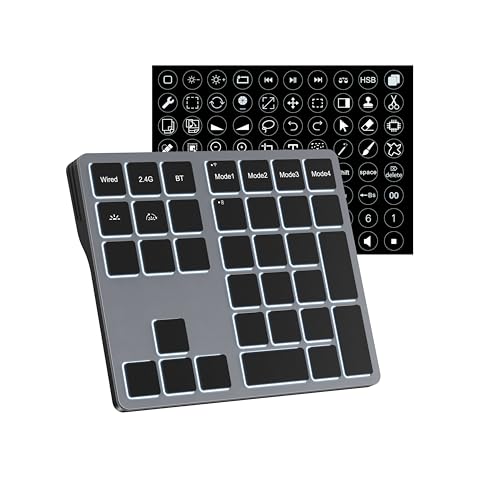
Doohoeek 25-Key Tri-Mode Macro Pad
Best for: Windows shortcut work
- Connectivity
- Bluetooth, 2.4GHz, Wired
- Backlighting
- 7-color
- Use
- Office
- Color
- Black
- Operating System
- Windows
View on Amazon: Doohoeek 25-Key Tri-Mode Macro Pad Affiliate link
Doohoeek Tri-Mode Macro Keypad: a 25-key Windows shortcut pad with Bluetooth 5.0, 2.4GHz and wired modes, four onboard layers and 7-color backlight.
Pros
- 25 keys, four onboard layers
- Three connection modes, 3 devices
- Stickers for labeling keys
- Layouts work wirelessly once saved
Cons
- Windows only
- Programming only over cable
- No switch, battery or size details
Good fit if
- You edit video or spreadsheets on Windows
- You want one pad for several apps
Skip if
- You use a Mac
- You need battery figures
Verdict: A layered wireless shortcut pad for Windows.
Specifications side by side
| Spec | Doohoeek 25-Key Tri-Mode Macro Pad |
|---|---|
| Connectivity | Bluetooth, 2.4GHz, Wired |
| Backlighting | 7-color |
| Use | Office |
| Color | Black |
| Operating System | Windows |
Frequently asked questions
Does the Doohoeek 25-key keypad work on a Mac?
No. Doohoeek says the keypad and its software are made only for Windows devices.
Can I program the Doohoeek keypad over Bluetooth?
No. Changes must be made in wired mode; saved layouts then work over Bluetooth and 2.4GHz.
How many layouts does the Doohoeek keypad hold?
Four, stored onboard and switched with the dedicated mode key.
How many devices can the Doohoeek keypad connect to?
Up to three, using Bluetooth 5.0, the 2.4GHz dongle or the cable.
Is the Doohoeek keypad mechanical?
The Doohoeek listing does not name a switch type, so it is not confirmed as mechanical.
See also
- be quiet light mount tkl linear review
- pusokei solar keyboard 109 key bluetooth review
- razer deathadder essential wired review
- best mechanical keyboards under 30
- best mechanical keyboards under 50
- 12 Best Mechanical Keyboards Under $100 in 2026
- 12 Best Mechanical Keyboards Under $150, Compared
- 13 Best Mechanical Keyboards Under $200 in 2026
- ciciglow programmable thermostat review
- frient intelligent keypad review