6 Best Alternatives to the Ducky One 3 Mini 60% Mechanical Keyboard (2026)
As an Amazon Associate we earn from qualifying purchases. Links on this page are affiliate links.
The Ducky One 3 Mini 60% Mechanical Keyboard delivers a compact footprint with hotswap flexibility and durable PBT keycaps. If you are seeking ducky one 3 mini 60 alternatives, you may want a different form factor or connectivity option. This guide covers 6 keyboards that share core specifications like RGB backlighting and gaming use. Each alternative matches the original’s focus on performance while offering distinct layouts or features.
You might prefer a 65% or 75% layout to retain arrow keys and function rows. Wireless connectivity could also be a priority over the original’s wired design. Some users need a numpad for data entry or a volume knob for media control. These 6 picks overlap with the Ducky’s key specs, including hotswap support and mechanical switches. You can choose based on your exact size and feature requirements. This list helps you find a keyboard that fits your desk and workflow.
How alternatives differ from Ducky
Corsair K65 PRO MINI 65% Optical
The Corsair K65 PRO MINI adds a 65% layout, which includes dedicated arrow keys that the Ducky One 3 Mini lacks. This makes it better for users who need quick navigation without switching to a larger board. It uses optical CORSAIR OPX switches for faster actuation compared to the Ducky’s Cherry MX Black switches. The Corsair is slightly smaller in width but heavier. You get RGB backlighting in both, but the Corsair focuses on wired performance. If you want arrow keys and speed, this is a practical upgrade. If you prefer the smallest footprint and hotswap flexibility, stick with the Ducky.
AULA F75 Pro Wireless Mechanical Keyboard
The AULA F75 Pro offers a 75% layout, providing arrow keys and a control knob that the Ducky does not have. It supports tri-mode connectivity, allowing wireless use, whereas the Ducky is wired only. Both keyboards feature hot-swappable sockets and PBT keycaps. The AULA is heavier and slightly longer than the Ducky. You gain versatility and extra keys for productivity or gaming. You give up the ultra-compact 60% footprint. This alternative suits users who want a compact board but still need function keys and wireless convenience. The Ducky remains better for strict desk space constraints.
AULA Full-Size Wireless Keyboard with Screen
The AULA F108 Pro is a full-size keyboard, significantly larger than the Ducky One 3 Mini. It includes a numpad and a physical volume knob for media control. Like the Ducky, it offers hot-swappable switches and PBT keycaps. The AULA is wireless, adding flexibility the Ducky lacks. It is much heavier and takes up more desk space. You gain full layout functionality and media controls. You lose the compact, minimalist design. This option is for users who prioritize functionality over size. If you need a numpad and knob, this is the choice. The Ducky is better for minimalists.
ASUS ROG Strix Scope II X Full-Size Wired Keyboard
The ASUS ROG Strix Scope II X is a full-size wired keyboard with a numpad, unlike the compact Ducky One 3 Mini. It features hot-swappable sockets and PBT keycaps, similar to the Ducky. The ASUS uses NX Snow V2 Linear switches, which differ from the Ducky’s Cherry MX Black. It is heavier and larger, designed for stationary desks. You get a spacious layout and durability. You sacrifice portability and desk space. This keyboard suits users who need a numpad and stable wired connection. The Ducky is better for those who want a small, flexible setup. Choose ASUS for maximum functionality.
GravaStar Mercury K1 Lite 75% Wireless Keyboard
The GravaStar Mercury K1 Lite provides a 75% layout with arrow and function keys, which the Ducky One 3 Mini lacks. It supports tri-mode connectivity, offering wireless options the Ducky does not have. Both keyboards feature RGB backlighting. The GravaStar has a gasket-mounted build for a softer feel. It is larger and heavier than the Ducky. You gain extra keys and wireless flexibility. You give up the ultra-compact 60% form factor. This alternative is ideal for users who want a balanced layout for work and gaming. The Ducky remains the better choice for those prioritizing the smallest possible footprint.
MageGee 60% Hot-Swappable Mini Keyboard
The MageGee MK-Box is a 60% wired keyboard, matching the Ducky One 3 Mini’s form factor. It features hot-swappable sockets, similar to the Ducky. Both offer RGB backlighting. The MageGee uses Blue Whale Switches, differing from the Ducky’s Cherry MX Black. It is designed for noise reduction and compact setups. The MageGee lacks the detailed sound dampening materials listed for the Ducky. You get a similar footprint and hotswap flexibility. You may sacrifice some premium build details. This option suits users wanting a budget-friendly 60% board. The Ducky is better for those seeking specific dampening and switch quality.
Quick picks
Our 7 picks

Ducky One 3 Mini 60% Mechanical Keyboard
Best for: compact gaming setups with hotswap needs
- Switch Type
- Cherry MX Black
- Form Factor
- 60%
- Backlighting
- RGB
- Keycap Material
- Double-shot PBT
- Hot-Swap Support
- Hot-Swappable
- Use
- Gaming
View on Amazon: Ducky One 3 Mini 60% Mechanical Keyboard Affiliate link
The Ducky One 3 Mini is a 60% mechanical keyboard featuring Cherry MX Black switches. It uses a dual-layer hotswap PCB with Kailh sockets, allowing you to change switches easily. Thick double-shot PBT keycaps resist shine. Dual-layer silicone and EVA foam dampen sound. This compact layout suits gamers who want a small footprint and reliable build quality without wireless features.
Pros
- Cherry MX Black linear switches for fast actuation
- Dual-layer hotswap PCB with Kailh sockets
- Thick double-shot PBT keycaps for durability
- Dual-layer silicone and EVA foam sound dampening
Cons
- Wired connection only; no Bluetooth or 2.4GHz wireless
- No dedicated media keys or volume knob
- Fixed 60% layout lacks arrow keys
Good fit if
- You need a compact keyboard for limited desk space
- You prefer tactile linear switches for gaming
- You want hotswap capability for future switch changes
Skip if
- You require wireless connectivity for a clutter-free setup
- You need dedicated arrow keys for productivity
- You prefer tactile or clicky switch types
Verdict: Ducky One 3 Mini 60% Cherry MX is a wired 60% keyboard built for gamers who value hotswap flexibility and sound dampening over wireless convenience. It fits users who prioritize a small footprint and durable PBT keycaps.

Corsair K65 PRO MINI 65% Optical
Best for: gamers needing fast inputs and arrow keys
- Switch Type
- CORSAIR OPX optical-mechanical
- Form Factor
- 65%
- Connectivity
- Detachable USB Type-C to Type-A
- Backlighting
- RGB
- Keycap Material
- PBT double-shot
- Use
- Gaming
View on Amazon: Corsair K65 PRO MINI 65% Optical Affiliate link
The Corsair K65 PRO Mini uses a 65% layout that keeps arrow and utility keys while staying compact. Its CORSAIR OPX optical-mechanical switches deliver linear, ultra-responsive keystrokes rated for 150 million actuations. AXON Hyper-Processing Technology sends actions to your game up to 8x faster than standard keyboards. Two layers of sound dampening soften keystroke acoustics. It weighs 1.32 pounds and measures 12.4 inches long.
Pros
- CORSAIR OPX optical-mechanical switches for ultra-responsive linear keystrokes
- AXON Hyper-Processing Technology for up to 8x faster action transmission
- Two layers of sound dampening for softer acoustics
- 65% layout retains arrow and utility keys
Cons
- Wired connection only via detachable USB Type-C to Type-A cable
- Heavier at 1.32 pounds compared to lighter portable options
- Smaller 65% footprint lacks a dedicated numpad
Good fit if
- You need arrow keys but want a compact desktop footprint
- You prioritize low-latency inputs for competitive gaming
- You prefer linear optical switches with high durability ratings
Skip if
- You require wireless connectivity for a clutter-free setup
- You need a full-size numpad for data entry
- You want a lighter keyboard for frequent travel
Verdict: Corsair K65 PRO Mini 65% Optical suits gamers who want fast, responsive inputs and arrow keys without sacrificing desk space. It is a practical wired choice for performance-focused users.

AULA F75 Pro Wireless Mechanical Keyboard
Best for: compact setups needing arrow keys and a knob
- Switch Type
- LEOBOG star vector linear
- Form Factor
- 75%
- Connectivity
- Bluetooth 5.0, 2.4GHz, USB wired
- Backlighting
- RGB
- Keycap Material
- PBT
- Hot-Swap Support
- Hot-Swappable
View on Amazon: AULA F75 Pro Wireless Mechanical Keyboard Affiliate link
The AULA F75 Pro is a 75% mechanical keyboard with tri-mode connectivity, including Bluetooth 5.0, 2.4GHz wireless, and USB wired options. It features hot-swappable LEOBOG linear switches and PBT keycaps. The build includes a multi-function knob and a 4000mAh battery. This layout retains arrow keys, making it suitable for users who want a compact footprint without sacrificing essential navigation controls for gaming or typing.
Pros
- Tri-mode connectivity with Bluetooth 5.0, 2.4GHz, and USB wired
- Hot-swappable PCB supports 3-pin and 5-pin switches
- Multi-function knob for media and lighting control
- 4000mAh battery for extended wireless use
- Side-printed PBT keycaps with gradient purple finish
Cons
- Larger footprint than 60% alternatives due to 75% layout
- Heavier build at 2.25 pounds
- No dedicated display mentioned in specifications
Good fit if
- You need arrow keys but want a compact desk setup
- You prefer hot-swappable switches for easy customization
- You want a multi-function knob for media control
Skip if
- You require a strict 60% layout for maximum space saving
- You prefer optical-mechanical switches over traditional linear switches
- You need a keyboard with a built-in display screen
Verdict: AULA F75 Pro 75% Wireless Keyboard fits users who want a compact keyboard with arrow keys and a control knob. It suits those who value hot-swap flexibility and tri-mode connectivity over the smallest possible footprint.
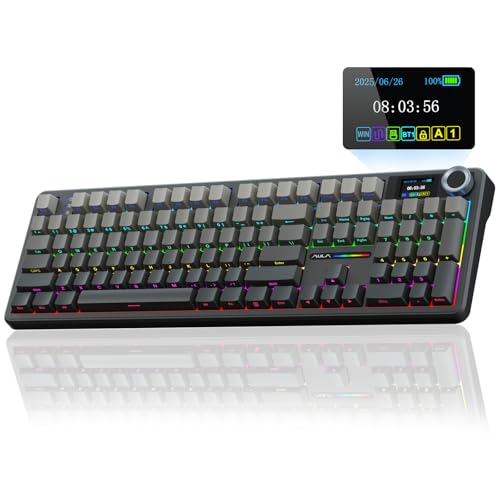
AULA Full-Size Wireless Keyboard with Screen
Best for: Users wanting full-size layout with physical media knob
- Form Factor
- Full-size (104 keys)
- Connectivity
- Bluetooth 5.0, 2.4GHz, USB-C
- Backlighting
- RGB
- Keycap Material
- Two-color injection-molded PBT
- Hot-Swap Support
- Hot-Swappable
- Media Controls
- Volume Knob
View on Amazon: AULA Full-Size Wireless Keyboard with Screen Affiliate link
The AULA F108 Pro is a full-size mechanical keyboard featuring a multi-function volume knob and a built-in TFT color display. It supports tri-mode connectivity via Bluetooth 5.0, 2.4GHz wireless, and USB-C wired connections. The board includes hot-swappable switches, two-color injection-molded PBT keycaps, and an 8000mAh battery. This setup suits users who want a large layout with dedicated media controls and visual feedback for system status.
Pros
- Built-in multi-function volume knob for quick audio adjustments
- TFT color display shows battery, connection mode, and backlight status
- Hot-swappable PCB supports 3-pin and 5-pin switches
- Two-color injection-molded PBT keycaps resist shine and sweat
- 8000mAh battery supports long-term wireless use
Cons
- Full-size layout is bulky and heavy at 2.65 pounds
- Display customization requires Windows software and wired connection
- Linux systems may experience abnormal F-zone functionality
Good fit if
- You need a full-size layout with a number pad
- You prefer physical knobs for volume and media control
- You want visual feedback on battery and connection status
Skip if
- You need a compact 60% or 65% keyboard
- You primarily use a Linux operating system
- You want to customize the screen display on macOS
Verdict: The AULA F108 Pro Full-Size Mechanical Keyboard fits users who want a large layout with dedicated media controls and visual feedback. It is ideal for desk setups where space is not a constraint.
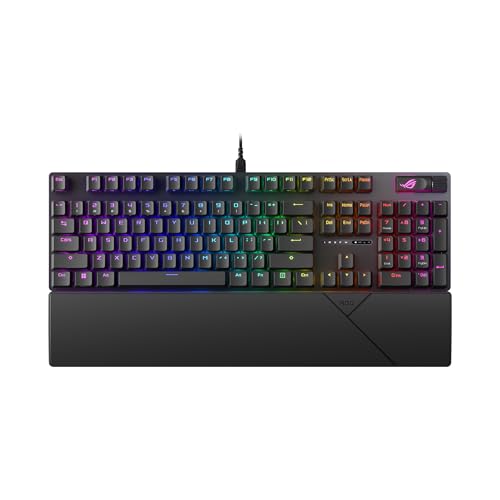
ASUS ROG Strix Scope II X Full-Size Wired Keyboard
Best for: Stationary desks requiring a numpad
- Switch Type
- ROG NX Snow V2 Linear
- Form Factor
- 100% Full-Size
- Connectivity
- Wired USB-C
- Backlighting
- RGB
- Keycap Material
- Doubleshot PBT
- Case Material
- Aluminum top plate
View on Amazon: ASUS ROG Strix Scope II X Full-Size Wired Keyboard Affiliate link
This wired full-size keyboard features an aluminum top plate and PBT doubleshot keycaps for durability. It uses hot-swappable ROG NX Snow V2 linear switches with pre-lubrication for smooth keystrokes. Integrated sound-dampening foam reduces echo. A detachable wrist rest and three angle adjustments support ergonomic comfort during long gaming or work sessions.
Pros
- Hot-swappable ROG NX Snow V2 linear switches
- Durable aluminum top plate and PBT keycaps
- Integrated sound-dampening foam for better acoustics
- Detachable wrist rest for ergonomic support
Cons
- 100% full-size layout lacks compact portability
- Wired USB-C connection limits mobility
- Heavy 2.1-pound build is not travel-friendly
Good fit if
- You need a large numpad for data entry
- You prefer a stable, heavy desk setup
- You want hot-swappable switches for customization
Skip if
- You need a compact 60% keyboard
- You require wireless connectivity for freedom
- You want a lightweight portable device
Verdict: ASUS ROG Strix Scope II X Full-Size suits users who prioritize a spacious layout and durable build over portability. It is ideal for stationary desks where you need a numpad and ergonomic accessories.

GravaStar Mercury K1 Lite 75% Wireless Keyboard
Best for: Users wanting 75% layout with wireless flexibility
- Switch Type
- GravaStar Stellar Bloom linear switches
- Form Factor
- 75%
- Connectivity
- Bluetooth, 2.4GHz, wired
- Backlighting
- RGB
- Hot-Swap Support
- Hot-Swappable
- Mounting Style
- Gasket Mount
View on Amazon: GravaStar Mercury K1 Lite 75% Wireless Keyboard Affiliate link
The GravaStar K1 Lite is a 75% wireless mechanical keyboard featuring tri-mode connectivity for wired, Bluetooth, or 2.4GHz use. It uses GravaStar Stellar Bloom linear switches with a 40gf actuation force and includes a 4000mAh battery for extended wireless operation. The gasket-mounted design with five layers of foam aims for a softer typing feel. This keyboard suits users who want a compact layout with dedicated function keys and a pastel aesthetic.
Pros
- Tri-mode connectivity including Bluetooth and 2.4GHz wireless
- 75% layout retains arrow and function keys
- 4000mAh battery supports long wireless use
- Gasket-mounted structure with five layers of internal foam
Cons
- Larger footprint than the 60% keyboards on this list
- No mention of hot-swappable sockets for switch customization
- Proprietary Stellar Bloom switches limit aftermarket options
Good fit if
- You need a compact keyboard that keeps arrow and function keys
- You want wireless freedom with Bluetooth or 2.4GHz options
- You prefer a softer, gasket-mounted typing feel
Skip if
- You require a true 60% layout to maximize desk space
- You want to swap switches without soldering
- You prefer a standard aluminum or plastic shell over a hollow frame
Verdict: GravaStar K1 Lite 75% Wireless Keyboard offers a balanced 75% layout with tri-mode connectivity and a soft gasket-mounted build. It fits users who want compact size but still need arrow and function keys for daily work and gaming.

MageGee 60% Hot-Swappable Mini Keyboard
Best for: Compact wired setups with hot-swap needs
- Switch Type
- Blue Whale Switch (Linear)
- Form Factor
- 60%
- Connectivity
- Wired USB
- Backlighting
- RGB
- Keycap Material
- Double-color injection
- Hot-Swap Support
- Hot-Swappable
View on Amazon: MageGee 60% Hot-Swappable Mini Keyboard Affiliate link
The MageGee MK-Box is a 68-key wired mechanical keyboard with a 60% form factor. It features hot-swappable linear Blue Whale switches and double-color injection keycaps. RGB backlighting offers 19 modes. EVA silencing cotton reduces hollow sound. This compact layout saves desk space while retaining arrow and function keys for practical use.
Pros
- Hot-swappable 3/5 pin switch sockets
- EVA silencing cotton for reduced noise
- 19 RGB backlight modes
- Retains arrow and F-keys
Cons
- Wired USB connection only
- No wireless capability
- Basic plastic construction
Good fit if
- You need a compact layout with arrow keys
- You want to customize switches easily
- You prefer wired reliability over wireless
Skip if
- You require wireless connectivity
- You need a full-size keyboard
- You want programmable macros via software
Verdict: The MageGee MK-Box 60% Wired Keyboard fits users who want a space-saving layout with hot-swappable switches and wired stability. It is a practical option for those who value compact design and noise reduction.
Specifications side by side
| Spec | Ducky One 3 Mini 60% Mechanical Keyboard | Corsair K65 PRO MINI 65% Optical | AULA F75 Pro Wireless Mechanical Keyboard | AULA Full-Size Wireless Keyboard with Screen | ASUS ROG Strix Scope II X Full-Size Wired Keyboard | GravaStar Mercury K1 Lite 75% Wireless Keyboard | MageGee 60% Hot-Swappable Mini Keyboard |
|---|---|---|---|---|---|---|---|
| Switch Type | Cherry MX Black | CORSAIR OPX optical-mechanical | LEOBOG star vector linear | not stated | ROG NX Snow V2 Linear | GravaStar Stellar Bloom linear switches | Blue Whale Switch (Linear) |
| Form Factor | 60% | 65% | 75% | Full-size (104 keys) | 100% Full-Size | 75% | 60% |
| Connectivity | not stated | Detachable USB Type-C to Type-A | Bluetooth 5.0, 2.4GHz, USB wired | Bluetooth 5.0, 2.4GHz, USB-C | Wired USB-C | Bluetooth, 2.4GHz, wired | Wired USB |
| Backlighting | RGB | RGB | RGB | RGB | RGB | RGB | RGB |
| Keycap Material | Double-shot PBT | PBT double-shot | PBT | Two-color injection-molded PBT | Doubleshot PBT | not stated | Double-color injection |
| Case Material | not stated | not stated | not stated | not stated | Aluminum top plate | not stated | not stated |
| Hot-Swap Support | Hot-Swappable | not stated | Hot-Swappable | Hot-Swappable | Hot-Swappable | Hot-Swappable | Hot-Swappable |
| Mounting Style | not stated | not stated | not stated | not stated | not stated | Gasket Mount | not stated |
| Media Controls | not stated | not stated | not stated | Volume Knob | not stated | not stated | not stated |
| Use | Gaming | Gaming | Gaming | Gaming | Gaming | Gaming | Gaming |
| Color | Cherry Mx Black | Black | F75 Pro-Gradient Purple | Gradient Black | Black | Lumen Rose | Klein Blue/Blue Whale Switch |
| Operating System | not stated | not stated | not stated | not stated | Mac | Mac, Windows | Mac |
| Dimensions | 19.7 × 19.7 × 11 inches | 12.4 × 4.15 × 1.41 inches | 12.7 × 5.64 × 1.7 inches | 17.5 × 5.55 × 1.65 inches | 17.2 × 5.1 × 1.5 inches | 1.63 × 7.39 × 2.27 inches | not stated |
| Weight | not stated | 1.32 pounds | 2.25 pounds | 2.65 pounds | 2.1 pounds | not stated | not stated |
| Size | Cherry MX Black | CORSAIR OPX Switches | not stated | not stated | NX Snow V2 Linear Switch | not stated | not stated |
| Model | DKON2161ST-AUSPDCLAWSC1 | CH-91A401A-NA | F75 Pro | AULA F108 | XA14 ROG STRIX SCOPE II X/NXSWV2/CA/PBT | GS K1 Lite | MK-Box |
Another guide worth a look: jiayiyoux 3 in 1 mini alternatives.
Frequently asked questions
Which Ducky One 3 Mini 60% alternative has the smallest footprint?
The Corsair K65 PRO MINI offers a compact 65% layout that is slightly larger than the 60% Ducky but remains highly portable. It measures 12.4 inches in length and 4.15 inches in width. This size fits well on smaller desks while providing dedicated arrow keys for navigation.
Are there wireless alternatives to the wired Ducky One 3 Mini?
Yes, the AULA F75 Pro and GravaStar Mercury K1 Lite both support wireless connectivity. The AULA F75 Pro features tri-mode connectivity, allowing use via Bluetooth, 2.4GHz wireless, or USB. The GravaStar K1 Lite also provides tri-mode options for flexible desk setups without cable constraints.
Which alternative includes a volume knob for media control?
The AULA F108 Pro Full-Size Mechanical Keyboard includes a physical volume knob for direct media control. It also features a display for visual feedback. This model is designed for users who want dedicated hardware controls without relying on software commands or keyboard shortcuts for adjusting audio levels.
Do any alternatives offer hot-swappable switches like the Ducky?
Several listed keyboards support hot-swappable switches for easy customization. The AULA F75 Pro, AULA F108 Pro, ASUS ROG Strix Scope II X, and MageGee MK-Box all allow switch replacement without soldering. This feature lets you change typing feel or sound profile by simply swapping out the mechanical switches.
Which option is best if you need a numpad?
The ASUS ROG Strix Scope II X Full-Size and the AULA F108 Pro are full-size layouts that include a numpad. These models are ideal for stationary desks where you need numeric input for data entry or gaming. They prioritize spacious layouts over the compact footprint of the 60% Ducky.
What is the difference between the 65% and 75% form factors?
The 65% Corsair K65 PRO MINI includes arrow keys but omits the function row. The 75% AULA F75 Pro and GravaStar K1 Lite retain the function row alongside arrow keys. The 75% layout provides more dedicated keys for shortcuts, while the 65% saves more desk space.
Which keyboard is the lightest among these alternatives?
The Corsair K65 PRO MINI is the lightest option at 1.32 pounds. Its compact dimensions and materials contribute to this lower weight. In comparison, the MageGee MK-Box, AULA F75 Pro, and others weigh between 2.1 and 2.65 pounds, making the Corsair the most portable choice for travel.