Gaming vs Office Mechanical Keyboards in 2026: Key Differences
As an Amazon Associate we earn from qualifying purchases. Links on this page are affiliate links.
Choosing between a gaming vs office mechanical keyboard often depends on your specific workflow needs. While both AULA S99 and Cherry Stream TKL provide reliable input devices, they target different environments. The AULA S99 emphasizes wireless flexibility and customizable lighting for gaming sessions. The Cherry Stream focuses on compact, silent performance for professional office tasks. You should compare their connectivity options, form factors, and switch types to decide which fits your desk setup.
Key differences
| Aspect | AULA 96% Wireless Membrane Keyboard | Cherry Stream TKL Wired Keyboard |
|---|---|---|
| Connectivity | Bluetooth 5.0, 2.4GHz, USB wired | USB wired |
| Form Factor | 96% | TKL (87%) |
| Switch Type | Membrane | CHERRY SX scissor |
| Backlighting | RGB | On-key status LEDs |
| Use | Gaming | Office |
| Noise Level | Not listed | Silent |
Which one should you choose?
Choose AULA 96% Wireless Membrane Keyboard if
- You need multiple wireless connection options like Bluetooth and 2.4GHz for different devices.
- You want customizable RGB lighting and a rotary knob for media control.
- You prefer a 96% layout that includes a numeric keypad.
Choose Cherry Stream TKL Wired Keyboard if
- You require a compact TKL design to save desk space and improve mouse positioning.
- You prioritize silent keystrokes to avoid disturbing colleagues in an office environment.
- You prefer the tactile feel of Cherry SX scissor switches with high durability.
Verdict: The AULA S99 suits gamers who value wireless freedom and visual customization. The Cherry Stream TKL is better for office workers who need a quiet, compact, and durable wired keyboard. Your choice depends on whether you prioritize connectivity flexibility or silent, space-saving efficiency.
Gaming vs Office Keyboard Specs
Connectivity options
The AULA S99 offers three distinct connection modes: Bluetooth 5.0, 2.4GHz wireless, and USB wired. This flexibility allows you to pair with multiple devices and switch between them easily. The Cherry Stream TKL relies solely on a USB wired connection. While this ensures a stable, low-latency link without battery concerns, it limits your placement options. If you need to move your keyboard between desktops or connect to tablets and phones, the AULA S99 provides significantly more versatility. For a fixed desk setup, the Cherry Stream is sufficient.
Form factor and size
The AULA S99 uses a 96% layout, which includes a full numeric keypad in a compact footprint. It measures 17.4 inches in length. The Cherry Stream TKL is a tenkeyless design, removing the number pad entirely. It measures 14.8 inches in length. The TKL layout frees up more desk space for mouse movement, which many gamers and precise typists prefer. The 96% layout retains the numpad for data entry tasks common in office work. Your choice depends on whether you need numeric input frequently or prioritize mouse space.
Switch mechanism
The Cherry Stream TKL features Cherry SX scissor switches. These are designed for silent operation and offer over 20 million actuations per key. The flat key profile provides precise strokes and reduces wear. The AULA S99 is explicitly identified as a membrane keyboard, not mechanical. Membrane switches generally offer a softer, mushier feel compared to mechanical or scissor mechanisms. For office environments where noise is a concern, the Cherry Stream is engineered for silence. The AULA S99 is better suited for gaming scenarios where tactile feedback is less critical than switch longevity.
Backlighting features
The AULA S99 includes vibrant RGB backlighting with 16.8 million colors and 16 preset effects. You can customize brightness, speed, and colors via software or physical knobs. The Cherry Stream TKL lacks RGB lighting. It does feature on-key status LEDs, which indicate functional states rather than providing aesthetic illumination. If you want to personalize your desk atmosphere or match your gaming setup, the AULA S99 is the clear choice. For a professional office appearance without distracting lights, the Cherry Stream is more appropriate.
Media and control knobs
The AULA S99 includes a dual-mode rotary knob. You can use this knob to adjust volume, switch connection modes, and control lighting effects directly. This provides quick access to common adjustments without using software. The Cherry Stream TKL does not list any physical media controls or knobs. You must use standard keyboard shortcuts to adjust volume or other settings. If you frequently change volume or lighting during sessions, the AULA S99 offers superior physical control. For minimalists who rarely adjust settings, the Cherry Stream is adequate.
Ergonomic adjustments
The AULA S99 features a foldable two-stage stand. This allows you to adjust the typing angle to reduce wrist pressure. The Cherry Stream TKL does not mention an adjustable stand in its specifications. It has a fixed height of 0.71 inches. Adjustable stands help customize typing posture for comfort during long sessions. The AULA S99 offers this flexibility. The Cherry Stream relies on its low profile and scissor mechanism for comfort. If you need to change the keyboard angle, the AULA S99 is the better option.
Hot-swappable support
The AULA S99 explicitly states that it does not support hot-swapping. You cannot replace individual switches without soldering. The Cherry Stream TKL uses Cherry SX scissor switches that are part of the membrane/scissor assembly. The data does not mention hot-swap sockets for the Cherry model either. Neither keyboard allows for easy switch replacement. If you prefer keyboards where you can change switches to alter feel, neither product fits that need. Both are designed as fixed units for their intended use cases.
Which keyboard fits your workflow best
Gamers needing wireless flexibility and macros
The AULA S99 supports Bluetooth 5.0, 2.4GHz wireless, and USB wired connections. You can program full-key macros and use three shortcut keys for complex commands. The 96% layout keeps the numpad while saving desk space. RGB lighting and a rotary knob let you adjust volume and effects easily during sessions.
Office users prioritizing quiet, compact typing
The Cherry Stream TKL uses silent CHERRY SX scissor switches rated for over 20 million actuations. Its compact 87% form factor reduces wrist strain by bringing the mouse closer. The wired USB connection ensures stable input. The low profile design minimizes wear and tear, making it ideal for constant professional typing without disturbing colleagues.
Users wanting multi-device connectivity and customization
You can connect the AULA S99 to three devices simultaneously via Bluetooth or 2.4GHz. The dual-mode rotary knob adjusts lighting and audio quickly. Full programmability allows custom shortcuts for efficiency. The 96% layout retains familiar keys while freeing desktop space. This versatility suits those who switch between work and gaming setups frequently.
Quick picks
| # | Product | Best for | Price |
|---|---|---|---|
| 1 | AULA 96% Wireless Membrane Keyboard | Gamers needing wireless flexibility and a number pad | Check price of AULA 96% Wireless Membrane Keyboard on Amazon |
| 2 | Cherry Stream TKL Wired Keyboard | quiet office typing | Check price of Cherry Stream TKL Wired Keyboard on Amazon |
The products compared

AULA 96% Wireless Membrane Keyboard
Best for: Gamers needing wireless flexibility and a number pad
- Use
- Gaming (what this guide is about)
- Switch Type
- Membrane
- Form Factor
- 96%
- Connectivity
- Bluetooth 5.0, 2.4GHz, USB wired
- Backlighting
- RGB
- Dimensions
- 17.4 × 7.28 × 2 inches
View on Amazon: AULA 96% Wireless Membrane Keyboard Affiliate link
The AULA S99 is a 96% layout keyboard designed for gaming and office use. It supports Bluetooth 5.0, 2.4GHz wireless, and USB wired connections. The device features full RGB backlighting with 16.8 million colors and a dual-mode rotary knob for volume and lighting control. It includes full-key macro programming and three shortcut keys. The gradient purple design includes a foldable stand for ergonomic adjustment.
Pros
- Three connectivity modes including Bluetooth 5.0 and 2.4GHz wireless
- Full RGB backlighting with customizable brightness and speed
- Dual-mode rotary knob for volume and lighting adjustments
- Full-key programmable macro support for gaming efficiency
Cons
- Membrane switch construction instead of mechanical switches
- No support for hot-swappable switches
- 96% layout retains a numeric keypad which reduces desk space savings
Good fit if
- You want wireless flexibility with Bluetooth and 2.4GHz options
- You prefer a compact layout that still includes a number pad
- You need customizable RGB lighting and macro programming
Skip if
- You require mechanical switches for tactile feedback
- You want a fully compact keyboard without a number pad
- You need hot-swappable switch sockets for customization
Verdict: The AULA S99 96% Wireless Keyboard suits gamers who need macro programming and wireless connectivity without sacrificing a number pad. Its membrane switches and lack of hot-swap support limit it for enthusiasts seeking tactile mechanical feel.
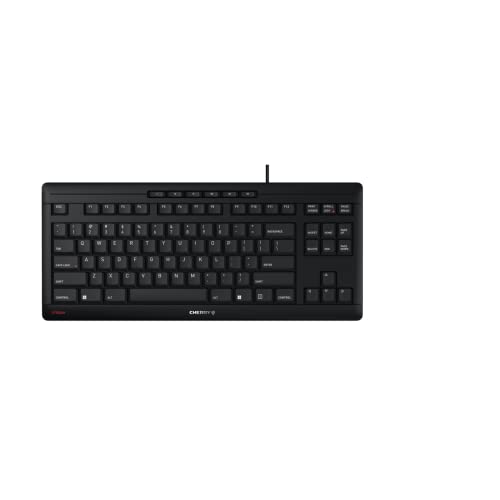
Cherry Stream TKL Wired Keyboard
Best for: quiet office typing
- Use
- Office (what this guide is about)
- Switch Type
- CHERRY SX scissor
- Form Factor
- TKL (87%)
- Connectivity
- USB wired
- Color
- Black
- Noise Level
- Silent
View on Amazon: Cherry Stream TKL Wired Keyboard Affiliate link
This Cherry Stream keyboard uses a TKL form factor with CHERRY SX scissor switches. It features silent keystrokes and on-key status LEDs. The compact design reduces hand-to-hand distance. It suits office workers who need quiet typing. The USB wired connection ensures stable input. It is ideal for shared workspaces where noise matters.
Pros
- CHERRY SX scissor mechanism for precise strokes
- Silent keystroke operation
- TKL compact form factor
- On-key status LEDs
Cons
- USB wired connectivity only
- No wireless option
- Limited to black or white color
Good fit if
- You work in a quiet office environment
- You prefer a compact keyboard layout
- You want reliable wired connectivity
Skip if
- You need wireless freedom
- You require a full-size numpad
- You want customizable RGB lighting
Verdict: Cherry Stream TKL Wired Keyboard is a quiet, compact option for office use. It fits buyers who prioritize silent typing and a smaller footprint over wireless flexibility.
Specifications side by side
| Spec | AULA 96% Wireless Membrane Keyboard | Cherry Stream TKL Wired Keyboard |
|---|---|---|
| Switch Type | Membrane | CHERRY SX scissor |
| Form Factor | 96% | TKL (87%) |
| Connectivity | Bluetooth 5.0, 2.4GHz, USB wired | USB wired |
| Backlighting | RGB | not stated |
| Use | Gaming | Office |
| Color | Gradient Purple | Black |
| Noise Level | not stated | Silent |
| Dimensions | 17.4 × 7.28 × 2 inches | 14.8 × 6.42 × 0.71 inches |
| Weight | not stated | 1.5 pounds |
| Model | S99 | not stated |
| Size | not stated | Compact |
Frequently asked questions
Is a membrane keyboard suitable for gaming?
Yes, membrane keyboards can work well for gaming if you prioritize connectivity over tactile feedback. The AULA S99 uses membrane switches but includes Bluetooth and 2.4GHz wireless options. It also offers macro programming, which helps gamers execute complex commands quickly without needing mechanical switch feel.
Which keyboard is better for a quiet office environment?
The Cherry Stream TKL is designed specifically for quiet office typing. It features silent switches and a compact TKL form factor. This reduces noise and saves desk space, making it ideal for shared workspaces where loud keystrokes might disturb colleagues or disrupt focus during long typing sessions.
Do I need a numpad for office work?
It depends on your data entry needs. The AULA S99 includes a 96% layout with a numpad, which is helpful for spreadsheets. However, the Cherry Stream TKL lacks a numpad to save space. Choose based on whether you frequently enter numbers or prefer a smaller footprint on your desk.
Can I connect a gaming keyboard to multiple devices?
Some gaming keyboards allow multi-device pairing. The AULA S99 supports Bluetooth 5.0, 2.4GHz wireless, and USB wired connections. This lets you switch between a PC and other devices easily. Most office keyboards like the Cherry Stream TKL stick to a single wired USB connection for stability.
What is the difference between TKL and 96% layouts?
TKL means Tenkeyless, which removes the numpad for a compact size. The 96% layout keeps the numpad but shrinks the arrow keys and spacing. The Cherry Stream TKL is smaller and lighter. The AULA S99 offers more keys in a similar footprint, balancing space savings with functionality.
Are wireless keyboards reliable for professional use?
Wireless keyboards are reliable if they offer stable connections. The AULA S99 provides Bluetooth and 2.4GHz options for flexible setups. For maximum stability without battery concerns, the Cherry Stream TKL uses a wired USB connection. Wired options eliminate latency and charging needs, which some office workers prefer for consistency.
Does keyboard size affect typing comfort?
Size impacts hand positioning and desk space. The Cherry Stream TKL is compact and lightweight at 1.5 pounds. The AULA S99 is larger at 17.4 inches long. A smaller keyboard may bring your hands closer together, while a 96% layout keeps the numpad within easy reach for number-heavy tasks.