GLORIOUS GMMK TKL Barebone vs GLORIOUS GMMK 2 Compact 65% (2026): Key Differences
As an Amazon Associate we earn from qualifying purchases. Links on this page are affiliate links.
You are comparing the glorious custom gaming keyboard vs gaming gmmk 2 compact. Both are barebone kits from GLORIOUS with USB-C connectivity and per-key RGB lighting. They share an aluminum top plate and hot-swappable switch support. The main difference is layout. The GMMK TKL uses a standard 87% TKL design. The GMMK 2 Compact uses a tighter 65% layout. This affects desk space and key availability. You need to decide which form factor fits your workflow.
Key differences
| Aspect | Glorious GMMK TKL Barebone | GLORIOUS GMMK 2 Compact 65% Barebones |
|---|---|---|
| Form Factor | TKL (87%) | 65% |
| Switch Compatibility | 3-pin (5-pin requires cutting legs) | 5-pin |
| Dimensions | 14 x 5.08 x 1.42 inches | 12.3 x 4.1 x 1.5 inches |
| Weight | 1.4 pounds | 1.9 pounds |
| Included Components | Not listed | USB-C cable, pullers, novelty key |
Which one should you choose?
Choose Glorious GMMK TKL Barebone if
- You want a standard layout with dedicated function keys and a full bottom row.
- You prefer lighter weight and plan to use 3-pin switches without modification.
- You need maximum compatibility with standard OEM sculpted keycaps.
Choose GLORIOUS GMMK 2 Compact 65% Barebones if
- You want a compact board that keeps arrow and navigation keys.
- You prefer easier installation of modern 5-pin switches.
- You want a heavier, more rigid frame with pre-lubed stabilizers and foam dampening.
Verdict: Choose the GMMK TKL if you prefer a traditional layout and standard 3-pin switches. Pick the GMMK 2 Compact if you want a smaller footprint with modern 5-pin support and better out-of-the-box sound dampening. Both offer solid aluminum builds and hot-swap flexibility.
Layout and Build Differences
Form factor
The GMMK TKL Barebone uses a standard TKL layout with 87 keys, preserving the full bottom row including the numpad area spacing. This makes it compatible with standard OEM keycaps and offers a familiar typing experience for those who do not need a numpad. In contrast, the GMMK 2 Compact 65% shrinks the footprint significantly. It retains dedicated arrow keys and navigation clusters while removing the function row and numpad. This compact design saves desk space without sacrificing essential navigation controls. You choose based on whether you prefer the traditional TKL width or the space-saving 65% layout.
Switch compatibility
Hot-swappable sockets define the customization potential for both keyboards, but they support different switch types. The GMMK TKL Barebone is designed for 3-pin plate-mounted mechanical switches. It does not natively support 5-pin switches, meaning you must cut off the plastic mounting legs on 5-pin switches to make them fit. This adds a step to the customization process. The GMMK 2 Compact 65% features sockets specifically designed for 5-pin switches. You can easily install switches from major brands like Cherry, Kailh, and Gateron without modification. This makes the GMMK 2 more convenient for users who prefer the wider availability and stability of 5-pin switches.
Build materials
Both keyboards feature an aluminum top plate, providing rigidity and a premium feel. However, the bottom construction differs. The GMMK TKL Barebone pairs its aluminum top with an ABS plastic bottom plate. This combination allows for fine sound tuning, letting you achieve either clacky or thocky profiles depending on your mods. The GMMK 2 Compact 65% also uses an aluminum top shell but includes thick interior keyboard foam. This foam acts as a dampener to eliminate case ping. Additionally, the GMMK 2 features an anodized finish that resists scratches and corrosion, offering a matte metallic finish that is smooth to the touch. The GMMK 2 offers more advanced sound dampening out of the box.
Included accessories
When you purchase the GMMK TKL Barebone, the package contains only the keyboard frame. You must source your own switches, keycaps, and cable separately. The GMMK 2 Compact 65% includes a few more items in the box. It comes with a 2-meter black braided USB-C cable, which is useful for setup. It also includes a switch puller and a keycap puller, tools necessary for installing your chosen components. Additionally, it provides a novelty ESC key. These included tools and the cable make the GMMK 2 slightly more ready-to-use for immediate customization, whereas the TKL is strictly a bare frame.
Dimensions and weight
Physical size and weight impact desk space and stability. The GMMK TKL Barebone measures 14 inches in length, 5.08 inches in width, and 1.42 inches in height. It weighs 1.4 pounds. The GMMK 2 Compact 65% is shorter at 12.3 inches in length and narrower at 4.1 inches in width. It is slightly taller at 1.5 inches and heavier at 1.9 pounds. The increased weight and grippy rubber feet on the GMMK 2 help it stay firmly in place during intense gaming sessions. The TKL is lighter and longer, which may suit users who prefer a wider typing area but need to move the keyboard more often.
Choose the right layout for you
You need arrow keys and compact size
The GMMK 2 Compact 65% saves desk space while keeping dedicated arrow and navigation keys. Its 65% layout fits in a smaller footprint than a standard TKL. You get a 12.3-inch length and 1.9-pound weight for stability. The aluminum top shell offers rigidity and scratch resistance. Hot-swap sockets accept 5-pin switches easily without soldering.
You prefer standard keycaps and full rows
The GMMK TKL Barebone uses a standard OEM layout with a full bottom row. This ensures wide compatibility with third-party keycaps from brands like Keychron or Akko. It measures 14 inches long and weighs 1.4 pounds. The aluminum top plate and ABS bottom allow for sound tuning. You can adjust the angle with the built-in stand for better ergonomics.
You want pre-lubed stabilizers and foam
The GMMK 2 Compact 65% comes with pre-installed lubricated stabilizers for a smooth press without rattle. It includes thick interior foam to dampen case ping. The package also includes a USB-C cable, switch puller, and keycap puller. These features help you achieve a clean sound profile right out of the box without extra modifications.
The products compared
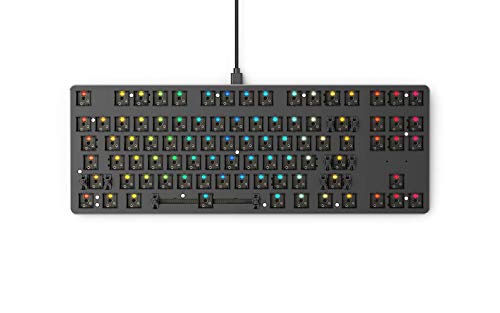
Glorious GMMK TKL Barebone
Best for: DIY keyboard builders seeking modularity
- Form Factor
- TKL (85%)
- Backlighting
- 16.8M RGB
- Case Material
- Aluminum top plate, ABS bottom
- Hot-Swap Support
- Hot-Swappable
- Color
- Black
- Dimensions
- 14 × 5.08 × 1.42 inches
View on Amazon: Glorious GMMK TKL Barebone Affiliate link
The Glorious GMMK TKL is a barebone mechanical keyboard with a TKL layout. It features hot-swappable 3-pin switch sockets, allowing you to customize switches without soldering. The build includes an aluminum top plate and ABS plastic bottom for sound tuning. It connects via USB-C wired and offers per-key RGB lighting. This kit suits builders who want a standard ANSI layout and modular switch options.
Pros
- Hot-swappable 3-pin switch sockets for easy customization
- Aluminum top plate and ABS plastic bottom for sound tuning
- Per-key 16.8 million RGB lighting with software support
- Standard ANSI OEM layout compatible with many keycaps
Cons
- Does not support 5-pin switches without modification
- Sold as a barebone kit requiring separate switches and keycaps
- Limited to wired USB-C connectivity
Good fit if
- You want to customize switch types without soldering
- You prefer a standard TKL layout with aluminum construction
- You need a wired keyboard for gaming or office use
Skip if
- You want a prebuilt keyboard with switches included
- You require wireless or Bluetooth connectivity
- You prefer 5-pin switches without cutting legs
Verdict: Glorious GMMK TKL Barebone 85% is a solid foundation for DIY enthusiasts who value build quality and switch flexibility. It fits users who want a wired, modular keyboard with a standard layout.

GLORIOUS GMMK 2 Compact 65% Barebones
Best for: Custom builders wanting compact layout with arrows
- Form Factor
- 65%
- Connectivity
- USB-C wired
- Backlighting
- 16.8M RGB
- Case Material
- Aluminum top frame
- Hot-Swap Support
- Hot-Swappable
- Color
- Black
View on Amazon: GLORIOUS GMMK 2 Compact 65% Barebones Affiliate link
The Glorious GMMK 2 Compact is a 65% barebone mechanical keyboard frame. It features an aluminum top shell for rigidity and durability. The layout retains dedicated arrow and navigation keys while saving desk space. You get hot-swappable sockets for easy switch installation without soldering. Pre-lubed stabilizers and internal foam reduce noise. It connects via USB-C and includes a braided cable.
Pros
- 65% compact layout with arrow keys
- Aluminum top shell for durability
- Hot-swappable 5-pin switch sockets
- Pre-lubricated stabilizers and foam dampening
Cons
- Barebone frame requires separate purchase of switches and keycaps
- Wired USB-C connection only
- Heavier build at 1.9 pounds may limit portability
Good fit if
- You want a compact keyboard that keeps navigation keys
- You enjoy customizing your own mechanical switches
- You prefer a sturdy aluminum frame over plastic
Skip if
- You need a pre-built keyboard with switches installed
- You require wireless Bluetooth connectivity
- You want a full-size keyboard with a number pad
Verdict: Glorious GMMK 2 Compact 65% Barebone fits builders who want a dense, compact frame with a full navigation cluster. It suits those who value tactile customization over plug-and-play convenience.
Specifications side by side
| Spec | Glorious GMMK TKL Barebone | GLORIOUS GMMK 2 Compact 65% Barebones |
|---|---|---|
| Form Factor | TKL (85%) | 65% |
| Connectivity | not stated | USB-C wired |
| Backlighting | 16.8M RGB | 16.8M RGB |
| Case Material | Aluminum top plate, ABS bottom | Aluminum top frame |
| Hot-Swap Support | Hot-Swappable | Hot-Swappable |
| Color | Black | Black |
| Dimensions | 14 × 5.08 × 1.42 inches | 12.3 × 4.1 × 1.5 inches |
| Weight | 1.4 pounds | 1.9 pounds |
| Size | TKL - 85% | Compact - 65% |
| Model | GMMK-TKL-RGB | GLO-GMMK2-65-RGB-B |
Frequently asked questions
Does the GMMK TKL Barebone include a numpad?
No, the GMMK TKL Barebone does not include a numpad. It uses a TKL form factor, which stands for tenkeyless. This layout removes the number pad to save desk space while keeping arrow keys and function rows. You get a standard 87-key arrangement that fits most ergonomic setups without the bulk of a full-size board.
Is the GMMK 2 Compact 65% smaller than the TKL?
Yes, the GMMK 2 Compact 65% is significantly smaller. It measures 12.3 inches in length compared to the TKL's 14 inches. The compact layout drops the function row and numpad, keeping only essential navigation keys. This results in a denser, more portable design that fits comfortably on smaller desks or travel bags.
Can I swap switches on both keyboards without soldering?
Yes, both keyboards support hot-swappable switches. This feature allows you to change mechanical switches without using a soldering iron. You can easily experiment with different switch types to find your preferred typing feel. This flexibility is a core benefit of both barebone kits, letting you customize the tactile experience to your liking.
Do both models feature RGB backlighting?
Yes, both the GMMK TKL Barebone and the GMMK 2 Compact 65% feature RGB backlighting. You can customize the color and lighting effects for each key individually. This per-key illumination helps you see your keys in low light and adds a visual flair to your setup. Both models share this aesthetic capability.
Which keyboard is heavier, the TKL or the Compact?
The GMMK 2 Compact 65% is heavier at 1.9 pounds. The GMMK TKL Barebone weighs 1.4 pounds. The extra weight in the Compact model may provide better stability on your desk. Heavier boards tend to stay in place during intense gaming sessions. You can choose based on your preference for portability versus stability.
Are keycaps included in either barebone kit?
No, neither kit includes keycaps as they are barebone versions. You must purchase switches and keycaps separately to complete your build. This allows you to choose specific components that match your desired typing sound and feel. The barebone frame provides the structure, while you supply the rest of the custom parts.
Does the 65% layout keep the arrow keys?
Yes, the 65% layout retains dedicated arrow keys. Unlike some ultra-compact layouts, this design keeps navigation keys accessible without requiring layer combinations. You get a balanced mix of space saving and usability. The arrows remain in their standard positions, making it easier to navigate menus and games without reaching for distant keys.