GLORIOUS GMMK PRO 75% Aluminum vs GLORIOUS GMMK 2 Compact 65% (2026): Key Differences
As an Amazon Associate we earn from qualifying purchases. Links on this page are affiliate links.
When comparing the glorious gaming gmmk 2 compact vs gaming gmmk pro 75, you see two aluminum barebones frames from Glorious. Both offer per-key RGB lighting and USB-C connectivity. They both support hot-swappable switches without soldering. The main difference lies in their layout. The GMMK 2 Compact uses a 65% form factor. The GMMK PRO uses a larger 75% layout. This changes the available keys and overall size for your desk.
Key differences
| Aspect | GLORIOUS GMMK 2 Compact 65% Barebones | Glorious GMMK PRO 75% Aluminum Barebones |
|---|---|---|
| Form Factor | 65% Compact | 75% TKL |
| Dimensions | 12.3 x 4.1 x 1.5 inches | 13.1 x 5.31 x 1.26 inches |
| Weight | 1.9 pounds | 3.3 pounds |
| Plate Swap Options | Not listed | Aluminum, Brass, or Polycarbonate |
| Media Controls | Not listed | Rotary knob included |
Which one should you choose?
Choose GLORIOUS GMMK 2 Compact 65% Barebones if
- You need a smaller footprint that saves desk space
- You prefer a lighter keyboard that is easier to move
- You want a layout that keeps arrow keys but removes the numpad
Choose Glorious GMMK PRO 75% Aluminum Barebones if
- You want a dedicated row of function keys above the numbers
- You value a heavier, more rigid build for stability
- You want the option to swap the internal plate for different sounds
Verdict: The GMMK 2 Compact suits those who prioritize space savings and a lighter build. The GMMK PRO is better for users who want a larger typing area and more customization options like plate swapping. Choose based on your preferred layout size.
Layout, Build, and Controls Compared
Form factor and size
The GMMK 2 Compact uses a 65% layout, packing dedicated arrow and navigation keys into a frame that measures 12.3 inches long and 4.1 inches wide. It weighs 1.9 pounds. The GMMK PRO features a 75% layout, offering a full row of function keys. It is larger at 13.1 inches long and 5.31 inches wide, with a weight of 3.3 pounds. If you need extra space for function keys, the PRO is the better choice. If desk space is tight, the Compact saves room while keeping essential navigation controls.
Build material and weight
Both keyboards use aluminum for their top shells. The GMMK 2 Compact specifies an aluminum top shell with anodization for scratch resistance. The GMMK PRO is CNC machined from solid aluminum, including an internal aluminum switch plate that adds rigidity. The PRO is significantly heavier at 3.3 pounds compared to the Compact's 1.9 pounds. This extra mass helps keep the PRO stationary during intense gaming sessions. Both designs prioritize durability and a premium feel through their metallic construction.
Switch compatibility
The GMMK 2 Compact features hot-swap sockets designed specifically for 5-pin switches. You can install switches from brands like Glorious, Cherry, Kailh, and Gateron without soldering. The GMMK PRO supports both 3-pin and 5-pin MX mechanical switches. This broader compatibility allows you to use a wider variety of switch types on the PRO. If you prefer 3-pin switches, the PRO is the only option here. Otherwise, both boards allow easy customization of the typing feel.
Sound dampening
The GMMK 2 Compact includes thick interior keyboard foam to dampen case ping and eliminate echo. It also comes with pre-installed, lubricated stabilizers for a smooth press. The GMMK PRO includes foam inside the case that you can add or remove to adjust the acoustic profile. It allows you to swap the aluminum switch plate for brass or polycarbonate plates to change the typing sound. While both offer sound customization, the Compact provides a ready-to-use dampened experience out of the box.
Media controls
The GMMK PRO includes a rotary knob that is easily replaceable with colorful alternatives from Glorious. This knob provides direct control for media playback and volume. The GMMK 2 Compact data does not mention a rotary knob or dedicated media controls. You would need to use software or key combinations for media functions on the Compact. If you want physical hardware control for volume and media, the PRO has a clear advantage with its integrated knob.
Which GMMK Should You Choose
You want dedicated arrow keys and compact size
The GMMK 2 Compact 65% fits your need for a smaller footprint while keeping navigation keys. Its 65% layout saves desk space without removing essential controls. The aluminum top shell provides rigidity, and the 1.9-pound weight keeps it stable during use. You get per-key RGB lighting and hot-swap sockets for easy switch customization.
You prefer a larger 75% layout with extra keys
The GMMK PRO 75% offers more keys for productivity and gaming efficiency. Its 75% layout includes function row keys for faster access. The CNC solid aluminum body weighs 3.3 pounds, providing substantial stability. You can swap the internal aluminum plate to change typing feel. Per-key RGB and USB-C connectivity round out the features.
You want interchangeable hardware for customization
The GMMK PRO allows you to replace the top frame, rotary knob, and cable for a unique look. You can also swap the internal aluminum plate for brass or polycarbonate to adjust sound and feel. This modular design lets you tailor the keyboard to your preferences. The 75% layout supports extensive modification while maintaining a solid aluminum build.
The products compared

GLORIOUS GMMK 2 Compact 65% Barebones
Best for: compact builds with arrow keys
- Form Factor
- 65%
- Connectivity
- USB-C wired
- Backlighting
- 16.8M RGB
- Case Material
- Aluminum top frame
- Hot-Swap Support
- Hot-Swappable
- Color
- Black
View on Amazon: GLORIOUS GMMK 2 Compact 65% Barebones Affiliate link
The Glorious GMMK 2 Compact is a barebones 65% mechanical keyboard frame with an aluminum top shell. It features per-key RGB backlighting and USB-C connectivity. The design includes hotswap sockets for 5-pin switches and pre-lubricated stabilizers. This compact layout retains arrow keys while saving desk space. It suits users who want a rigid, durable build for gaming or typing.
Pros
- Aluminum top shell for rigidity and scratch resistance
- Hotswap sockets for easy switch installation
- Pre-lubricated stabilizers reduce rattle
- Compact 65% layout keeps arrow keys
Cons
- Barebones frame requires separate purchase of switches and keycaps
- USB-C wired connection only
- Limited to 5-pin switch compatibility
Good fit if
- You want a compact keyboard with dedicated arrow keys
- You prefer a heavy, stable aluminum build
- You enjoy customizing switches and keycaps
Skip if
- You need a prebuilt keyboard with switches included
- You require wireless connectivity
- You prefer a full-size layout with numpad
Verdict: Glorious GMMK 2 Compact 65% Aluminum is a solid choice for enthusiasts who value build quality and customization. It fits buyers seeking a rigid, compact frame for their preferred switches.
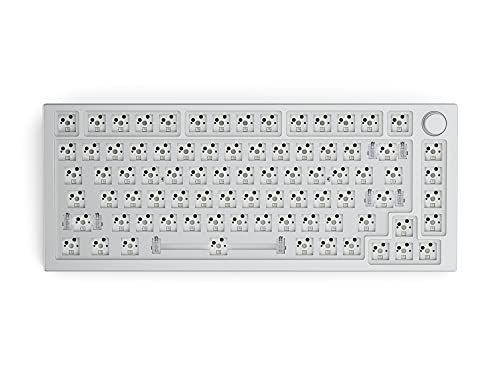
Glorious GMMK PRO 75% Aluminum Barebones
Best for: builders wanting a heavy 75-percent aluminum base
- Form Factor
- 75%
- Backlighting
- RGB
- Case Material
- CNC Aluminum
- Use
- Gaming
- Dimensions
- 13.1 × 5.31 × 1.26 inches
- Weight
- 3.3 pounds
View on Amazon: Glorious GMMK PRO 75% Aluminum Barebones Affiliate link
The GLORIOUS GMMK PRO 75% Aluminum Keyboard is a barebones mechanical keyboard frame designed for modular builds. You get a solid CNC aluminum body weighing 3.3 pounds, 5-pin hot-swap switch sockets, and a dedicated rotary knob. It fits builders who want dedicated arrow and function keys along with heavy desktop stability for custom switch configurations.
Pros
- Solid CNC-machined aluminum body weighing 3.3 pounds
- Hot-swap PCB supports both 3-pin and 5-pin MX switches
- Integrated rotary knob and replaceable switch plate design
- Includes switch puller, keycap puller, and 2-meter braided USB-C cable
Cons
- Barebones configuration requires sourcing separate switches and keycaps
- Heavy 3.3-pound aluminum body limits portable use
- Larger 13.1-inch width occupies more desk area than 65-percent frames
Good fit if
- You want a dedicated function row, arrow cluster, and rotary knob.
- You prefer a heavy, rigid CNC aluminum frame that stays put.
- You plan to install your own 3-pin or 5-pin MX mechanical switches.
Skip if
- You want a complete pre-built keyboard ready to type on immediately.
- You want an ultralight board to pack into a bag regularly.
- You prefer the narrowest desk footprint possible.
Verdict: GLORIOUS GMMK PRO 75% Aluminum Keyboard delivers a sturdy, customizable foundation for builders who want a heavy metal chassis and dedicated 75-percent navigation keys.
Specifications side by side
| Spec | GLORIOUS GMMK 2 Compact 65% Barebones | Glorious GMMK PRO 75% Aluminum Barebones |
|---|---|---|
| Form Factor | 65% | 75% |
| Connectivity | USB-C wired | not stated |
| Backlighting | 16.8M RGB | RGB |
| Case Material | Aluminum top frame | CNC Aluminum |
| Hot-Swap Support | Hot-Swappable | not stated |
| Use | not stated | Gaming |
| Color | Black | White Ice |
| Dimensions | 12.3 × 4.1 × 1.5 inches | 13.1 × 5.31 × 1.26 inches |
| Weight | 1.9 pounds | 3.3 pounds |
| Size | Compact - 65% | GMMK Pro (75%) |
| Model | GLO-GMMK2-65-RGB-B | GMMK-PRO-BAREBONES-RENEWED |
Frequently asked questions
Is the GMMK 2 Compact better for small desks?
Yes, if desk space is tight. The GMMK 2 Compact measures 12.3 inches long and 4.1 inches wide. It weighs 1.9 pounds. This compact 65% layout keeps arrow keys while reducing footprint. The larger GMMK PRO is 13.1 inches long and weighs 3.3 pounds. You save space with the compact model.
Does the GMMK PRO have a heavier build?
Yes, the GMMK PRO is significantly heavier. It weighs 3.3 pounds compared to the GMMK 2 Compact’s 1.9 pounds. The PRO also has a slightly taller profile at 1.26 inches high versus 1.5 inches for the compact. The extra weight comes from its larger aluminum chassis and 75% layout structure.
Can I use both keyboards for gaming?
Both are designed for gaming use. The GMMK 2 Compact is listed for gaming use with a black finish. The GMMK PRO is also specified for gaming, available in White Ice. Both feature per-key RGB backlighting. You can choose either based on your preferred layout and size requirements.
Which model is smaller in width?
The GMMK 2 Compact is narrower. It measures 4.1 inches wide. The GMMK PRO is wider at 5.31 inches. Both are aluminum barebones frames. The compact width suits users who want a tighter footprint. The PRO’s wider frame accommodates its 75% layout with additional navigation keys.
Are both keyboards available in RGB lighting?
Yes, both models include RGB backlighting. The GMMK 2 Compact offers per-key RGB illumination. The GMMK PRO also features per-key RGB lighting. This allows you to customize colors for each key. Lighting is a shared feature between these two aluminum keyboard frames.
Is the GMMK 2 Compact a 65% layout?
Yes, the GMMK 2 Compact uses a 65% form factor. It packs arrow and navigation keys into a smaller frame. The model number is GLO-GMMK2-65-RGB-B. This layout balances size and functionality. The GMMK PRO uses a 75% layout instead, which is larger and includes more keys.
Does the GMMK PRO come in White Ice?
Yes, the GMMK PRO is available in White Ice. This color option is listed for the 75% aluminum model. The GMMK 2 Compact is listed in Black. You can choose the color that matches your setup. Both remain aluminum barebones keyboards for custom switch installation.