Keychron J3 SE Review (2026): Pink and Blue 96% Wireless Keyboard with Knob and Sakura Milk Switches
As an Amazon Associate we earn from qualifying purchases. Links on this page are affiliate links.
The Keychron J3 SE is a 96% wireless keyboard in a pink and blue colorway, with a numpad and a knob packed into a frame narrower than a full-size board. It ships with Sakura Milk switches on a hot-swap PCB that accepts almost all 3-pin and 5-pin MX switches from Cherry, Gateron, Kailh, Panda and others. It is our pick for anyone who wants a colorful desk board that still keeps a number pad and full remapping: QMK firmware is set through the Keychron Launcher web app. It connects over a 1000Hz 2.4 GHz receiver, Bluetooth 5.2 or a cable. MDA-profile PBT keycaps are non-shine-through, with 22+ RGB effects underneath. This review is written from Keychron's listing, without hands-on testing.
What stands out
- 96% layout with numpad and knob
- Pink and blue colorway
- Sakura Milk switches, 3/5-pin hot-swap
- 2.4 GHz at 1000Hz, Bluetooth 5.2, wired
- QMK through Keychron Launcher
Who it fits
Good fit for
Home and office users who want a pastel wireless board with a numpad and programmable keys.
Who should skip it
Anyone who wants shine-through legends or a full 104-key layout with standard gaps.
Verdict: A cheerful 96% board that does not give up numpad, wireless or QMK for its looks.
J3 SE specs that matter
96% layout
Numpad and arrows in a compact frame, plus a knob.
Sakura Milk switch
Stock switch named in the title; any 3/5-pin MX fits.
1000Hz 2.4 GHz
Bluetooth 5.2 and USB-C wired as well.
QMK firmware
Remap and macros in Keychron Launcher.
MDA PBT keycaps
Non-shine-through, oil-resistant.
Fn + Caps Lock
Switches between macOS and Windows keymaps.
Colors and keycaps
This J3 SE listing is the pink and blue colorway; a solid pink version is also sold. The MDA-profile keycaps are PBT with non-shine-through legends, so the 22+ RGB effects glow around the keys rather than through the letters. The listing gives no dimensions, weight or switch type details beyond the Sakura Milk name.
Daily use
The J3 SE stores separate keymaps for macOS and Windows and switches with Fn + Caps Lock, which helps if one board serves a Mac laptop and a Windows PC. The knob and every key can be remapped in Keychron Launcher, which runs in any browser. For games, the 2.4 GHz receiver runs at 1000Hz. The listing does not give a battery capacity.
J3 SE buyer checklist
The J3 SE suits you if:
Check before you buy
- You want a pastel J3 SE with a numpad
- The J3 SE knob is handy for volume or shortcuts
- You move the J3 SE between Mac and Windows
- Unlit legends do not bother you
The product at a glance
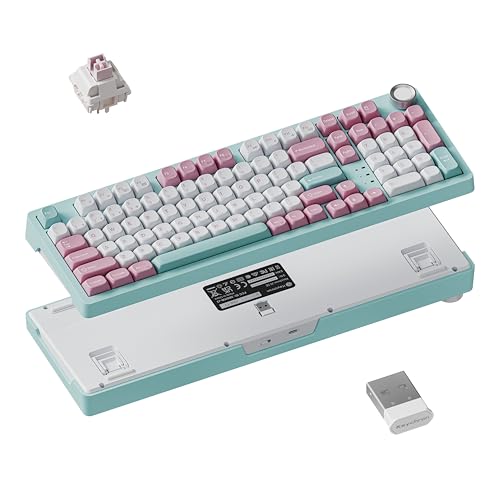
Keychron 96% Wireless Mechanical Keyboard with Knob
Best for: Pastel 96% wireless board
- Switch Type
- Sakura Milk
- Form Factor
- 96%
- Connectivity
- 2.4 GHz, Bluetooth 5.2, USB-C wired
- Backlighting
- RGB
- Keycap Material
- PBT
- Hot-Swap Support
- Hot-Swappable
View on Amazon: Keychron 96% Wireless Mechanical Keyboard with Knob Affiliate link
Keychron J3 SE (Pink Blue, Sakura Milk): a 96% wireless keyboard with numpad, knob, 3/5-pin hot-swap, QMK Launcher and MDA PBT keycaps.
Pros
- Numpad and knob in a 96% frame
- Tri-mode with 1000Hz receiver
- Hot-swap and QMK
Cons
- Legends are not shine-through
- No dimensions, weight or battery size listed
- Switch details limited to the name
Good fit if
- You want a colorful wireless board with numpad
- You use Mac and Windows
Skip if
- You need lit legends
- You want a standard 104-key layout
Verdict: A colorful, well-equipped 96% wireless board.
Specifications side by side
| Spec | Keychron 96% Wireless Mechanical Keyboard with Knob |
|---|---|
| Switch Type | Sakura Milk |
| Form Factor | 96% |
| Connectivity | 2.4 GHz, Bluetooth 5.2, USB-C wired |
| Backlighting | RGB |
| Keycap Material | PBT |
| Hot-Swap Support | Hot-Swappable |
| Media Controls | Volume Knob |
| Operating System | Mac, Windows |
| Color | Pink Blue |
If you want something far smaller than a 96% layout for travel, our mustar 61 key portable blue keyboard review covers a compact 61-key alternative.
Frequently asked questions
What switches does the Keychron J3 SE come with?
The J3 SE listing names Sakura Milk switches; other 3-pin and 5-pin MX switches fit too.
Does the J3 SE have a number pad?
Yes: the J3 SE is a 96% layout with numpad and knob.
How do I switch the J3 SE between Mac and Windows?
Press Fn + Caps Lock; each system can keep its own keymap.
What keycap profile does the J3 SE use?
MDA-profile PBT keycaps with non-shine-through legends.
Does the J3 SE have a 2.4 GHz receiver?
Yes: the J3 SE runs at 1000Hz on its receiver, plus Bluetooth 5.2 and USB-C.