Keychron K2 HE 75% Magnetic Review: Who It Fits and Who Should Skip It
As an Amazon Associate we earn from qualifying purchases. Links on this page are affiliate links.
This keychron k2 he rapid trigger review focuses on the Keychron K2 HE, a 75% wireless magnetic keyboard. It uses Gateron double-rail magnetic switches and offers adjustable actuation points from 0.2 to 3.8 mm. These specs let you fine-tune sensitivity for gaming or typing. The board supports 2.4 GHz, Bluetooth 5.2, and Type-C connections. You get a 1000 Hz polling rate for responsive input. The layout includes shine-through PBT keycaps and RGB lighting. It runs on QMK firmware with web-based configuration. This setup bridges work and play with precise control.
What stands out
- Gateron double-rail magnetic switches with pre-lubed design for smooth, stable keypresses.
- Adjustable actuation points from 0.2 to 3.8 mm with 0.1 mm sensitivity.
- Three connectivity options: 2.4 GHz, Bluetooth 5.2, and Type-C.
- 1000 Hz polling rate for competitive gaming responsiveness.
- Shine-through PBT keycaps with 22+ RGB backlight effects.
Who it fits
Good fit for
You should choose this keyboard if you need precise control over keystroke sensitivity. The adjustable actuation points help gamers minimize accidental touches in fast-paced titles. Typists who want customizable depth will appreciate the 0.1 mm sensitivity steps. The three connectivity modes suit users who switch between a computer, phone, and tablet. The 75% layout saves desk space while keeping essential keys. Magnetic switches offer durability and speed for heavy use.
Who should skip it
You should look elsewhere if you prefer mechanical switches with tactile feedback. This board uses magnetic Hall Effect sensors, which feel different from traditional clicky switches. If you need a full-size layout with a numpad, the 75% form factor lacks those extra keys. Users wanting a physical software app will find only a web configurator here. If you require wired-only connectivity, the wireless focus may not fit your workflow. The exclusive switch compatibility limits customization options.
Verdict: The Keychron K2 HE offers precise magnetic switch control for gamers and typists. Its adjustable actuation and multi-device support make it a versatile choice.
Keychron K2 HE Key Specs
Form Factor: 75%
This layout retains function keys and navigation clusters while removing the numpad. You get a compact footprint that saves desk space without losing essential shortcuts. It suits users who need arrow keys and F-row controls but want a smaller keyboard than a full-size model. Compare this to 60% layouts if you prefer minimalism, or 80% if you need a numpad for data entry.
Switch Type: Gateron magnetic
These Hall Effect switches detect position via magnetism rather than physical contact. This allows for rapid trigger features and adjustable actuation points. You benefit from faster response times and customizable sensitivity for gaming or typing. Unlike traditional mechanical switches, these do not suffer from contact bounce. Check if they are hot-swappable if you plan to change switches later, though this model supports only Gateron double-rail magnetic types.
Connectivity: 2.4 GHz, Bluetooth 5.2, Type-C
You have three ways to connect. The 2.4 GHz dongle offers low latency for gaming. Bluetooth 5.2 lets you pair with multiple devices like phones or tablets for easy switching. Type-C provides wired connection for charging or zero-latency use. This flexibility helps you move between workstations or devices seamlessly. Compare this to Bluetooth-only models if you prioritize wireless freedom over gaming performance.
Keycap Material: Shine-through PBT
PBT plastic is durable and resistant to shine or wear over time. The shine-through design allows RGB backlighting to illuminate the legends clearly. You get a textured typing feel that resists oil buildup from fingers. This material is generally thicker and quieter than ABS keycaps. Look for this spec if you want longevity and clear backlight visibility in low-light environments.
Backlighting: RGB
Each key has independent red, green, and blue LEDs. You can customize colors and effects to match your setup or mood. This enhances visibility in dark rooms and adds aesthetic appeal to your desk. Compare this to single-color white backlighting if you prefer simplicity. RGB allows for deeper personalization, which is useful for gamers who want visual cues or typists who enjoy a vibrant workspace.
Build Quality and Physical Design
The listing describes the Keychron K2 HE as a black 75% layout keyboard. This form factor keeps the function row and navigation cluster while removing the number pad. You gain a compact footprint that saves desk space without losing essential shortcuts. The unit measures 14.2 inches in width, 7.99 inches in depth, and 2.83 inches in height. It weighs 2.16 pounds, providing a stable base that resists sliding during intense typing or gaming sessions.
Keycaps are made from shine-through PBT material with a Cherry profile. This finish offers durability and a textured feel that resists shine over time. The material allows RGB backlighting to pass through evenly, ensuring every key is visible in low light. According to the listing, the keyboard includes acoustic foams inside the case. These materials help dampen sound and reduce hollow echoes, creating a deeper, more consistent thock for each press.
The design supports wireless connectivity via 2.4 GHz and Bluetooth 5.2, along with a Type-C port for wired use. This flexibility lets you switch between devices or charge the keyboard without losing functionality. The magnetic switches are pre-lubed and double-rail, which the listing notes provides ultra-stable and responsive typing. The overall build prioritizes a balance of portability and solid construction for both work and competitive gaming environments.
Setup and everyday use guide
You connect the Keychron K2 HE through three distinct pathways. The listing specifies 2.4 GHz wireless, Bluetooth 5.2, and Type-C modes. This allows you to pair up to three devices simultaneously. You can switch between your computer, phone, and tablet without unplugging anything. The 1000 Hz polling rate supports competitive gaming scenarios where response time matters. For configuration, you use the Launcher Web Configurator. This tool runs in your browser, so you do not need to install separate software on your machine. You can adjust actuation points, remap keys, and create macros directly from the web interface. The adjustable actuation point ranges from 0.2 to 3.8 mm. You set each key with 0.1 mm sensitivity. This lets you choose shallow presses for quick actions or deeper engagement for deliberate typing. The keyboard includes Gateron double-rail magnetic switches. These are pre-lubed for stability. You cannot swap them with standard mechanical switches because the board is compatible exclusively with Gateron double-rail magnetic options. The shine-through PBT keycaps work with the RGB backlighting. The listing notes 22+ backlight effects. This ensures visibility in low light. The device weighs 2.16 pounds and measures 7.99 inches wide. It fits standard desk setups without excessive footprint. You get snap action features that prioritize the last key pressed. This aids directional changes in games like Valorant. Everyday use involves managing these wireless connections and web-based settings. The physical design remains static once you have your preferred actuation points saved.
Who Needs This Keyboard
You should verify your device compatibility before purchasing. This keyboard supports both macOS and Windows, but the keycaps are pre-printed for specific layouts. You may need to swap keycaps if your operating system differs from the default configuration. The listing notes exclusive compatibility with Gateron double-rail magnetic switches. You cannot use third-party switches with this board. Keep an eye on the shine-through PBT keycaps. They resist wear but may show oil buildup over time. Regular cleaning with isopropyl alcohol helps maintain clarity. This model sits alongside other magnetic options in our 1 reviews. It offers a 75% layout, unlike full-size or compact 60% alternatives. Consider your desk space and typing habits. If you need a numpad, look elsewhere. If you value rapid trigger features, this fits well. The web-based configurator simplifies setup, but you must have a browser. Ensure you have a stable internet connection for initial customization.
Check before you buy
- Check if your OS matches the pre-printed keycaps.
- Verify you only use Gateron double-rail magnetic switches.
- Confirm you do not need a number pad.
- Ensure you have internet access for web config.
The product at a glance
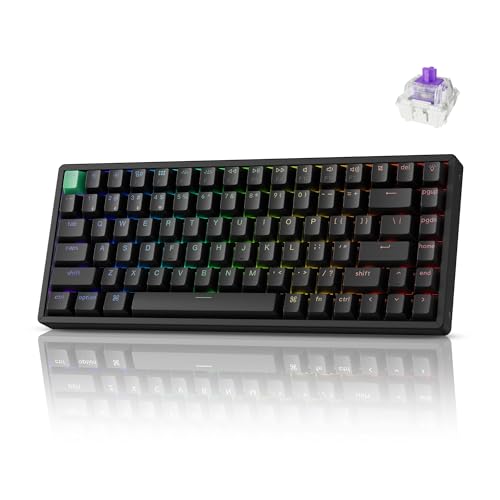
Keychron K2 HE 75% Magnetic Wireless Keyboard
Best for: Compact gaming and typing with rapid triggers
- Switch Type
- Gateron double-rail magnetic
- Form Factor
- 75%
- Connectivity
- 2.4 GHz, Bluetooth 5.2, Type-C
- Backlighting
- RGB
- Keycap Material
- Shine-through PBT
- Case Material
- Aluminum
View on Amazon: Keychron K2 HE 75% Magnetic Wireless Keyboard Affiliate link
The Keychron K2 HE is a 75% wireless keyboard featuring Gateron magnetic switches and rapid trigger technology. It offers adjustable actuation points from 0.2 to 3.8 mm and supports 2.4 GHz, Bluetooth 5.2, and Type-C connectivity. This layout suits users who want a compact footprint without losing arrow keys. The web-based configurator allows deep customization of macros and key mappings directly from a browser.
Pros
- Gateron double-rail magnetic switches for rapid triggering
- Adjustable actuation points with 0.1 mm sensitivity
- Three connectivity modes including Bluetooth 5.2
- Web-based Launcher for key remapping and macros
- Shine-through PBT keycaps with RGB backlighting
Cons
- Compatible exclusively with Gateron double-rail magnetic switches
- No physical display for status monitoring
- Configuration relies on a web browser interface
Good fit if
- You need a compact 75% layout for desk space
- You want precise control over actuation depth
- You prefer wireless freedom with multiple device support
Skip if
- You require hot-swappable switches from other brands
- You prefer a full-size keyboard with numpad
- You want a dedicated hardware configurator
Verdict: Keychron K2 HE 75% Magnetic Keyboard delivers rapid trigger precision for competitive gaming and work. It fits users who value customizable actuation points and a compact wireless design.
Specifications side by side
| Spec | Keychron K2 HE 75% Magnetic Wireless Keyboard |
|---|---|
| Switch Type | Gateron double-rail magnetic |
| Form Factor | 75% |
| Connectivity | 2.4 GHz, Bluetooth 5.2, Type-C |
| Backlighting | RGB |
| Keycap Material | Shine-through PBT |
| Case Material | Aluminum |
| Color | Black |
| Operating System | Mac, Windows |
| Dimensions | 2.83 × 7.99 × 14.2 inches |
| Weight | 2.16 pounds |
Frequently asked questions
Does the Keychron K2 HE support rapid trigger functionality?
Yes, this keyboard features rapid trigger capabilities. It uses Gateron double-rail magnetic switches to detect key position continuously. This allows you to reset keystrokes instantly without waiting for the key to physically return to its starting position. This spec is critical for competitive gaming where fast repeated inputs are necessary.
How adjustable are the actuation points on this keyboard?
You can customize the actuation depth between 0.2 and 3.8 mm. This range lets you set the trigger point for each key individually. You might choose a shallow depth for quick gaming responses or a deeper point to prevent accidental presses during typing. This precision comes from the magnetic sensor technology.
What connectivity options does the Keychron K2 HE offer?
The device supports three connection modes: 2.4 GHz wireless, Bluetooth 5.2, and Type-C wired. You can pair up to three devices simultaneously. This allows you to switch between a computer, phone, and tablet easily. The listing confirms it is a wireless keyboard with these specific transmission standards.
Is the Keychron K2 HE compatible with Mac and Windows?
It supports both operating systems. However, the keycaps are pre-printed for specific layouts. You may need to swap keycaps if your OS differs from the default configuration. The listing notes exclusive compatibility with Gateron switches, which function across both platforms. Verify your keycap layout before finalizing your setup.
What is the physical size of the 75% layout?
The keyboard measures 7.99 inches in width and 2.83 inches in length. The height is 1.42 inches. This compact footprint saves desk space while retaining the function row and navigation cluster. It removes the number pad to fit smaller workspaces without losing essential shortcuts for productivity or gaming.
How heavy is the Keychron K2 HE keyboard?
The unit weighs 2.16 pounds. This weight provides stability during intense typing or gaming sessions. The solid build helps prevent the keyboard from sliding across your desk. The listing specifies this mass along with its black color and wireless connectivity, indicating a sturdy construction suitable for daily use.
What type of switches are used in this magnetic keyboard?
It uses Gateron double-rail magnetic switches. These switches rely on magnetic fields rather than physical metal contacts to register keystrokes. This design enables the rapid trigger feature and adjustable actuation points. The double-rail structure ensures consistent key wobble control, which is important for precise input accuracy.