Klymra Womier DK75 75% Wireless Review: A Quiet Membrane Board with Screen
As an Amazon Associate we earn from qualifying purchases. Links on this page are affiliate links.
The Womier DK75 is listed under the Klymra brand, with Womier in the title. Despite the mechanical look and the "creamy" wording, the listing says plainly that it uses silent membrane switches, so it is not a mechanical keyboard and has no hot-swap sockets. Top reason to pick it: a quiet, low-cost 75% that still runs on Bluetooth 5.0, 2.4GHz or USB-C and adds a screen and volume knob. It has PBT keycaps, 15 RGB effects set with FN keys, and a 4000mAh battery. The listing weight is 1.6 pounds. This review comes from Klymra's listing and published specs, not hands-on testing.
What stands out
- DK75: 75% layout, silent membrane keys
- Bluetooth 5.0, 2.4GHz and USB-C on the DK75
- DK75 screen shows battery and connection
- Knob for volume or DK75 light effects
- PBT keycaps, 4000mAh in the DK75
Who it fits
Good fit for
Students and office users who want a quiet, compact wireless board with a mechanical look and a low price.
Who should skip it
Anyone who wants real mechanical switches, hot-swap sockets or software remapping.
Verdict: A quiet 75% membrane board with useful extras for the money, as long as you do not expect mechanical keys.
Womier DK75 specs explained
Key type
Silent membrane, per the DK75 listing: not mechanical, no hot-swap.
Layout
75% with arrows and an F-row; the DK75 key count is not stated.
Connection
Bluetooth 5.0, 2.4GHz receiver and USB-C wired on the DK75.
Screen and knob
The DK75 screen shows battery and mode; knob sets volume or lighting.
Lighting
15 RGB effects and 7 colors, set with DK75 FN combinations.
Battery
4000mAh with auto-sleep; the DK75 listing gives no runtime.
Weight
1.6 pounds per the DK75 spec field.
DK75 green build and keycaps
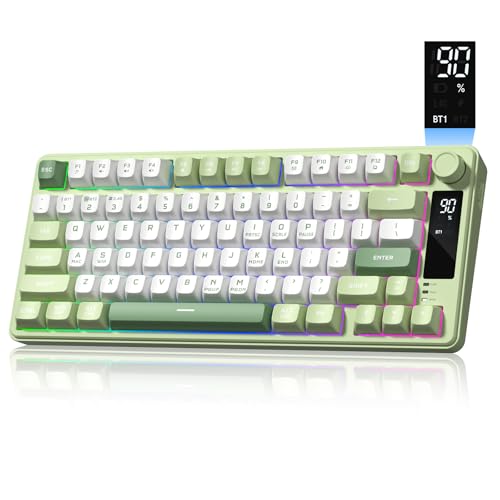
This DK75 listing is the green colorway with PBT keycaps, which resist the shine ABS caps get over time. The keyboard is styled like a 75% mechanical board, with a knob and a small screen at the top right, and has a tilt angle for typing. Under the caps are membrane switches, which give a cushioned, quiet press rather than the defined travel of a mechanical switch. The listing gives no dimensions.
Daily use with the Womier DK75
Switching between Bluetooth, the 2.4GHz dongle and USB-C covers a laptop, a tablet and a desktop, and the listing names Mac and Windows. Lighting changes run through FN keys, so there is no software to install, and there is none for remapping either. The screen saves you guessing the battery level, though the listing does not give hours per charge. Choose the DK75 if quiet keys and a low price matter most; choose a hot-swap mechanical 75% such as the EPOMAKER or AULA boards if you want to change switches later.
Womier DK75: before you buy
Make sure these fit your needs:
Check before you buy
- You are fine with membrane keys on the DK75
- No hot-swap or switch choice on the DK75
- Lighting is set by FN keys, not an app
- No battery runtime is listed for the DK75
The product at a glance
Womier DK75 75% Wireless Keyboard
Best for: Quiet budget 75%
- Switch Type
- Membrane
- Form Factor
- 75%
- Backlighting
- RGB
- Keycap Material
- PBT
- Connectivity
- Wireless
- Media Controls
- Volume Knob
View on Amazon: Womier DK75 75% Wireless Keyboard Affiliate link
Womier DK75 (green, Klymra listing): a 75% tri-mode keyboard with silent membrane keys, PBT caps, status screen, media knob, 15 RGB effects and a 4000mAh battery.
Pros
- Quiet membrane keys for shared rooms
- Screen and knob at a low price
- Three connection modes
Cons
- Not mechanical; no hot-swap
- No battery runtime listed
- No software for remapping
Good fit if
- You want a quiet compact wireless board
- You type in shared spaces
Skip if
- You want mechanical switches
- You want to remap keys
Verdict: A quiet budget 75% with screen and knob.
Specifications side by side
| Spec | Womier DK75 75% Wireless Keyboard |
|---|---|
| Switch Type | Membrane |
| Form Factor | 75% |
| Backlighting | RGB |
| Keycap Material | PBT |
| Connectivity | Wireless |
| Media Controls | Volume Knob |
| Use | Gaming |
| Color | Green |
| Operating System | Mac, Windows |
| Noise Level | Silent |
| Weight | 1.6 pounds |
| Model | womier DK75 |
If you are also planning the desk your keyboard will sit on, our fezibo 75 review covers that L-shaped standing desk's published specs.
Frequently asked questions
Is the Womier DK75 mechanical?
No. The DK75 listing says it uses silent membrane switches with a mechanical-style look.
Why does the DK75 listing show Klymra?
Klymra is the brand on the listing; the title and model field name the Womier DK75.
What does the DK75 screen show?
Battery level and connection status, per the listing.
Does the DK75 need software?
No. Its 15 RGB effects, colors, brightness and speed are set with FN key combinations.
How heavy is the DK75?
The DK75 spec field lists 1.6 pounds.