Logitech G vs Corsair Gaming Mice: Which Brand Fits You?
As an Amazon Associate we earn from qualifying purchases. Links on this page are affiliate links.
When you compare a logitech g vs corsair gaming mouse, you are looking at two distinct approaches to performance. Both brands deliver high-end sensors built for competitive play. The Logitech G305 offers wireless freedom with a lightweight design. The Corsair Scimitar focuses on wired precision with extensive button customization. Your choice depends on whether you value connectivity flexibility or specialized input control.
Key differences
| Aspect | Logitech G305 Lightspeed Wireless Mouse | Corsair Scimitar RGB Elite Wired MMO Mouse |
|---|---|---|
| Connectivity | LIGHTSPEED Wireless | Wired |
| Maximum DPI | 12,000 DPI | 18,000 DPI |
| Sensor | HERO | PixArt PMW3391 |
| Programmable Buttons | not listed | 17 |
| Weight | 3.36 ounces | 4.3 ounces |
Which one should you choose?
Choose Logitech G305 Lightspeed Wireless Mouse if
- You prefer a wireless setup without cable drag.
- You want a lightweight mouse for fast movements.
- You value long battery life on a single AA cell.
Choose Corsair Scimitar RGB Elite Wired MMO Mouse if
- You play MMOs or MOBAs and need many buttons.
- You want adjustable side buttons for your grip.
- You prefer a contoured shape with a finger rest.
Verdict: The Logitech G305 suits players who prioritize wireless convenience and a light, classic form factor. The Corsair Scimitar is better for MMO players who need dedicated side buttons and a wired connection. Choose based on your preferred genre and connectivity needs.
Logitech G vs Corsair Mouse Specs
connectivity
You must choose between wireless freedom and wired stability. The Logitech G305 uses LIGHTSPEED wireless technology to deliver a 1 ms response time. This allows for faster performance than many wired options without cable drag. The Corsair Scimitar relies on a wired connection via a braided cable. This ensures zero latency and constant power, though it limits your movement range. If you prefer a clean desk setup without tethering, the Logitech G305 is the practical choice. If you need absolute reliability for competitive play, the Corsair Scimitar wired link is superior.
sensor
Both mice feature high-end optical sensors tailored for gaming precision. The Logitech G305 utilizes the HERO sensor with a maximum DPI of 12,000. This sensor is known for excellent power efficiency and accuracy. The Corsair Scimitar employs the PixArt PMW3391 sensor, which supports up to 18,000 DPI. It adjusts in 1 DPI steps for fine-tuning. While the Corsair offers a higher peak DPI, both sensors provide the tracking accuracy required for fast-paced games. The difference in maximum DPI rarely impacts actual gameplay for most users, making this a close call between two capable optical engines.
buttons
Button configuration defines the control layout for different genres. The Corsair Scimitar includes 17 fully programmable buttons, including 12 side buttons on a key slider control system. This allows you to reposition them to fit your grip, which is ideal for MMOs and MOBAs requiring frequent actions. The Logitech G305 features a classic shape with standard button placement. It does not list additional side buttons in the provided specifications. If you play complex games with many abilities, the Corsair Scimitar offers significantly more control options. For standard gaming, the Logitech G305 layout is sufficient.
weight
Mouse weight affects how your hand feels during long sessions. The Logitech G305 weighs 3.36 ounces, making it a lightweight option. This reduces fatigue and allows for quicker movements. The Corsair Scimitar weighs 4.3 ounces, which is heavier. The additional weight comes from its larger body and mechanical components. A lighter mouse is generally easier to lift and flick. The Corsair Scimitar offers a finger rest for support, which may appeal to users who prefer a heavier, more stable feel. If you prioritize speed and agility, the Logitech G305 is the lighter choice.
battery
Power management differs significantly between these two designs. The Logitech G305 runs on a single AA battery and offers up to 250 hours of continuous gaming. This ultra-long battery life means you can game for months without changing the power source. The Corsair Scimitar is a wired mouse, so it does not have a battery. It draws power directly from your PC via the USB cable. This eliminates the need to ever worry about charging or replacing batteries. If you want to avoid battery maintenance entirely, the Corsair Scimitar wired design is the most practical solution.
build
Durability and physical design vary between the two models. The Corsair Scimitar features 50 million click-rated Omron switches and a sturdy scroll wheel. Its contoured shape fits palm grips and includes a finger rest for added support. The Logitech G305 has a lightweight mechanical design with a compact, portable shape. It includes built-in storage for the USB wireless receiver. The Corsair Scimitar is larger, measuring 6.89 inches in length, while the Logitech G305 is 4.6 inches long. The Corsair offers more robust construction for heavy use, while the Logitech G305 focuses on portability and simplicity.
Which mouse fits your workflow best
Mobile gamers needing long battery life
The Logitech G305 runs on a single AA battery for up to 250 hours. Its LIGHTSPEED wireless connection provides a 1 ms response time. You get wireless freedom without cable drag. The lightweight design and compact shape make it easy to pack. This option suits players who travel or want a clutter-free desk setup.
MMO players requiring many programmable keys
The Corsair Scimitar offers 17 fully programmable buttons. The patented Key Slider system lets you reposition the 12 side buttons to fit your grip. This layout helps execute complex macros in MMOs and MOBAs. The contoured shape includes a finger rest for support during long sessions. Wired connectivity ensures stable tracking.
Users wanting high precision and durability
This mouse features a native 18,000 DPI PixArt PMW3391 sensor. You can adjust tracking in 1 DPI resolution steps. The Omron switches are rated for 50 million clicks. The braided cable and sturdy scroll wheel withstand heavy use. The wired connection eliminates any potential wireless interference for consistent performance.
Players preferring lightweight ergonomic comfort
Weighing only 3.36 ounces, the Logitech G305 is easy to maneuver. Its classic shape supports maximum comfort and durability. The HERO optical sensor delivers accurate tracking at 12,000 DPI. You benefit from a portable design with built-in storage for the USB receiver. This mouse is ideal for those who value agility and ease of movement.
The products compared

Logitech G305 Lightspeed Wireless Mouse
Best for: wireless gaming with long battery life
- Connectivity
- LIGHTSPEED Wireless
- Maximum DPI
- 12,000 DPI
- Programmable Buttons
- 6
- Sensor
- HERO
- Battery Life
- up to 250 hours
- Use
- Gaming
View on Amazon: Logitech G305 Lightspeed Wireless Mouse Affiliate link
The Logitech G305 uses LIGHTSPEED wireless technology for a 1 ms response time and a HERO optical sensor with 12,000 DPI. It runs on a single AA battery for up to 250 hours of use. The lightweight 3.36-ounce design fits small to medium hands. You get reliable performance without wires. This mouse suits gamers who want long battery life and precise tracking.
Pros
- HERO optical sensor with 12,000 DPI
- 1 ms LIGHTSPEED wireless response time
- Up to 250 hours battery life on one AA
- Lightweight 3.36-ounce mechanical design
Cons
- Requires a disposable AA battery
- No onboard memory for profile storage
- Single button configuration limits macro options
Good fit if
- You prefer wireless freedom without charging cables
- You want a lightweight mouse for fast movements
- You need a reliable sensor for competitive gaming
Skip if
- You require a rechargeable battery system
- You need a mouse with many programmable buttons
- You prefer a heavier mouse for stability
Verdict: Logitech G305 Wireless Gaming Mouse delivers precise tracking and long battery life in a lightweight package. It is an ideal choice for gamers who value wireless convenience and sensor accuracy over complex button layouts.
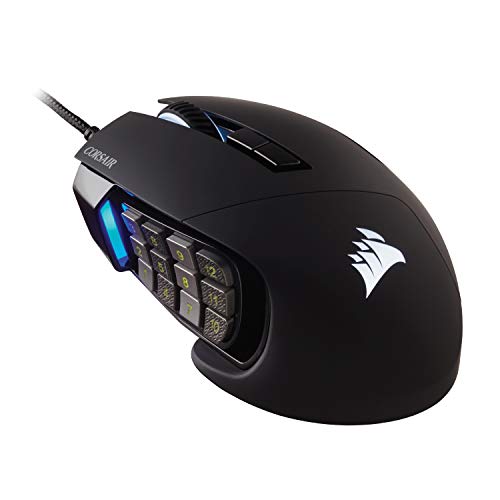
Corsair Scimitar RGB Elite Wired MMO Mouse
Best for: MMO and MOBA gamers
- Connectivity
- Wired
- Maximum DPI
- 18,000 DPI
- Programmable Buttons
- 17
- Sensor
- PixArt PMW3391
- Backlighting
- RGB
- Use
- Gaming
View on Amazon: Corsair Scimitar RGB Elite Wired MMO Mouse Affiliate link
The Corsair Scimitar RGB Elite is a wired mouse built for MMO and MOBA players. It features 17 programmable buttons, including 12 side keys on a patented slider system for custom placement. The PixArt PMW3391 sensor offers 18,000 DPI with 1 DPI steps. Its contoured shape includes a finger rest. This mouse suits those needing many buttons for complex macros.
Pros
- 17 fully programmable buttons for macros
- 12 side buttons on adjustable slider system
- PixArt PMW3391 sensor with 18,000 DPI
- Contoured shape with finger rest
Cons
- Wired connection limits mobility
- Heavier at 4.3 ounces
- No wireless capability
Good fit if
- You play MMOs or MOBAs
- You need many side buttons
- You prefer a contoured grip
Skip if
- You want wireless freedom
- You prefer lightweight mice
- You play FPS games
Verdict: Corsair Scimitar RGB Elite MMO Mouse fits MMO players needing 17 buttons and adjustable side keys. It suits those who prioritize macro execution over wireless mobility.
Specifications side by side
| Spec | Logitech G305 Lightspeed Wireless Mouse | Corsair Scimitar RGB Elite Wired MMO Mouse |
|---|---|---|
| Connectivity | LIGHTSPEED Wireless | Wired |
| Maximum DPI | 12,000 DPI | 18,000 DPI |
| Programmable Buttons | 6 | 17 |
| Sensor | HERO | PixArt PMW3391 |
| Battery Life | up to 250 hours | not stated |
| Backlighting | not stated | RGB |
| Use | Gaming | Gaming |
| Color | White | Black |
| Game Genre | not stated | MMO |
| Operating System | Mac | Mac |
| Dimensions | 2.45 × 1.5 × 4.6 inches | 6.89 × 4.49 × 0.1 inches |
| Weight | 3.36 ounces | 4.3 ounces |
| Size | 4.6" x 2.4" x 1.5" | 1 Count (Pack of 1) |
| Model | 910-005289 | CH-9304211-AS |
Frequently asked questions
Is Logitech G better for wireless gaming?
Logitech G excels in wireless performance. The G305 uses LIGHTSPEED technology for a 1 ms response time. This matches many wired mice in speed. It also offers long battery life on a single AA cell. You get freedom from cables without lag.
Does Corsair make mice for MMO players?
Yes, Corsair designs mice for MMO gamers. The Scimitar RGB Elite features 17 buttons. It includes adjustable side keys for macros. This layout suits players who need many commands at their fingertips. It is a wired mouse focused on functionality over mobility.
Which mouse is lighter for fast aiming?
The Logitech G305 is the lighter option. It weighs just 3.36 ounces. Its compact size measures 4.6 by 2.4 inches. This lightweight design helps with quick movements. The Corsair Scimitar is heavier at 4.3 ounces and larger, prioritizing button access over weight.
Do I need a wired mouse for stability?
Wired mice offer consistent signal stability. The Corsair Scimitar uses a wired connection. This eliminates any potential wireless interference. You do not need to charge it. It is ideal if you prefer a fixed setup without battery management.
Can I use Logitech G mice for office work?
The Logitech G305 works well for general use. It is wireless and runs on one AA battery. This provides months of use. Its simple button layout is easy for daily tasks. The lightweight design reduces hand fatigue during long sessions.
Which brand offers better customization for macros?
Corsair provides extensive macro support. The Scimitar has 17 programmable buttons. You can assign complex commands to the side panel. This is crucial for MMOs. Logitech G mice typically have fewer buttons, focusing on essential clicks rather than extensive macro sets.
Is the Logitech G305 good for small hands?
The G305 fits smaller hands well. Its dimensions are 4.6 by 2.4 inches. The low weight of 3.36 ounces makes it easy to control. You can grip it comfortably for long periods. It is designed for agility rather than palm rest support.
Does the Corsair Scimitar have RGB lighting?
Yes, the Corsair Scimitar includes RGB backlighting. It allows you to customize the look of your mouse. The lighting can be adjusted to match your setup. This feature is available on the wired Scimitar model, adding aesthetic value to its functional design.